EaseUS PDF Editor: Edit, Convert, OCR and Sign PDFs on Windows
EaseUS PDF Editor is a Windows PDF editor and converter (with a separate Mac version) that edits text and images, rearranges pages, converts PDFs to Word, Excel and PowerPoint, makes scanned PDFs editable with OCR, and builds forms, signatures and passwords. The order page shows $49.95 a year or $79.95 for lifetime upgrades, and the free version handles the first three pages of each job.
It's aimed at home and small-office users who need more than a free reader but don't want an Acrobat subscription: fixing a typo in a contract, turning a scanned invoice into a spreadsheet, or merging a stack of receipts into one file.
Quick facts
- Version: 6.4.1.0
- Developer: EaseUS (Chengdu Yiwo Tech Development Co., Ltd.)
- Platform: Windows 11, 10, 8 and 7; the Mac version is a separate purchase
- Converts to: DOC, DOCX, XLS, XLSX, PPT, PPTX, PNG, BMP, TIFF, JPG and JPEG
- OCR: 29 languages
- Price: $19.95 for 1 month (with a Black Friday $10 off the monthly plan), $49.95 a year, $79.95 lifetime
- Free version: first 3 pages for conversion, splitting and OCR, 3 files per merge or batch, files under 100 MB for compression; Pro removes the watermark
- Guarantee: 30 days, for technical problems support can't fix
- What we checked: the Free vs Pro limits on EaseUS's product page and the prices on the Windows order page on November 20, 2026 ($19.95 1-Month, $49.95 1-Year, $79.95 Lifetime Upgrades). We didn't edit a PDF with it.
Download Free TrialBuy Now
Overview
The start screen gives you the five jobs most people come for: Open, Create, Edit, Convert from PDF and Merge, plus an All Tools page. Inside a document, a tabbed toolbar (Read, Comment, Edit, Form, Page, Protect, Convert, Batch) keeps everything one click away, much like a Word ribbon.
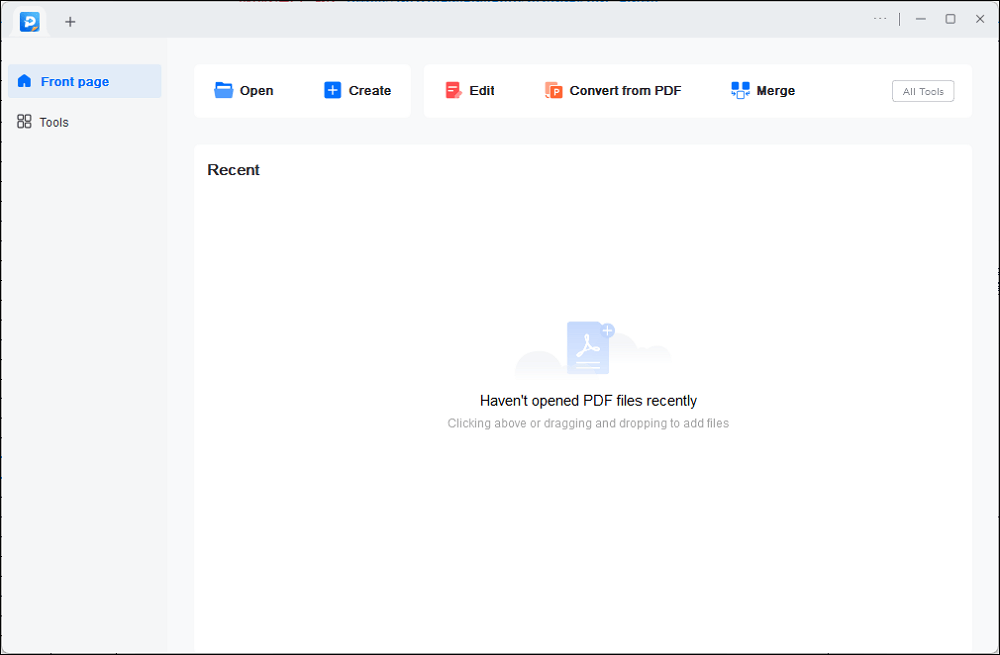
The front page: Open, Create, Edit, Convert from PDF and Merge, with recent files below.
Features
Edit text, images and pages
EaseUS PDF Editor adds, changes or removes text, images and links in a PDF, and inserts, deletes, reorders, extracts, crops, rotates or resizes pages. You can add headers, footers, page numbers and text or image watermarks.
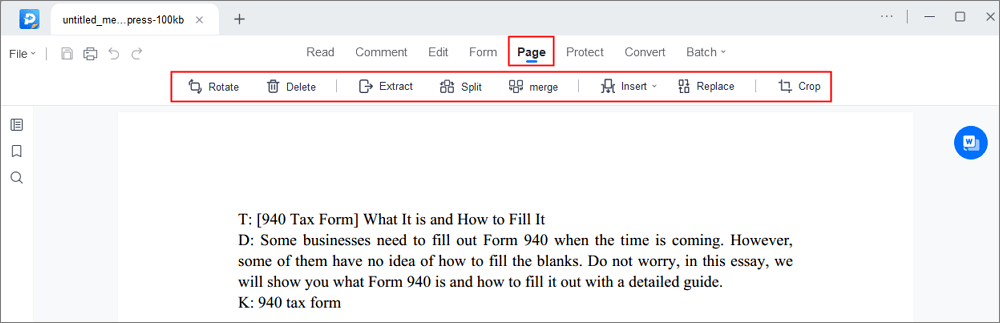
The Page tab: Rotate, Delete, Extract, Split, Merge, Insert, Replace and Crop.
Convert PDFs and make scans editable
EaseUS PDF Editor converts PDFs to Word, Excel, PowerPoint and image formats, and creates PDFs from Office files and images. Its OCR recognizes text in scanned or image-based PDFs in 29 languages, including English, French, German, Italian, Korean and Japanese.
Merge, split and compress
EaseUS PDF Editor combines PDFs and images into one file, splits a PDF by pages, file size or top-level bookmarks, and compresses large PDFs for email. Batch tools print several PDFs at once.
Forms, comments, signatures and passwords
EaseUS PDF Editor builds fillable forms with six control types (push button, check box, radio button, combo box, list box and text field) and can import or export form data. You can comment, highlight and bookmark pages, sign with an image or a digital ID, and set a password that blocks viewing, copying, editing or printing.
Who It's For, and Who Should Skip It
It suits Windows users who handle PDFs every week, such as contracts, invoices, forms and scans, and would rather pay once than subscribe to Acrobat.
Skip it if you only read and sign occasionally: free readers and Windows' built-in tools cover that. Teams that need shared review workflows, cloud storage or redaction for legal work should look at Adobe Acrobat or Foxit instead.
Usage Guide
- Download and install EaseUS PDF Editor (the installer fetches the program during setup).
- Click Open, or drag a PDF onto the front page.
- Use the Edit tab for text and images, Page for page tools, Form for fields, Protect for passwords.
- To convert, choose Convert and pick Word, Excel, PowerPoint or an image format; for scans, run OCR first.
- Save or export. The free version stops at three pages, so buy a plan for full documents.
Before you buy
- Lifetime beats yearly after 18 months at $79.95 against $49.95 a year.
- Cancel subscriptions in writing. One Trustpilot reviewer was still charged after pressing cancel and advises emailing EaseUS.
- Licenses are per PC. Moving to a new computer usually means asking support for a license reset.
- Refunds are for technical faults only, within 30 days, after working with support.
Where it falls short
- "Lifetime" doesn't mean every future version for at least one buyer, who complains that a new release wasn't covered.
- Activation limits. Many Trustpilot reviews are about reaching the activation limit after a reinstall or new PC.
- Stability reports. One reviewer says it froze on first use while converting to Word.
What Users Say
EaseUS scores 4.9 out of 5 on Trustpilot from 39,746 reviews overall (November 20, 2026). Reviews that name PDF Editor are mostly about support resolving license and update problems, with a few about the product itself.
Trustpilot
"I also then purchased their PDF editor software. Easy to use and so much better than the other 'BIG' company." Thomas Devine, 5 stars, May 7, 2026
"I was at the activation limit for PDF Editor - Lifetime Upgrades." Jim McGrath JIMDQUAD, 5 stars, September 22, 2026 (fixed by support)
"I used their pdf editor for 2 years, then decided not to renew so pressed 'delete/cancel' on my account." Kevin Mccloskey, 4 stars, "If you cancel, make sure to email Easeus", June 6, 2026
"Purchased a lifetime license to pdf editor only to find that it does not in fact apply to updates." Bob, 1 star, "Lifetime updates doesn't mean all updates!", May 26, 2026
"Upon downloading the software I immediately attempted to use and it completely froze up." Seamus De Valera, 1 star, April 21, 2026
Editions and Pricing
| Plan |
Price |
Limits |
| Free | $0 | First 3 pages, 3 files per batch, watermark |
| 1-Month | $19.95, auto-renews | Unlimited, 1 month of upgrades |
| 1-Year | $49.95, auto-renews | Unlimited, 1 year of upgrades |
| Lifetime Upgrades | $79.95 once | Unlimited, lifetime upgrades |
The Buy Now button opens EaseUS's PDF Editor order page for Windows, where you pick the plan.
FAQs
Is EaseUS PDF Editor free?
EaseUS PDF Editor has a free version, but conversion, splitting and OCR stop at the first three pages, merging and batch jobs at three files, and output carries a watermark. Pro removes the limits.
Can EaseUS PDF Editor convert scanned PDFs to Word?
Yes. EaseUS PDF Editor's OCR recognizes text in scanned and image-based PDFs in 29 languages and converts them to editable formats.
Is there a Mac version?
Yes, EaseUS sells PDF Editor for Mac separately, with its own order page. A Windows license doesn't cover it.
Can I create fillable forms with EaseUS PDF Editor?
Yes. EaseUS PDF Editor adds push buttons, check boxes, radio buttons, combo boxes, list boxes and text fields, and can import or export form data to fill several forms at once.
System Requirements
Conclusion
EaseUS PDF Editor is a good buy at $79.95 for the lifetime license if you edit, convert and fill PDFs regularly on Windows and want to stop paying for Acrobat. It covers editing, OCR, forms, signing and page tools in one familiar ribbon-style window. The reasons for caution are per-PC activation limits and some disputes about what "lifetime" includes, so test the free version on your own files first.
Download Free TrialBuy Now