EaseUS MobiMover Pro: Move iPhone Data to a PC, a New Phone or Android
EaseUS MobiMover Pro is a Windows program (with a separate Mac version) that copies photos, videos, music, contacts, messages and other files between an iPhone or iPad and a computer, from one phone to another, and between iPhone and Android. It also backs up iPhone data and WhatsApp chats. The order page shows $39.95 for one year or $69.95 for lifetime upgrades, each for up to three PCs, and the free version moves 20 files a day.
It's for the everyday iPhone chores iTunes and the Apple Devices app make awkward: pulling a few thousand photos onto a PC, dropping music and ringtones onto a phone without a sync, or moving to a new phone that isn't from Apple.
Quick facts
- Version: 6.2.4
- Developer: EaseUS (Chengdu Yiwo Tech Development Co., Ltd.)
- Platform: Windows 11, 10, 8.1, 8 and 7; the Mac version supports macOS 10.13 to macOS 26
- Devices: iPhone 4s and later including iPhone 17, iPad, iPod touch, Android phones; iOS 26 supported
- Price: $23.95 a month, $39.95 a year, $69.95 lifetime (3 PCs each); Technician from $399 a year
- Free version: all transfer types, limited to 20 files a day
- Guarantee: 30 days, for technical problems support can't fix
- What we checked: on November 20, 2026, the order page showed MobiMover Pro at $23.95 for 1 month, $39.95 for 1 year (marked down from $59.95) and $69.95 for lifetime upgrades (from $89.95), and the checkout listed EaseUS MobiMover Technician (1 - Year Subscription) at $499 with $100 off. We didn't connect a phone to it.
Download Free TrialBuy Now
Overview
MobiMover organizes everything in a left-hand menu: Browse & Transfer to manage a phone's contents, three Quick Transfer modes (Phone to PC, PC to Phone, Phone to Phone), a Backup Manager and a WhatsApp Manager, plus converters for HEIC photos and video-to-MP3. You connect the phone by USB, pick a mode, tick the categories and click Transfer.

MobiMover's main window with PC to Phone selected, and the Manager, Quick Transfer, Backup & Restore, Media and Converter menus on the left (an earlier version of the interface, from EaseUS's guide).
Features
Four ways to transfer
EaseUS MobiMover moves files from an iPhone or Android phone to a PC, from a PC to a phone, from any phone to an iPhone, and from any phone to an Android device. The January 2024 update added Android support and new transfer types: SMS and iMessage, calendar, Safari bookmarks, app lists, office documents, reminders, alarms, call records and recordings.
An iTunes-free music and file manager
EaseUS MobiMover adds music, playlists, ringtones, books and photos to an iPhone, iPad or iPod by drag and drop, without syncing and wiping what's already there. You can browse a phone's contents from the PC and delete or export items in bulk to free up space.
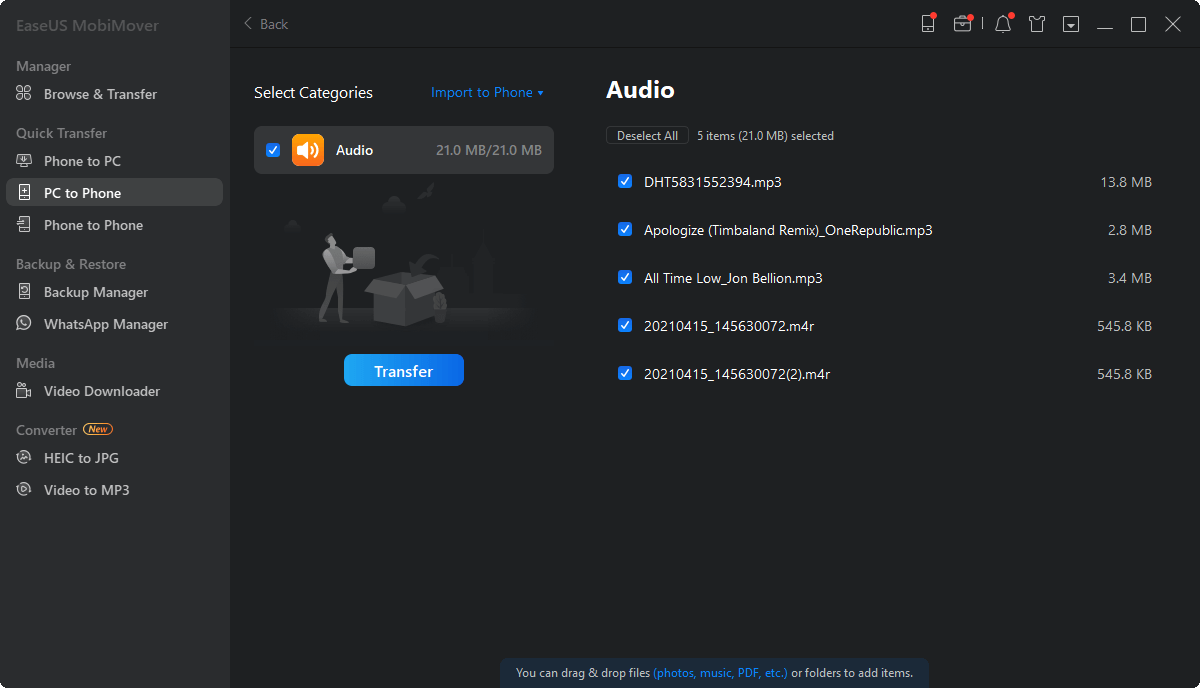
PC to Phone with five audio files (songs and .m4r ringtones) selected and ready to transfer.
Backup you can open
EaseUS MobiMover backs up and restores up to 14 types of iPhone data in one click: music, camera roll, photos, videos, contacts, messages, call history, notes, reminders, calendar, voice memos, voicemail, and Safari bookmarks and history. Unlike an iTunes backup, you can view the backup and pull out single items.
WhatsApp backup and iPhone-to-iPhone transfer
EaseUS MobiMover backs up WhatsApp messages and media to the PC, restores them to any iPhone or iPad, and moves chats from one iPhone to another. WhatsApp moves that involve Android need EaseUS's separate ChatTrans product.
Who It's For, and Who Should Skip It
MobiMover suits iPhone owners with a Windows PC who want to copy photos off, put music on, keep a readable backup, or switch phones, including to Android. The Technician edition is for repair shops serving customers.
Skip it if your Mac already does what you need through Finder and iCloud, or if you only move photos now and then: Windows' Photos app imports them for free. If you need to move WhatsApp between iPhone and Android, this isn't the right tool.
Usage Guide
- Download and install MobiMover (the installer fetches the program during setup).
- Connect your iPhone, iPad or Android phone by USB, and tap Trust on the iPhone when asked.
- Pick a mode: Phone to PC, PC to Phone, Phone to Phone, or Browse & Transfer.
- Tick the categories or files you want, choose the destination, and click Transfer.
- For a full backup, open Backup Manager; for chats, open WhatsApp Manager.
Before you buy
- Test with the free version first. It does every transfer, just 20 files a day.
- Refunds are for technical problems only. EaseUS refunds within 30 days when support can't fix a fault, not for a change of mind.
- The Mac version is a separate purchase with its own order page.
- Lifetime costs less than two years of the yearly plan at the prices shown.
Where it falls short
- Slow feature updates. The last "What's New" entry on the product page is from January 2024, though EaseUS lists iOS 26 and iPhone 17 support.
- Few independent reviews. Most coverage is old blog reviews or competitors' comparison pages.
- Activation questions come up. Several Trustpilot reviewers needed support to get a license or an update recognized.
What Users Say
Reviews mentioning MobiMover on EaseUS's Trustpilot page (4.9 out of 5 overall from 39,746 reviews, November 20, 2026) are almost all 4 or 5 stars, but most praise the support staff rather than describe the software.
Trustpilot
"EaseUS mobimover seemed to be the program that was able to solve my dilemma." Libby, 5 stars, "It worked!", July 26, 2024
"Jennifer is great. She helped me to get my memories forever on EaseUs Mobimover." Foto Media, 5 stars, January 21, 2026
"Claire is an expert and solved my issue with Mobimover version 6.2 which wouldn't transfer edited files…" Michael Oberle, 5 stars, August 22, 2024
"I have a life time license for MobiMover but the Video Downloader module stopped working." Rey, "Video Download not working in MobiMover but FIXED", June 24, 2025
"I noticed some change in old and updated version of MobiMover." Erwin Burghard, 4 stars, "MobiMover problem explained.", March 25, 2023
MacUpdate editorial review
"Not only was the process easy to do, but it is beneficial for being able to have your data in more than one place." Joel Lockard, MacUpdate, February 10, 2023
Taken together: buyers find it easy, and when something breaks (an update, a license, a module) EaseUS support fixes it quickly. What's missing is recent independent testing.
Comparisons
MobiMover vs Apple Devices / iTunes
Apple's tools are free but sync whole libraries and make full, closed backups. MobiMover copies individual files both ways without a sync, and its backups can be browsed and extracted item by item.
MobiMover vs AnyTrans
Both are full iPhone managers with transfer, backup and phone-switching tools. MobiMover's $69.95 lifetime license covers three PCs; compare the free versions of both on your own phone before choosing.
Editions and Pricing
| Edition |
Price |
PCs |
Limits |
| Free | $0 | 1 | 20 files a day |
| Pro, 1 month | $23.95 | 3 | Unlimited, auto-renews |
| Pro, 1 year | $39.95 (list $59.95) | 3 | Unlimited, auto-renews |
| Pro, lifetime upgrades | $69.95 (list $89.95) | 3 | Unlimited, one payment |
| Technician, 1 year | $399 (list $499) | Unlimited | Service for clients |
The Buy Now button opens EaseUS's MobiMover order page, where you pick the plan.
FAQs
Is EaseUS MobiMover free?
EaseUS MobiMover has a free version with every transfer type, limited to 20 files a day. Pro removes the limit.
Does EaseUS MobiMover work with iPhone 17 and iOS 26?
Yes. EaseUS lists iPhone 4s through the iPhone 17 series and iOS 26 as supported.
Can EaseUS MobiMover move data from iPhone to Android?
Yes. Since January 2024 EaseUS MobiMover transfers data between iPhone and Android and between two Android phones. WhatsApp chats to or from Android need EaseUS ChatTrans instead.
How many computers can I use MobiMover Pro on?
EaseUS MobiMover Pro licenses cover three PCs. The Technician edition covers unlimited PCs and allows service for clients.
Will MobiMover erase what's already on my iPhone?
EaseUS MobiMover adds files to the iPhone without the full sync that replaces a library, so existing content stays unless you choose to delete it.
System Requirements
- Windows 11, 10, 8.1, 8 or 7 (Mac version: macOS 10.13 High Sierra to macOS 26)
- iPhone 4s or later, iPad, iPod touch, or an Android phone
- A USB cable for the device
Conclusion
EaseUS MobiMover Pro is worth $69.95 for the lifetime license if you regularly move photos, music and files between an iPhone and a Windows PC, or need to switch to a new phone, including Android. Its strength is that it does these jobs file by file without iTunes' syncing rules. The reason to hold back is the slow pace of new features and the thin independent testing, so use the free 20-files-a-day version on your own phone before you pay.
Download Free TrialBuy Now