EaseUS Video Editor: A Simple Timeline Editor for Windows Beginners
EaseUS Video Editor is a beginner-friendly multi-track video editor for Windows 10 and 11, with built-in transitions, text, music, AI subtitles and noise reduction. Pro costs $49.95 a year, $29.95 a month or $79.95 for a lifetime license; the free version is fully usable but stamps a watermark on exports.
It's aimed at the person with a folder of phone clips who wants a family montage, a vlog or a school project without learning Premiere Pro: drag the clips onto the timeline, cut, add a song and a title, export.
Quick facts
- Developer: EaseUS (Chengdu Yiwo Tech Development Co., Ltd.)
- Platform: Windows 10 and 11
- Editing: multi-track timeline, trim, split, crop, rotate, merge, speed, zoom, picture-in-picture, mosaic
- Extras: AI subtitles (speech to text), audio extraction, noise reduction, background fill, watermark removal, dubbing
- Export: MP4 or MOV video, WAV or MP3 audio; up to 4K in Pro
- Price: $29.95 a month, $49.95 a year, $79.95 lifetime
- Free version: watermark on exports, no Pro effects or 4K export
- Guarantee: 30 days, for technical problems support can't fix
- What we checked: the three plans on EaseUS's order page on November 27, 2026 ($29.95 monthly, $49.95 yearly, $79.95 lifetime, in USD, the same as EaseUS's 2025 list prices), and the free version's limits in EaseUS's comparison table and online help. We didn't edit a project with it.
Black Friday 2026: on November 27, 2026 EaseUS's order page showed the monthly plan at $17.97 (40% off) as a limited-time offer; the yearly and lifetime prices were unchanged.
Download Free TrialBuy Now
Overview
EaseUS Video Editor uses the layout most beginner editors share: a library at the top left (Media, Audio, Text, Transitions, Stickers, Effects, Filters, Templates), a player in the middle, clip settings on the right (Video, Audio, Color, Animation, Speed) and a multi-track timeline across the bottom. You drag clips, music and titles onto the timeline and adjust them with the panel on the right while the preview plays in real time.
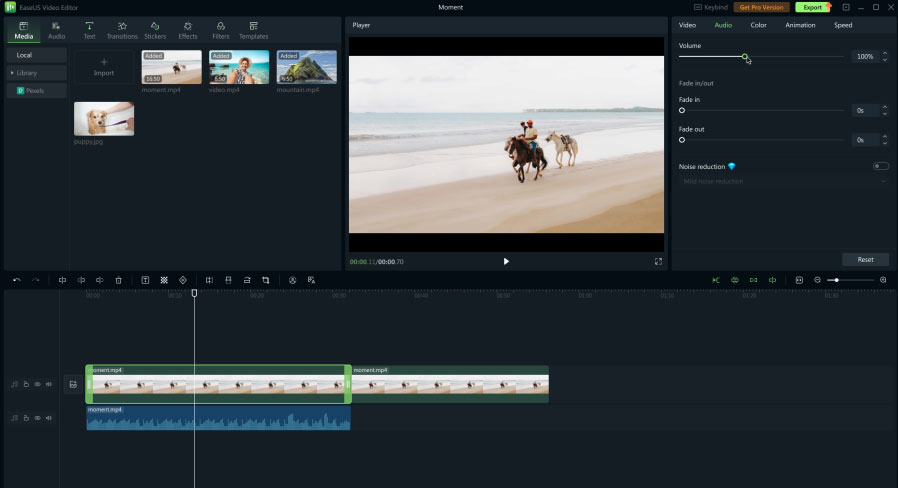
The editor with imported clips in the Media library, the player, the Audio panel (volume, fade in/out, noise reduction) and two clips plus an audio track on the timeline.
Features
Basic edits on a multi-track timeline
EaseUS Video Editor covers the everyday edits: cut, split, trim and crop, rotate and flip, merge clips, zoom, change speed for slow motion or time-lapse, picture-in-picture, mosaic and fade in/out. Separate tracks hold video, music, voice-over and titles, so you can line them up by dragging.
Built-in libraries of effects, text and music
EaseUS Video Editor ships with libraries you download inside the app: EaseUS lists 400+ songs and sound effects, and 100+ each of video effects and transitions, texts and subtitles, filters and stickers. Filters and effects are added by dragging them to the timeline.
AI subtitles and audio tools
EaseUS Video Editor's AI Subtitles turn speech in a clip into editable subtitles: right-click the clip on the timeline and choose Generate Subtitles. Audio tools extract the soundtrack from a video onto its own track, reduce background noise, replace the original audio and add dubbing or voice-overs.

The Audio tab's Audio Extract panel, with the clip's Video settings (scale, position, rotate, flip, opacity) on the right.
Clean-up tools: watermark removal and background fill
EaseUS Video Editor can remove a logo, watermark or unwanted text from a video, and fill the empty bars of a vertical or square clip with a blurred or styled background so it suits a widescreen or social media frame.
Export to MP4, MOV or audio
EaseUS Video Editor exports to MP4 or MOV with your choice of resolution and frame rate, or saves the audio alone as WAV or MP3. The free version adds a watermark; Pro removes it and allows up to 4K. It imports common formats including MP4, MOV, MKV, AVI, WMV, FLV, WEBM, MTS/M2TS and MXF.
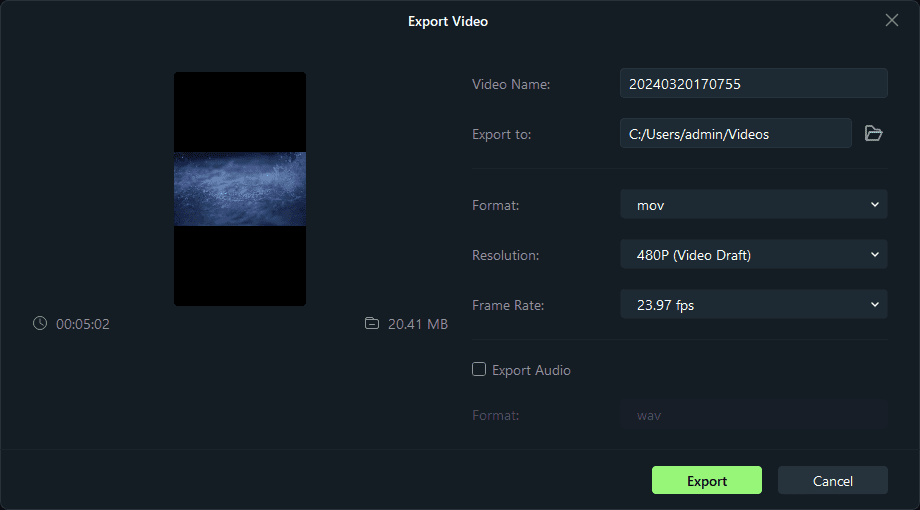
The Export Video dialog: file name, folder, format (MOV here), resolution, frame rate and the optional separate audio export.
Real-World Uses
- Family videos: join holiday clips, add music and titles, and export one MP4 to share.
- Short vlogs and social clips: cut the dead air, add AI subtitles and a background fill for vertical footage.
- School and work projects: trim a screen recording, add a voice-over and remove background hum.
- Pulling audio: extract a song or a speech from a video and save it as MP3.
Who It's For, and Who Should Skip It
EaseUS Video Editor suits beginners on Windows who want a tidy, modern editor with ready-made effects and don't want to learn a professional program.
Skip it if you need color grading, keyframe-heavy motion work or a Mac version; DaVinci Resolve is free and far more capable once learned. Also compare it with Clipchamp, which comes with Windows 11 and covers simple edits at no cost, and with Filmora, which offers a similar beginner design with a bigger effects store and a Mac version.
Usage Guide
- Download the installer from EaseUS and install it on Windows 10 or 11.
- Open it and start a new project from the get-started window.
- Click + or drag video, audio and photos into the Media library.
- Drag clips to the timeline, then trim, split and arrange them.
- Add text, transitions, music and filters from the library tabs, and adjust clips in the right-hand panel.
- Click Export, choose MP4 or MOV, the resolution and frame rate, and save. To remove the watermark, click Get Pro Version and enter your license.
Before you buy
- Do a full test export in the free version. Everything works except the Pro effects and 4K, so you can check speed and quality on your PC; only the watermark gives it away.
- Monthly and yearly plans renew automatically. At $79.95 the lifetime license costs less than two years of the yearly plan.
- EaseUS refunds only on technical grounds. The 30-day guarantee covers faults support can't fix, not a change of mind.
Where it falls short
- Limited footage editing. TechRadar lists "Limited footage editing options" among its reasons to avoid it, and Fstoppers noted that for work such as color editing you may need another program.
- Price for what it is. TechRadar called it "A little on the expensive side," and free editors cover the same basics.
- Windows only, and EaseUS now lists only Windows 10 and 11.
- Some dated text effects. TechRadar also flagged "Some ugly text effects."
What Users Say
Most in-depth reviews of EaseUS Video Editor date from 2020, before the current version added AI subtitles and 4K export, so read their limits with that in mind.
TechRadar (Sofia Elizabella Wycilik-Wilson, January 16, 2020)
TechRadar's verdict: "An accessible video editor that doesn't fall into the 'professional' category by any means, but still produces some impressive results." Its reasons to buy were "Simple, accessible interface," "Good range of effects and transitions" and "Decent selection of overlays"; its reasons to avoid were "Limited footage editing options," "A little on the expensive side" and "Some ugly text effects." On pricing it wrote that the plan you choose "will determine whether the price is 'quite expensive' or 'very expensive'."
Fstoppers (Usman Dawood, June 25, 2020)
Fstoppers called it possibly the best video editing software for beginners, saying "the video editor is extremely intuitive and easy to use" and "the software itself feels snappy and responsive." Its criticism: "The only downside of this software is that you cannot export content at resolutions higher than full HD" (the current Pro version exports up to 4K), and "There aren't a lot of editing tools available, as this software isn't really meant for that."
Indezine (Geetesh Bajaj, September 17, 2020)
Indezine wrote that it "hand-holds you with options so that means a diminished learning curve" and called it "a one-stop destination for creating video content." The reviewer upgraded because "doing so also removes the EaseUS Video Editor watermark from exported videos," noted that "Some options are only available to VIPs," and found the finished MP4 took a few minutes to render.
Ratings
EaseUS's own product page claims a 4.7 rating from 10,295 reviews, a figure it doesn't let you inspect. EaseUS as a company scores 4.9 out of 5 on Trustpilot from 39,773 reviews, mostly about its recovery and backup products, and one buyer there wrote on November 25, 2026 that "the pricing is on the higher side only."
The themes: reviewers agree it's easy to learn, quick and well stocked with effects for beginners; they criticize the price, the shallow editing tools for anything beyond basic cuts, and some cheesy text effects.
Comparisons
EaseUS Video Editor vs Wondershare Filmora
Both are beginner editors with drag-and-drop timelines, effect libraries and AI tools. Filmora has a larger effects store and a Mac version; EaseUS Video Editor is simpler and its $79.95 lifetime license is a straightforward one-time option for Windows users.
EaseUS Video Editor vs Clipchamp and DaVinci Resolve
Clipchamp is built into Windows 11 and handles simple edits free; DaVinci Resolve is free and professional-grade but takes real effort to learn. EaseUS Video Editor sits between them: more built-in effects than Clipchamp, far less to learn than Resolve.
Editions and Pricing
| Plan | Price | Term | What you get |
|---|
| Free | $0 | Unlimited | Standard editing, watermark on exports |
| Pro Monthly | $29.95 | Auto-renews monthly | No watermark, all effects, 4K export |
| Pro Yearly | $49.95 | Auto-renews yearly | The same, 1 year of upgrades |
| Pro Lifetime | $79.95 | One-time | The same, lifetime upgrades |
The Buy Now buttons on this page open EaseUS's plan page, where you choose the plan.
FAQs
Is EaseUS Video Editor really free?
EaseUS Video Editor's free version has no time limit and lets you edit and export, but every exported video carries an EaseUS watermark and the Pro effects and 4K export are locked.
Does EaseUS Video Editor run on Windows 7?
EaseUS Video Editor's product page lists Windows 10 and Windows 11 only. Older help pages still mention Windows 7 and 8, so on those systems test the free version before buying.
Is there a Mac version of EaseUS Video Editor?
No. EaseUS Video Editor is Windows only.
Can EaseUS Video Editor make YouTube Shorts or TikTok videos?
Yes, for simple clips: EaseUS Video Editor can fill the background of vertical or square footage, add AI subtitles and export MP4 to upload yourself.
What's the difference between EaseUS Video Editor and EaseUS VideoKit?
EaseUS Video Editor is the timeline editor. EaseUS VideoKit is a separate toolkit centered on converting and compressing video and audio files.
What happens to my projects if the subscription ends?
EaseUS Video Editor falls back to the free version: you can still open and edit, but exports carry the watermark again.
System Requirements
- Windows 10 or Windows 11
- Internet connection for the web installer and the downloadable effect and music libraries
Conclusion
EaseUS Video Editor is worth it for Windows beginners who want to make family videos, vlogs and school projects quickly, with ready-made effects, AI subtitles and noise reduction in a clean interface; the $79.95 lifetime license is the sensible way to buy it. It's not worth paying for if your edits are simple enough for the free Clipchamp, or if you want room to grow, where Filmora or the free DaVinci Resolve go further. Use the free version for a real project first: if the only thing you dislike is the watermark, buy it.
Download Free TrialBuy Now