EaseUS VoiceWave: A Real-Time Voice Changer and Soundboard for Gaming and Chat
EaseUS VoiceWave is a real-time AI voice changer for Windows 10 and 11 that changes your microphone voice live in games, Discord, Zoom and streams, with 2,000+ voices, 150,000+ sound effects and voice cloning. It's a free download with a set of free voices; the full library costs $29.95 a year ($14.95 a month, $39.95 lifetime).
It sits between your microphone and the app you're talking in: pick a voice, and your squad on Discord or your stream audience hears a robot, a deep villain or an anime character instead of you.
Quick facts
- Version: 3.6.1
- Developer: EaseUS (Chengdu Yiwo Tech Development Co., Ltd.)
- Platform: Windows 10 and 11; mobile apps on the App Store and Google Play
- Works with: Discord, Zoom, Skype, Google Meet, Twitch, OBS, Streamlabs and 1,000+ games and platforms (EaseUS's count)
- Library: 2,000+ voices, 150,000+ sound effects and memes
- Price: $14.95 a month, $29.95 a year, $39.95 lifetime (one PC)
- Free: download with a set of free voices
- Guarantee: 30 days, for technical problems support can't fix
- What we checked: the three plans on EaseUS's order page on November 27, 2026 ($14.95 monthly, $29.95 yearly, $39.95 lifetime, in USD, the same as on its September 2026 page). We didn't test the voices.
Download Free TrialBuy Now
Overview
EaseUS VoiceWave shows its voices as a grid you can filter (Trending, All Voices, Favorites, Customization, Free, Male and more). On first run it asks for your microphone and headphones, then you choose a voice and adjust volume, pitch and timbre on the right, add sound effects, or bind voices and sounds to hotkeys. In Discord, OBS or a game you then select VoiceWave's virtual microphone.
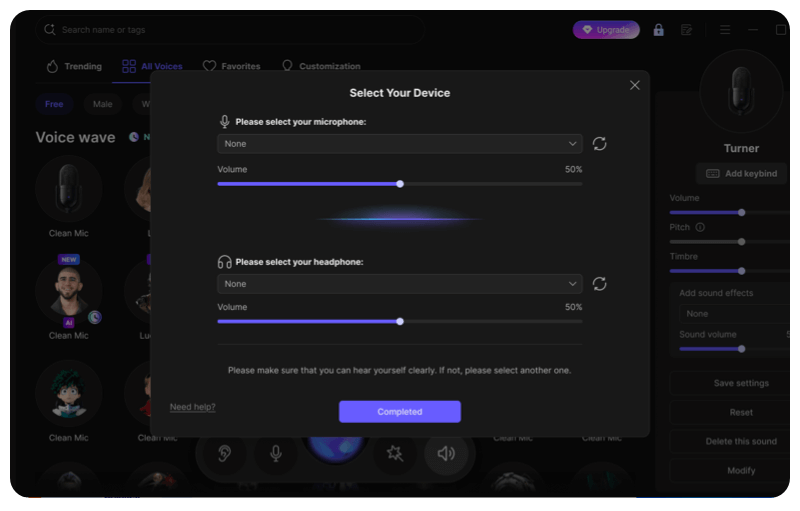
The Select Your Device dialog (microphone, headphones, volume) over VoiceWave's voice grid, with the pitch, timbre and sound-effect settings on the right.
Features
Real-time voice changing
EaseUS VoiceWave changes your voice live in games and chat apps, with male-to-female and female-to-male voices, robots, monsters and characters, and noise reduction to clean up the microphone.
Soundboard
EaseUS VoiceWave's soundboard plays sound effects and memes from a library of 150,000+, each on a hotkey, while you talk.
Custom voices and voice cloning
EaseUS VoiceWave lets you build your own voice from pitch, timbre and effects, and paid plans include unlimited voice cloning to make a voice from an audio sample.
Change the voice in recorded files
EaseUS VoiceWave also applies voices to existing audio and video files, which helps for narration, characters in a video or anonymous voice-overs.
Real-World Uses
- Gaming with friends: play a character voice in Discord or in-game chat.
- Streaming: add voices and meme sounds on hotkeys in OBS or Streamlabs.
- Privacy: disguise your voice in public voice chats.
- Video projects: give characters distinct voices in recorded clips.
Who It's For, and Who Should Skip It
EaseUS VoiceWave suits gamers, streamers and Discord users who want a large, regularly updated voice library and a soundboard in one app, and who are fine with a subscription or a $39.95 one-time price.
Skip it if you only want a few basic effects: free voice changers such as Clownfish or the free voices in VoiceWave itself may be enough. Also note the limits on use: copying a real person's voice to deceive or harass people can be illegal, and many games and platforms ban impersonation. Use cloning on your own voice or with permission.
Usage Guide
- Download VoiceWave from EaseUS and install it on Windows 10 or 11.
- Select your microphone and headphones in the device dialog and check you can hear yourself.
- Pick a voice (the Free filter shows the ones you can use without a plan) and adjust pitch and timbre.
- In Discord, OBS or your game, choose VoiceWave's virtual microphone as the input.
- Bind voices and sounds to hotkeys; buy a plan for the full library.
Before you buy
- Try the free voices first in the app you'll actually use, to check latency and quality with your microphone.
- The lifetime license is the cheapest over time: $39.95 once versus $29.95 every year.
- One computer per license.
- EaseUS refunds only on technical grounds. The 30-day guarantee covers a fault support can't fix, not a change of mind, so use the free version first.
Where it falls short
- Results depend on your microphone. Real-time voice changing adds processing; a cheap headset mic gives a less convincing voice.
- Windows only on desktop. There's no Mac app; the mobile apps are separate.
- Few independent reviews. Most praise comes from EaseUS's own site and download sites.
What Users Say
FileHorse (user rating 8.1/10 from 19 ratings)
FileHorse's pros include "Wide range of voice modulation options and effects," "Real-time voice changing during audio calls and video chats," "User-friendly interface," "Background noise removal" and "Low system requirements." It lists no cons.
EaseUS on Trustpilot (company-wide)
EaseUS shows a Trustpilot score of 4.9 out of 5 from more than 20,000 reviews on the VoiceWave page; the score covers the whole company, not this product alone. One buyer wrote on November 25, 2026 that "the pricing is on the higher side only."
The themes: users like the size of the voice library, the soundboard and the easy setup; the questions are about price and how natural the voices sound on ordinary microphones.
Comparisons
EaseUS VoiceWave vs Voicemod
Voicemod is the best-known voice changer and also has a large library, soundboard and AI voices, with a free tier. VoiceWave competes on price: its $39.95 lifetime license is a one-time cost.
EaseUS VoiceWave vs MorphVOX
MorphVOX Pro is a long-standing one-time-purchase voice changer with fewer, more traditional voices. VoiceWave has far more AI voices, sound effects and voice cloning.
Editions and Pricing
| Plan | Price | Term | License |
|---|
| Free | $0 | Unlimited | Free voices only |
| Monthly | $14.95 | Auto-renews monthly | 1 PC |
| Yearly | $29.95 | Auto-renews yearly | 1 PC |
| Lifetime | $39.95 | One-time, lifetime upgrades | 1 PC |
Paid plans include the full voice library, voice cloning, custom voices and changing voices in files. Students who verify their status get 10% off. The Buy Now buttons on this page open EaseUS's plan page.
FAQs
Is EaseUS VoiceWave free?
EaseUS VoiceWave is a free download with a set of free voices; the full library of 2,000+ voices, voice cloning and file voice changing need a paid plan.
Does EaseUS VoiceWave work with Discord?
Yes. Select VoiceWave's microphone as the input device in Discord's voice settings, and your friends hear the voice you pick.
Is there a Mac version of EaseUS VoiceWave?
No. EaseUS VoiceWave runs on Windows 10 and 11; EaseUS offers separate mobile apps for iPhone and Android.
Can EaseUS VoiceWave change the voice in a video I already recorded?
Yes. EaseUS VoiceWave's paid plans can transform the voice in existing audio and video files.
Will EaseUS VoiceWave slow down my games?
FileHorse lists low system requirements among VoiceWave's pros, but any real-time voice changer uses some CPU; test with the free voices while gaming.
System Requirements
- Windows 10 or Windows 11
- A microphone and headphones
Conclusion
EaseUS VoiceWave is worth it for gamers and streamers who want a big, regularly updated voice library and soundboard at a low one-time price; the $39.95 lifetime license beats paying yearly. Start with the free voices in your own setup, since microphone quality decides how convincing it sounds, and skip it if a few basic effects are all you need. Use voice cloning responsibly.
Download Free TrialBuy Now