Aiseesoft MobieSync: Move Photos, Contacts and Music Between iPhone, Android and Your PC
Aiseesoft MobieSync is a Windows program that connects iPhones, iPads and Android phones by USB and copies photos, music, videos, contacts and messages between two phones (in either direction, across platforms) or between a phone and the PC, with tools to organize, back up and clean up that data. Our Buy Now button sells a lifetime license at $62.45, paid once with no renewal.
Switching from Android to iPhone or back is where most people meet this problem. Apple's Move to iOS app and Google's switching tools move the basics once, during setup; after that, getting a folder of photos, a contact list or a set of ringtones from one phone to the other, or onto a Windows PC without iTunes, means juggling cloud accounts and cables. MobieSync puts both phones in one window.
Quick facts
- Version: 2.5.62 (program installer dated January 16, 2026)
- Developer: Aiseesoft Studio
- Runs on: Windows 11, 10, 8.1, 8 and 7. There's no Mac version.
- Phones: iPhone, iPad and iPod touch on iOS 6 to iOS 27; Android 4.0 to Android 16 (Samsung, Google Pixel, Huawei, Motorola, LG, OnePlus, Xiaomi and others)
- Transfers: photos, music, videos, contacts and messages, phone to phone and phone to PC (and back)
- Extras: one-click contacts backup and restore, duplicate contact merging, ringtone maker, HEIC to JPG/PNG converter
- Price: $62.45 one-time on the order page for a lifetime license; a 3-PC license is also sold (see Editions and Pricing)
- Refunds: 30-day money-back guarantee for lifetime licenses when there's a quality problem
- What we checked: the 2.5 MB online installer (file version 2.5.60) and the 191 MB program installer it downloads (file version 2.5.62), and the order page, rechecked on November 4, 2026, which sells "Aiseesoft MobieSync" at $62.45 as a lifetime license with no renewal. We didn't connect phones to it.
Before you buy
- The Buy Now button sells a lifetime license at $62.45, a one-time payment with nothing to cancel. Aiseesoft's own site shows it at $49.96 with its coupon. The 3-PC license is listed below.
- Windows only. Mac owners need a different tool.
- Set up the connection first. iPhones need iTunes (10.7 or later) installed on the PC so Windows can see them, and Android phones usually need USB debugging switched on, as with other desktop phone managers. Check both phones are detected in the trial.
- Not every data type crosses platforms. MobieSync moves photos, media, contacts and messages; app data, WhatsApp chats and settings don't transfer between iPhone and Android this way.
- It replaces FoneCopy. Aiseesoft's FoneCopy phone-transfer page now downloads and sells MobieSync.
Download Free TrialBuy Now
Overview
MobieSync's window has a sidebar with Home, Photos, Music, Videos, Contacts, Messages and Toolbox. Connect one or more phones by USB and a drop-down at the top switches between them; the Home screen shows the selected phone's name, type, capacity, used and free space and OS version, with one-click shortcuts below. Pick a data type, tick items in the list (with previews), and use the toolbar to export them to another connected device or to the PC, add files from the PC, delete them, or sort them into albums, playlists and groups.
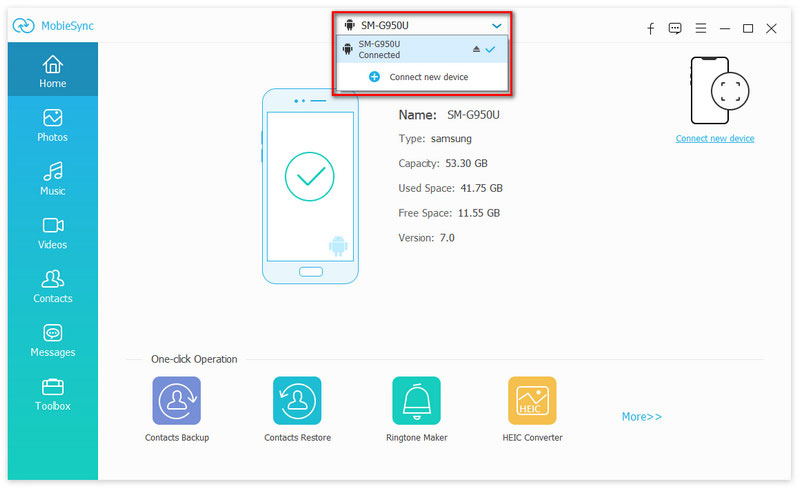
The Home screen with a Samsung SM-G950U connected (53.30 GB capacity, Android 7.0), the device drop-down and "Connect new device", and Contacts Backup, Contacts Restore, Ringtone Maker and HEIC Converter shortcuts.
Features
Phone-to-phone transfer across iOS and Android
Aiseesoft MobieSync copies selected items directly between two connected phones: iPhone to iPhone, Android to Android, or across platforms in either direction. Contacts, photos, music, videos and messages are supported, so you can carry a photo library and address book from an old Galaxy to a new iPhone without going through Google Photos or iCloud.
Phone-to-PC backup without iTunes sync
Aiseesoft MobieSync exports any selection to a Windows folder and adds files from the PC to the phone, item by item, instead of iTunes' all-or-nothing sync. Messages and iMessages export to HTML, CSV or TXT with sender, number, time and emoji kept; contacts export to CSV or vCard.
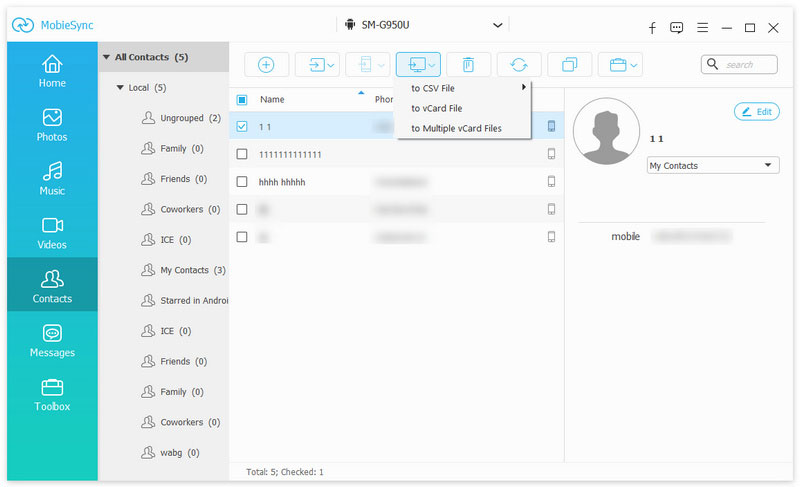
The Contacts section with groups on the left, a contact selected and the export menu open: to CSV File, to vCard File or to Multiple vCard Files.
Contact management and one-click backup
Aiseesoft MobieSync edits contacts, sorts them into groups, finds and merges duplicates, and backs up the whole address book in one click to the PC, ready to restore to the same or another phone. That's the simplest safety net before a phone reset.
Media organizing, ringtones and HEIC conversion
Aiseesoft MobieSync creates and edits photo albums and music or video playlists, edits song tags, and plays media for preview. Its Toolbox makes iPhone M4R ringtones from a song on the phone or PC (with a clip range) and can send them straight to the iPhone, and converts HEIC photos to JPEG or PNG with a quality setting and an option to keep EXIF data. It can also rename an iOS device.
Real-World Uses
- Android to iPhone switch: copy contacts, camera photos and your music collection from the old phone to the new one in one session.
- Family photo archive: pull years of iPhone photos to a Windows PC by album, then free up the phone.
- Keeping a conversation: export an important SMS or iMessage thread to HTML before trading in the phone.
- Custom ringtones: clip a song into an iPhone ringtone and add it without iTunes.
- Two-phone users: keep a work Android and a personal iPhone's contacts in step by copying groups between them.
Who It's For, and Who Should Skip It
It suits Windows users who move data between iPhones and Android phones, or who want an iTunes-free way to copy selected photos, music, contacts and messages to their PC.
Skip it if you're setting up a new phone and only need the basics once: Apple's Move to iOS app and Google's Switch to Android app are free. If all your data already lives in Google or iCloud, syncing those accounts does the job. Mac owners need a Mac tool, and anyone moving WhatsApp history across platforms needs WhatsApp's own transfer method.
Usage Guide
- Install: run the downloaded installer, which fetches the program. Install iTunes if you'll connect an iPhone.
- Connect: plug in the phones by USB. Tap Trust on the iPhone; on the Android phone, allow the connection (and turn on USB debugging if asked).
- Pick the source: choose the phone you're copying from in the drop-down at the top.
- Select data: click Photos, Music, Videos, Contacts or Messages and tick the items.
- Transfer: use Export to Device to send them to the other phone, or export to the PC; use Add to bring PC files onto the phone.
Where it falls short
- Connection setup is the hurdle. Android USB debugging, driver prompts and iPhone trust dialogs are the usual reasons a phone isn't detected; budget time for the first connection.
- Dated device list. The supported-devices section still names models like the Galaxy S23 and Pixel 7 as examples, though the iOS and Android version support is current.
- No app data or chats. It doesn't move app data, WhatsApp, LINE or other chat histories between platforms.
- Few independent reviews. The coverage we found is Aiseesoft's own pages.
What Users Say
Reviews on Aiseesoft's page
Aiseesoft's MobieSync page shows 89 reviews, chosen by the vendor:
"Best iTunes alternative. I don't like using iTunes sync way to transfer all kinds of files." David
"I mainly purchase it to copy iPhone pictures to my Dell computer. But I notice that the Ringtone Maker function is really helpful." Lily
"After several media files (like images, videos and songs) transferring, I always got a smooth transfer process." Jack
Trustpilot (Aiseesoft as a company)
Aiseesoft Studio scores 3.8 out of 5 from about 610 Trustpilot reviews across all products. Buyers often praise quick email support, for example "Company reset my registration to reregister my software on a new computer." (Lowell, October 2026). The one-star reviews mostly concern refunds that were refused when the product wasn't judged faulty.
The pattern: users value it as an iTunes replacement for copying photos and music, and like the ringtone maker. There's no independent testing to confirm how it handles the newest phones, so use the trial.
Editions and Pricing
| License | Price | Term | PCs |
|---|
| Lifetime (our Buy Now button) | $62.45 (Aiseesoft's site shows $49.96 with its coupon) | One-time payment | 1 |
| Multi-user lifetime | $79.96 | One-time payment | 3 |
FAQs
Can Aiseesoft MobieSync transfer from Android to iPhone after the iPhone is set up?
Yes. Aiseesoft MobieSync copies contacts, photos, music and videos to an iPhone that's already in use, without erasing it. Apple's Move to iOS only works during the iPhone's initial setup.
Does it work over Wi-Fi?
Aiseesoft MobieSync's guide connects phones with a USB cable. Aiseesoft also publishes a MobieSync app on Google Play, but the Windows program's transfers are described over USB.
Can I connect two phones at the same time?
Yes. Aiseesoft MobieSync shows all connected phones in its device drop-down, which is how phone-to-phone transfers work.
Will it transfer my WhatsApp messages?
No. Aiseesoft MobieSync exports SMS and iMessages, not WhatsApp. Use WhatsApp's own chat transfer for that.
Is there a Mac version of MobieSync?
No. Aiseesoft MobieSync runs on Windows 11, 10, 8.1, 8 and 7 only.
What happened to Aiseesoft FoneCopy?
Aiseesoft's FoneCopy phone-transfer page now offers MobieSync for download and purchase, so MobieSync is the product to buy for phone-to-phone transfers.
System Requirements
- Windows 11, 10, 8.1, 8 or 7
- 1 GHz Intel or AMD processor, 1 GB RAM
- iTunes 10.7 or later for iPhones, iPads and iPods
- iOS 6 to iOS 27, iPadOS 13 to 27, Android 4.0 to Android 16
- USB cables for each phone
Conclusion
Worth it for Windows users who move data between iPhones and Android phones, or want an iTunes-free photo, music and contact manager. Aiseesoft MobieSync handles both platforms in one window, transfers selectively, and adds useful extras such as contact backup, a ringtone maker and HEIC conversion. The main reason not to buy: if you're just setting up a new phone, the free Move to iOS or Switch to Android apps cover the basics. The Buy Now button sells a $62.45 lifetime license, which is a lot for a single phone switch but pays off if you keep managing phone data from the PC; check that both phones connect in the trial before you pay.
Download Free TrialBuy Now