Wondershare Recoverit: Get Back Deleted Files from PCs, Drives and SD Cards
Wondershare Recoverit is a Windows data recovery program that finds deleted and lost files on hard drives, USB sticks, SD cards, lost partitions and NAS servers, lets you preview them, and copies them back. The free version recovers up to 500 MB; the Annual Plan costs $74.99 a year for two PCs.
You emptied the Recycle Bin a day too early, a camera card shows up as "RAW", or Windows won't boot and the only copy of a project is on the C: drive. Recoverit is built for those moments. It is the current name of Wondershare Data Recovery, which Wondershare first released in 2003, so if you knew the old program, this is its successor.
Quick facts
- Version: 15.0.0, released September 22, 2026
- Developer: Wondershare (the program was called Wondershare Data Recovery until version 7.0 in 2018)
- Platforms: Windows 11, 10, 8.1, 8, 7 and Vista, Windows Server 2003 to 2022. A separate Mac version is sold
- Recovers from: internal and external drives, USB flash drives, SD and camera cards, lost partitions, NAS servers, Linux disks, OneDrive, and PCs that won't boot (via a bootable USB drive)
- File systems: NTFS, ReFS, FAT16, FAT32, exFAT, APFS, HFS+, HFSX, BTRFS, XFS, RAID and RAW volumes
- Price: Annual Plan $74.99, Monthly $58.49, Perpetual $134.99, each for 2 Windows PCs
- Free version: full scan and preview, recovery capped at 500 MB
- Guarantee: 7-day money-back guarantee, granted when support can't solve your problem
- What we checked: the 2.0 MB web installer on Wondershare's download server, the version history (15.0.0 dated September 22, 2026), and the plan prices on the order page on November 21, 2026. We didn't run a recovery on a damaged drive.
Before you buy
Run the free version first. It scans the whole drive and shows you every file it can find, so you know whether your files are recoverable before you pay. Stop using the drive you lost data on, and don't install Recoverit onto it: every new write can overwrite the deleted files. The Monthly and Annual plans renew automatically until you cancel, and the Perpetual Plan covers only version 15 with its minor updates, not the next major version.
Download Free TrialBuy Now
Overview
Recoverit opens on a single screen titled "Select a location to start recovery". Every drive and partition the PC can see is a tile, including lost partitions shown in red. Pick one, and the scan starts straight away: a quick pass first, then a deep scan that reads the disk sector by sector for files whose folder entries are gone. Results arrive while the scan runs, so you can preview and recover early finds without waiting for the end.
The left sidebar holds the rest of the toolkit: SD Card Recovery (marked Pro), Partition Recovery, File Repair for corrupted videos, photos and documents, and Other Tools, which covers NAS, Linux, disk images and the bootable rescue drive. Version 15 added AI search and file tagging for SD card scans, capture-time folder views, and automatic video repair after an SD card scan.
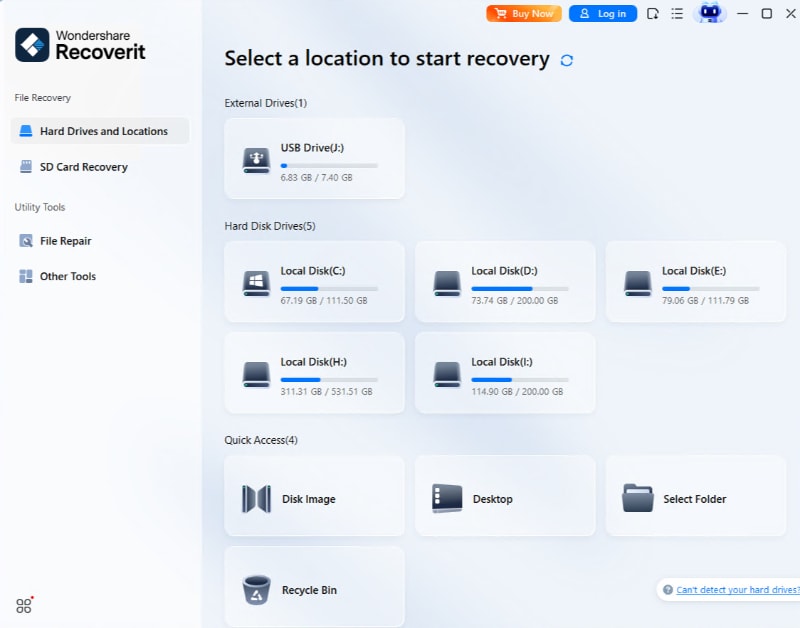
The Hard Drives and Locations screen: each drive is a tile, and a lost partition appears in red.
Features
Scan any drive and preview before you recover
Recoverit scans internal disks, external USB drives, flash drives and memory cards and sorts what it finds by location or file type. You can filter by file status (deleted or existing), type, date modified, size and tag, or type a description into the AI search box. Wondershare lists more than 1,000 recoverable formats, from Office documents and PDFs to camera RAW files and 4K/8K video. Previews open inside the program, which is the quickest way to tell a good file from a damaged one.
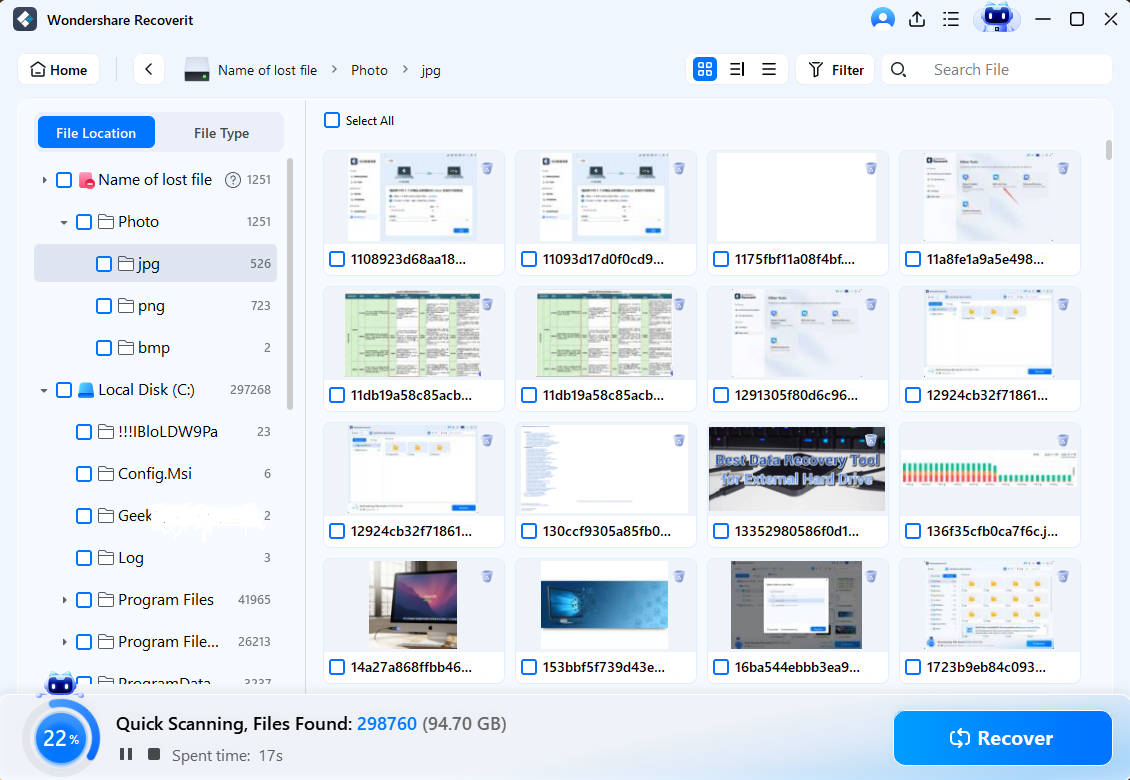
A quick scan of drive C: folders appear while the scan runs, with a running count of files found.
Rebuild photos and videos from SD cards
Recoverit's SD card mode targets camera and drone cards (Wondershare names DJI, GoPro, Canon and Sony). It identifies the card and camera, reassembles fragmented video clips, and lists photos and videos by capture time and original folder. Version 14.5 added recovery from lost SD card partitions; version 15 added AI tagging and search for these scans and repairs recovered videos automatically when the scan ends.
Repair corrupted videos, photos and documents
Recoverit includes repair tools for files that come back damaged or were broken to begin with: Corrupted Video Repair (MP4, MOV and other formats), Corrupted Photo Repair (including RAW), and Corrupted Document Repair for PDF and Office files. Two AI photo tools, Blurry Photo Enhancer and Facial Detail Enhancer, sit on the same screen.
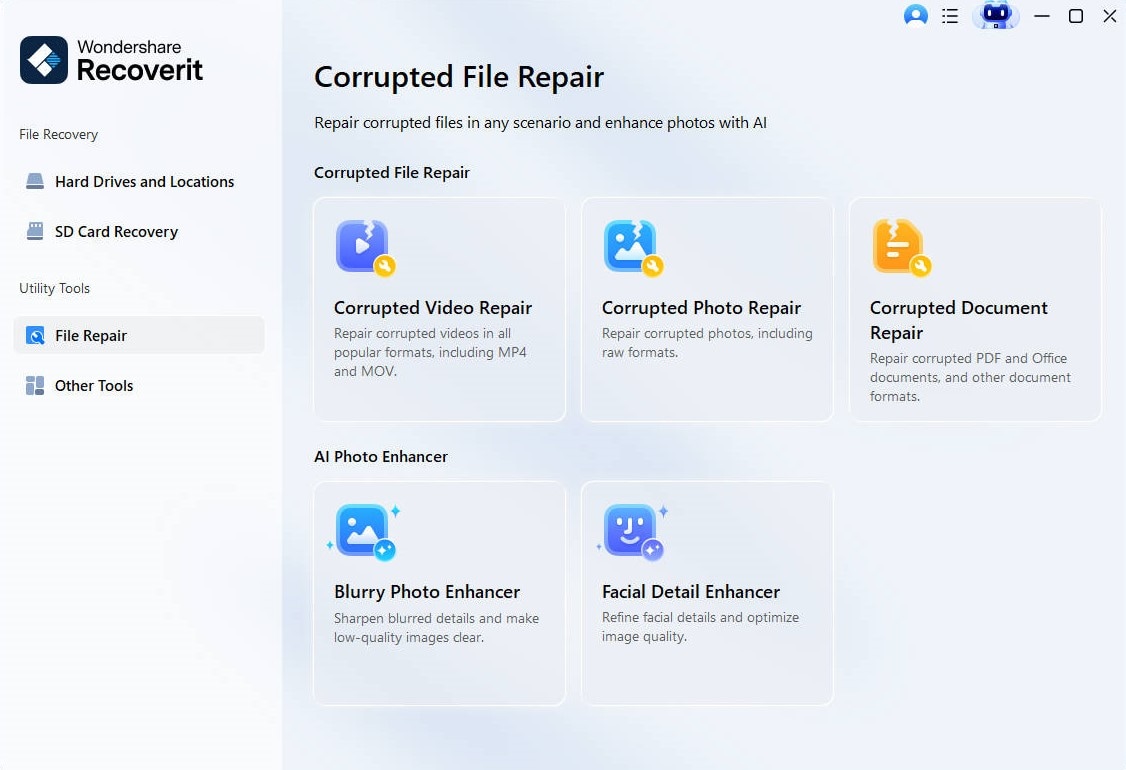
The File Repair screen: video, photo and document repair, plus two AI photo enhancers.
Rescue a PC that won't start
Recoverit can write a bootable USB drive on a working computer. You start the broken PC from that drive and copy files off its disk to an external drive, which helps after a blue screen, a failed update or a damaged system partition. The order page's FAQ describes it as recovery media for when Windows can't boot.
Lost partitions, NAS, Linux, disk images and OneDrive
Recoverit's Partition Recovery finds deleted or lost partitions and restores their files. Other Tools connects to Synology, QNAP and Thecus NAS servers over the network, so you don't have to pull the disks, and reads Linux disks with ext4, BTRFS, XFS and BFS. You can also image a failing disk and scan the image instead of the drive, and since version 14 recover files deleted from OneDrive.
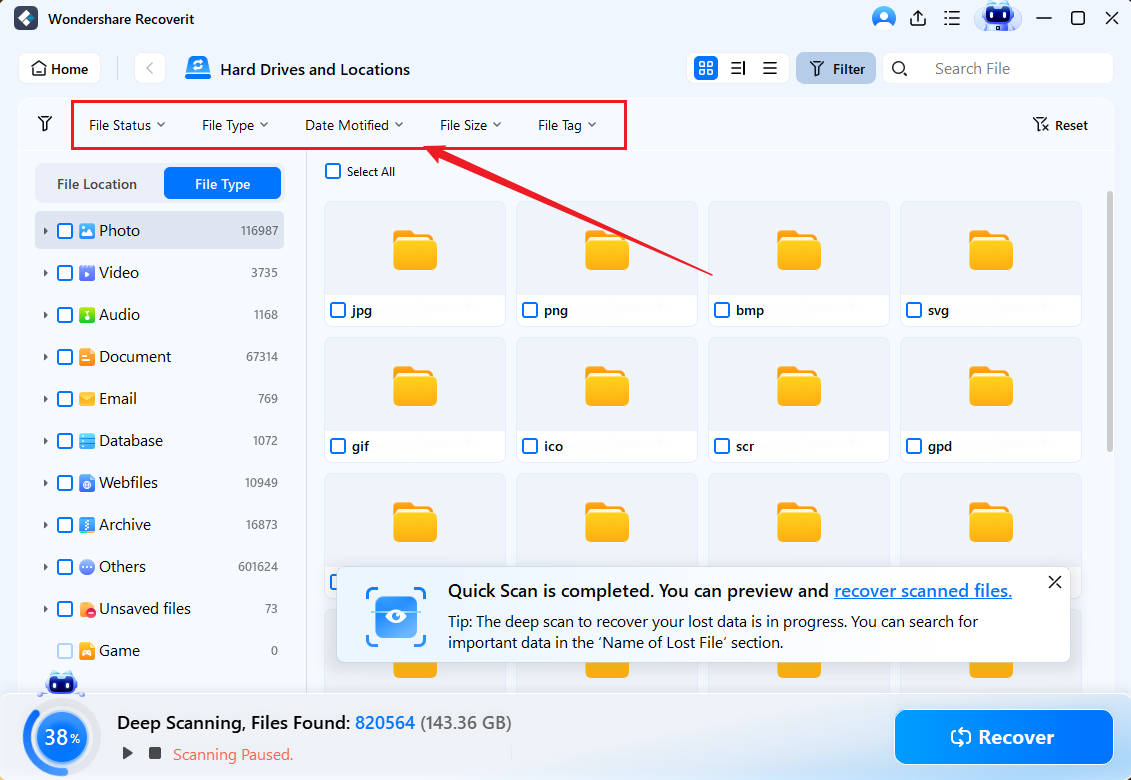
The filter bar (file status, type, date modified, size and tag) narrowing results to reconstructed photos.
Benefits
- You know before you pay. The free scan and preview show exactly what can come back.
- One tool for most data-loss cases. Deleted files, formatted cards, lost partitions, a dead Windows install and a NAS are all handled in the same program.
- Two PCs per license. Every plan covers two Windows computers, which suits a desktop and a laptop.
- Made for camera files. The SD card mode and video repair matter if you shoot on drones, action cams or mirrorless cameras.
Real-World Uses
- A formatted camera card: you formatted the card in the camera before copying the shoot. The SD card scan lists the photos by capture time and rebuilds the video clips.
- The emptied Recycle Bin: a spreadsheet you deleted last week is gone from the bin. A quick scan of the drive, filtered to "deleted" and ".xlsx", usually finds it in minutes.
- Windows won't boot: a failed update leaves the laptop looping. You build a bootable USB drive on another PC and copy your Documents folder to an external disk.
- A partition vanished: a resize went wrong and drive D: disappeared. Partition Recovery finds it and restores its files.
Who It's For, and Who Should Skip It
A good fit: home users and small offices who lost files to deletion, formatting or a crash, and photographers and video makers who work from SD cards. The interface needs no technical knowledge.
Skip it if: the drive clicks, grinds or isn't detected at all. That's a hardware failure, and running any software on it can make things worse; a professional lab is the right call. Skip it too if you only need one small file back: the free version's 500 MB may already cover it, and free tools such as Windows File Recovery exist. For phones, Recoverit isn't the tool: it doesn't recover data from iPhone or Android storage.
Usage Guide
- Install on a different drive. Download the free version and install it on a disk other than the one you lost files from.
- Pick a location. In Hard Drives and Locations, click the drive, partition or folder to scan. Use SD Card Recovery for camera cards.
- Let the scan run. Results appear during the scan. Narrow them with the filters or AI search.
- Preview. Open files to check they're intact before you recover them.
- Recover to another drive. Click Recover and save to a different disk, never the source drive.
- Repair if needed. If a video or photo won't open, run it through File Repair.
Where it falls short
- The free tier is small. 500 MB is less than some rivals give away, and TechRadar notes that the free plan doesn't save scans.
- Not every file comes back whole. Several Trustpilot reviewers say some recovered videos or photos wouldn't open, even after repair. Overwritten data can't be recovered by any tool.
- License activation and refunds. Some buyers report a perpetual license blocked after reinstalling Windows, and refund requests refused after an automatic renewal. Turn off auto-renewal in your Wondershare account if you only need it once.
- Support is chatbot-first. Several reviews complain that reaching a person takes a long time.
What Users Say
Recoverit is rated 4.7 out of 5 on Trustpilot from 6,866 reviews (79% five-star, 10% one-star) and 4.3 out of 5 on G2 from 59 reviews.
TechRadar
TechRadar's review (Krishi Chowdhary, updated April 23, 2026) tested the free version on Windows 11 and found it fast: "I was able to scan 640GB of data within 2 hours, whereas Stellar took more than 5 hours for the same." On results: "Recoverit successfully identified and recovered the entire dataset without any missing files". It liked that "The interface is pretty sleek and modern, with a dark theme."
The criticism was about the free tier and the marketing: "the free plan only allows 500 MB of data recovery, which isn't sufficient for most users." The listed cons were "Free plan doesn't save scans" and "Oversells its AI functions".
Trustpilot: what happy users say
- Mr Alan Gough (5 stars, November 20, 2026): "I had a failed HDD 90%full - This recovered it to a HDD"
- Pamela Peterson (5 stars, November 15, 2026): "My files are saved. I thought they were gone forever."
- kingwarren (4 stars, November 12, 2026): "I got most of my files and pictures back"
- debesh.banerjee (4 stars, November 13, 2026): "It was easy to use and value for money"
- debrabautista (5 stars, November 18, 2026): "UNCOMPLICATED, SIMPLE TO USE"
- sprashanth (5 stars, November 19, 2026), with a wish: "I wish a tool could let me recover files directly to cloud storage"
Trustpilot: the complaints
- Vinicio Nieves (1 star, November 12, 2026), "Perpetual license blocked after OS reinstall": "I am not using the software on multiple machines; I only want to use the single perpetual license I paid for."
- Cav. Luca Bernardo Malino (1 star, November 3, 2026), "Refund refused despite an immediate request": "When I was charged for the Recoverit renewal, I cancelled the subscription and requested a refund at the same time."
- Giovanna Lo Faro (1 star, October 25, 2026), "not free at all": "The advertisement is very misleading.You can't recover anything without subscribing."
- PlayBergamo (1 star, November 13, 2026): "Bad customer service and refund policy."
The themes
People who praise Recoverit talk about getting back files they had given up on, often from failed or formatted drives, and about how easy it is to use. The complaints are mostly about the business side rather than the scanning: automatic renewals people didn't expect, refunds refused, license activations that break after a reinstall, and support that starts with a bot. A smaller group says some recovered videos or photos were unplayable. "Free" in the marketing means free scanning and preview plus 500 MB, which some users read as more than it is.
Comparisons
Recoverit vs EaseUS Data Recovery Wizard
Both scan the same kinds of drives and both show previews before you pay. EaseUS Data Recovery Wizard Pro costs $99.95 a year and its free version recovers up to 2 GB; Recoverit's Annual Plan is $74.99 for two PCs, with a 500 MB free tier. Recoverit adds NAS recovery, a dedicated SD card mode and built-in file repair in the same license, so it's the better value for camera users and households with two computers.
Monthly vs Annual vs Perpetual
For a one-off emergency, the Monthly Plan gets you the files for less, as long as you cancel. If you want a recovery tool on hand all year, the Annual Plan costs only a little more than a month. The Perpetual Plan pays off after about two years, but it stays on version 15.
Editions and Pricing
All three plans have the same features: unlimited recovery, full preview, SD card recovery, file repair and crash recovery, for two Windows PCs. Choose the plan on the order page.
| Plan |
Price |
Term |
PCs |
| Free | $0 | Scan and preview, recover up to 500 MB | 1 |
| Monthly Plan | $58.49 (list $64.99) | 1 month, renews automatically | 2 |
| Annual Plan | $74.99 | 1 year, renews automatically | 2 |
| Perpetual Plan | $134.99 | One-time payment, version 15 with minor updates | 2 |
FAQs
Is Wondershare Recoverit the same as Wondershare Data Recovery?
Yes. Wondershare Data Recovery was renamed Recoverit with version 7.0 in 2018, and Wondershare's version history runs from Data Recovery 1.0 in 2003 to Recoverit 15.0 in September 2026.
Can Recoverit recover files deleted a long time ago?
Recoverit can recover old deletions as long as the space hasn't been overwritten by new data. On a busy system drive that can happen within days; on a spare external drive files can survive for years.
Does Recoverit work on an SSD?
Recoverit scans SSDs like any other drive, but on most modern SSDs Windows runs TRIM, which erases deleted blocks soon after deletion. Recovery from an SSD is therefore much less likely than from a hard drive or memory card.
Can I use one Recoverit license on a Windows PC and a Mac?
No. Recoverit's Windows plans cover two Windows PCs, and the Mac version is sold separately with its own plans for two Macs.
How do I cancel a Recoverit subscription?
Recoverit's Monthly and Annual plans can be cancelled at any time before renewal from your Wondershare account, and Wondershare says it sends a reminder email before the term ends. Cancelling stops the next charge; the current term keeps working.
Will Recoverit get my money back if it finds nothing?
Recoverit comes with a 7-day money-back guarantee, which applies when support can't solve your problem. Scanning with the free version first is the better protection: if the scan doesn't show your files, don't buy.
Can Recoverit recover files from a phone?
No. Recoverit for Windows recovers from computer drives, external drives, memory cards and NAS. It can read a phone's removable SD card in a card reader, but not the phone's internal storage.
System Requirements
- Windows 11, 10, 8.1, 8, 7 or Vista, or Windows Server 2003 to 2022
- At least 2 GB of RAM (more for scanning large drives)
- About 56 MB of disk space for the program
- Internet connection to download the full program (the installer is a 2.0 MB web installer)
Conclusion
Recoverit is worth buying when the free scan shows the files you need: the Annual Plan at $74.99 for two PCs is fair value for a tool that handles deleted files, formatted cards, lost partitions and unbootable PCs in one place, with good results in independent testing. The one reason to buy it is how much ground it covers without any technical skill. The main reason to hesitate is the business side: watch the automatic renewal, and don't count on a refund. Scan first, buy only if your files are there, and cancel renewal if you won't need it again.
Download Free TrialBuy Now