DataNumen Data Recovery: Find Deleted and Lost Files Before You Pay
DataNumen Data Recovery is a $49.95 Windows tool that scans a drive, a whole disk or a disk image for deleted and lost files and copies the ones you pick to a safe place. It's for home and office users who emptied the Recycle Bin, formatted the wrong drive or lost a partition, and want to see what can come back before they spend anything.
The free version runs the full scan and shows you every file it found, with picture previews. Only saving the files needs the paid licence, so you know the answer before you buy.
Quick facts
- Version: 5.0 installer dated July 9, 2026 (the product page still shows 4.0, released July 20, 2024)
- Developer: DataNumen, Inc.
- Platform: Windows, 32-bit program, administrator rights needed to scan disks
- File systems: NTFS, FAT16, FAT32, ext2, ext3, ext4, HFS+ and APFS
- File types: more than 430, found by their content even when the file system entry is gone
- Price: $49.95 for one user, one-time, at checkout (the vendor's list price is $59.95)
- Trial: free version that scans and lists recoverable files and folders but doesn't save them
- Guarantee: 30 days
- What we checked: installer file version 5.00 (17.65 MB, digitally signed by DataNumen, Inc.) downloaded from the vendor, with a July 9, 2026 file date; the $49.95 order page price, with no auto-renewal shown. We didn't run a recovery on a damaged or formatted drive. Checked on November 8, 2026.
Before you buy
- Stop writing to the drive. Every new file saved to the drive can overwrite what you want back. Install the program on a different drive if you can, and close every file and program using the drive before the scan, as DataNumen asks.
- Scan first, pay second. The free version lists every file it can recover. If the files you need aren't in the list, the full version won't find them either: both use the same recovery engine.
- Save to another drive. Pick an output folder on a different drive from the one you're scanning.
- Upgrades run for one month. After that a new version needs the Annual Support and Maintenance Plan or a paid upgrade fee.
- A refund needs a reason. The 30-day guarantee covers you if the full version recovers less than the free version showed, or if another tool recovers more, but you must explain the reason in detail.
Download Free Trial Buy Now
Overview
DataNumen is better known for repairing single damaged files (Outlook PST, Excel, Word, ZIP). Data Recovery is its drive-level tool. Instead of fixing one broken file, it reads the raw sectors of a drive, rebuilds what it can of the folder tree, and hunts for files of known types in the space the file system says is empty.
The window is plain: a folder tree on the left, the found files on the right, a six-stage progress bar on top and two big buttons, Scan and Recover. You tick what you want and save it somewhere else.
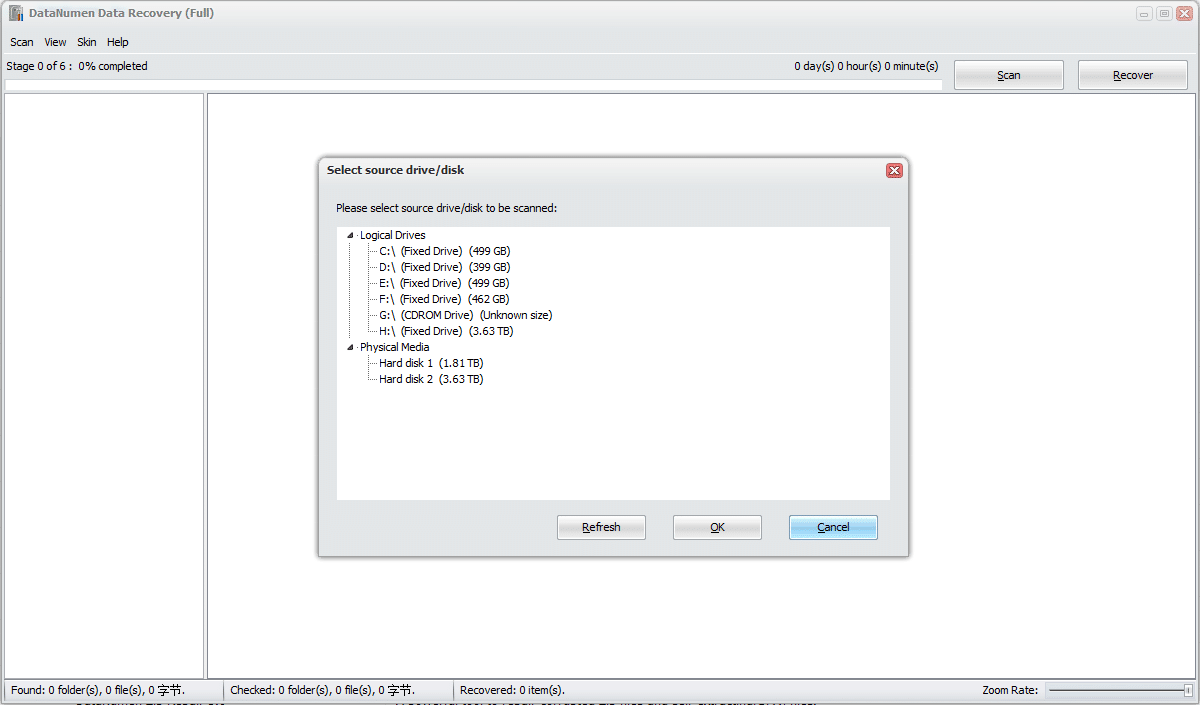
Choosing what to scan: logical drives (C:, D: and so on) or a whole physical hard disk, from an older version's window.
Features
Recovers deleted files and files lost to formatting
DataNumen Data Recovery covers two kinds of loss. Deleted files: a plain delete, a delete from the Recycle Bin, or an emptied Recycle Bin. Lost files: a drive formatted or repartitioned by mistake, a corrupt file system, or bad sectors on a failing disk. It brings back files, whole folders with their hierarchy, and the NTFS alternate data streams attached to files.
Finds 430+ file types by their content
DataNumen Data Recovery scans the raw disk data and looks for the structure of more than 430 known file types. That's how a photo or document can come back after a format wiped the file table. Files found this way usually lose their original names, which is why the results include a "MoreRecoveredFiles" folder with names like File5.JPG.
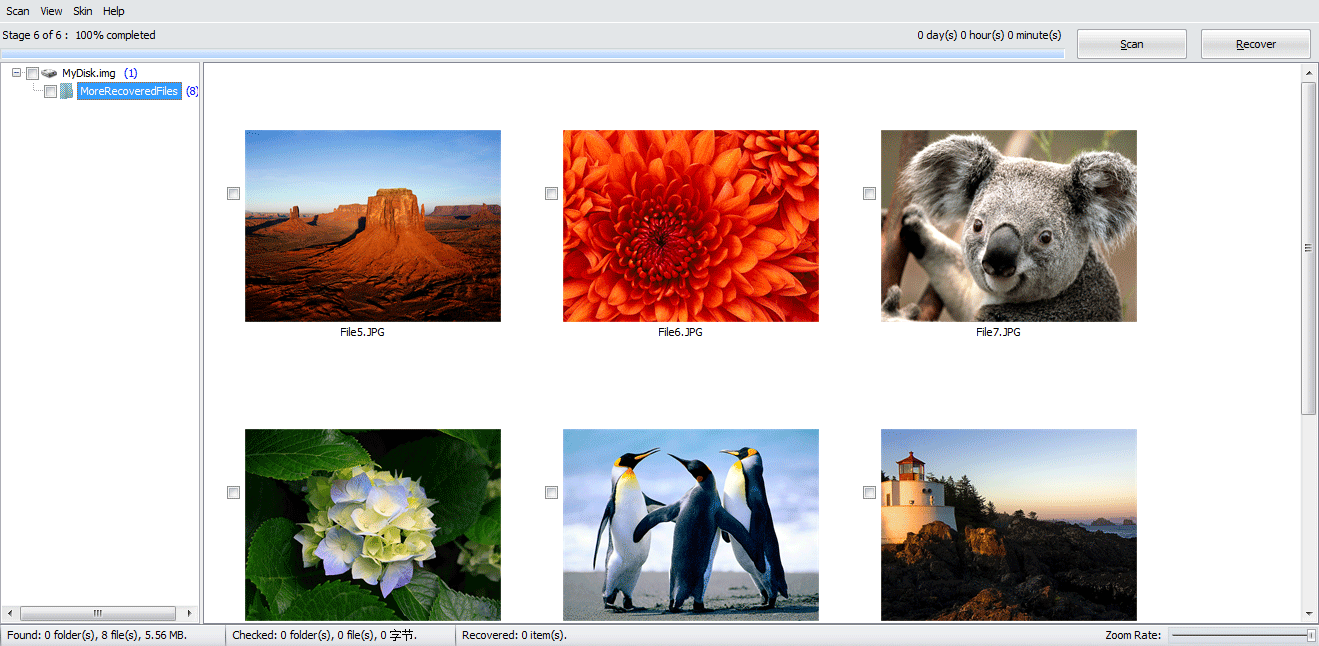
Scan results from a disk image: eight photos found in MoreRecoveredFiles, shown as thumbnails with a check box each, and a zoom slider at the bottom right.
Works with Windows, Linux and Mac drives
DataNumen Data Recovery reads NTFS and FAT16/FAT32 drives from Windows PCs and USB sticks, ext2, ext3 and ext4 from Linux, and HFS+ and APFS from Macs. The program itself runs only on Windows, so a Mac drive has to be connected to a Windows PC.
Scans disk image files
DataNumen Data Recovery can scan an image file instead of a live drive. On a disk that's starting to fail, the safer route is to copy it once into an image (DataNumen sells a separate Disk Image tool for that) and then recover from the copy, so the failing disk isn't read again and again.
Scan options for difficult drives
DataNumen Data Recovery's options let you set the sectors per cluster, the number of reanalysis passes and the code page used for file names, and switch individual jobs on or off: fast scan, deleted folders, deleted files, lost and found files, embedded files, all other file types, skipping already analyzed sections, and fixing wrong file extensions. The defaults suit most cases.
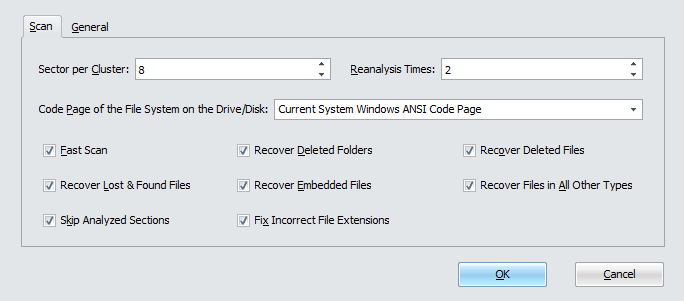
The Scan tab of the options dialog, with every recovery type ticked.
Filter, sort and avoid name clashes
DataNumen Data Recovery lets you filter and sort the found files and folders, keeps Unicode file names, and renames a file automatically when one of the same name already exists in the output folder, so nothing is overwritten during the copy.
Benefits
- A free answer to "can I get it back?" The scan and the list cost nothing, which is the hardest question in data recovery.
- A low price for a drive-level tool. $49.95 one-time is at the low end for this kind of software, with no yearly renewal at checkout.
- One tool for several kinds of drive. Windows, Linux and Mac file systems are covered from one Windows PC.
Real-World Uses
- The Recycle Bin was emptied last week. Scan the drive and look for the folder by name in the tree.
- A camera card or USB stick was formatted. The file table is gone, but the content scan can still find the JPGs and documents.
- Windows says a drive needs formatting. Don't format it. Scan it and copy what's there to another disk first.
- An old Linux or Mac external drive won't mount. Connect it to a Windows PC and scan the physical disk.
Who It's For, and Who Should Skip It
It suits Windows users who've lost personal or office files through deletion or formatting and want a cheap, simple tool with a free scan. The free list of recoverable files makes it a sensible first stop.
Skip it if you only use a Mac and have no Windows PC. Skip it if the drive clicks, grinds or isn't detected at all: that's a hardware fault, and every extra hour of scanning can make it worse, so a professional recovery lab is the better call. If your only problem is one damaged Outlook, Excel or ZIP file rather than a lost one, DataNumen's file repair tools are the right product, and if you only need to undelete files on an NTFS drive, DataNumen NTFS Undelete is the narrower tool.
Usage Guide
- Download and install the free version, ideally on a drive other than the one you're recovering from.
- Close any files and programs that are using the drive.
- Start DataNumen Data Recovery, select the drive or physical disk, and click OK to start the scan. To scan an image file instead, choose that option from the Scan menu.
- To change the scan settings first, open the options dialog from the menu before you start.
- Watch the progress bar through the six stages. You can stop the scan at any time.
- Browse the results tree and previews, and tick the files and folders you want.
- With the full version, click Recover, pick an output folder on another drive, and click OK. A message box tells you when it's done.
Where it falls short
- Overwritten data is gone. One customer quoted below got back more than with other products, but none of the three and a half weeks of work she was missing. No tool can recover data that's been written over.
- Names can be lost. Files found by the content scan come back with generic names, so sorting a big haul of File1, File2 and so on takes time.
- The documentation lags behind. The help file's FAQ still calls 2.4 the current version, and the product page lists 4.0 while the download is 5.0.
- A 32-bit program. The specifications list it as 32-bit, which works on 64-bit Windows but isn't a modern build.
- Little independent feedback. G2 shows only four reviews, averaging 3 out of 5.
What Users Say
There's little independent English feedback on DataNumen Data Recovery. DataNumen's product page shows 4.90 out of 5 from 1,650 votes, which is the vendor's own count, and only one customer testimonial for this product.
On DataNumen's site
Ms. Mascha Fujimoto, retired, Arizona, March 16, 2021: "Your product was the best and did the most! But I don't think anything can recover the data I lost. It recovered what I already had, which was more than previous products, but none of the 3.5 weeks of data that was missing. If I thought the missing data was there, I would have definitely paid $50 to retrieve, and MAYBE $100 if I was Positive that all of the missing data was there. But it wasn't, so it wasn't worth $100."
On G2
G2 lists four reviews of DataNumen Data Recovery with an average of 3.0 out of 5, too few for G2 to rate it against other tools. Reviewers praise how simple it is and how well it scans the disks and finds deleted files, and one says it recovers almost everything. The main complaint is having to pay again for later versions, and one reviewer puts its recovery at around 80 percent.
The pattern: the scan finds a lot and the program is easy to drive, but it can't perform miracles on data that's gone, and buyers don't like paying again for upgrades. The free scan answers the first question for your own drive.
Comparisons
DataNumen Data Recovery vs. DataNumen NTFS Undelete
NTFS Undelete is DataNumen's narrower tool for deleted files on NTFS drives. Data Recovery adds formatted and corrupt drives, FAT, Linux and Mac file systems, and the content scan for 430+ file types.
DataNumen Data Recovery vs. Windows' own options
Check the Recycle Bin, File History and any cloud sync's own recycle bin first: they're free and keep the original names. DataNumen Data Recovery is for when those are empty or the drive itself has been formatted or damaged.
Editions and Pricing
There's one edition. The order page shows a weekly special price for every quantity, and $49.95 is what a single licence costs at checkout. Larger orders are priced per licence:
| User licenses | List price each (US$) | Special price each (US$) |
|---|
| 1 | 59.95 | 49.95 |
| 2 - 9 | 49.95 | 39.95 |
| 10 - 24 | 39.95 | 29.95 |
| 25 - 49 | 29.95 | 24.95 |
| 50 - 99 | 24.95 | 16.95 |
| 100 - 199 | 16.95 | 11.95 |
| 200 - 499 | 11.95 | 9.95 |
| 500+ | 9.95 | 6.95 |
FAQs
Will the full version of DataNumen Data Recovery find more than the free scan?
No. DataNumen Data Recovery's free and full versions use the same recovery engine and find the same files. The full version only adds saving them, so the free scan tells you exactly what you'd get.
Can DataNumen Data Recovery recover files from a Mac drive?
DataNumen Data Recovery reads HFS+ and APFS drives, but it runs only on Windows. Connect the Mac drive to a Windows PC and scan it there.
Can DataNumen Data Recovery get files back from an SSD?
DataNumen Data Recovery can scan an SSD like any other drive, but on most SSDs Windows tells the drive to erase deleted blocks (TRIM), often within minutes. Deleted files on an SSD are therefore much less likely to come back than on a hard disk or USB stick.
Why do my recovered files have names like File5.JPG?
DataNumen Data Recovery names files it found by their content, without a surviving file system entry, by number. Files whose entries survived keep their original names and folders.
Does DataNumen Data Recovery need administrator rights?
Yes. DataNumen Data Recovery needs administrator privileges to read a drive or disk directly for scanning and recovery.
Is the DataNumen Data Recovery licence a subscription?
No. DataNumen Data Recovery is a one-time purchase with no auto-renewal at checkout. Free upgrades last one month, and later versions need the support plan or an upgrade fee.
What if another program recovers more than DataNumen Data Recovery?
DataNumen's Best Recovery Guarantee promises a full refund within 30 days of purchase if another tool recovers more data than its product.
System Requirements
- Windows
- Intel or equivalent processor, x86 or x64
- 32 MB of memory minimum, 2 GB recommended
- 34 MB of disk space
- Administrator privileges for disk scanning and recovery
Conclusion
Worth $49.95 if the free scan lists the files you've lost. The one reason to buy is that you pay only after you've seen your own files in the results, at a price well below most recovery tools. The main reason not to is thin independent evidence: few reviews, documentation that trails the current version, and no way around data that's already been overwritten. Run the free scan, and let the list decide.
Download Free Trial Buy Now