DataNumen DBF Repair: Recover Data From Corrupt dBASE, FoxPro and Clipper Tables
DataNumen DBF Repair is a $149.95 Windows tool that repairs corrupt DBF database files from dBASE, FoxPro, Visual FoxPro and Clipper, including their DBT and FPT memo files, and writes the recovered records to a new table. It is a one-time purchase for one user.
DBF tables often sit underneath accounting packages and in-house programs written decades ago, long after anyone remembers how they work. When one of those files stops opening, you need the records out of it, and the free demo tells you whether that can be done before you spend anything.
Quick facts
- Version: 4.0, released January 17, 2024
- Developer: DataNumen, Inc. (sold as Advanced DBF Repair in earlier years)
- Platform: Windows (32-bit program)
- Files: DBF, plus DBT and FPT memo files
- Formats: dBASE III, dBASE IV, dBASE 5, FoxBase, FoxPro 2.0 to 2.6, Visual FoxPro. Clipper tables are handled as dBASE III
- Price: $149.95 for one user, one-time, at checkout (the vendor's list price is $199.95)
- Trial: free demo that previews the recovered data but doesn't export it
- Guarantee: 30 days
- What we checked: installer file version 4.00 (14.35 MB, with a valid DataNumen, Inc. digital signature) downloaded from the vendor, with a January 17, 2024 file date; the $149.95 order page price, with no auto-renewal shown. We didn't repair a damaged table ourselves. Checked on November 9, 2026.
Before you buy
- An Oracle .dbf is a different file. Oracle datafiles share the extension but not the format. DataNumen sells a separate product, DataNumen Oracle Recovery, for those.
- Copy the damaged file first, along with its DBT or FPT file, and work on the copy.
- Check the demo's preview. It uses the same recovery engine as the full version, so records missing from the preview won't appear after you pay.
- Upgrades run for one month. After that a new version needs the Annual Support and Maintenance Plan or a paid upgrade fee.
- A refund needs a reason. The 30-day guarantee asks you to explain why in detail, and DataNumen may ask for the original damaged file.
Download Free Trial Buy Now
Overview
A DBF file breaks in two main ways: the header that describes the table gets damaged, or some of the records do. DataNumen DBF Repair handles both, then saves a new file, so Damaged.dbf becomes Damaged_fixed.dbf and the original stays as it was. By default it detects the format by itself. If your application refuses the output, you can force a specific format from the dropdown and run the repair again.
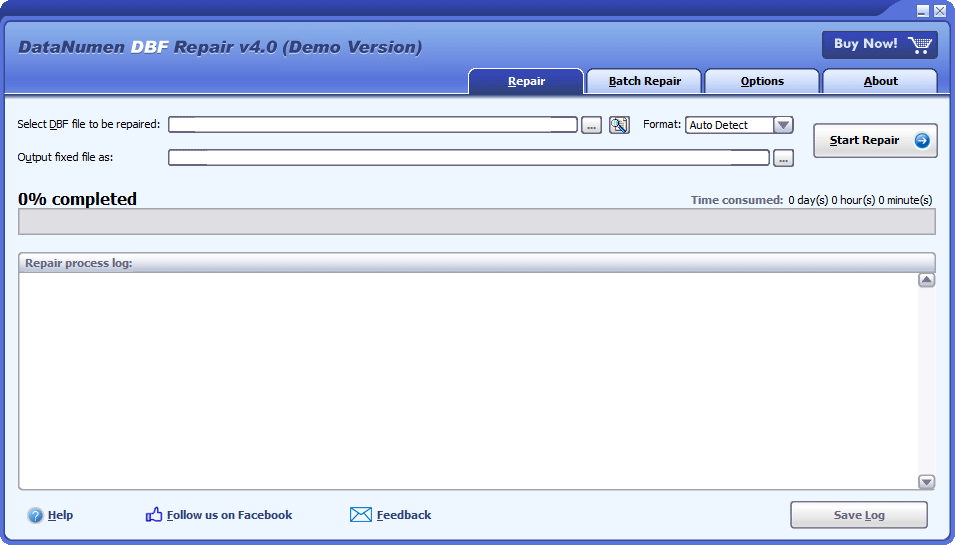
The Repair tab of the version 4.0 demo: the damaged file, the format dropdown set to Auto Detect, the output name and the repair log.
Features
Repairs both the header and the records
DataNumen DBF Repair recovers from a damaged file header as well as damaged data records, and restores the table schema along with the rows. All data types are covered, including memo and binary fields.
Reads memo fields from DBT and FPT files
DataNumen DBF Repair pulls memo and binary content from the companion DBT or FPT file. A separate option tells it to ignore a companion file that is filled with zeros.
Splits oversized tables
DataNumen DBF Repair can split its output when a file reaches a size you set, which is aimed at DBF files that have grown past the 2 GB mark. It can also split a table once it passes a field count you choose. The default field limit in the demo is 255.
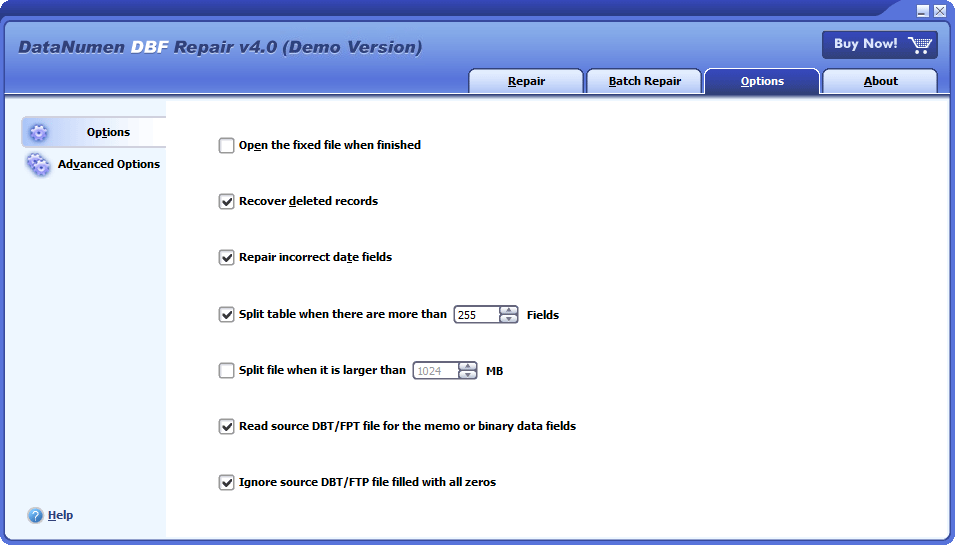
The Options tab: recover deleted records, repair incorrect date fields, split by field count or by file size, and the DBT/FPT settings.
Recovers deleted records and fixes bad dates
DataNumen DBF Repair has Options tab switches to bring back deleted records and to repair incorrect date fields. Both are ticked by default in the demo. Untick deleted records if rows you removed on purpose should stay gone.
Batch repair
DataNumen DBF Repair's Batch Repair tab takes a list of tables, added by hand or found with Search Files, and repairs them in one run.
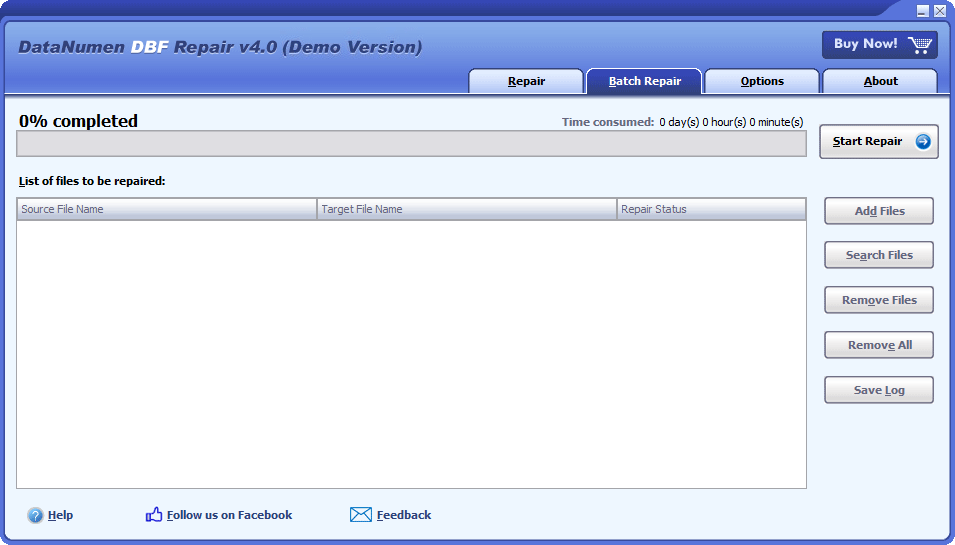
The Batch Repair tab: source and target names, repair status, and buttons to add, search for and remove files.
Benefits
- You keep legacy systems running. The repaired table goes back into the program that uses it, in the format that program expects.
- You know the outcome before paying. The preview shows what can be saved.
- The original stays untouched. The output is always a new file.
Real-World Uses
- An old FoxPro application stops opening a table. One Canadian customer quoted below had exactly this with a file they suspected was oversized.
- A contact database built on DBF files is damaged. Another customer recovered a complete ACT! 2000 database.
- A table has hit the 2 GB ceiling. Repair it and split the output into pieces the application can open.
- A folder of damaged tables after a disk failure. Queue them all on the Batch Repair tab.
Who It's For, and Who Should Skip It
It suits IT staff and developers who look after dBASE, FoxPro or Clipper systems and have a table with no recent backup.
Skip it if you have a clean backup that is recent enough, because restoring costs nothing. Skip it too if you need the data in Access format, since it can't write MDB files, and if you're on a Mac, since it needs a Windows PC.
Usage Guide
- Download and install the demo, then close any program that might change the DBF file.
- On the Repair tab, type the path, browse to the file, or use the find button to search the computer.
- Leave Format on Auto Detect for the first attempt. Choose dBASE III for a Clipper table.
- Check the output name, which ends in
_fixed.dbf by default.
- On the Options tab, decide about deleted records and any splitting.
- Click Start Repair and read the preview. If your records are there, order the full version and repair again.
- Rebuild the indexes in your application.
Where it falls short
- It doesn't recover indexes. You rebuild them afterwards with a command such as
INDEX ON <key expression> TAG <tag name>.
- It can't borrow a schema. If the header is badly damaged, you can't load the structure from another DBF file with the same layout.
- No update since January 2024. The DBF format itself is static, so this matters less than it would for most software.
What Users Say
Independent reviews of this tool are hard to find. DataNumen's product page shows 4.90 out of 5 from 1,644 votes, which is the vendor's own count. Everything quoted here comes from DataNumen's site, which publishes only what it chooses to.
Customers on DataNumen's site
Graeme Nightingale, IT Consultant, Australia, April 25, 2026: "You guys are genius's. The file is fixed and complete."
Kenelm Butler, Canada, October 10, 2018: "In our company, there is an old FoxPro DBF file. We cannot open it. We think it is oversized. Your DBF recovery software helps to fix the file. Now we can access the data inside it properly."
Myrtle Terry, Delaware, US, July 15, 2019: "The tool fixes my Microsoft FoxPro Database with a quick scan. Very helpful!"
Stephen Rice, Production Director, Sacramento Magazines Corp.: "I just wanted to let you know that DataNumen DBF Repair was able to recover all the data from our ACT! 2000 database."
DataNumen also publishes case studies naming Thyssenkrupp Elevator and Abbott Diabetes Care as users of the tool.
The pattern is consistent but one-sided: people with old FoxPro or ACT! data report getting it back. Failed repairs don't appear on a vendor's testimonial page, which is the reason to rely on the demo instead.
Comparisons
DataNumen DBF Repair vs. DataNumen Database Recovery
Database Recovery is DataNumen's $299.95 suite, which covers corrupt Access databases as well as DBF files. Buy DBF Repair if DBF tables are all you have. The suite only makes sense if you also look after Access files.
Other DBF repair tools
SysInfo and Aryson also sell DBF recovery programs for FoxPro, Clipper and dBASE files. We haven't compared their results with DataNumen's. The fair test is to run your own damaged file through each one's demo and compare what comes back.
Editions and Pricing
There's one edition. The order page shows a weekly special price for every quantity, and $149.95 is what a single license costs at checkout.
| User licenses | List price each (US$) | Special price each (US$) |
|---|
| 1 | 199.95 | 149.95 |
| 2 - 9 | 149.95 | 119.95 |
| 10 - 24 | 119.95 | 89.95 |
| 25 - 49 | 99.95 | 69.95 |
| 50 - 99 | 69.95 | 49.95 |
| 100 - 199 | 49.95 | 39.95 |
| 200 - 499 | 39.95 | 29.95 |
| 500+ | 29.95 | 19.95 |
FAQs
Can DataNumen DBF Repair output to Access format?
No. DataNumen DBF Repair can't save the recovered data as an Access MDB database. Its output is a DBF file.
Is DataNumen DBF Repair a subscription?
No. DataNumen DBF Repair is a one-time purchase with no auto-renewal at checkout.
How long does DataNumen DBF Repair take?
DataNumen DBF Repair's run time depends on the size of the DBF file and of any DBT or FPT file that goes with it.
Does DataNumen offer an online DBF repair service?
No. DataNumen DBF Repair is only sold as a program you run on your own PC.
What corrupts a DBF file in the first place?
DataNumen lists hard drive failure, viruses, sudden power loss, too many fields in a table and an oversized database as common causes.
System Requirements
- Windows 95 through 11, or Windows Server 2003 through 2019, 32-bit or 64-bit
- Intel or equivalent processor, x86 or x64
- 16 MB of memory minimum, 1 GB recommended
- 19 MB of disk space
Conclusion
Worth $149.95 if a dBASE, FoxPro or Clipper table you can't recreate has stopped opening and the demo shows your records. Not worth it if a recent backup exists. The reason to buy is that it handles header damage, memo files and oversized tables in one tool, with a free preview first. The main reason not to is the price against a problem a backup would have solved, and you still have to rebuild the indexes yourself.
Download Free Trial Buy Now