DataNumen BKF Repair: Get Your Files Back Out of a Corrupt Windows Backup
DataNumen BKF Repair is a $149.95 Windows tool that pulls the files out of damaged BKF backups, the archives written by Windows NTBackup, Veritas Backup Exec, BackupAssist and older Veeam jobs, when the backup program itself refuses to restore them. It's a one-time purchase, and the free demo shows you which files it can recover before you pay.
BKF files tend to turn up years after they were made: an old server's last full backup, a client's archive on a dying USB disk, a decade of work saved with Windows XP's backup tool. When NTBackup stops halfway with a "the backup file is unusable" error, this is the kind of program you reach for.
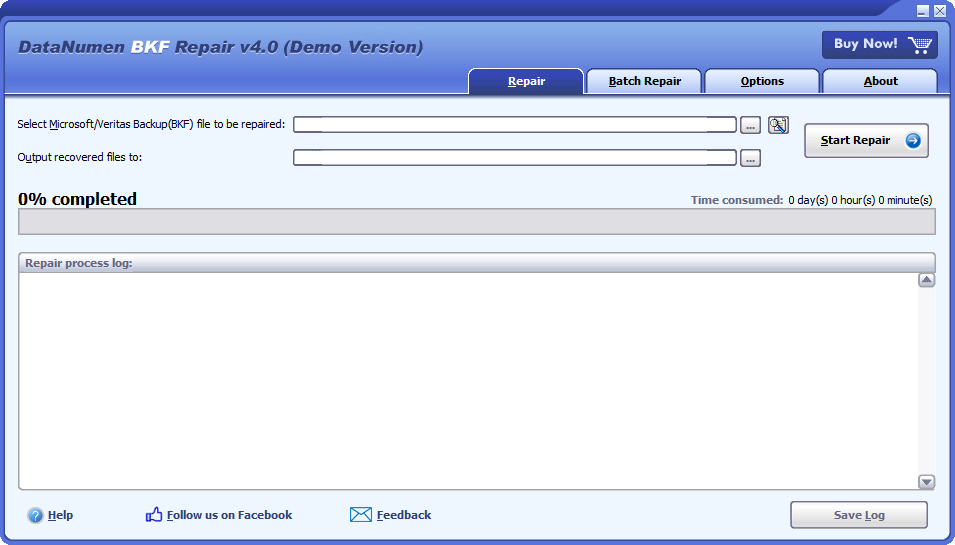
The Repair tab: pick the damaged BKF file, pick an output folder, and click Start Repair.
Quick facts
- Version: 4.0, released December 30, 2023 (the current installer is file version 4.01)
- Developer: DataNumen, Inc.
- Platform: Windows only, 32-bit program that runs on 32- and 64-bit Windows
- Reads: BKF files from NTBackup and the Windows 95 to Server 2003 backup utility, Veritas Backup Exec, BackupAssist, Veeam Backup & Replication and other tools using the BKF format
- Price: $149.95 for one license, one-time payment, cheaper per copy in volume
- Free demo: lists every recoverable file but doesn't extract any
- Refunds: 30 days, with a written reason
- What we checked: the installer (14.19 MB, file version 4.01, digitally signed by DataNumen, Inc.) downloaded from the vendor, and the $149.95 price on the order page with its volume tiers. We didn't repair a damaged BKF file ourselves. Checked on November 24, 2026.
Before you buy
- Run the demo on your own file first. DataNumen says the demo and the full version use the same recovery engine, so a file the demo doesn't list can't be recovered by the paid version either.
- Plan for disk space. The output folder needs at least 1.1 times the BKF's size for an uncompressed backup and 5 times its size for a compressed one, so a 200 GB compressed backup can need a terabyte free.
- Use a local drive for the output. DataNumen warns that writing to a network drive slows the recovery and can corrupt the results.
- Upgrades are free for one month. After that you need DataNumen's Annual Support and Maintenance Plan or a paid upgrade.
- A refund needs a reason. The 30-day guarantee asks you to explain why in detail, and DataNumen may ask for the damaged file to check it.
Download Free Trial Buy Now
Overview
A BKF file is a backup archive in the Microsoft Tape Format (MTF). Windows wrote them with NTBackup until Server 2003 and XP, and Backup Exec and a few other tools kept using the format. Microsoft dropped NTBackup after XP, so on a modern PC you often have no program left that can open a BKF at all, let alone a damaged one.
DataNumen BKF Repair doesn't try to fix the BKF so another program can read it. It reads the archive itself and extracts what it finds: datasets, volumes, folders and files, written straight into a folder named after the backup (MyBackup.bkf goes to MyBackup_recovered). You get usable files, not a repaired archive you still need to restore.
The program has barely changed in look for years. It's a four-tab window with no wizard, which suits the job: there's little to configure besides where the files go.
Features
Reads BKF files from several backup programs
DataNumen BKF Repair handles backups from the Windows 95, 98, ME, NT, 2000, XP and Server 2003 backup utility (NTBackup), all versions of Veritas Backup Exec and BackupAssist, Veeam Backup & Replication, and other tools that write the BKF format, whether they were made on Windows, NetWare, OS/2 or Mac OS.
Compressed, multi-dataset and multi-volume backups
DataNumen BKF Repair recovers compressed BKF archives and backups that span several datasets or volumes, the shape most scheduled server backups took. It keeps the dataset, volume and folder structure, so the files land where they were, not in one flat heap.
Fast scan first, thorough scan when needed
DataNumen BKF Repair has two scan modes on its Options tab. The fast scan is meant for minor damage. If files are missing afterwards, untick it and run the slower, more thorough scan on the same file.
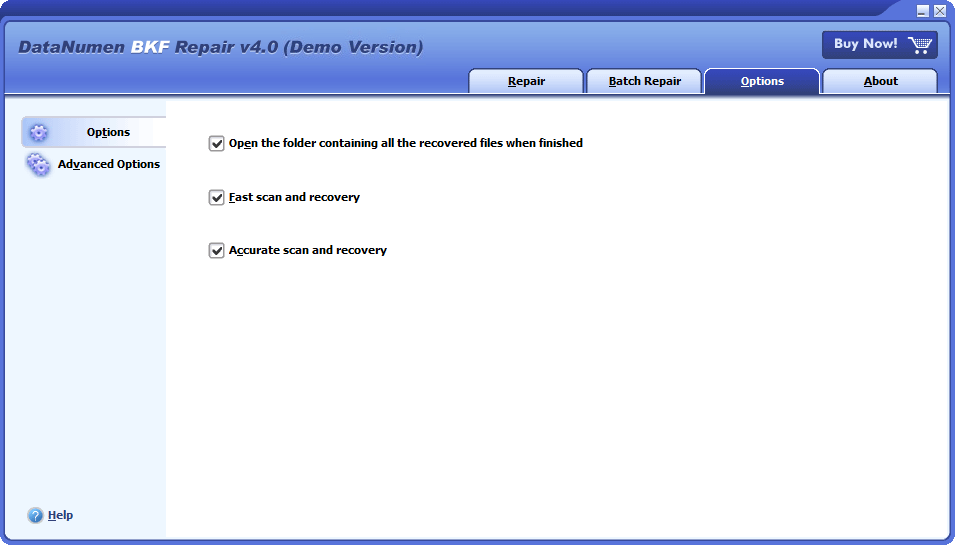
The Options tab: open the output folder when finished, fast scan and recovery, and accurate scan and recovery.
Batch repair for a shelf of old backups
DataNumen BKF Repair can queue many BKF files and process them in one run. The Batch Repair tab adds files by hand or searches a drive for them, then shows each file's status as it goes.
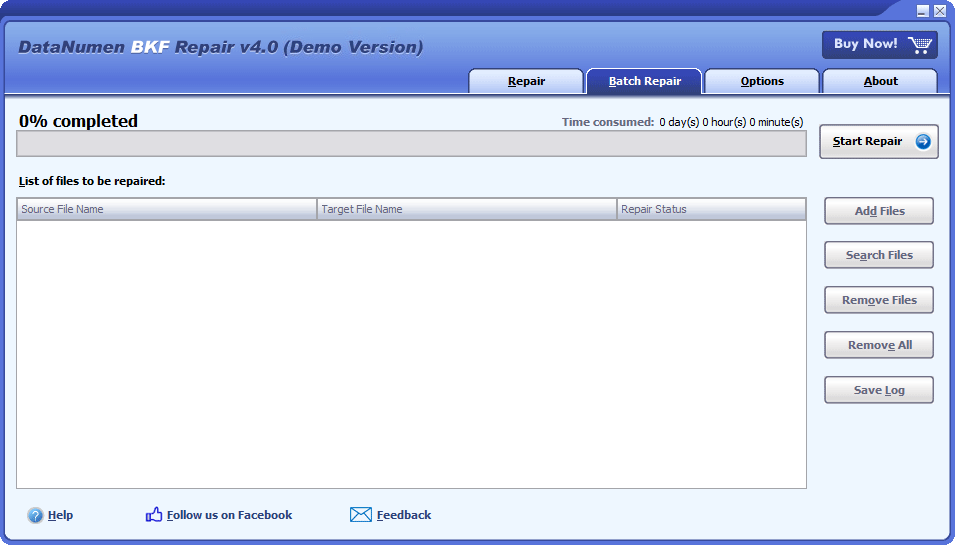
The Batch Repair tab, with the list of source files, target names and repair status.
No administrator rights, no size cap
DataNumen BKF Repair runs without administrator privileges, which helps on a locked-down work PC. DataNumen gives its file size limit as 16,777,216 TB, so in practice any backup you have will fit. It can also scan disk image files, useful when the BKF sat on a drive you've already imaged.
Benefits
- You find out for free whether it's worth paying. The demo's file list is the honest answer to "can my backup be saved?"
- You don't need the old backup software. The files come out as ordinary files, so you don't have to build an XP virtual machine or track down a Backup Exec license.
- It's a one-time cost. For a one-off rescue, you pay once and keep the program.
Real-World Uses
- The last backup of a retired server. A Server 2003 box was scrapped years ago, and its final NTBackup set is the only copy of an old accounting database. NTBackup's restore stops with an error partway through.
- A client's archive on a failing disk. One of DataNumen's customers describes a 2 TB backup damaged by bad storage media, with all the data extracted afterwards.
- Old family files. Someone finds a Windows XP backup of the family photos and documents on an external drive, and no current Windows version will open it.
- An IT shop clearing old media. A technician batch-scans a folder of Backup Exec BKF files to see which ones still hold anything worth keeping.
Who It's For, and Who Should Skip It
It's for IT administrators, data recovery technicians and anyone stuck with a BKF file that won't restore, especially when the backup holds something that can't be recreated.
Skip it if your backups come from Windows Backup and Restore, File History or a modern image tool: those don't write BKF files, and this program can't read them. Skip it too if you only want to browse a single file inside a backup, since it extracts everything and has no search or file picker. Mac users need a Windows PC to run it, though the BKF can come from anywhere.
Usage Guide
- Install and launch. Download the free demo, run the installer and start DataNumen BKF Repair. Close NTBackup or any other program that might touch the BKF file.
- Pick the damaged file. On the Repair tab, type the BKF's path or click the browse button next to the first field.
- Pick the output folder. By default it's a new folder named after the backup with "_recovered" added. Choose a local drive with enough free space.
- Start the repair. Click Start Repair and watch the progress bar and log. The time depends on the file's size, the number of items and whether they're compressed.
- Check the result. A message box confirms success and the output folder opens. In the demo, you get the list of recoverable items instead of the files.
- Try a deeper scan if needed. If something's missing, untick fast scan on the Options tab and run it again.
Where it falls short
- All or nothing. DataNumen BKF Repair extracts the whole backup. It can't search for one file or extract only a chosen folder, which DataNumen lists as a missing feature.
- Windows 11 isn't officially listed. DataNumen says it tested the program on Windows 10 and 11 without problems, but the official list of systems stops at Windows 10 and Server 2019.
- Badly damaged backups lose data. Whatever the scan can't read is gone. The vendor's advice is to keep checked, redundant backups so you never need a tool like this.
- Dated interface. The window looks like software from the 2000s. It works, but it won't preview a recovered file for you.
What Users Say
Independent reviews of DataNumen BKF Repair are scarce, which is typical for a specialist tool bought once in a crisis. Most of what's available comes from DataNumen's own testimonial wall, and its product page shows 4.90 out of 5 from 1,643 votes, a rating the vendor collects itself. Read the quotes below with that in mind.
Customer testimonials on DataNumen's site
"I encounter a Windows BKF file created by Windows NTBackup. But NTBackup refuses to restore the backup BKF file. With the help of your tool, I recovered BKF file data in it. The quick scanning mode is enough for my file. And it can extract BKF file for me." Liêm Tran, Vietnam, Feb 10, 2021
"Yesterday I got a 2TB corrupt Windows backup file from my customer, it is corrupt due to bad storage media. The customer said he cannot restore BKF file. With your file repair tool, I am able to extract all data from it." Tuğba Avcı, Turkey, Nov 15, 2019
"Needed to restore a Windows XP backup file. Your software worked wonders... I will definately recommend!" Eric Seeds, IT Administrator, Cable Technology Laboratories, New Brunswick, NJ, USA, January 8, 2020
"This software fixed my corrupt Windows backup file! After the scanning process, it recovered data smoothly. Also the support is fantastic!" Samppa Jokinen, Finland, July 25, 2016
"I try many of backup file, your software is working well, congratulation. Is efficient and easy to use." Serge R, Paris, France, March 25, 2024
The themes
The praise is consistent: it gets files out of NTBackup sets the original program won't restore, the fast scan is often enough, and support answers. One customer thanks a support engineer by name for help that recovered "10 years of work", which suggests some cases need a back-and-forth with support. The criticism you'll find is about what the program doesn't do, chiefly searching or picking files inside a backup, rather than about failed recoveries, but with so few independent reviews, the demo on your own file is the test that counts.
Comparisons
DataNumen BKF Repair vs. other BKF recovery tools
DataNumen BKF Repair competes with Recovery for Backup, SysTools BKF Repair and Kernel Recovery for BKF. DataNumen publishes its own test, which puts its recovery rate level with Recovery for Backup and above the rest, at a lower price. That's the vendor's test, not an independent one. Since every one of these tools has a free demo, the fair way to choose is to run two demos on the same damaged file and compare the lists.
DataNumen BKF Repair vs. DataNumen Archive Repair
DataNumen Archive Repair is the company's suite for damaged Zip, SFX, RAR, TAR and CAB archives. It doesn't include BKF Repair, so for a Windows backup file you need this program on its own.
Editions and Pricing
There's one edition, sold as a one-time license. Buying several copies lowers the price per copy, as shown on the order page on November 24, 2026:
| Licenses bought | Price per license (US$) |
|---|
| 1 | 149.95 |
| 2 - 9 | 119.95 |
| 10 - 24 | 89.95 |
| 25 - 49 | 69.95 |
| 50 - 99 | 49.95 |
| 100 - 199 | 39.95 |
| 200 - 499 | 29.95 |
| 500+ | 19.95 |
FAQs
Can DataNumen BKF Repair open a BKF file that isn't damaged?
Yes. DataNumen BKF Repair extracts the contents of any BKF it can read, so it also works as a way to get files out of a healthy NTBackup set on a PC that no longer has NTBackup.
Does DataNumen BKF Repair run on Windows 11?
DataNumen BKF Repair runs on Windows 11 according to DataNumen, which says it tested it there without problems, but the official requirements still list Windows 95 to 10 and Server 2003 to 2019.
Can I repair a BKF file on a Mac?
Not directly. DataNumen BKF Repair is Windows-only, so DataNumen's advice is to copy the BKF to a Windows PC, recover it there, and copy the files back.
Is DataNumen BKF Repair a subscription?
No. DataNumen BKF Repair is a one-time purchase. Updates are free for a month, and later versions need the Annual Support and Maintenance Plan or an upgrade fee.
What if the full version recovers less than the demo showed?
DataNumen refunds the order if the full version's result doesn't match the demo's, under its "Try Before Buy" guarantee. It also promises a refund if you find a tool that recovers more from the same file.
What can I do if DataNumen BKF Repair can't recover my backup?
Contact DataNumen's support with the file. The company says its team will analyze the backup by hand and try to recover what the program couldn't.
System Requirements
- Windows 95/98/ME/NT/2000/XP/Vista/7/8/8.1/10 or Windows Server 2003/2008/2012/2016/2019, 32- or 64-bit
- Intel or equivalent x86/x64 processor
- 32 MB RAM minimum, 2 GB recommended
- 20 MB of disk space for the program, plus room for the recovered files
- No administrator privileges needed
Conclusion
DataNumen BKF Repair is worth $149.95 when a BKF file holds data you can't get anywhere else and the free demo lists the files you need. The reason to buy it is that it turns an unrestorable NTBackup or Backup Exec archive into plain files without any of the old software. The reason to hesitate is the thin pool of independent reviews and an interface that extracts everything or nothing. Run the demo first: its file list tells you exactly what you'd be paying for.
Download Free Trial Buy Now