DataNumen Outlook Drive Recovery: Find Lost Outlook Mail on a Drive When the PST Is Gone
DataNumen Outlook Drive Recovery is a $199.95 Windows tool that scans a drive or whole disk for Outlook data after a PST file was deleted, the drive was formatted or the partition was lost, and saves what it finds into a new PST. It is a one-time purchase for one user.
If the PST file is still on your disk, even in a damaged state, this is the wrong tool and DataNumen says so itself. This one is for the worse situation, when the file is no longer there to open.
Quick facts
- Version: 10.2, released May 9, 2025
- Developer: DataNumen, Inc.
- Platform: Windows, 32-bit and 64-bit builds. Administrator rights are required for scanning
- Outlook data: Outlook 97 to 2021, Outlook for Office 365 and Microsoft 365
- Sources: hard disks, flash drives and other storage, on FAT, FAT32, NTFS, Linux Ext2 and Ext3 and similar file systems
- Price: $199.95 for one user, one-time, at checkout (the vendor's list price is $249.95)
- Trial: free demo that builds a PST with the real structure but demo text in place of the contents
- Guarantee: 30 days
- What we checked: installer file version 10.20 (19.94 MB, with a valid DataNumen, Inc. digital signature) downloaded from the vendor, with a May 9, 2025 file date; the $199.95 order page price, with no auto-renewal shown. We didn't run a recovery on a formatted drive ourselves. Checked on November 9, 2026.
Before you buy
- Stop writing to the drive. Every new file can overwrite the mail you want back. Install the program on a different drive if you can.
- Save the output somewhere else. DataNumen warns not to write the recovered PST to the drive you are scanning.
- Still have the PST? Then you want DataNumen Outlook Repair, at the same price, and not this one.
- Upgrades run for one month. After that a new version needs the Annual Support and Maintenance Plan or a paid upgrade fee.
- A refund needs a reason. The 30-day guarantee asks you to explain why in detail.
Download Free Trial Buy Now
Overview
DataNumen Outlook Drive Recovery only reads the source drive and never writes to it, according to the vendor. You choose a logical drive if it still exists, or the whole physical disk if the partition is gone or has been resized. The program works through its stages, then builds a PST that you open in Outlook. Items whose original location is known return to their folders, and the rest land in folders named Recovered_Group1, Recovered_Group2 and so on.
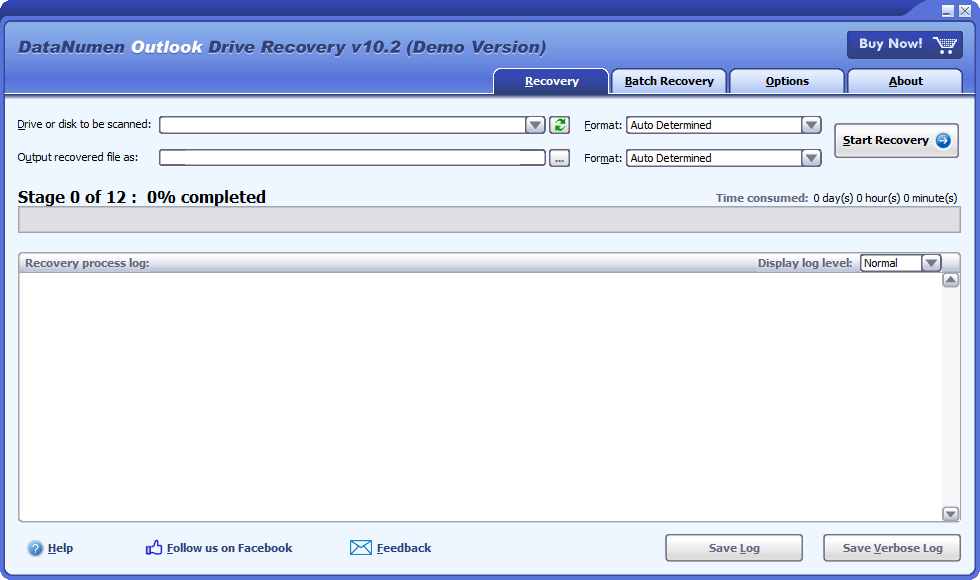
The Recovery tab of the version 10.2 demo: the drive or disk to scan, source and output format dropdowns, the 12-stage progress bar and the log.
Features
Scans drives and whole disks
DataNumen Outlook Drive Recovery works from a logical drive or a physical disk, which covers a lost partition, a damaged partition table or a master boot record that no longer works. The vendor also lists drives that can't be read because of hardware failure.
Recovers the full range of Outlook items
DataNumen Outlook Drive Recovery looks for email messages, attachments, embedded objects, folders, posts, calendar items, meeting requests, contacts, distribution lists, tasks, journals and notes, along with deleted items and data in temporary files. Password-protected data is supported.
Splits a large result
DataNumen Outlook Drive Recovery can split the output PST once it passes a size you set, with a default of 1000 MB in the demo, and has options for recovering unattached attachments and for a fast scan on large drives.
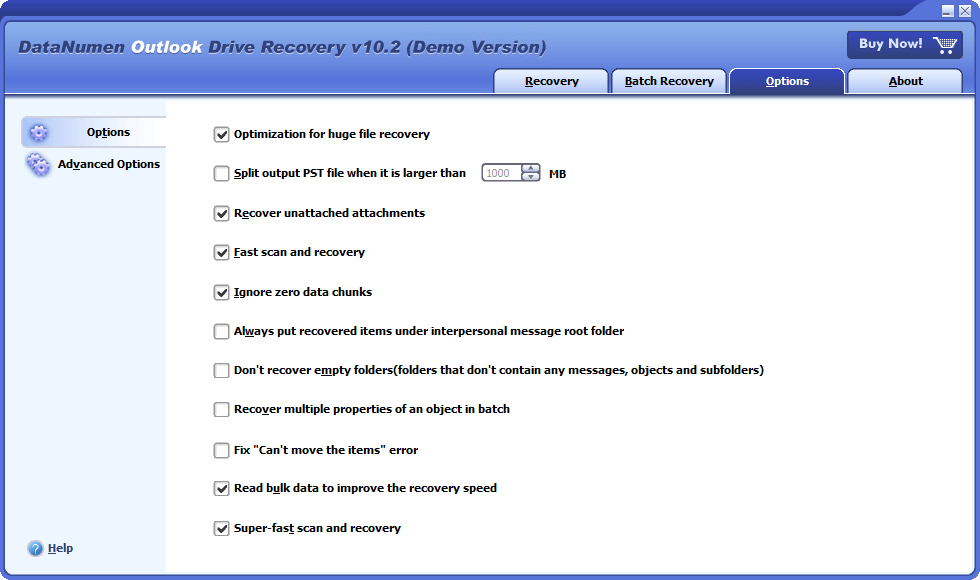
The Options tab, with PST splitting, unattached attachments, fast scan and zero-data settings.
Scans several drives in one batch
DataNumen Outlook Drive Recovery's Batch Recovery tab takes a list of drives and disks and gives each its own output file.

The Batch Recovery tab: source and target format dropdowns, the list of drives and disks, and buttons to add and remove them.
Benefits
- You can tell from the demo's folders and item counts. The demo PST opens in Outlook, so you see what was found before buying.
- It leaves the source alone, which matters when a second attempt may be needed.
- The result is a normal PST, ready to open in Outlook with no extra conversion.
Real-World Uses
- A PST was deleted and the Recycle Bin emptied. Scan the drive it lived on.
- A drive was formatted by mistake. The one customer comment we found concerns a disk that had been formatted twice.
- A disk was re-partitioned and the old volume is gone. Scan the whole physical disk.
- A PC won't start after boot sector damage. Connect the disk to another Windows PC and scan it there.
Who It's For, and Who Should Skip It
It suits IT staff and individuals who have lost a PST along with the drive or partition it was on, and have no backup of the mail.
Skip it if the PST is still visible on your disk, or if you use a mail account whose messages are still on the server, because reconnecting the account brings them back at no cost. Skip it too if you've kept using the drive heavily since the loss, since overwritten mail can't come back with any tool.
Usage Guide
- Exit Outlook and close other programs, then download and install the demo, on a different drive if you can.
- On the Recovery tab, choose the logical drive, or the whole disk if the partition is gone or was resized.
- Leave the source format on Auto Determined unless you know the Outlook version. Setting it saves time.
- Choose an output PST on a different drive and pick the format, or leave it on Auto Determined.
- Click Start Recovery and wait for the stages to finish.
- Open the demo PST in Outlook and check the folders. If it looks right, order the full version and run the recovery again.
Where it falls short
- The demo can't confirm your content. It shows structure and fills the items with demo text, so you have to judge from what's found, not from reading the messages.
- SSDs are harder. A solid-state drive with TRIM may have already erased deleted data, and no scanner can bring that back.
- The file system list is older. The vendor names FAT, FAT32, NTFS, Ext2 and Ext3, and doesn't name exFAT or Ext4.
- Scans take time, since it reads the whole drive or disk, and it needs enough free space elsewhere for the output.
What Users Say
G2 shows 4.1 out of 5 from 7 reviews for this product, a small but real sample, and a lower score than the 4.90 from 1,636 votes on DataNumen's own product page.
A customer on DataNumen's site
Antonis N., Retired Engineer, Patras, Greece, February 27, 2021: "In a really messed up HDD (double formatted) was a perfect recovery. A tool making what is promising!"
With so little to go on, treat the demo as your main evidence.
Comparisons
DataNumen Outlook Drive Recovery vs. DataNumen Outlook Repair
Both cost $199.95. Outlook Repair fixes a PST file that exists but is damaged, and Outlook Drive Recovery searches a drive for Outlook data when the file itself is gone. Pick by which of those describes your problem.
DataNumen Outlook Drive Recovery vs. DataNumen Exchange Recovery
Exchange Recovery works on orphaned or damaged OST offline storage files that still exist, so it is the one to use if you have an OST file and no access to the account.
Editions and Pricing
There's one edition. The order page shows a weekly special price for every quantity, and $199.95 is what a single license costs at checkout.
| User licenses | List price each (US$) | Special price each (US$) |
|---|
| 1 | 249.95 | 199.95 |
| 2 - 9 | 189.95 | 149.95 |
| 10 - 24 | 149.95 | 119.95 |
| 25 - 49 | 119.95 | 99.95 |
| 50 - 99 | 89.95 | 69.95 |
| 100 - 199 | 59.95 | 49.95 |
| 200 - 499 | 49.95 | 39.95 |
| 500+ | 34.95 | 29.95 |
FAQs
Is DataNumen Outlook Drive Recovery a subscription?
No. DataNumen Outlook Drive Recovery is a one-time purchase with no auto-renewal at checkout.
What if DataNumen Outlook Drive Recovery finds nothing on a drive?
DataNumen advises scanning the physical disk that contains the drive. If that fails too, send its support team the recovery log, saved with system information included.
Does DataNumen Outlook Drive Recovery need administrator rights?
Yes. DataNumen Outlook Drive Recovery needs administrator privileges to scan drives and disks.
How soon do I get DataNumen Outlook Drive Recovery after ordering?
DataNumen says a second email with a link to the full version of DataNumen Outlook Drive Recovery arrives within 15 minutes of the order confirmation.
System Requirements
- Windows, 32-bit or 64-bit
- Intel or equivalent processor, x86 or x64
- 64 MB of memory minimum, 4 GB recommended
- 35 MB of disk space
- Administrator privileges
Conclusion
Worth $199.95 if the PST is gone, there's no backup, the mail isn't on a server and the demo finds your folders. Not worth buying if the PST still exists. The reason to buy is that it reaches Outlook data other tools would need an intact file to read. The main reason not to is that its chances fall with every write to the drive, and with TRIM on an SSD, the demo may simply show nothing.
Download Free Trial Buy Now