DataNumen Database Recovery: Access and DBF Repair in One Windows Suite
DataNumen Database Recovery is a $299.95 Windows suite that bundles DataNumen Access Repair (for corrupt MDB and ACCDB databases) and DataNumen DBF Repair (for dBASE, Clipper, FoxPro and Visual FoxPro DBF files) under one license. It's for IT staff and developers who look after both kinds of desktop database and want one tool for either.
A shared Access back end that breaks after a network drop, or an old FoxPro system that suddenly reports a corrupt table, can stop a whole office. If you only ever deal with one of the two formats, though, the single tool is cheaper.
Quick facts
- Version: suite 2.7, released December 25, 2020
- Developer: DataNumen, Inc.
- Platform: Windows, 32-bit installer
- Included tools: DataNumen Access Repair and DataNumen DBF Repair
- Files: MDB, ACCDB, DBF, DBT and FPT
- Price: $299.95 for one user, one-time, with no auto-renewal on the order page
- Trial: free demo that previews what can be recovered, but doesn't write the full fixed database
- Guarantee: 30 days
- What we checked: installer file version 2.70 (12.27 MB, digitally signed by DataNumen, Inc.) downloaded from the vendor, with a June 5, 2022 file date; the $299.95 order page price. We didn't run a repair on a damaged database. Checked on November 8, 2026.
Before you buy
- Do the sums. Bought separately, DataNumen Access Repair costs $199.95 and DBF Repair $149.95 on their order pages, $349.90 together. The suite saves about $50 only if you need both.
- Check the component versions. The suite's last release is 2.7 from December 2020, while the stand-alone Access Repair 4.5 (November 2023) and DBF Repair 4.0 (January 2024) are newer. Ask DataNumen which versions the suite installs before you buy.
- SQL Server isn't included. Despite the name, this suite covers Access and DBF files only. Corrupt MDF files need DataNumen SQL Recovery.
- Upgrades and support run for one month. After that you need the Annual Support and Maintenance Plan or a paid upgrade.
- A refund needs a reason. Refunds run for 30 days, but you must explain why in detail, and DataNumen may ask for the original corrupt file to verify it. The company offers to sign an NDA where needed.
Download Free Trial Buy Now
Overview
The suite opens on a Repair Tools tab with one large button for each tool and one for the help topics. Each button starts the matching DataNumen program, which writes the recovered data to a new file and leaves the damaged one alone.
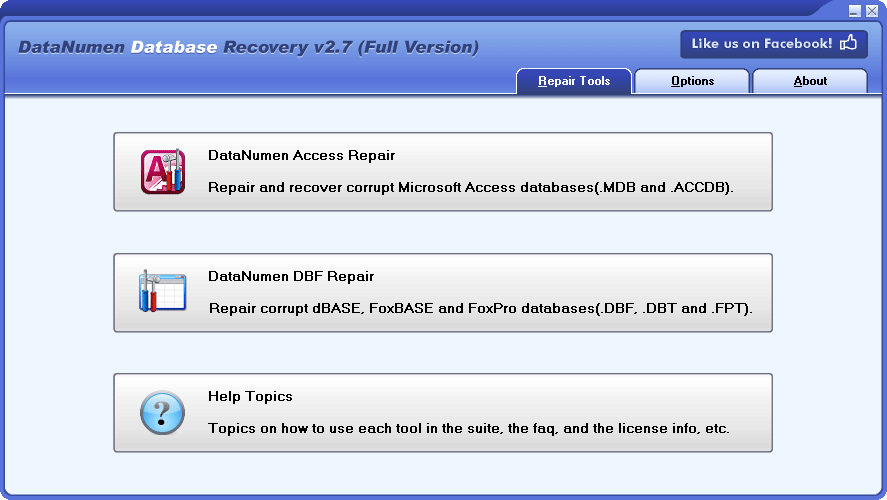
The Repair Tools tab in version 2.7: DataNumen Access Repair, DataNumen DBF Repair and the help topics.
Features
Access databases: tables, queries and relationships
DataNumen Database Recovery's Access tool repairs MDB and ACCDB files from Access 95 to 2021 and Microsoft 365. It recovers tables, records, queries, indexes and relationships, and brings back tables and records that were deleted.
Password-protected Access files
DataNumen Database Recovery's Access tool also handles password-protected databases, so a lost or unknown password doesn't block the repair.
DBF tables from dBASE, Clipper and FoxPro
DataNumen Database Recovery's DBF tool repairs tables made by Clipper, dBASE III, IV and 5, FoxBase, FoxPro, Visual FoxPro and other DBF-compatible programs. It rebuilds the table schema and the records, including every data type.
Memo and binary fields in DBT and FPT files
DataNumen Database Recovery's DBF tool recovers memo and binary data stored in separate DBT or FPT files, which simpler DBF fixers often lose.
Splitting for oversized tables
DataNumen Database Recovery's DBF tool can split an oversized DBF output into smaller files, and split a table by field count, so the result opens in programs with stricter limits.

The suite's Options tab, with "Auto check and apply product updates".
Benefits
- One license for two database worlds. Useful where a modern Access front end still reads tables from an old FoxPro or dBASE system.
- About $50 less than the two tools bought separately.
- No risk to the original. Each repair writes a new file, and the demo shows whether the data is recoverable first.
Real-World Uses
- A shared Access back end on a file server. A user's PC crashed mid-write and the database now won't open. Repair a copy and get the tables back.
- A legacy accounting or stock system in FoxPro. A table and its FPT memo file are damaged. Recover the records, memo fields included.
- A consultant who supports small businesses. Keep one tool for both formats on the support laptop.
- A deleted table in Access. Someone removed a table by mistake and there's no backup. The Access tool can recover deleted tables and records.
Who It's For, and Who Should Skip It
It suits IT staff, database developers and consultants who handle both Access and DBF files on Windows.
Skip it if you only deal with Access, because DataNumen Access Repair alone costs $100 less and is updated more often. The same goes for DBF-only users and DataNumen DBF Repair at $149.95. Skip it for SQL Server, Oracle or MySQL databases, which it doesn't touch. If you also repair Excel, Word, PowerPoint and Outlook files, DataNumen Office Repair includes Access Repair along with those tools.
Usage Guide
- Install the demo and close any program that has the damaged database open.
- Make a copy of the damaged file and work on the copy.
- Start DataNumen Database Recovery and click DataNumen Access Repair or DataNumen DBF Repair.
- In that tool, choose the damaged file. The output name is filled in for you.
- Start the repair and check the preview of the recovered data.
- If what you need is there, order the full version, repair again, and open the fixed database in Access or your DBF program to check it.
Where it falls short
- An old suite release. No new suite version since December 2020, while both tools have newer stand-alone releases.
- English only. The suite lists English as its only language, while many single DataNumen tools offer 95.
- Almost no independent reviews. We found a G2 page with just two reviews and nothing more.
What Users Say
Independent feedback on DataNumen Database Recovery is scarce. Here is all we could confirm.
G2
G2 shows an average of 4.3 out of 5 from only two reviews. One five-star reviewer calls it the best data-driven recovery product they've tried, and the other, from 2018, praises its efficiency without any detailed criticism. Two reviews aren't enough to judge by, and we read them through a summarizer, as G2 blocks direct access.
DataNumen's own figures
The product page shows 4.90 out of 5 from 1,653 votes, a figure the vendor collects itself. Read it as marketing rather than independent evidence.
With so little to go on, the demo on a copy of your own database is the best test you can run.
Comparisons
DataNumen Database Recovery vs. the stand-alone tools
DataNumen Access Repair ($199.95) plus DBF Repair ($149.95) cost $349.90 bought separately, against $299.95 for the suite. The stand-alone tools have newer releases (Access Repair 4.5, DBF Repair 4.0) than the suite's 2.7, so ask DataNumen which component versions the suite installs before you count on the newest fixes.
DataNumen Database Recovery vs. Access's Compact and Repair
Access's built-in Compact and Repair is free and fixes many minor problems. DataNumen's tool is for databases Access can't open or repair at all, and for deleted tables Compact and Repair can't bring back.
Editions and Pricing
There's one edition. Volume licenses are cheaper per user, as listed on DataNumen's order page:
| User licenses | Price per license (US$) |
|---|
| 1 | 299.95 |
| 2 - 9 | 229.95 |
| 10 - 24 | 169.95 |
| 25 - 49 | 139.95 |
| 50 - 99 | 99.95 |
| 100 - 199 | 69.95 |
| 200 - 499 | 59.95 |
| 500+ | 39.95 |
FAQs
Does DataNumen Database Recovery repair SQL Server databases?
No. DataNumen Database Recovery covers Access (MDB, ACCDB) and DBF files only. DataNumen sells SQL Recovery separately for SQL Server MDF files.
Does DataNumen Database Recovery need Access installed?
No. DataNumen Access Repair, the Access tool in the suite, doesn't need Access on the PC. If Access is installed, the tool uses its database engine during the repair, so you may see Access open and close by itself.
Can DataNumen Database Recovery repair Visual FoxPro tables with memo fields?
Yes. DataNumen Database Recovery's DBF tool supports Visual FoxPro and recovers memo and binary data from the matching FPT or DBT file.
Is DataNumen Database Recovery a subscription?
No. DataNumen Database Recovery is a one-time purchase. Free upgrades and support last one month, then you can buy the Annual Support and Maintenance Plan or pay for an upgrade.
How soon can I download the full version of DataNumen Database Recovery?
DataNumen says you can usually download the full version immediately after you place the order online.
Can I install DataNumen Database Recovery on several PCs with one license?
No. A single-user license covers one computer. DataNumen sells multi-user and site licenses, and each workstation that uses the program over a network needs its own license.
System Requirements
- Windows
- Intel or equivalent processor, x86 or x64
- 32 MB of memory minimum, 2 GB recommended
- 22 MB of disk space
Conclusion
Worth $299.95 only if you really work with both Access and DBF databases. The reason to buy is one license for both formats, about $50 cheaper than the two tools separately. The main reason not to is that most people need only one of them, and each stand-alone tool costs less and has a newer release date than this 2020 suite. Run the demo on a copy of your database before you pay.
Download Free Trial Buy Now