Short answer: If your SQL Server tools are still 32-bit (SSMS 20 or older, or the 32-bit DTSWizard.exe), the free way works: install Microsoft's Visual FoxPro OLE DB provider and run SQL Server's Import and Export Wizard. Starting with SSMS 21 and SQL Server 2025 the wizard is 64-bit only, and that 32-bit provider can't load, so the cheapest fix is a 64-bit DBF driver: ODBC Driver for xBase from Devart ($139.95 a year), which also works for a SQL Server linked server and for MySQL Workbench. If you'd rather map fields on screen and get a file of rejected rows, Visual Importer ETL Standard ($120 a year) loads DBF tables into SQL Server, MySQL or PostgreSQL. For MySQL or PostgreSQL with no budget at all, export to CSV and use LOAD DATA or COPY.
At a glance: every way to get a DBF into a SQL database
| Route |
Cost |
Into |
64-bit tools |
Best for |
| Import and Export Wizard + Visual FoxPro OLE DB provider |
Free |
SQL Server |
✗ (32-bit provider) |
A one-time copy with SSMS 20 or older |
CSV export + LOAD DATA / COPY |
Free |
MySQL, PostgreSQL |
✓ |
Small tables with no memo fields |
| ODBC Driver for xBase (Devart) |
$139.95 a year |
Anything that speaks ODBC |
✓ (32- and 64-bit) |
SSMS 21, linked servers, MySQL Workbench |
| Visual Importer ETL Standard |
$120 a year |
SQL Server, MySQL, PostgreSQL, Oracle and more |
✓ (32- and 64-bit builds) |
Repeat imports with field mapping |
| Advanced ETL Processor Standard |
$420 a year |
Same targets, plus DBF as a target |
✓ (32- and 64-bit builds) |
Cleaning and reshaping data on the way in |
| HXTT DBF (JDBC) |
$339 one-time |
Any database your Java code writes to |
✓ (any Java VM) |
Java shops and Linux servers |
| DataNumen DBF Repair |
$149.95 one-time |
A repaired DBF (then any route above) |
Windows program |
A DBF that won't open at all |
How we put this guide together
- We read Microsoft's current documentation for the SQL Server Import and Export Wizard, its ODBC data sources,
OPENROWSET and linked-server provider errors, plus Microsoft's archived Visual FoxPro downloads page.
- We read MySQL's Workbench migration and
LOAD DATA manuals and PostgreSQL's COPY reference for the MySQL and PostgreSQL routes.
- We checked that every paid tool here reads DBF files, on the vendor's own feature lists, editions grids, connection-string references and release histories.
- We downloaded the Advanced ETL Processor Standard and Visual Importer ETL Standard trials and read their file versions (3.10.2.7 and 5.5.1.4).
- What we checked: the order-page prices of all five paid tools, Microsoft's Visual FoxPro OLE DB provider download link (it now lands on a "page not found" error), and the latest releases of the Devart driver (6.2.0, October 16, 2026) and HXTT DBF (7.1.277, July 13, 2026), all on November 23, 2026.
We didn't import a DBF file into a live server for this guide. The SQL below is the documented syntax put together for DBF files, not a script we ran, so try it on a copy of your data first.
Before you start: what a "DBF file" really is
A DBF table is rarely one file. Memo fields (long text, notes, comments) live in a companion file with the same name: .FPT for FoxPro and Visual FoxPro, .DBT for dBase and Clipper. Indexes sit in .CDX, .MDX, .NTX or .IDX files, and a Visual FoxPro application may tie its tables together with a .DBC database container. Copy the whole folder, not just the .DBF, or every memo column comes across empty or the table refuses to open.
The second thing to check is the code page. DOS-era dBase and Clipper files usually hold text in an OEM code page (437, 850, 866 and so on), while FoxPro for Windows files use a Windows code page such as 1252. If accented letters or Cyrillic turn into junk after the import, the data is fine and the code page setting is wrong. Devart's ODBC driver, for example, has a Code Page setting for exactly this, and its default is the system locale.
Third: work on a copy. If an old program still writes to those files, copy them while it's closed.
Free way 1: SQL Server's Import and Export Wizard
The SQL Server Import and Export Wizard is the free route Microsoft gives you, and it's what most "DBF to SQL Server" tutorials show. It works, with one big condition: the wizard and the DBF provider must have the same bitness.
Steps (32-bit wizard + Visual FoxPro OLE DB provider)
- Get the provider. Microsoft's Visual FoxPro OLE DB provider (
VfpOleDB.dll) is the same version that ships with Visual FoxPro 9.0 SP2. Microsoft's download link for it now ends on a "page not found" error, so you need a copy from an existing Visual FoxPro 9.0 SP2 install or a machine that already has it.
- Start the 32-bit wizard. In SSMS 20 or older, right-click the target database and choose Tasks > Import Data: Microsoft documents those SSMS versions as 32-bit applications that install the 32-bit wizard. On a server with SQL Server installed, the 32-bit
DTSWizard.exe is in C:\Program Files (x86)\Microsoft SQL Server\<version>\DTS\Binn (160 is SQL Server 2022).
- Choose the source. Pick Microsoft OLE DB Provider for Visual FoxPro, then set the data source to the folder of free tables (or the
.DBC file).
- Choose the destination (your SQL Server and database), tick the tables, check Edit Mappings for column types, and run it. You can also save the job as an SSIS package to run it again.
The wizard also accepts any ODBC driver through its .NET Framework Data Provider for ODBC entry, with a DSN or a connection string. That's how a 64-bit DBF driver plugs in when the 32-bit route is closed.
The real limits of the free way
- SSMS 21 and SQL Server 2025 broke it. Microsoft's documentation says that starting with SQL Server Management Studio 21 and SQL Server 2025, the Import and Export Wizard only supports a 64-bit environment. A 64-bit wizard doesn't list providers that exist only in 32-bit form, and the Visual FoxPro OLE DB provider was never released as 64-bit.
- The 64-bit wizard needs a full SQL Server install, while SSMS 20 and SSDT only install the 32-bit one. So on a workstation with older tools you'll usually have the 32-bit wizard, and on a server you may have both.
- Visual FoxPro is long out of support. Microsoft ended extended support for Visual FoxPro 9.0 on January 13, 2015, and its downloads page says the Visual FoxPro ODBC driver is "no longer supported" and recommends the OLE DB provider instead.
- The ODBC driver is older still. Microsoft stopped updating the Visual FoxPro ODBC driver after Visual FoxPro 6, so tables that use features added in versions 7 to 9 can fail with it, and Windows 10 and 11 don't ship it.
- Memo and code page problems show up as data, not errors. Check a few long text fields and a few accented names in SQL Server before you drop the source files.
Free way 2: OPENROWSET or a linked server
OPENROWSET lets you query a DBF folder from T-SQL and pour it into a table with SELECT ... INTO. Microsoft's reference says it works with an OLE DB provider only when the Ad Hoc Distributed Queries option is on and the provider's DisallowAdhocAccess setting is 0. The catch is bitness again: the provider has to match SQL Server, and Microsoft's troubleshooting article for "provider has not been registered" errors (7403 and 7302) tells you to install the 64-bit provider for a 64-bit instance. Since there's no 64-bit Visual FoxPro provider, a modern 64-bit SQL Server can't use it here at all.
With a 64-bit ODBC driver for DBF files, the same idea works through MSDASQL, Microsoft's OLE DB provider for ODBC drivers. Here's the pattern with Devart's driver and its documented connection-string keywords:
EXEC sp_configure 'show advanced options', 1; RECONFIGURE;
EXEC sp_configure 'Ad Hoc Distributed Queries', 1; RECONFIGURE;
SELECT * INTO dbo.Customers FROM OPENROWSET('MSDASQL', 'Driver={Devart ODBC Driver for xBase};Database=C:\Legacy\Data;DBFFormat=VisualFoxPro;', 'SELECT * FROM customer');
For tables you'll read more than once, Devart documents a linked server instead: tick Allow inprocess on the MSDASQL provider, create a linked server of type "Other data source" with the Microsoft OLE DB Provider for ODBC Drivers, and enter a System DSN that points at the DBF folder. The driver, the DSN and SQL Server must all be the same bitness and on the same computer. After that, SELECT * FROM [DBFLINK]...[customer] reads a table. The driver isn't free, but this route needs no other tool.
Free way 3: DBF to MySQL or PostgreSQL
Neither MySQL nor PostgreSQL reads DBF files on its own, so the free routes go through ODBC or CSV.
- MySQL Workbench's Migration Wizard can migrate from databases it doesn't support directly through its "Generic" option, as long as you have an ODBC driver for the source, and MySQL says the migration is then "less automatic". MySQL Workbench is a 64-bit program and the ODBC driver must be the same architecture, or you get an "architecture mismatch" error. Microsoft's FoxPro ODBC driver is 32-bit and unsupported, so in practice this route needs a 64-bit DBF driver such as Devart's.
- CSV plus
LOAD DATA is the zero-cost MySQL route. Export each table to CSV (from the original FoxPro or dBase program if you still have it, or from any tool that opens DBF files), then load it. MySQL reads the file in the database's character set unless you add a CHARACTER SET clause, so name the DBF's code page there. LOAD DATA LOCAL only works when both the server and your client allow local_infile.
- PostgreSQL's
COPY ... FROM with FORMAT csv does the same job, and its ENCODING option names the file's code page. COPY from a server file needs superuser rights or the pg_read_server_files role. In psql, \copy reads the file from your own computer instead.
CSV is where memo fields get lost or cut, and dates and logical fields arrive as text you have to convert. It's fine for a few small tables. For dozens of tables, or ones with memo fields, a driver or an import tool saves you the clean-up.
If you would rather watch a converter do the job than read about it, our video page How To Use DBF To SQL Converter Software shows a DBF file turned into SQL statements step by step.
When the free way runs out: the paid tools
Each of these reads DBF files on the vendor's own documentation, and each fixes a different gap in the free routes. Prices are what the order page showed on November 23, 2026.
ODBC Driver for xBase (Devart)
ODBC Driver for xBase is a DBF driver with 32-bit and 64-bit builds for Windows, plus macOS and Linux versions. Price: $139.95 a year for the Desktop edition on Windows, renewing at the same price. Version: 6.2.0, October 16, 2026. Trial: 30 days, fully functional. Best for: anyone whose tools are 64-bit, which now includes SSMS 21.
ODBC Driver for xBase is the piece that makes Microsoft's free tools usable again on 64-bit systems. Install the 64-bit driver, create a DSN on the DBF folder, and it shows up in the Import and Export Wizard (through the .NET Framework Data Provider for ODBC), as a SQL Server linked server, in SSIS, and in MySQL Workbench's generic migration. It covers dBase III through dBase 10, Clipper, FoxPro 2, Visual FoxPro, CodeBase and HiPer-Six files, and its DBFFormat setting can force one format on every file in the folder when headers are unreliable.
Two settings matter for imports. Code Page picks the text encoding (UnitedStatesOEM, WesternEuropeanANSI, CyrillicDOS and many more), and IgnoreDataErrors, IgnoreMetadataErrors and IgnoreIndexErrors let it skip damaged rows, headers or indexes and return the rest. Version 6.2.0 improved CodeBase and Visual FoxPro compatibility and fixed updates to logical fields.
What we like
- 64-bit, so it works with SSMS 21, SQL Server 2025 and MySQL Workbench
- Reads every common xBase flavor through one driver
- Can skip corrupt rows instead of failing the whole table
- Windows, macOS and Linux builds
Watch out for
- It's a driver, not a converter: you still need the wizard, SSIS or Workbench to move the data
- The $139.95 price is a yearly subscription
- The trial download needs a Devart account
"We use ODBC Driver for xBase to access legacy DBF databases and integrate them with modern web applications. ... The driver has helped bridge the gap between older database systems and newer technologies, making data migration and reporting much easier."
And the same reviewer's con: "During the initial setup, we encountered a few bugs, such as certain SQL statements not working as expected and some language display issues. However, after reporting these problems to the support team, they responded quickly and provided fixes in a timely manner."
Sarayut S., Web Engineer, Packaging and Containers, review on Capterra (5 out of 5)
Download ODBC Driver for xBase TrialBuy ODBC Driver for xBase
Setting up the DSN for the right bitness is where most people trip. Our guide How to Install a 32-bit or 64-bit ODBC Driver on Windows walks through it.
Visual Importer ETL Standard
Visual Importer ETL Standard is a Windows import tool from DB Software Laboratory (ETL-Tools). Price: $120 a year for one computer, with auto-renewal on the order page. Version: 5.5.1.4. Trial: 30 days, fully functional, no registration. Best for: repeat DBF loads into SQL Server, MySQL or PostgreSQL by someone who'd rather click than script.
Visual Importer ETL Standard lists DBF among its file sources and SQL Server, MySQL, PostgreSQL, Oracle, SQLite, Access and any ODBC, JDBC or OLE DB database among its targets. You map each source column to a target column, choose what happens on an error or a null, pick add, update or delete logic by key fields, and preview the rows before you run. Rows that fail go to a rejected-records file instead of stopping the load, which is the part that saves time on old data with bad dates.
ETL-Tools lists Microsoft's FoxPro ODBC driver as the requirement for DBF and FoxPro files. Both programs come in 32-bit and 64-bit builds, so match the build to the driver that reads your DBF files: the 32-bit build with Microsoft's 32-bit driver, or the 64-bit build with a 64-bit driver such as Devart's through its ODBC source (a combination we didn't test).

Visual Importer ETL Standard (32-bit build): the four columns of an orders file mapped to the [DEMO].[dbo].[orders] table, with the If Error and If Null rules on the right and the source rows previewed below. The source here is a CSV file; a DBF source uses the same mapping grid.
What we like
- The cheapest paid option here at $120 a year
- Column mapping, validation and a rejected-records file
- Loads into MySQL and PostgreSQL, not just SQL Server
- Command line for repeat runs
Watch out for
- Windows only
- Needs a DBF driver installed for DBF sources
- No scheduler in Standard: that's the Professional and Enterprise editions
- The interface looks dated, as reviewers say
Reviews of Visual Importer on its own are scarce. DB Software Laboratory's shared profile shows 4.9 out of 5 from 16 reviews on Capterra (as the vendor's site displays it), and the comments there are about the vendor's tools in general.
"Don't be put off by the look & feel of this tool. It feels a little bit Windows XP-esque." Teun M., Computer Software, on GetApp
"If you have a problem or scenario you cannot solve, go to their support forum and you normally get a reply back in a few hours." Alan J., Logistics and Supply Chain, on GetApp
Download Visual Importer ETL TrialBuy Visual Importer ETL Standard
Advanced ETL Processor Standard
Advanced ETL Processor Standard is the same vendor's bigger desktop ETL tool. Price: $420 a year for one computer, auto-renewing. Version: 3.10.2.7, November 18, 2026. Trial: 30 days, fully functional. Best for: DBF data that needs real cleaning (deduplication, lookups, splitting columns) before it goes into SQL Server, MySQL or PostgreSQL.
Advanced ETL Processor Standard has a dedicated DBF Reader: you point it at a directory and pick the table, and a file mask can load many DBF tables in one run. From there a Validator applies rules (190+ validation functions), a Transformer reshapes the data (200+ transformation functions), and a Writer loads SQL Server, MySQL, PostgreSQL, Oracle or another target. It can also write DBF files and SQL insert scripts, which helps when the old system still needs a copy.
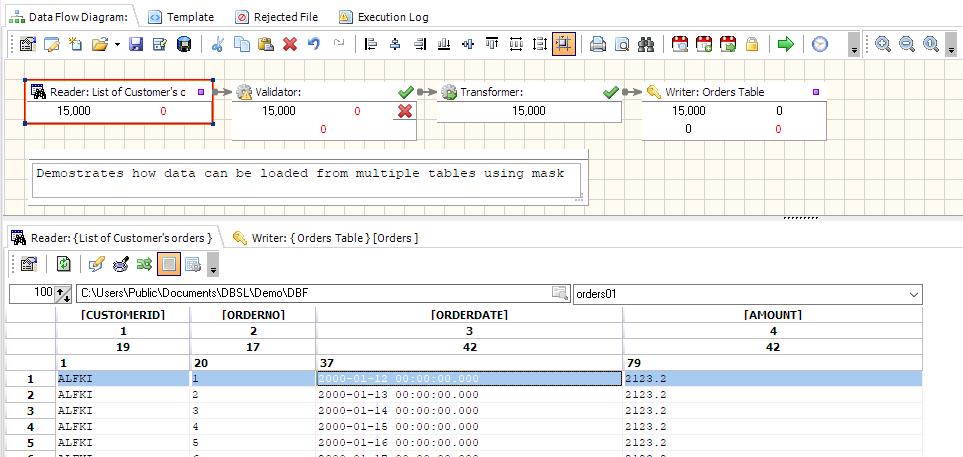
Advanced ETL Processor's data flow: a DBF reader on the demo DBF folder (table orders01) passes 15,000 rows through a Validator and a Transformer to the Orders table writer, with the DBF rows (CUSTOMERID, ORDERNO, ORDERDATE, AMOUNT) shown below.
What we like
- A real DBF reader with masks for many tables at once
- Validation and transformation on the way in
- Writes DBF and SQL scripts too, not just databases
Watch out for
- $420 a year is a lot for a one-time copy
- Windows only, and DBF files still need a driver
- No scheduler in Standard
"AETL is great value for the money. In the domain of Integration, it may not necessarily cover all of the use cases, but it will handle the majority of tasks with ease." Dmitriy V., Retail, on GetApp
"Their support team is incredible! Quick responses, very helpful and on many occasions have enhanced their objects' functionality to solve our business needs, generally, within a few days." Charles H., Banking, on GetApp
Download Advanced ETL Processor TrialBuy Advanced ETL Processor Standard
Need the import to run every night, or when a new DBF lands in a folder? That's the Professional and Enterprise editions of both programs. Our comparison Advanced ETL Processor vs Visual Importer ETL covers which edition adds what.
HXTT DBF
HXTT DBF is a pure Java (type 4) JDBC driver for dBase, FoxPro, Visual FoxPro and Clipper tables. Price: $339 one-time for a Single Server License, with a year of upgrades. Version: 7.1.277, July 13, 2026. Trial: 30 days, but at most 50 queries per session and only the first 1,000 rows of a SELECT. Best for: Java developers, and moving DBF data into PostgreSQL or MySQL on a Linux server.
HXTT DBF runs anywhere Java runs, so it's the answer when the DBF files sit on a Linux box and no Windows tool is in the picture. It reads the memo files (DBT, FPT, SMT) and indexes (IDX, CDX, NDX, MDX, NTX) directly, handles any encoding the Java VM supports plus old DOS code pages the JVM lacks, and gives your code a normal JDBC connection: read a table with SQL, write the rows to PostgreSQL or MySQL with their own JDBC drivers. Advanced ETL Processor and Visual Importer can also read through any JDBC driver.
The trial's 1,000-row limit means you can test the connection and your mappings but not migrate a real table without buying. And it's a developer library: if you don't write code or use a JDBC-based tool, one of the Windows tools above fits better. Public user reviews of HXTT DBF are hard to find.

DBAdmin, the small admin tool included with HXTT DBF (older Windows look): one connection to the folder d:/abc/, with the physical table abc.DBF it has open and a Close Physical Table option.
What we like
- Runs on Linux, macOS, Windows or any Java VM
- Reads memo files, indexes and old DOS code pages
- One-time license, not a subscription
Watch out for
- You write the copy step yourself (or use a JDBC tool)
- The trial returns only 1,000 rows per SELECT
- Few public reviews
Download HXTT DBF TrialBuy HXTT DBF
DataNumen DBF Repair (when the file won't open)
DataNumen DBF Repair is a Windows repair tool for corrupt dBASE, FoxPro, Visual FoxPro and Clipper tables. Price: $149.95 one-time for one user. Version: 4.0. Trial: a free demo that previews the recovered records but doesn't save them. Best for: a DBF that every import tool rejects with "not a table" or header errors.
DataNumen DBF Repair doesn't import anything. It writes a repaired copy (Damaged.dbf becomes Damaged_fixed.dbf), recovering from a damaged header or damaged records, reading memo data from the DBT or FPT file, and optionally bringing back deleted records. Then you import the fixed file with any route above. Run the demo first: it uses the same engine, so records missing from its preview won't appear after you pay. And if your ".dbf" came from Oracle, it's a different file altogether that this tool doesn't handle.
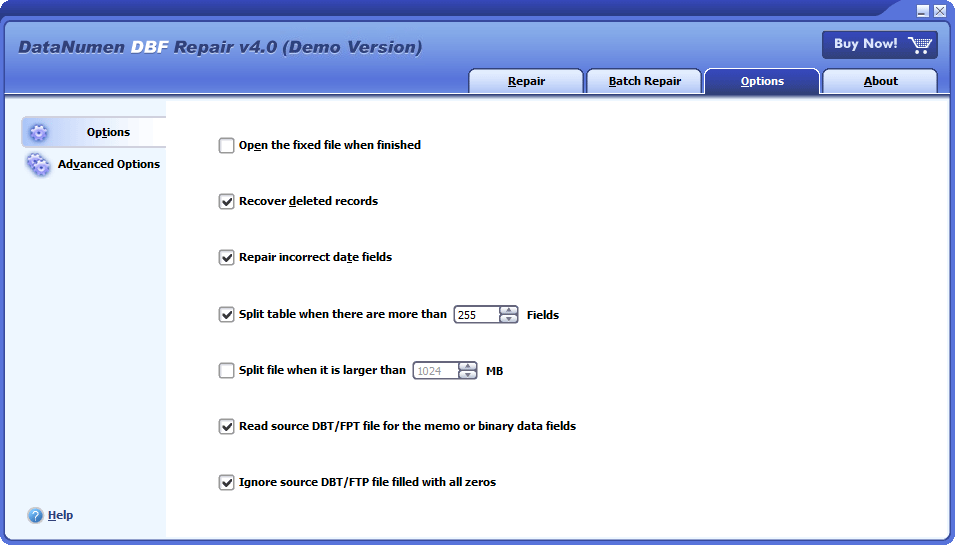
The Options tab of the DataNumen DBF Repair 4.0 demo: recover deleted records, repair incorrect date fields, split tables with more than 255 fields, and read the source DBT/FPT file for memo or binary fields.
"In our company, there is an old FoxPro DBF file. We cannot open it. We think it is oversized. Your DBF recovery software helps to fix the file. Now we can access the data inside it properly." Kenelm Butler, Canada, on DataNumen's site
Independent reviews are hard to find; the testimonials above come from the vendor's own page, which shows 4.90 out of 5 from 1,644 votes.
Download DataNumen DBF Repair DemoBuy DataNumen DBF Repair
What the paid import tools cost
Price of one license (USD)
Visual Importer ETL Standard (per year)$120
ODBC Driver for xBase, Desktop for Windows (per year)$139.95
HXTT DBF Single Server (one-time)$339
Advanced ETL Processor Standard (per year)$420
Order-page prices checked on November 23, 2026. The three yearly prices renew automatically. DataNumen DBF Repair ($149.95 one-time) is a repair tool, so it's left out.
Which should you choose?
| Your situation |
Pick |
Why |
| A few FoxPro tables, once, and you have SSMS 20 or older | Free: wizard + Visual FoxPro OLE DB provider | Both are 32-bit, so they work together at no cost |
| SSMS 21, SQL Server 2025 or a 64-bit-only server | ODBC Driver for xBase | A 64-bit driver is the only way into the 64-bit wizard or a linked server |
| DBF to MySQL with Workbench | ODBC Driver for xBase, or CSV + LOAD DATA for free | Workbench is 64-bit and needs a 64-bit ODBC driver |
| Monthly or repeat loads, someone non-technical runs them | Visual Importer ETL Standard | Saved mappings, a rejected-rows file, the lowest price |
| Messy data that needs deduplication and reshaping | Advanced ETL Processor Standard | Validation and transformation steps between reader and writer |
| DBF files on Linux, target PostgreSQL, a Java team | HXTT DBF | Pure Java, no Windows needed, one-time license |
| Every tool says the file is corrupt or "not a table" | DataNumen DBF Repair first | Repair, then import the fixed copy |
Who should skip the paid tools: if you have SSMS 20 or older and a handful of tables to copy once, the free wizard is enough. Skip Advanced ETL Processor for a straight copy with no clean-up, since Visual Importer does that for less. Skip HXTT DBF unless you write Java or run a JDBC tool. And skip the driver-only option if nobody on the team is comfortable setting up a DSN and a linked server; Visual Importer hides more of that.
What commonly goes wrong
- "The provider is not registered on the local machine." A bitness mismatch: a 32-bit provider called from a 64-bit wizard or SQL Server. Use the 32-bit wizard, or a 64-bit driver.
- The driver isn't in the ODBC list. It's in the other ODBC Data Source Administrator: Windows has separate 32-bit and 64-bit ones, and Microsoft's own tip is to look in the 32-bit one when the 64-bit list doesn't show your driver.
- Empty memo columns. The
.FPT or .DBT file wasn't copied with the table.
- Garbled accents or Cyrillic. The code page is wrong. Set it in the driver (Devart's
Code Page), in LOAD DATA ... CHARACTER SET, or in PostgreSQL's ENCODING.
- Ad hoc access denied.
OPENROWSET needs Ad Hoc Distributed Queries turned on and the provider's DisallowAdhocAccess set to 0.
- Dates and logical fields arrive as text. Common with CSV routes; convert them in SQL afterwards or map types in the wizard's Edit Mappings.
- The source keeps changing. If the old program is still in use, a one-time copy goes stale. Read live through a linked server, or schedule the import with an Enterprise edition.
FAQs
Can I convert a DBF file to SQL Server for free?
Yes, if you can run the 32-bit SQL Server Import and Export Wizard (SSMS 20 or older, or the 32-bit DTSWizard.exe from a SQL Server install) with Microsoft's Visual FoxPro OLE DB provider. From SSMS 21 and SQL Server 2025 the wizard is 64-bit only, so the free combination stops working and you need a 64-bit DBF driver such as ODBC Driver for xBase.
Is there a 64-bit Visual FoxPro OLE DB provider?
No. Microsoft's Visual FoxPro OLE DB provider exists only as a 32-bit provider, and Visual FoxPro itself left extended support on January 13, 2015. For 64-bit SQL Server, SSIS or MySQL Workbench you need a third-party 64-bit driver, such as Devart's ODBC Driver for xBase.
How do I import a DBF file into MySQL?
MySQL can't read DBF files directly. Either export the tables to CSV and load them with LOAD DATA (with a CHARACTER SET clause for the file's code page), or install a 64-bit DBF ODBC driver and use MySQL Workbench's generic migration. Visual Importer ETL Standard also loads DBF tables straight into MySQL.
How do I convert a DBF file to PostgreSQL?
PostgreSQL has no DBF reader, so export to CSV and use COPY ... FROM (or psql's \copy) with the right ENCODING. For many tables, Visual Importer ETL Standard and Advanced ETL Processor Standard load DBF into PostgreSQL directly, and on Linux, HXTT DBF reads the files from Java.
Why are my memo fields empty after the import?
Memo text is stored in a separate .FPT (FoxPro) or .DBT (dBase) file with the same name as the table. If that file didn't travel with the .DBF, every tool shows the memo columns empty or refuses the table. Copy the whole folder.
What if the DBF file is corrupt?
Try Devart's ODBC Driver for xBase with IgnoreDataErrors turned on, which skips damaged rows and returns the rest. If the header itself is broken and nothing opens the table, DataNumen DBF Repair writes a repaired copy; its free demo shows what it can recover before you pay.
Conclusion
Try the free way first, but know where it ends. The SQL Server Import and Export Wizard with Microsoft's Visual FoxPro OLE DB provider still copies DBF tables into SQL Server at no cost, as long as your tools are 32-bit. On SSMS 21, SQL Server 2025, MySQL Workbench or any 64-bit-only setup, that provider can't load, and Devart's ODBC Driver for xBase at $139.95 a year is the smallest purchase that gets the free tools working again. If you'd rather not touch DSNs and linked servers, or you load DBF data more than once, Visual Importer ETL Standard at $120 a year does the import with mappings and a rejected-rows file. Both have 30-day trials, so test them on a copy of your own files first.
Download ODBC Driver for xBase TrialBuy ODBC Driver for xBaseDownload Visual Importer ETL TrialBuy Visual Importer ETL Standard