Advanced ETL Processor Standard: Desktop ETL for Imports, Exports and Clean-Up Jobs You Run Yourself
Advanced ETL Processor Standard is a $420-a-year Windows ETL tool from DB Software Laboratory for people who move, clean and convert data by hand: Excel into SQL Server, CSV into PostgreSQL, a database table out to XML or a Tableau file. It's the entry edition of Advanced ETL Processor, with the full set of readers, writers, transformations and validation rules but no scheduler or workflow automation.
The job it's built for is familiar to anyone who has been handed "just a spreadsheet" to load: dates in three formats, a city column that needs splitting, duplicates, and a target database that rejects half the rows. Instead of writing a one-off script, you draw the flow (reader, validator, transformer, writer), watch the record counts, and get the rejected rows in a separate file.
Quick facts
- Version: 3.10.2.7, released November 18, 2026
- Developer: DB Software Laboratory (etl-tools.com), United Kingdom
- Platform: Windows only (64-bit and 32-bit builds). No Mac or Linux version of this edition
- Price: $420 per year for one computer, $2,000 per year for a site licence. The order renews automatically each year
- Included: one year of updates and technical support, no per-row or per-run fees
- Trial: 30 days, fully functional, no registration or credit card
- Refunds: the vendor's pricing page states a 30-day refund policy
- What we checked: the 45 MB AdvancedETL_64.zip downloaded from the vendor on November 23, 2026 contains a setup file reporting version 3.10.2.7; $420.00 for the single-computer licence and $2,000.00 for the site licence on the order page on November 23, 2026, with auto-renewal switched on. We read the edition comparison and the system requirements but didn't run a transformation ourselves
Download Free TrialBuy Now
Before you buy
Standard doesn't schedule anything. There's no repository, no packages (multi-step workflows), no scheduler and no folder or mailbox monitors in this edition. You open a transformation and run it, or call it from the command line. If the job has to run every night on its own, look at the Professional or Enterprise edition instead (prices below).
It's a yearly subscription. The order page sets the licence to renew automatically each year at the same price. You can switch auto-renewal off in your customer account after buying.
Overview
Advanced ETL Processor has been around since the mid-2000s, first on dbsoftlab.com and now on etl-tools.com, and it's still updated often: the version history lists 522 releases, with 3.10.0 adding Clarion TPS files in May 2026, a Parquet reader in March 2026 and SQL Server sign-in improvements (including Microsoft Entra options) in July 2026. Standard is the edition for manual desktop work; Professional and Enterprise, each with its own installer, add development and automation features on top of the same core.
Work happens on a data flow diagram. You drop a Reader on the canvas, connect it to a Transformer, Validator, Sorter, Deduplicator or Pivot object, then to a Writer, and run it. Each object shows how many records went through and how many were rejected, and the execution log shows the speed and totals when it finishes.

The main window: a reader, transformer and XML writer on the data flow diagram, the source data below, and the completion log showing 2,916 records written at 37,385 records per second. The title bar shows the 32-bit build.
Features
Advanced ETL Processor Standard reads almost any business file or database
Sources include delimited and fixed-width text, multiple Excel files and sheets, Google Spreadsheets, XML, JSON, Parquet, QlikView QVD and QVX, DBF, Access, Clarion, and databases through SQL Server, Oracle, MySQL/MariaDB, PostgreSQL, SQLite, Interbase/Firebird, MongoDB, Salesforce, ODBC, JDBC and OLE DB. It can also read mail from POP3 and IMAP4 servers, RSS feeds, Active Directory and HL7 messages. MySQL and PostgreSQL clients are built in; Oracle and Interbase need their own client installed.
Advanced ETL Processor Standard writes to databases, Excel and BI files
Writers cover the same databases plus Excel, delimited text, XML, JSON, HL7, SQL insert scripts, stored procedures, Tableau Hyper and TDE files and Qlik QVD/QVX. Loading can add records, update them, delete them, add new and update old, or add only new ones, with your own SQL run before and after the load.
Advanced ETL Processor Standard has 200+ transformation functions
String, number, date and JSON functions, multiple date formats, lookups, coded-value translation, calculated fields, joining and splitting columns, surrogate keys, and Python support for anything the built-in functions don't cover. Grouping, sorting, deduplication, pivot and unpivot, cloning rows and summarizing rows are separate objects you drop on the diagram.
Advanced ETL Processor Standard checks data with 190+ validation rules
Validation rules test strings, numbers, dates and times, compare against a list, or use regular expressions. Records that fail go down a separate branch or into a rejected-records file, and a data quality log records what failed, so you fix the source instead of guessing why the load stopped.
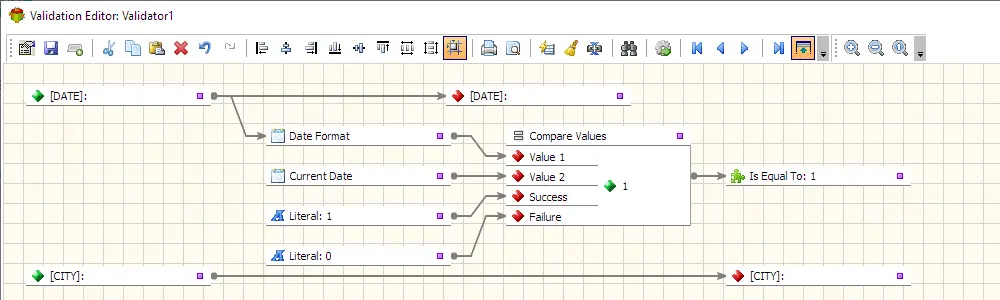
The validation editor: a DATE field is formatted and compared with the current date, while CITY passes straight through.

An Excel conversion: a validator sends 2 records to the "Completed" writer and 4 to "Pending".
Benefits
- No usage meter. The price is the licence. There are no charges per execution or per row, which matters when a monthly load moves millions of records.
- Your data stays on your PC. Nothing goes through a cloud service, which keeps it simple for finance, health or public-sector data that can't leave the building.
- Repeatable instead of one-off. A saved transformation runs the same way next month, so a clean-up you did once by hand in Excel becomes a file you re-run.
- Support people answer. Reviewers keep coming back to the vendor's forum and how quickly it replies (see What Users Say).
Real-World Uses
- A finance analyst receives a supplier's monthly Excel file, validates dates and amounts, and loads only the good rows into SQL Server, with the rejected rows sent back to the supplier.
- A DBA moving an old system reads DBF or Access tables, maps the fields to a new PostgreSQL schema, and generates surrogate keys on the way.
- A Qlik or Tableau user turns database extracts into QVD or Hyper files without writing a load script.
- A consultant cleans a client's customer list (standardized names, split address columns, removed duplicates) and hands back a tidy CSV.
Who It's For, and Who Should Skip It
Advanced ETL Processor Standard suits one person doing hands-on data work on a Windows PC: business analysts, DBAs, developers and consultants who load and convert data on request and want a visual tool instead of scripts.
Skip it if your jobs must run unattended. Standard has no scheduler, so anyone who needs nightly loads, FTP downloads, emailed reports or folder monitoring should buy Enterprise, and teams that build and test packages before handing them to production should look at Professional. Skip it also if you're on a Mac or Linux desktop (it's Windows only), or if you only need to import into a database once in a while: the vendor's own Visual Importer ETL Standard costs $120 a year and is aimed at simple imports.
Usage Guide
- Download the 64-bit trial (the 32-bit build is only for old 32-bit database drivers), unzip it and run the setup as administrator, as the note inside the zip says.
- Install any database client you need: Oracle Client for Oracle, the FoxPro ODBC driver for DBF files. MySQL and PostgreSQL work without extra software.
- Start a new transformation and drop a Reader on the diagram. Pick the source (an Excel file, a CSV, a table) and preview the data in the grid below.
- Add a Validator for the rules your target needs, then a Transformer to map source fields to target fields and apply functions.
- Add a Writer, choose the target and the loading method (add, update, add new and update old), and run it. Check the rejected file and the execution log.
- Save the transformation. To repeat it later, open and run it again, or call it from the command line interface.
Tips
- The vendor recommends at least 8 GB of memory, but the program streams data rather than holding it all in memory, so a modest PC copes with large files.
- The vendor's First 5 Minutes tutorial and the free 15-minute consultation help you check that Standard is enough before you pay for a higher edition.
- You can upgrade from Standard to Professional or Enterprise later by paying the difference.
Where it falls short
- The interface looks old. Several reviewers say so directly (one calls it "Windows XP-esque"), and the toolbar-heavy windows in the screenshots agree.
- So many ways to do one thing. With hundreds of functions and objects, finding the best approach takes time, and reviewers say some features aren't obvious at first.
- Documentation lags the product. One long-time customer wrote that the online documentation "could do with some updates and extra detail".
- Message-based integration is limited according to one reviewer, though that's mainly an Enterprise concern.
- Standard's own limits: no scheduler, repository or workflow, so anything that must run on its own needs a pricier edition or Windows Task Scheduler around the command line.
What Users Say
Advanced ETL Processor has few public reviews, but they're consistent. The vendor shows 4.9 out of 5 from 16 reviews on Capterra. An archived copy of GetApp from July 2024 showed 4.9 out of 5 from 13 reviews, 12 of them five stars, and an archived Software Advice copy from November 2024 rated it 4.7 for ease of use, 4.8 for customer support, 5 for value for money and 4.8 for functionality. Most reviewers run the Professional or Enterprise edition for scheduled jobs, so read their praise for scheduling as being about those editions; what they say about the transformations, the interface and support applies to Standard too.
Praise for value and breadth (GetApp)
José M., Food Production, 1,001-5,000 employees, "Very versatile": "I was looking for software with a very particular characteristic, which was the possibility of being able to read qvd files from qlik and load them in other services or databases. I found some, however, the cost benefit was what finally convinced me."
Dmitriy V., Retail, 501-1,000 employees, "Great ROI" (7/10 likelihood to recommend): "AETL is great value for the money. In the domain of Integration, it may not necessarily cover all of the use cases, but it will handle the majority of tasks with ease. The learning curve is very fast and the application development cycle is short."
Teun M., Computer Software, 11-50 employees: "This tool is perfect for converting data from a wide variety of source systems to a wide variety of target systems. You can easily set up more complex data processes."
Dmitry D., Accounting, 1-10 employees, "AETL system": "AETL provided an extremely reliable and easy to use\maintain for all our data integration processes. Using this system we were able to integrate data streams from over 40 NHS organisations into one single DB."
Praise for support (GetApp)
Charles H., Banking, 1-10 employees, "The Best Kept Secret of ETL Tools": "It's a full featured ETL product. Easy to use and very powerful." And on support: "Their support team is incredible! Quick responses, very helpful and on many occasions have enhanced their objects' functionality to solve our business needs, generally, within a few days."
Alan J., Logistics and Supply Chain, 51-200 employees, "ETL Manages our Data Flow": "If you have a problem or scenario you cannot solve, go to their support forum and you normally get a reply back in a few hours."
Pietro V., Security and Investigations, 51-200 employees: "Moreover the programmers are really open to implement the features that you are in need of."
Criticism (GetApp)
Teun M.: "Don't be put off by the look & feel of this tool. It feels a little bit Windows XP-esque. You can choose other look & feel themes yourself, but it would be better if out-of-the-box 1 clear, well-arranged (modern) look & feel were offered."
José M.: "I think that the graphical interface can be improved to adapt to the new times, however it is fully functional."
Bruce G., Investment Management, 1-10 employees (Professional and Enterprise user): "Whilst the online documentation could do with some updates and extra detail it is easily accessible and very readable."
Andrew R., Marketing and Advertising, 1-10 employees: "The front end has some quirks that take a bit of getting used to, but the documentation covers it all."
Pietro V.: "Some features are not so easy to understand the very first time but all the guys in the forum are really open to help you."
Dmitriy V.: "Support for message-based integrations and protocols is limited. Not necessarily a con, more of a note."
The pattern: people stay with Advanced ETL Processor for years because it handles almost any file or database, costs far less than the big ETL platforms, and the developers answer forum posts and add features on request. The recurring complaints are cosmetic and about learning: an old-fashioned interface, many ways to do the same thing, and documentation that trails the releases. Nobody in these reviews reported data loss or unreliable loads.
Comparisons
Standard vs Professional vs Enterprise
All three editions share the same readers, writers, 200+ transformations, 190+ validation rules, data preview and command line. Professional ($660 a year) adds a shared repository on Access, SQL Server, Oracle, MySQL, PostgreSQL or Interbase, saved connections, packages (workflows with file, FTP, email, SQL and HTTP steps), a scheduler, package debugging and an object library. Enterprise ($840 a year) adds unattended execution through an execution agent, monitors that react to new files, FTP uploads, HTTP calls and incoming mail, and AI integration.
Pick Standard when a person runs each job; pick Enterprise when jobs must run with nobody at the keyboard.

For comparison, the Professional edition: the repository tree on the left and the Schedule, Version Control and Event Monitors tabs at the top are what Standard leaves out. The data flow diagram itself is the same.
Advanced ETL Processor Standard vs Visual Importer ETL Standard
Visual Importer ETL Standard ($120 a year) from the same vendor is aimed at simple user-run imports into databases. Advanced ETL Processor Standard costs more but adds the full validation and transformation toolkit, more targets (Excel, XML, JSON, Tableau and Qlik files) and data quality handling, so it fits jobs where the data needs cleaning on the way, not just loading.
Editions and Pricing
| Edition and licence | Price at checkout | Computers | Best for |
|---|
| Standard, single computer | $420 per year | 1 | Manual desktop ETL by one user |
| Standard, site licence | $2,000 per year | Unlimited at one physical site | Several users running manual ETL |
| Professional, single computer | $660 per year | 1 | Building and testing ETL packages |
| Enterprise, single computer | $840 per year | 1 | Scheduled, unattended production jobs |
Every licence includes a year of updates and technical support. A site licence covers the buyer's employees and agents on any number of computers at one location, such as one building or a group of nearby buildings. You can upgrade from single to site, or from Standard to a higher edition, by paying the difference.
Buy Single Computer ($420/yr)Buy Site Licence ($2,000/yr)
FAQs
Does Advanced ETL Processor Standard stop working when the year is up?
Advanced ETL Processor Standard is sold as an annual licence, and the order is set to renew automatically each year. The price covers a year of updates and support. If you don't plan to renew, ask the vendor what your licence allows after the year before you buy.
Can Advanced ETL Processor Standard run a job on a schedule?
Not by itself. Advanced ETL Processor Standard has no scheduler; it does have a command line interface, so a transformation can be started from Windows Task Scheduler. For built-in scheduling and unattended runs, the vendor points you to Enterprise.
Does Advanced ETL Processor run on a Mac or Linux?
No. Advanced ETL Processor is Windows only. The vendor's Linux packages are for its separate Deep Bin and Event Logger products.
Do I need to install database drivers for Advanced ETL Processor?
Only for some databases. Advanced ETL Processor has MySQL and PostgreSQL clients built in. Oracle needs an Oracle client (8.1.7 to 18), Interbase and Firebird need their client library, and DBF files need the FoxPro ODBC driver.
Is the Advanced ETL Processor trial limited?
The Advanced ETL Processor trial is fully functional for 30 days, with no registration and no credit card. You can test it on your own data before paying.
Can I move my Advanced ETL Processor licence to a new PC?
Yes. The Advanced ETL Processor licence agreement lets you permanently transfer your rights, as long as the new user accepts the same terms. A single licence covers one computer at a time.
Is there a refund if Advanced ETL Processor Standard doesn't fit?
The vendor's pricing page lists a 30-day refund policy alongside secure checkout and instant licence delivery. Since the trial is a full 30 days, testing first is the safer route.
System Requirements
- Windows XP or higher (64-bit and 32-bit builds)
- Up to 250 MB of disk space
- 8 GB of memory recommended
- Oracle client, Interbase/Firebird client, FoxPro ODBC driver, BDE or Tableau client only when you work with those formats
- Python, optionally, for Python transformations
Conclusion
Advanced ETL Processor Standard is worth $420 a year if you spend real time loading and cleaning data by hand on Windows. It reads and writes nearly every file and database you're likely to meet, its validation and rejected-row handling save hours of detective work, and its users rate the vendor's support unusually highly.
The main reason not to buy it: it doesn't automate. If your loads must run overnight without you, Standard is the wrong edition and Enterprise is the one to trial. And be ready for an interface that looks a decade older than it is. Try the 30-day trial on one of your own messy files; if it handles that, it will likely handle the rest.
Download Free TrialBuy Now