Advanced ETL Processor Professional: The Edition for Building and Debugging ETL Packages
Advanced ETL Processor Professional is a $660-a-year Windows ETL tool from DB Software Laboratory for developers, DBAs and consultants who build data workflows and test them before they go live. It adds a shared repository, multi-step packages and a package debugger to the data flow designer in the Standard edition.
The problem it solves is the one that starts when a single import turns into a process: fetch a file from FTP, check it arrived, validate it, load it, archive it, email somebody when it breaks. Instead of a folder of scripts only one person understands, you draw that sequence as a package, set a breakpoint on the step you suspect, and watch the variables change.
Quick facts
- Version: 6.5.4.3, released November 2026
- Developer: DB Software Laboratory (etl-tools.com), United Kingdom
- Platform: Windows only (64-bit and 32-bit builds)
- Price: $660 per year for one computer, $3,000 per year for a site licence. The order renews automatically each year
- Included: one year of updates and technical support, no per-row or per-run fees
- Trial: 30 days, fully functional, no registration or credit card
- Refunds: the vendor's pricing page states a 30-day refund policy
- What we checked: the 86 MB AdvancedETLPro_64.zip downloaded from the vendor on November 23, 2026 contains a setup file reporting version 6.5.4.3; $660.00 for the single-computer licence and $3,000.00 for the site licence on the order page on November 23, 2026, with auto-renewal switched on. We read the edition comparison and the manual but didn't build or run a package ourselves
Download Free TrialBuy Now
Before you buy
Professional designs jobs; Enterprise runs them unattended. Professional has a Scheduler tab and package design, but the Execution Agent, the Windows service that runs scheduled work with nobody logged in, is available only in Enterprise. So are the monitors that react to new files or emails. If production is the goal, read the Enterprise listing too.
Don't leave the repository on Access. The default repository is an MS Access file, and the vendor's own manual says not to use it in production because it tends to get corrupted over time. The vendor recommends the free SQL Server Express instead, which needs about 150 MB.
It's a yearly subscription. The order page sets the licence to renew automatically at the same price, covering a year of updates and support.
Overview
Advanced ETL Processor has two engines. The transformation engine moves data through a reader, validator, transformer and writer on a diagram. The automation engine strings actions together into packages, where each action ends in success or failure and that result decides what runs next. Standard has only the first. Professional gives you both, plus a repository database that several developers can connect to at once.
It's updated at a pace few desktop tools match: the vendor's history page lists 797 releases for this edition, with a Split File action added on September 30, 2026 and a Send Syslog Message action on November 12, 2026.

The Professional main window, connected to a SQL Server repository: the objects tree on the left, a package that sends a PDF to Google Gemini in the middle, and the list of available actions on the right. The title bar shows the 32-bit build.
Features
Advanced ETL Processor Professional builds multi-step packages
Advanced ETL Processor Professional packages combine transformations, SQL scripts, file and folder operations, FTP, HTTP requests, zip with password, POP3 and IMAP4 receivers, email notifications, SOAP, XSLT, Amazon S3, Azure Blob storage, Telegram and RabbitMQ steps. Loop actions iterate over values, records, files, emails and JSON. Links from each action carry the On Success or On Error path, so failure handling is visible on the diagram.

The vendor's annotated package screen: a starting point, success and failure links, a break point, and the debugging log underneath. The title bar in this manual image reads Enterprise; Professional has the same package designer.
Advanced ETL Processor Professional debugs packages step by step
Advanced ETL Processor Professional lets you run a single action or the whole package, set breakpoints, and see the current action highlighted as it executes. A Variables tab shows values before each action and a Variables Updated tab shows what the action changed. The vendor advises turning the Write Variables logging off in production.
Advanced ETL Processor Professional shares work through a repository
Advanced ETL Processor Professional stores connections, transformations, packages, SQL scripts, reports and logs in a repository on SQL Server, Oracle, MySQL, PostgreSQL, Interbase/Firebird or Access. Several developers can connect to the same one, and a synchronization wizard copies objects from a development repository to another by drag and drop.
Advanced ETL Processor Professional keeps old versions automatically
Advanced ETL Processor Professional creates a new version each time you save a transformation, SQL script, report, email template or package once it is under version control, and a Version Control Manager lists them for rollback. A reusable Objects Library holds actions you use again across projects.
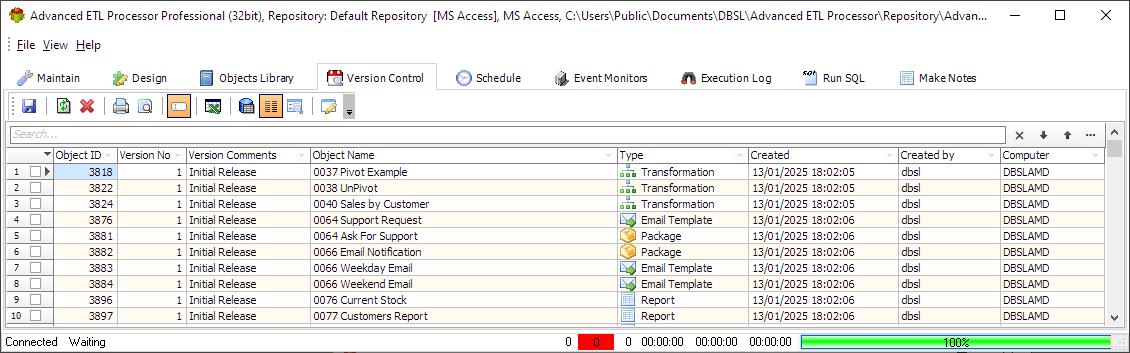
The Version Control tab: each saved object with its version number, comment, type, date and user.
Advanced ETL Processor Professional still does all the data work
Everything in the Standard edition is here: readers and writers for text, Excel, XML, JSON, Parquet, QlikView QVD and QVX, Tableau Hyper files and the common databases, 200+ transformation functions, 190+ validation rules, pivots, deduplication, rejected-records files and a command line interface.
Benefits
- Failures you can diagnose. A breakpoint and a variables view beat adding print statements to a batch file.
- Work that outlives its author. A package in a shared repository, with versions, is easier to hand over than scripts on someone's desktop.
- A cost that doesn't scale with volume. The vendor charges no execution or row fees, so a heavier month costs the same.
- A straight path to production. Enterprise uses the same repository structure, so packages built here don't need rewriting to run there.
Real-World Uses
- A consultant builds a client's monthly supplier-file process on a laptop, tests it against real files, and hands the repository to the client's Enterprise server.
- A BI developer prototypes a warehouse load that fetches files by SFTP, loads staging tables and generates QVD files for Qlik, stepping through failed loads with breakpoints.
- A software vendor keeps a library of customer-import packages under version control and clones one for each new customer.
- A database team shares one SQL Server repository so everyone works from the same connections and scripts.
Who It's For, and Who Should Skip It
Advanced ETL Processor Professional suits people who build ETL processes on Windows, especially where the finished work runs somewhere else or a small team shares it.
Skip it if you only run imports by hand (Standard is $420 a year and has the same transformations), or if the jobs must run on their own on a server, since Enterprise is only $180 a year more and includes the agent and monitors. If you mostly load files into database tables without heavy reshaping, Visual Importer ETL Professional does package work for $360. It's also the wrong tool on a Mac or Linux desktop: the vendor's ETL software is Windows only.
Usage Guide
- Download the 64-bit trial, unzip it and run the setup as administrator. Use the 32-bit build only if you depend on old 32-bit drivers.
- Create a repository with the Repository Creation Wizard. Pick SQL Server Express for anything beyond a quick test.
- Add saved connections for your databases, FTP servers and mail accounts in the objects tree.
- Build a transformation for the data work, then create a package and drag that transformation in as an action.
- Add the surrounding steps (check the file exists, archive it, send a failure email), link them by success and failure, and set the starting point.
- Set a breakpoint and press the green arrow to debug. Check the Variables and Execution Log tabs, then save. Version control records the change.

The Schedule tab listing one task, a repository backup, with its frequency and the computer it runs on.
Where it falls short
- A dated interface. Toolbars and tabs in the style of older Windows software, as several reviewers mention below.
- A long learning curve for packages. With this many action types there are several ways to do one job, and a reviewer wishes something told you the best one.
- Documentation is uneven. Some manual pages are little more than a screenshot, and one long-time customer asks for more detail.
- Limited message-based integration, according to one reviewer who runs about 20 integrations, though RabbitMQ and MSMQ steps exist.
- No unattended execution in this edition. Production runs need Enterprise.
What Users Say
Advanced ETL Processor has few public reviews, but they're consistent. The vendor's site shows 4.9 out of 5 from 16 reviews on Capterra, and a July 2024 archived copy of GetApp showed 4.9 out of 5 from 13 reviews, 12 of them five stars. The quotes below come from that GetApp copy and are about Advanced ETL Processor generally; where a reviewer named the edition, it's noted.
From people building workflows
Bruce G., Investment Management, 1-10 employees (Professional and Enterprise user): "The tool set is relatively easy to learn and generally intuitive to use. The ability to design and build reusable ETL elements through a graphical user interface at an affordable price was what drew us to the product in the first instance."
Charles H., Banking, 1-10 employees, "The Best Kept Secret of ETL Tools": "When I co-founded my last bank (AltaPacific Bank) in 2006 I started to use their professional version and later upgraded to their enterprise version." He adds: "I have yet to come across an ETL product with all of the essential functionality at an incredibly low cost of ownership."
Alan J., Logistics and Supply Chain, 51-200 employees: "The most important is the ETL-Tools has a comprehensive tools sets to handle almost anything thrown at it."
Andrew R., Marketing and Advertising, 1-10 employees: "Setting up new users is pretty straightforward with this tool, and I have been using it for around 10 years."
On support
Charles H.: "Their support team is incredible! Quick responses, very helpful and on many occasions have enhanced their objects' functionality to solve our business needs, generally, within a few days."
Peter B., Transportation/Trucking/Railroad, 51-200 employees: "Clearly usability! We can use it in various processes. Support for the software is perfect +++ which is very important!"
Bruce G.: "The team at DB Software Laboratory have always been responsive with many feature requests being positively considered for inclusion in upcoming releases."
Criticism
Bruce G.: "Whilst the online documentation could do with some updates and extra detail it is easily accessible and very readable."
Alan J.: "There are so many ways to solve problems and do things, I wish there was something that could tell you the best way to do it, but that comes with time and knowledge."
Benjamin P., Logistics and Supply Chain, 11-50 employees: "For small setup it may use an integrated DB more efficient than Access DB. I had to setup an SQL express to get it wotk in a reliable way."
Patrick M., Banking, 51-200 employees: "User interface is a little dated, but works well."
Dmitriy V., Retail, 501-1,000 employees (7/10 likelihood to recommend): "Support for message-based integrations and protocols is limited. Not necessarily a con, more of a note."
The pattern: long-term customers value the range of formats, the low cost and developers who respond quickly and add features on request. The complaints are a dated interface, documentation that could go deeper, and the Access repository, which matches the vendor's own warning.
Comparisons
Professional vs Standard vs Enterprise
All three share the readers, writers, transformations, validation rules and command line. Standard ($420) stores transformations as files and has no repository or packages. Professional ($660) adds the repository, connections, reports designer, scheduler screen, packages, debugging and object library. Enterprise ($840) adds the Execution Agent, Directory, FTP, HTTP, POP3, IMAP4 and MS MQ monitors, and AI integration.
Pick Professional for a development machine; pick Enterprise for the machine that does the nightly work.
Advanced ETL Processor Professional vs Visual Importer ETL Professional
The vendor says the two share the same package workflow model; the difference is transformation depth. Visual Importer ETL Professional ($360 a year) maps a source straight into a target table. Advanced ETL Processor Professional ($660) adds the diagram with validators, transformers, sorters and pivots, and can write to Excel, XML, JSON and Tableau or Qlik files.
Editions and Pricing
| Edition and licence | Price at checkout | Computers | Best for |
|---|
| Professional, single computer | $660 per year | 1 | One developer building and testing packages |
| Professional, site licence | $3,000 per year | Unlimited at one physical site | A development team at one location |
| Standard, single computer | $420 per year | 1 | Manual desktop ETL |
| Enterprise, single computer | $840 per year | 1 | Scheduled, unattended production jobs |
Every licence includes a year of updates and technical support. A site licence covers the buyer's employees and accredited agents on any number of computers at one location, normally one building. The vendor's pricing page says you can move to a site licence later by paying the difference.
Buy Single Computer ($660/yr)Buy Site Licence ($3,000/yr)
FAQs
Can Advanced ETL Processor Professional run scheduled jobs overnight?
Advanced ETL Processor Professional has the Scheduler screen, but the Execution Agent that runs scheduled actions as a Windows service is available only in Enterprise. For overnight runs with nobody logged in, plan on Enterprise.
Will packages built in Advanced ETL Processor Professional work in Enterprise?
Yes. Advanced ETL Processor Professional and Enterprise use the same repository database structure, so an Enterprise installation can connect to the repository holding your packages.
Which database should I use for the Advanced ETL Processor repository?
For Advanced ETL Processor the vendor recommends SQL Server Express, which is free. Oracle, MySQL, PostgreSQL and Interbase/Firebird also work, while the default MS Access file isn't recommended for production.
Does Advanced ETL Processor Professional need much hardware?
Advanced ETL Processor needs up to 250 MB of disk space, and the vendor recommends at least 8 GB of memory. It streams data instead of loading it all at once, so extra memory doesn't necessarily make it faster.
Does Advanced ETL Processor Professional run on Linux?
No. Advanced ETL Processor Professional is Windows only. The vendor's Linux packages are for its Deep Bin and Event Logger products.
Can I move an Advanced ETL Processor licence to someone else?
The Advanced ETL Processor licence agreement allows a permanent transfer of all your rights, provided the recipient accepts the same terms.
What happens to Advanced ETL Processor Professional if I don't renew?
Advanced ETL Processor Professional is sold as an annual licence that includes a year of updates and support, and the order renews each year. Ask the vendor what the licence allows after that year if you plan to stop renewing.
System Requirements
- Windows XP or higher (64-bit and 32-bit builds)
- Up to 250 MB of disk space, plus about 150 MB for the repository database
- 8 GB of memory recommended
- Oracle client, Interbase/Firebird client, FoxPro ODBC driver, BDE or Tableau client only for those formats; MySQL and PostgreSQL clients are built in
- Python, optionally, for Python transformations
Conclusion
Advanced ETL Processor Professional is worth $660 a year for someone who designs ETL workflows for a living on Windows. The package debugger, repository and automatic versions are what separate it from the Standard edition, and its users praise the support.
The main reason not to buy it: most buyers who need jobs to run unattended should spend the extra $180 on Enterprise. Buy Professional for the development seat, and use the 30-day trial to build one real package first.
Download Free TrialBuy Now