Advanced ETL Processor Enterprise: Windows ETL That Runs Your Data Jobs With Nobody Watching
Advanced ETL Processor Enterprise is an $840-a-year self-hosted Windows ETL suite from DB Software Laboratory for IT teams that need imports, exports and file handling to run on a schedule or the moment a file or email arrives. It's the top edition, and the one that adds the unattended Windows services.
It answers a common late-night problem: the supplier file that lands at 2 a.m. and has to be validated, loaded and archived before the morning report, with somebody told only if it fails. A folder monitor spots the file, the Execution Agent runs the package, and the log says exactly which step went wrong.
Quick facts
- Version: 6.5.4.3, released November 2026
- Developer: DB Software Laboratory (etl-tools.com), United Kingdom
- Platform: Windows only (64-bit and 32-bit builds), usually installed on a server
- Price: $840 per year for one computer, $4,000 per year for a site licence. The order renews automatically each year
- Included: one year of updates and technical support, unlimited executions, no row fees
- Trial: 30 days, fully functional, no registration or credit card
- Refunds: the vendor's pricing page states a 30-day refund policy
- What we checked: the 122 MB AdvancedETLEnt_64.zip downloaded from the vendor on November 23, 2026 contains a setup file reporting version 6.5.4.3; $840.00 for the single-computer licence and $4,000.00 for the site licence on the order page on November 23, 2026, with auto-renewal switched on. We read the edition comparison and the automation manual but didn't run the agent or monitors ourselves
Download Free TrialBuy Now
Before you buy
Plan the server side. The Execution Agent and monitors are installed with the program but aren't configured for you. They are registered as Windows services from the interface or an elevated command line, the agent needs a licence key, and the vendor advises running it under the same user account you design with and using UNC paths rather than mapped drives.
Use a real repository database. The default MS Access repository isn't recommended for production because it tends to get corrupted over time. The vendor recommends the free SQL Server Express.
It's a yearly subscription that the order page sets to renew automatically at the same price.
Overview
Advanced ETL Processor Enterprise combines a designer with a set of Windows services. You build transformations and packages on a desktop, store them in a repository, and the services on your server do the running. The vendor describes Enterprise as the edition for servers and continuous, automated work, and its history page lists 807 releases, including a Split File action on September 30, 2026 and a Send Syslog Message action on November 12, 2026.
Because it runs on your own Windows machines, the data never passes through a vendor's cloud. That matters for finance and health data, and the pricing makes it easy to budget: the licence is the cost, however many rows or runs you put through it.
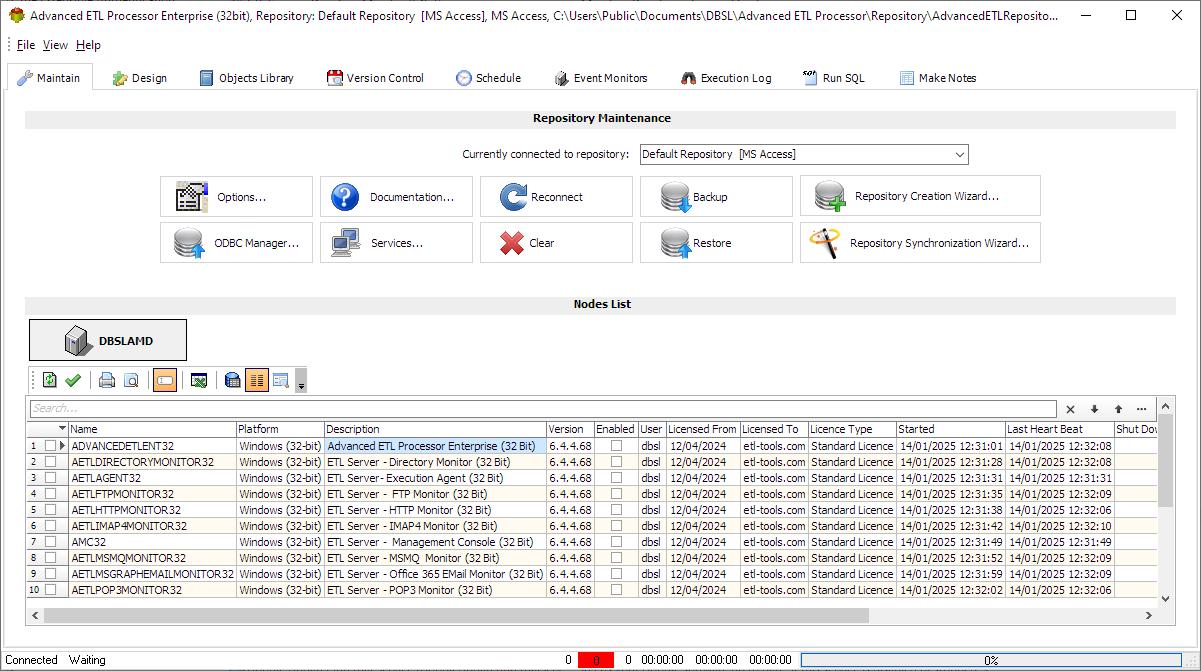
The Enterprise maintenance screen: repository tools at the top and, in the Nodes List, the execution agent and monitor services installed on this computer with their versions. The title bar shows the 32-bit build.
Features
Advanced ETL Processor Enterprise runs jobs with no one logged in
Advanced ETL Processor Enterprise includes the Execution Agent, a Windows service that runs scheduled packages, transformations, imports and SQL scripts. Schedules can run once or daily, weekly or monthly, limited to chosen days and months, with a timeout, and the 64-bit agent can run both 64-bit and 32-bit actions. The agent can email you about its own status.
Advanced ETL Processor Enterprise reacts to events
Advanced ETL Processor Enterprise has monitors that start a task when something happens: a new file in a directory, an FTP upload, a POP3, IMAP4 or Office 365 email, an HTTP call, or an MS MQ message. That removes the guesswork of polling every ten minutes in case a file has arrived.

The Event Monitors tab with HTTP, Office 365 email, FTP, file and POP3 monitors, each tied to an action. This manual image has a Professional title bar; the monitors themselves are Enterprise features in the edition comparison.
Advanced ETL Processor Enterprise shows what ran in a browser
Advanced ETL Processor Enterprise includes a Management Console, a web dashboard that shows runs, completions and failures for today, this week and this month, plus execution duration charts. It runs as its own Windows service on port 8080 by default.

The Management Console dashboard: run, completed and failed counts by day, week and month, pie charts by status, and execution duration per day.
Advanced ETL Processor Enterprise connects to AI services
Advanced ETL Processor Enterprise lists AI integration as an Enterprise-only feature. The vendor's example packages send data to ChatGPT or Google Gemini through HTTP actions and loop over the answers, so a workflow can classify or summarize text as one of its steps.

A vendor example package for ChatGPT: user input, an HTTP submit, a loop over the returned choices, and the answer shown at the end.
Advanced ETL Processor Enterprise includes the full design toolkit
Everything in Professional is here: shared repositories, packages with SQL, file, FTP, HTTP, email, zip, SOAP, XSLT, Amazon S3 and Azure Blob steps, a package debugger with breakpoints, automatic version control, 200+ transformation functions, 190+ validation rules and rejected-records files.
Benefits
- Fewer 2 a.m. surprises. Jobs start on the event rather than a guess about timing, and failures leave a log and a rejected-records file.
- A flat, known cost. Unlimited executions and no row fees, in contrast to usage-priced cloud ETL.
- One place for the whole job. Loading, file moves, FTP, email and notifications sit in one package instead of a chain of scripts and scheduled tasks.
- Data stays in-house. Everything runs on your own Windows infrastructure.
Real-World Uses
- A logistics company receives orders in every format around the clock, and a monitor picks up each file and loads it into production systems.
- A healthcare data team consolidates feeds from many organisations into one database on a nightly schedule.
- A finance department runs month-end extracts on the first working day, writes Excel and PDF reports and emails them out.
- An IT team replacing SSIS jobs moves file-to-database loads into packages that DBAs can read and change.
Who It's For, and Who Should Skip It
Advanced ETL Processor Enterprise suits organisations that run recurring data work on their own Windows servers and want it handled without someone clicking Run.
Skip it if a person runs each job by hand (Standard is half the price), or if you only need a development seat with no unattended running (Professional, $660). If your jobs are mainly loading files into tables with light clean-up, Visual Importer ETL Enterprise does the same scheduled work for $600. And if your stack is Linux or you want a hosted service, this is the wrong product: it's Windows software you administer yourself.
Usage Guide
- Install the 64-bit trial as administrator on the machine that will do the work.
- Create a repository on SQL Server Express or another server database, and add your connections.
- Build and debug your transformation and package in the designer.
- From an elevated command line, run
aetlagent.exe /INSTALL to register the Execution Agent as a Windows service, and enter your licence key. - On the Schedule tab, add the package with its timing, or on the Event Monitors tab tie it to a directory, FTP or email event.
- Install the Management Console with
amc.exe /INSTALL if you want the web dashboard, open it on port 8080 and change the default login straight away.
Where it falls short
- Windows only, including the services. There's no Linux agent for this product.
- Administration is your job. Services, accounts, UNC paths and repository backups all need someone who knows Windows servers.
- A dated interface. Reviewers mention it repeatedly.
- Thin spots in the manual. Several automation pages are short, and the vendor still tells you to open the console in Internet Explorer.
- Message-based work may need more tooling, according to one reviewer, despite the MS MQ and RabbitMQ options.
What Users Say
The vendor's site shows 4.9 out of 5 from 16 reviews on Capterra, and a July 2024 archived copy of GetApp showed 4.9 out of 5 from 13 reviews. The first group below is published on the vendor's Enterprise page; the rest come from that GetApp copy and are about Advanced ETL Processor generally.
On the vendor's Enterprise page
Lionel Albrecht, Swiss Banking (4.5/5): "I used Advanced ETL Processor Enterprise in 2 Enterprises for many business processes. I did not find any other tool with so many functions and broad flexibility for that Price. If you need support for bugs or solution design you will get it very fast. Best Support I have ever seen."
Jeff W., Corporate Data Team (5/5): "The support is fabulous. They respond quickly and are super helpful. I was also really impressed with how fast they implement new features based on feedback. On top of that, the value for money is excellent."
Daniel Fung, Solutions Architect (4.5/5): "The product is easy to learn and once a developer understands the ETL way for solving the problem at hand, the developer's productivity will increase. Even our DBAs now use Advanced ETL Processor Enterprise to quickly create solutions instead of SSIS or SQL jobs."
From people running it daily (GetApp)
Pietro V., Security and Investigations, 51-200 employees: "I love it. It is so easy: I started with simple projects and now I have hunderd of projects working in a scheduled way."
Alan J., Logistics and Supply Chain, 51-200 employees: "As a 3PL we are getting orders from all sources, in all formats 24x7. ETL-TOOLS is used to bring them into our productions systems, and return any/all customer data requirements."
Dmitry D., Accounting, 1-10 employees: "Using this system we were able to integrate data streams from over 40 NHS organisations into one single DB."
Charles H., Banking, 1-10 employees: "Using their scheduler & command line utility in addition to Microsoft's Task Scheduler automates everything!"
Criticism (GetApp)
Teun M., Computer Software, 11-50 employees: "Don't be put off by the look & feel of this tool. It feels a little bit Windows XP-esque."
Dmitriy V., Retail, 501-1,000 employees (7/10 likelihood to recommend): "Support for message-based integrations and protocols is limited. Not necessarily a con, more of a note. If your organization has the need for message-based integration you may need additional tooling." His company also pairs the product with a separate scheduler: "Advanced ETL is coupled with Visual Cron for scheduled task execution."
Benjamin P., Logistics and Supply Chain, 11-50 employees: "I had to setup an SQL express to get it wotk in a reliable way."
Pietro V.: "Some features are not so easy to understand the very first time but all the guys in the forum are really open to help you."
The pattern: people who run it for years praise breadth, price and fast support, sometimes including custom features. The complaints are the look of the interface and the learning curve, not lost data or failed runs.
Comparisons
Enterprise vs Professional vs Standard
Standard ($420) handles hand-run transformations. Professional ($660) adds the repository, packages, debugger and scheduling screen. Enterprise ($840) adds what runs without you: the Execution Agent, the Directory, FTP, HTTP, POP3, IMAP4 and MS MQ monitors, the Management Console and AI integration.
At $180 more than Professional, Enterprise is the sensible choice for any machine doing production work.
Advanced ETL Processor Enterprise vs Visual Importer ETL Enterprise
The vendor says the two share the same packages, monitors and agents; the difference is transformation design. Visual Importer ETL Enterprise ($600 a year) suits import and export jobs. Advanced ETL Processor Enterprise ($840) adds the diagram of validators, transformers, sorters and pivots for data that needs reshaping before it loads, and is what the vendor recommends to new users.
Advanced ETL Processor Enterprise vs usage-priced cloud ETL
Hosted ETL services typically bill by volume or connector and look after the infrastructure for you. Advanced ETL Processor Enterprise costs a flat $840 a year and keeps data on your servers, but you install, patch and watch it yourself, on Windows.
Editions and Pricing
| Edition and licence | Price at checkout | Computers | Best for |
|---|
| Enterprise, single computer | $840 per year | 1 | One production server |
| Enterprise, site licence | $4,000 per year | Unlimited at one physical site | Teams building and running jobs at one location |
| Professional, single computer | $660 per year | 1 | Building and testing packages |
| Standard, single computer | $420 per year | 1 | Manual desktop ETL |
Every licence includes a year of updates and technical support. A site licence covers the buyer's employees and accredited agents on any number of computers at one location, normally one building. The vendor's pricing page says you can move to a site licence later by paying the difference.
Buy Single Computer ($840/yr)Buy Site Licence ($4,000/yr)
FAQs
Does Advanced ETL Processor Enterprise need a dedicated server?
Advanced ETL Processor Enterprise doesn't need expensive hardware. The vendor says most customers run it on low-end cloud servers, and that two i7 processors with 16 GB of memory are typically more than sufficient.
Do I need one Advanced ETL Processor Enterprise licence for each server?
A single Advanced ETL Processor Enterprise licence covers one computer. For several computers at the same physical location the site licence covers an unlimited number.
Can Advanced ETL Processor Enterprise watch an Office 365 mailbox?
Advanced ETL Processor Enterprise lists an Office 365 Monitor among its event monitors in the manual, alongside POP3 and IMAP4 monitors, so a new message can start a package.
Can I replace SSIS with Advanced ETL Processor Enterprise?
The vendor positions Advanced ETL Processor Enterprise as a no-code alternative to SSIS, and one reviewer's DBAs use it instead of SSIS or SQL jobs. Rebuild one real SSIS job during the 30-day trial to see how the work translates.
What does Advanced ETL Processor Enterprise cost if I upgrade from Standard?
The vendor's pricing page says you can upgrade Advanced ETL Processor Standard to Professional or Enterprise by paying the difference. Ask the vendor for the upgrade details.
Is the Advanced ETL Processor Enterprise trial limited?
The Advanced ETL Processor Enterprise trial is fully functional for 30 days, with no registration and no credit card, so you can test unattended runs before paying.
System Requirements
- Windows XP or higher (64-bit and 32-bit builds)
- Up to 250 MB of disk space, plus about 150 MB for the repository database
- 8 GB of memory recommended
- Administrator rights to install the Windows services
- Oracle client, Interbase/Firebird client, FoxPro ODBC driver, BDE or Tableau client only for those formats; MySQL and PostgreSQL clients are built in
Conclusion
Advanced ETL Processor Enterprise is worth $840 a year if recurring data work has to run on your own Windows servers without supervision. The agent and monitors are the reason to buy this edition over Professional, the price undercuts usage-billed services at any real volume, and customers consistently rate the support.
The main reason not to buy it: you're the administrator. If you don't have someone comfortable with Windows services and a SQL Server repository, a hosted service may suit you better. If you do, test one real overnight job during the 30-day trial.
Download Free TrialBuy Now