Office 365 Email Logger: Save Microsoft 365 Mailbox Messages to a Database on a Schedule
Office 365 Email Logger is a $100-a-year server application for Windows and Linux from DB Software Laboratory that reads Microsoft 365 mailboxes through the Microsoft Graph API, records each matching message in a database and saves the message files and attachments to disk. It's for admins and developers who need mailbox contents to feed another process.
The typical case is a shared mailbox that's secretly a data feed: suppliers send invoices to it, a system emails its nightly export to it, and someone drags attachments into a folder each morning. This replaces the dragging with rules, and leaves a record of what came in.
Quick facts
- Version: 3.0.0.0, installer dated September 10, 2026
- Developer: DB Software Laboratory (etl-tools.com), United Kingdom
- Platform: Windows 64-bit and Linux 64-bit (.deb); the vendor offers special builds for other systems on request
- Price: $100 for a one-year licence. The order renews automatically
- Interface: a browser, on port 3333 by default
- Trial: 30 days, fully functional, no registration or credit card
- What we checked: the 50 MB office365_logger_64.zip downloaded from the vendor on November 10, 2026 contains a setup file reporting version 3.0.0.0; $100.00 for the one-year licence on the order page, with auto-renewal switched on, on November 10, 2026. We read the manual and its screenshots but didn't connect it to a mailbox ourselves
Download Free TrialBuy Now
Before you buy
You need to register an app in Microsoft 365. The connection form asks for an Application (Client) ID, a Directory (Tenant) ID and a Client Secret, so someone with rights in your Microsoft 365 tenant has to create those first. The manual doesn't walk you through it or list the permissions to grant.
It logs and stores; it doesn't transform. The vendor is direct about this: for scheduled ETL jobs, transformations or workflow actions, use Advanced ETL Processor Enterprise instead.
The star rating isn't about this product. The 4.9 Capterra badge on the vendor's logger page belongs to its shared review profile, where the reviews discuss Advanced ETL Processor. We found no independent reviews of this logger.
Overview
Office 365 Email Logger belongs to the vendor's family of eight Event Loggers, small server programs that each capture one kind of event and write it to a repository database. This one polls Microsoft 365 on a schedule through Microsoft Graph. A filter decides which messages matter; basic details go to the database, and the msg files and attachments go to folders on disk, ready for another program to pick up.

The vendor's data flow: a scheduler pulls mail from the Office 365 server through an email filter, into the repository database and the file system, for processing by other software.
Features
Office 365 Email Logger connects through Microsoft Graph
Office 365 Email Logger signs in with an application registration instead of a mailbox password, using the Client ID, Tenant ID and Client Secret you enter on the Servers page. You can define several server connections, each with a status field that shows whether it works.
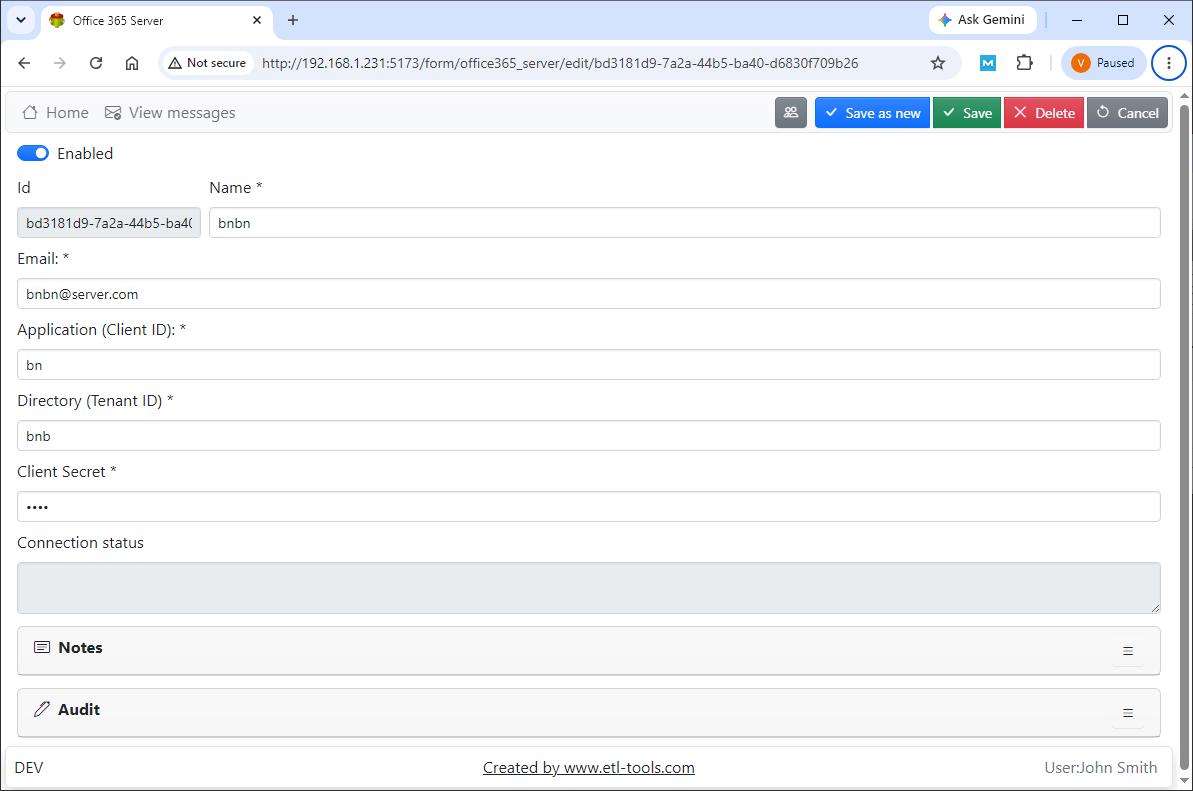
The server form: a name, a mailbox email address, the Application (Client) ID, Directory (Tenant) ID and Client Secret, with a connection status below.
Office 365 Email Logger filters with regular expressions
Office 365 Email Logger rules choose which messages to download, such as only read messages, and can match on sender, subject, recipient or attachment name with regular expressions. Each rule is tied to one connection and mailbox and can be switched on or off.
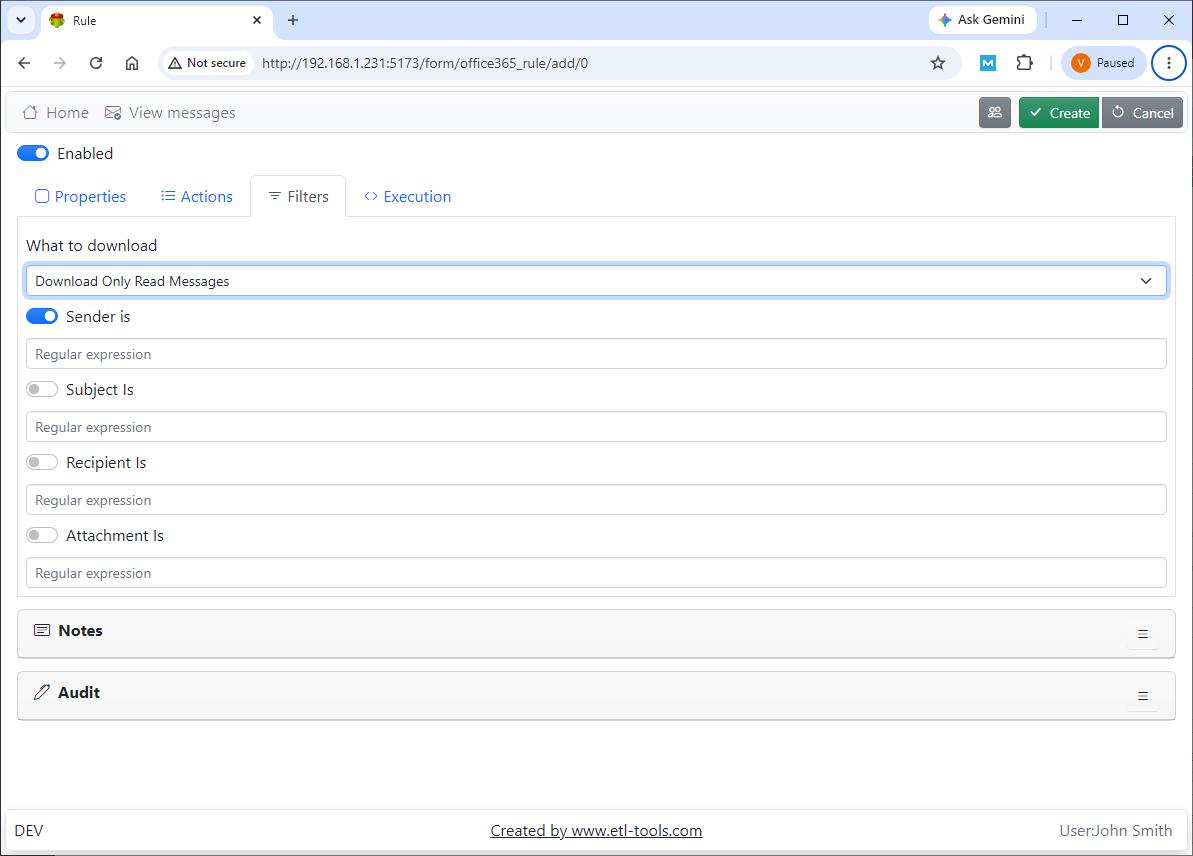
The Filters tab of a rule: a What to download choice and regular expression fields for sender, subject, recipient and attachment.
Office 365 Email Logger saves messages and attachments
Office 365 Email Logger can save each message to a directory and extract its attachments to another, optionally only those matching a regular expression. After processing, it can act on the message, for example mark it as read, and a limit caps how many messages a run handles.
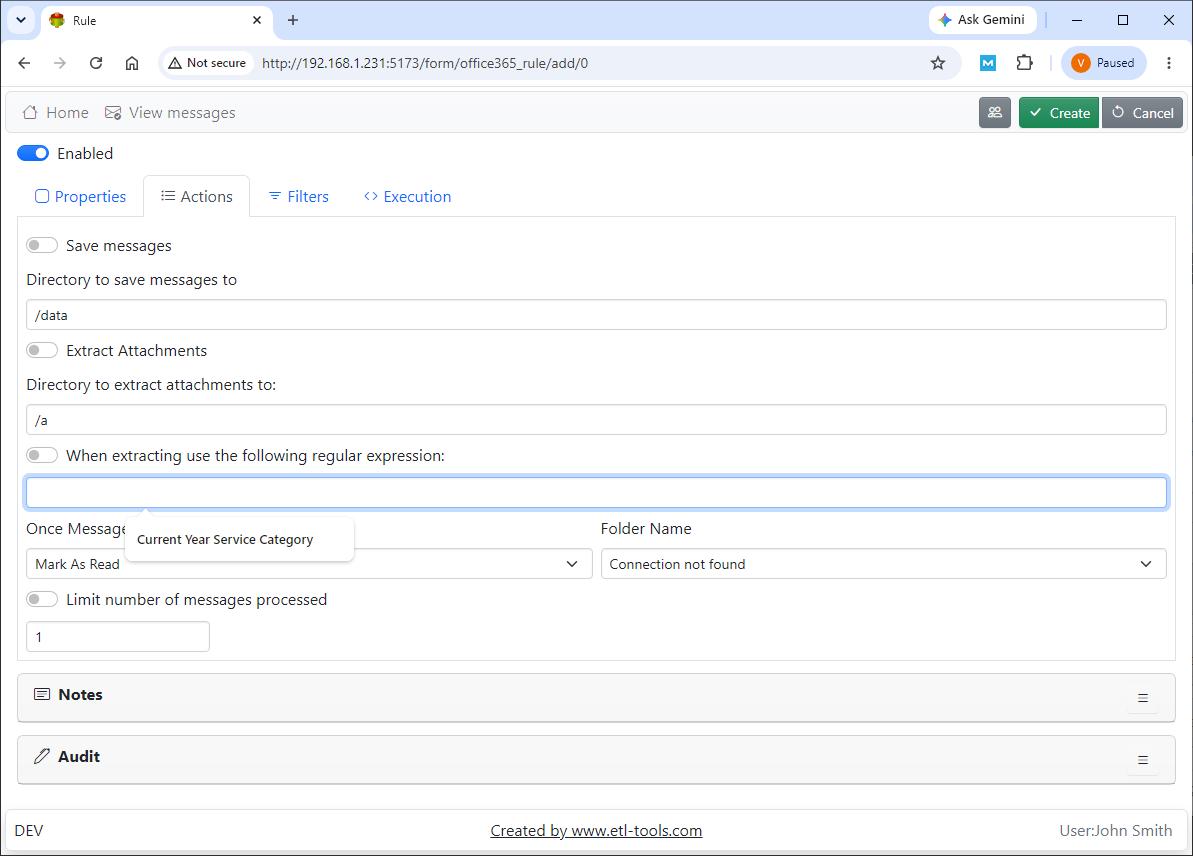
The Actions tab: directories for saved messages and attachments, an attachment regular expression, what to do once a message is processed, and a message limit.
Office 365 Email Logger triggers your own processing
Office 365 Email Logger can run custom JavaScript or a command line for each message, passing details such as the sender, subject, message ID and attachment count. The vendor's sample script starts an Advanced ETL Processor package, but it could call any program.
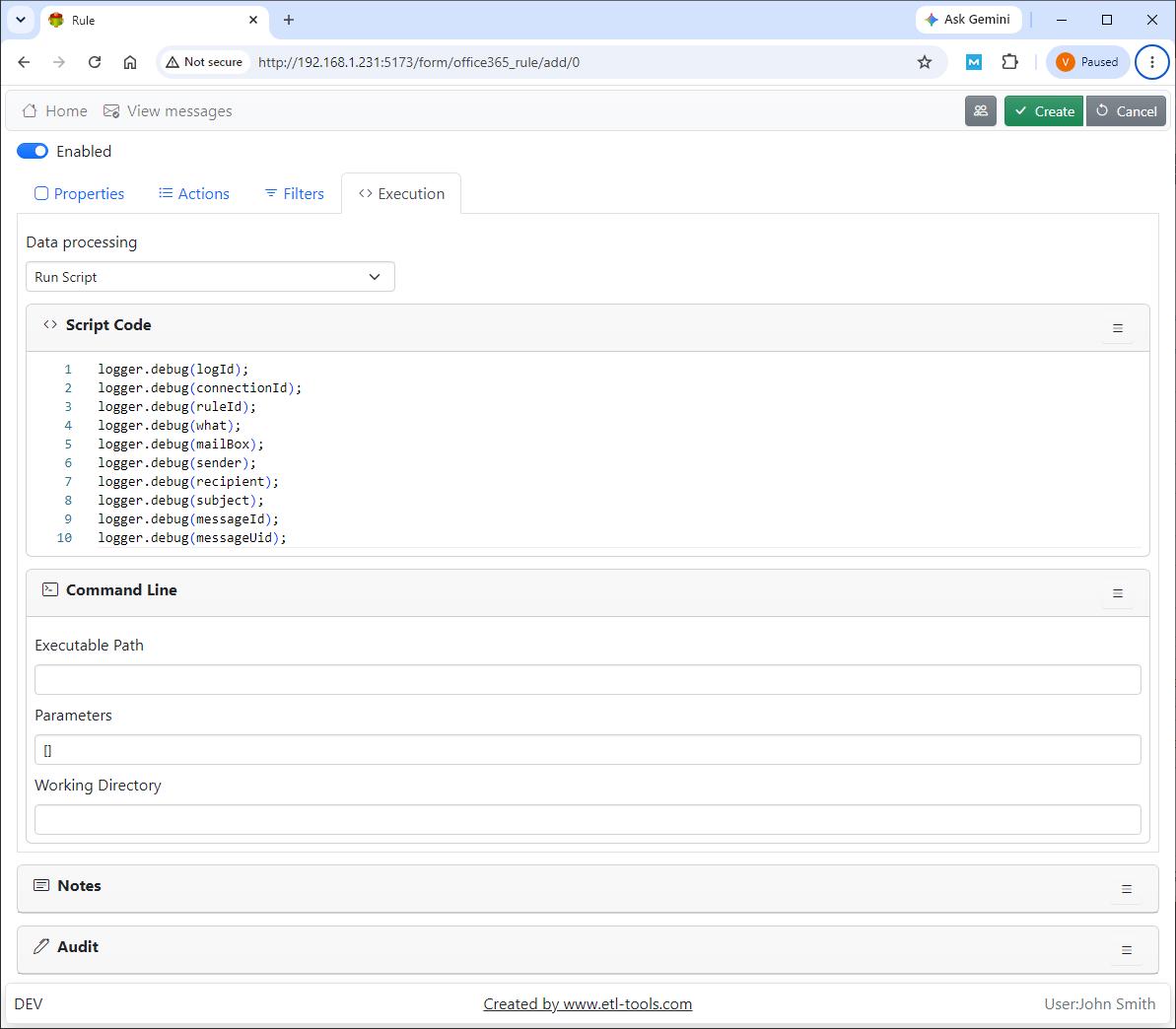
The Execution tab: a script editor with the available message fields, and command line settings for an executable, parameters and a working directory.
Office 365 Email Logger queues work to protect the connection
Office 365 Email Logger uses an Execution Queue so that only one connection is open at a time, running tasks in sequence. That avoids the timeouts and server overload that too many simultaneous connections can cause.
Office 365 Email Logger controls who can see the data
Office 365 Email Logger has users and groups with access rights set per page, grid and form. Passwords are encrypted with a security key, which the vendor says to change right after installation, and SSL can be turned on for the web interface.
Benefits
- No more hand-saving attachments. A rule does what someone was doing every morning.
- A searchable record. Message details end up in a database you can query.
- Cheap to try. At $100 a year it costs far less than an ETL suite if email capture is all you need.
- Runs where you do. Windows service or Linux systemd unit, on your own machine.
Real-World Uses
- An accounts team routes supplier invoices from a shared mailbox into a folder that their document system watches.
- A developer stores incoming order confirmations in PostgreSQL and fires a script to update a fulfilment system.
- An operations group collects a nightly report emailed by a legacy system and saves only the CSV attachment.
- An IT admin keeps a database record of messages reaching a monitored alerts mailbox.
Who It's For, and Who Should Skip It
Office 365 Email Logger suits admins and developers comfortable with Microsoft 365 app registrations and regular expressions who want email captured for another system to use.
Skip it if you want a compliance archive or eDiscovery product: this saves what your rules match and has no retention or legal-hold features in its documentation. Skip it if your mail isn't on Microsoft 365 (the vendor's IMAP4 Email Logger, also $100, is the one to look at), or if you also need scheduled transformations and workflows, where Advanced ETL Processor Enterprise covers email as well. Ordinary Outlook users who want to save a few messages don't need a server application.
Usage Guide
- Register an application in your Microsoft 365 tenant and note the Client ID, Tenant ID and a Client Secret.
- On Windows, run the setup wizard. On Linux, install the .deb package with apt and enable the
etl-tools-office365-email-logger service with systemctl. - Open
http://localhost:3333 in a browser, sign in with the default account from the manual, and change that password. - On the Servers page, add a connection with your application details and check its status.
- On the Rules page, add a rule: choose the mailbox, the filters, where to save messages and attachments, and what to do once a message is processed.
- On the Schedule page, set when it runs, then watch the Execution Queue and Event Log for the first runs.

The Execution Queue: tasks from the scheduler with their submitted and processed times, dated September 10, 2026.
Where it falls short
- A thin manual. Several pages are a screenshot and little else, and the app registration isn't explained.
- Scheduled polling, not instant. Messages are read when the schedule runs.
- SQLite is for light use. The vendor recommends a different repository database for high-load systems.
- No version history published. Unlike the vendor's ETL tools, the loggers have no public list of changes, so you can't see what an update adds.
- Technical to set up. Security keys, SSL and repository changes are made by editing a settings file and restarting the service.
Comparisons
Office 365 Email Logger vs IMAP4 Email Logger
Both cost $100 a year and work the same way. Office 365 Email Logger connects through Microsoft Graph with an app registration, while the vendor's IMAP4 Email Logger is for mailboxes reachable over IMAP. Pick by where your mail lives.
Office 365 Email Logger vs Advanced ETL Processor Enterprise
Advanced ETL Processor Enterprise ($840 a year) has an Office 365 monitor and email loop actions inside a full ETL suite, on Windows only. Office 365 Email Logger ($100) does the capture alone, also runs on Linux, and can hand off to a script. Buy the suite when the email is one step in a larger data process.
Editions and Pricing
| Licence | Price at checkout | Term | Best for |
|---|
| Office 365 Email Logger, single licence | $100 | 1 year, renews automatically | One server capturing Microsoft 365 mail |
The vendor sells each logger separately at the same price, with Windows and Linux builds of each.
Buy One-Year Licence ($100)
FAQs
Does Office 365 Email Logger need my mailbox password?
No. Office 365 Email Logger connects with an application registration: the Client ID, Tenant ID and Client Secret from your Microsoft 365 tenant, along with the mailbox address.
Does Office 365 Email Logger work with a shared mailbox?
Office 365 Email Logger connects to the mailbox you select in a rule, and its rules work per mailbox. The manual doesn't address shared mailboxes specifically, so confirm it on your tenant during the 30-day trial.
Where does Office 365 Email Logger store its data?
Office 365 Email Logger uses a SQLite repository by default and also supports PostgreSQL, MySQL, MariaDB, SQL Server and Oracle. Saved msg files and attachments go to the directories set in each rule.
Can Office 365 Email Logger run on Linux?
Yes. Office 365 Email Logger has a 64-bit .deb package for Linux that runs as a systemd service, along with a 64-bit Windows build that runs as a Windows service.
Will Office 365 Email Logger delete my email?
Office 365 Email Logger only does what the rule's "once processed" setting says, and the setting shown in the vendor's screenshot is Mark As Read. Test with a copy of real mail before pointing it at a live mailbox.
System Requirements
- Windows 64-bit or Linux 64-bit with .deb package support
- A Microsoft 365 tenant with a registered application
- A web browser for the interface; port 3333 by default
- Optional: PostgreSQL, MySQL, MariaDB, SQL Server or Oracle for the repository
Conclusion
Office 365 Email Logger is worth $100 a year if you need a Microsoft 365 mailbox to feed a database or another program and you can handle an app registration. Rules with regular expressions, attachment extraction and the script hook cover the common cases at a modest price.
The main reason not to buy it: it's a sparsely documented niche tool with no independent reviews, and it isn't a compliance archive. Use the 30-day trial on a test mailbox first.
Download Free TrialBuy Now