Mail Attachment Downloader PRO Server: Turn Incoming Email into Saved, Converted and Filed Documents
Mail Attachment Downloader PRO Server is a Windows program that watches your Gmail, Microsoft 365, Exchange and IMAP mailboxes around the clock and saves the emails and attachments that match your rules, then converts, renames, files, prints or forwards them. It's for offices and IT staff who handle invoices, orders, reports or scans that arrive by email. A one-time Pro Server license costs $495 (on sale from $550), and the cheaper Pro Client edition costs $300; both are also sold by the year.
If someone on your team spends part of every morning opening emails, saving PDFs into the right customer folder and renaming them by invoice number, this is the job it takes over. You describe the job once as a rule ("emails from billing@ with a PDF attached, subject contains Invoice"), tell it where to save and what to call the file, and it does the same thing every time a new email arrives, on a server, with nobody signed in.
Quick facts
- Version: 3.4 build 1042, released October 2026
- Developer: Gearmage LLC, which also makes Gear Doc Converter and a free Photo Organizer
- Platform: Windows 10 or later and Windows Server 2016 or later, 32 or 64-bit, .NET Framework 4.8; also runs on Windows cloud VMs such as Azure
- Mail services: Gmail and Google Workspace, Microsoft 365 and Exchange (Microsoft Graph or EWS, including shared mailboxes), Outlook.com, Yahoo and any IMAP server; POP3 too
- Price: Pro Server $495 one-time or $300 a year; Pro Client $300 one-time or $180 a year
- Trial: the free edition (one account, one rule, attachments only); there's no separate PRO trial
- Refunds: full refund within 30 days of purchase
- What we checked: the free installer zip (24 MB), whose setup file reports version 3.4.1042, dated October 30, 2026; order page prices of $495 for a one-time Pro Server license (shown as $550 less a $55 discount), $300 for one-time Pro Client, $300 a year for Pro Server and $180 a year for Pro Client, on November 22, 2026. We didn't connect it to a live mailbox or license the PRO editions.
Download Free EditionBuy Pro Server (one-time)Buy Pro Client (one-time)
Overview
Mail Attachment Downloader started as a free tool that pulls attachments out of a mailbox into a folder, and that free edition still exists. The PRO editions turn it into an email automation engine. Everything is built around rules: each rule says which emails to catch, what values to pull out of them, where to save the result and which actions to run next. Rules run from top to bottom, can be dragged into a new order, and a catch-all rule at the bottom can pick up whatever the others miss.
It's a local program, not a cloud service. It talks straight to your mail server and keeps files on your PC, server or network share. Nothing passes through a third party unless you add an action that sends it out, such as a SharePoint upload, a webhook or an AI prompt. For Gmail you sign in with Google in your browser, so the program never sees your password.
Pro Server is the full edition: unlimited accounts, a Windows service that keeps running when nobody is signed in and restarts after a reboot, Windows Server support, and the heavier actions (document conversion to 59 formats, PDF merge and split, databases, scripts, webhooks, ChatGPT and Claude). Pro Client is the desktop edition for a PC that's signed in during the working day.
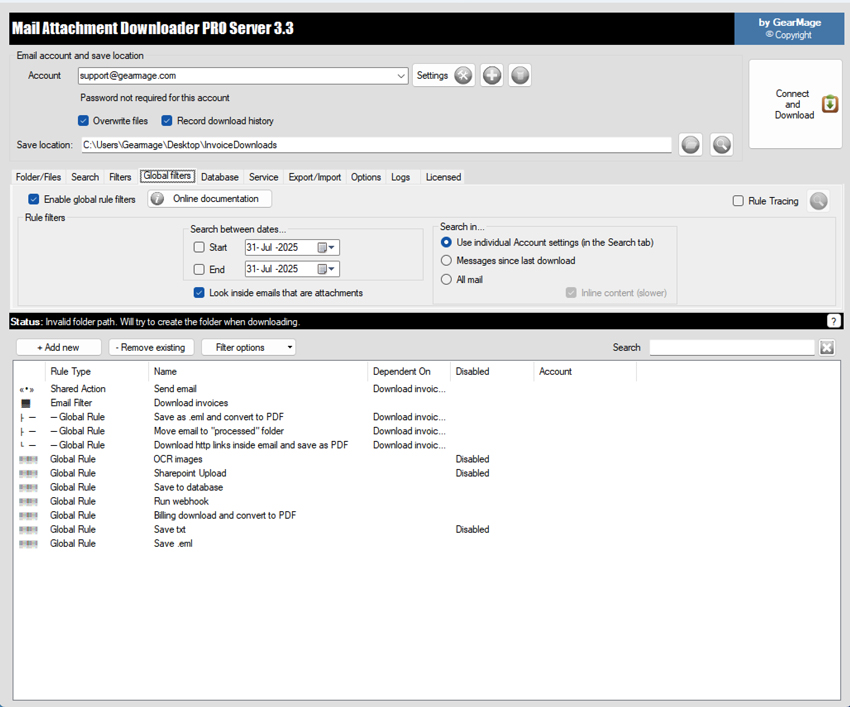
The PRO Server 3.4 main window. The Global filters tab lists the rules: an email filter that picks invoice emails, rules chained to it (save as .eml and convert to PDF, move to a "processed" folder, download linked files), and others for OCR, SharePoint, a database and a webhook.
Features
Rules with filters, AND/OR logic and a tester
Mail Attachment Downloader PRO matches emails by date range, account, sender, subject, any other email field, attachment name or attachment count. Conditions combine with AND and OR groups, take regular expressions, and you can test a filter on a sample before saving it. One rule can pick the emails while other rules chained to it each do one job with them, which keeps a complicated workflow readable.
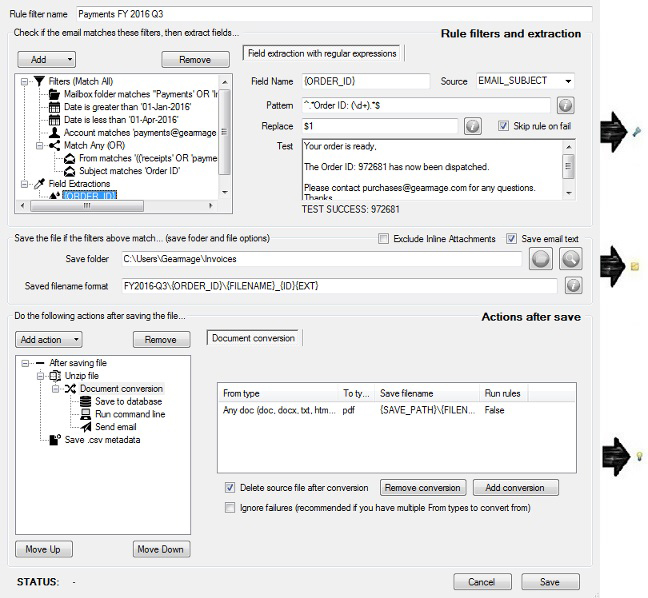
The rule editor: date, account and sender filters on the left, a regular expression that pulls the invoice number out of the subject (the test shows 4821), the save folder and file name pattern, and the actions after saving (unzip, convert to PDF, send email, save fields to CSV).
Pull values out of emails, then use them anywhere
Pro Server's extraction wizard lets you highlight a value in a sample email, such as an invoice number or a total, and turns it into a field like {INVOICE_NUMBER}. You can clean the value up, then use it in folder names, file names, database columns and reply emails. It also reads the rows of Excel and CSV attachments, so an emailed daily report can go straight into a database table. Pro Client has basic extraction with regular expressions.
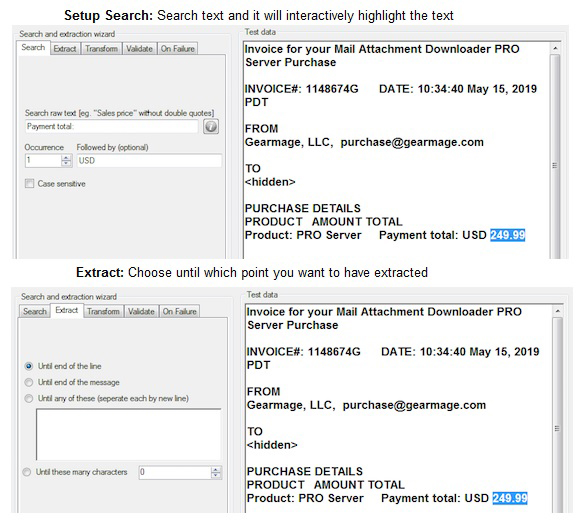
The extraction wizard finding the value after "Total due:" and before "USD" in a sample invoice; the status bar shows the result, 249.99.
Folders and file names built from the email
Mail Attachment Downloader PRO builds save paths from email fields and your extracted values, for example {FROM}\{ORDER_ID}.pdf, and creates missing folders as it goes. It can save the whole email as .eml (Pro Server also .msg), including emails with no attachments, and log sender, subject, dates and extracted values to a CSV file, either one file per email or a running log.
Convert, merge and split documents
Pro Server converts email bodies and attachments between 59 formats, including DOCX, XLSX, PPTX, EML, images and PDF, to PDF, multi-page TIFF, Word or images, with DPI and compression settings for images. It can merge an email and all its attachments into a single PDF, split out pages, add or remove PDF passwords, and make scans searchable with a lightweight OCR that's still marked alpha and reads English characters only. Pro Client converts to PDF only and can encrypt or decrypt PDFs.
Actions on emails and files
After saving, Mail Attachment Downloader PRO can move, copy or delete the email or mark it as read (if a step fails, the email stays where it was), copy or rename the saved files to a network share, and print them as soon as they arrive. Pro Server adds unzipping (with more actions on each file inside), downloading files linked in the email body such as Dropbox or Google Drive links, templated replies and notifications sent from any of your accounts, uploads to SharePoint Online or on-premises SharePoint, and per-rule error actions, such as moving a failed email to a review folder and alerting your team.
Databases, scripts, webhooks and AI
Pro Server writes email fields, attachments and extracted values to any ODBC database and can look values up for later actions. It runs PowerShell, batch files or programs per email or per file, and calls webhooks whose JSON replies become new fields. It can also run ChatGPT or Claude prompts on an email, its attachments or extracted values and use the answer in the next action. Developers can plug their own code into filtering, extraction and actions with the SDK, which comes with the Pro Server 3-pack ($1,050 one-time).
A 24x7 Windows service with history and charts
Pro Server installs as a Windows service that runs as the Windows user you choose, keeps working with nobody signed in and starts again after a reboot. A history view shows what was processed, by which rule and when, with a filter for failures only, and settings can be exported and imported on another machine.
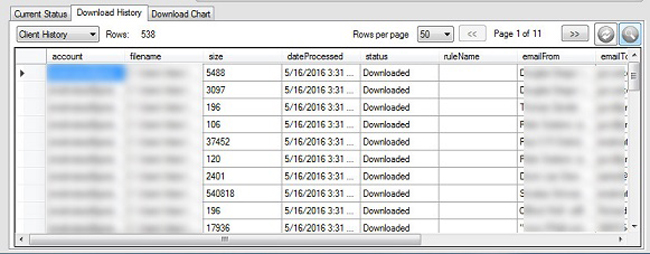
The Download History tab: 286 rows for one account, each with the mailbox folder, saved file, time, status and sender, plus a Failures only filter.
Benefits
- Hours back every week. Saving, renaming and filing attachments by hand is slow and easy to get wrong; a rule does it the same way every time.
- Your mail stays in-house. Unlike cloud email parsers, there's no third-party service reading your invoices; it's just your server talking to your mail server.
- One-time price. Most email-to-document automation is sold as a monthly cloud subscription. Here you can pay once and keep the version you bought.
- Fits existing systems. Folders, network shares, ODBC databases, SharePoint and scripts mean the output lands where your accounting or document system already looks.
Real-World Uses
- Accounts payable: catch supplier invoices from several shared mailboxes, pull out the invoice number and total, save each PDF as
Supplier\InvoiceNo.pdf, record the row in the AP database and move the email to "Processed".
- Daily reports into a database: a partner emails an Excel sales report each night; Pro Server reads its rows into a SQL table before anyone arrives.
- Scanned documents: a copier emails scans to a mailbox; each one is converted to a searchable PDF and filed on the network share.
- Order confirmations: orders arrive as zipped attachments; each file is unzipped, converted to PDF and emailed on to the warehouse with the order number in the subject.
- Archiving: save every email of a mailbox as .eml with its attachments in dated folders, for records you have to keep.
Who It's For, and Who Should Skip It
Pro Server suits small and mid-sized businesses, IT departments and consultants who automate document intake for clients; one customer quoted on the vendor's site has used it in client projects for over eight years. Pro Client suits one person or a small office that wants rules, several mailboxes and custom file names on a desktop PC that's on during the day.
Skip it if you only want to save the attachments from one personal mailbox now and then: the free edition does that at no cost. Skip it too if you're on a Mac or Linux (it's Windows-only), or if you want a hosted service with no server to look after; a cloud email parser fits that better, at the cost of your mail passing through someone else's servers.
Usage Guide
- Try the free edition first. Download the zip, run the installer and connect one mailbox to check that sign-in and folder access work with your mail provider. PRO builds come as a download link in the license email after purchase, and installing a new build keeps your settings.
- Add your accounts. Choose the server type (Gmail, Microsoft 365, Exchange or IMAP). Gmail uses browser sign-in; Yahoo and some other providers need an app password, and the program has setup guides for 23 such providers.
- Set the search. Pick the folders (or a folder name pattern) and a start date, so the first run doesn't fetch years of mail.
- Build a rule on the Global filters tab: filters, extracted fields, the save folder and file name pattern, then the actions after saving.
- Test it. "Test this rule" runs the rule against your mailbox before you trust it with real work.
- Install the service (Pro Server) on the Service tab, so it runs on schedule with nobody signed in. Check the History tab's Failures only view now and then.
Before you buy
- Pick the edition by where it runs. Pro Client won't install on Windows Server, is 32-bit, has no Windows service and converts to PDF only. If it has to run unattended, you need Pro Server.
- One-time licenses include one year of support and major upgrades. After that, the version you have keeps working, but the next major version (Gearmage's FAQ mentions version 4.0) is a paid upgrade unless you buy a yearly support extension. Subscriptions include all major upgrades while they're active.
- The license is tied to the email and company you enter before checkout, and they can't be changed afterwards.
- Volume pricing applies automatically at checkout for 3 or more installs.
Where it falls short
- Firewalls and proxies that inspect HTTPS are the most common source of trouble. Before build 1042, a Microsoft 365 search that got no answer could wait forever, and the service then skipped every scheduled run until it was reinstalled; 1042 adds a time-out and a warning when a certificate doesn't come from the mail provider.
- Gmail's daily download limit stops a large first download partway; the program keeps its place and carries on at the next run, so a big mailbox can take days.
- The OCR is basic: marked alpha, English characters only, and not a replacement for a dedicated OCR product.
- It's a dense Windows Forms program. Rules are powerful but the screens are packed with options, and the learning curve is real for anyone who isn't comfortable with fields, patterns and regular expressions.
What Users Say
Independent reviews of the PRO editions are scarce: the review sites list it with few or no ratings (AlternativeTo shows 4 likes and no written reviews). What's out there is below.
Customers quoted on Gearmage's site
"We have used Mail Attachment Downloader in dozens of client projects over 8+ years. It is incredibly versatile… We often call it 'Outlook rules on steroids'." (Jeremy)
"With Mail Attachment Downloader, we have automated this process, saving hundreds of hours and improving efficiency—at a fraction of the cost of traditional solutions." (Derek)
"I love the program. It has been a huge time saver and I love that it will download specific email attachments to the NAS to be accessible by all employees, even when I am not in the office." (Stewart)
"It is reliable, supports multi-account setups, and offers powerful rule-based filtering… an excellent solution we confidently recommend." (Anne)
On support: "In every instance, their support team has been outstanding—highly responsive, knowledgeable, and genuinely helpful." (Derek)
Download.com (CNET) staff review, January 2015, free edition
"Download your email attachments to your PC with a single click using Mail Attachment Downloader." The reviewers found it "Fast: The app performed very quickly when we tested its download capabilities" and "Safe: Mail Attachment Downloader only scans your emails, and it doesn't mess with them in any way."
Their complaints: "Currently, there is no way of having the app automatically check for new attachments," and "While the software's functionality is superb, it is obvious that the app was created first and foremost as a utility." Bottom line: "While the visuals leave room for improvement, the core functionality is rock solid." Scheduled, unattended runs are exactly what Pro Server added since; the plain look hasn't changed much.
The pattern: people who use it for business automation praise its range and the vendor's support; the recurring complaint, then and now, is a utilitarian interface. The quotes on the vendor's own site are, naturally, picked by the vendor.
Comparisons
Free vs Pro Client vs Pro Server
| Feature | Free | Pro Client | Pro Server |
|---|
| License | Personal use | Commercial | Commercial |
| Email accounts | 1 | Up to 15 | Unlimited |
| Rules | 1, fixed save format | Unlimited | Unlimited |
| Save whole emails | No | .eml | .eml or .msg |
| Data extraction | No | Regular expressions | Wizard, Excel and CSV rows |
| Document conversion | No | PDF only | 59 formats, merge, split, OCR |
| Databases, scripts, webhooks, AI, SharePoint | No | No | Yes |
| Windows Server and 24x7 service | No | No, desktop only | Yes, 32 and 64-bit |
Compared with Outlook rules and cloud parsers
Outlook's own rules can move emails but can't save attachments to named folders, rename them from the email's content or run unattended without Outlook open. Cloud email parsers do extraction well but are monthly subscriptions and read your mail on their servers. Mail Attachment Downloader PRO Server sits in between: local, one-time pricing, and most of the parser features, in exchange for running and maintaining it on your own Windows machine.
Editions and Pricing
Prices for one install, as shown on the order page on November 22, 2026. One-time licenses never expire and include one year of support and major upgrades; subscriptions include support and every major upgrade while active, and Gearmage gives 15% off subscription renewals with auto-renew switched on. Each button orders that edition and term.
The 3+ prices are Gearmage's published volume tiers (6 or more installs costs less again). The free edition costs nothing for personal use.
FAQs
Should I buy the one-time license or the subscription of Mail Attachment Downloader PRO?
Mail Attachment Downloader PRO's one-time license costs less over three years or more if you're happy to stay on the version you bought. The subscription makes sense if you want every major upgrade and ongoing support without paying for upgrades separately. You can switch from a subscription to a one-time license later by cancelling and buying one.
Can Mail Attachment Downloader PRO Server read Microsoft 365 shared mailboxes?
Yes. Mail Attachment Downloader PRO connects to Microsoft 365 and Exchange through Microsoft Graph or EWS with modern sign-in, and shared mailboxes and groups show up in the folder list next to your own Inbox. An organization can also use its own app registration with app-only access, which suits a service that runs unattended.
Does Mail Attachment Downloader send my emails to a cloud service?
No. Mail Attachment Downloader runs on your own PC or server and downloads straight from your mail server. Data only leaves your network when you add an action that sends it, such as a ChatGPT or Claude prompt, a SharePoint upload or a webhook, and then only what that action sends.
Will Mail Attachment Downloader download the same email twice?
No. Mail Attachment Downloader remembers what it has already processed, so you don't have to move, delete or mark emails as read for it to spot new ones. Those actions are there for keeping the mailbox tidy.
Does Mail Attachment Downloader work on a Mac?
No. Mail Attachment Downloader is Windows-only: Windows 10 or later for both editions, and Windows Server 2016 or later for Pro Server. On a Mac you'd need a Windows virtual machine.
How do I upgrade from Mail Attachment Downloader version 3 to version 4?
Mail Attachment Downloader 3 licenses keep working in version 3 indefinitely. If your support is current (the first year after purchase or a support extension), the upgrade to 4.0 is free through Gearmage support; otherwise it's a paid upgrade. Your email, company and serial carry over, and subscriptions include 4.0 already.
Is there a discount for resellers or IT consultants?
Yes. Gearmage gives resellers 25% off Pro Client and Pro Server licenses through its sales team, though not combined with the multi-install volume prices. There's also a partner program with white-label options.
System Requirements
- Windows 10 or later (Pro Client and Pro Server)
- Windows Server 2016 or later (Pro Server only)
- Pro Server: 32 or 64-bit; Pro Client: 32-bit
- .NET Framework 4.8
- Any Windows cloud VM, such as Azure
- Installer: 24 MB zip
Conclusion
Mail Attachment Downloader PRO Server is worth $495 if email is how documents reach your business and someone is still filing them by hand. You get rules, extraction, conversion, databases and a 24x7 service on your own server, with no third party reading your mail, and the vendor is actively maintaining it (build 1042 shipped in October 2026). The main reason not to buy is the work it asks of you: it's a dense Windows tool that rewards patience with patterns and fields, and a one-time license only covers major upgrades for its first year. Try the free edition with your mailbox first; if a desktop that's on during the day is enough, Pro Client at $300 is the better buy.
Download Free EditionBuy Pro Server (one-time)Buy Pro Client (one-time)