Automatic Email Manager: Print, Save and Route Incoming Email Without Touching It
Automatic Email Manager is a $99-a-year Windows application from Namtuk that watches your mailboxes and acts on each new email for you: it prints the message and its attachments, saves them as PDF, replies, forwards, or pings Slack, Teams or Telegram. It suits offices, shops and pharmacies that get orders, invoices or faxes by email, and it runs on a PC or server with no Outlook and nobody logged in.
If someone in your business spends the first hour of the day opening emails and clicking Print, this is the job it was built to take over. It started in 2006 as Automatic Print Email and took its current name in 2010, when it had grown past printing.
Quick facts
- Version: 10.00.1103, released November 2, 2026
- Developer: Namtuk, with addresses in Rennes, France and Miami, USA
- Platform: 64-bit Windows 11, 10 and Windows Server 2016 to 2025. No Mac or Android version
- Mailboxes: Gmail, Office 365, Exchange, Hotmail/Outlook.com, Yahoo, iCloud, any IMAP or POP3
- Price: $99 for one year, or $399 perpetual, per computer, before local taxes
- Trial: 30 days, all features, no registration
- Refunds: none, all sales are final
What we checked: installer version 10.00.1103 (66 MB, digitally signed by Namtuk) downloaded from the vendor, and order page prices of $99.00 for the annual license and $399.00 for the perpetual license. We read the installer's details but didn't install it or run a scenario, so the feature descriptions come from Namtuk's documentation. Checked on November 6, 2026.
Before you buy
- Use the whole 30-day trial. Namtuk doesn't refund under any circumstance, so test your real mailbox, your printer and your attachment types before paying.
- The $99 license is a one-year term, not an auto-renewing subscription. Nothing is charged again, but when the year ends you renew by hand or the software stops working.
- One license covers one computer. You can move it to another computer, but you can't install it on two at once.
- The machine has to stay on. Emails that arrive while it's off are processed at the next start.
Download Free TrialBuy Now
Overview
The idea is simple. You connect a mailbox, then build scenarios: lists of actions that run on each new email, optionally filtered by conditions such as the sender, subject, body text or attachment type. A background service checks the mailbox on your schedule, anywhere from every few seconds to fixed times of day, and does the work.
The difference from a cloud tool like Zapier is where it runs. Automatic Email Manager sits on your own PC or server, so it can reach your local and network printers and drives. Its logic is rule-based, so the same email gets the same treatment every time.
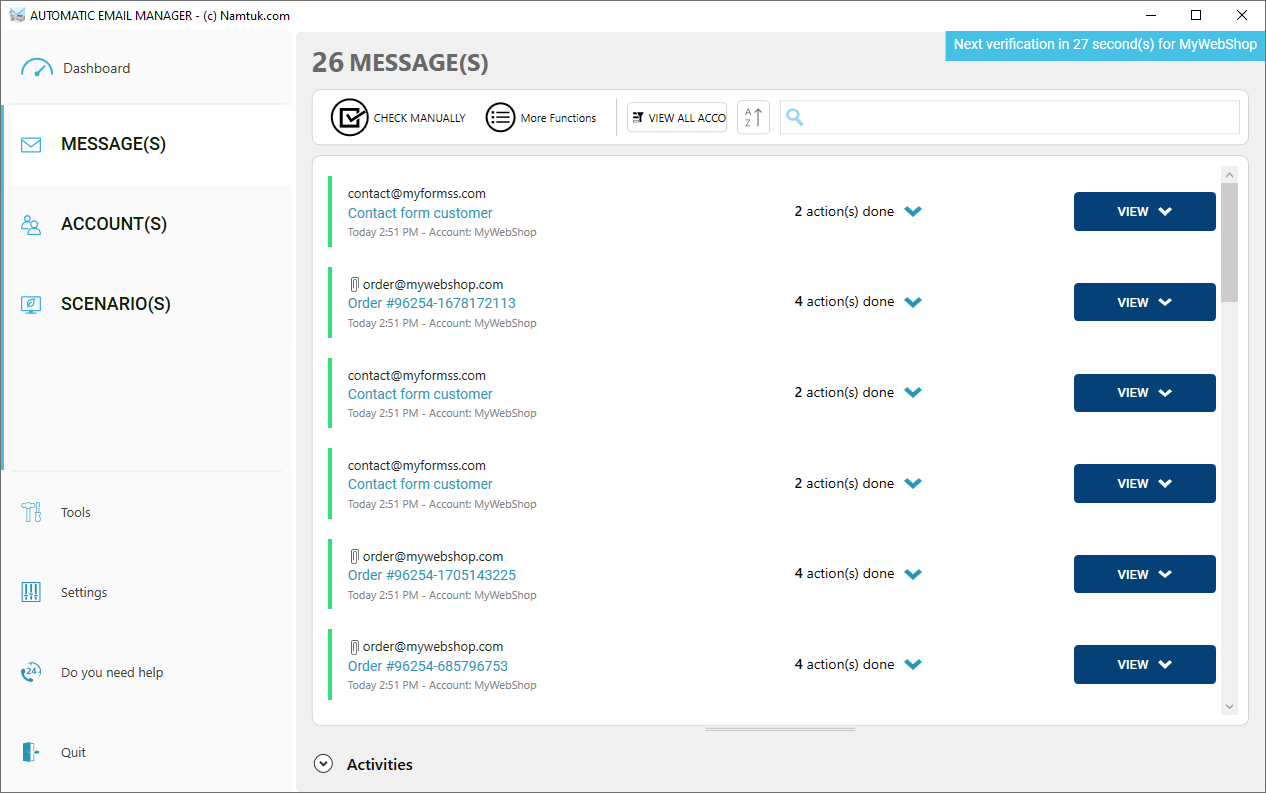
The message list, with the actions completed on each order and contact form email and a countdown to the next mailbox check.
Features
Unattended printing to the printer you choose
Automatic Email Manager prints email bodies and attachments such as PDF, Word, Excel, PowerPoint and images to any printer installed in Windows, including network and receipt printers. Different emails can go to different printers. You can add page numbers and stamps like "Received", print several pages per sheet, and insert a separator page, even from a tray of colored paper, so a stack of jobs stays easy to sort.
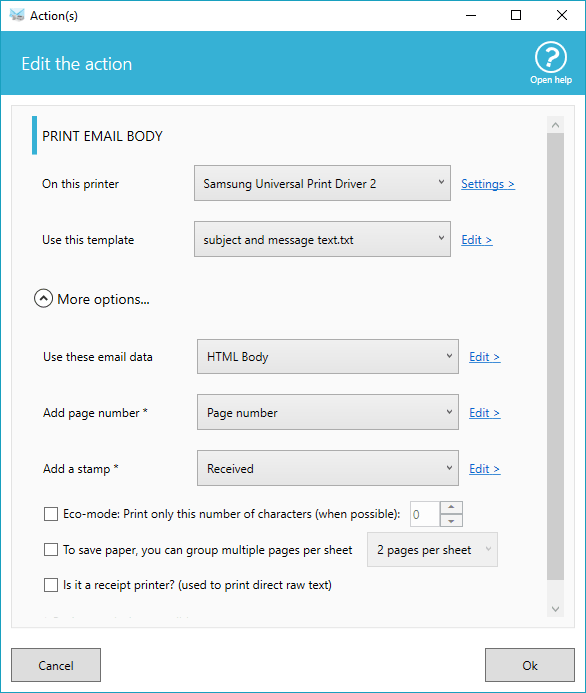
The Print Email Body action: printer, template, page numbers, stamp, eco-mode and a receipt printer option.
Emails saved as PDF, EML, MSG, text or images
Automatic Email Manager saves each email to a local or network folder in the format your archive or ERP expects, and can pull out the attachments on their own. It can also merge the email body and its attachments into a single PDF, with page numbers and stamps, which makes one tidy record per invoice. Only some attachment types can be converted to PDF.
Replies, forwards and team notifications
Automatic Email Manager can answer an order with your own template, forward a copy, or send a new email with files attached, optionally some days after the original arrived. It also posts to Slack, Microsoft Teams and Telegram, pushes to your phone through Pushover, and can call any web API with an HTTP request.
Data extraction, CSV export and scripts
Automatic Email Manager reads structured details out of an email with regular expressions and a data extractor built for things like order confirmations, then uses them in file names and actions. It exports email details to CSV, collects addresses into a list, downloads files from links in the message, and runs your own program or script, which can return a value for later actions.
Fallbacks when an action fails
Automatic Email Manager lets you decide what happens when a printer is off or a network drive is missing: carry on, skip to the next scenario, stop for that email, or run a different action, such as saving to another folder. Version 10 goes further with branching between scenarios, so a failed condition or error can start a fallback scenario.
New in version 10: optional AI actions and more
Automatic Email Manager 10 adds actions that summarize or translate the text of an email or attachment, or turn it into an audio file, using your own ChatGPT, Gemini or Claude API key. Also new: several monitored folders per account, a list that keeps a history of the last 30 days, image watermarks, barcodes and QR codes in stamps, and FTP backup. Scenarios still run on the rules you set.
Benefits
- Nothing gets missed because someone was busy. The rule fires on every matching email, including the ones that arrive before anyone is at a desk.
- Email stays in your building. Scenarios run on your own machine and your email isn't processed on Namtuk's servers, which matters for medical or legal paperwork. Actions you point outside, like Slack or an AI provider, do send that content there.
- Costs don't grow with volume. One license covers unlimited accounts with no per-email or per-task charge. Namtuk says some customers run over 600 accounts.
Real-World Uses
- Online shop: a Shopify or WooCommerce order email prints the packing slip in the warehouse, and the invoice is saved to an accounting folder.
- Restaurant: online orders print straight on the kitchen's receipt printer.
- Pharmacy: prescriptions that arrive by email print without staff watching an inbox.
- Accounts payable: supplier invoices merge with the covering email into one stamped PDF, ready for filing when the team arrives.
- Office replacing a fax line: eFax emails print like faxes always did, and junk is filtered out by rule first.
Who It's For, and Who Should Skip It
It's a strong fit for a small or mid-sized business with a repetitive, predictable email job, especially anything ending at a printer or a shared folder. It also suits teams with an IT person who can leave it running on a server.
Skip it if you're on a Mac, or if you want to connect web apps to each other with no email involved: Zapier or Power Automate fit that better and keep running with your computer off. If you only print the odd message to the default printer and always have Outlook open, an Outlook desktop rule may be enough. And for sorting a personal inbox, $99 a year is more than you need to spend.
Usage Guide
- Download the installer and install it on the PC or server that will stay on. You don't need to register for the trial.
- Click Connect your email, enter the address, and test the connection. IMAP is the default, and the account wizard offers Office 365, Gmail, Exchange and others.
- Choose what to fetch (all or unread emails) and how often to check.
- Add a scenario and pick the actions, such as print attachments, mark as read and move to an archive folder.
- Add conditions if only some emails should qualify, for example a sender containing your shop's domain.
- Send yourself a test email, watch the list, then leave it running in the background.
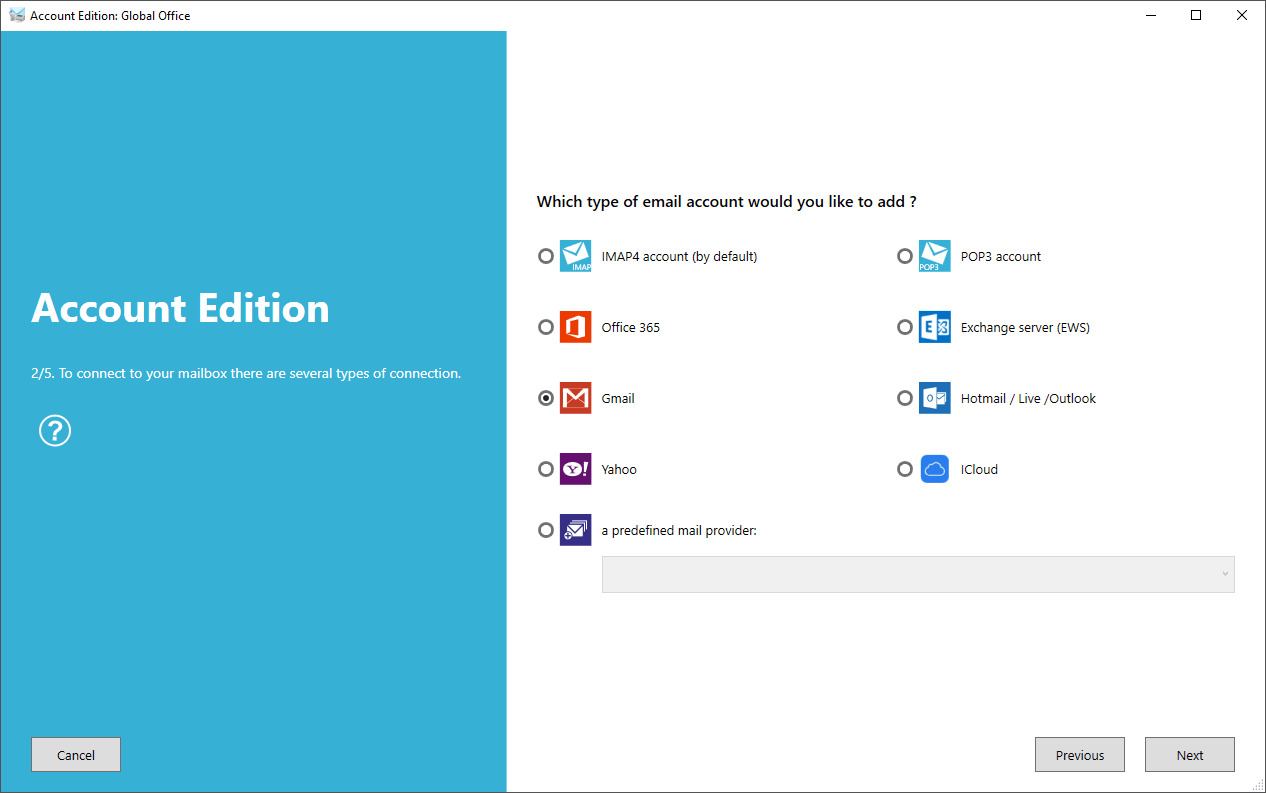
Step 2 of the account wizard, with the connection types. These screenshots come from Namtuk's site, so version 10's refreshed windows may look a little different.
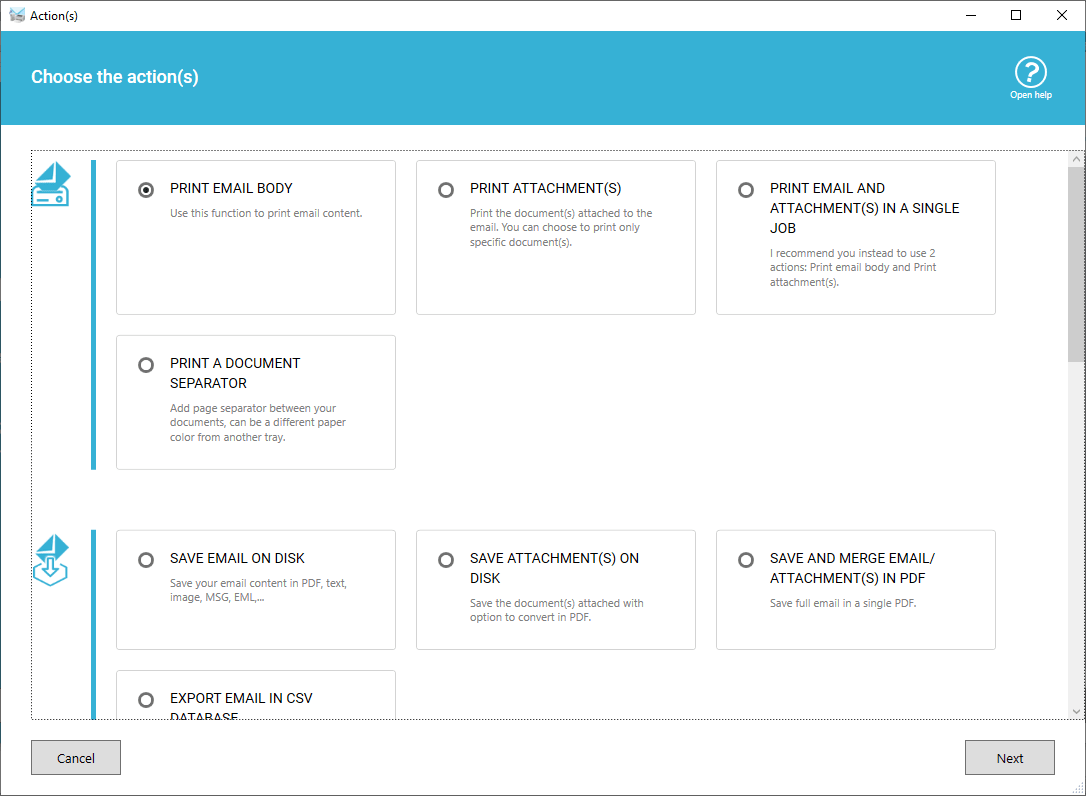
Choosing the actions for a scenario, with the print and save groups in view.
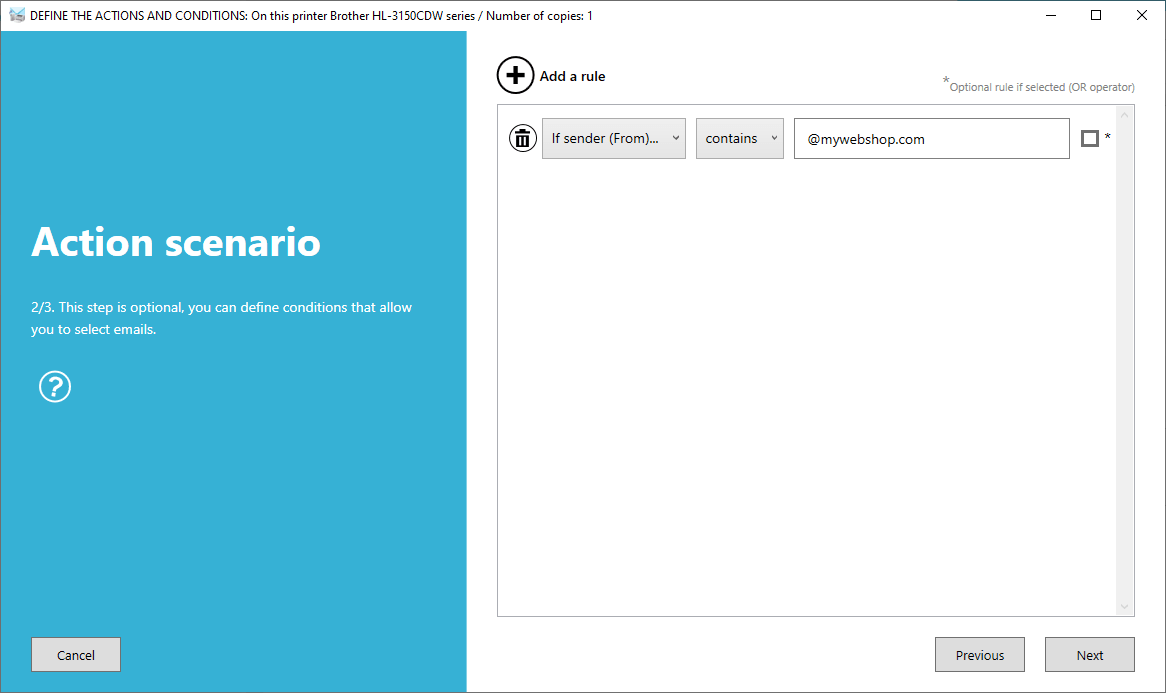
An optional condition limiting a scenario to emails from one sender domain.
Tips
- Keep the mailbox small. Add a move or delete action to each scenario. An inbox with thousands of emails is much slower to check.
- Going unattended with network printers? Windows services run under a system account with no network access by default. Set the service's Log On tab to a user who can reach the printer or folder.
- Using Windows Server with Office 365? Sign-in needs Edge or Chrome installed.
- Back up first. Version 9 and later have a Backup and restore button under Tools, which is also how you move to a new computer.
Where it falls short
- Rules take some setting up. The basics are quick, but reviewers have called the setup clunky, and getting the conditions right on your real emails is the actual work. One buyer gave up because the rules he set didn't perform.
- It isn't crash-proof. Namtuk's own help center has a guide to restarting it after a crash with Windows Task Scheduler, so plan for that if printing is critical.
- Printing depends on the file type. It won't touch unknown attachment types, and some formats need help: LibreOffice ODT files, for instance, need LibreOffice installed and a command line set up in the file type options.
- Unusual mail setups need tweaks. IBM Domino has to fetch all emails rather than a date range, Google Workspace admins may need to enable IMAP, and emails attached inline as EML or MSG can need a settings change.
- Paying and renewing has caused trouble. Several buyers report declined cards, VAT ID errors and confusion over currency on the order page, and you repeat that process every year on the annual plan.
What Users Say
Automatic Email Manager holds a 4.8 out of 5 on Trustpilot from 402 reviews (86% five-star, 2% one-star) and 4.6 out of 5 on Capterra from 17 reviews. SoftwareReview shows 4.5 from 13 ratings. We found no in-depth review from a tech publication, so what follows is customer feedback. Quotes keep the writers' own spelling.
Trustpilot: praise
"This program is great! When the AP staff come in, the invoices are already printed and they can start work immediately." Sally Pellegra, 4 stars, January 13, 2022
"This is exactly what we were looking for: Ability to automatically print AND save to PDF an email AND its attachments." Richard, 5 stars, November 12, 2022
"Automatic-email-manager has worked as advertised for us since 2019." M. Overcash, 5 stars, April 9, 2026
"If I need assistance, my email is answered within the hour." Gulf Coast Marine, 5 stars, September 4, 2026
"I have only just realised how long we have been reliant on this software." Andy Hartwell, 5 stars, June 30, 2026, under the title "Been using this for 19 years now !"
Trustpilot: criticism
"Rules installed do not perform. I have removed the software from our computers." William Ballentine, 1 star, June 30, 2025
"Third party would not accept credit card, then their bank took 10.01 in fees so I had to send second payment." customer, 1 star, January 15, 2026
"We really suffer for renewing every year. We don't know what is wrong with the payment gateway..." Sam, 2 stars, October 2, 2023
"Expensive for what it does, especially as it is a subscription." Simon, 2 stars, November 19, 2019
"It's a little clunky to get setup and the interface isn't great but it is doing the job we need it to" MK, 3 stars, August 6, 2019
Namtuk answers most critical reviews in public, and often disputes them: it told the first reviewer above that it's more constructive to contact the company before getting upset, and it says bank fees and card acceptance are outside its control. The two interface and price quotes date from 2019, and version 10 has since refreshed the windows.
Customer comments published by Namtuk
These come from the vendor's own testimonials page, so expect them to lean positive, but they show how people use it.
"Great software that allows us to automatically print our 9-1-1 dispatch and clear reports that are sent to us for each run we go on. These reports contain crucial information that we need for each run. Not having to print them manually each time saves lives!" Raymond L. Davis
"Good experience, software is working as expected. It receives my restaurant orders and prints it automatically to the kitchen printer, saves me lot of times." Steve A.
"Great software, 98% reliability, 2% of the time the program won't print my attachment somehow." David
"It's very nice software. Maybe it is more expensive." Panos
"I had some issues getting the program to activate, and was dismayed when I saw that there was no phone number for support, but the email based support ended up being very quick and reliable." Josh
The recurring themes
People like that it runs for years with little attention, with several saying they've used it for a decade or more, and that support replies fast. The complaints are about getting started and paying: rules that don't behave at first, an interface some find clumsy, trouble at checkout or renewal, and the price for a small user. Note that only 23 of the 402 Trustpilot reviews are from the last 12 months, so much of that score is older.
Comparisons
Automatic Email Manager vs Zapier and Power Automate
Automatic Email Manager wins when the end of the job is on your premises: a local printer, a network folder, a script. Zapier and similar cloud services connect web apps to each other and work with your PC off, but they can't reach your printer or local disks, and their pricing tends to rise with users or tasks. Automatic Email Manager only triggers on incoming email and only works while your machine is on.
Automatic Email Manager vs an Outlook rule
An Outlook desktop rule can print matching emails for free, but only with Outlook open, with you logged in to Windows, and only to the default printer. Automatic Email Manager needs no email client or logged-in user, and it can send different emails to different printers. It's worth the money once either of those limits gets in your way.
Editions and Pricing
There's one product with every feature in both licenses, and the choice is how you pay. At $99 a year, the perpetual license pays for itself in a little over four years, and a missed renewal can't stop your printing. These are single-license prices on the order page. Namtuk's volume discounts start at two licenses, with annual licenses down to $51 each above 100 and perpetual down to $349 each above 50.
| License |
Price |
Term |
New versions |
Computers |
| Annual |
$99 |
1 year, renewed by hand |
All included |
1 |
| Perpetual |
$399 |
Never expires |
Included for 4 years, then 30% off to update |
1 |
Buy Perpetual License
FAQs
Does Automatic Email Manager need Outlook installed?
No. Automatic Email Manager connects straight to the mail server, so it needs no Outlook, Thunderbird or other email client on the machine.
How many email accounts can I add to one Automatic Email Manager license?
Automatic Email Manager has no limit on accounts per license. Each account is one mailbox, and more accounts simply take longer to check on each pass.
What happens when the annual Automatic Email Manager license runs out?
Automatic Email Manager stops working once a year has passed from the purchase date, unless you renew. Namtuk reminds you by email and inside the software. You can also switch to a perpetual license at any time.
Does Automatic Email Manager send my emails to the cloud?
Automatic Email Manager processes email on the computer where it's installed, not on Namtuk's servers. The exceptions are ones you set up yourself: an AI action sends text to your chosen provider, and a Slack or Telegram action posts to that service.
Do I have to pay to upgrade from an older Automatic Email Manager to version 10?
Version 10 of Automatic Email Manager is free for customers with a valid license on versions 7, 8 or 9. Namtuk says the upgrade leaves your scenarios and settings in place, and you can roll back to version 9.
Is the Automatic Email Manager interface in other languages?
Yes. Automatic Email Manager comes in English, French, German, Spanish, Italian, Dutch, Portuguese, Danish and Chinese, among others.
System Requirements
- Windows 11, Windows 10 or Windows Server 2016, 2019, 2022 or 2025
- 64-bit Windows only
- 8 GB of RAM, more is better
- 150 MB of free disk space
- Any printer installed in Windows, for the print actions
Conclusion
Automatic Email Manager is worth the price if email regularly has to become paper or a filed PDF and a person is doing that by hand. At $99 a year, it pays back after a few hours of saved staff time, and customers who have left it running for over a decade suggest it holds up. The main reason to hold back is the no-refund policy combined with a setup some buyers found hard, so buy only after your own scenarios have worked through the trial. If your automation lives entirely in web apps, or you're not on Windows, look elsewhere.
Download Free TrialBuy Now