Rofiles: A Hot-Folder Robot That Converts, Stamps, Prints and Sends Every New File
Rofiles from Namtuk is a Windows tool that watches folders and runs a scenario on every new file that lands there: convert it to PDF, stamp it, merge it, print it, email it, upload it by FTP or post it to Teams, with optional AI summaries and translations through your own Gemini or ChatGPT key. It's aimed at IT staff and small offices that move a steady stream of documents by hand. An annual license is $99 and a 5-year license $399, per computer, and the trial runs 30 days or 500 files.
Think of the scanner that drops invoices into a shared folder, the ERP that exports a PDF per order, or the colleague who saves reports somewhere for someone else to print. Each of those ends with a person opening files one by one. Rofiles sits on that folder as a Windows service and does the follow-up work as soon as a file appears, then moves the file to a "processed" or "failed" folder so you can see what happened.
Quick facts
- Developer: Namtuk, Rennes, France (makers of Automatic Email Manager)
- Version: 2026.16.0608, released June 8, 2026
- Platforms: 64-bit Windows 11 and 10, Windows Server 2016 to 2025. No Mac or Linux version
- Files: PDF, Word, Excel, PowerPoint, text, XML, RTF, CSV, HTML, Markdown, MSG and EML emails, PNG, JPG, BMP, PSD, TIFF, GIF, WebP, HEIF, ZIP and PRN
- Price: $99 a year or $399 for five years, one computer per license, unlimited folders and files
- Trial: all features for 30 days or 500 files
- What we checked: the installer on November 25, 2026: Rofiles-setup.exe, 67.2 MB, version 2026.16.0608, dated June 8, 2026 and signed by Namtuk; and the order page on November 25, 2026: Rofiles 1 Year $99.00, Rofiles 5 Years $399.00. We didn't run scenarios on our own files.
Before you buy
- No refunds, under any circumstances. Namtuk's order page says all sales are final, so build your real scenario during the trial. The 500-file limit can run out before the 30 days on a busy folder.
- The license stops processing when it runs out. Renewal isn't automatic; if you don't renew, Rofiles stops handling files at the end of the term.
- A smaller Starter license exists. Namtuk also sells a Starter license (one folder, up to 1,000 files a year, regularly $60) and was offering it free for a year as a limited promotion when we checked. It's ordered from Namtuk's own site; the buttons on this page order the unlimited 1-year and 5-year licenses.
- AI actions send your files out. Everything else runs locally, but summaries, translations, transcription, text to speech and image generation go to Google Gemini or OpenAI, using an API key you pay for separately.
Download Free TrialBuy 1 Year ($99)Buy 5 Years ($399)
Overview
Setup is a three-step wizard per folder: pick the folder (local or network, with or without subfolders) and how often to check it, build the scenario of actions, then choose where processed and failed files go. A scenario is a chain of steps, and a condition step splits it into "yes it matches" and "no it doesn't" branches, so one folder can send invoices to a receipt printer and everything else to an archive. The main window shows each monitored folder with a countdown to the next check and a list of the files handled, with every action's result.
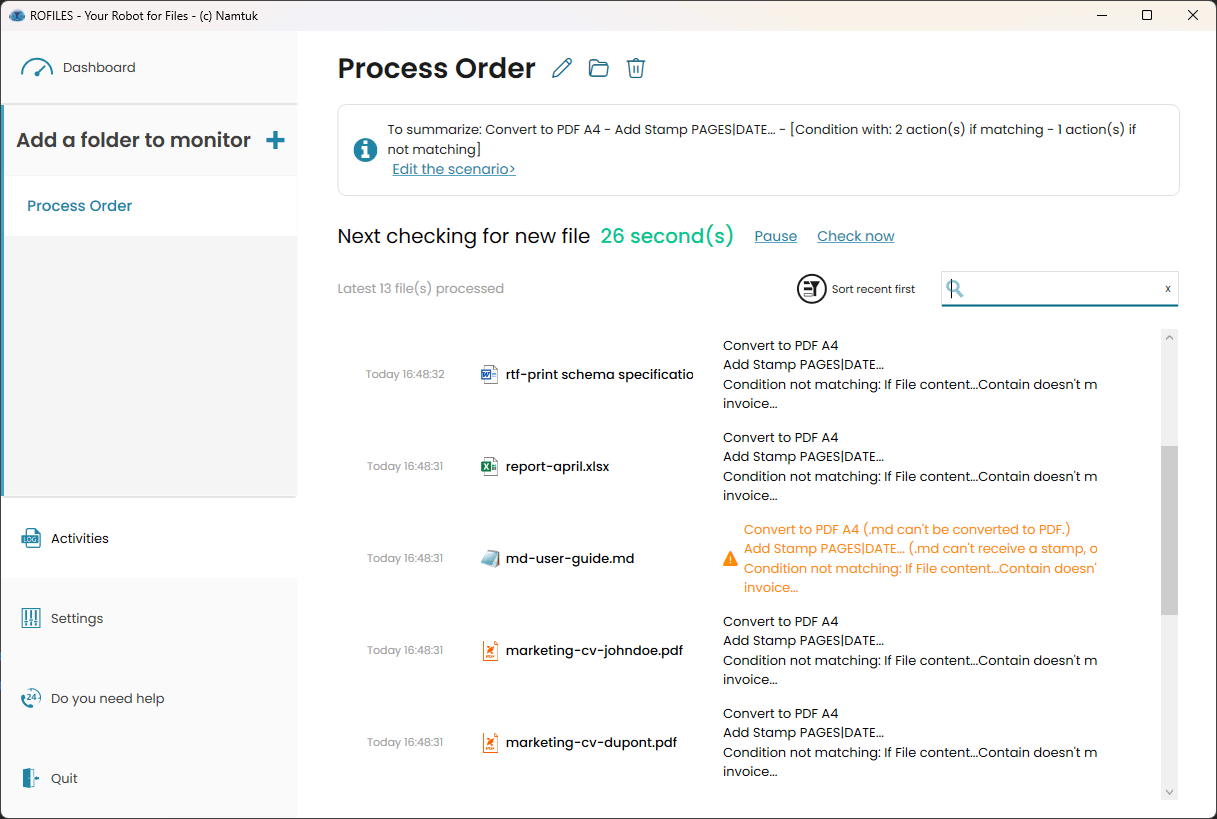
A folder called "Process Order": its scenario summary (convert to PDF A4, add a page and date stamp, then a condition), the next check in 26 seconds, and the latest files. A Markdown file is flagged in orange because that version couldn't convert it to PDF.
Features
Watches local and network folders on a schedule
Rofiles checks each folder at the interval you set, or on an advanced schedule, and can include subfolders. Successful and failed files can be moved to separate folders, so nothing is processed twice and errors are easy to find.
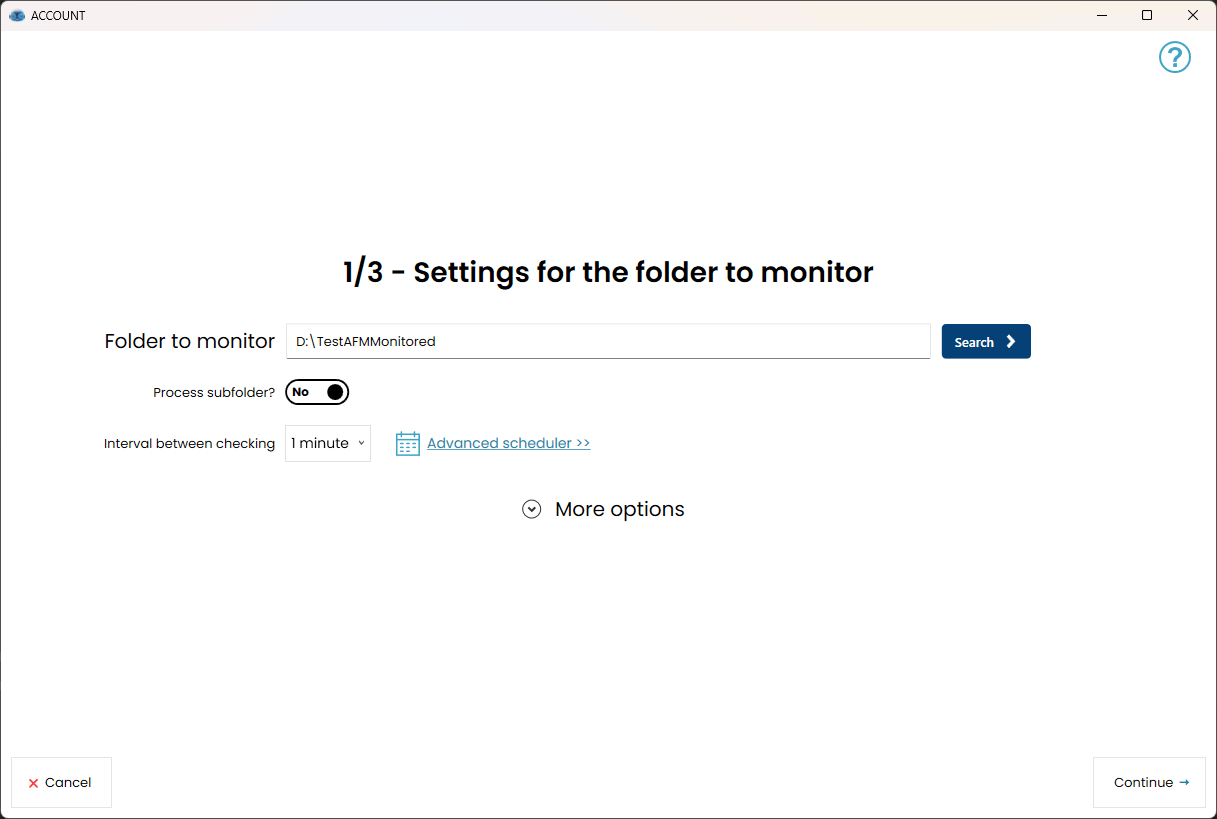
Step 1: the folder to monitor, whether to include subfolders, and a 1-minute check interval, with an advanced scheduler link.
Converts and transforms files
Rofiles converts Word, Excel, PowerPoint, images, XML, text and email files to PDF or to PNG, JPG or TIFF images. On PDFs it adds, inserts or removes pages and stamps text such as "Received on" and the date; on images it rotates, resizes and mirrors. It can also pull the raw text out of a document for another system, and merge every file in a run into a single PDF or text file, then run a final scenario on the merged file (stamp, print or email it).
Chains actions into a scenario
Rofiles builds each folder's job from blocks you stack in order: convert, stamp, print, send. Each block can be switched off without deleting it, and "Add something" inserts another step anywhere in the chain.
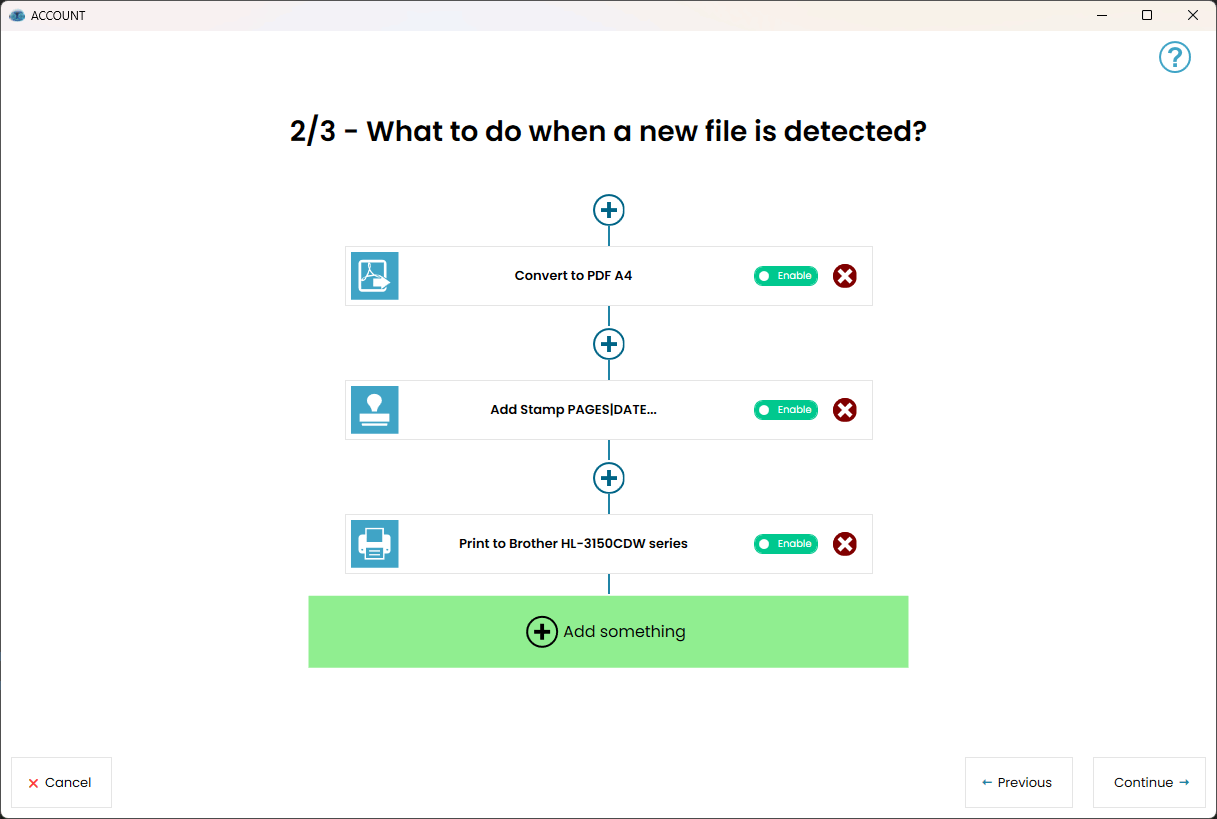
Step 2: a three-action scenario: convert to PDF A4, add a pages and date stamp, print to a Brother HL-3150CDW.
Conditions route each file
Rofiles can test a file's name or content and take a different path for each answer. A file whose text contains "order invoice" goes to the receipt printer and triggers a Teams message; anything else stops there. Conditions can also pick a printer by file content.
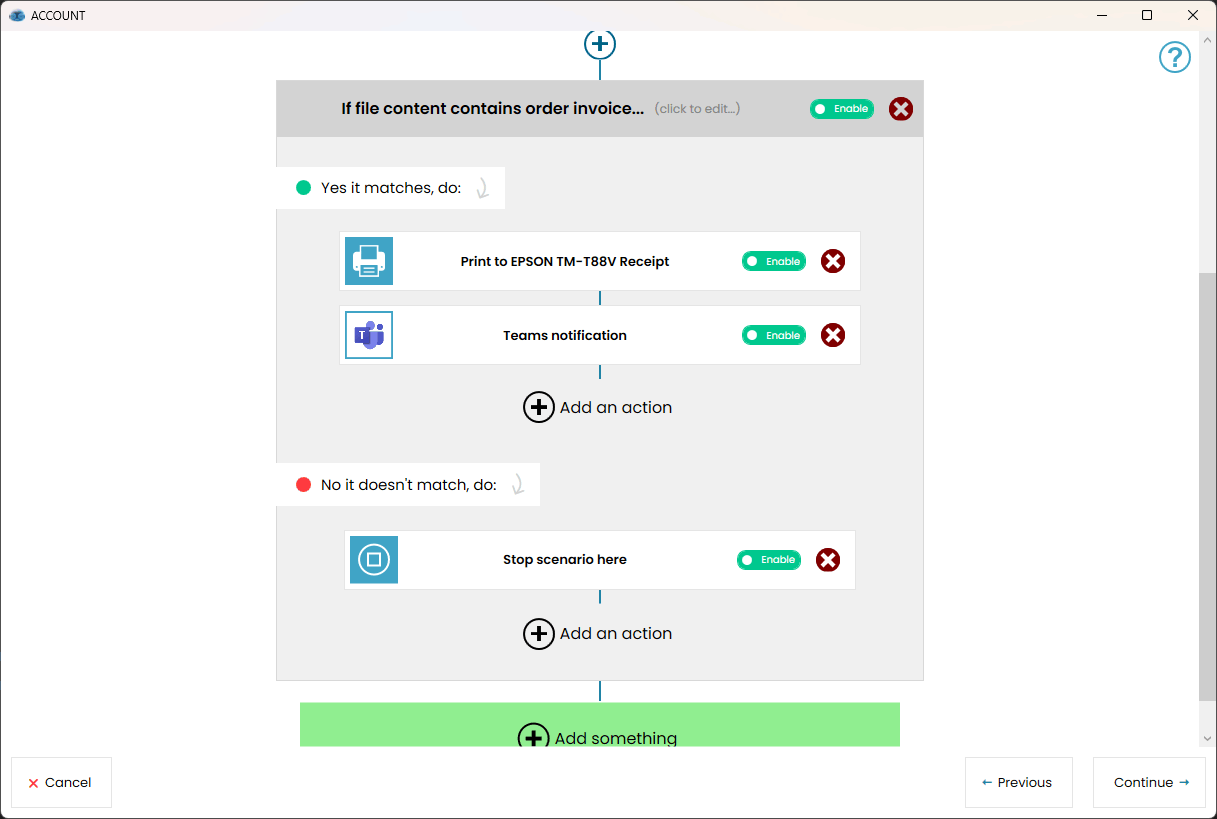
A condition: if the file content contains "order invoice", print to an Epson TM-T88V receipt printer and send a Teams notification; if not, stop the scenario.
Sends results wherever they're needed
Rofiles delivers the processed file, or the text it produced, to a local or network folder, any Windows printer, email through any SMTP service (Gmail, Office 365, Exchange), an FTP server, Microsoft Teams, Slack, Telegram, or your own system through an HTTP API call. File-name fields such as %ORIGINAL_FILENAME_FULL% let you keep the original name and path in the output.
AI actions with your own key
With a Google Gemini or OpenAI key, Rofiles summarizes or translates documents, transcribes audio files to text, turns text into an MP3 (with an option to play it straight away, which Namtuk added for blind users), and generates images from a text prompt. The June 2026 release lists Gemini 3 Flash and 3 Pro models.
Benefits
- Repetitive file handling stops depending on a person. Once a scenario works, every file is treated the same way, including at night and on weekends.
- It works with systems you can't change. Anything that can save a file to a folder (a scanner, an ERP export, a web app's download) can feed Rofiles, with no integration work on that system.
- Your documents stay on your server unless you add an AI step.
- It's actively developed. The release history lists ten releases between June 2025 and June 2026.
Real-World Uses
- Scan-to-archive: scanned invoices dropped into a folder are stamped with the received date, converted to PDF and copied to the accounting share.
- Order printing: an ERP or web shop saves a PDF per order, and Rofiles prints the ones containing "invoice" on the warehouse printer.
- Daily batch: all reports saved during the day are merged into one PDF, watermarked and emailed to a manager on a schedule.
- Accessibility: documents placed in a folder are summarized and read aloud as audio for a visually impaired colleague.
- Meeting notes: audio recordings saved to a folder are transcribed and the text posted to a Teams channel.
Who It's For, and Who Should Skip It
Rofiles is for IT admins and small offices on Windows who have a folder where files pile up and a routine that always follows: convert, stamp, print, send. It's easiest to justify where the same steps run dozens of times a day.
Skip it if your files arrive by email rather than in a folder (Namtuk's Automatic Email Manager covers that), if you only need the occasional batch conversion (a one-off PDF converter is cheaper), or if you're on a Mac or Linux. People comfortable with scripting can build simple folder watchers with PowerShell or Power Automate; Rofiles' value is doing it without code, with printing, stamping and delivery built in.
Usage Guide
- Download and run the installer on a 64-bit Windows PC or server. It adds the Microsoft .NET runtime if needed.
- Click "Add a folder to monitor", choose the folder and the check interval, and decide whether subfolders count.
- Build the scenario: add actions in order, and add a condition where files need different handling.
- Choose where processed and failed files go, then save. Rofiles starts watching as a Windows service.
- Drop a few test files in the folder and check each result in the folder's history list before pointing real traffic at it.
- For AI actions, paste your Gemini or OpenAI API key in the settings first.
Where it falls short
- Not every action fits every file type. The vendor's own screenshot shows a Markdown file failing PDF conversion and stamping; Markdown support arrived only in the June 2026 release. Test your actual formats in the trial.
- Folder polling, not instant. Rofiles checks on an interval (one minute in the default setup), so a file waits until the next check.
- Very little outside feedback. Rofiles is new and has almost no public user reviews yet.
What Users Say
Reviews so far
Rofiles has no user reviews yet on Product Hunt, where its launch page shows "No reviews yet", and no ratings on SourceForge or Appvizer. Namtuk's track record comes from its older product: Automatic Email Manager, built by the same team on a similar engine, holds a 4.8 out of 5 rating from 402 reviews on Trustpilot, where long-time customers keep coming back to two points, that it runs for years without attention and that support answers quickly. That says something about the company, not about Rofiles itself, so lean on the trial.
Comparisons
Rofiles vs Automatic Email Manager
Both are Namtuk tools that run as Windows services and apply rules automatically. Automatic Email Manager starts from a mailbox: it prints, saves and forwards incoming emails and their attachments. Rofiles starts from a folder: it converts, stamps, merges, prints and sends files that appear there, and adds AI actions. Both cost $99 a year. Pick by where your documents arrive; some offices use both, with Automatic Email Manager saving attachments to a folder that Rofiles then processes.
Editions and Pricing
| License | Price | Folders and files | Term |
|---|
| Starter | $60 a year (free for a year as a promotion when we checked) | 1 folder, 1,000 files | 1 year or 1,000 files |
| Annual | $99 | Unlimited | 1 year |
| 5 Years | $399 | Unlimited | 5 years |
Every license covers one computer, includes all new versions and support for its term, and can be moved to another machine. Namtuk discounts orders of two or more licenses, and the order form adds local tax by country. The buttons below order the Annual and 5-year licenses:
Buy 1 Year ($99)Buy 5 Years ($399)
FAQs
Does Rofiles need a user logged in to Windows?
No. Rofiles runs as a Windows service, so it keeps watching folders after a reboot and when nobody is signed in, which is why it suits a server.
Does Rofiles send my files to the cloud?
Only for AI actions. Rofiles converts, stamps, merges, extracts and prints on the computer where it's installed. Summaries, translations, transcription, text to speech and image generation go to Google Gemini or OpenAI with your own API key.
Can Rofiles watch a network share?
Yes. Rofiles monitors local or network folders, including their subfolders if you switch that on.
What happens when the 30-day trial ends?
The Rofiles trial stops after 30 days or 500 files, whichever comes first. Entering a license key in the installed trial keeps all your folders and scenarios.
Does the Rofiles license renew automatically?
No. Rofiles licenses are renewed by hand; Namtuk sends a reminder by email and in the program. Without renewal, Rofiles stops processing files at the end of the term.
Can I get a refund on Rofiles?
No. Namtuk doesn't refund Rofiles purchases for any reason, so use the trial on your real files before you buy.
How do I move Rofiles to a new server?
Copy C:\ProgramData\Namtuk\ROFILES\ to the same place on the new machine, install Rofiles there, and uninstall it from the old one. The license transfers with it.
System Requirements
- Windows 11 or 10, or Windows Server 2016, 2019, 2022 or 2025, 64-bit
- 150 MB of free disk space
- Microsoft .NET runtime (the installer adds it if missing)
- For AI actions: a Google Gemini or OpenAI API key
Conclusion
Rofiles is worth $99 a year if you have a folder where files arrive all day and someone spends time converting, stamping, printing or forwarding them: it replaces that routine with a scenario you build in a few clicks and leave running as a service. The one reason to buy is how much it covers without scripting, from PDF stamping and merging to printer routing and Teams messages. The main reason to hold back is that it's young, with almost no outside reviews, and Namtuk gives no refunds, so prove your exact scenario in the 30-day, 500-file trial first.
Download Free TrialBuy 1 Year ($99)Buy 5 Years ($399)