At a glance
| Tool |
Reads attachments from |
Price at checkout |
Free use |
Runs unattended |
| Mail Attachment Downloader PRO Server | Gmail, Microsoft 365, Exchange, IMAP, POP3 | $495 one-time (regular $550), or $300 a year | Free edition: 1 account, 1 rule | ✓ Windows service |
| Kernel Outlook Attachment Extractor | PST, OST, MSG files, Outlook profiles | $49 (Home, 2 PCs, 1 year) | Trial saves 10 attachments per folder | ✗ one-off jobs |
| Kutools for Outlook | Classic Outlook (any account in it) | $59 one-time | 30-day full trial | Auto-save while Outlook is open |
| Automatic Email Manager | Gmail, Office 365, Exchange, IMAP, POP3 | $99 a year ($399 perpetual) | 30-day full trial | ✓ Windows service |
| Download Mailbox Emails | IMAP with a password or app password | $19 one-time ($9.50 with BLACKFRIDAY2026 through December 1, 2026) | Trial with a limited number of emails | ✗ |
| G-Lock Email Processor | POP3, IMAP (password sign-in), mail folders | $595 one-time | 30-day full trial | ✓ Windows service |
How we picked and what we checked
- We looked for Windows tools listed on this site whose main job, or one of their main jobs, is saving email attachments in bulk, and grouped them by where the mail lives: a live mailbox, Outlook's own data files, or a mail server that keeps receiving new messages.
- We read each vendor's product, pricing, FAQ and help pages for the sources it reads, the trial limits and the license terms.
- We downloaded the current installers and read their version data, and opened every order page.
- What we checked: Mail Attachment Downloader's free installer, version 3.4.1043 (dated November 23, 2026), and Automatic Email Manager's installer, version 10.02.1124 (dated November 24, 2026), both downloaded on November 24, 2026; order page prices on November 24, 2026 of $495 for Mail Attachment Downloader PRO Server (shown as $550 less a $55 discount), $49 for Kernel Outlook Attachment Extractor Home, $59 for Kutools for Outlook, $99 for Automatic Email Manager, $595 for G-Lock Email Processor and $19 for Download Mailbox Emails, which dropped to $9.50 with the BLACKFRIDAY2026 code.
We compared features, sources, trials and prices. We didn't connect these tools to a live mailbox or time an extraction, so speeds are the vendors' and users' reports.
The free ways first
Every mail program can save all the attachments of one email in one go. None of them can do it for a whole folder without help:
- Classic Outlook for Windows: open or select the email, click the arrow next to any attachment and choose Save All Attachments. Repeat for every email.
- Gmail on the web: an email with two or more attachments has a Download all button that saves them as one zip file. Again, one email at a time.
- New Outlook and Outlook on the web: each message has a Download all option for its own attachments.
- Thunderbird: Save All works on the open message; saving from many messages needs an add-on.
- A VBA macro in classic Outlook can loop through a folder and save everything, but you have to enable macros, paste in code and fix it when it breaks. Most offices won't allow it.
The free option that does a whole mailbox is Mail Attachment Downloader's free edition. It's the free tier of the same program as the PRO Server edition below, for personal use: one email account, one rule, attachments only, saved into the folder you choose. You sign in to Gmail through Google in your browser, so the program never sees your Gmail password. It's Windows-only.
- Download the free zip (24 MB) and run the installer.
- Add your account: choose Gmail, Microsoft 365, Exchange or IMAP. Yahoo and some other providers need an app password.
- Pick the mail folders and a start date, so the first run doesn't fetch years of mail you don't need.
- Set the save location and click Connect and Download.
Two things to expect. Gmail caps how much you can download per day, so a big mailbox stops partway; Mail Attachment Downloader remembers where it was and carries on at the next run. And the program remembers what it has already saved, so running it again only picks up new mail.
Download Mail Attachment Downloader Free
When the free edition stops being enough (a second account, separate folders per sender, file names taken from the email, a PST file with no mailbox behind it), one of the tools below takes over.
Mail Attachment Downloader PRO Server
Mail Attachment Downloader PRO Server by Gearmage
- Price: $495 one-time at checkout on November 24, 2026 (shown as $550 less a $55 discount, with no end date given), or $300 a year. Pro Client, the desktop edition, is $300 one-time or $180 a year.
- Platform: Windows 10 or later and Windows Server 2016 or later; version 3.4.1043
- Refunds: full refund within 30 days
- Best for: offices that receive invoices, orders, reports or scans by email and want them saved, renamed and filed automatically, around the clock
Mail Attachment Downloader PRO Server turns "download all attachments" into a standing rule. Each rule says which emails to catch (sender, subject, date, attachment name or count, with AND/OR groups and regular expressions), where to save, what to call the file and what to do next. A save path like {FROM}\{ORDER_ID}.pdf builds folders from the email itself, and the extraction wizard pulls values such as an invoice number out of the message for use in file names. It installs as a Windows service, so it keeps working with nobody signed in.
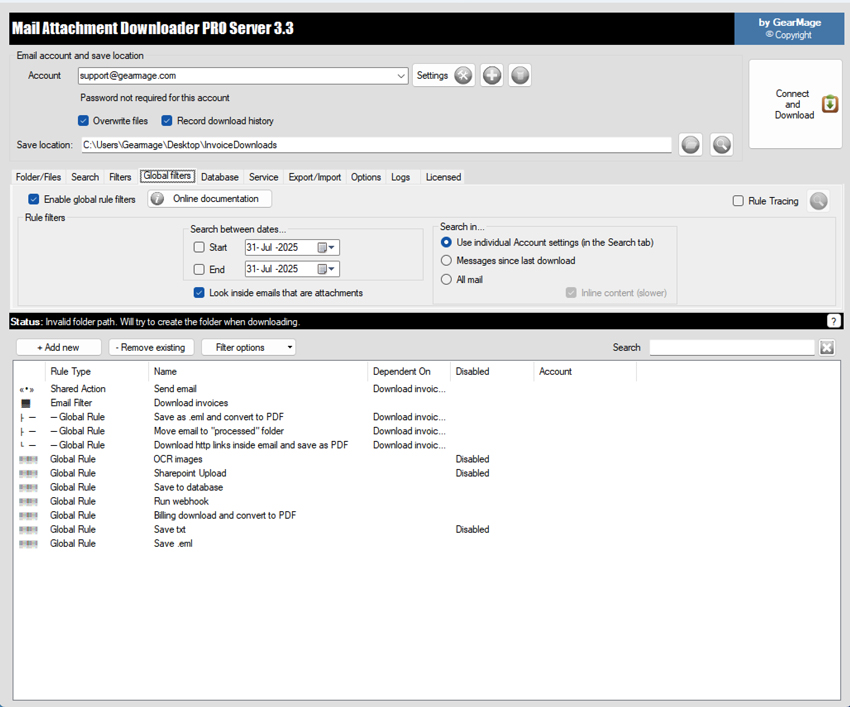
The PRO Server 3.4 window: one account, a save location of C:\Users\Public\Documents\Invoices, and a list of rules that download invoices, save them as .eml and PDF, move processed mail, run OCR, upload to SharePoint and write to a database.
After saving, PRO Server can unzip attachments, convert them between 59 formats, merge an email and its attachments into one PDF, print, move or mark the email as read, download files linked in the body, upload to SharePoint, write rows to an ODBC database or call a webhook. Pro Client does the core job (several accounts, unlimited rules, custom names) on a desktop that's on during the day, converts to PDF only, and doesn't install on Windows Server.
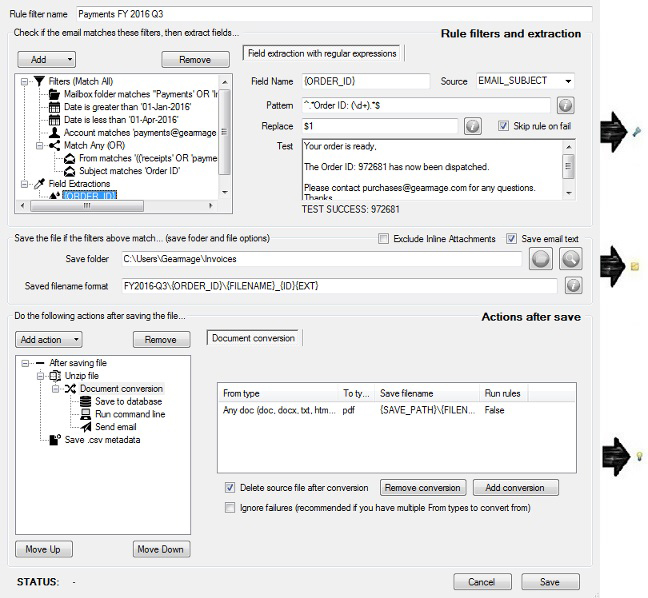
A rule that catches invoice emails from billing@acme.com, pulls the invoice number out of the subject (the test shows 4821), saves into a folder named after it, then unzips, converts to PDF and sends an email.
What we like
- Covers Gmail, Microsoft 365 (including shared mailboxes), Exchange and any IMAP server
- Folders and file names built from the email's own content
- Runs locally: your mail goes from your server to your disk, not through a cloud service
- A one-time license, with a free edition to test sign-in first
Watch out for
- Dense, option-packed screens; regular expressions help
- One-time licenses include major upgrades for the first year only
- There's no PRO trial; you test with the free edition
- Windows-only, and HTTPS-inspecting firewalls cause most connection trouble
"We have used Mail Attachment Downloader in dozens of client projects over 8+ years. It is incredibly versatile… We often call it 'Outlook rules on steroids'." (Jeremy, quoted on Gearmage's site)
"I love the program. It has been a huge time saver and I love that it will download specific email attachments to the NAS to be accessible by all employees, even when I am not in the office." (Stewart, quoted on Gearmage's site)
Download.com's staff review of the free edition (January 2015) called it "Fast" and "Safe", but noted "the app was created first and foremost as a utility." Independent reviews of the PRO editions are scarce; AlternativeTo shows likes but no written reviews.
Download Free EditionBuy Mail Attachment Downloader PRO Server
Kernel Outlook Attachment Extractor
Kernel Outlook Attachment Extractor by KernelApps
- Price: $49 for the Home License at checkout (2 PCs, valid 1 year); Kernel lists Corporate at $149 and Technician at $299, both lifetime
- Platform: Windows 11 back to older versions, Windows Server 2022 back to 2003; version 25.2
- Trial: saves 10 attachments per folder
- Best for: a one-time clean-out of an Outlook mailbox or an old PST file, even on a PC without Outlook
Kernel Outlook Attachment Extractor is the quickest answer when the mail is already in Outlook's data files. Add one or more PST, OST or MSG files (password-protected PSTs too), or connect an Outlook profile for Office 365, Exchange, Gmail or IMAP, tick the folders and choose Extract, Attachments. The files land in a folder tree that mirrors the mailbox, so "Inbox/Clients/Acme" becomes a folder of Acme's documents. Filters by sender, subject, date and read state, plus include or exclude lists of file extensions (only .pdf, or everything but images), narrow it down. It also exports email addresses to Excel.
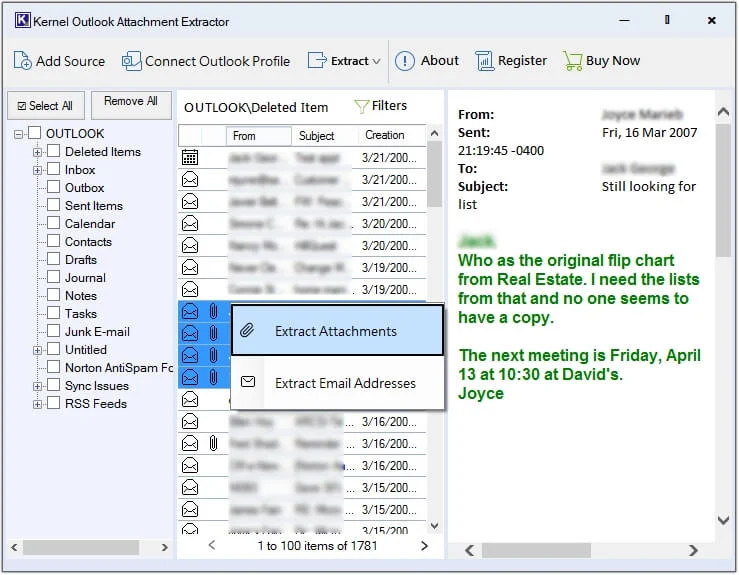
A loaded Outlook folder tree on the left, selected messages with attachments, and the right-click menu offering Extract Attachments or Extract Email Addresses.
What we like
- Reads PST and OST files without Outlook installed
- Keeps the mailbox's folder structure
- File-type include and exclude filters
- The trial shows it can read your file before you pay
Watch out for
- The $49 Home License lasts one year
- Corrupt PST or OST files are refused; repair them first
- It copies the attachments out but doesn't remove them from the emails
- No scheduling: it's a tool you run, not a service
"I needed to access attachments from an old PST file on a system without Outlook installed... This tool worked perfectly, allowing me to extract all the attachments directly from the orphaned PST file in the same hierarchal order." (Paul P. Bogen, system administrator, quoted by Kernel)
Kernel's page shows 4.9 out of 5 from 440 reviews collected on its own site. Independent reviews of this particular tool are scarce; on Trustpilot the company holds 4.9 from 166 reviews, mostly about its converters.
Download Kernel Outlook Attachment Extractor TrialBuy Kernel Outlook Attachment Extractor
Kutools for Outlook
Kutools for Outlook by ExtendOffice
- Price: $59 one-time at checkout, with two years of free updates
- Platform: classic Outlook 2010 to 2024 and Microsoft 365 on Windows; not the new Outlook, the web or Mac
- Trial: 30 days, all features; 60-day money-back guarantee
- Best for: classic Outlook users who want bulk attachment tools inside Outlook, plus 100 other conveniences
Kutools for Outlook adds the missing "save attachments from all selected emails" to classic Outlook. Its Attachment Manager lists the attachments across the folders you choose, so you can sort by size or sender and batch save, detach, compress or delete them. It can also auto-save or auto-detach the attachments of new mail as it arrives, while Outlook is open. Since it's a general add-in, you also get things like replying with the original attachments kept, snooze and duplicate removal.

The Attachment Manager listing 478 attachments with received date and sender, a search scope menu, and Save, Delete, Compress and Detach buttons along the bottom.
What we like
- Works inside Outlook, on whatever accounts Outlook already has
- Detach and compress free up mailbox space, not just copy files
- One payment, a long trial and a 60-day guarantee
Watch out for
- Classic Outlook only; Microsoft is moving people to the new Outlook
- Auto-save only runs while Outlook is open
- No file names built from the email's content
"Kutools is constantly expanding and improving and is a must have utility to add to your productivity tools." (Stephen, quoted by ExtendOffice)
On Trustpilot, ExtendOffice as a company had 4.3 out of 5 from 8 reviews on November 6, 2026. The sharpest complaint there is about license recovery after a PC failure: "It is a long and drawn out and impossible process to try and retrieve your very long serial code." (Terry Bradley, July 16, 2022)
Download Kutools for Outlook TrialBuy Kutools for Outlook
Automatic Email Manager
Automatic Email Manager by Namtuk
- Price: $99 for one year at checkout, or $399 perpetual, per computer
- Platform: 64-bit Windows 11, 10 and Windows Server 2016 to 2025; version 10.02.1124
- Trial: 30 days, all features; no refunds after purchase
- Best for: shops and offices that want incoming attachments printed and saved as PDF without anyone touching them
Automatic Email Manager saves attachments as part of a "scenario" that runs on every new email. It can save the attachments on their own, save the whole email as PDF, EML or MSG, or merge the body and attachments into one PDF, and its strength is printing: attachments go straight to any Windows printer, including network and receipt printers. It's the pick when "download" really means "print and file". It runs as a service with no Outlook needed, and its 402 Trustpilot reviews average 4.8.
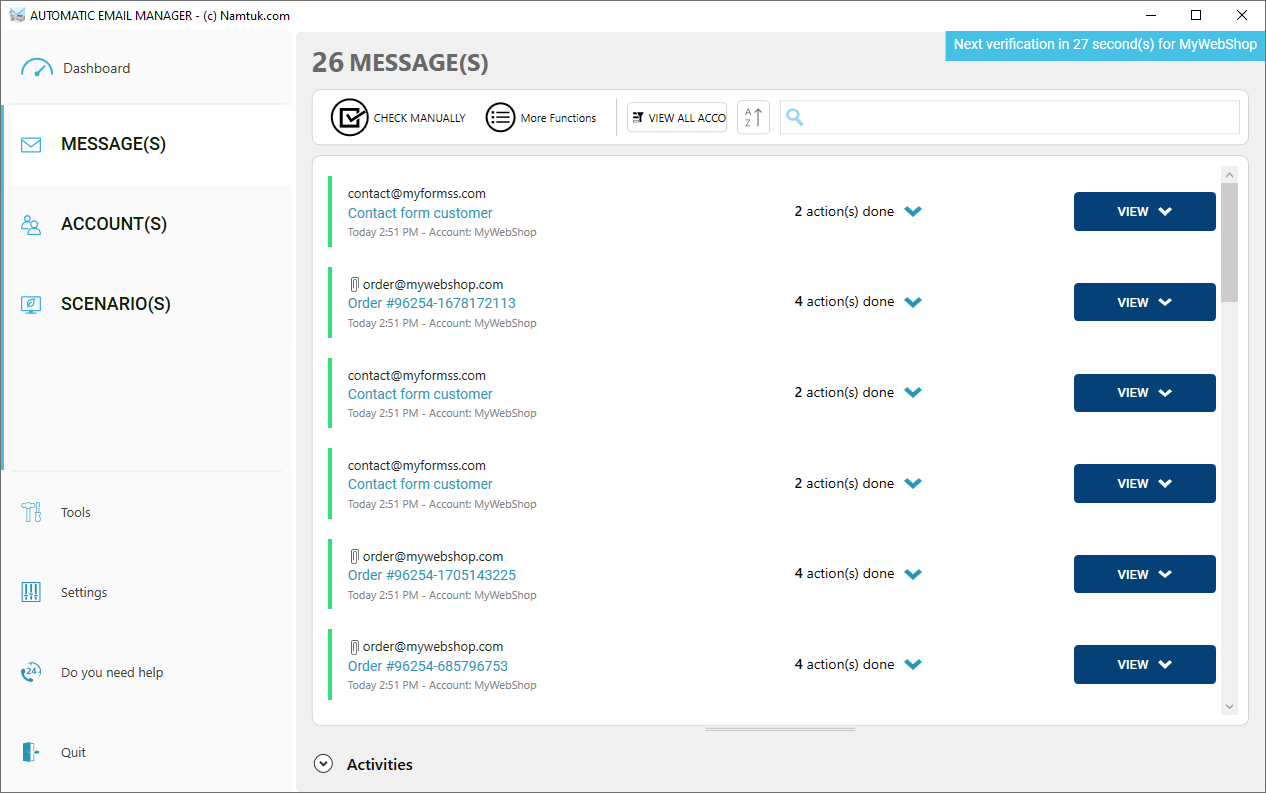
The message list: order and contact form emails with the number of actions done on each, and a countdown to the next mailbox check.
What we like
- Unattended printing plus saving in one rule
- Long-running product with frequent builds
- Strong Trustpilot record and fast email support
Watch out for
- No refunds: use the whole trial
- The $99 license stops working after a year unless renewed
- Only some attachment types convert to PDF
"This is exactly what we were looking for: Ability to automatically print AND save to PDF an email AND its attachments." (Richard, Trustpilot, November 12, 2022)
"It's a little clunky to get setup and the interface isn't great but it is doing the job we need it to" (MK, Trustpilot, August 6, 2019)
Download Automatic Email Manager TrialBuy Automatic Email Manager
Download Mailbox Emails
Download Mailbox Emails by Vovsoft
- Price: $19 one-time, lifetime license. Black Friday: the BLACKFRIDAY2026 code took it to $9.50 at checkout on November 24, 2026; Vovsoft's sale runs through December 1, 2026
- Platform: Windows 11 back to Vista; version 2.2
- Trial: a limited number of emails, personal use
- Best for: keeping every email of an IMAP account, attachments included, as files before you close or clean out the account
Download Mailbox Emails saves whole messages, not loose attachments. It logs in over IMAP and writes each email of the folders you tick as an EML file, with its attachments inside; Thunderbird, Outlook and Windows Mail open them. That's the right tool when you want the emails and their files kept together, and the wrong one when you want a folder of PDFs. It signs in with a password or app password only, so Outlook.com and Hotmail, which no longer accept password IMAP, don't work.
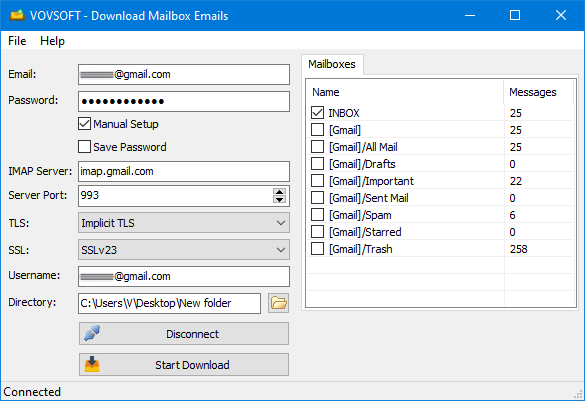
Connected to imap.gmail.com on port 993: Gmail's folders with their message counts, INBOX ticked, and an output folder on the desktop.
Vovsoft's page shows 4.8 out of 5 from 4 ratings, among them "simple, easy to use. does what it says on the tin." (Anonymous User). Enter BLACKFRIDAY2026 in the coupon box at checkout to get the sale price.
Get the Download Mailbox Emails TrialBuy Download Mailbox Emails
G-Lock Email Processor
G-Lock Email Processor by G-Lock Software
- Price: $595 one-time at checkout
- Platform: Windows 10 or Windows Server 2008 or later; version 3.6.2, from August 2020
- Trial: 30 days; 60-day money-back guarantee
- Best for: pulling data out of emails and their CSV, text or PDF attachments into a database
G-Lock Email Processor treats saving attachments as one step in a data pipeline. Its rules can save attachments to a folder (unzipping first), rename them, store them in a database as binary data and convert images and TIFFs to PDF, but its real job is extracting fields from messages and attachments into Access, MySQL, SQL Server or any ODBC database. Two caveats make it a niche pick here: there have been no releases since 2020, and accounts sign in with a server, login and password, so mailboxes that only allow modern sign-in, such as Microsoft 365, may not connect. Test your account in the trial.
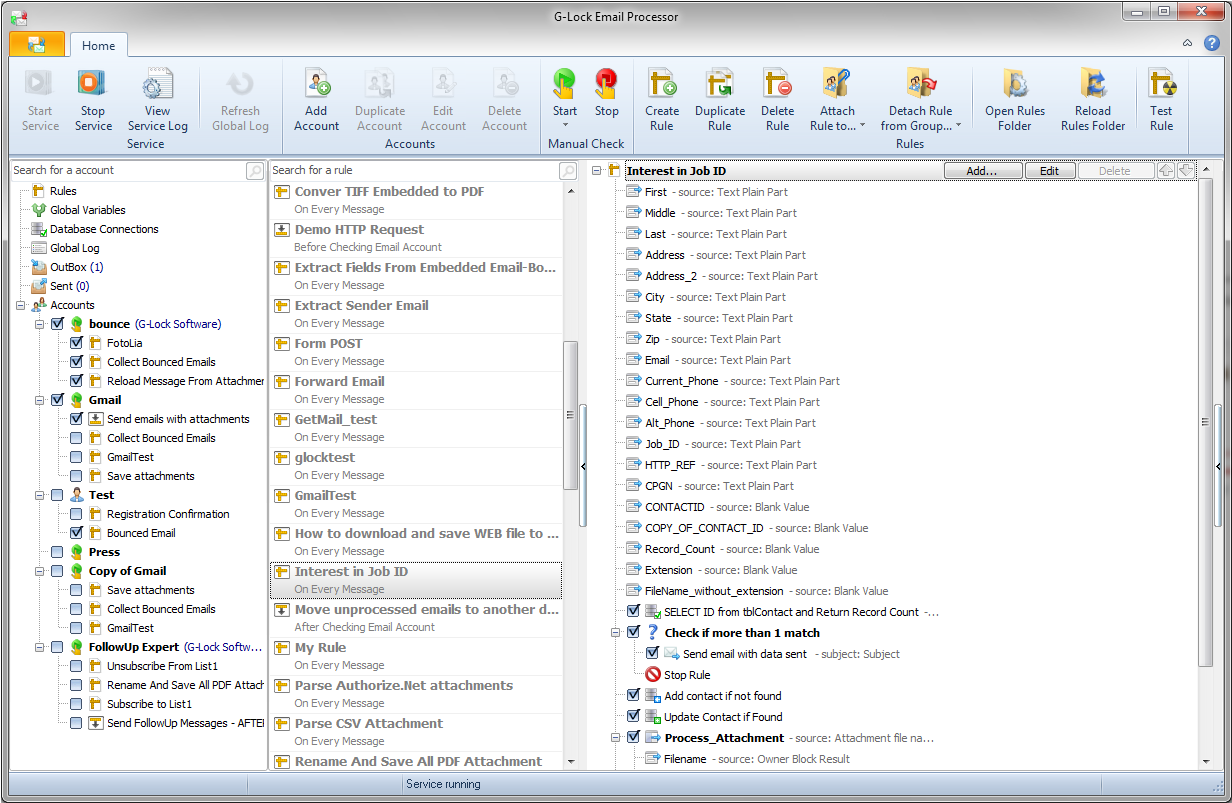
Accounts with their attached rules (several named "Save attachments") on the left, the rule library in the middle, and a rule's field extractors and database steps on the right.
The vendor's site shows 5.00 out of 5 from 16 reviews written between 2013 and 2019, such as: "The G-Lock Email Processor has given us the ability to process our files from email attachments which has been phenomenal for us!" (Randy Douglas, IT Manager, March 5, 2014). None of them speak to current mail services.
Download G-Lock Email Processor TrialBuy G-Lock Email Processor
Prices compared
One-time licenses (USD)
G-Lock Email Processor$595
Mail Attachment Downloader PRO Server$495
Download Mailbox Emails$19
Yearly licenses (USD per year)
Mail Attachment Downloader PRO Server$300
Automatic Email Manager$99
Kernel Outlook Attachment Extractor (Home, 2 PCs)$49
Checkout prices on November 24, 2026, before any coupon, except Mail Attachment Downloader PRO Server's yearly price, from the order page on November 22, 2026. Mail Attachment Downloader's free edition costs nothing.
Which should you choose?
| Your situation |
Pick |
Why |
| One personal Gmail or IMAP mailbox, once | Mail Attachment Downloader Free | Free, does the whole mailbox, resumes after Gmail's daily limit |
| An old PST or OST file, or a big Outlook mailbox | Kernel Outlook Attachment Extractor | Reads the files without Outlook and keeps the folder tree |
| You work in classic Outlook every day | Kutools for Outlook | Bulk save and detach inside Outlook, one payment |
| Invoices or orders arriving all day, to be filed by rule | Mail Attachment Downloader PRO Server | Service, named folders and files, conversion, modern sign-in |
| Attachments must also be printed | Automatic Email Manager | Printing is its core job, and it saves PDFs in the same rule |
| You want the emails kept whole, with attachments inside | Download Mailbox Emails | One EML per message, $19 once |
| Attachment contents must go into a database | G-Lock Email Processor (if the trial connects) | Field extraction from CSV, text and PDF attachments into ODBC databases |
Who should skip what: skip PRO Server if you only need a one-off download (the free edition or Kernel is enough). Skip Kernel if your PST is damaged, since it needs a healthy file. Skip Kutools if you've moved to the new Outlook or use a Mac. Skip Automatic Email Manager if you never print, as Mail Attachment Downloader Pro Client saves to named folders for a one-time price. Skip Download Mailbox Emails for Outlook.com and Hotmail. Skip G-Lock if your mail is in Microsoft 365 and the trial can't sign in.
What commonly goes wrong
- Thousands of files called "image001.png". Signature logos and inline pictures count as attachments. Filter by extension (Kernel), exclude inline attachments (Mail Attachment Downloader) or sort by size first (Kutools).
- The first run downloads years of mail. Set a start date or pick folders before the first run.
- Gmail and Microsoft 365 sign-in. Tools that only take a password need an app password for Gmail and Yahoo, and may not connect to Microsoft 365 at all. Check sign-in in a trial before paying.
- Same-name files overwrite each other. Use a naming pattern that adds the date, sender or an ID, or keep the mailbox's folder structure.
- A damaged PST. Extraction tools read healthy files; repair the PST first.
- Copying isn't deleting. Saving attachments doesn't shrink the mailbox unless the tool detaches them (Kutools) or you delete the messages afterwards.
FAQs
Can Outlook save attachments from multiple emails at once?
No, not on its own. Classic Outlook's Save All Attachments works on one email at a time. Kutools for Outlook adds bulk saving inside Outlook, and Kernel Outlook Attachment Extractor does whole folders from a profile or a PST file.
How do I download all attachments from Gmail at once for free?
Mail Attachment Downloader's free edition does it: connect your Gmail account through Google sign-in, pick the labels and a start date, and it saves every attachment to a folder. Gmail's own Download all button only covers the email you have open.
Can I extract attachments from a PST file without Outlook?
Yes. Kernel Outlook Attachment Extractor reads PST and OST files on a PC where Outlook isn't installed, including password-protected PSTs, and saves the attachments in the mailbox's folder structure. The trial saves 10 attachments per folder so you can test your file.
Is there a tool that saves new attachments automatically as they arrive?
Yes. Mail Attachment Downloader PRO Server and Automatic Email Manager both run as Windows services that check the mailbox on a schedule and save each new attachment with nobody signed in. Kutools for Outlook can auto-save too, but only while Outlook is open.
Do these tools send my email to a cloud service?
No. Mail Attachment Downloader, Kernel, Kutools, Automatic Email Manager, Download Mailbox Emails and G-Lock Email Processor all run on your own Windows PC or server and save files locally. Data only leaves your network if you add an action that sends it, such as a webhook or an AI prompt in Mail Attachment Downloader PRO Server.
Will downloading attachments delete them from my mailbox?
No, not unless you ask for it. Mail Attachment Downloader, Kernel and Download Mailbox Emails only copy. Kutools for Outlook can detach attachments to free space, and Mail Attachment Downloader PRO and Automatic Email Manager can move or delete emails after saving if you set that action.
Is there a Mac tool for this?
Not among these. All six are Windows programs. On a Mac you'd run them in a Windows virtual machine, or save attachments one email at a time in Apple Mail or Outlook for Mac.
Why does the Gmail download stop halfway?
Gmail limits how much one account can download per day. Mail Attachment Downloader keeps its place and continues at the next run, so a large mailbox can take a few days to finish.
Conclusion
Start free: Mail Attachment Downloader's free edition empties one mailbox's attachments into a folder, and Outlook or Gmail can handle the odd single email. For an Outlook data file, Kernel Outlook Attachment Extractor at $49 is the shortest route. When attachments keep arriving and someone is still saving and renaming them by hand, Mail Attachment Downloader PRO Server is the tool to buy: it files every attachment by rule, around the clock, on your own server, for $495 once. Expect a dense interface and test sign-in with the free edition first.
Download Free EditionBuy Mail Attachment Downloader PRO Server