Vovsoft Download Mailbox Emails: Save a Whole IMAP Mailbox as EML Files
Download Mailbox Emails is a $19 Windows program from Vovsoft that logs in to an email account over IMAP and saves every message in the folders you pick, attachments included, as separate EML files on your PC, without deleting anything from the server. It works with Gmail, Yahoo, iCloud and other IMAP providers, but not with Outlook.com or Hotmail, since Microsoft ended password-based IMAP. The $19 is a one-time lifetime license, and there's a free trial.
It's a plain way to keep an offline copy of a mailbox before closing an account, leaving a job or running out of storage.
Quick facts
- Version: 2.2, released November 1, 2026
- Developer: Vovsoft
- Platform: Windows 11, 10, 8/8.1, 7 and Vista, 32-bit and 64-bit. No Mac version
- Connects with: IMAP and a password or app password (Gmail needs 2-Step Verification and an App Password). No OAuth sign-in, so Outlook.com and Hotmail don't work
- Saves as: one EML file per message, with headers, body and attachments, which Thunderbird, Outlook and Windows Mail open
- Range: whole folders or a numbered range of messages, newest first if you like
- Editions: installer (4.07 MB) and portable (3 MB), one license for both
- Price: $19, one-time payment, lifetime license with free updates
- Trial: free to try, with a limited number of emails, for personal, non-commercial use
- What we checked: installer file version 2.2.0.0 (4,277,888 bytes) with a valid code signature, downloaded from the vendor on November 11, 2026, and $19.00 on the order page with no auto-renewal on November 11, 2026. We didn't connect it to a mailbox
Download Free TrialBuy Now
Overview
Type your email address and password, and Download Mailbox Emails fills in the IMAP server settings for common providers (or tick Manual Setup to enter them yourself). Click Connect, and the Mailboxes list shows every folder with its message count. Tick the folders you want, choose an output directory and press Start Download.
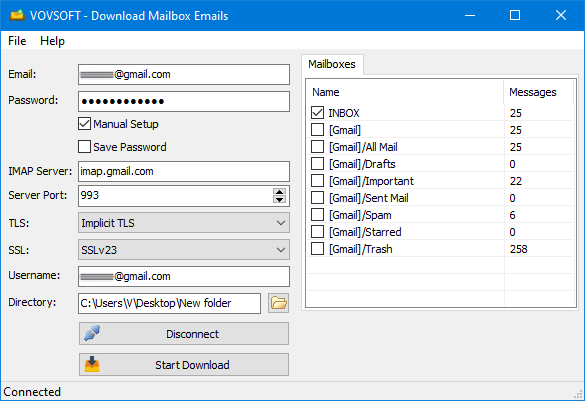
Connected to a Gmail account: IMAP server imap.gmail.com on port 993 with implicit TLS, and Gmail's folders with their message counts.
Features
Every folder, every attachment
Download Mailbox Emails saves each message as an EML file in MIME format, so the headers, body and attachments all stay together, and names files using the subject. Messages stay on the server: the program never deletes anything.
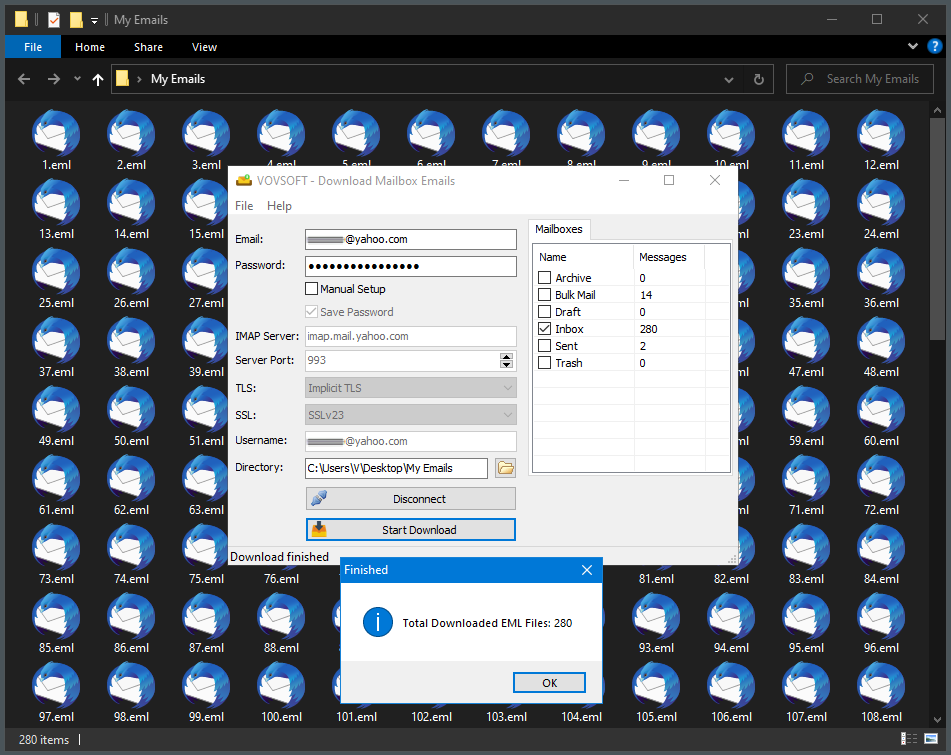
A Yahoo inbox of 280 messages saved as 280 EML files in a folder on the desktop.
Download a range, or just the newest
Download Mailbox Emails' Download Range setting picks which message numbers to fetch, and since version 2.1 it can run from a larger number down to a smaller one, so you can grab just the most recent emails.
Settings for slow servers
Download Mailbox Emails 2.2 added timeout settings for slow or busy mail servers, and the program remembers your settings between sessions. Vovsoft has step-by-step guides for Gmail, iCloud, Yahoo, Mail.com and Spectrum.
Real-World Uses
- Keeping an offline archive of an old Yahoo account before closing it.
- Backing up a Gmail inbox before deleting messages to free up Google storage.
- Saving a work mailbox's project folder as files to hand to a colleague or a lawyer.
- Pulling only the last few hundred messages from a huge mailbox.
Who It's For, and Who Should Skip It
It suits people who want a simple, file-based backup of an IMAP mailbox and are comfortable creating an app password.
Skip it if your mail is on Outlook.com, Hotmail or another Microsoft 365 account that needs a Microsoft sign-in: it can't connect. Gmail users who want everything in one archive can also use Google Takeout for free. And if you'd rather read and search your old mail in an app, Thunderbird downloads and keeps IMAP mail free too.
Usage Guide
- For Gmail, turn on 2-Step Verification and create an App Password. Other providers may also need an app password.
- Download the installer or the portable edition and start Download Mailbox Emails.
- Enter your email address and password, or tick Manual Setup and enter the IMAP server, port and security settings.
- Click Connect and tick the folders you want.
- Pick an output directory and click Start Download. Open the EML files in Thunderbird, Outlook or Windows Mail.
Before you buy
Try the free version against your own provider first, since sign-in rules vary and Microsoft accounts won't connect at all. One license covers one person on any number of their own computers. Vovsoft's general policy is no refunds once the key is delivered, since a free trial comes first (accidental orders are generally refunded, at its discretion, and PayPro Global has the final say on its orders).
Where it falls short
- No OAuth2 sign-in, so Outlook.com, Hotmail and accounts that require a browser sign-in are out. OAuth2 is an open request.
- One account at a time, with no saved list of accounts and no scheduled automatic backups.
- It saves loose EML files, not a single searchable archive or PST.
- It went from August 2024 to November 2026 without an update, so it changes slowly.
What Users Say
On Vovsoft's site
Download Mailbox Emails' page shows 4.8 out of 5 from 4 ratings, with three short comments.
"I've used it once so far and it worked perfectly" Anders
"simple, easy to use. does what it says on the tin." Anonymous User
"THANKS A LOT VERY GOOD" IOANNIS MARAGOS
Vovsoft as a company has a TrustScore of about 4.6 out of 5 from 411 reviews on Trustpilot, read through a summarizer. Four ratings don't say much, so the trial is the real test.
Comparisons
Download Mailbox Emails vs Thunderbird
Thunderbird is free, downloads IMAP mail, supports Microsoft sign-in and lets you read and search it, but keeps it in its own mail store. Download Mailbox Emails produces a folder of plain EML files you can copy anywhere, with nothing else to set up.
Download Mailbox Emails vs Google Takeout
Google Takeout exports a Gmail account free as one MBOX file. Download Mailbox Emails works for any IMAP provider and gives you one file per message.
Editions and Pricing
| Edition | Price | License | What you get |
|---|
| Trial | Free | Personal, non-commercial use | Downloads a limited number of emails |
| Licensed | $19 one-time | Lifetime | Unlimited emails, commercial use, no nag screen or ads, lifetime free updates |
The installer and portable editions use the same key, sent by email right after payment. Vovsoft's $99 Universal License covers all of its desktop programs.
FAQs
Does Download Mailbox Emails work with Outlook.com or Hotmail?
No. Microsoft has disabled password-based IMAP access, so Download Mailbox Emails can't connect to Outlook.com or Hotmail accounts.
How do I connect Download Mailbox Emails to Gmail?
Turn on 2-Step Verification in your Google account, create an App Password, and use it with imap.gmail.com, port 993 and implicit TLS in Download Mailbox Emails.
Does Download Mailbox Emails delete emails from the server?
No. Download Mailbox Emails only copies messages. Everything stays in your mailbox.
How do I open the EML files Download Mailbox Emails creates?
Open them in Mozilla Thunderbird, Microsoft Outlook or Windows Mail. Each file is one complete message with its attachments.
Can Download Mailbox Emails download only recent emails?
Yes. Download Mailbox Emails' Download Range setting can start from the highest message number and work down, so you get the newest messages first.
Is the Download Mailbox Emails license a subscription?
No. The $19 license is a one-time payment that never expires and includes future updates.
System Requirements
- Windows 11, 10, 8/8.1, 7 or Vista, 32-bit or 64-bit
- About 5 MB for the program, plus space for your messages
- An IMAP email account that accepts a password or app password
Conclusion
Download Mailbox Emails is worth $19 if you want a quick, file-by-file backup of a Gmail, Yahoo, iCloud or other IMAP mailbox and want to keep the files yourself. The reason to buy it is how simple it is: connect, tick folders, download. The reason not to: it can't reach Microsoft accounts, and free tools like Thunderbird and Google Takeout cover a lot of the same ground.
Download Free TrialBuy Now