Total Converter: One Offline Tool for Email, Mailbox, Document and Image Files
Total Converter from OMID SOFT is a $39 Windows program that converts and extracts email messages (EML, MSG, MHT), mailbox files (PST, OST, OLM, MBOX, NSF), contacts and calendars (VCF, ICS), documents (PDF, DOCX, EPUB, RTF and more) and images, entirely offline. It suits anyone who regularly receives files in formats they can't open, or needs to pull messages and attachments out of an old mailbox. The trial has every feature enabled for 30 runs.
A winmail.dat attachment you can't open, a client's .msg file on a PC without Outlook, an Outlook for Mac OLM archive, an EPUB you need as a PDF: each usually means hunting for a separate converter, often an online one you have to upload private mail to. Total Converter puts these jobs in one window on your own PC.
Quick facts
- Developer: OMID SOFT
- Version: 19.44, November 2026
- Messages: EML, EMLTPL, MHT, MHTML, HTML, EMLX, MSG, OFT, and TNEF winmail.dat
- Mailbox storage: PST, OST, OLM, MBOX, TGZ, NSF and MSO
- Documents: PDF, XPS, OXPS, EPUB, AZW3, MOBI, ODT, DOCX, DOC, RTF; images: DNG, PSD, BMP, JPG, GIF, PNG, TGA, SVG, TIF, DCM; contacts and calendars: VCF, VCS, ICS
- Platforms: Windows 7 or later with .NET Framework 4.8; a portable build and a Microsoft Store edition are available
- Price: $39 one-time per user, with one year of free upgrades
- Trial: all features, 30 runs, then locked
- What we checked: the installer on November 23, 2026: TotalConverter.exe, 32.3 MB, Total Converter version 19.44, dated November 22, 2026, with a code-signing certificate that expired in May 2020; and the order page on November 23, 2026: Total Converter .NET $39.00 with no auto-renewal. We didn't convert files ourselves.
Before you buy
- No refunds. OMID SOFT's license agreement says all fees are non-refundable, so use your 30 trial runs on the files you actually need to convert.
- Expect security warnings on the direct download. omidsoft.com is served over plain http (its https certificate expired in April 2026) and the installer's signing certificate expired in 2020, so browsers and Windows flag or block it. The download button opens OMID SOFT's download page, where you can pick the installer, the portable build or the Microsoft Store edition (Total Converter Store), which installs without those warnings on Windows 10 and 11.
- Check whether the free Email Converter is enough. OMID SOFT's free Email Converter already handles messages, mailbox storage, contacts and calendars; Total Converter adds documents, images and the rest.
Download Free TrialBuy Now ($39)
Overview
The window is organized in tabs: Single for one file, Batch for many, Personal, Storage for mailbox files, Image, and Detect, which identifies a file's real type from its content. In the Single tab you pick the source file, click its format, pick the target format and click Convert; options let you also save the attachments, certificates, recipients and timestamps from a message. Everything runs in memory on your PC; nothing is uploaded.
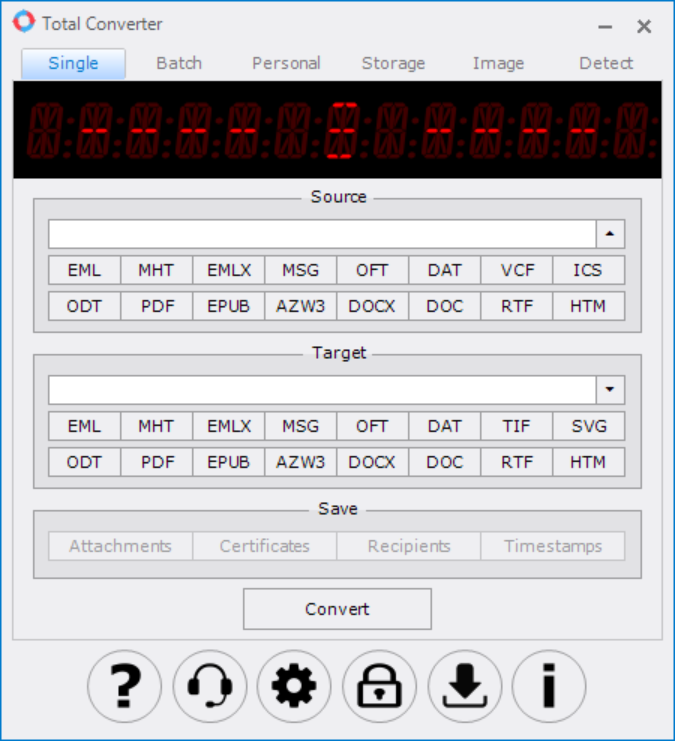
The Single tab: source formats (EML, MHT, EMLX, MSG, OFT, DAT, VCF, ICS, ODT, PDF, EPUB, AZW3, DOCX, DOC, RTF, HTM), target formats including TIF and SVG, and the Save options for attachments, certificates, recipients and timestamps.
Features
Email messages in any common format
Total Converter opens MIME messages (EML, EMLX, MHT) and Outlook's MAPI messages (MSG, OFT) without Outlook, including S/MIME messages and international character sets, and converts between them or to documents such as PDF and DOCX. It also unpacks TNEF winmail.dat attachments, the files Outlook sends that other mail programs can't read.
Mailbox storage extraction
Total Converter extracts and converts the contents of mailbox files: Outlook PST and OST, Outlook for Mac OLM, MBOX and TGZ archives, and Lotus Notes NSF. That's how you get mail out of an old archive when the program that made it is gone.
Contacts and calendars
Total Converter converts and splits VCF contact files and VCS and ICS calendar files, for example breaking one large calendar export into separate events.
Documents and images
Total Converter converts documents and e-books (PDF, XPS, OXPS, EPUB, AZW3, MOBI, ODT, DOCX, DOC, RTF) and images (including camera DNG, Photoshop PSD, SVG, TIFF and medical DICOM DCM files). These are the formats that set it apart from OMID SOFT's free Email Converter.
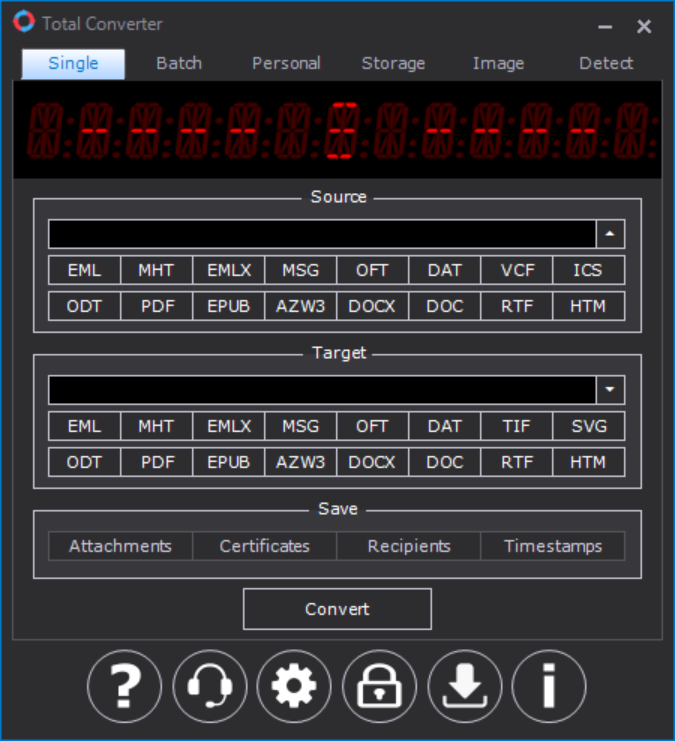
The same Single tab in the dark theme, with the Batch, Personal, Storage, Image and Detect tabs along the top.
File type detection
Total Converter's Detect tab identifies a file from its content rather than its extension, which helps with mail attachments that arrive with no extension or the wrong one.
Benefits
- Privacy: mail and documents stay on your PC instead of going through an online converter.
- One purchase for many formats, instead of a separate paid tool for each conversion.
- No Outlook needed to read MSG, PST or OST data.
- Cheap at $39 with no subscription.
Real-World Uses
- Opening winmail.dat attachments sent from Outlook to someone using another mail program.
- Turning saved .msg files into PDF for a case file or an archive.
- Getting mail out of an OLM or MBOX archive after switching mail programs.
- Converting an EPUB or MOBI to PDF, or a DNG or PSD to a common image format.
Who It's For, and Who Should Skip It
It's for Windows users who keep running into email, mailbox and document formats they can't open, such as office staff, IT helpers and anyone handling old mail archives, and who prefer offline tools.
Skip it if you only deal with messages and mailboxes: the free Email Converter from the same developer covers those. Skip it if you're on a Mac. And if you need a full mailbox migration into Microsoft 365 or Gmail with folders preserved, look at a dedicated migration tool instead.
Usage Guide
- Install Total Converter from the direct download, the portable build or the Microsoft Store, and make sure .NET Framework 4.8 is present.
- Pick a tab: Single for one file, Batch for a folder, Storage for a PST, OST, OLM, MBOX or NSF file.
- Choose the source file and click its format, then click the target format.
- Tick what else to save (attachments, certificates, recipients, timestamps) and click Convert.
- Register your license from the lock button before your 30 trial runs are used up.
Where it falls short
- A dense, button-heavy interface: many formats on one screen, with little guidance for first-time users.
- No independent reviews of the current version, so the trial is the only real test.
- Windows only, and it needs .NET Framework 4.8.
Comparisons
Total Converter versus OMID SOFT Email Converter (free)
Email Converter is OMID SOFT's free, donation-supported tool for converting messages, extracting PST, OST, OLM and MBOX storage, and converting and splitting contacts and calendars. Total Converter does all of that and adds document, e-book and image conversion, for $39.
Total Converter versus OMID SOFT Email Studio
Email Studio is the developer's email and storage viewer and parser, free except for its enterprise storage tools ($29), with extras such as merging, splitting and building storage files, downloading and uploading email, custom POP3, IMAP and SMTP commands, and built-in DKIM and RBL checks. Choose Email Studio to work inside mailboxes, and Total Converter to change formats, especially to and from documents and images.
Editions and Pricing
Price as the order page showed it on November 23, 2026. OMID SOFT gives volume discounts on multiple licenses.
| Version | Price | What you get | Term |
|---|
| Trial | $0 | All features | 30 runs, then locked |
| Total Converter license | $39 | All features, one user | Perpetual; 1 year of free upgrades, then 50% per extra year |
FAQs
Does Total Converter need Outlook installed to open MSG or PST files?
No. Total Converter parses MSG, OFT, PST and OST files with its own code, so Outlook doesn't have to be on the PC.
Can Total Converter open winmail.dat files?
Yes. Total Converter reads TNEF winmail.dat files, the attachments Outlook sometimes sends, and gets the real attachments and message out of them.
What counts as one of the 30 trial runs?
The Total Converter trial counts program starts: it runs 30 times with every feature enabled and then locks until you enter a license.
Why does Windows warn me about the Total Converter installer?
The Total Converter installer on omidsoft.com is signed with a certificate that expired in May 2020 and is downloaded over http, so browsers and SmartScreen treat it as unverified. The Microsoft Store edition avoids this on Windows 10 and 11.
Can I get a refund for Total Converter?
No. OMID SOFT's license agreement states that all fees are non-refundable, so finish testing within the 30 trial runs before you buy.
System Requirements
- Windows 7 or later (the Microsoft Store edition needs Windows 10 or 11), 64-bit or 32-bit
- .NET Framework 4.8 or later
- 1 GHz processor, 1 GB RAM, 100 MB of free disk space
Conclusion
Total Converter is worth $39 if you regularly face email, mailbox, document and image formats you can't open and want one offline tool for all of them, with no subscription and a build from November 2026. The reasons to hold back are a busy interface, no independent reviews, no refunds, and a download that trips security warnings unless you use the Microsoft Store edition. If messages and mailboxes are all you convert, the developer's free Email Converter may be all you need; if you also need documents and images, use your 30 trial runs and then buy.
Download Free TrialBuy Now ($39)