G-Lock Email Processor: Turn Incoming Emails into Database Records Automatically
G-Lock Email Processor is a $595 one-time-purchase Windows program that reads incoming email around the clock and, by rules you set up, pulls data out of messages and attachments into databases, files and Outlook, sends auto-replies and handles bounces. It's for small businesses and IT staff who receive orders, forms, reports or files by email and are tired of copying them by hand. The latest version, 3.6.2, dates from 2020.
Picture a web shop where every order arrives as an email: someone reads it, copies the name, address and order number into the database, saves the attachment and sends a confirmation. G-Lock Email Processor does all of that as a Windows service, checking your mailboxes on a schedule and running each message through your rules, with no one logged in.
Quick facts
- Version: 3.6.2, installer dated August 6, 2020 (no newer release since)
- Developer: G-Lock Software (glocksoft.com), owned by Deluxe Custom Apps LLC, Tbilisi, Georgia. The order page sells it as "GlockApps Email Processor"
- Platform: Windows 10 or Windows Server 2008 or later
- Mail sources: POP3 and IMAP accounts (SSL or STARTTLS) and local or network folders
- Outputs: text files, MS Access, MySQL, SQL Server, Oracle and other ODBC databases, Outlook items, PDF and HTML reports, HTTP posts, outgoing email
- Price: $595 for a single-user license, a one-time payment
- Trial: 30 days with every feature: 3 days without activation, then a free key adds another 27
- Guarantee: 60-day money-back guarantee. The only condition is telling the vendor why you weren't happy
- Download size: 55.7 MB (zip)
- What we checked: the installer (gep3_setup.exe, file version 3.6.2, digitally signed, dated August 6, 2020), the vendor's version history, which ends at 3.6.2, and the $595 one-time price on the order page on November 3, 2026. We didn't build or run a rule
Before you buy
- No updates since 2020. The version history stops at 3.6.2 and the system requirements stop at Windows 10. Run the trial on the PC or server you'll actually use.
- Test your mailbox sign-in first. Mail accounts in G-Lock Email Processor are set up with a server address, login and password, and the vendor's pages don't mention OAuth sign-in. Mailbox providers that only accept OAuth for IMAP and POP, such as Microsoft 365, may not connect, so add your real account during the trial and press Test.
- The price went up. The single-user license now costs $595, double the $295 it used to sell for.
- Auto-replies and follow-ups fall under G-Lock's anti-spam policy. It applies to all G-Lock products: you may only email people who gave you permission, or who bought or asked about buying from you and haven't opted out, and never purchased, rented or third-party lists. Mail sent in reply to someone who wrote to you fits that; using the follow-up feature to mail people who didn't ask doesn't.
Download Free Trial Buy Now
Overview
G-Lock Email Processor works with three building blocks. Accounts are the mailboxes or folders it checks, every few minutes, on a schedule, or manually. Rules are attached to accounts and run top to bottom on each message. Each rule is a chain of components: a message filter, field extractors, then actions such as "insert into database", "save attachment" or "send email", with conditions and a Stop Rule step for branching.
The program has been around since at least 2004 (one reviewer has used it since version 1.75), and the rule engine is mature. A built-in log shows what each rule did with each message, which reviewers single out as the thing that makes rules easy to debug.
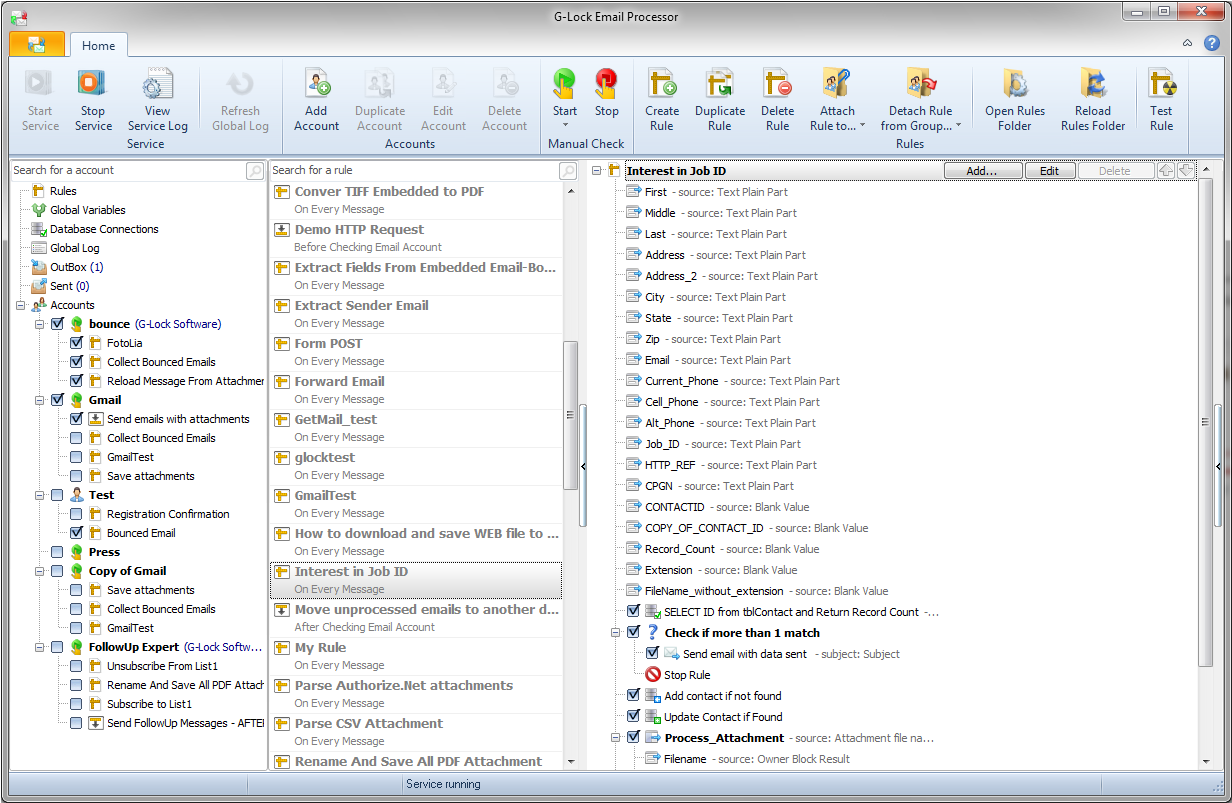
The main window: mail accounts with their attached rules on the left, the rule library in the middle, and a rule that extracts contact fields, checks the database for a match and then adds or updates the contact (vendor screenshot).
Features
Catch only the messages you want
G-Lock Email Processor's message filter matches on sender addresses (with wildcards such as *yyy.com), message size, and words or regular expressions in the subject, body, To field or any header. You test the filter against a sample message before you go live, so you know exactly which emails a rule will touch.

A message filter for sales notifications from two domains under 10 KB, tested against the message source on the right (vendor screenshot).
Extract fields from bodies and attachments
G-Lock Email Processor pulls a value out of a message by start and end markers ("after Indicator1:" to "end of line"), from the plain-text or HTML body, a header, or an attachment converted to text, including TEXT, HTML, CSV and multi-page PDF attachments. A post-processing script (VBScript, JScript or its own functions) can then reformat the value, for example turning an email date into the date format your database expects.

The Extract Field dialog pulling "CPU usage: 50%" out of a sample message, with the Test result at the bottom (vendor screenshot).
Write straight into your database
G-Lock Email Processor inserts, updates, selects and deletes records in MS Access, MySQL, SQL Server, Oracle and any ODBC database, mapping extracted fields to columns or running your own SQL. Selected records can feed the next steps, for example to check whether a customer already exists before adding them.

An "Insert into DataBase" component mapping the Subject field to a table column, with the generated INSERT statement (vendor screenshot).
Attachments, reports and Outlook
G-Lock Email Processor saves attachments to a folder (unzipping them first if needed), renames them, stores them in a database as binary data, converts images and multi-page TIFFs to PDF, and builds PDF or HTML reports from extracted data with its report designer. Through Outlook Redemption it can also turn an email into an Outlook contact, task, note or calendar appointment.
Replies, follow-ups and web requests
G-Lock Email Processor can answer a message with a plain-text or HTML auto-reply, schedule follow-ups for a set number of days later, forward the original, open a URL found in the email and save the page as a file or PDF, read RSS feeds, and send an HTTP or XML POST with the extracted data to a web service.
Bounce and unsubscribe handling
G-Lock Email Processor recognizes hard, soft, transient and blocked bounces, subscribe and unsubscribe requests, auto-replies and challenge-response messages, so you can remove dead or opted-out addresses from the database your mailings use. One reviewer uses it this way for about 3 million emails a month.

An IMAP account set up for a bounce mailbox: server, login and password, folder, what to do with processed messages, and SSL or STARTTLS options (vendor screenshot).
Benefits
- Hours of copy-and-paste go away. Order, lead and form emails become database records the moment they arrive, around the clock, without typing errors.
- One price, no per-message fees. Hosted email parsers usually charge monthly by volume. Here you pay once and process as much mail as your PC can handle.
- Data stays in-house. Messages are read and written on your own machine and database, not passed through a cloud service.
- Hands-on help. Users describe support that connects remotely to fix rules, and G-Lock also sells paid consulting to build rules for you.
Real-World Uses
- A software vendor reads purchase notifications, runs a script to generate a license key, emails it to the buyer and logs the sale. One long-time user describes exactly this setup.
- A purchasing department extracts order data from suppliers' emails into a database, sometimes 1,000 messages in a batch.
- A company with offshore clients receives data files as email attachments instead of over an unreliable FTP link and processes them automatically.
- An email marketer processes bounces and opt-out requests from a bounce mailbox and removes those addresses from the mailing database.
Who It's For, and Who Should Skip It
It's for businesses on Windows that receive structured emails in volume and have someone comfortable with databases, ODBC and a little scripting. It suits on-premises setups where data shouldn't leave the building.
Skip it if your mail lives in Microsoft 365 and the trial can't sign in, if you want a cloud parser that connects to Zapier or a CRM without a Windows PC running, or if you only need to sort or forward a few messages, which Outlook's own rules already do. At $595 for a program last updated in 2020, it's also a poor pick if you need a vendor that's still adding features.
Usage Guide
- Install. Unzip gep.zip and run gep3_setup.exe. The trial runs for 3 days, then asks for a free key that adds another 27.
- Add an account. Click Add Account, enter the POP3 or IMAP server, login and password, choose SSL if needed and press Test. Tick "Process Seen Messages" if you want existing mail handled.
- Create a rule. Click Create Rule, add a message filter, then field extractors and the actions you want, such as Insert into DataBase or Save Attachment.
- Test it. Use Test Rule on a sample message and read the log before letting it loose on real mail. Tick "Save processed emails to local disk" so a mistake doesn't lose messages.
- Attach and start. Attach the rule to the account, set how often the account is checked, and start the service.
Where it falls short
- Processed mail can be deleted for good. If an account is set to delete messages and "Save processed emails to local disk" is off, the vendor's FAQ says processed emails are gone forever.
- Seen messages are skipped by default. A common surprise in the FAQ: the log shows a connection but no new messages until you tick "Process seen messages".
- Network paths and permissions trip people up. Writing to a mapped drive failed in the vendor's own lab tests until they used a full network path and matching account passwords.
- Mail providers keep changing. One reviewer's provider made changes that broke the connection, and support had to step in. With no releases since 2020, newer sign-in rules are the biggest risk.
What Users Say
We found no independent reviews of G-Lock Email Processor on the big software review sites. The reviews below are from the vendor's own site, which shows 5.00 out of 5 from 16 reviews, written between 2013 and 2019. Take them as long-time customers' experiences rather than a neutral sample.
How customers use it
Garth Williams, April 24, 2013, "GLock Email Processor = Superb Program!": "We have been using G-Lock Email Processor (GEP) since version 1.75 in 2004. ... We use GEP to automatically respond to product evaluation requests and purchases, including: - determine what product was requested/purchased - kick off a script to generate a custom validation key for the product - autorespond to customer including custom text, link to product and validation key - update customer database with all that information - write a log file"
Daniel, May 22, 2019, "Fantastic Software + Product": "We used G-Lock to monitor our purchasing and extract the data into a database. Sometimes it has to process 1k mails, but no time there are any performance problems."
Brad Butler, August 15, 2014, "Workhorse! Recommend for In-House Email Marketing": "We send out on average about 3 million emails per month and we use the Email Processor to process our bounced and opt-out requests."
IT Network Admin, July 23, 2014, "Great product!": "We needed a way to process CSV files into an internal CRM system. ... This also saves us 1600$ over Email2DB, which is also great news!"
Randy Douglas, IT Manager, March 5, 2014: "The G-Lock Email Processor has given us the ability to process our files from email attachments which has been phenomenal for us! The product is stable, fully customizable, and its logging is supurb!"
On support, and when things break
Dominic, June 25, 2015, "Fantastic Support": "We had been using G-Lock processor for some time with out any problems. Our provider sadly made some changes that broke the connection to G-lock. G-lock support was fantastic and took a backup of our system and restored it and debugged the problem really quickly."
Robert Sincavage, June 25, 2013: "it is easy to configure and stable. I love the logging feature - it makes it very simple to configure the rules."
Tim, April 24, 2013, "My best investment": "I was so impressed at how helpful and responsive Julia and Dmitry have been in achieving our solution, which has saved hours and hours of custom development work."
The pattern
Customers praise stability, the logging, the flexibility of scripts and above all the support staff, who often build or fix rules remotely. Several reviews quietly show the other side: setups that needed the vendor's help to get working, and a provider change that broke the connection. The newest review is from 2019, so none of them speak to current Windows or mail-provider behavior.
Comparisons
G-Lock Email Processor vs cloud email parsers
Cloud parsers run on someone else's servers, connect to apps through Zapier and similar tools, and are actively developed, but they charge monthly and your mail passes through their service. G-Lock Email Processor costs $595 once, runs on your Windows PC or server and writes straight into local databases, with no outside service involved. If your mail is in Microsoft 365 or Gmail with modern sign-in, a maintained cloud parser is the safer bet.
G-Lock Email Processor vs Outlook rules
Outlook rules can move, flag and forward mail, but they can't extract fields into a database, parse PDF attachments or run without Outlook open. G-Lock Email Processor does all of that as a background service.
Editions and Pricing
There's one edition. A single-user license costs $595, paid once, and the order page sells it as a lifetime license. G-Lock also sells a $725.05 bundle with EasyMail7 and its Email Verifier, and offers paid consulting to build rules for you.
FAQs
Does G-Lock Email Processor work with Gmail?
G-Lock Email Processor reads any IMAP or POP3 account over SSL, and the vendor names Gmail as supported. Its account settings use a login and password, so with Gmail you'd normally need an app password for that account. Check it in the trial before buying.
Can G-Lock Email Processor read PDF attachments?
Yes. G-Lock Email Processor converts PDF attachments, including multi-page ones, to plain text so field extractors can read them, and it does the same for HTML, TEXT and CSV attachments.
Does it need Outlook installed?
No. G-Lock Email Processor connects to mail servers itself. Outlook is only needed if you want it to create Outlook contacts, tasks, notes or appointments.
Can I reprocess emails after fixing a rule?
Yes. In G-Lock Email Processor, open the account, click "Clear Message ID Cache" (and, for IMAP, "Start processing from first message"), then restart the service. Messages already deleted from the server can only be recovered if you saved processed emails to disk.
Is the license a subscription?
No. G-Lock Email Processor is sold as a one-time, lifetime single-user license for $595, with no renewal set up on the order page.
Can I send marketing follow-ups with it?
Only to people who agreed to hear from you. G-Lock's anti-spam policy, which covers all its products, allows email only to people who gave permission or who bought or asked about buying from you and haven't opted out, and bans purchased, rented and third-party lists.
System Requirements
- Windows 10, or Windows Server 2008 or later
- About 56 MB download
- POP3 or IMAP mail accounts, or local or network mail folders
- An ODBC driver for the database you write to (MS Access, MySQL, SQL Server, Oracle and others)
Conclusion
G-Lock Email Processor is a capable, long-proven rule engine for turning incoming email into database records, files and replies on your own Windows machine, and its customers have been happy with it for years. The reason to buy it is that it does in-house what usually takes a monthly cloud subscription or custom code, for one payment.
The reason to hesitate is that payment: $595 for software last updated in 2020, whose password-based mailbox sign-in may not work with every modern mail provider. Use the 30-day trial with your real mailbox and real messages. If your rules run cleanly there, it's worth it for a business processing email in volume. If the account test fails, look at a maintained alternative instead.
Download Free Trial Buy Now