G-Lock EasyMail7: In-House Email Marketing Software for Windows
G-Lock EasyMail7 is a $159 Windows program for sending newsletters and automated email sequences from your own computer or server, through your own SMTP server or a delivery service such as Amazon SES, instead of paying a hosted email service per subscriber. It suits small businesses, associations and IT-minded marketers who want to keep their mailing lists in-house. Be aware that the latest version, 7.46.3, dates from February 2020.
Hosted services like Mailchimp charge more as your list grows and keep your subscribers on their servers. EasyMail7 takes the other route: you install a server component that holds your lists, templates and sent items, connect to it with a client from any PC, and send through whatever mail service you choose. With Amazon SES that can cost a fraction of a hosted plan, but you take on the setup, the deliverability work and the legal responsibility yourself.
Quick facts
- Version: 7.46.3, released February 4, 2020 (no newer release since)
- Developer: G-Lock Software (glocksoft.com), owned by Deluxe Custom Apps LLC, Tbilisi, Georgia. The order page sells it as "GlockApps EasyMail7"
- Platform: Windows 7, 8 and 10, Windows Server 2008/2012 or later, Internet Explorer 9 or later. On a Mac only through Parallels Desktop with a Windows license
- How it works: EasyMail7 Server runs as a Windows service on a PC, Windows Server, Amazon EC2 or Azure VM. EasyMail7 Client connects to it from as many computers as you like
- Sending: your own SMTP server, your ISP's SMTP server, IIS SMTP pickup, Amazon SES (API or SMTP), or several SMTP servers in rotation. No mail server is included
- Price: $159 for the Personal license (1 user, 12 months of updates and support, 30 spam tests). Business is $259 and Enterprise $1,569
- Trial: 14 days, 1 user and 1 workplace, 250 emails per hour, 1,000 per day and 12,000 per month. It's activated with a free key sent to your email
- Guarantee: 60-day money-back guarantee. The only condition is telling the vendor why you weren't happy
- Download size: 40.8 MB (zip)
- What we checked: the trial installer (easymail7_setup_trial.exe, file version 7.46.3.1510, digitally signed, dated February 4, 2020), the vendor's version history, which ends at 7.46.3, and the $159 price on the order page, where the license is set to renew every 12 months, on November 3, 2026. We didn't send a campaign with it
Before you buy
- No updates since February 2020. The vendor's What's New list stops at 7.46.3, and the system requirements still end at Windows 10. The 12 months of "free updates" in the license have had nothing new to deliver for several years, so test the trial on your own Windows version first.
- The order renews yearly. The vendor describes the license as a one-time payment you can keep using forever, but the order page sets the $159 Personal license up as a 12-month subscription with automatic renewal pre-selected. If you only want the first year, turn auto-renewal off in your 2Checkout account after buying. The order page says it can be disabled at any time.
- Permission lists only. G-Lock's anti-spam policy lets you send only to people who gave you permission or who bought (or asked about buying) from you and haven't opted out. Purchased lists, rented lists and any third-party lists are banned, even if they're described as opt-in. The app itself reminds you that to comply with the CAN-SPAM law you must process bounce and unsubscribe emails after each sending. Breaking the policy can cost you the license.
Download Free Trial Buy Now
Overview
EasyMail7 is the seventh generation of G-Lock's EasyMail, which goes back to the XP era. Version 7 split the program into a client-server design: the server does the sending, checks for returned mail and updates contact lists in the background without anyone logged in, and the client is just a front end that talks to it over an encrypted connection. That lets several staff members share one set of lists from different PCs, each in their own workplace with its own mail accounts, templates and groups.
Pricing is per server and per user, never per subscriber or per email. Every paid license gets every feature, and the number of groups, subscribers and email accounts is unlimited. What limits your sending is the mail service behind it: Gmail or Yahoo accounts allow only around 100 messages a day, so for real volume you'll need Amazon SES, SendGrid, Mailgun or your own SMTP server.
Features
Send through Amazon SES at its allowed rate
G-Lock EasyMail7 connects to Amazon SES through its API and keeps to your account's maximum send rate automatically, so you don't have to work out throttling yourself. It can also use SES's SMTP credentials, any other SMTP server, IIS's pickup folder, or several SMTP servers at once to spread the load. Each account can sign mail with DKIM and add custom headers.

The Delivery Options tab of an outgoing mail account, with the delivery modes listed and Amazon SES API selected, showing the account's 24-hour quota and send rate (vendor screenshot of an older 7.7 build).
Throttling and scheduling for ordinary SMTP servers
G-Lock EasyMail7 lets you cap each mail account at so many messages per hour and per day, and set how many SMTP connections run at once, so a hosting company's limits don't get your account suspended. Campaigns can go out immediately or on a schedule (hourly, daily, weekly or monthly), and a campaign sent to several groups skips duplicate addresses.

An account's General tab: From and bounce addresses, a CAN-SPAM reminder about processing bounces and unsubscribes, and throttling set to 500 messages per hour and 4,000 per day (vendor screenshot, older 7.7 build).
Mail straight from your own database
G-Lock EasyMail7 can send to contacts pulled live from an ODBC database, MS Access, Excel, MySQL, SQL Server or CSV file, or from a WordPress site running G-Lock's WPNewsman plugin, without exporting and importing lists. You map the columns to merge fields or write your own SQL query. Importing into internal groups is fast too: the vendor times 1 million addresses at 43 seconds.

The Database Link menu (ODBC, Access, Excel, MySQL, SQL Server, CSV, WPNewsman) and the Database Manager mapping table columns to merge fields with the generated SQL (vendor screenshot, older 7.7 build).
Automated email sequences
G-Lock EasyMail7 sends autoresponder series to each subscriber on their own timeline: a welcome message now, the next one a day later, another after 10 hours, with branches that depend on whether the reader clicked a link. Once it's set up, the server runs it in the background.
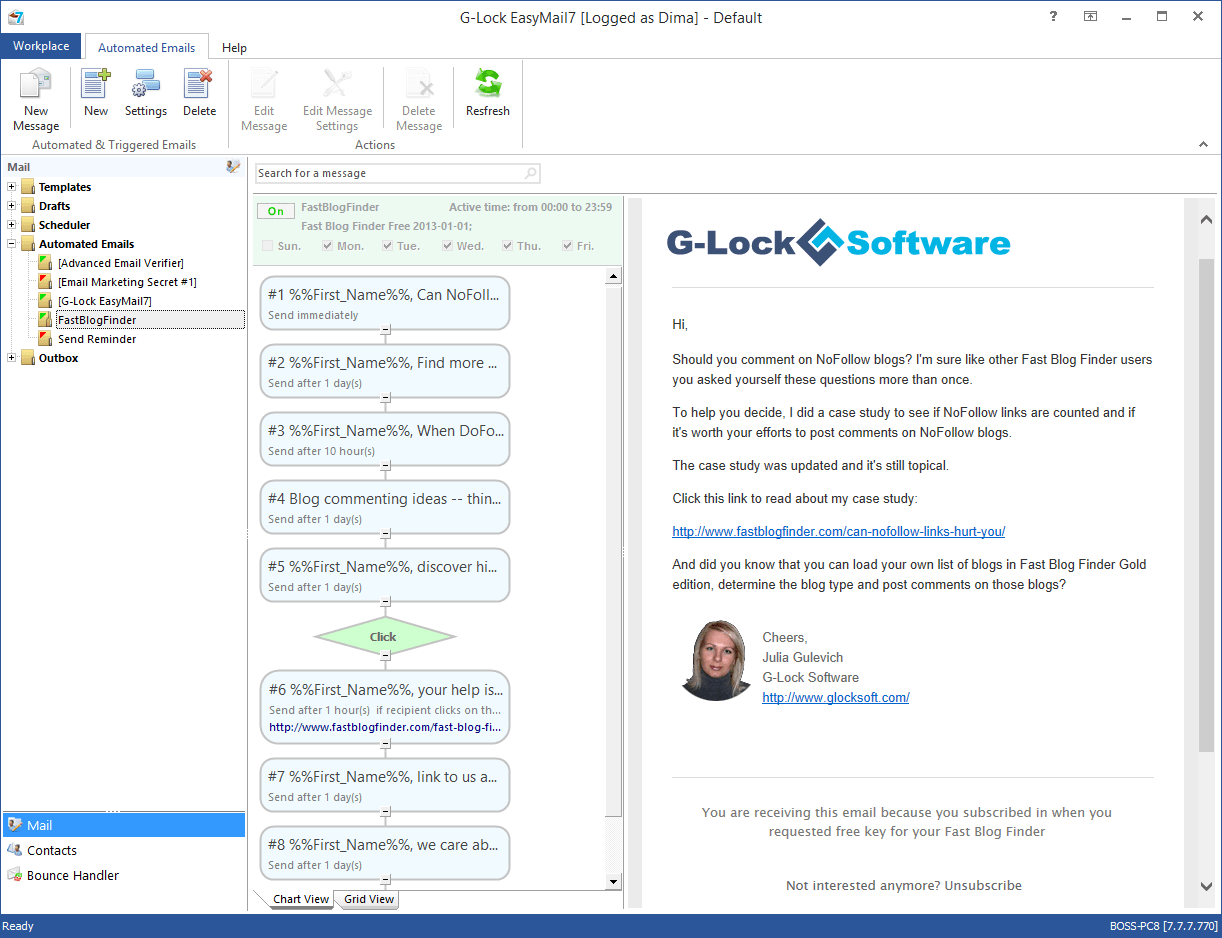
An automated sequence in chart view, with delays between messages, a click condition, and the message preview with its unsubscribe line (vendor screenshot, older 7.7 build).
Bounce Handler and exclusion lists
G-Lock EasyMail7 checks your bounce mailboxes over POP3 or IMAP, sorts returns into hard, soft, feedback-loop and blocked, and then unsubscribes or deletes those addresses from your groups or updates your external database. Unsubscribe requests can go straight onto a global exclusion list that every group respects, and workplace rules can block whole patterns such as abuse@ addresses.

Bounce Handler: per-mailbox counts of hard, soft, FBL and blocked bounces, and an IMAP bounce account set to add unsubscribes to the Global Exclusion List and unsubscribe or delete bounced addresses (vendor screenshot, older 7.7 build).
Inbox placement tests before you send
G-Lock EasyMail7 is linked to GlockApps, the same company's deliverability service, so you can send a campaign to test seed addresses first and see whether it lands in the inbox, the Gmail Promotions tab or spam at each provider, along with SPF and DKIM results and a SpamAssassin score. The Personal license includes 30 tests, Business 150.
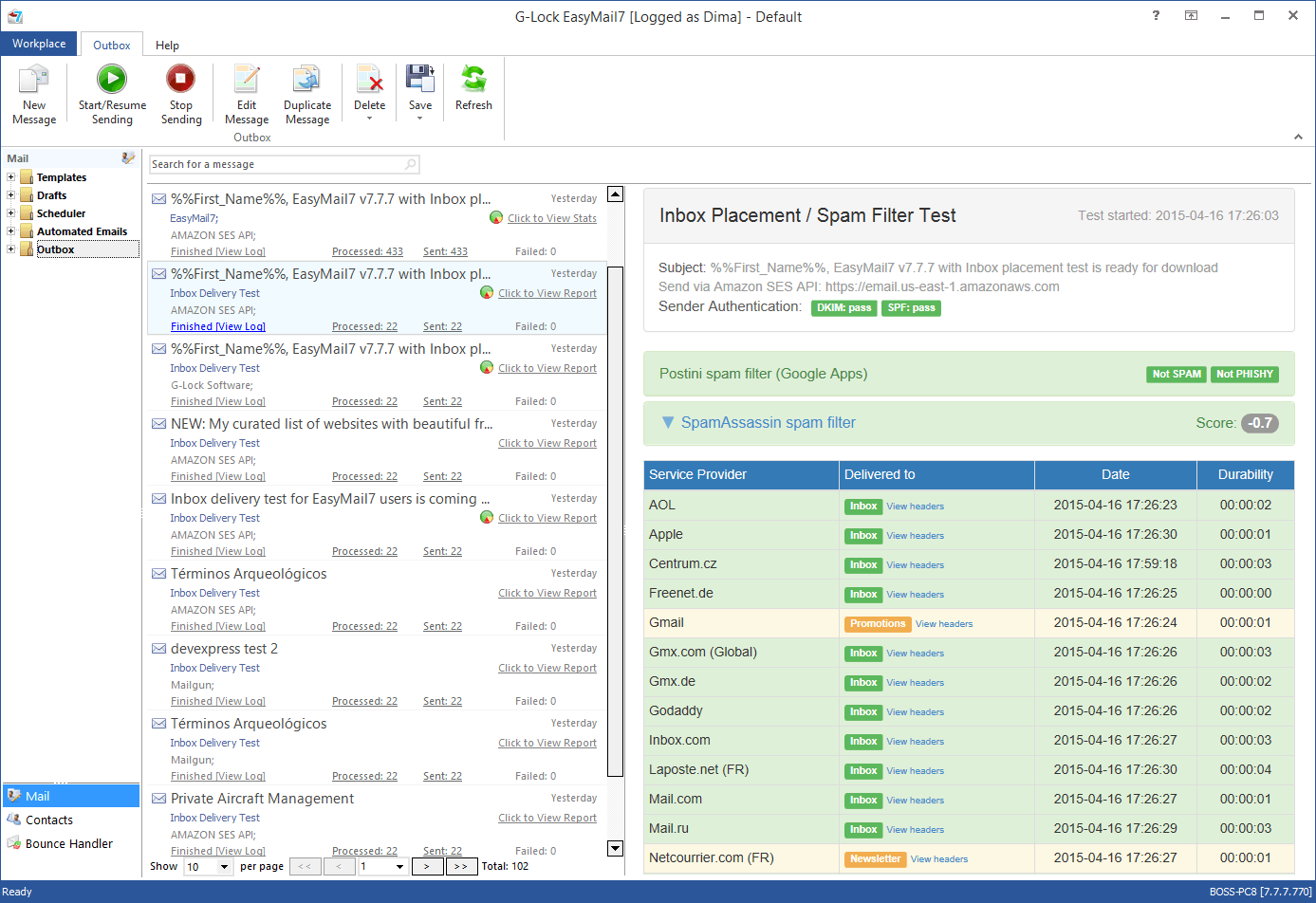
The Outbox with an Inbox Placement / Spam Filter Test report: DKIM and SPF pass, SpamAssassin score, and the folder each provider delivered to (vendor screenshot from 2015, older 7.7 build).
Editor, tracking and integrations
G-Lock EasyMail7 has a drag-and-drop editor with blocks for buttons, images and text, a built-in FTP client that uploads your images and rewrites their paths, per-group unsubscribe links, and segments. Open and click tracking comes from G-Lock Analytics, a separate paid service, and links can carry Google Analytics or Piwik tags. A RESTful API and a Zapier connection add contacts from web forms, CRMs and shops.
Benefits
- Costs that don't grow with your list. You pay for the license and your mail service, not per subscriber. A list of 50,000 costs the same to manage as a list of 500.
- Your data stays with you. Lists and sending statistics live on your own server, which matters to organizations that can't upload member or customer data to a US marketing platform.
- No lock-in to one sender. If one delivery service suspends you or gets expensive, you switch accounts in a dialog rather than migrating to a new platform.
Real-World Uses
- A membership association keeps members in its own SQL Server database and sends the monthly newsletter straight from a query, so the list is always current without exports.
- A small online shop sends promotions through Amazon SES to customers who bought and didn't opt out, with SES's bounce and complaint notices processed by the Bounce Handler.
- A software vendor runs a nine-message onboarding sequence for trial users, with a branch for those who clicked the buy link.
Who It's For, and Who Should Skip It
It's for Windows users who are comfortable setting up an SMTP or Amazon SES account, DNS records for SPF and DKIM, and a Windows service, and who send to their own opt-in lists often enough that per-subscriber pricing hurts.
Skip it if you want something that works out of the box: hosted services handle deliverability, sign-up forms, compliance footers and reporting for you, and they're actively developed. Skip it too if you work on a Mac or Linux, need modern reporting dashboards, or expect regular updates. And it's the wrong tool for anyone hoping to mail purchased or scraped lists: the license forbids it and your delivery service will shut you down.
Usage Guide
- Install. Unzip the download and run easymail7_setup_trial.exe on the PC or server that will host the EasyMail7 Server. The client is installed alongside it.
- Activate the trial. On first start, enter your name and email on the activation screen. A free key arrives by email.
- Log in. The default user name and password are Admin and Admin (case sensitive). Change the password straight away.
- Add an outgoing mail account. Under Outgoing Mail Accounts, add your SMTP server or Amazon SES keys, a bounce address on your own domain, DKIM and throttling limits.
- Add contacts. Import a CSV or Excel file into a group, or link a database table so the list stays live.
- Set up the Bounce Handler. Point it at your bounce mailbox and choose whether bounces are unsubscribed or deleted.
- Create and test a message. Build it in the editor, add the unsubscribe link, run an inbox placement test, then send or schedule it.
Where it falls short
- Setup takes skill. Reviewers on Capterra and G2 describe it as harder to set up than hosted email services and not for beginners used to Mailchimp or Constant Contact. Connecting external databases may need someone technical.
- Thin built-in reporting. Reviewers say the statistics are minimal and they export data to analyze it. Full open and click tracking needs the separate G-Lock Analytics service.
- Deliverability is your job. EasyMail7 hands mail to your SMTP server, so warming up a new IP, authenticating your domain and keeping complaint rates low are up to you. G-Lock warns that more than 1 complaint per 1,000 emails gets mail blocked.
- An aging codebase. The requirements still call for Internet Explorer 9, and the EasyMail7 blog's last post is from July 2016.
What Users Say
Most reviews of EasyMail7 are old, written between 2013 and 2020, and they're mostly positive, with support as the standout.
Reviews on the vendor's site (4.83 out of 5 from 24 reviews)
Randy Hunt, July 11, 2019, "Wonderful Service and Support": "I am using EasyMail7 with AWS. I am enjoying using the software, and it does more than what I expected. The support is unbelievable! I contacted support (Julia) with a complicated AWS question, and she knew exactly how to fix my situation."
Steven Nagy, IT Systems Administrator, Supply Chain Management Association Ontario, December 11, 2014, "Very flexible email broadcast software": "it's very handy to create our subscribers list as a query against our CRM database, and have the list updated automatically every time we send out another newsletter. A lot of other cloud solutions require you to export your list from your CRM, and import it back to their system, which is too much manual work."
Zeki J, IT Manager, Properties Abroad, December 11, 2014: "So all i needed was an app to connect to Amazon SES to send my emails from, manage my contacts, bounces, unsubscribes etc. G-LOCK Easymail7 has answered all my prayers." He adds: "I have had a few technical niggles due to me setting it up incorrectly at the beginning but every time Julia and the team have assisted me promptly and successfully."
Will, June 12, 2014, "Excellent Support and a Great Product": "There are a few features missing that I would like to see added at some point but I would say that it is the best desktop email sending software out there." His wish list: "automatic feedback loops and a better unsubscribe system."
Justin Bertwistle, December 20, 2013: "we send in excess of half a million emails a month to our customers ... though there have been some minor bugs as with any new software, the support from G-lock has been first class and these little issues are fixed very very quickly."
Walt Cade, December 6, 2013: "I'm still struggling with the software, but glad I have good support behind me."
Independent review sites
Capterra lists G-Lock EasyMail7 at 4.8 out of 5 from 33 reviews. Reviewers there like the choice of data sources for mailing lists, the reliable CSV and ODBC setup, the built-in bounce handler and not paying a fee per email, and they praise the tutorials and quick bug fixes. The criticism is about setup: one reviewer found it more challenging to set up than other email marketing platforms they had used, and others say you need reasonable computer skills, some HTML, and possibly technical staff to connect external databases.
G2 shows 5.0 from just 3 reviews. One reviewer calls the reporting module and statistics minimal, so data has to be exported to a tool like Access, and another says it isn't for novices used to the structured approach of Mailchimp or Constant Contact.
TrustRadius has a 2020 review titled "A Decent Email Marketing Solution" that scores it 5 out of 10.
The pattern
People who stick with EasyMail7 love the low running cost with Amazon SES, sending straight from their own databases, and unusually personal support. The complaints are a steep setup, basic reports and missing extras. Almost all of these reviews predate 2021, so they say nothing about how the program runs on Windows 11 or with today's stricter Gmail and Yahoo sender rules.
Comparisons
EasyMail7 vs hosted services (Mailchimp, Constant Contact)
Hosted services charge monthly by list size, host your data, and look after deliverability, sign-up forms and compliance footers. EasyMail7 costs $159 once (plus optional maintenance), keeps data on your server and sends through your own provider, so large lists cost far less, but you do the technical and compliance work. If you don't want to manage DNS records and bounce mailboxes, a hosted service is the better buy.
EasyMail7 vs older G-Lock EasyMail versions
G-Lock calls EasyMail7 the first client-server email marketing program for Windows: the server, multiple users and workplaces arrived with version 7. Reviewers who upgraded from version 6 found it faster and easier to use. Only EasyMail7 is sold now.
Editions and Pricing
| License | Price | Users | Spam tests | Updates and support |
|---|
| Personal | $159 | 1 | 30 | 12 months |
| Business | $259 | 3 + 2 free (current offer) | 150 | 12 months |
| Enterprise | $1,569 | 30 | 1,500 | 24 months |
All licenses cover one EasyMail7 Server with unlimited subscribers and sending. After the update period you can keep using the last version you're entitled to. Renewing within the first month after expiry costs 50% of the regular price, dropping to 30% and 10% off over the next two months, then full price. The Buy Now button below is for the Personal license. G-Lock also sells a $725.05 bundle of EasyMail7, its Email Verifier and Email Processor.
FAQs
Does G-Lock EasyMail7 run on Windows 11?
G-Lock EasyMail7's system requirements list Windows 7, 8 and 10 and Windows Server 2008/2012 or later, and Windows 11 isn't mentioned because the last release came out in February 2020. Install the free trial on your own machine before you buy, and use the 60-day refund if it misbehaves.
Can I use EasyMail7 to email a list I bought?
No. G-Lock EasyMail7's anti-spam policy, which follows Spamhaus's definition of spam as unsolicited bulk email, bans purchased, rented and third-party lists, even "opt-in" ones. You may only mail people who gave you permission, or who bought or asked about buying from you and haven't opted out. Its acceptable use policy lists spamming and forged headers as reasons to terminate the license.
Does EasyMail7 include a mail server?
No. G-Lock EasyMail7 is a front end that sends through an SMTP server or delivery service you provide, such as Amazon SES, SendGrid or Mailgun.
Is EasyMail7 a one-time purchase or a subscription?
G-Lock EasyMail7 is licensed for permanent use, with 12 months of updates included, and the vendor says renewing is optional. The order page, however, sets the license up to renew automatically every 12 months, so switch auto-renewal off in your 2Checkout account if you don't want to pay for another year of updates.
Can I use EasyMail7 on a Mac?
Only in a Windows virtual machine. G-Lock EasyMail7 is Windows software, and the vendor suggests Parallels Desktop with a Windows license for Mac users.
Do I need a license for each computer?
G-Lock EasyMail7 is licensed per server installation and per user. The client can be installed on as many PCs as you like, and you can add users later by paying the time-adjusted difference.
How do people sign up to my list?
G-Lock EasyMail7 has no hosted sign-up forms of its own. The vendor's answer is its free WPNewsman WordPress plugin, which collects confirmed opt-in subscribers that EasyMail7 reads over its API, or Zapier connections to form builders such as JotForm, Wufoo and SurveyMonkey.
System Requirements
- Windows 7, 8 or 10, or Windows Server 2008/2012 or later (also Amazon EC2 or Azure Windows VMs)
- Internet Explorer 9 or later
- About 41 MB download
- An SMTP server or email delivery service account
Conclusion
G-Lock EasyMail7 still does what it was built for: sending permission-based newsletters and sequences from your own Windows server through Amazon SES or any SMTP service, at a fixed $159 instead of a monthly bill that grows with your list. That's the one reason to buy it, and for a technically confident user with a large opt-in list the savings can be real.
The main reason not to is age. Nothing has been released since February 2020, the requirements stop at Windows 10, and the reviews are just as old, so you're buying a finished product, not one that's still evolving, and the yearly renewal the order page sets up adds little. Try the trial on your own setup, send a test campaign through your provider, and buy only if it works there. Everyone else is better served by a hosted email service.
Download Free Trial Buy Now