Kutools for Outlook: 100+ Email Tools for Classic Outlook
Kutools for Outlook is a $59 one-time-purchase Windows add-in from ExtendOffice that adds more than 100 tools to classic Outlook 2010 through 2024 and Microsoft 365, for people who live in their inbox and handle a lot of attachments.
Outlook drops attachments when you reply, can't snooze a message out of the way, and makes you save emails one at a time. Those small annoyances add up over a day, and they're what this add-in goes after.
Quick facts
- Version: 31.00, released August 20, 2026
- Developer: ExtendOffice Technology Inc.
- Platform: Windows only, with classic Outlook 2010 to 2024 or Microsoft 365, 32-bit or 64-bit
- Price: $59 for a lifetime license, with two years of free updates and support
- Trial: 30 days with every feature
- Guarantee: 60 days, no questions asked
- Not for: New Outlook, Outlook on the web or Outlook for Mac
What we checked: installer version 31.00.06 (95.1 MB), digitally signed by ExtendOffice Technology Inc. and downloaded from the vendor, and the checkout price of $59.00 for a lifetime license, both on November 6, 2026. We read the installer's version data but didn't install it or test it on a mailbox.
Download Free Trial Buy Now
Overview
Kutools adds its own tabs to the Outlook ribbon and extra buttons in the compose and reading windows. The tools fall into a few groups: AI help, email automation, attachment handling, duplicate removal, junk blocking, search, printing and contacts.
ExtendOffice keeps it moving: the update history lists eight releases between July 2025 and August 2026. Its newer tools include things Gmail users take for granted, such as Snooze and Pin to Top.
Features
Reply and keep the attachments
Kutools for Outlook lets you use Reply or Reply All and keep the original attachments in the message. Outlook strips them by default, which means re-attaching files by hand when you're reviewing documents with several people.
Snooze, schedule and repeat email
Kutools for Outlook adds Snooze, which hides a message and brings it back to the Inbox as unread at the time you pick. Schedule Emails sends a message later, and Recurring Email sends one daily, weekly, monthly or on a custom cycle, with start and end dates.
A real Attachment Manager
Kutools for Outlook lists attachments across your mail so you can batch save, detach, compress or delete them, and it can auto-save or auto-detach new ones. It's the quickest fix for a mailbox that's nearing its size limit.

Attachment Manager listing 478 attachments, with a search scope menu open.
Save many emails as files
Kutools for Outlook exports selected messages to PDF, HTML, TXT, Word, CSV or Excel in one go, with or without the header. That's useful for audits and for keeping project records outside the mailbox.

Choosing the output formats and content when saving messages to files.
Remove duplicate emails
Kutools for Outlook scans the folders you choose for duplicate messages, then lets you review the matches before removing them. Separate tools cover duplicate contacts and tasks. It helps most after a mailbox import or a rule that went wrong.

Picking the folders to scan for duplicate emails.
Smarter recipient picking
Kutools for Outlook replaces the recipient window with a tree view of address books across accounts, with search and filtering, so To, CC and BCC lists take fewer clicks in a large organization. You can decline it and keep Outlook's own window.
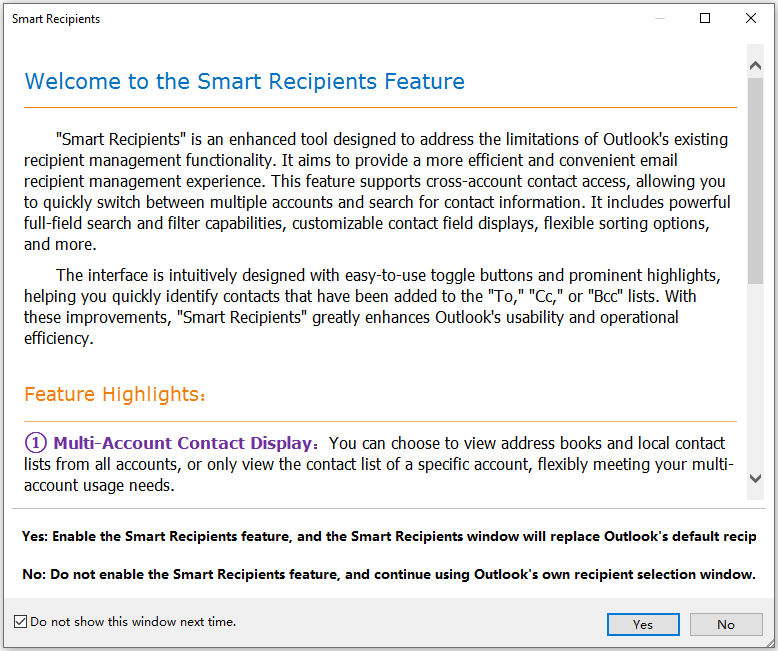
The Smart Recipients welcome window, which lets you turn the feature on or leave Outlook's own window in place.
AI replies, summaries and translation
Kutools for Outlook can draft replies, summarize messages or whole folders, and translate, working from the reading window. You configure the AI provider, API key and model in AI Settings, so check what your provider charges.
Benefits
Most of these tools take seconds, but they're seconds you spend many times a day. The bigger gain is fewer mistakes: a warning when you mention an attachment and forget it, automatic CC rules for messages that must reach a manager, and Send Separately so a mass email doesn't expose everyone's address.
It also moves some tasks from IT to you. Clearing out attachments and duplicates yourself is often quicker than asking for more mailbox space.
Real-World Uses
- Contract review: reply to all with the attachments kept, so everyone stays on the same file.
- Records for an audit: save a project folder's messages as PDFs in one batch.
- A full mailbox: detach old attachments to a network folder and compress the rest.
- Regular reminders: set a monthly timesheet email once and let it repeat.
- After a migration: clear out the duplicate messages an import left behind.
Who It's For, and Who Should Skip It
Kutools suits office workers on classic desktop Outlook with Windows: assistants, sales and support staff, project managers and anyone handling high email volume with files attached.
Skip it if you've moved to New Outlook, Outlook on the web or a Mac. The full add-in doesn't run there, and ExtendOffice's online version, ZKutools Anywhere, covers only the AI features today. Check which Outlook you have first, particularly if your company is switching. Skip it too if your IT policy blocks add-ins, or if you only need one feature that Outlook already has, such as delayed delivery.
Usage Guide
- Close Outlook and run the installer. MSI packages are available for company deployment and for a version without AI.
- Open Outlook and find the new Kutools tabs on the ribbon.
- Try a quick win first: select some messages and save them as PDFs with the bulk save tool.
- Open Attachment Manager and sort by size to see what's using your mailbox space.
- Look through the Kutools tabs for always-on features such as Auto CC, and set the rules you want.
- For AI, open AI Settings, choose a provider and model, and enter your API key.
Before you buy
- Confirm you're on classic Outlook. If the window has a "New Outlook" toggle turned on, this add-in won't load until you switch back.
- Lifetime means the version you have. Updates and support stop after two years unless you renew. The software keeps working.
- Auto Reply is listed by the vendor as available for POP and IMAP accounts, so check it against your mailbox type during the trial.
Where it falls short
- No future-proofing. Microsoft is pushing New Outlook, and this add-in depends on classic Outlook. A lifetime license is only as useful as your access to classic Outlook.
- Bugs can linger. A forum user said that when blocking multiple domains "the count of blocked domains doesn't change", and that support gave "no commitment as to when they will be fixed". That was March 2024, so it may be gone now.
- Sending tools need Outlook running. A desktop add-in can only act while it has the app to work through, so test Schedule Emails and Recurring Email on your own setup.
- AI needs setup. It uses a provider you configure, and message text goes to that provider, which your company may not allow.
What Users Say
Independent feedback aimed at the Outlook add-in is thin, so this section is short. Most comments cover ExtendOffice in general.
Trustpilot
Trustpilot, ExtendOffice company page: 4.3 out of 5 from 8 reviews when we looked on November 6, 2026. That's a small sample, and it covers the company rather than this one product.
Jesse Crenshaw, 5 stars, May 7, 2026, a long-time Kutools user who owns several ExtendOffice products, praises the no-subscription pricing and the support team.
Terry Bradley, 1 star, July 16, 2022, on license activation after a machine failure: "It is a long and drawn out and impossible process to try and retrieve your very long serial code." He ends with "I regret having purchased."
Microsoft Tech Community forum
Spencer-Atlanta, March 31, 2024, after several months of use: "It seems to work ok up to a point." The post goes on to describe the blocked-domains problem covered above.
Customers quoted by ExtendOffice
Stephen: "I have the Excel, Word and outlook Kutoold add-in." He adds: "Kutools is constantly expanding and improving and is a must have utility to add to your productivity tools."
John: "I have been looking for something that would give me some of the same ease-of-use in Microsoft Word, Microsoft Outlook as do our preferred programs." He says it "installs easily, works perfectly".
These come from ExtendOffice's own site, so treat them as hand-picked.
The pattern: long-time customers are loyal and like the support staff, the one specific Outlook complaint concerns an unfixed bug, and license recovery is the sore point for the company overall. Use the trial to form your own view.
Comparisons
Kutools for Outlook vs classic Outlook on its own
Outlook has rules, Quick Steps and delayed delivery, and those cover many routine needs for free. Kutools for Outlook adds what they can't do: keeping attachments on reply, snoozing, bulk export and a proper attachment manager.
Kutools for Outlook vs ZKutools Anywhere
ZKutools Anywhere for Outlook is ExtendOffice's online add-in for New Outlook, Mac and the web. It currently supports only AI features, so it doesn't replace the desktop tools.
Editions and Pricing
There's one edition. Volume discounts start at two licenses, and the prices below are ExtendOffice's published per-license rates.
| Licenses | Discount | Price per license |
|---|
| 1 | None | $59.00 |
| 2 to 4 | 15% | $50.15 |
| 5 to 9 | 25% | $44.25 |
| 10 to 24 | 32.5% | $39.83 |
Kutools for Office costs $129 and bundles the Outlook, Excel, Word and PowerPoint add-ins with Office Tab Pro in one installer, which makes sense if you'd use most of them.
FAQs
Does Kutools for Outlook work with New Outlook?
No. Kutools for Outlook runs on classic desktop Outlook for Windows. For New Outlook, ExtendOffice offers ZKutools Anywhere, which currently covers AI features only.
Does Kutools for Outlook work with Microsoft 365?
Yes, with the classic desktop Outlook that comes with Microsoft 365, in 32-bit and 64-bit.
Is there a Mac version of Kutools for Outlook?
No. Kutools for Outlook isn't compatible with macOS.
What happens to Kutools for Outlook after two years?
Kutools for Outlook keeps working at the version you have. New versions and free support stop unless you renew.
Can I install Kutools for Outlook without AI?
Yes. ExtendOffice's download page offers non-AI versions of Kutools for Outlook as EXE and MSI files.
Can I deploy Kutools for Outlook across a company?
Yes. ExtendOffice provides an MSI package with a deployment guide, and volume pricing for two or more licenses.
Can I get a refund on Kutools for Outlook?
Yes. ExtendOffice offers 60 days from purchase with no questions asked: email support@extendoffice.com or sales@extendoffice.com with proof of purchase.
System Requirements
- Windows Vista, 7, 8, 8.1, 10, 11, Windows Server 2003 to 2025, Citrix/Windows Terminal Server, 32-bit and 64-bit
- Outlook 2010 to 2024 or Microsoft 365 (classic desktop Outlook), 32-bit and 64-bit
- About 95 MB for the installer
- Not compatible with macOS
Conclusion
Kutools for Outlook is worth $59 if you're staying on classic Outlook and email is a large part of your day. Keeping attachments on reply and clearing a full mailbox would justify it for many office workers.
The reason to buy is that it fixes small daily annoyances Microsoft hasn't. The reason to hold back is New Outlook: if your company is moving there, a one-time purchase for classic Outlook could have a short life, so check that first and use the 30-day trial.
Download Free Trial Buy Now