Kutools for Word: 100+ Batch and Editing Tools for Microsoft Word
Kutools for Word is a $59 one-time-purchase Windows add-in from ExtendOffice that adds more than 100 tools to Word 2013 through 2024 and Microsoft 365, for people who edit, convert or clean up many documents.
Word is fine for a single file. It's the fiftieth file that hurts: the same name change across a folder, a report that has to be split into chapters, or a hundred blank pages to find. Kutools handles those jobs in bulk.
Quick facts
- Version: 27.00, released September 10, 2026
- Developer: ExtendOffice Technology Inc.
- Platform: Windows only, with Word 2013 to 2024 or Microsoft 365, 32-bit or 64-bit
- Price: $59 for a lifetime license, with two years of free updates and support
- Seats: one license covers two computers
- Trial: 60 days with every feature
- Guarantee: 60 days, no questions asked
- Languages: 44 interface languages
What we checked: installer version 27.00.33 (77.9 MB), digitally signed by ExtendOffice Technology Inc. and downloaded from the vendor, and the checkout price of $59.00 for a lifetime license, both on November 6, 2026. We read the installer's version data but didn't install it or run its tools.
Download Free Trial Buy Now
Overview
Kutools adds its own tabs to the Word ribbon, plus a side pane for AutoText, symbols, bookmarks and captions. Beyond AI, the tools cover batch find and replace, merging and splitting, Word and PDF conversion, tables, images, QR codes and cleanup of things like blank pages and section breaks.
This is one of the fastest-moving add-ins we've seen: ExtendOffice put out nine numbered releases between September 2025 and September 2026. Much of that recent work has gone into the AI tools.
Features
Batch find and replace across files
Kutools for Word runs several find-and-replace rules across many documents at once, with options for where to search, the case and highlighting. You can save rule sets and preview results first. This is the tool that pays for the add-in if you maintain a lot of templates or contracts.

Batch Find and Replace with three rules set up across a folder of .docx files.
Convert between Word and PDF in batches
Kutools for Word converts DOCX files to PDF and PDFs to editable DOCX from inside Word, using a list of files and an output folder. It saves opening and exporting each file by hand.
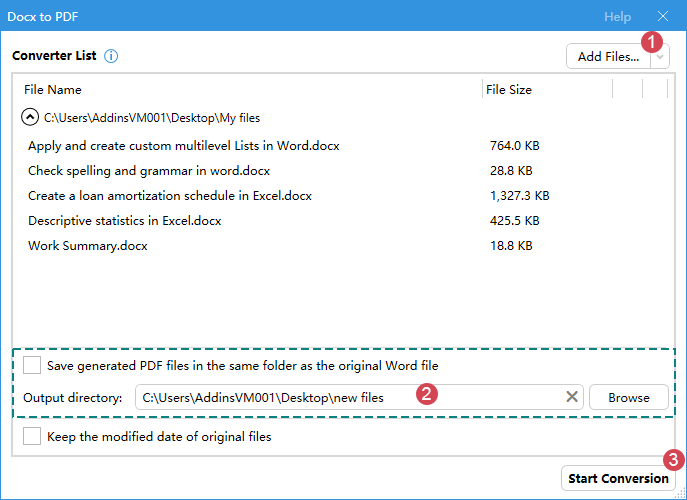
The Docx to PDF window with five files queued and an output folder set.
Split and merge documents
Kutools for Word splits a long document by heading, page break, section break, page or every n pages, and names the pieces from a prefix you set. It can also merge files back together.
Symbol and emoji picker
Kutools for Word opens a pane of math symbols, arrows, currency signs and emoji, with favorites and a custom library, so you don't have to dig through the Insert Symbol dialog.
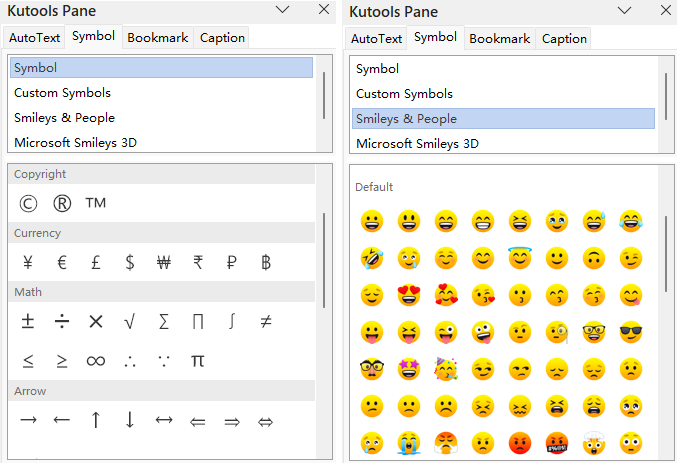
The Kutools Pane showing the symbol list on the left and emoji on the right.
AI writing help
Kutools for Word includes an AI Assistant for rewriting, summarizing, translating and answering questions about a document, plus a Real-Time Assistant that polishes, continues, summarizes and translates as you type. ExtendOffice says your API key stays encrypted on your computer and your text goes only to the AI provider you choose.
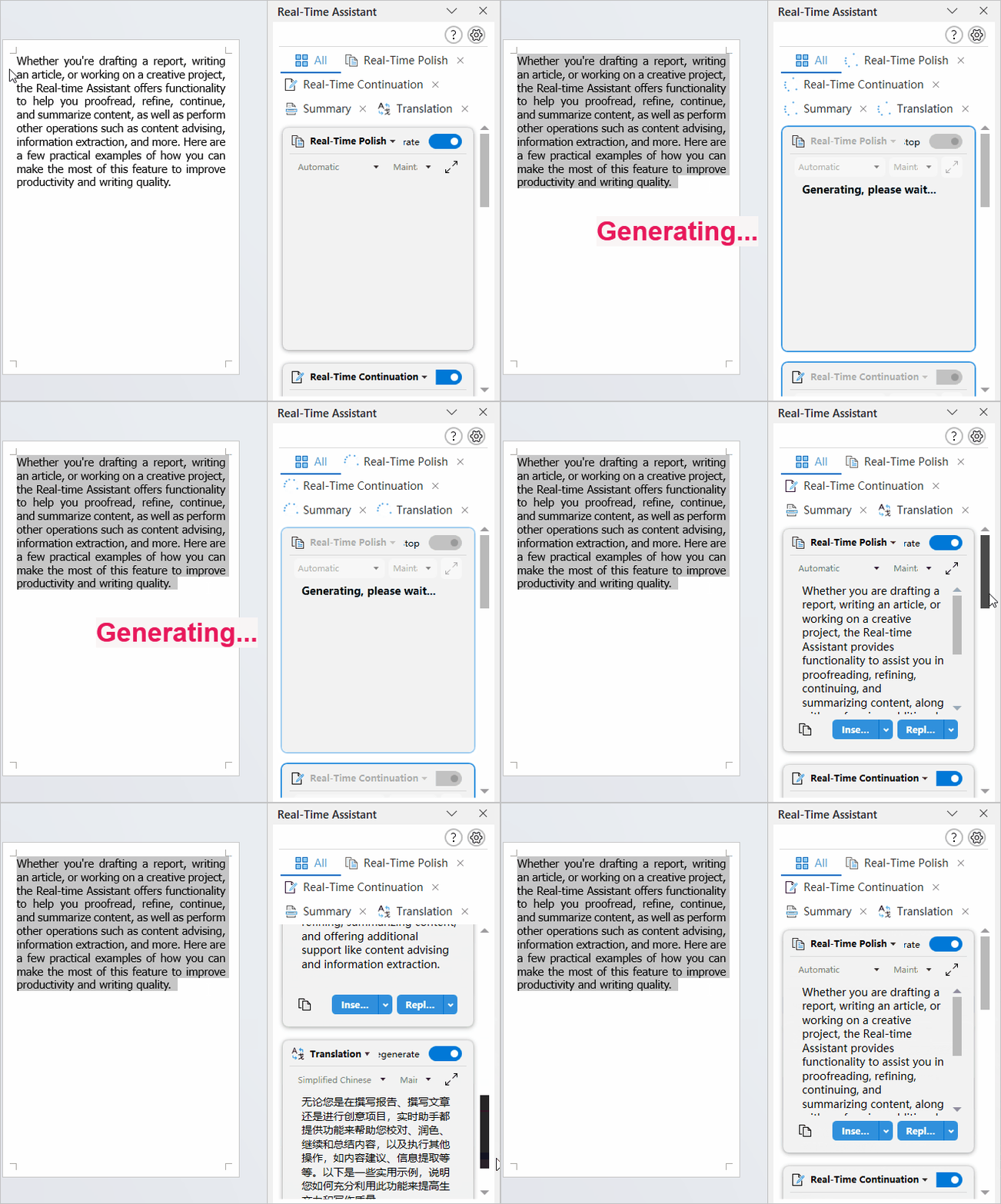
The Real-Time Assistant pane beside a document, with Polish and Continuation options.
Mail merge to separate files
Kutools for Word can create a separate Word or PDF file for each mail merge record, named from your data source. Word on its own puts every record in one document.
Eye Comfort Mode
Kutools for Word replaces the white page with a softer tinted background for long reading sessions, and you can switch it off in a click.
Benefits
The value here is scale. A change you'd make forty times by hand happens once, and it happens the same way in every file, so fewer documents go out with an old company name or a wrong date.
It also bundles things you might otherwise pay for or hunt down separately, such as a PDF converter and an AI writing helper, inside the app you already have open.
Real-World Uses
- Rebranding: replace a company name and address across a folder of templates in one run.
- Manuals and theses: split a long document into chapters by heading, then send each to a different reviewer.
- Personalized letters: produce one named PDF per customer from a mail merge.
- Second-language writing: polish and translate a draft while you type.
- Document cleanup: delete blank pages and stray section breaks from a file that came from someone else.
Who It's For, and Who Should Skip It
Kutools suits legal and admin staff, technical writers, students with long documents, and anyone maintaining many templates on Windows.
Skip it if you're on a Mac or Word for the web, because it won't run there. Skip it too if you write a few short documents a month: Word's own find and replace and Save as PDF will do. Word 2010 and older aren't on the supported list.
Usage Guide
- Close Word and run the installer. MSI packages are available for company deployment and for a version without AI.
- Open Word and find the Kutools tabs on the ribbon.
- Make copies of a few test documents before your first batch job.
- Open Batch Find and Replace, add a rule, add the files, and preview before you replace.
- For AI, open the AI settings, choose a provider and enter your API key.
- After buying, register with the license details from the email. The paid version is the same download as the trial.
Before you buy
- Lifetime means the version you have. Updates and support stop after two years unless you renew. One Trustpilot buyer from 2023 found his upgrades had ended in 2025 and asked for a clearer chart of what's included.
- Release pace matters. With a release most months, a license falls behind quickly once its two years of updates end.
- To update: uninstall the old version before installing the new one, as ExtendOffice advises.
Where it falls short
- Thin independent feedback. Few reviews exist outside ExtendOffice's own pages, far fewer than for Kutools for Excel.
- Batch edits are hard to undo. A wrong rule across fifty files is a bad afternoon, so test on copies.
- PDF results depend on the PDF. ExtendOffice promises its layout is preserved, but complex files convert imperfectly in any tool, so check a few pages.
- AI isn't simply included. It runs through a provider you configure, so check that provider's charges and whether your documents may go to it.
- Word only. It does nothing for Google Docs or LibreOffice users.
What Users Say
Word-specific reviews are scarce, so this section is short. The one independent review clearly about this add-in is positive, and it comes with a useful warning about licensing.
Trustpilot
Trustpilot, ExtendOffice company page: 4.3 out of 5 from 8 reviews when we looked on November 6, 2026. That's a small sample, and it covers the company rather than this one product.
ulhas gore, "Review of Kutools for Word", 5 stars, May 8, 2026: "Kutools is a great product, and the support team is very responsive." He bought a lifetime license in 2023. Support told him free upgrades had ended in 2025 and gave him an older version that activated with his license. He'd like a clearer upgrade chart on the website.
Terry Bradley, 1 star, July 16, 2022, on recovering licenses after a machine failure: "It is a long and drawn out and impossible process to try and retrieve your very long serial code."
Customers quoted by ExtendOffice
WJSwanepoel: "I have been using KUTools for Word for several months now and simply cannot do without it."
George: "Ku Tools for Word, Ku Tools for Excel, and Office Tabs are the very best tools in my software library. I use them every single day".
Thanh Nhan: "I can save a lot of time on many Word and Excel operations."
Stephen: "Kutools is constantly expanding and improving and is a must have utility to add to your productivity tools."
These come from ExtendOffice's own product page, so treat them as hand-picked.
The pattern: buyers like the time saved and the support team. The criticism is about licensing: when updates end, and how hard a license can be to restore.
Comparisons
Kutools for Word vs Word on its own
Word handles find and replace, Save as PDF and mail merge in single documents, and that's enough for most people. Kutools for Word adds the batch layer across files, automatic splitting, and a separate file for each mail merge record.
Kutools for Word vs Microsoft Copilot
Copilot is a paid Microsoft service. The AI in Kutools for Word works with a provider and API key you choose, and it runs on older perpetual versions of Word too, so it's a way to get AI help without changing your Office plan.
Editions and Pricing
There's one edition. Volume discounts start at two licenses, and the prices below are ExtendOffice's published per-license rates.
| Licenses | Discount | Price per license |
|---|
| 1 | None | $59.00 |
| 2 to 4 | 15% | $50.15 |
| 5 to 9 | 25% | $44.25 |
| 10 to 24 | 32.5% | $39.83 |
Kutools for Office costs $129 and bundles the Word, Excel, Outlook and PowerPoint add-ins with Office Tab Pro in one installer.
FAQs
Does Kutools for Word work with Microsoft 365?
Yes. Kutools for Word supports desktop Word from Microsoft 365 and Word 2013 to 2024, in 32-bit and 64-bit.
Is there a Mac version of Kutools for Word?
No. Kutools for Word isn't compatible with macOS.
How many computers does one Kutools for Word license cover?
One Kutools for Word license covers two computers, such as one at work and one at home. On a Terminal Server or Citrix server, each desktop that accesses it needs its own license.
Is the Kutools for Word trial limited?
No. Kutools for Word has a 60-day full-featured trial, and the paid version is the same download.
Does ExtendOffice see the text I send to the AI tools?
ExtendOffice says data passes only between your computer and the AI provider and is never sent to ExtendOffice, and that your API key is stored encrypted on your computer. The provider's own privacy terms still apply.
Can I install Kutools for Word without AI?
Yes. ExtendOffice's download page offers non-AI versions of Kutools for Word as EXE and MSI files.
Can I get a refund on Kutools for Word?
Yes. ExtendOffice offers 60 days from purchase with no questions asked: email support@extendoffice.com or sales@extendoffice.com with proof of purchase.
System Requirements
- Windows Vista, 7, 8, 8.1, 10, 11, Windows Server 2003 to 2025, Citrix/Windows Terminal Server, 32-bit and 64-bit
- Word 2013 to 2024 or Microsoft 365, 32-bit and 64-bit
- About 78 MB for the installer
- Not compatible with macOS
Conclusion
Kutools for Word is worth $59 if you regularly work across many documents on Windows. Batch find and replace and splitting alone can repay it in one project, and the 60-day trial is long enough to find out.
The reason to buy is doing in one run what Word makes you do file by file. The reason to pass is that casual Word users won't touch most of it, and independent reviews are few, so rely on the trial rather than on anyone's praise.
Download Free Trial Buy Now