Deep Bin: Build Browser Screens for Your Data Without Writing an App
Deep Bin is a $300-a-year low-code database app builder for Windows and Linux from DB Software Laboratory. You design pages, grids, data entry forms and menus in a browser, and your staff then browse and edit records through those screens instead of a spreadsheet or a raw database tool.
The typical case is a small internal system that has outgrown a shared Excel file: table bookings, equipment loans, a list of suppliers with notes. Building a real web app for it is too much work, and handing people direct database access is asking for trouble. Deep Bin sits in the middle: one server, a few designed screens, and a login for each user.
Quick facts
- Version: 3.0.0.0, installer dated November 6, 2026
- Developer: DB Software Laboratory (etl-tools.com), United Kingdom
- Platform: Windows 64-bit and Linux 64-bit (.deb); the vendor offers special builds for other systems on request
- Interface: a web browser, on port 3333 by default
- Repository: SQLite by default; PostgreSQL, MySQL, MariaDB, Microsoft SQL Server or Oracle for heavier use
- Price: $300 for a one-year single-server licence. The order renews automatically
- Trial: 30 days, fully functional, no registration or credit card
- What we checked: the 50 MB deep_bin_64.zip downloaded from the vendor on November 11, 2026 contains a setup file reporting version 3.0.0.0; $300.00 for the one-year licence on the order page, with auto-renewal switched on, on November 11, 2026. We read the manual and studied its screenshots but didn't build an application with it ourselves
Download Free TrialBuy Now
Before you buy
Your data lives in Deep Bin's own tables. The manual describes "models" stored in the repository: general-purpose data tables with spare text, number, date and yes/no columns (20 of each) that your grids and forms map onto. It doesn't show pointing a form at a table in an existing database of your own, so if that's what you need, test it in the trial before you pay.
It's a builder, not a template library. You start with an empty front page and design every screen yourself. The restaurant booking example in the manual shows what's possible, but it doesn't ship as a ready-made app.
The star rating isn't about this product. The 4.9 Capterra badge on the Deep Bin page belongs to the vendor's shared review profile, where the reviews discuss Advanced ETL Processor. We found no independent reviews of Deep Bin.
Overview
Deep Bin is a small server program. You install it on one Windows or Linux machine, open it in a browser and sign in. An administrator (someone with access to the Settings menu) designs the application: a front page, menus of actions, grids that list records, and forms that edit them. Ordinary users get a limited menu and only see the screens their group allows.
Everything you design is stored as JSON in the repository database, and each designer has a RAW editor where you can edit that JSON directly. DB Software Laboratory built its own Event Loggers and its licensing server on Deep Bin, which is a fair sign that the framework is used for real work and not just demos.
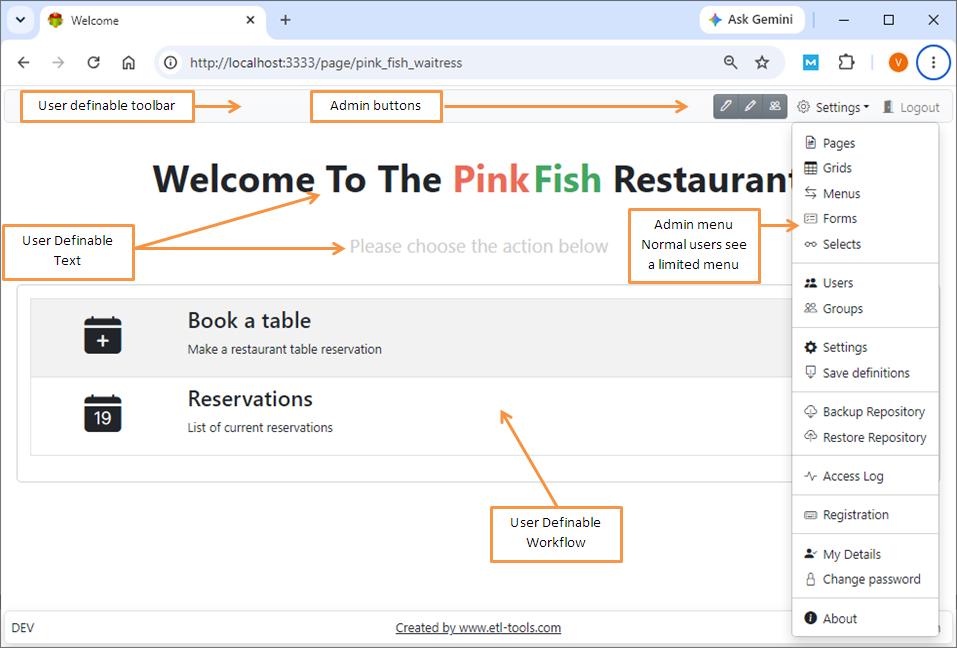
The vendor's restaurant example: a front page with "Book a table" and "Reservations" actions, and the admin menu (Pages, Grids, Menus, Forms, Selects, Users, Groups, Settings, Backup and Restore Repository, Access Log).
Features
Deep Bin grids list, search and export your records
A Deep Bin grid shows the records of one model with the columns you choose, renamed and reordered by drag and drop. It can show all records, the first N records, or all records with paging. There's an incremental search box at the top, filters (several filters combine with AND, and dynamic filters appear above the grid), sort orders applied in sequence, Excel export, and row actions: the gear icon on each row opens a form, with the record ID passed in the link.
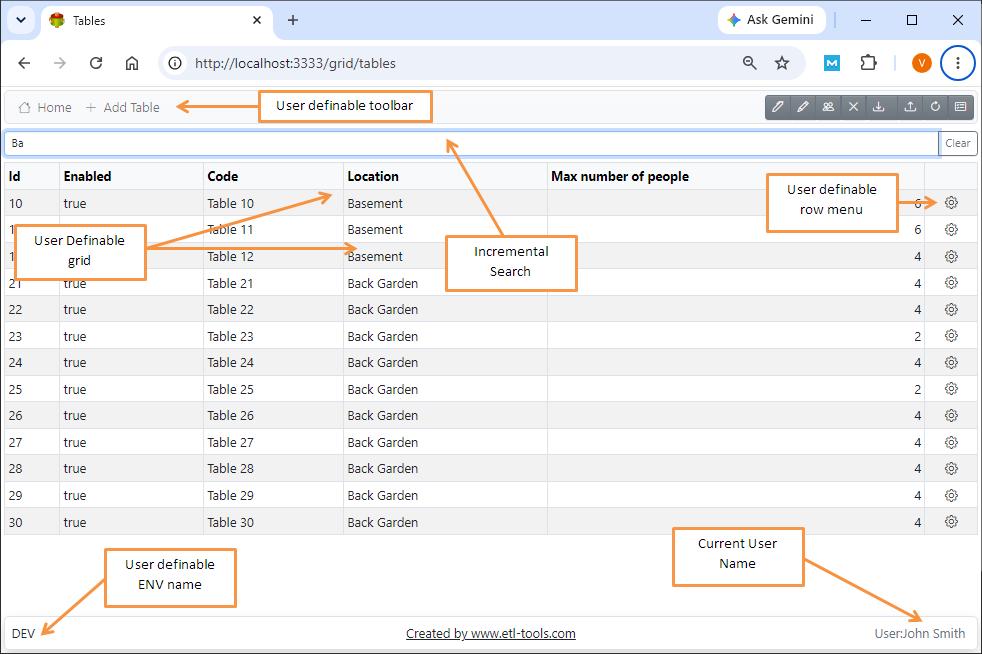
A grid of restaurant tables filtered by typing "Ba" in the search box, with a row menu on each record and the signed-in user in the footer.
Deep Bin forms are designed on a grid of rows and columns
The Deep Bin form designer lays out inputs in rows and columns, with a property editor for each object's width, type, name, label, hint and disabled state. Object types include text, number and date inputs, drop-down selects, check boxes, multi-line text areas, a formatted-text editor, hidden fields for default values, dual lists, cards, tabs and static text. A form can hide its Save As, Delete or Cancel buttons, or be made read-only, and an Audit panel shows who created and last updated the record, and when.
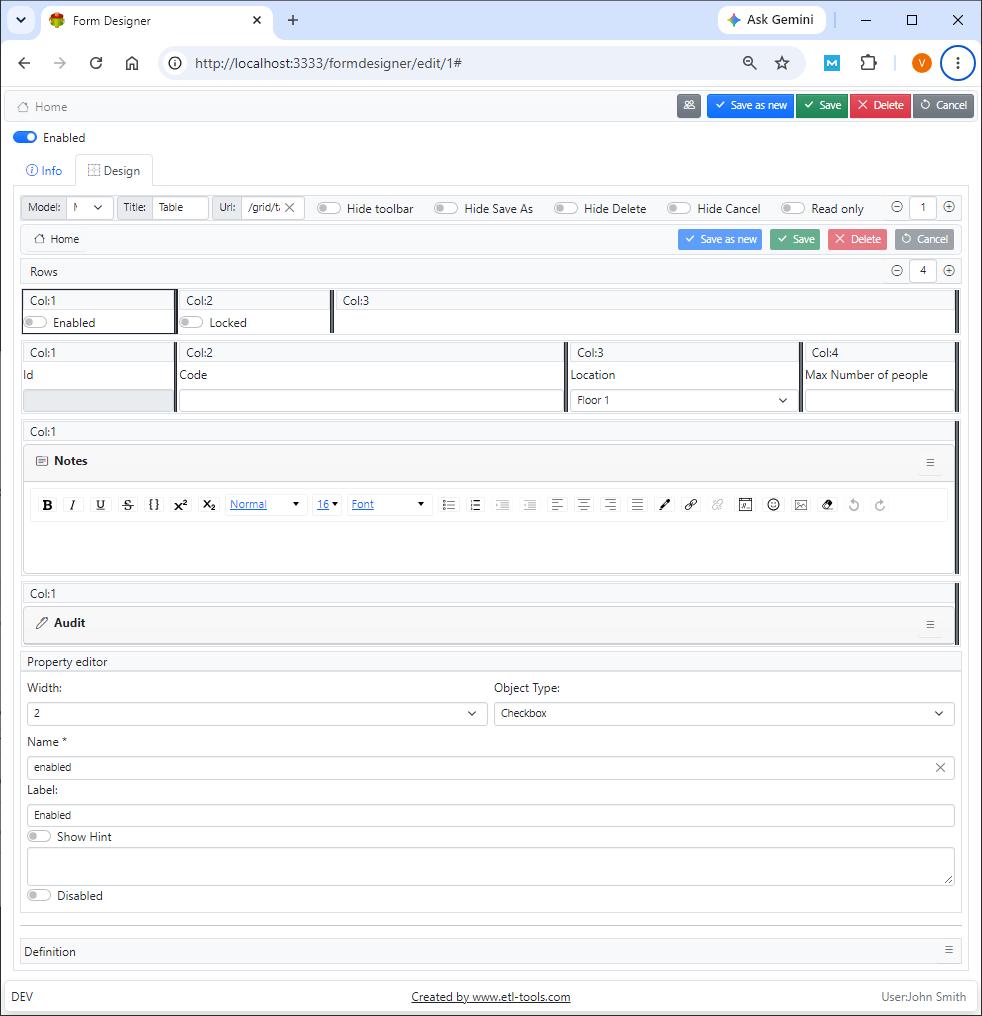
The form designer: four rows of fields (Enabled, Locked, Code, Location, Max Number of people, Notes, Audit) and the property editor for the "Enabled" checkbox.
Deep Bin selects turn a SQL query into a drop-down
A Deep Bin select is a dynamic list of values built from a SQL SELECT statement. Put one on a form and users pick from current data instead of typing it: in the vendor's booking form, the Table field lists every table defined in the Tables grid, so a reservation can't point at a table that doesn't exist.
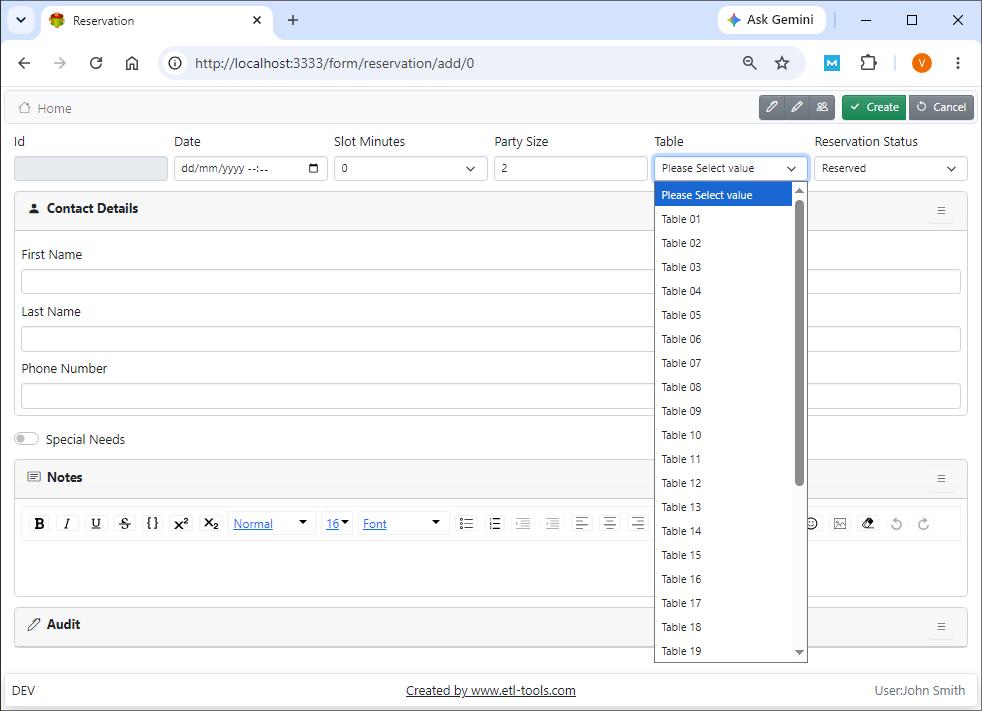
A reservation form with date, slot, party size, table, status and contact details; the Table drop-down is a select.
Deep Bin pages, menus and toolbars tie it together
A Deep Bin page is the starting point users land on, and each user has a default page. Pages hold text in your own colors and fonts, and can embed grids, forms, menus, cards, tabs, rows and HTML. Menus are lists of actions with an icon, title, description and link. The toolbar along the top is editable too: buttons can sit left or right, link to any page or form, or be hidden, though the Settings menu and Logout button always stay.
Deep Bin controls access with users, groups and SSL
Deep Bin signs every user in and gives each one a group, and the Access Log records logins. Passwords are encrypted with a security key you're told to change right after installation, sessions expire after a set number of days (30 by default), and you can switch on HTTPS by copying a certificate and key into the settings folder. Security can be turned off entirely, which the vendor advises against outside of recovery.
Benefits
- People edit data through screens you control. They see the fields you chose, pick values from lists and can't drop a table by accident.
- No client to roll out. Anyone on the network with a browser and a login can use it.
- You choose the database. Start on the built-in SQLite file and move to SQL Server, PostgreSQL or Oracle when the data or the number of users grows.
- Every record has an audit trail. Created by, created at, updated by and updated at are filled in for you.
Real-World Uses
- Bookings and reservations. The manual's own example: tables, slots, party sizes and a status for each booking, with the front-of-house staff seeing only "Book a table" and "Reservations".
- Asset or equipment registers. One grid of items, one form per item, a select for the location, and an Excel export when the auditor asks.
- Reference data maintenance. Let a business team keep lookup lists (product codes, branch details, price bands) up to date without a database login.
- A front end for data your other tools produce. The vendor's Event Loggers are Deep Bin applications that show captured events in grids, which hints at the pattern: something writes the records, Deep Bin lets people review and correct them.
Who It's For, and Who Should Skip It
Deep Bin suits an IT generalist or database admin in a small or mid-sized organization who needs an internal data entry tool this week, is comfortable editing a settings file and restarting a service, and doesn't want to write a web application.
Skip it if you need a public-facing app, a mobile app, or a polished design out of the box; a hosted no-code platform will get you there faster. Skip it too if your real need is to move or transform data on a schedule: the vendor itself points you to Advanced ETL Processor Enterprise for that. And if you only want a desktop editor for tables you already have, the vendor's Active Table Editor is the more direct tool.
Usage Guide
- Install it. On Windows, run the setup from the zip; Deep Bin installs as the "ETL-Tools.com Deep Bin (64bit)" service. On Linux, run
sudo apt install ./deep-bin-amd64.deb, then sudo systemctl enable etl-tools-deep-bin and sudo systemctl start etl-tools-deep-bin. - Sign in. Open
http://localhost:3333 and log in as welcome@etl-tools.com with the password Welcome. Change that password and the security key straight away. - Pick the repository. SQLite is fine for a trial. For real use, set the connection type, host, database and credentials in the .env settings file, switch on "Run SQL Scripts" once so it builds the tables, and restart.
- Build a grid. Settings, then Grids: give it a code (it becomes part of the link), a model and a title, then add the fields, filters, sorts and a row action.
- Build the form the row action opens, adding selects for any field that should come from a list.
- Add a menu and a front page that link to the grid and the "new record" form, then create groups and users and set each user's default page.
- Back up the repository from the Settings menu before you change the database type or make big design changes.
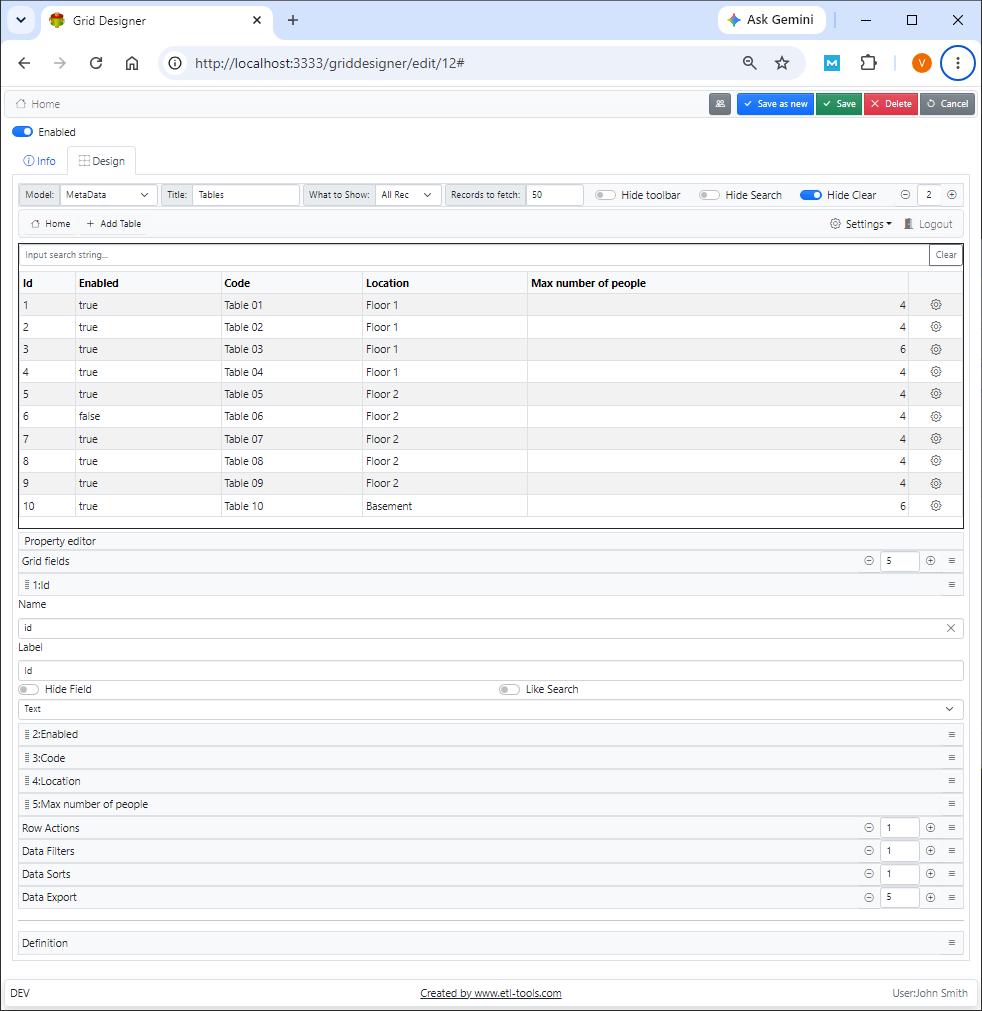
The grid designer with a live preview at the top and the field list, Row Actions, Data Filters, Data Sorts and Data Export sections below.
Where it falls short
- Thin documentation. Most manual pages are a few screenshots and a sentence or two (the Selects page is 75 words). Expect to learn by trying, or by asking on the vendor's support forum.
- Settings live in a text file. Changing the database, port or SSL means editing the .env file and restarting the service, and moving to another database type means re-creating users and groups.
- Easy to lock yourself out. The manual warns that deleting or disabling all users or groups can stop anyone signing in; the fix is to turn security off in the settings file, repair it and turn it back on.
- SQLite is for small data. The vendor recommends another database type for high-load systems.
- A plain look. Pages are clean Bootstrap-style screens with editable colors and text, not a visual theme designer.
Comparisons
Deep Bin vs Active Table Editor
Both come from DB Software Laboratory and both put forms and menus in front of a database. Active Table Editor ($120 a year per computer) is a Windows desktop program aimed at editing the tables you already have. Deep Bin ($300 a year per server) runs as a server on Windows or Linux and is used from any browser on the network, so you install it once rather than on each desk.
Deep Bin vs Advanced ETL Processor Enterprise
Advanced ETL Processor Enterprise moves and transforms data on a schedule, with no one watching. Deep Bin is for people typing and reviewing records. They work well together: an ETL job loads the data, a Deep Bin screen lets someone check it.
Editions and Pricing
| Licence | Price | Term | Covers |
|---|
| Single Server Annual Licence | $300 | One year, renews automatically | One server installation |
| Free trial | $0 | 30 days | All features, no registration |
There's one edition. The vendor also sells onsite training and consultancy at $500 each on the same order page.
FAQs
Is Deep Bin licensed per user?
No. Deep Bin is sold as a single-server annual licence, so you pay for the installation, and the manual puts no cap on the number of user accounts you create on it.
Can Deep Bin run on Linux?
Yes. Deep Bin has a 64-bit Debian package that installs as a systemd service called etl-tools-deep-bin, with its settings in /etc/etl-tools.com/deep-bin and its logs in /var/log/etl-tools.com/deep-bin. For other systems, the vendor offers to make a special build.
Do Deep Bin users need anything installed?
No. Deep Bin users only need a web browser that can reach the server's port (3333 unless you change it) and a user account.
Can I export data from Deep Bin to Excel?
Yes. Each Deep Bin grid can have Data Export definitions that export its records in Excel format.
How do I back up a Deep Bin application?
Deep Bin has Backup Repository and Restore Repository commands in its Settings menu. Since the designs (pages, grids, forms, menus) and the data are all in the repository, that one backup holds the whole application.
What happens when the Deep Bin licence year ends?
The Deep Bin order is a subscription that renews automatically each year at $300, so the licence keeps running unless you cancel the renewal. The vendor sells no lifetime licence.
Is there a video tutorial for Deep Bin?
Yes. DB Software Laboratory has short tutorials on its YouTube channel for Deep Bin's pages, grids, menus and security, linked from the matching pages of the online manual.
System Requirements
- Windows 64-bit, or 64-bit Linux that installs .deb packages
- About 50 MB for the installer
- A web browser for each user
- Repository: the built-in SQLite file, or PostgreSQL, MySQL, MariaDB, Microsoft SQL Server or Oracle
- Optional: an SSL certificate (server.key and server.cer) for HTTPS
Conclusion
Deep Bin is worth $300 a year if you need a handful of browser-based data entry screens with logins, for a team on your own network, and you'd rather configure than code. The one reason to buy it is how quickly a grid, a form and a menu turn into something staff can use safely. The main reason not to is the thin documentation and the fact that your data sits in Deep Bin's own repository tables, so use the 30-day trial to build one real screen against your real data before you pay.
Download Free TrialBuy Now