DBConvert Studio: One Windows Program to Migrate and Sync Between Ten Database Engines
DBConvert Studio is a $699 Windows application that copies database structure and data between SQL Server, MySQL/MariaDB, PostgreSQL, Oracle, IBM DB2, Firebird, SQLite, Access, FoxPro and Excel, in any direction it supports, and keeps two databases in step with scheduled one-way or two-way sync. The $699 license never expires and includes a year of updates. It's for DBAs, developers and consultants who move data between more than one pair of engines.
If you've ever hand-written CREATE TABLE scripts to get an Access or SQL Server database into PostgreSQL, fixed type mismatches one column at a time, and then wondered whether every row really arrived, this is the job Studio automates: connect both sides, review the mapping, run, and let it check the copy against the source.
Quick facts
- Version: 5.8.0, released November 8, 2026 (the What's New page lists six releases between September 30 and November 8, 2026)
- Developer: Slotix s.r.o. (DBConvert), in business since 2001
- Platform: Windows 10 or later. No Mac or Linux version
- Servers: SQL Server, MySQL/MariaDB, PostgreSQL, Oracle, IBM DB2, Firebird/InterBase
- Files: SQLite, Microsoft Access, FoxPro, Excel, plus MySQL and PostgreSQL dump files as a destination
- Cloud: Azure SQL, Amazon RDS/Aurora, Google Cloud SQL, Supabase and Neon, through their SQL Server, MySQL or PostgreSQL engine
- Modes: Convert (one-time migration) and Sync (one-way or two-way, scheduled)
- Price: $699 Personal license (1 user), perpetual, 1 year of updates included
- Trial: no time limit; character data after the first 50 records in each table is marked as trial data
- What we checked: the 183 MB installer (191,917,248 bytes, dated November 8, 2026) on the vendor's server, the trial rules in the vendor's documentation, and $699.00 for the Personal license on the order page on November 11, 2026, with Business and Enterprise as paid options in the same cart. We didn't run a migration ourselves
Download Free TrialBuy Now
Overview
DBConvert has sold single-pair tools for two decades: "DBConvert for Access & MySQL", "DBConvert for MSSQL & PostgreSQL" and so on, each licensed for one combination of engines. DBConvert Studio puts every one of those directions into a single application under one license. Version 5.8.0 rebuilt Studio on the same new interface the pair tools got in autumn 2026, so a job looks the same whichever engines it touches.
Every job runs through three screens: Setup (Convert or Sync, source and destination), Tables & mapping (which tables and columns, and what type each one becomes), and Execution (review, run, watch the progress). Jobs save themselves as you work, so you can run the same migration again, schedule it, or call it from a script.
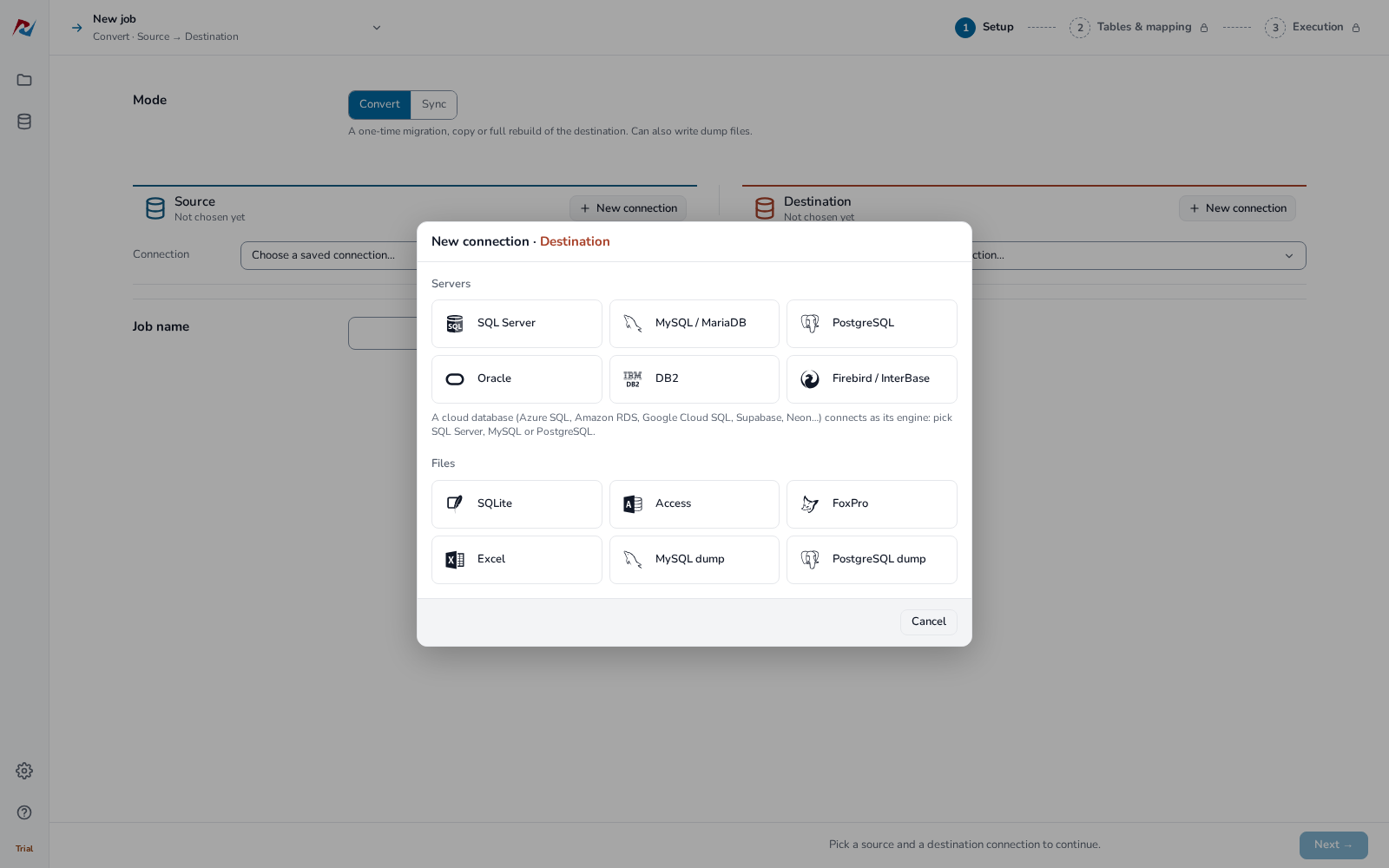
The Setup step of a new Convert job in DBConvert Studio: the destination picker lists six server engines and the file formats, including MySQL and PostgreSQL dump files.
Features
Any supported direction from one license
DBConvert Studio converts in either direction between the engines it supports, so SQL Server to PostgreSQL, Oracle to MySQL and Access to Azure SQL are all the same program. The vendor's notes on the limits: Excel works with Convert only (as a source or as a new workbook), and DB2 pairs with SQL Server, MySQL and PostgreSQL. A cloud database connects as the engine it runs, so Supabase and Neon are PostgreSQL connections, and Azure SQL is a SQL Server connection with encryption switched on automatically.
Type mapping you can see and change
DBConvert Studio shows, for every column, the destination type it will become, and you can change a type or a name in place before anything is written. A type set for the whole job applies to every table, while a type set on a single column wins. A line at the bottom of the screen names anything that would fail.
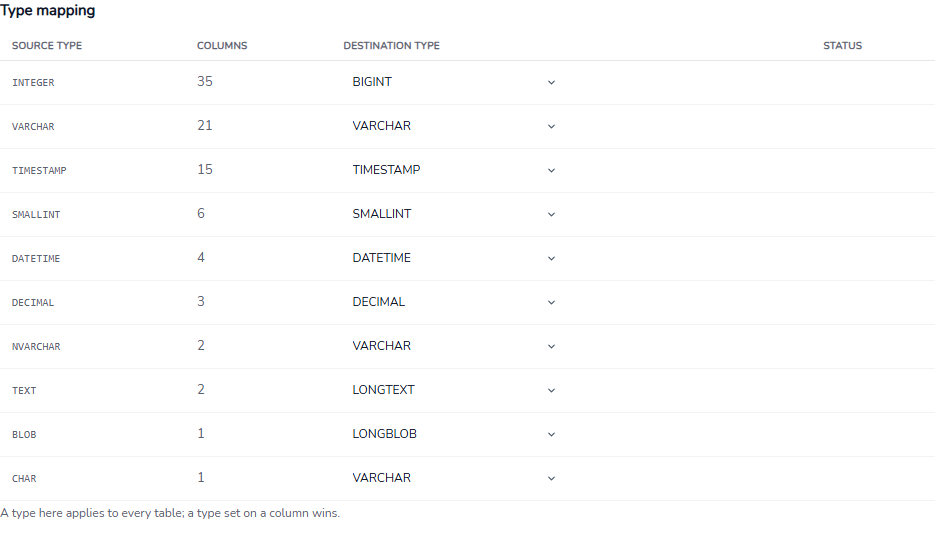
The job-wide type mapping: each source type, how many columns use it, and the destination type, each with a drop-down to change it.
Verify the copy after the run
DBConvert Studio can check the destination against the source when the run ends, which is new in version 5.8.0. It works on three levels: schema (every table and column, with the planned type), totals (row counts, sums, earliest and latest dates, text lengths) and rows (every copied row compared). The vendor's reason is a real one: a run can finish without errors and still change data, because one server can store a value another can't hold in the same form.
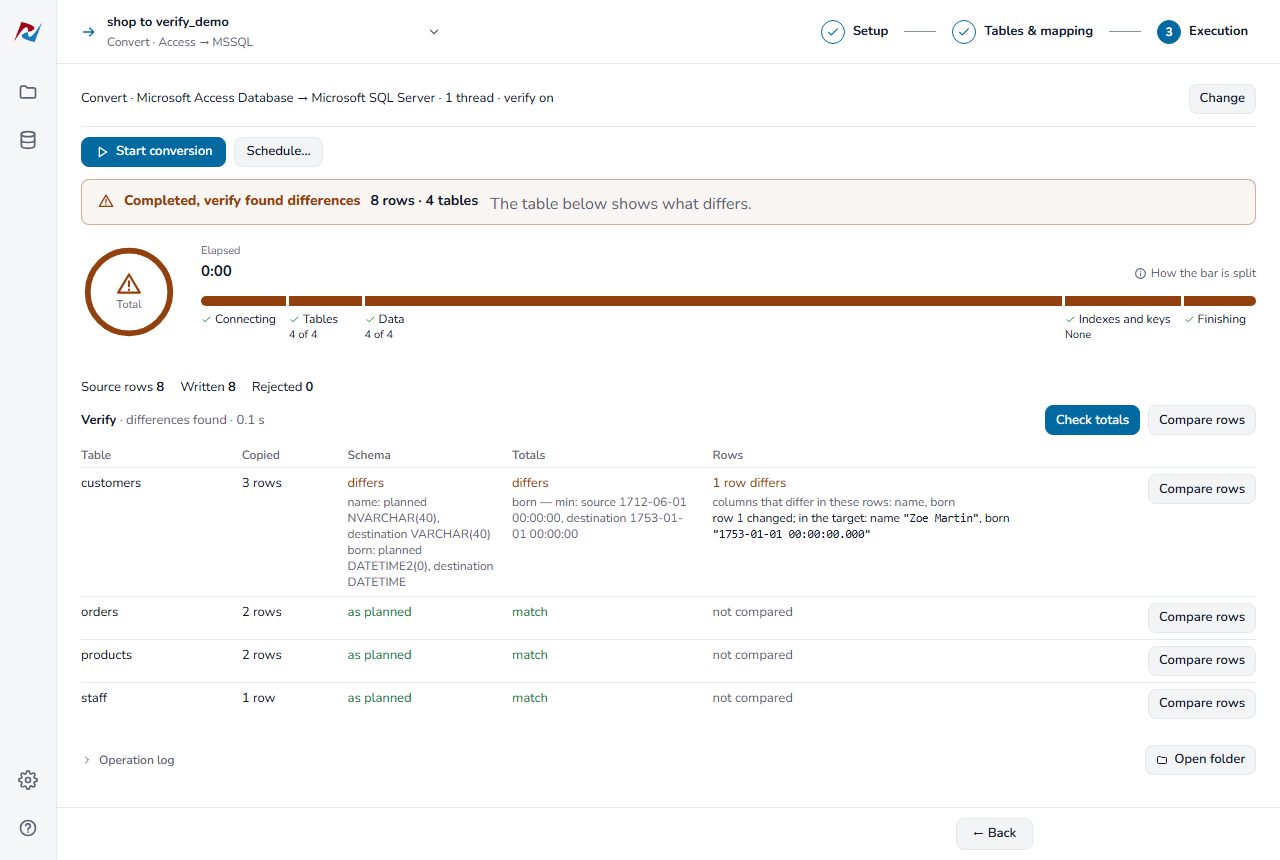
An Access to SQL Server run with verify on: three tables match, and the customers table shows one row whose name was trimmed to VARCHAR and whose 1712 birth date became 1753-01-01, SQL Server's DATETIME minimum.
Sync that carries only what changed
DBConvert Studio's Sync mode keeps two databases in step after the first copy, one way or both ways. With trigger-based sync, it adds tracking triggers and a history table, so later runs move only inserted, updated and deleted rows; the vendor's 5.7.0 notes give 3 million rows in 18 seconds for a first one-way sync with change tracking. Every synchronized table needs a primary key or a unique, non-composite index so rows can be matched.
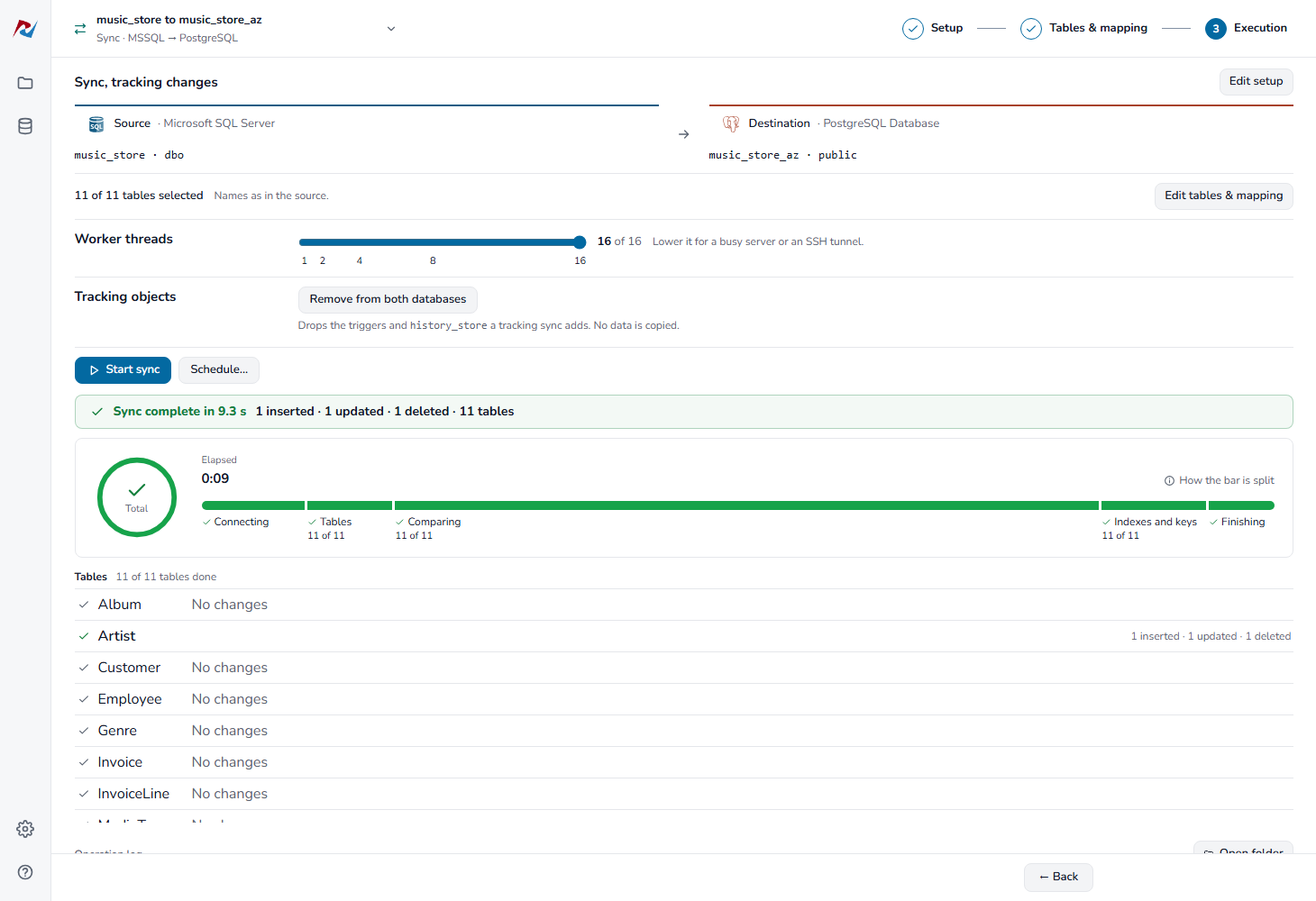
A SQL Server to PostgreSQL sync with change tracking: 16 worker threads, finished in 9.3 seconds, with the changes listed per table.
Parallel workers for large tables
DBConvert Studio splits large tables across worker threads and builds indexes after the data is loaded. The vendor's test stand times a 10-million-row table at 15 seconds from MySQL to PostgreSQL and 22.5 seconds from SQL Server to PostgreSQL. The thread count is capped by your license (2 for Personal, 8 for Business, 16 for Enterprise) and by your processor. Parallel reads work from SQL Server, MySQL, PostgreSQL, Oracle, Firebird and SQLite; every destination takes parallel writes except Access, FoxPro and DB2.
Saved jobs, schedules and the command line
DBConvert Studio saves each job as you build it. You can schedule a job daily, weekly, monthly or every few minutes, and it runs with the app closed as long as you're logged in to Windows; a start that arrives while the last run is still going is skipped and logged. The --run-job switch runs a saved job from your own scripts, and each run leaves a lastrun.json file a script can read.
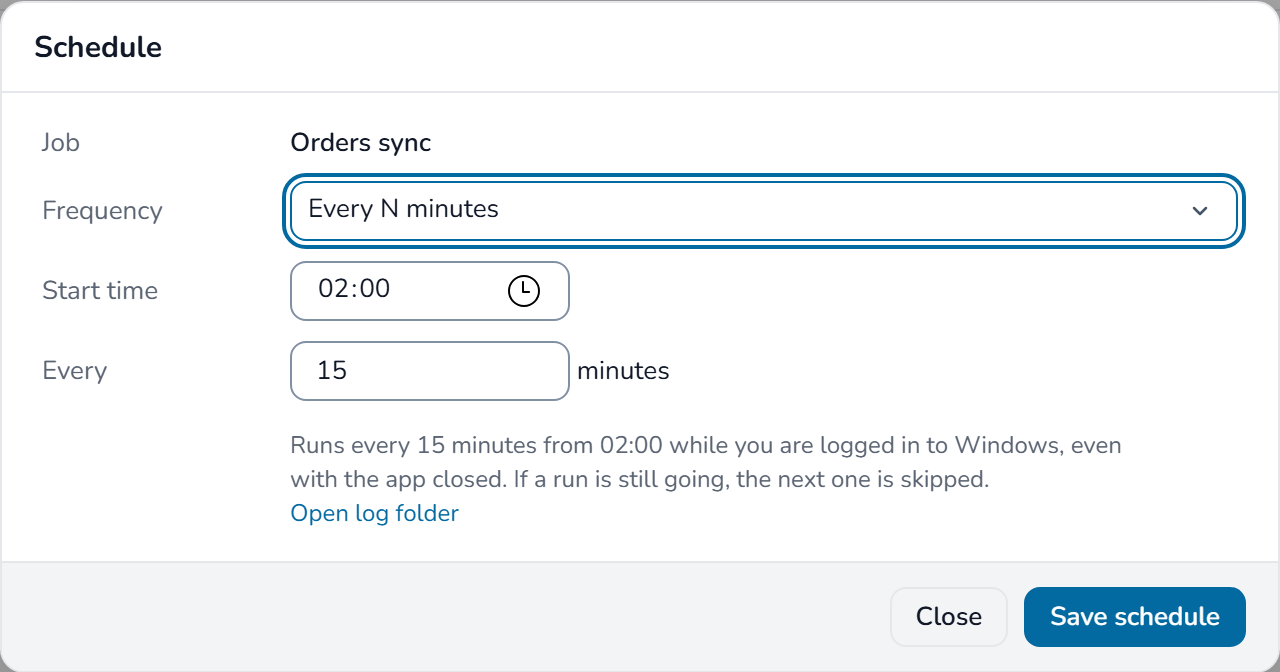
The Schedule dialog: an "Orders sync" job set to run every 15 minutes from 02:00.
Built-in SSH tunnel and filters
DBConvert Studio has an SSH tunnel built in (ed25519 keys work, nothing extra to install) for MySQL, PostgreSQL and DB2 servers you can't reach directly. You can also filter rows with conditions, pick several source schemas in one job and either keep them or merge them into one, and decide whether tables added to the source later join the job.
Benefits
- One purchase instead of many. Each pair tool starts at $199, so the fourth pair you'd need costs more than Studio. Studio also lets you send one source to several destinations.
- Proof, not hope. Verify turns "the run finished" into "the data matches", table by table, which is what an auditor or a client will ask you.
- Migrate once, then keep running. The same job does the first copy and the incremental syncs during a cut-over period, so you're not maintaining two tools.
- A perpetual license. After the first year your version keeps working; renewing is only for newer builds.
Real-World Uses
- Retiring an Access back end. Move a 20-year-old Access or FoxPro application's tables to SQL Server or PostgreSQL, check the verify report for dates and text that didn't fit, and fix the mapping before the final run.
- SQL Server to PostgreSQL. Convert the schema and data, then run a scheduled one-way sync every 15 minutes while the application is switched over, so the new database stays current until cut-over day.
- Feeding a reporting copy. Keep a MySQL reporting database filled from an Oracle or Firebird production system overnight, from Task Scheduler, with only the changed rows moving.
- Consulting work. A database consultant who meets a different pair of engines at every client keeps one tool and one set of saved jobs.
- Moving to the cloud. Load an on-premises SQL Server into Azure SQL, or MySQL into Amazon RDS, through the same connection screens as a local server.
Who It's For, and Who Should Skip It
It's for DBAs, developers and IT consultants who move data between several engine pairs, or who need ongoing sync rather than a one-off copy, and who work on Windows.
Skip it if you only ever need one pair of databases: a DBConvert pair tool (from $199) does the same conversion and sync for that pair. Skip it too if you need stored procedures, functions and triggers converted, because DBConvert moves tables, columns, indexes, views and foreign keys, and the vendor says procedural code has to be rewritten by hand. If you need continuous, low-latency replication from the transaction log rather than scheduled syncs, the vendor points you to its separate product, DBConvert Streams. And if you're on a Mac or Linux desktop, there's no version for you.
Usage Guide
- Install. Download the 183 MB installer and run it on Windows 10 or later. The database runtimes and drivers are included; for DB2, setup downloads IBM's driver, so no IBM client is needed first.
- Start a job. Choose Convert (one-time copy or full rebuild) or Sync, then add a connection for the source and one for the destination. A saved connection is reused by every job.
- Pick the tables. On Tables & mapping, select tables and columns, open a table to see each column's destination type, and change types or names where needed.
- Check the plan. On Execution, review what the run will do, set the worker threads, and tick Verify after the run.
- Run it. Start the conversion and follow the phases: connecting, tables, data, indexes and keys. Read the verify results when it finishes.
- Repeat. Reopen the job from the Jobs list to run it again, click Schedule… to automate it, or use
--run-job from a script.
Before you buy
- The trial copies every row but marks the data. All rows are transferred, but character data after the first 50 records of each table is replaced with ***TRIAL***, and views and queries aren't migrated. There's no time limit and no full-function timed trial, so test on a copy whose first 50 rows show what you need.
- A trial-only MySQL error. With MySQL as the destination, the trial can report error 1452 (foreign-key constraint fails), because parent tables are incomplete. The vendor says the licensed build doesn't have this.
- Refunds are narrow. The money-back guarantee covers a serious migration problem the developers can't fix after you buy, not a change of mind. Use the trial to decide.
- Users, not machines. Licenses count the people allowed to run the program, and Business and Enterprise licenses cover one company only.
Where it falls short
- No procedural code. Stored procedures, functions and triggers aren't converted.
- Some engines are limited. Excel is Convert-only, DB2 only pairs with SQL Server, MySQL and PostgreSQL, and Access, FoxPro and DB2 destinations don't take parallel writes.
- Sync needs keys. A table without a primary key or a unique non-composite index can't be synchronized.
- A young interface. Studio moved to the new application in November 2026, and the release notes show fixes landing every few days (Firebird constraint names that were wrong in 5.5.0 were fixed in 5.6.0). Expect to update often during the first months.
- Schedules need a logged-in user. A scheduled job runs only while you're logged in to Windows.
What Users Say
Published reviews of DBConvert are few but consistently positive. Most cover the DBConvert tools in general rather than Studio alone, which is fair, since Studio is the same engine with every pair included.
SourceForge (5.0 out of 5, 4 reviews)
- Brian F., Software Developer ("Database Migration made easy", August 2022, 5/5) moved a 10-year-old SQLite database with 25 tables to SQL Server; the trial conversion took about 10 minutes and the data checked out. He also notes that DBConvert Studio bundles most converters at reasonable prices. His cons: "I have not run into any cons yet as everything from installation to use of software has met expectation"
- Danny T., Database developer ("My experience with this program", February 2023, 5/5): "Supports many databases On-Premise + Cloud based." He also praises the options for renaming, redefining and filtering, and fast conversion.
- Rob B., Manager ("Good and easy to use", September 2023, 5/5): "Fairly much options." As a con he wrote: "haven't seen yet, may be more database directions."
- Markus P., DBA and data analyst ("Good experience with the tool", June 2021, 5/5): "Simple and intuitive interface." and "This is no doubt a thoughtful and pretty good product."
G2 and the vendor's customer list
G2 shows DBConvert at 5.0 from a single review, and its seller page for Slotix averages 4.8 from two, too few to mean much. DBConvert says it has more than 50,000 customers in over 100 countries and lists organizations such as Intel, Siemens, the University of Oxford and the U.S. Department of the Treasury among them.
The pattern: reviewers like the number of engines, the mapping and filtering options and the conversion speed, and several praise quick support. Nobody reports a serious problem, but the reviews are few and mostly predate the November 2026 interface, so the free trial on your own data is the better test.
Comparisons
DBConvert Studio vs. a DBConvert pair tool
A pair tool, such as DBConvert for MSSQL & PostgreSQL, does exactly what Studio does for that one combination, both ways, including sync, from $199. Studio's $699 buys every combination and one-source-to-many distribution. The break-even is the fourth pair, or sooner if you're not sure which engines your next project will use.
DBConvert Studio vs. DBConvert Streams
Studio's sync runs on a schedule: it compares or reads tracked changes, moves them and stops. DBConvert Streams is the vendor's separate product for continuous, log-based change data capture, for when minutes of lag are too much.
Editions and Pricing
| License | Price on the order page | Users | Worker threads | Updates and support |
|---|
| Personal | $699 | 1 | 2 | 1 year of updates; premium support optional (+$209.70) |
| Business | $2,106 ($699 + $1,407 option) | Up to 5, one company | 8 | 1 year of updates; premium support optional |
| Enterprise | $4,686 ($699 + $3,987 option) | Unlimited, one company | 16 | 3 years of updates; premium support included |
All three are perpetual: when the update period ends, your version keeps working, and you renew only if you want newer builds. Premium support means priority tickets with a response within one business day, escalation to the developers, and hotfixes for bugs. The Business and Enterprise prices are the cart's base price plus the tier option, as shown on November 11, 2026.
FAQs
Does DBConvert Studio keep working after the first year?
Yes. DBConvert Studio's license never expires. The first 12 months include every minor and major release; after that your installed version keeps working without limits, and renewing is optional, only for builds released later.
Can DBConvert Studio convert stored procedures and triggers?
No. DBConvert Studio moves tables, columns, indexes, views and foreign keys with type mapping, but stored procedures, functions and triggers have to be rewritten by hand for the new engine.
Does DBConvert Studio work with Azure SQL, Amazon RDS and Supabase?
Yes. DBConvert Studio connects to a cloud database as the engine it runs: Azure SQL as SQL Server (with TLS turned on automatically for *.database.windows.net), Amazon RDS and Aurora as SQL Server, MySQL or PostgreSQL, and Supabase and Neon as PostgreSQL. A paused serverless Azure database is waited for rather than reported as a timeout.
I already own a DBConvert pair tool. Will Studio open my key?
No, a pair tool's key is for that pair. The vendor's release notes for 5.8.0 say your DBConvert Studio key opens Studio, and the vendor's store has a Licenses & Upgrades section for moving between licenses.
How are users counted on a DBConvert Studio license?
DBConvert Studio counts people, not installations: the number of individuals allowed to run it. Business and Enterprise licenses apply within one company, so two separate companies each need their own license.
Can DBConvert Studio write a SQL dump instead of connecting to a server?
Yes. DBConvert Studio's Convert mode can write a MySQL or PostgreSQL dump file as the destination, which helps when the target server isn't reachable from your PC.
Can DBConvert do the migration for me?
Yes. DBConvert sells migration services in which its engineers run the job with the same software, if you'd rather not run it yourself.
System Requirements
- Windows 10 or later
- 183 MB installer; database runtimes and drivers included (setup downloads IBM's driver for DB2)
- Network access to the source and destination databases; DB2 for Linux, UNIX and Windows 11.1 or later
- No Mac or Linux version
Conclusion
DBConvert Studio is worth its $699 if you work with more than three engine pairs or need migration and ongoing sync in one tool. The reason to buy it is breadth with checks: ten engines in any supported direction, a mapping you can see before anything is written, and a verify step that shows which rows didn't survive the trip. The main reason not to is scope: if you only ever move one pair, a $199 pair tool does the same job, and if your database lives in stored procedures, you'll still be rewriting those by hand. Run the free trial on a copy of your own data first; it moves every row, so you'll see the real speed and the real mapping.
Download Free TrialBuy Now