DbSchema Architect: Design a Database Before It Exists, Then Deploy, Document and Version It
DbSchema Architect is the top edition of DbSchema, a desktop database designer for Windows, macOS and Linux that works with more than 100 SQL and NoSQL databases. On top of ER diagrams, schema sync, Git collaboration and HTML documentation, Architect adds logical and conceptual modeling and flow diagrams generated from your SQL. A Personal perpetual license costs $313.60, with a 15-day free trial of every feature.
Most schema tools start from a live database. That's fine until your team has to agree on what the data looks like before anyone has picked PostgreSQL or SQL Server, or until a schema with hundreds of tables has been changed by five people and nobody can say which version is in production. DbSchema keeps a model file of your schema that you can design offline, review in Git, compare against any database and publish as documentation. Architect is the edition for the people who design that model from scratch.
Quick facts
- Version: 10.6.0
- Developer: Wise Coders GmbH (Munich, Germany), development team in Romania, ISO 27001:2022 certified
- Platforms: Windows (x64 and ARM64), macOS, Linux (x64 and ARM64); Java is bundled
- Databases: 100+ through JDBC, including PostgreSQL, MySQL, SQL Server, Oracle, MongoDB, Snowflake, BigQuery, Redshift, SQLite, Cassandra and DynamoDB
- Price: $313.60 Personal perpetual license, then optional updates at $80 a year; Commercial $470.40, Educational $156.80; monthly plans from $15.68
- License: per developer, active on 2 computers, one at a time; floating licenses for teams
- Trial: 15 days of all Architect features, then it continues as the free Community edition
- What we checked: the Windows installer from dbschema.com (157 MB, file version 10.6.0, signed by Wise Coders Solutions SRL), and every DbSchema Architect price on the order page on November 8, 2026: $313.60 Personal, $470.40 Commercial and $156.80 Educational perpetual, with maintenance set to auto-renew at $80, $120 and $40 a year. We didn't model or synchronize a real database.
Before you buy
- The yearly update fee renews automatically. On the order page, a perpetual license includes one year of new versions and then renews the maintenance at $80 a year (Personal). It's optional: your license keeps working without it. To stop it, turn off automatic renewal in your PayPro Global account or ask DbSchema support to switch it to manual.
- Check that you need Architect, not Pro. Architect's extras are logical/conceptual design and flow diagrams from SQL. If you design straight in tables for one database, the Pro edition does everything else for less, and you can upgrade to Architect later for the price difference.
- Personal means you pay as an individual. If your company pays, the Commercial license ($470.40) is the right one; students and teachers get the Educational price.
- Refunds are limited. DbSchema refunds automatic renewals and duplicate charges within 15 days of the charge. Use the 15-day trial (extendable once by another 15 days) to decide before you buy.
- When the trial ends, the free edition can't open saved project files. Your files stay on your disk and open again once you register a license.
Download Free TrialBuy Now
Overview
DbSchema comes in three editions from one installer. Community is free: it connects, reverse-engineers a schema into diagrams and runs SQL. Pro keeps the design in a model file you can work on offline, and adds documentation, schema synchronization, the visual query builder, data tools and the AI Assistant with your own key. Architect adds everything you need to design before a database exists, plus flow diagrams that show which tables your procedures, functions, triggers and scripts read and write.
The model is the center of it all. DbSchema reads your database once and keeps a model that the diagrams, documentation, data tools and deployment all work from, so there's no second copy to keep in sync. The model is a file on your machine or your Git server; nothing goes to a cloud service.
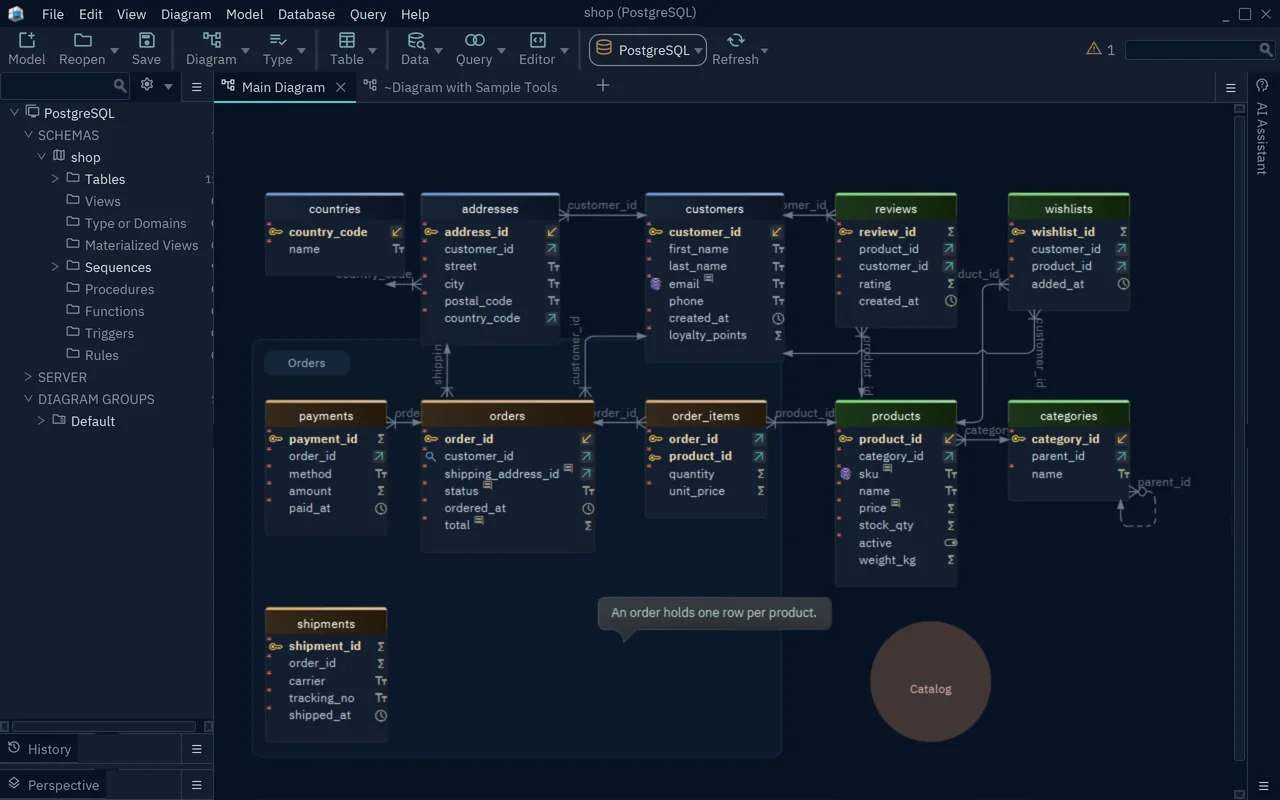
A DbSchema diagram of a PostgreSQL "shop" schema: tables with keys and data-type icons, foreign-key lines, an "Orders" group, a callout note and a "Catalog" shape, with the schema tree on the left.
Features
Logical design: agree on the data before choosing the database
DbSchema Architect's logical design holds entities, attributes and relations with general data types and names in plain words, connected to no database. You set each relation's cardinality (one or more, zero or more) and identifying or non-identifying type, keep naming rules in a dictionary, and when the design is ready generate the physical model for PostgreSQL, SQL Server, MongoDB or any supported engine. You can also go the other way: convert a model reverse-engineered from a live database into a logical one, which writes customer_id as "customer id" and turns NOT NULL foreign keys into "one or more" relations. Logical design needs Architect.
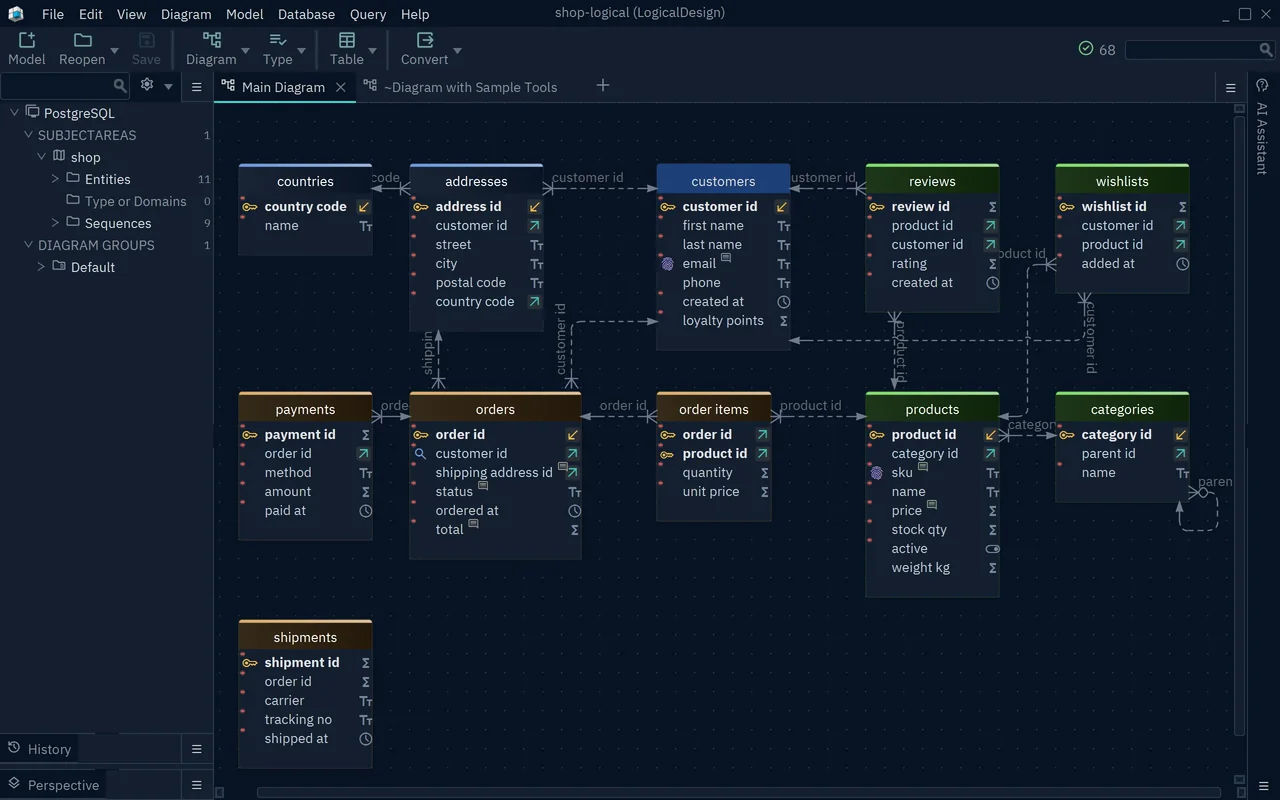
A logical model in DbSchema Architect: entities such as customers, orders and products with attribute names in plain words, Subject Areas and Entities in the tree, and a Convert button for generating the physical model.
Flow diagrams generated from SQL
DbSchema Architect draws flow diagrams showing which tables your procedures, functions, triggers and scripts read and write, and refreshes the diagram from the code. On a legacy database where business logic lives in stored procedures, that answers "what writes to this table?" without reading every routine by hand.
Review schema changes in Git like code
DbSchema Architect has Git built in. You commit the model, pull teammates' changes, see who changed which table in the model history and resolve conflicting edits side by side, with "Ours", "Theirs" or a merge. The Git server can be your own internal one or GitHub, Bitbucket and similar, which is also how DbSchema avoids a cloud collaboration service.
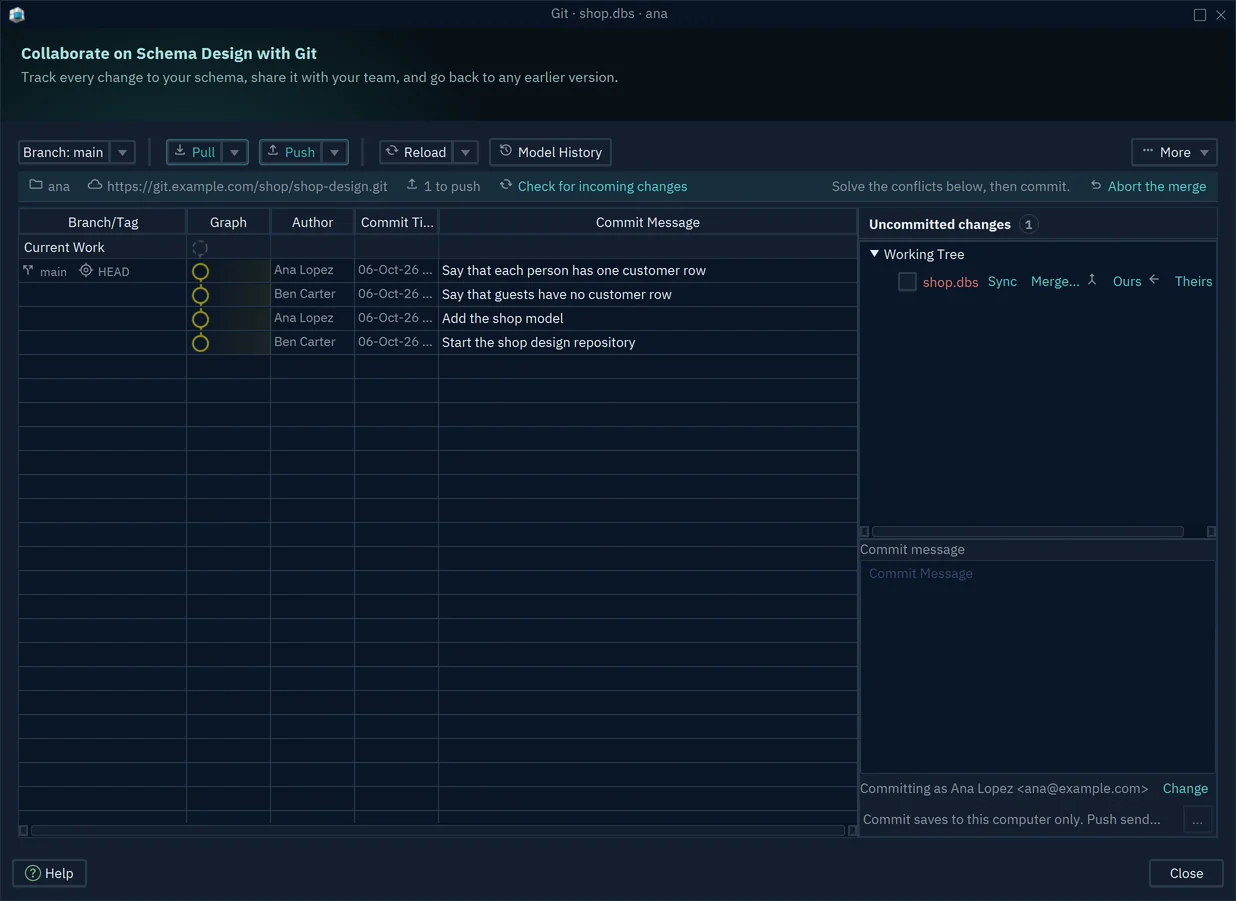
The DbSchema Git dialog during a merge: commit history by two designers, and a conflicting shop.dbs model with Sync, Merge, Ours and Theirs options.
Compare, synchronize and deploy
DbSchema Architect's schema synchronization compares the model with a database (or two environments, such as development and production), shows the differences, lets you choose which to apply and generates the migration script. It also imports legacy DDL files into a model you can edit visually and export clean DDL from.
Documentation anyone can open in a browser
DbSchema Architect publishes the schema as interactive HTML5, PDF or Markdown documentation, diagrams and comments included. Readers see each table's columns, data types, constraints, indexes and the keys that reference it, and need no install or license to read it.
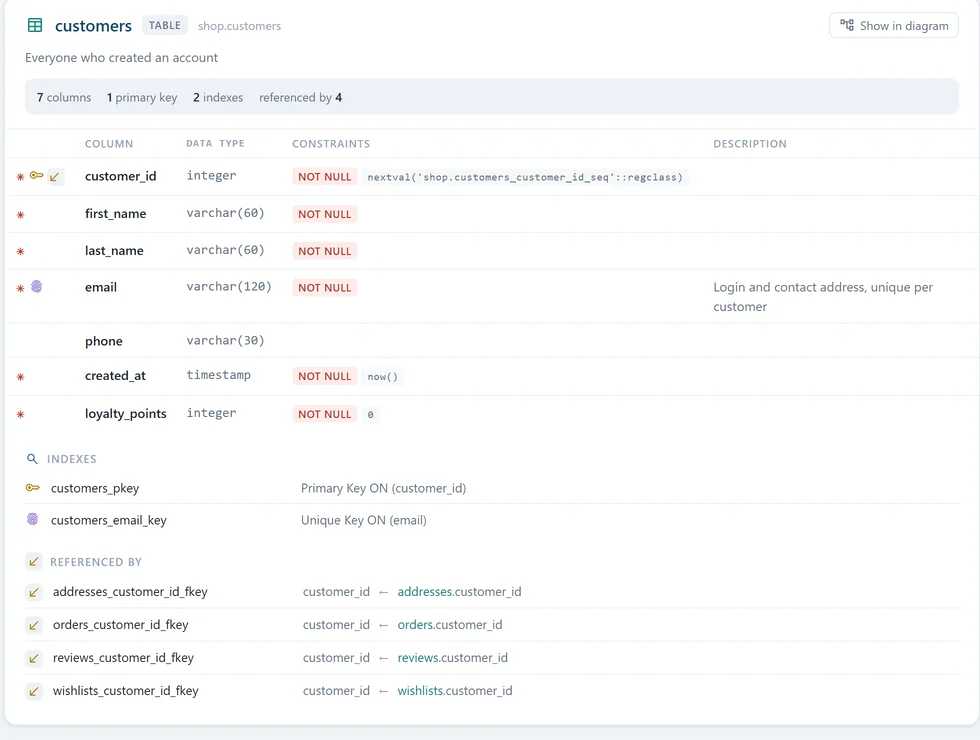
A table page in DbSchema's HTML5 documentation: columns with data types and NOT NULL constraints, a column description, the indexes and the four foreign keys that reference the table.
Query, browse and fill the data
DbSchema Architect includes a SQL editor with autocompletion for your tables and columns, a visual query builder that writes the SQL as you tick columns and join tables along foreign keys, a relational data browser for exploring and editing records across related tables, a data generator for test data, and an importer for CSV, Excel, JSON and XML files. Results export to CSV, JSON or Excel. The AI Assistant writes queries from plain English, using your own provider key or the separate $9 a month subscription.
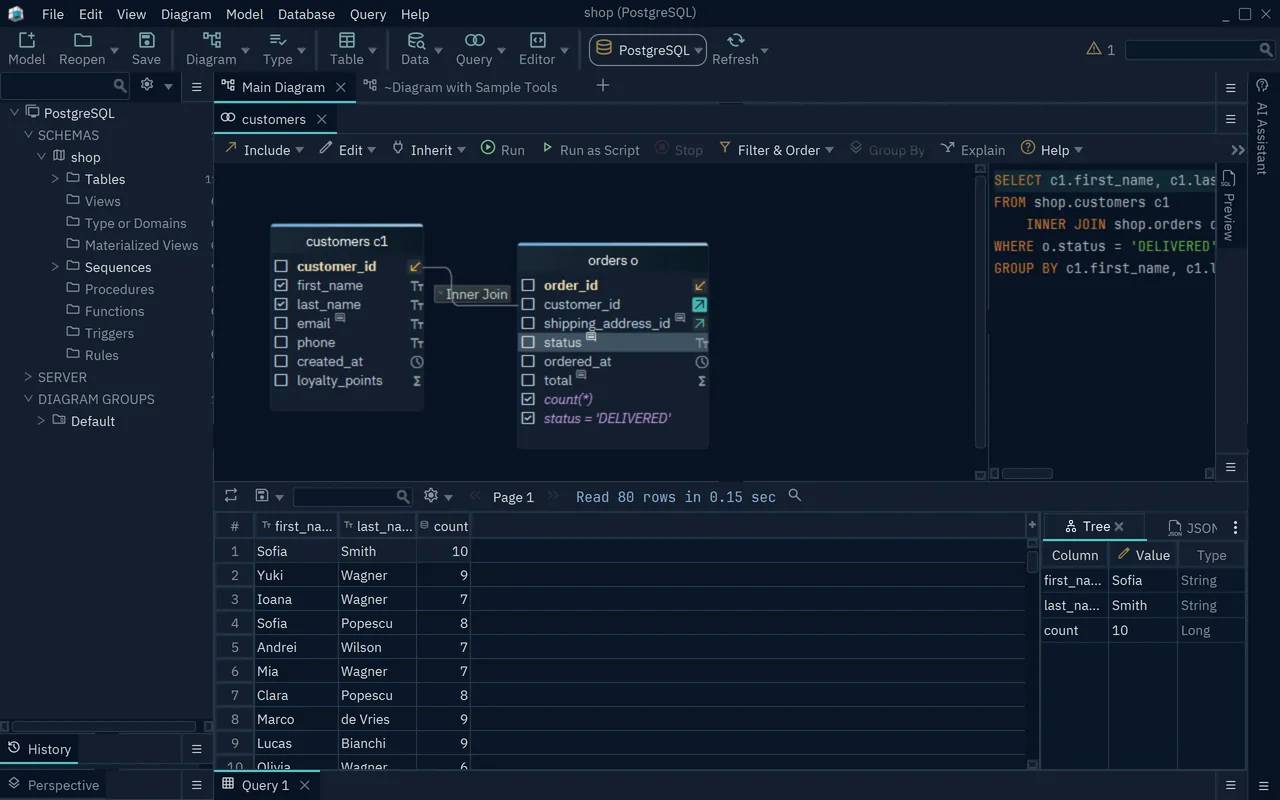
The visual query builder: customers joined to orders, a filter on status = 'DELIVERED' and a count, the generated SQL on the right and 80 result rows below.
Benefits
- One model instead of four tools. Design, documentation, data work and deployment share the same model, so the docs and the migration scripts can't drift from the design.
- Your schema stays in-house. No cloud account and nothing uploaded; connections go over SSL/TLS or an SSH tunnel, which matters for regulated teams.
- Works across your whole stack. One tool for PostgreSQL, a MongoDB service and a Snowflake warehouse, with JDBC drivers downloaded for you.
- Handles big schemas. Built for databases with thousands of tables, with one diagram per subsystem so a developer sees the ten tables that matter.
Real-World Uses
- A new product: a team sketches the data model logically, argues about relations instead of integer types, and generates the PostgreSQL schema once the platform is chosen.
- A migration: reverse-engineer an Oracle schema, convert it to a logical model, then generate the physical model for SQL Server.
- A legacy system: generate flow diagrams from the stored procedures to see which routines write to which tables before refactoring.
- Release reviews: commit model changes to Git, review them in a pull request, then use schema sync to produce the migration for production.
- Onboarding: publish HTML5 docs so new developers and analysts can read the schema without asking the one person who knows it.
Who It's For, and Who Should Skip It
DbSchema Architect fits data architects, senior developers and DBAs who design schemas, not just query them: people who model before a database is chosen, move schemas between engines, or need to untangle logic buried in SQL code. It suits teams that want Git-based collaboration over a cloud modeling service.
Skip it if:
- You only connect, browse and run SQL. DbSchema's free Community edition does that, as do free SQL clients.
- You design physical tables for one database. DbSchema Pro covers model files, docs, sync and data tools without the Architect price.
- You want a browser-based, real-time collaborative modeler. DbSchema is a desktop app that shares work through Git; a cloud modeling tool fits that workflow better.
- You need a lightweight app. It's a Java desktop application with a 157 MB installer.
Usage Guide
- Install: download the installer for your system and run it. Java comes bundled. The first start opens a 15-day Architect trial with no registration.
- Connect: on the Welcome Screen choose Start New, pick your database and enter the connection. DbSchema downloads the JDBC driver and draws the schema.
- Or design from scratch: choose File, New Model, Design without Database, then Logical Design, name the subject area and start adding entities and relations.
- Generate the physical model: use Model, Convert Model with your target database, review the conversion rules and press Convert.
- Save and share: save the model file and commit it to Git from the built-in Git dialog.
- Deploy: run schema synchronization against the database, pick the differences to apply and generate the migration script.
- Register: after buying, open Help, Register License, and sign in with your DbSchema account or paste the license key PayPro Global emails you.
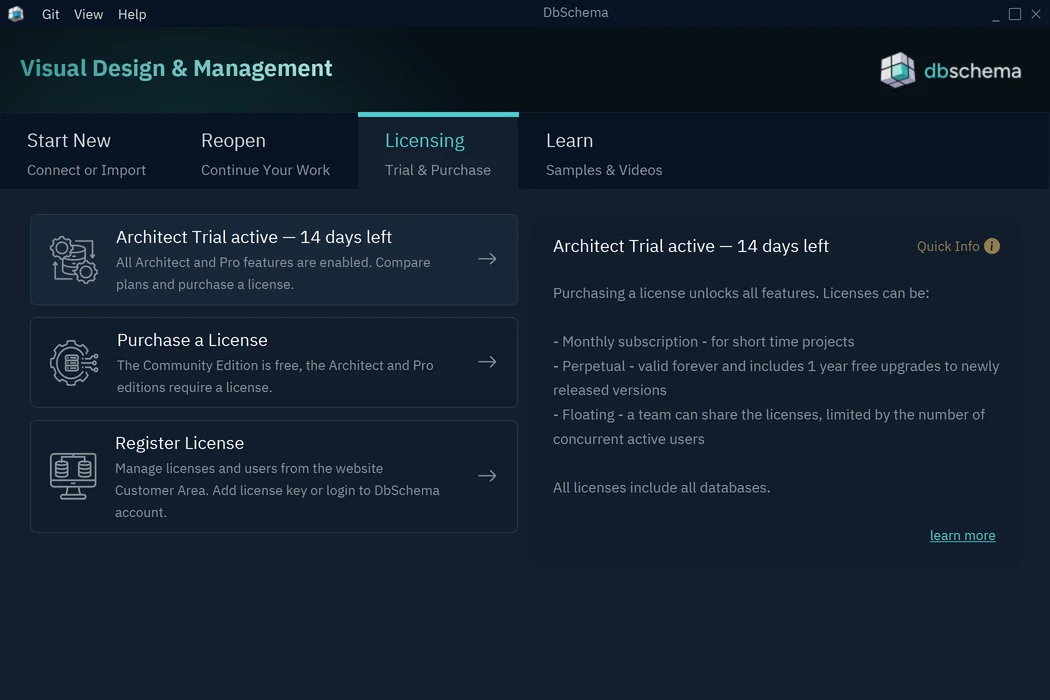
The Licensing tab of DbSchema's welcome screen during the trial: "Architect Trial active, 14 days left", with options to purchase or register a license.
Where it falls short
- Logical modeling has rough edges. Converting a physical model stops with "Not all LogicalDesign data types are specified" when a type has no logical counterpart (smallint in the vendor's own sample), and a TrustRadius reviewer found the logical model integration weak and wanted a way to update existing models with changes.
- Refreshing a schema can show phantom differences when the database rewrites elements internally, such as PostgreSQL default values with sequences.
- Reverse-engineering procedures and triggers depends on configurable SQL queries per database, which the vendor says are the best available, not complete.
- New keys need a new version: license keys issued since 10.4.0 are rejected by older versions, and after an update past your maintenance year DbSchema says "License expired" until you renew or reinstall a version from your year.
- Few independent reviews exist; the review-site ratings come from a handful of reviewers each.
What Users Say
DbSchema has a small but loyal following among developers. Review sites have only a few reviews each, and most of the praise comes from forum posts where people recommend tools to each other.
Review-site ratings
As listed on DbSchema's reviews page: G2 4.5/5 from 2 reviews, Capterra 5.0/5 from 1 review, TrustRadius 8.9/10 from 2 reviews, Product Hunt 5.0/5 from 2 reviews and SourceForge 5.0/5 from 1 review.
The criticism in those reviews is about features, not stability: TrustRadius reviewers (one titled a review "DbSchema is a good tool at a great price") found the logical data model integration weak and missed conceptual modeling, which Architect now lists; a G2 reviewer wanted a much better autocompletion in the SQL editor; a Capterra reviewer found some database documentation out of date; and a SourceForge reviewer saw the free version as only good for evaluation.
A Sr. Data Engineer on SourceForge (April 2021, quoted on DbSchema's reviews page): "It is attractive, intuitive, and includes the features that are most important to me without adding a lot of complication."
Developers on Reddit, Hacker News and Stack Overflow
These are quoted on DbSchema's reviews page, which links each one to the original post.
r/snowflake (December 2023): "After looking at a number of tools we selected dbschema, it's not perfect but it is very functional and pretty cheap compared to other products."
r/SQLServer (March 2025): "I love DbSchema! It's very easy to use, supports a lot of databases, and even has some automation capabilities with Groovy."
Stack Overflow answer (December 2021): "We use DBSchema to visualize the database schema and to build queries using the visual query builder. DBSchema quickly reverse engineers the schema into a model."
r/PostgreSQL (July 2022): "I absolutely love dbschema. Been using it for a few years now and haven't found anything that I like more…"
r/Backend (December 2025): "DBSchema paid - Out of all the ones I tried this worked the best for me."
r/Database (July 2020): "dbSchema is quite nice and the price tag isn't too high I think."
Hacker News (franch, July 2015): "I use DBSchema for ER diagrams, works well."
The themes are consistent: people like the diagrams, the visual query builder, the number of databases and the price compared with enterprise modeling suites. The complaints are about the depth of logical modeling and the SQL editor's autocompletion, which are worth testing in the trial if they're central to your work. Note that DbSchema's own page picks the quotes, and the review-site ratings rest on very few reviews.
Comparisons
DbSchema Architect vs DbSchema Pro
Pro ($196 Personal perpetual) has the model file, offline design, HTML5/PDF/Markdown documentation, the visual query builder, schema synchronization, data generator and importer, and the AI Assistant with your own key. Architect ($313.60) adds logical and conceptual design and flow diagrams from SQL. A Pro license upgrades to Architect for the difference ($117.60 Personal), so starting with Pro loses nothing.
DbSchema Architect vs the free Community edition
Community connects to every supported database, reverse-engineers schemas into interactive diagrams, edits tables and runs SQL, free for any use. It can't save the design to a file or work offline, and has no documentation, sync or data tools.
Editions and Pricing
All DbSchema licenses include every supported database, and the floating license is the option for a team that shares seats. Perpetual licenses run every version released within a year of purchase; monthly plans include every update while you pay and can be cancelled anytime.
| License |
Perpetual |
Updates after year 1 |
Monthly |
Who it's for |
| Personal | $313.60 | $80 a year | $31.36 | An individual paying for themselves |
| Commercial | $470.40 | $120 a year | $47.04 | A company or organization; seats can be reassigned |
| Educational | $156.80 | $40 a year | $15.68 | Students and teachers |
| Floating | $1,168.00 | $280 a year | - | A team sharing seats |
Prices are before tax, which is added at checkout. Teachers can request a free class license for a course.
Buy Personal Perpetual ($313.60)Buy Commercial Perpetual ($470.40)Buy Educational Perpetual ($156.80)Buy Personal Monthly ($31.36)Buy Commercial Monthly ($47.04)Buy Educational Monthly ($15.68)Buy Floating License ($1,168.00)
FAQs
Does a DbSchema Architect perpetual license stop working if I don't renew?
No. A DbSchema perpetual license never expires; it runs every version released within a year of your purchase. Renewing only adds another year of new versions, maintenance and support. If you install a newer version later, DbSchema asks for a renewal, and you can reinstall a version from your year instead.
Can I use one DbSchema license on my work and home computers?
Yes. A regular DbSchema license key can be active on two computers at a time, for one person. To move it to a third, use Help, Unregister License on one of them first; support can clear activations from a lost or reformatted machine.
How does the DbSchema floating license work?
A DbSchema floating license lets a team share a number of seats: as many people as you bought can work at once, and a seat is freed when someone closes DbSchema. With DbSchema accounts there's no server to install; on a network without internet access you can run your own license server from DbSchemaCLI.
Is monthly or perpetual cheaper for DbSchema Architect?
DbSchema's perpetual license costs the same as ten months of the monthly plan. If you'll use it for more than about ten months, perpetual is cheaper; for a short project, the monthly plan, which you can cancel anytime, costs less.
Does DbSchema send my schema or data to the cloud?
No. DbSchema is a desktop application that connects to databases through their vendors' JDBC drivers, keeps the model as a local file and uses Git for collaboration. It contacts the DbSchema server only for updates, documentation, drivers and license activation. The AI Assistant sends your questions to the AI provider you choose.
Can I extend the DbSchema trial?
Yes, once. DbSchema's 15-day trial can be extended by another 15 days from the Customer Area, which emails you a trial key, as long as your email holds no license yet.
Can my company pay by purchase order?
Yes. Use "Get a quote" on DbSchema's pricing page for a pro-forma invoice with your country's taxes, then choose Pay Later and Purchase Order at checkout. DbSchema can send temporary keys while the payment is processed. PayPro Global is the reseller of record and issues the invoice.
Does DbSchema run on Apple Silicon and ARM Linux?
DbSchema ships a macOS DMG installer, an ARM-64 Windows installer and an ARM-64 Linux package alongside the x64 builds, all with Java bundled.
System Requirements
- Windows (x64 or ARM64): EXE, MSI or ZIP
- macOS: DMG or TGZ
- Linux (x64 or ARM64): shell installer, DEB, RPM or tar.gz
- Java runtime bundled; nothing else to install
- Network access to your databases; internet access for activation, or offline activation from another computer
Conclusion
DbSchema Architect is worth $313.60 if you design databases rather than just use them, and especially if you model before choosing an engine, move schemas between databases or need to see what your SQL code touches. It's far cheaper than the enterprise modeling suites, keeps everything on your machine and in Git, and covers documentation, sync and querying in the same tool. The main reason not to buy it is that most developers only need DbSchema Pro, which is $117.60 cheaper and upgradeable later; the second is that its logical modeling is the part reviewers find weakest, so test it in the trial. Remember to switch off the auto-renewing $80 maintenance if you don't want it.
Download Free TrialBuy Now