Short answer: if you're moving into MySQL, SQL Server or PostgreSQL, try the vendor's free tool first: MySQL Workbench's Migration Wizard, Microsoft's SQL Server Migration Assistant (SSMA) or pgloader. If you need any other direction, such as SQL Server or PostgreSQL into Oracle, PostgreSQL into SQL Server, or several pairs in one tool with a check that every row arrived, buy DBConvert Studio ($699, perpetual). Choose dbForge Edge ($749.95 a year) if you also want a full IDE for all four engines, and Skyvia Data Integration (from $99 a month) if the copy has to keep running on a schedule in the cloud. For files and messy data rather than whole databases, Advanced ETL Processor Standard ($420 a year) is the better fit.
At a glance
| Tool |
Price |
Directions |
What moves |
Keeps syncing after? |
| DBConvert Studio (Windows) |
$699 once, 1 year of updates |
Any direction between SQL Server, MySQL, PostgreSQL, Oracle, DB2, Firebird, SQLite, Access, FoxPro, Excel |
Tables, columns, indexes, foreign keys, data; ✗ procedures and triggers |
✓ one-way or two-way, scheduled |
| dbForge Edge (Windows) |
$749.95 a year, or $1,499.95 perpetual |
Into SQL Server, MySQL, Oracle or PostgreSQL from any ODBC source |
Table data, one import job at a time; full copy only within one engine |
✗ across engines (✓ data compare within one engine) |
| Skyvia Data Integration (browser) |
Free (10k records a month); $99 a month for 500k |
From SQL Server, MySQL, PostgreSQL, Oracle, BigQuery, Snowflake into any supported database |
Tables it creates, and the data |
✓ incremental runs on a schedule |
| Advanced ETL Processor Standard (Windows) |
$420 a year |
Files and databases in, files and databases out |
Data you map, validate and transform, table by table |
✗ no scheduler in Standard |
| Free vendor tools (Workbench, SSMA, pgloader) |
$0 |
Each one only into its own vendor's database |
Schema and data; SSMA also converts Oracle PL/SQL |
✗ (pgloader can be re-run nightly) |
How we picked
- We started from the job: moving a database's tables and rows from one engine to another (SQL Server, MySQL, PostgreSQL, Oracle) and, where needed, keeping the two in step until cut-over.
- We read the free tools' own documentation (the MySQL Workbench manual, Microsoft Learn for SSMA, the pgloader docs) for which directions they support and what they leave out.
- For each paid tool we read the vendor's current documentation on what moves (schema, data, code), the trial limits and the system requirements.
- We opened each paid product's order page in US dollars to read the price a buyer pays today.
- What we checked: DBConvert Studio 6.0.1 (35.6 MB installer, released November 21, 2026) at $699.00 on the order page, dbForge Edge 2026.2.109 (November 21, 2026) at $749.95, and Skyvia Data Integration Standard at $99.00 a month, all on November 23, 2026; Advanced ETL Processor Standard at $420 a year on the vendor's order page the same day; SSMA for Oracle 10.6 on Microsoft's download page (published September 1, 2026).
We compared documented features, prices and trials. We didn't migrate a production database with any of these tools, so speed figures below are the vendors' own.
The free way first: each database vendor's own migration tool
Every big database vendor gives away a tool for moving into its own database. If your direction is one of theirs, start there. The catch is in that word "into": none of the three below writes to Oracle, none moves PostgreSQL into SQL Server, and each one covers only its own target.
| Free tool |
Moves into |
From |
Code objects |
| MySQL Workbench Migration Wizard |
MySQL |
SQL Server 2000+, Access 2007+, PostgreSQL 8.0+, SQLite, SQL Anywhere, Sybase ASE 15+, MySQL; others through generic ODBC |
✗ views, procedures and triggers are listed but not converted |
| SQL Server Migration Assistant (SSMA) |
SQL Server 2019+, Azure SQL Database, Azure SQL Managed Instance |
Access, Db2, MySQL, Oracle, SAP ASE (one SSMA edition per source) |
✓ procedures, functions, packages, triggers, with a report of what failed |
| pgloader |
PostgreSQL (also Citus, Redshift) |
MySQL, SQL Server, SQLite, PostgreSQL, Redshift, plus CSV, DBF and IXF files |
✗ tables, keys, indexes and data only |
MySQL Workbench Migration Wizard: free, into MySQL only
The Migration Wizard in the free MySQL Workbench copies a SQL Server, Access, PostgreSQL, SQLite or Sybase database into MySQL, schema and data. The manual is plain about its limits: generally only tables and their data are converted automatically, while views, stored procedures and triggers are shown in the wizard for you to convert by hand. It reads every source except MySQL through ODBC, so you install the matching ODBC driver first (Microsoft's driver on Windows, or FreeTDS on Linux and macOS for SQL Server), and it can't connect through SSH.
Use it when MySQL is your destination and your logic lives in the application rather than in stored procedures.
SQL Server Migration Assistant: free, the only one that converts procedures
SSMA is Microsoft's free tool for moving Access, Db2, MySQL, Oracle and SAP ASE databases into SQL Server 2019 or later, Azure SQL Database or Azure SQL Managed Instance. Each source has its own download; SSMA for Oracle 10.6 was published on September 1, 2026, runs on Windows and needs .NET 8 and an Oracle Client 12 or later. Its big advantage over everything else in this article is code conversion: Oracle procedures, functions, packages, sequences and triggers become T-SQL, and a report flags each object it couldn't convert so you can fix the source, edit the code or leave it out. User-defined types aren't supported, and Oracle's SYS and SYSTEM schemas can't be migrated.
Use it when SQL Server or Azure SQL is the destination, above all from Oracle with a lot of PL/SQL. No paid tool here converts procedural code.
pgloader: free, scriptable, into PostgreSQL
pgloader is an open-source command-line loader that migrates MySQL, SQL Server, SQLite or another PostgreSQL into PostgreSQL in one command. It reads the source catalog (tables, columns, defaults, primary and foreign keys, indexes, comments), applies casting rules you can override (MySQL's zero dates become NULL by default), loads with PostgreSQL's COPY protocol and rebuilds the indexes afterwards. Because every run drops and recreates the target, you can run it every night during a project until cut-over. The released line is 3.6.x, installed from Debian or RPM packages or Docker; a v4 JAR that runs on Windows with Java 21 is still a development build. There's no graphical interface, and Oracle isn't a source.
Use it when PostgreSQL is the destination and you're comfortable with a command line and a Linux box or Docker.
If your direction isn't in that table, or you want one program for several pairs, a check that every row arrived intact, or a sync that keeps running after the first copy, that's where the paid tools come in.
DBConvert Studio: best for any direction, with proof the data matches
DBConvert Studio · $699 Personal license (1 user), perpetual, with a year of updates · Windows 10 or later · version 6.0.1, November 21, 2026 · Best for: DBAs and consultants who move data between more than one pair of engines, or need a scheduled sync during cut-over.
DBConvert Studio is a Windows program that converts and synchronizes databases in any direction between SQL Server, MySQL/MariaDB, PostgreSQL, Oracle, IBM DB2, Firebird, SQLite, Access, FoxPro and Excel, so SQL Server to Oracle, PostgreSQL to SQL Server and Access to Azure SQL are all the same job. Cloud databases connect as their engine: Azure SQL as SQL Server, Amazon RDS and Aurora, Google Cloud SQL, Supabase and Neon as MySQL or PostgreSQL. It can also write a MySQL or PostgreSQL dump file instead of connecting to a server. Excel works with Convert only, and DB2 pairs with SQL Server, MySQL and PostgreSQL.
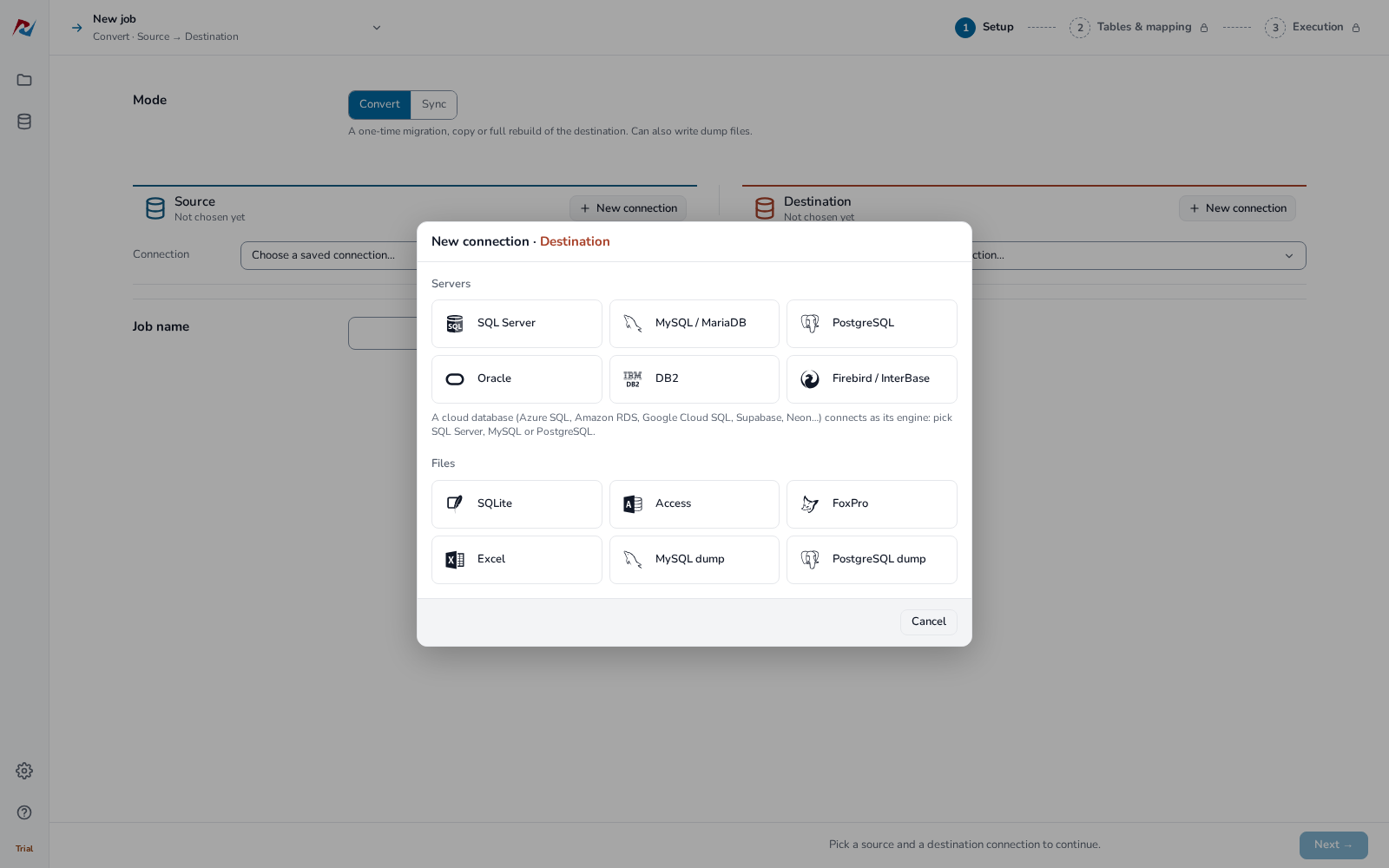
Setting up a Convert job in DBConvert Studio: the destination picker lists six server engines, four file formats and MySQL or PostgreSQL dump files.
Every job runs through three screens: Setup (Convert or Sync, source and destination), Tables & mapping (each column shows the type it will become, and you can change it), and Execution. What moves is tables, columns, indexes and foreign keys with their data, with type mapping between the engines. Stored procedures, functions and triggers don't move: the vendor says they have to be rewritten by hand.
The feature that sets it apart is Validate the copy, added in version 5.8.0 as "Verify". After the run, DBConvert Studio compares the destination with the source on three levels: the schema, the totals (row counts, sums, earliest and latest dates, text lengths) and the rows themselves. It exists because a run can finish without a single error and still change data, when the destination can't hold a value the source could.
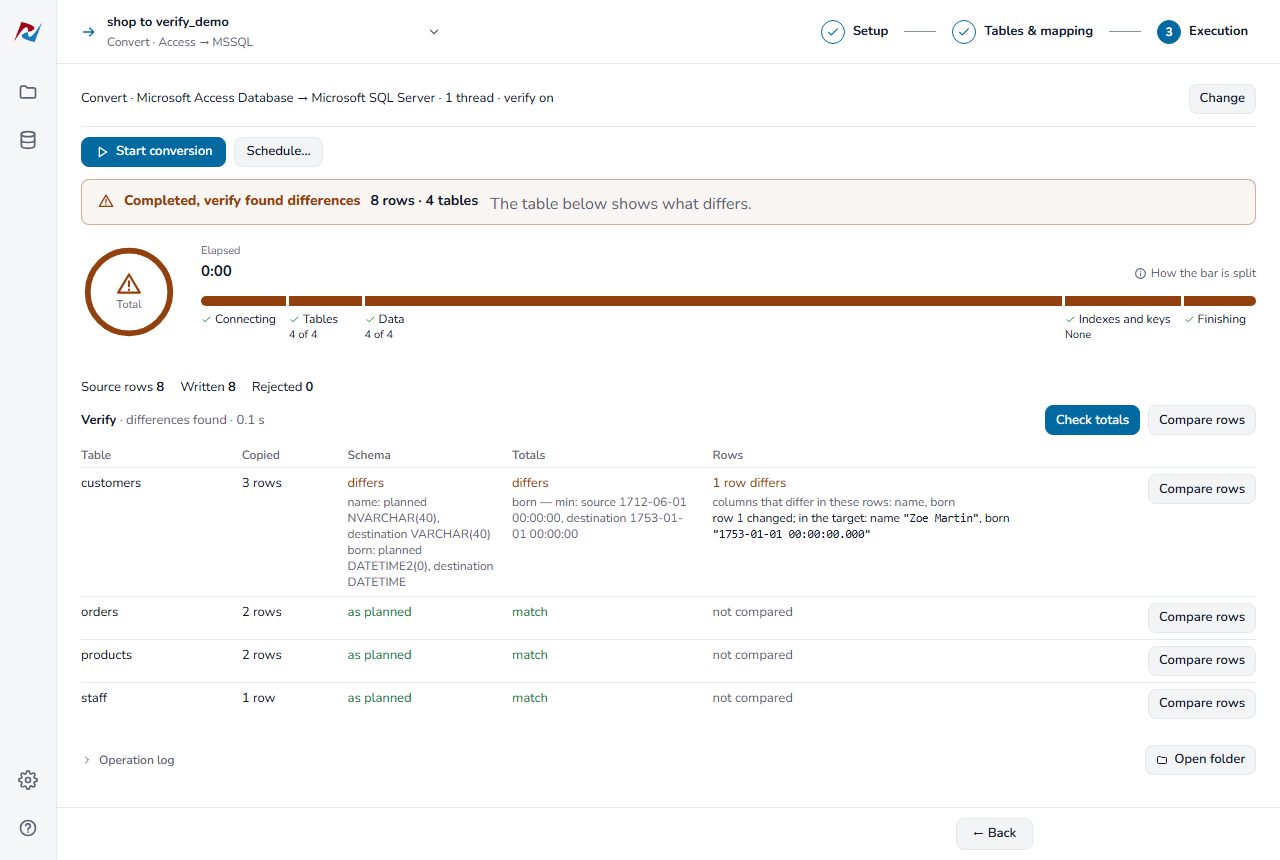
An Access to SQL Server run that finished with 0 rejected rows: the check still found that one customer's name became VARCHAR and a 1712 birth date became 1753-01-01, the minimum for SQL Server's DATETIME.
After the first copy, the same job can switch to Sync, one way or both ways, on a schedule as often as every few minutes. With trigger-based change tracking only inserted, updated and deleted rows move; the vendor's notes give 3 million rows in 18 seconds for a first one-way sync. Every synchronized table needs a primary key or a unique, non-composite index. Large tables are split across worker threads (the count depends on your license tier), and the vendor's test stand times a 10-million-row table at 15 seconds from MySQL to PostgreSQL and 35 seconds from MySQL to Oracle. Saved jobs run from Task Scheduler or a CI step with dbconvert-run.exe, and version 6.0 added an optional assistant, running on a local Ollama model or an agent you already use, that explains failed runs without seeing your passwords.
What we like
- Any direction among ten engines, including into Oracle and DB2
- Row-by-row validation after the run
- The same job migrates once, then syncs until cut-over
- Perpetual license: your version keeps working after the update year
- Runtime and drivers are in the 35.6 MB installer
Watch out for
- No conversion of procedures, functions or triggers
- Windows only
- The trial watermarks text after the first 50 rows of each table (5 in a Sync), and there's no timed full trial
- Refunds only for a serious migration problem the developers can't fix, not a change of mind
- Scheduled jobs need a logged-in Windows user
What users say
DBConvert has few public reviews, all positive: 5.0 out of 5 from 4 reviews on SourceForge and a single 5-star review on G2. They cover the DBConvert tools in general and predate the November 2026 interface.
- Danny T., database developer, SourceForge (February 2023): "Supports many databases On-Premise + Cloud based."
- Markus P., DBA and data analyst, SourceForge (June 2021): "Simple and intuitive interface."
- Rob B., manager, SourceForge (September 2023), on the downside: "haven't seen yet, may be more database directions."
Download DBConvert Studio TrialBuy DBConvert Studio
dbForge Edge: best if you also want an IDE for all four engines
dbForge Edge · $749.95 for a 1-year subscription, $1,499.95 perpetual · Windows (macOS and Linux through CrossOver) · version 2026.2.109, November 21, 2026 · Best for: developers and DBAs who work in SQL Server, MySQL, Oracle and PostgreSQL every day and migrate data now and then.
dbForge Edge is Devart's bundle of the Enterprise editions of dbForge Studio for SQL Server, MySQL/MariaDB, Oracle and PostgreSQL. It isn't a dedicated migration tool, and that matters for this question. Its cross-engine migration is the Data Import wizard reading an ODBC source: in the Studio for your destination engine, you point the wizard at a data source for the other database, pick the tables, and it suggests target column types and can create the target tables. Devart's own guide for loading PostgreSQL into SQL Server works this way. Import templates can be saved and run from the command line.
What doesn't cross engines: Copy Database, Schema Compare and Data Compare work within one engine (SQL Server to SQL Server, MySQL to MySQL, and so on). Those are excellent for moving a database to a new server or a cloud instance of the same engine, and for checking two copies match, but they won't turn a SQL Server schema into a PostgreSQL one. The import wizard gives you table data, not views or procedures.
The ODBC driver is a separate install. Devart's documentation says the native drivers work, or you can buy Devart's own, such as the ODBC Driver for SQL Server, ODBC Driver for PostgreSQL, ODBC Driver for MySQL or ODBC Driver for Oracle. Our guide How to Install a 32-bit or 64-bit ODBC Driver on Windows covers the setup.
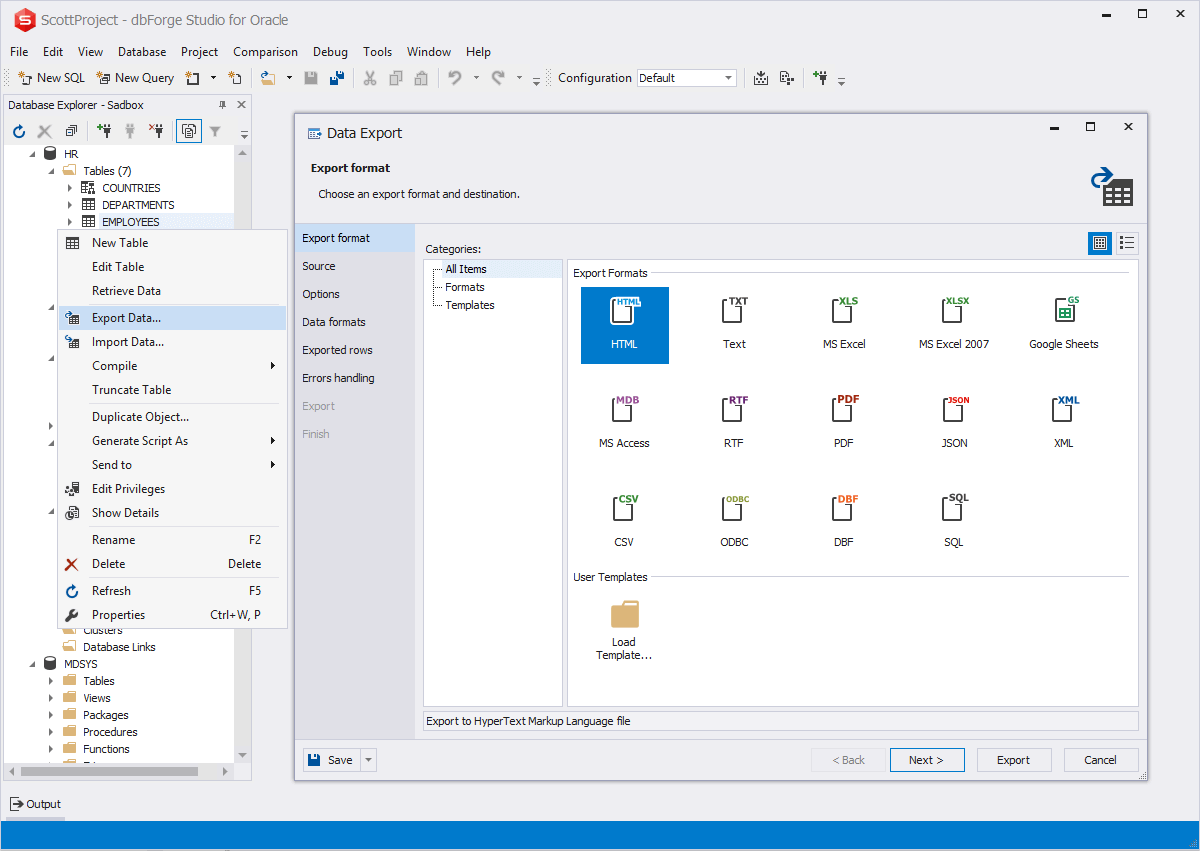
The Data Export wizard in dbForge Studio for Oracle, one of the four Studios in dbForge Edge: ODBC sits next to the file formats, and the matching Import Data command is on the same table menu.
What we like
- Four full IDEs, so the migration tool is also your daily tool
- Same-engine copy, schema compare and data compare are first rate
- Import templates run from the command line
- Fully functional 30-day trial
Watch out for
- Cross-engine moves are table data through ODBC, not a schema conversion
- No ongoing sync between different engines
- The default license is a subscription that stops working when it lapses
- 471.70 MB installer, Windows only natively
What users say
dbForge Edge has 5 out of 5 from 12 reviews on SoftwareSuggest; the complaints are about platform and weight, not migration.
- Courtney S., DBA, SoftwareSuggest (April 2024): it offers "such features as Copy and Backup/Restore databases that are unmatched by Datagrip and providing broader database support than MySQL Workbench."
- Akos B., backend developer, quoted on Devart's page: "It has also great tools for data export/import."
- Robert G., database developer, SoftwareSuggest (April 2024): "Performance can slow when handling large datasets, affecting efficiency."
Download dbForge Edge TrialBuy dbForge Edge
Skyvia Data Integration: best for a scheduled copy with nothing to install
Skyvia Data Integration · Free plan (10,000 records a month), Standard $99 a month for 500,000 records, Professional $499 a month for 10 million · runs in a browser · Best for: keeping a reporting or new database filled from an existing one on a schedule, without a server of your own to run it.
Skyvia Data Integration is Devart's cloud ETL service. Its Replication tool reads tables from SQL Server, Oracle, PostgreSQL, MySQL, BigQuery or Snowflake and writes them to any database or warehouse Skyvia supports, creating the target tables for you. After the first load, incremental runs pick up new and changed rows by a created or modified column, or, for a SQL Server source only, through SQL Server's change tracking (the Log-based mode), which also catches deletes. Runs go once a day on the Free plan, as often as hourly on Standard and every minute on Professional.
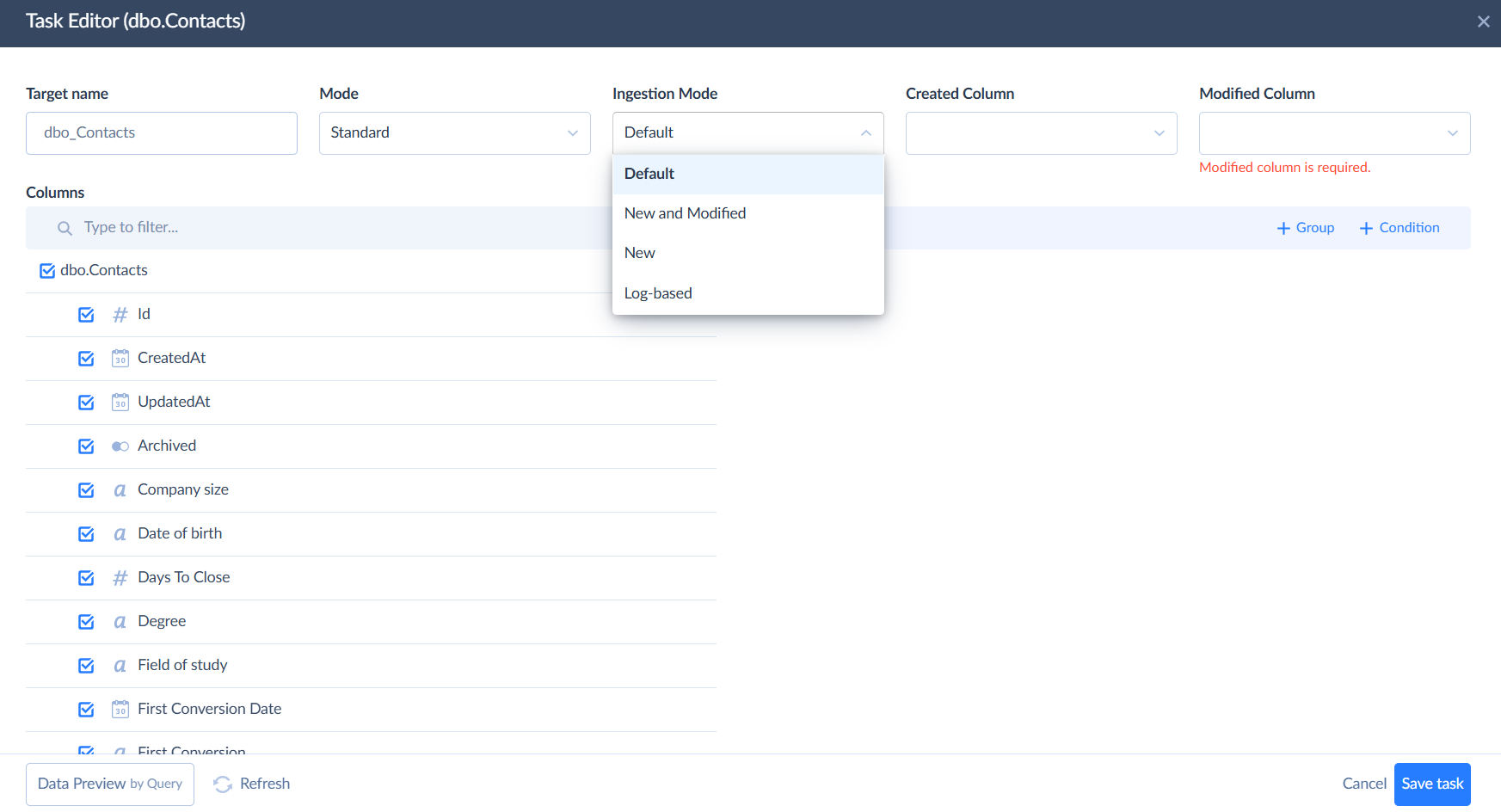
Skyvia's replication Task Editor for a dbo.Contacts table: the column list on the left and the Ingestion Mode choices that decide how later runs find changed rows.
The limits follow from what it is. Skyvia moves data, not database code, and its type handling is automatic rather than a column-by-column mapping screen like DBConvert's. Your database has to be reachable from Skyvia's cloud: an on-premise server either opens a port to the internet or runs Skyvia's agent. And the price is per record: every row copied counts against the monthly allowance, so a one-off 50-million-row migration is a poor fit, while a nightly incremental copy of a few hundred thousand changed rows is exactly what the Standard plan is priced for.
What we like
- Nothing to install or keep running
- Creates target tables and keeps them current
- Free plan for small jobs, 14-day Professional trial with 5 million records
- The same account also loads cloud apps such as Salesforce into your database
Watch out for
- Priced by records, so big one-time loads get expensive
- Data only: no views, procedures or triggers
- Your database must be reachable from the cloud
- Batch schedules, not real-time
What users say
Skyvia's site cites 4.8 out of 5 on G2 and on Capterra, and 4.9 out of 5 on Gartner Peer Insights, for the whole Skyvia platform. Reviewers praise ease of use and the range of connectors; the common reservations are a learning curve in the advanced pipeline designer and documentation gaps. John McPhillips, Senior Data/BI Engineer at TitanHQ, in a customer story on Skyvia's site: "Skyvia gives a lot more freedom to customize your data extraction process."
Buy Skyvia Data Integration Standard
Advanced ETL Processor Standard: best when the data needs cleaning on the way
Advanced ETL Processor Standard · $420 a year for one computer · Windows · 30-day fully functional trial · Best for: moving data whose quality you don't trust, between databases and files, with every rejected row kept.
Advanced ETL Processor Standard from DB Software Laboratory isn't a schema converter: you draw a flow of readers, validators, transformers and writers, so each table you move is a mapping you build. In return you get what the migration tools above don't do: split and merge columns, fix dates in three formats, drop duplicates, validate against rules and write the rejects to their own file. It reads and writes SQL Server, Oracle, MySQL, PostgreSQL and other databases as well as Excel, CSV and XML. The Standard edition has no scheduler or multi-step packages; the higher editions add them. For a simpler loader of files into a database, its sibling Visual Importer ETL Standard costs $120 a year; our comparison Advanced ETL Processor vs Visual Importer ETL covers every edition.

Advanced ETL Processor Standard after a run: the log shows 352,031 records read and written at about 224,796 records per second, with 0 rejected.
What we like
- Validation and rejected-row files for dirty data
- Databases and files on both sides
- No per-row fees
Watch out for
- You build each table's mapping; no whole-database conversion
- Yearly license that renews automatically
- No scheduler in Standard
Download Advanced ETL Processor TrialBuy Advanced ETL Processor Standard
What the first year costs
First-year cost for one user (USD)
MySQL Workbench, SSMA, pgloader$0
Advanced ETL Processor Standard (yearly)$420
DBConvert Studio Personal (perpetual)$699
dbForge Edge (1-year subscription)$749.95
Skyvia Data Integration Standard (12 months at $99)$1,188
Prices on the order pages on November 23, 2026. Skyvia lists Standard at $79 a month when billed annually ($948 a year), and its Free plan covers 10,000 records a month.
The ongoing cost differs more than the first year. DBConvert Studio keeps working after its update year with no further payment. dbForge Edge's subscription and Advanced ETL Processor's yearly license renew at the same price, and Edge stops working if you don't renew (its $1,499.95 perpetual license avoids that). Skyvia is billed as long as the job runs, which is the point if you need a standing replica and a waste if you only needed one copy.
Which should you choose?
| Your situation |
Pick |
Why |
| Oracle with lots of PL/SQL into SQL Server or Azure SQL | SSMA (free) | The only tool here that converts procedures, packages and triggers |
| SQL Server or PostgreSQL into Oracle, or PostgreSQL into SQL Server | DBConvert Studio | No free vendor tool covers these directions |
| Several engine pairs, or a consultant who meets a new pair at every client | DBConvert Studio | Every direction under one perpetual license, plus validation |
| Weeks of parallel running before cut-over | DBConvert Studio | Scheduled one-way or two-way sync of changed rows |
| Same engine, new server or cloud (SQL Server to Azure SQL, MySQL to RDS) | dbForge Edge | Copy Database plus schema and data compare to prove the copy |
| A standing reporting copy, no server to run jobs | Skyvia Data Integration | Incremental replication on a schedule in the cloud |
| Messy data, spreadsheets and CSVs alongside the database | Advanced ETL Processor Standard | Validation, transformation and rejected-row files |
Our pick for most readers is DBConvert Studio. It's the one paid tool here built for moving whole databases between different engines, it covers the directions the free tools don't, and its validation step answers the question every migration ends with: did all the data arrive unchanged?
Who should skip each one: skip DBConvert Studio if your database is mostly stored procedures (it won't convert them) or you work on a Mac. Skip dbForge Edge if migration is the only job, since you'd pay for four IDEs to use one wizard. Skip Skyvia for a one-off move of tens of millions of rows, or if policy keeps your data off third-party clouds. Skip Advanced ETL Processor if you want the schema built for you.
What commonly goes wrong
- Procedures are the real work. MySQL Workbench, pgloader, DBConvert Studio, dbForge Edge's import and Skyvia all move tables and data, not stored procedures, functions or triggers. Count your code objects before you budget the project; only SSMA converts them, and only into SQL Server.
- A clean run isn't a correct copy. Values the destination can't hold get trimmed or shifted without an error, like the 1712 date that became 1753-01-01 in SQL Server. Compare row counts and spot-check data afterwards, or use a tool that validates.
- Tables without keys. Incremental sync in DBConvert Studio needs a primary key or a unique index on every table, and Skyvia's incremental modes need a created or modified column (or SQL Server change tracking). Add keys before you plan a cut-over period.
- Judging the tool by its trial. DBConvert's trial watermarks text after 50 rows per table (5 in a Sync, where it's also much slower), so check structure and types in the trial, not performance.
- Drivers and network. The free tools and dbForge Edge's import need ODBC drivers set up first, and Skyvia needs your server reachable from the internet or its agent installed.
FAQs
What is the best free tool to migrate SQL Server to MySQL?
MySQL Workbench's Migration Wizard is the free choice for SQL Server to MySQL. It converts tables and data and lists views, procedures and triggers for you to convert by hand. If you need validation afterwards or a sync until cut-over, DBConvert Studio covers the same direction for $699.
Can I migrate PostgreSQL to SQL Server for free?
Microsoft's SSMA doesn't list PostgreSQL as a source, so there's no free Microsoft tool for it. dbForge Edge can import PostgreSQL tables into SQL Server through an ODBC driver, and DBConvert Studio converts PostgreSQL to SQL Server with the schema, keys and indexes and can keep the two in sync.
Which tool converts Oracle PL/SQL stored procedures?
SQL Server Migration Assistant for Oracle converts Oracle procedures, functions, packages and triggers to T-SQL and reports each one it couldn't convert. DBConvert Studio, dbForge Edge, Skyvia and pgloader don't convert procedural code, so with any of them you rewrite it by hand.
Can I move SQL Server or MySQL into Oracle?
Yes, DBConvert Studio writes to Oracle from SQL Server, MySQL, PostgreSQL and its other supported engines, and Skyvia can replicate data into Oracle. None of the free vendor tools here targets Oracle.
Does DBConvert Studio work with Azure SQL and Amazon RDS?
Yes. DBConvert Studio connects to Azure SQL as a SQL Server (with encryption turned on automatically), and to Amazon RDS and Aurora, Google Cloud SQL, Supabase and Neon through their SQL Server, MySQL or PostgreSQL engine.
Is dbForge Edge a database migration tool?
dbForge Edge is a set of four database IDEs with migration features: Copy Database and schema and data compare within one engine, and a Data Import wizard that loads table data from another engine through ODBC. For converting a whole database between engines, a dedicated tool such as DBConvert Studio does more.
Can I keep the old and new databases in sync during the switch?
DBConvert Studio's Sync mode keeps two different engines in step, one way or both ways, on a schedule. Skyvia Data Integration keeps a one-way copy current with incremental runs. pgloader can only re-run the whole migration, which works for nightly test loads but not as a live sync.
How do I test DBConvert Studio before buying?
DBConvert Studio's trial has no time limit and copies every row, but text after the first 50 rows of each table is watermarked. Use it to check the type mapping and the validation report on a copy of your database, then buy; refunds cover only a serious migration problem the developers can't fix.
Conclusion
Start with the free tool from your destination's vendor: MySQL Workbench into MySQL, SSMA into SQL Server, pgloader into PostgreSQL. SSMA is the one to beat whenever Oracle code has to come along. For everything else, DBConvert Studio is the tool we'd buy: $699 once for every direction among ten engines, a sync for the cut-over period and a validation report that shows whether the data arrived unchanged. Its one big gap, stored procedures, is a gap every tool here except SSMA shares. Choose dbForge Edge instead if you want an everyday IDE and mostly move within one engine, and Skyvia Data Integration if the copy has to keep running in the cloud.
Download DBConvert Studio TrialBuy DBConvert Studio