dbForge Edge: Four Database IDEs for SQL Server, MySQL, Oracle and PostgreSQL Under One License
dbForge Edge is Devart's Windows bundle of four full database IDEs, the Enterprise editions of dbForge Studio for SQL Server, MySQL/MariaDB, Oracle and PostgreSQL, sold as one license for $749.95 a year (or $1,499.95 perpetual). It's built for developers and DBAs who work across several database engines and would otherwise juggle SSMS, MySQL Workbench, SQL Developer and pgAdmin.
If your week involves a SQL Server ERP database, a MySQL web backend and a PostgreSQL analytics server, you know the cost of switching tools: different shortcuts, different compare tools, different export wizards. Edge gives you the same interface, the same schema and data compare, and the same command-line automation on all four.
Quick facts
- Version: 2026.2.96, released November 9, 2026 (the previous builds came out October 16 and September 22, 2026)
- Developer: Devart
- Platform: Windows 7 to 11 and Windows Server 2008 to 2025, with .NET Framework 4.7.2; on macOS and Linux it runs through CodeWeavers CrossOver (on Ubuntu also through Wine)
- What's inside: dbForge Studio for SQL Server, dbForge Studio for MySQL (also MariaDB), dbForge Studio for Oracle, dbForge Studio for PostgreSQL. You can install any one, two, three or all four
- Connects to: more than 30 databases and cloud services, including Azure SQL, Amazon RDS and Aurora, Amazon Redshift, Google Cloud, Oracle Cloud, Supabase and Neon
- Installer size: 471.74 MB
- Price: $749.95 for a 1-year subscription, $1,499.95 for a perpetual license
- Trial: free, fully functional for 30 days (the download asks you to sign in with a free Devart account)
- Refund: 30-day money-back guarantee on annual and perpetual licenses
- What we checked: version 2026.2.96 and its November 9, 2026 date on Devart's download page and revision history, the 471.74 MB installer size listed there, and the order page price of $749.95 for the 1-year subscription and $1,499.95 for the perpetual license on November 12, 2026. We didn't run the installer or connect it to our own databases.
Before you buy
- The default license is a subscription. When a subscription runs out, the software stops working until you renew. The perpetual license keeps working forever and comes with a period of updates and support that you can extend later.
- The AI Assistant is a separate license. Devart's AI Assistant appears inside the Studios, but its paid plan ($9.95 a month or $99.95 a year, 20 million tokens a month) isn't part of the Edge license. A free plan with 200,000 tokens a month covers light use.
- Windows only, natively. On a Mac you need a CrossOver license and a Windows 10 64-bit "bottle" with .NET Framework 4.7.2. On Ubuntu, Devart also shows an install through Wine and Winetricks.
Download Free TrialBuy Now
Overview
The dbForge Studios are its flagship IDEs, each sold separately for its own database engine. dbForge Edge packages the top edition of all four into a single installer and a single license. Each Studio is still its own program with its own window, but they share the same layout, menus and tool set, so a habit you build in the SQL Server Studio works in the PostgreSQL one.
The coverage is broad: SQL Server from 2000 (limited) through 2025, including Azure SQL, Synapse and Microsoft Fabric; MySQL 5.5 onward and MariaDB, Percona and HeatWave; Oracle 8i through 26ai; and PostgreSQL 8.4 through 18 along with Redshift, Greenplum, YugabyteDB, TimescaleDB and many hosted Postgres services. Devart ships updates often. The October and November 2026 builds fixed user-reported bugs in all four Studios, such as an out-of-memory error on large XLS comparison reports and wrong alias quoting in Query Builder for Oracle and PostgreSQL.
Features
A SQL editor that suggests whole JOINs
dbForge Edge's SQL editor completes table names, columns and entire JOIN clauses based on foreign keys, formats code to your style, and has a debugger for stored procedures, triggers and functions. The visual Query Builder lets you drag tables onto a diagram and turns it into SQL. You can also link a database to Git or another version control system and generate documentation for it.
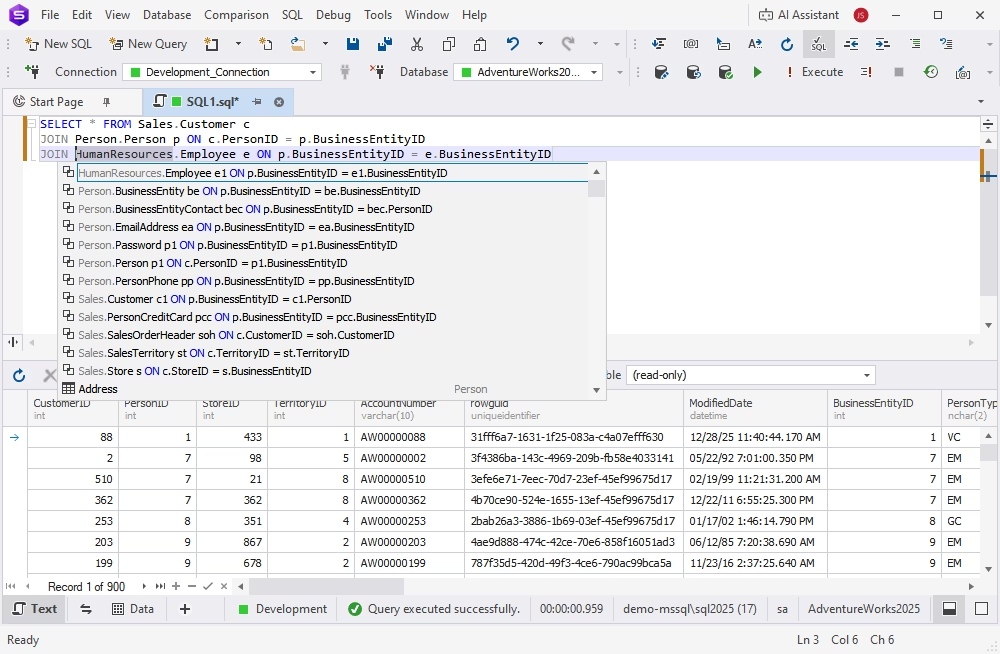
dbForge Studio for SQL Server, part of Edge, offering JOIN suggestions for an AdventureWorks query, with the result grid below.
Visual database design with ER diagrams
dbForge Edge draws an existing database as an entity-relationship diagram (reverse engineering) or lets you build a new one on the diagram, with a Table Designer for columns, keys, indexes and constraints. Refactoring tools help you restructure an existing database.
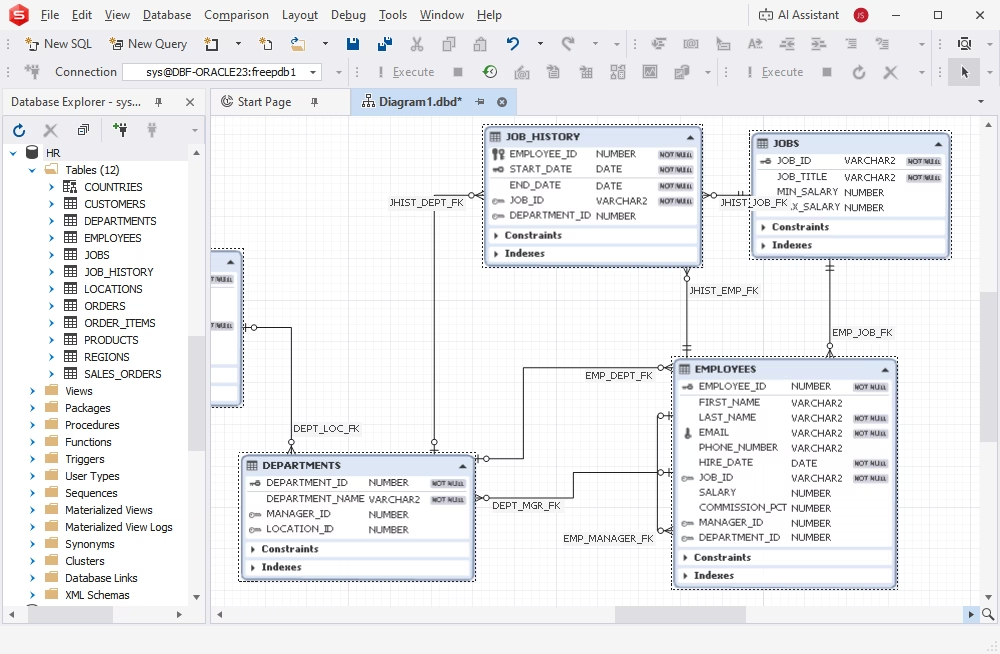
dbForge Studio for Oracle showing the HR sample schema as an ER diagram, with the Database Explorer on the left.
Data editing, import, export and migration
dbForge Edge's Data Editor lets you edit rows in a grid, with a pop-up editor for long text. Import and export wizards handle the common formats, and the Studios copy data between databases or migrate a whole database to a new server. Data Compare finds the row differences between two tables and writes the script that syncs them.
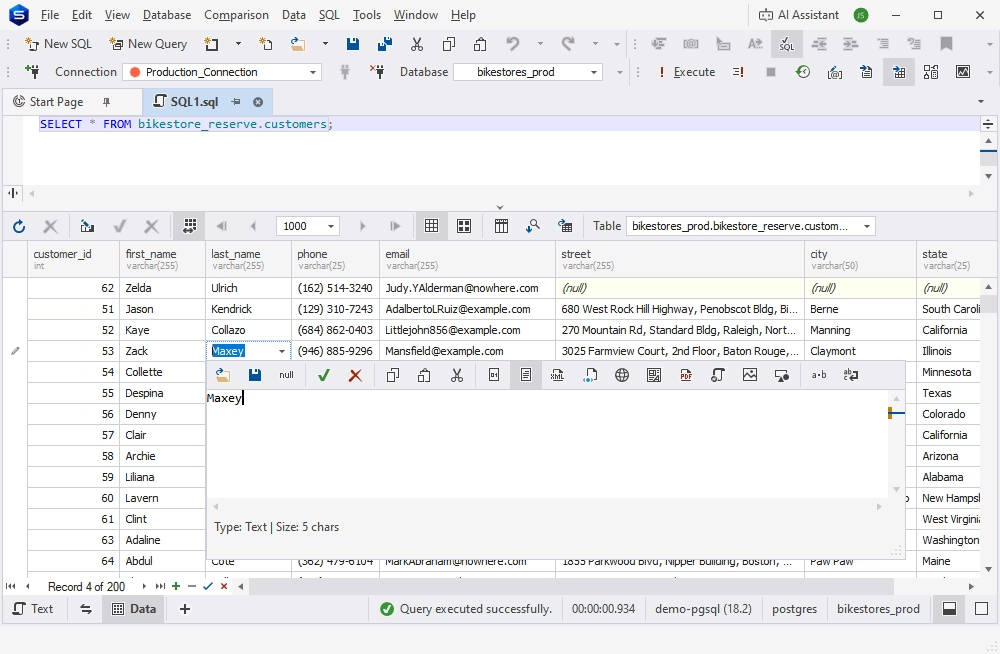
Editing a cell in a PostgreSQL customers table from the grid's pop-up text editor.
Schema compare, backups and deployment
dbForge Edge compares two database schemas, shows every difference object by object, and generates a synchronization script you can review before it runs. That's the tool for moving changes from development to test to production. The Studios also back up and restore databases and manage security.
Server administration and tuning
dbForge Edge includes user and privilege management, server activity monitoring, index fragmentation analysis, and a Query Profiler that shows execution plans and timings so you can see why a query is slow. It can also encrypt and decrypt stored procedures.
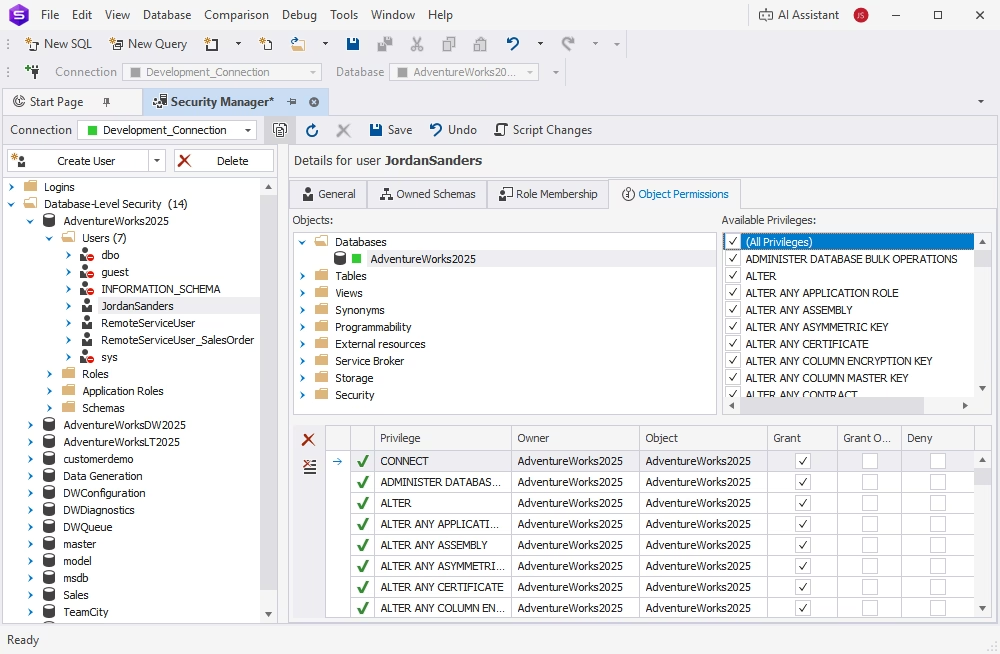
The Security Manager in dbForge Studio for SQL Server, granting object permissions to a database user.
Reports, pivot tables and command-line automation
dbForge Edge builds reports and pivot tables from query results and exports them in several formats. Schema compare, data compare, backups and data import or export can all run from the command line, so you can schedule them to run on their own.
An AI Assistant in every Studio
dbForge Edge's Studios have a built-in AI Assistant chat that writes SQL from a plain-language request, explains or optimizes a query, and troubleshoots errors. You can attach a database so it reads the metadata (not the data) for context. It's off by default and runs on a free or paid plan of its own.
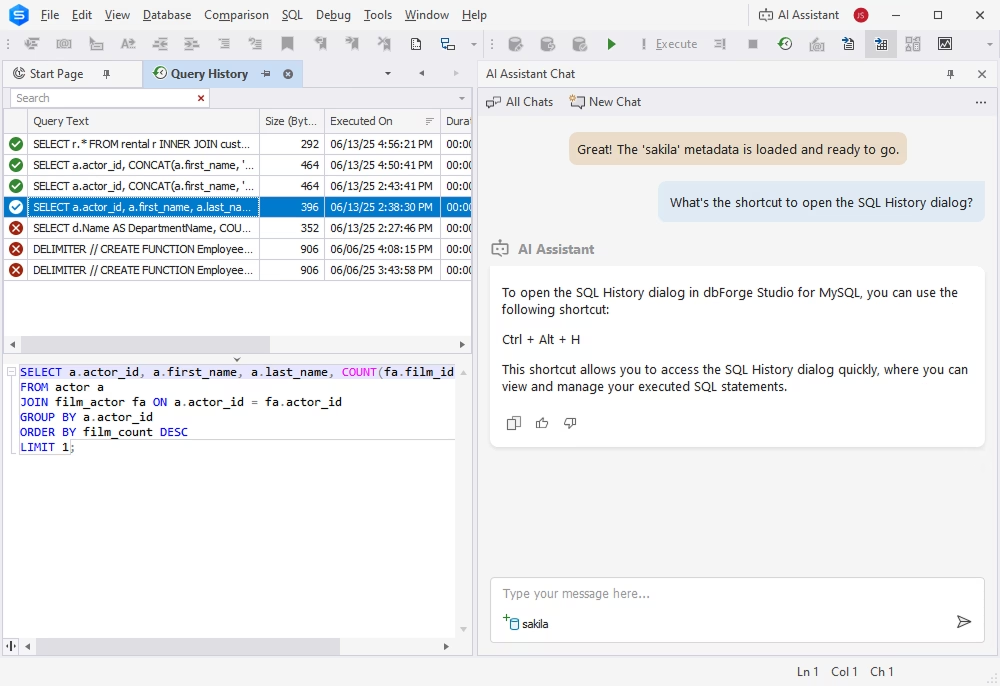
dbForge Studio for MySQL with Query History on the left and the AI Assistant chat on the right.
Benefits
- One tool to learn instead of four. The same compare tools, wizards and shortcuts work on every engine you support.
- One license to manage. A team that needs all four engines buys one product per seat, with volume discounts of 5% from 5 licenses, 10% from 10 and 15% from 20.
- Tools the free vendor clients don't have. Schema and data compare with sync scripts, test data, a stored-procedure debugger and command-line automation in one place.
Real-World Uses
- A consultancy with mixed clients: one client runs SQL Server, another MySQL, a third Oracle. Edge covers all three with one install on the consultant's laptop.
- Migrating from MySQL to PostgreSQL: export data from the MySQL Studio, recreate and compare the schema in the PostgreSQL Studio, and check the rows with Data Compare.
- Release deployment: compare the staging and production schemas, review the generated script, and run the same comparison from the command line in a nightly job.
- Performance firefighting: profile a slow query on SQL Server, read the plan, check index fragmentation, and fix it without leaving the Studio.
Who It's For, and Who Should Skip It
Buy dbForge Edge if you work with at least two of SQL Server, MySQL/MariaDB, Oracle and PostgreSQL every week and want the full Enterprise tool set on each. Database developers, DBAs and consultants get the most out of it.
Skip it if you only use one database engine: the single Studio for that engine costs a fraction of Edge (dbForge Studio for PostgreSQL Professional is $139.95 a year). Skip it too if you work on a Mac or Linux and don't want to run a Windows app through CrossOver, or if you only need to browse tables and run the odd query, where a free client is enough.
Usage Guide
- Download the trial from Devart's download page and sign in with a free Devart account when it asks.
- Run the installer and choose a full or custom install, ticking only the Studios you need.
- Open a Studio and create a connection to your server (host, port, login; SSH or SSL where the engine supports it).
- Use the Database Explorer to browse objects, then open a new SQL document and start typing: completion appears as you go.
- For deployments, start a schema comparison from the Comparison menu, pick the source and target, review the differences and generate the sync script.
What Users Say
SoftwareSuggest (5/5 from 12 reviews)
All twelve reviews on SoftwareSuggest give dbForge Edge five stars, most of them from developers and DBAs who used the trial. The praise is about the interface and cross-engine support, and the complaints are consistent: no native Mac or Linux version, a learning curve, and slowdowns on very large data sets.
Richelle G., Software Developer (August 2024): "Intuitive GUI for SQL development and debugging, excellent schema design capabilities, seamless version control integration, and valuable performance-tuning features." Her one complaint: "Pity that there is no native version for macOS without a virtualization layer."
Mia M., Database Developer (May 2024): "dbForge Edge excels in most aspects but doesnt have native support for Linux—it can run only with Wine, but that’s not a problem for me."
Lesley C., Database Administrator (February 2024): "Convenient interface, integration with different DBMS, robust analysis, and optimization tools. Having four advanced IDEs in one bundle makes it the perfect tool for me." On the downside: "Occasionally, there are minor delays when dealing with very large datasets."
Robert G., Database Developer (April 2024): "Performance can slow when handling large datasets, affecting efficiency."
Joy L., DBA (March 2024): "Users with limited resources might find the software demanding as it requires a robust system for smooth operation."
Courtney S., DBA (April 2024), compared it with DataGrip and MySQL Workbench and wrote that it offers "such features as Copy and Backup/Restore databases that are unmatched by Datagrip and providing broader database support than MySQL Workbench."
Jamey B., Database Developer (January 2024): "It is the best option available, thanks to its user-friendly interface and support for various platforms. Additionally, it is more cost-effective to purchase everything together rather than individually."
Customer comments on Devart's page
Devart's Edge page quotes customers of the dbForge Studios that make up Edge. These are the vendor's picks, so read them as such.
Akos B., Backend Developer: "Have been using different DB managers over years and tried all existing major ones for Windows, and stuck with dbForge. It's versatile enough and most importantly, has great UI and works with minimum errors, unlike some other products. It has also great tools for data export/import."
Troy A., IS Director: "dbForge brings all the tools needed to administer and develop for not only Microsoft SQL Server, but many other dbs. It's nice having them all in one consistent interface and the software is very easy to use."
Scott M., President, Computer Software: "dbForge Studio is like SSMS on steroids! Tons of features, and I especially like the tabbed interface that allows me to see multiple views very easily."
The recurring themes
People like the consistent interface across engines, the SQL completion and the compare tools, and several say it beats MySQL Workbench, pgAdmin or DataGrip for administration. The complaints repeat too: Windows only, heavy on a modest PC, slower on very large result sets, and a lot to learn at first. Many of the reviews were written after a trial rather than years of use.
Edge vs. a Single dbForge Studio
dbForge Edge contains the same programs Devart sells one at a time, so the choice comes down to how many engines you use. With one engine, buy that Studio: dbForge Studio for PostgreSQL costs $89.95 a year in Standard and $139.95 in Professional. With two or more, Edge is the simpler buy and gives you the Enterprise level of each one.
Editions and Pricing
dbForge Edge comes in one edition, Enterprise. The order page opens on the 1-year subscription, and the perpetual license is an option on the same page.
| License |
Price |
What happens after a year |
| Enterprise, 1-year subscription |
$749.95 per year |
Renew to keep using it, or the Studios stop working |
| Enterprise, perpetual |
$1,499.95 |
Keeps working; renew only to get new versions and support |
Priority support is an optional extra on the order page. The perpetual license pays for itself after two years compared with the subscription.
FAQs
Does dbForge Edge run on a Mac?
dbForge Edge is a Windows program. Devart documents installing it on macOS or Linux through CodeWeavers CrossOver, in a Windows 10 64-bit bottle with .NET Framework 4.7.2 installed first. CrossOver is a separate paid product.
Do I have to install all four Studios?
No. The dbForge Edge installer has a custom option, so you can install just one, two, three or all four Studios.
Is the AI Assistant included in the dbForge Edge license?
No. dbForge Edge's license covers the four Studios. The AI Assistant has a free plan with 200,000 tokens a month and a paid plan at $9.95 a month or $99.95 a year with 20 million tokens. It sends only database metadata, not your data, and is based on models from OpenAI and Anthropic.
What happens when my dbForge Edge subscription ends?
dbForge Edge stops working when a subscription lapses, until you renew. If you'd rather own it outright, choose the perpetual license, which keeps working after its support period ends.
Can I get a refund on dbForge Edge?
Yes. Devart refunds dbForge Edge within 30 days of purchase for annual subscriptions and perpetual licenses if you're not satisfied.
Does dbForge Edge work with cloud databases like Azure SQL or Amazon RDS?
Yes. dbForge Edge connects to Azure SQL Database and Managed Instance, Amazon RDS and Aurora, Amazon Redshift, Google Cloud SQL, Oracle Cloud, Supabase, Neon, Heroku and other hosted services of the four engines.
Is there a discount for a team?
Yes. Devart takes 5% off dbForge Edge for 5 to 9 licenses, 10% for 10 to 19 and 15% for 20 or more.
System Requirements
- Windows 7, 8, 8.1, 10 or 11, or Windows Server 2008, 2012, 2016, 2019, 2022 or 2025
- .NET Framework 4.7.2 or later
- About 472 MB for the installer download
- macOS or Linux: CodeWeavers CrossOver, or Wine with Winetricks on Ubuntu
Conclusion
dbForge Edge is worth it if you really work across several database engines: four full Enterprise IDEs with the same compare, sync and automation tools on each is hard to match in one package, and Devart keeps all four updated every few weeks. The main reason not to buy it is the price for a single engine, where one Studio costs far less, and the Windows-only design if you live on a Mac. Try it for 30 days on your own databases, and if you keep it past two years, the perpetual license is the cheaper route.
Download Free TrialBuy Now