Devart Excel Add-in for Salesforce Marketing Cloud: Subscribers, Emails and Data Extensions in Excel
Devart Excel Add-in for Salesforce Marketing Cloud (formerly ExactTarget) connects Microsoft Excel for Windows to Marketing Cloud, so you can load subscribers, emails, data extensions and other objects into a worksheet, edit them and save them back, for $179.95 as a perpetual license with 1 year of updates. It's for email marketers and Marketing Cloud admins who maintain lists and data extensions by hand.
Marketing Cloud is built for automation, not quick edits. Fixing a few hundred subscriber attributes, checking a data extension before a send or listing every email in a folder usually means an import activity, a SQL query activity or a support ticket. With the add-in those objects are Excel tables: filter, fix and commit.
Quick facts
- Version: 3.2.145, released November 18, 2026 (the shared build of all Devart Excel add-ins)
- Developer: Devart
- Excel: Microsoft Excel 2007, 2010, 2013, 2016, 2019, 2021 and 2024, Windows only
- Download: 81.18 MB installer (all Devart Excel add-ins), free Devart account required
- Sign-in: UserNamePassword, ServerToServer or RefreshToken authentication; AppCenterClient only for legacy packages created before August 1, 2019
- Price: perpetual license with 1 year of updates $179.95, with 2 years $259.95, with 3 years $329.95
- Trial: 30 days
- Refunds: the order page promises a 30-day money-back guarantee "if you are not satisfied"; Devart's ordering FAQ describes refunds only for technical problems support can't fix, within 30 days
What we checked: version 3.2.145 and the 81.18 MB installer on the download page, the Excel versions and requirements on the compatibility page, the Salesforce Marketing Cloud connection options in Devart's documentation, the Salesforce Marketing Cloud and ExactTarget entries in the revision history from 2016 to 2021, and the order page, which charged $179.95, $259.95 and $329.95 for 1, 2 and 3 years of updates, with no discount applied, on November 29, 2026. We didn't connect the add-in to a live Salesforce Marketing Cloud account.
Download Free TrialBuy with 1 Year of Updates ($179.95)
Overview
The add-in puts a Devart tab on the Excel ribbon with Get Data, Refresh, Edit Mode, Commit and Rollback. Get Data opens an import wizard: choose Salesforce Marketing Cloud and an Authentication Type. UserNamePassword takes the API URL of your Marketing Cloud instance (the S1 web service address by default), a user name and password; ServerToServer and RefreshToken use an app's client ID and secret. AppCenterClient still appears, but Devart's documentation marks it as deprecated and usable only with legacy packages created before August 1, 2019. A Client IDs option limits queries to specific business units.
Then you pick an object such as Email or a data extension in the visual Query Builder, or write SQL, and the rows land in an Excel table that stays connected. The add-in was first released for ExactTarget in February 2016; Devart's screenshots still show the ExactTarget name.
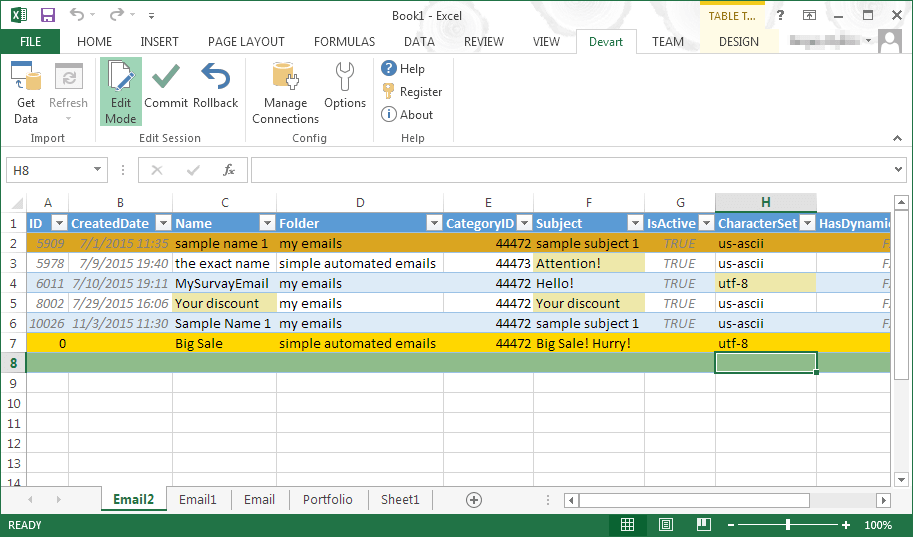
Edit Mode on an Email table from the ExactTarget-branded version: email IDs, created dates, names, folders, subjects and character sets, with edited cells and a new row highlighted before Commit.
Features
Bulk-edit Marketing Cloud data in a worksheet
Devart Excel Add-in for Salesforce Marketing Cloud turns an imported table into an editable view. Click Edit Mode, change values, add or delete rows; changes are highlighted and nothing reaches Marketing Cloud until you click Commit.
Query Builder or SQL
Devart Excel Add-in for Salesforce Marketing Cloud imports through a visual Query Builder with column picks, filters and row limits, or through SQL; queries with a LIMIT clause got much faster in 2018.
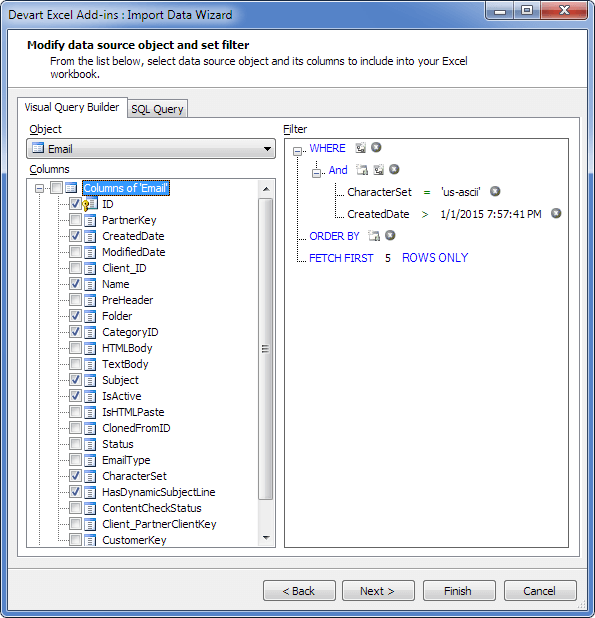
The Visual Query Builder on the Email object: columns such as ID, Name, Folder, Subject and CharacterSet ticked, a filter on character set and created date, and the first five rows only.
Data extensions and subscribers
Devart Excel Add-in for Salesforce Marketing Cloud works with subscribers, emails and other objects, data extensions included, and has supported inserting and updating account users since 2017.
One-click refresh
Devart Excel Add-in for Salesforce Marketing Cloud reloads every imported table with the Refresh button, keeping charts and formulas on current data.
Validation before commit
Devart Excel Add-in for Salesforce Marketing Cloud checks edits against field types and required fields as you type and marks bad cells with a note.
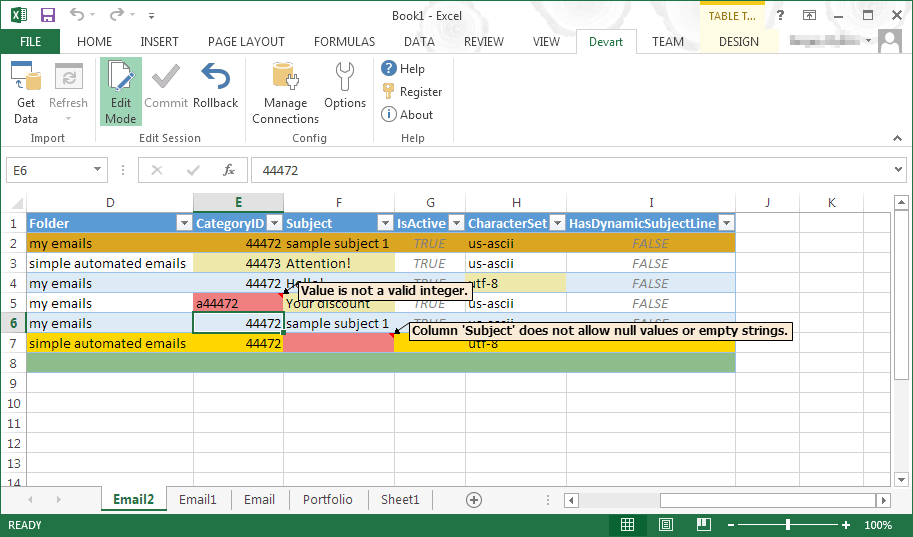
Validation in the worksheet: a non-numeric CategoryID and an empty Subject are marked with notes before anything is sent to Marketing Cloud.
Benefits
- Quick fixes without automation. Correct subscriber or data extension rows in a sheet instead of building an import activity.
- Pre-send checks. Look over a data extension in Excel with filters before an email goes out.
- Inventory of content. List emails with folders and subjects in a refreshable sheet.
- Fewer mistakes. Highlighted changes and validation show exactly what will be sent.
Real-World Uses
- A marketer opens a data extension in Excel, filters out test addresses and commits the cleanup before a send.
- An admin lists every email with its folder and subject to tidy up content folders.
- A team keeps a refreshable sheet of subscriber counts by status for weekly reporting.
- An agency limits queries to one client's business unit with the Client IDs option.
Who It's For, and Who Should Skip It
It's for Windows Excel users who look after Salesforce Marketing Cloud data and make small and medium manual changes often enough that import activities feel slow.
Skip it if you're on a Mac, if your Marketing Cloud data is maintained only by automations, or if you need a tool that follows Marketing Cloud's newest API changes closely: the last Marketing Cloud-specific change in the revision history is from 2021. For loading data into SQL Server, Devart's SSIS components for Salesforce Marketing Cloud fit better.
Usage Guide
- Close Excel, sign in to devart.com (a free account), download the Excel add-ins installer and run it with an administrator account. The installer contains every Devart Excel add-in.
- In Marketing Cloud, create an API integration package or API user and note the credentials.
- Open Excel, select the Devart tab, click Get Data and choose Salesforce Marketing Cloud.
- Pick the authentication type (UserNamePassword, ServerToServer or RefreshToken), enter the credentials and click Test Connection.
- Pick an object such as Email or a data extension, tick the columns and add filters, preview and click Finish.
- To change data, click Edit Mode, edit the rows, then click Commit, or Rollback to undo.
Before you buy
- Windows Excel only. It needs Excel 2007 to 2024 on Windows, .NET Framework 4.0 and the Visual Studio 2010 Tools for Office Runtime, installed by an administrator.
- What the price buys. Devart's order page describes the license as perpetual with one year of updates and support, extendable to three years at purchase.
- Check the renewal option. The order page has an automatic renewal option for the support period; untick it at checkout if you don't want it.
- Don't plan on AppCenterClient. It works only with legacy packages created before August 1, 2019; new setups use UserNamePassword, ServerToServer or RefreshToken.
- Edits are live. A commit changes your real Marketing Cloud data, so test on a small data extension first.
Where it falls short
- No Marketing Cloud-specific updates since 2021. The last entry is ServerToServer authentication on the main connection page in August 2021; the add-in gets the line's shared updates, such as Excel 2024 support in June 2026.
- Dated look and names. The screenshots and parts of the product page still show ExactTarget and the deprecated AppCenterClient sign-in.
- Hard to find on devart.com. The add-in isn't linked from the Excel add-ins overview page, though it's on the compatibility list and can be ordered.
- API speed limits. Large data extensions load slowly through the SOAP API, so filter in the query.
What Users Say
We found no published user reviews of the Marketing Cloud add-in on its own. What the release record shows about it and the Excel add-ins line it belongs to:
What the record shows
ExactTarget support arrived in February 2016, inserts and updates of account users in September 2017, a large speedup for queries with LIMIT in May 2018, ServerToServer authentication in November 2019, moved to the main connection page in August 2021.
Steady releases of the line
The Excel add-ins had builds in June (Excel 2024 support), August, September and November 2026.
A licensing change users asked for
Since January 2025 saved connections are no longer hidden or deleted when a trial or subscription ends.
Comparisons
vs. Marketing Cloud import activities and exports
Marketing Cloud's own import, export and SQL query activities are included and handle large volumes. The add-in fits quick manual edits and checks, where setting up an activity takes longer than the change.
vs. Devart ODBC Driver for Salesforce Marketing Cloud
The ODBC driver lets Power BI and Excel's Power Query read Marketing Cloud, but Power Query doesn't write back. The add-in is the one for editing.
vs. the Excel Add-in Cloud Pack
If you also work with other cloud apps, Devart's Cloud Pack bundles its add-ins for cloud services, and the Universal Pack holds all 25 Devart Excel add-ins.
Editions and Pricing
There is one edition with full functionality, sold as a perpetual license; the price depends on how many years of updates and support you buy. Each button opens the order page with that term selected; priority support can be added there.
| License | Updates and support | Price | Buy |
|---|
| Excel Add-in for Salesforce Marketing Cloud | 1 year | $179.95 | Buy 1 year |
| Excel Add-in for Salesforce Marketing Cloud | 2 years | $259.95 | Buy 2 years |
| Excel Add-in for Salesforce Marketing Cloud | 3 years | $329.95 | Buy 3 years |
All three prices were read on the order page on November 29, 2026, with no discount applied.
FAQs
Is Devart Excel Add-in for Salesforce Marketing Cloud the same as the ExactTarget add-in?
Yes. Devart Excel Add-in for Salesforce Marketing Cloud started as Excel Add-in for ExactTarget in 2016; the product page address and screenshots still use the ExactTarget name.
Which sign-in methods does Devart Excel Add-in for Salesforce Marketing Cloud support?
Devart Excel Add-in for Salesforce Marketing Cloud supports UserNamePassword, ServerToServer and RefreshToken, plus AppCenterClient for legacy packages created before August 1, 2019.
Can Devart Excel Add-in for Salesforce Marketing Cloud work with one business unit?
Yes. Devart Excel Add-in for Salesforce Marketing Cloud has a Client IDs option that limits retrieve requests to specific partner accounts or business units.
Does Devart Excel Add-in for Salesforce Marketing Cloud work with Excel for Mac?
No. It supports only Microsoft Excel for Windows, versions 2007 to 2024.
What happens when the update period ends?
Devart's order page describes the Excel add-in license as perpetual: the version you have keeps working, and the update period only covers new versions and support, which you can extend.
System Requirements
- Microsoft Excel 2007, 2010, 2013, 2016, 2019, 2021 or 2024 for Windows
- .NET Framework 4.0 or higher
- Visual Studio 2010 Tools for Office Runtime
- An administrator account for installation
- A Salesforce Marketing Cloud account with API access
Conclusion
Worth it only for Marketing Cloud users who make manual changes often enough that import activities slow them down, and whose setup works in the 30-day trial. At $179.95 for a perpetual license with a year of updates, Devart Excel Add-in for Salesforce Marketing Cloud makes subscribers, emails and data extensions editable in Excel with validation. The one reason to buy is quick, checked edits without building an activity. The main reason not to is its age: no Marketing Cloud-specific updates since 2021 and an ExactTarget-era interface.
Download Free TrialBuy with 1 Year of Updates ($179.95)