Short answer
Install the ODBC driver that matches the bitness of the application that will use it, not the bitness of Windows. 32-bit Excel or Access on 64-bit Windows needs a 32-bit driver and a data source (DSN) created in the 32-bit ODBC Data Source Administrator, C:\Windows\SysWOW64\odbcad32.exe. 64-bit apps use C:\Windows\System32\odbcad32.exe.
Devart's drivers, such as ODBC Driver for SQL Server ($179.95 a year) and ODBC Driver for MySQL ($139.95), install the 32-bit and 64-bit drivers from one Windows installer, so either kind of app can use them. If you need three or more databases, ODBC Universal Bundle ($499.95 a year) covers every Devart ODBC driver.
At a glance: the drivers in this guide
| Fact | Every Devart ODBC driver here |
|---|
| 32-bit and 64-bit Windows drivers | ✓ from one installer |
| Database client software needed | ✗ (Direct mode) |
| macOS and Linux packages | ✓, licensed separately per platform |
| Free trial | 30 days, activated with a trial key |
| Perpetual license | ✓ ($279.95 to $349.95 per driver, $999.95 for the bundle) |
What we checked
- We followed Devart's installation, activation and DSN documentation for its Windows drivers, step by step.
- We read the download page of each driver for its current version, release date and installer size.
- We put each driver and the bundle in the cart and noted the price and product name on the order page.
- We gathered the ratings and comments review sites carry for Devart's ODBC drivers.
What we checked: order page prices of $179.95 a year for the SQL Server and Oracle drivers, $139.95 for the MySQL, PostgreSQL and SQLite drivers and $499.95 for ODBC Universal Bundle, and download pages listing versions 6.2.0 (SQL Server, MySQL, Oracle) and 5.2.0 (PostgreSQL, SQLite), all released October 16, 2026, with Windows installers of 30.63 MB to 32.84 MB, all on November 16, 2026. We followed the documented steps but didn't install the drivers or connect to a live server.
32-bit or 64-bit: the one rule that matters
An ODBC driver is loaded into the application that uses it, so a 32-bit program can only load a 32-bit driver, and a 64-bit program only a 64-bit one. Windows keeps the two sets apart, with two separate ODBC Data Source Administrators and two separate lists of system DSNs. This is why "it works in Power BI but Excel can't see it" is such a common complaint: 64-bit Power BI Desktop and a 32-bit copy of Office look in different places.
| You want to use | Driver bitness | Administrator to open |
|---|
| 64-bit Excel, Access or Power BI Desktop | 64-bit | C:\Windows\System32\odbcad32.exe, or "ODBC Data Sources (64-bit)" |
| 32-bit Excel or Access on 64-bit Windows | 32-bit | C:\Windows\SysWOW64\odbcad32.exe, or "ODBC Data Sources (32-bit)" |
| A 64-bit SQL Server linked server | 64-bit | The 64-bit administrator, on the SQL Server machine |
| An old 32-bit line-of-business program | 32-bit | The 32-bit administrator |
The folder names look backwards, and they are: on 64-bit Windows, System32 holds the 64-bit tools and SysWOW64 the 32-bit ones. To check an Office app, open File, Account, About (for example About Excel), and the first line says 32-bit or 64-bit. For other programs, Task Manager marks 32-bit processes with "(32 bit)" after the name.
Step 1: download the driver for your database
Pick the driver that matches your database. Each Devart download page offers an EXE or MSI installer for Windows, a PKG for macOS and DEB or RPM packages for Linux. You need a free Devart account to get the trial key.
Download ODBC Driver for SQL ServerDownload ODBC Driver for MySQLDownload ODBC Driver for PostgreSQLDownload ODBC Driver for SQLiteDownload ODBC Driver for Oracle
Step 2: run the installer and keep the 64-bit option
- If an older version of the same Devart driver is installed, uninstall it first. Devart's documentation recommends that over overwriting it.
- Run the EXE or MSI and follow the wizard.
- On the Select Components page, leave the 64-bit driver ticked. Clear it only if you're sure every app that will use the driver is 32-bit. The 32-bit driver installs either way.
- On the License Information page, choose Input Purchased or Trial activation key and paste your key, or choose Activate product later.
- Click Next to install, then Finish.
Devart's drivers talk to the database over its own network protocol in Direct mode, so you don't need to install SQL Server Native Client, MySQL Connector, the PostgreSQL client or Oracle Instant Client first. The Oracle driver can also use an installed Oracle Client (OCI mode) if you prefer.
Step 3: activate the driver, even for the trial
A Devart ODBC driver won't connect until it is activated, and that includes the 30-day trial. If you skipped activation during setup, open the ODBC Data Source Administrator, click Add on the System DSN tab, choose the Devart driver, and open the License tab of its configuration window. Click Input Activation Key and paste the key from your registration email or the Devart Customer Portal, or load the key file. A subscription license checks the license online, so a locked-down server needs internet access to activate it; a perpetual license can be activated offline.
Step 4: create the DSN in the matching administrator
- Open the administrator that matches your application (see the table above). On Windows 10 and 11, type ODBC Data Sources in Start and pick the 32-bit or 64-bit entry.
- Choose the User DSN tab (only you can use it) or the System DSN tab (every user and Windows services, which a scheduled job or a SQL Server linked server needs).
- Click Add, select the Devart driver, for example "Devart ODBC Driver for MySQL", and click Finish.
- Fill in a Data Source Name, the server, port, user name, password and database.
- Add SSL, SSH or HTTP tunnel settings on the Security Settings tab if the server isn't directly reachable.
- Click Test Connection, then OK.
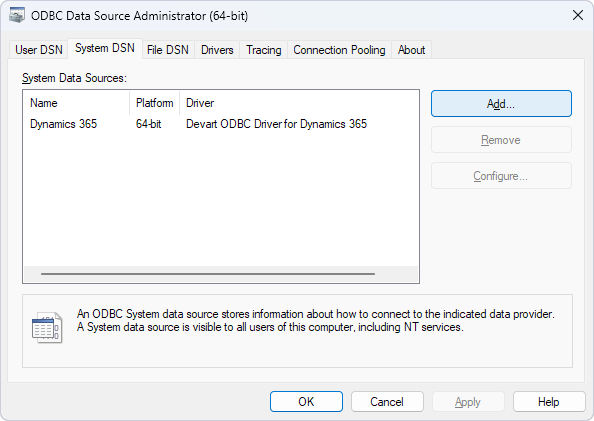
The 64-bit ODBC Data Source Administrator on Windows. The Platform column shows which bitness a DSN belongs to; this one uses Devart's Dynamics 365 driver.
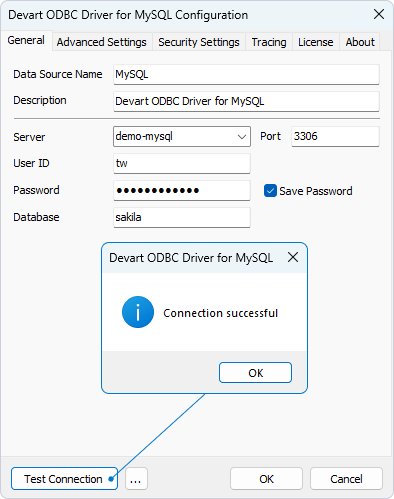
The Devart ODBC Driver for MySQL configuration dialog after Test Connection. The SQL Server, PostgreSQL, SQLite and Oracle drivers use the same layout.
Step 5: connect from Excel, Power BI or code
Once the DSN exists, every ODBC-aware program of the same bitness can use it.
- Excel: Data, Get Data, From Other Sources, From ODBC, then pick the DSN.
- Power BI Desktop: Get Data, ODBC, pick the DSN, then choose tables in the Navigator.
- Access: External Data, New Data Source, From Other Sources, ODBC Database, then link or import the tables.
- Code without a DSN: name the driver in the connection string, for example
DRIVER={{Devart ODBC Driver for SQL Server}};Data Source=myhost;Initial Catalog=mydatabase;User ID=myuser;Password=mypass;Port=1433.
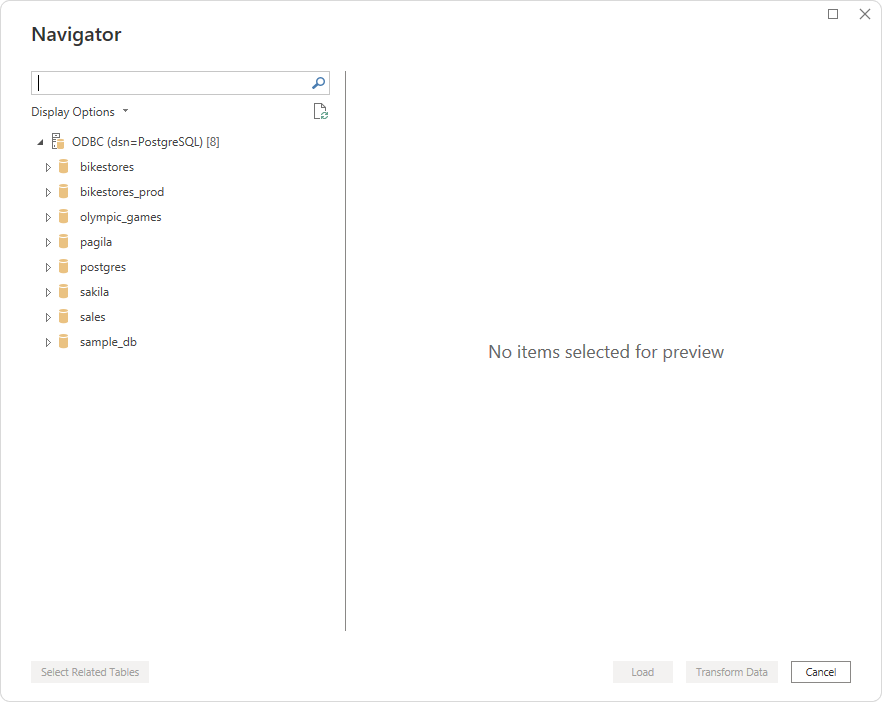
Power BI Desktop's Navigator listing PostgreSQL databases through the Devart driver's DSN.
Troubleshooting the usual ODBC errors
| Error or symptom | Usual cause | Fix |
|---|
| "Data source name not found and no default driver specified" | The DSN was created in the other administrator, or the name in the connection string is misspelled | Create the DSN in the administrator matching the app's bitness |
| "The specified DSN contains an architecture mismatch between the Driver and Application" | A 32-bit app is using a 64-bit DSN, or the reverse | Install both driver bitnesses and recreate the DSN in the right administrator |
| The DSN shows in one program but not another | The two programs have different bitness | Create the same DSN in both administrators |
| A scheduled job or service can't see the DSN | It was created as a User DSN | Recreate it on the System DSN tab |
| The driver refuses to connect after install | It hasn't been activated | Enter the trial or purchased key on the License tab |
Which Devart driver for which database
SQL Server
ODBC Driver for SQL Server: $179.95 a year or $349.95 perpetual. Best for: old SQL Server versions and servers behind a firewall
Devart ODBC Driver for SQL Server supports SQL Server 2000 to 2025, including Express editions, with SQL Server or Windows authentication. Version 6.2 added SQL Server 2025 and Always Encrypted. Its built-in SSH and HTTP tunnels reach a hosted server whose port 1433 is closed, without a VPN.
What we like
- Reaches SQL Server 2000 through 2025
- SSH and HTTP tunnels built in
- Same setup dialog on Windows, macOS and Linux
Watch out for
- The database vendors' own free drivers cover modern servers you can reach directly
- A subscription checks the license online
Download ODBC Driver for SQL ServerBuy ODBC Driver for SQL Server
MySQL and MariaDB
ODBC Driver for MySQL: $139.95 a year or $279.95 perpetual. Best for: MySQL or MariaDB data in Excel, Access and BI tools
Devart ODBC Driver for MySQL connects to MySQL 3.23 to 9.x, MariaDB 5.x to 12.x and cloud MySQL such as Amazon Aurora, Azure Database for MySQL and Google Cloud SQL, with no MySQL client libraries. It has SSL, SSH and HTTP tunneling, and a 32-bit driver for older Office installs.
What we like
- MariaDB and cloud MySQL included
- No client libraries to deploy
- 32-bit and 64-bit from one installer
Watch out for
- Per-platform licensing: Windows and Mac users need separate licenses
Download ODBC Driver for MySQLBuy ODBC Driver for MySQL
PostgreSQL
ODBC Driver for PostgreSQL: $139.95 a year or $279.95 perpetual. Best for: PostgreSQL and hosted Postgres in Power BI, Excel or SSIS
Devart ODBC Driver for PostgreSQL works with PostgreSQL 8.0 to 18.x and services built on it, including Amazon Aurora and RDS, Azure Database for PostgreSQL, Google Cloud SQL, AlloyDB, CockroachDB and Heroku Postgres. It needs no PostgreSQL client and supports SSL, SSH and HTTP tunnels.
What we like
- Covers PostgreSQL 18 and the main cloud services
- Tunnels for servers you can't reach directly
Watch out for
- A paid alternative to free community drivers, so you pay for support and the extras
Download ODBC Driver for PostgreSQLBuy ODBC Driver for PostgreSQL
SQLite
ODBC Driver for SQLite: $139.95 a year or $279.95 perpetual. Best for: opening SQLite files in Excel, Access or Power BI
Devart ODBC Driver for SQLite opens SQLite 3 database files with its own built-in engine in Direct mode, so nothing else needs installing, and it can encrypt files with AES, Blowfish, TripleDES, Cast128 or RC4. Files encrypted with SQLCipher or other extensions won't open with it.
What we like
- No SQLite library to install
- Built-in database encryption
Watch out for
- Its encryption format is Devart's own
- SQLCipher files aren't supported
Download ODBC Driver for SQLiteBuy ODBC Driver for SQLite
Oracle
ODBC Driver for Oracle: $179.95 a year or $349.95 perpetual. Best for: Oracle data in Windows tools without installing Oracle Client
Devart ODBC Driver for Oracle connects to Oracle 8.0 to 26ai, Express Editions, Oracle Cloud and RAC in Direct mode over TCP/IP, or through an installed Oracle Client in OCI mode. It supports SSL, Oracle wallets and SSH and HTTP tunneling.
What we like
- No Oracle Client needed in Direct mode
- Spans very old and current Oracle versions
Watch out for
- Priced with SQL Server at the top of the single drivers
Download ODBC Driver for OracleBuy ODBC Driver for Oracle
One driver or ODBC Universal Bundle?
ODBC Universal Bundle is one license for all 78 Devart ODBC drivers, from databases to cloud apps such as Salesforce, HubSpot, Shopify and QuickBooks, at $499.95 a year for one Windows desktop or $999.95 perpetual. For the five database drivers in this guide alone, buying them one by one costs $779.75 a year, so the bundle is cheaper from the fourth driver on, and three drivers at the SQL Server price already cost $539.85. On macOS and Linux only 19 of the 78 drivers run, mostly the databases. If you're choosing between Devart's ODBC and ADO.NET options for one source, our dotConnect for Salesforce vs ODBC Driver for Salesforce comparison walks through that choice.
One year for one Windows desktop at checkout (USD)
ODBC Driver for SQLite$139.95
ODBC Driver for MySQL$139.95
ODBC Driver for PostgreSQL$139.95
ODBC Driver for SQL Server$179.95
ODBC Driver for Oracle$179.95
All five drivers above, bought separately$779.75
ODBC Universal Bundle (all 78 drivers)$499.95
Order page prices checked on November 16, 2026, Desktop for Windows, 1-year subscription.
Download ODBC Universal Bundle DriversBuy ODBC Universal Bundle
Which should you choose?
| Your situation | Pick | Why |
|---|
| 32-bit Excel on 64-bit Windows, any database | Any Devart driver, DSN in the 32-bit administrator | One installer puts both bitnesses on the PC |
| A hosted SQL Server with its port closed | ODBC Driver for SQL Server | SSH and HTTP tunnels are built into the driver |
| MySQL or MariaDB into Excel or Access | ODBC Driver for MySQL | No MySQL client to deploy, 32-bit and 64-bit |
| Oracle on PCs without Oracle Client | ODBC Driver for Oracle | Direct mode connects with nothing else installed |
| A SQLite file in Power BI | ODBC Driver for SQLite | Built-in engine, nothing else to install |
| Four or more sources, or cloud apps too | ODBC Universal Bundle | Cheaper than four single drivers and covers the rest |
Who should skip a paid driver: if you connect Windows tools to a current database server you can reach directly, start with the free ODBC driver your database vendor publishes. Devart's drivers earn their price with tunnels, very old server versions, a setup dialog on Mac and Linux, compatibility fixes for named tools and vendor support. Skip the single drivers if you need three or more databases, and skip the bundle if you need only one or two.
What commonly goes wrong
- Matching Windows instead of the app. 64-bit Windows with 32-bit Office is common, and that Office needs the 32-bit DSN.
- User DSN for a service. SQL Server Agent jobs, linked servers and gateways run as a service account and only see System DSNs.
- One Desktop license for a shared server. A Desktop license covers one user at a time on one computer; a Power BI gateway or a shared reporting server needs a Server license, from $899.95 to $999.95 a year per driver.
- A Windows license on a Mac. Devart licenses each platform separately, so a Windows user and a Mac user need two licenses.
- Forgetting activation. The trial needs a key too. No key, no connection.
What users say
Ratings for Devart's ODBC drivers
Review sites treat Devart's ODBC drivers as one product line rather than driver by driver. The figures and comments below came from the sites' listings through search summaries, since the review pages block automated reading.
- Capterra: 4.7 out of 5 from 26 reviews of Devart ODBC Drivers. One reviewer summed it up as "Great product. Very Reliable."
- G2: about 4.5 to 4.6 out of 5 from 17 to 18 reviews, depending on the page, with one review headlined "Reliable driver with reliable support".
- TrustRadius: a much lower 5.2 out of 10 from 58 reviews and ratings. One reviewer wrote that "Prices are still high", and others asked for faster license delivery and more how-to articles.
The pattern: users find the drivers reliable and quick to set up, and support solves real problems. The friction is per-user, per-platform pricing and license questions, so check the license type before you buy.
FAQs
Should I install the 32-bit or 64-bit ODBC driver?
Install the one that matches the application, not Windows. A Devart ODBC driver installs both from one Windows installer, so the real choice is which ODBC Data Source Administrator you create the DSN in: SysWOW64 for 32-bit apps, System32 for 64-bit apps.
Why can't Excel see my ODBC data source?
Usually because Excel is 32-bit and the DSN was made in the 64-bit administrator, or the reverse. Check Excel's bitness under File, Account, About Excel, and create the DSN in the matching administrator.
Where is the 32-bit ODBC Data Source Administrator?
On 64-bit Windows it is C:\Windows\SysWOW64\odbcad32.exe, and Start lists it as "ODBC Data Sources (32-bit)". The 64-bit one is C:\Windows\System32\odbcad32.exe.
Do Devart ODBC drivers need the database client installed?
No. Devart ODBC Driver for SQL Server, MySQL, PostgreSQL, SQLite and Oracle connect directly in Direct mode, so no SQL Server Native Client, MySQL Connector, PostgreSQL client or Oracle Client is needed.
Is there a free trial of Devart ODBC drivers?
Yes. Each Devart ODBC driver has a 30-day trial, but it must be activated with a trial key from a free Devart account before it will connect.
Can I use one Devart ODBC license on Windows and Mac?
No. Devart sells Desktop for Windows, Desktop for macOS and Desktop for Linux as separate licenses at the same price, so each platform needs its own.
What is the difference between a User DSN and a System DSN?
A User DSN is visible only to the Windows account that created it. A System DSN is visible to every user and to Windows services, which scheduled jobs, SQL Server linked servers and gateways need.
Is ODBC Universal Bundle worth it?
ODBC Universal Bundle is worth it from about the fourth driver. At $499.95 a year for one Windows desktop it costs less than four single drivers at $139.95 to $179.95 each, and it includes all 78 Devart ODBC drivers.
Conclusion
Getting ODBC working on Windows comes down to one rule: match the driver and the DSN to the application's bitness, and use a System DSN for anything that runs as a service. Devart's drivers make the first half easy by installing 32-bit and 64-bit drivers together and connecting with no database client. For a single database, ODBC Driver for SQL Server and its siblings cost $139.95 to $179.95 a year; for four or more sources, ODBC Universal Bundle at $499.95 is the better buy. Try the 30-day trial against your own server and tool before you pay.
Download ODBC Driver for SQL ServerBuy ODBC Driver for SQL Server