Short answer: choose dotConnect for Salesforce if you're a .NET developer writing C# or VB.NET code that reads or writes Salesforce data, especially with Entity Framework Core or Dapper. Choose ODBC Driver for Salesforce if you want Salesforce data inside Excel, Power BI, Tableau, Access, SQL Server or any other ready-made tool, with no programming.
Both are made by Devart and both turn Salesforce objects into SQL tables. The difference is who uses them: dotConnect is a library for your own application ($369.95 once per developer), while the ODBC driver is a connector for existing apps ($179.95 a year per computer).
At a glance
| |
dotConnect for Salesforce |
ODBC Driver for Salesforce |
| What it is | ADO.NET data provider for .NET code | ODBC driver for any ODBC-compliant tool |
| Who uses it | .NET developers | Analysts, report writers, DBAs, developers in other languages |
| Price on the order page | $369.95, Professional, one developer | $179.95 a year, Desktop for Windows |
| License type | Perpetual, 1 year of updates (renewal $189.95) | Subscription, stops working if not renewed (perpetual sold separately) |
| Current version | 6.2.223 (October 8, 2026) | 4.2.0 (October 16, 2026) |
| Platforms | .NET on Windows, Linux, macOS (installer Windows-only, NuGet everywhere) | Windows 32/64-bit, macOS 64-bit, Linux 64-bit |
| SQL reads and writes | ✓ | ✓ |
| Native SOQL | ✓ | ✗ (SQL is translated for you) |
| Entity Framework Core, Dapper, NHibernate | ✓ | ✗ |
| Excel, Power BI, Tableau, Access | ✗ | ✓ |
| Server-to-server sign-in | ✓ (since 6.2.100) | ✓ (since 4.1.0) |
| Free trial | 30 days, fully functional, no card | 30 days, fully functional |
| Download | 20 MB installer or NuGet package | 77.8 MB Windows EXE, plus MSI, PKG, DEB and RPM |
How we picked and what we checked
- We compared the two Salesforce connectors Devart sells, because buyers searching for a "Salesforce connector" often can't tell which one they need.
- We read each product's feature, compatibility, ordering and revision history pages on Devart's site, and the user reviews we could find.
- We checked the current versions, the download sizes and the price each license costs at checkout, including the renewal price.
What we checked: dotConnect for Salesforce 6.2.223 (October 8, 2026) and ODBC Driver for Salesforce 4.2.0 (October 16, 2026) on Devart's download pages and revision histories, and the order page prices, $369.95 for dotConnect Professional (renewal $189.95) and $179.95 a year for the ODBC Driver Desktop for Windows subscription, all on October 20, 2026. We compared features, licenses and prices, and didn't connect either product to a Salesforce org ourselves.
dotConnect for Salesforce
dotConnect for Salesforce is Devart's ADO.NET data provider: it lets C# and VB.NET code work with Salesforce accounts, contacts, opportunities and custom objects as if they were tables in a database.
- Price: $369.95 for the Professional single-developer license, perpetual, with a year of updates and support (renewal $189.95 a year)
- Runs on: .NET 5 to 10, .NET Core 2.0 to 3.1, .NET Standard 2.0 and 2.1, .NET Framework 4.5 to 4.8, on Windows, Linux and macOS
- Best for: developers building applications, services and integrations on Salesforce data
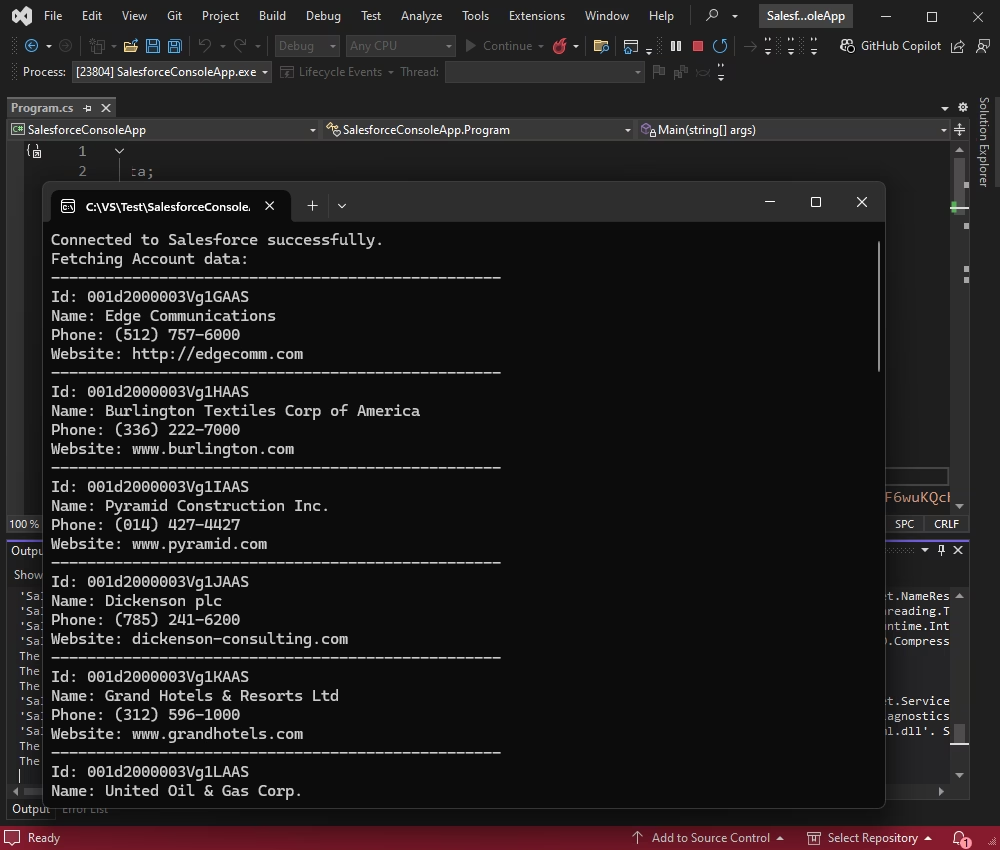
A Visual Studio console app, from Devart's documentation, that connected to Salesforce through dotConnect and printed Account records with their ID, name, phone and website.
dotConnect for Salesforce does well where code is involved. You open a SalesforceConnection, run SELECT, INSERT, UPDATE or DELETE statements, and read the results with a data reader, like any other ADO.NET provider. When standard SQL isn't enough, you can send native SOQL. Simple queries run on Salesforce, and a local SQL engine handles the joins Salesforce can't do itself.
The Professional edition adds the ORM side: Entity Framework Core 1 to 10 (you can scaffold a DbContext from your org), Entity Framework 4 to 6, NHibernate and Dapper, plus Devart's Entity Developer model designer. It signs in with interactive OAuth, a stored refresh token, user name and security token, or server-to-server credentials for unattended services. Devart has shipped seven releases of it in 2026, most recently 6.2.223 on October 8, 2026.
Where it falls short: it's useless without a developer and a .NET project, the Windows installer and Visual Studio integration need a free Devart account, and the NuGet package (Devart.Data.Salesforce) is the only route on Linux and macOS. Public reviews are scarce: the clearest sign of use is about 8,900 NuGet downloads.
What we like
- SQL, SOQL, EF Core, Dapper and NHibernate in one provider
- Perpetual license: the version you buy keeps working
- Cross-platform .NET, including .NET 10
- Frequent releases and a demo MCP server for AI assistants
Watch out for
- Developers only, no use in Excel or BI tools
- Entity Framework needs the Professional edition
- Few public user reviews to go on
- Server installs need the $999.95 Server license
Download dotConnect for Salesforce TrialBuy dotConnect for Salesforce
ODBC Driver for Salesforce
ODBC Driver for Salesforce makes Salesforce look like an ordinary SQL database to any program that speaks ODBC, so a spreadsheet, BI dashboard or linked Access table can read live Salesforce data and write changes back.
- Price: $179.95 a year for the Desktop edition on Windows (one computer, one user at a time), including support and upgrades
- Runs on: Windows 7 and later (32-bit and 64-bit, including Terminal Server), macOS 64-bit, Linux 64-bit
- Best for: analysts and database people using Excel, Power BI, Tableau, Access, SQL Server or DBeaver
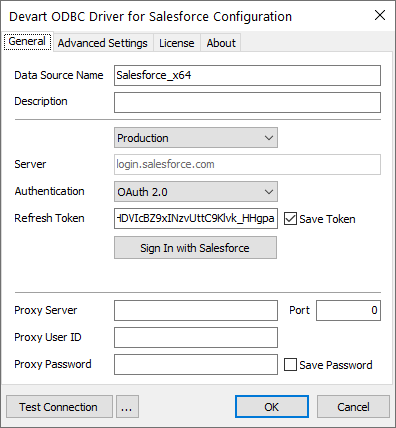
The driver's configuration dialog on Windows, from Devart's guide: a data source name, the Production environment at login.salesforce.com, OAuth 2.0 with a Sign In with Salesforce button and saved refresh token, proxy settings, and Test Connection.
ODBC Driver for Salesforce does well where no code is wanted. You create a data source (DSN), sign in to Salesforce, and Account, Contact and Opportunity appear as tables in whatever tool you use. It supports SQL-92 SELECT with joins, grouping, aggregates and subqueries, plus INSERT, UPDATE, DELETE and bulk operations, with metadata caching and connection pooling to save API calls. Version 4.0 added a graphical setup and OAuth on macOS and Linux, 4.1.0 (April 2026) added server-to-server authorization, and 4.2.0 (October 16, 2026) improved compatibility with Ubuntu 24 and 26, CentOS 10, DBeaver, Node.js and Visual FoxPro, and fixed expiring tokens when Refresh Token Rotation is on.
Where it falls short: the cheap license is a subscription that stops the driver when it lapses and checks its status online, the Desktop edition covers one user at a time (shared servers need Server Standard or Enterprise), and reviewers mention fiddly setup and modest speed on complex queries.
What we like
- Works in Excel, Power BI, Tableau, Access and SQL Server
- No programming, no SOQL to learn
- Windows, macOS and Linux packages
- Reads and writes, including bulk updates
Watch out for
- Subscription: stops working if you don't renew
- Desktop license is one user at a time
- Complex queries can be slow or fail
- Match the 32-bit or 64-bit DSN to your app
What users say about ODBC Driver for Salesforce
On Software Advice UK the driver is rated 4.4 out of 5 from 10 reviews.
- Peter (Financial Services, 4/5): "Easy to setup in ODBC 64 bit setup. Allows MS-Access to see the data as linked tables." His con: "Writing complex access queries that run against salesforce ODBC connections directly can result in errors."
- Ryan (Civil Engineering, 4/5): "The ODBC Salesforce driver has allowed me to avoid an unnecessary migration to Salesforce." Con: "The driver isn't very fast, but there are methods to make it fast enough."
- Jeff (Business Supplies & Equipment, 2/5) called it "Super buggy" and said two support cases were still unresolved.
Download ODBC Driver for Salesforce TrialBuy ODBC Driver for Salesforce
Who each one is for
The single most important difference: dotConnect for Salesforce goes inside software you write; ODBC Driver for Salesforce goes underneath software you already use. If the person doing the work opens Visual Studio, it's dotConnect. If they open Excel, Power BI or SQL Server Management Studio, it's the ODBC driver.
There is one overlap: a developer who doesn't use .NET (Python, PHP, Node.js, Java through an ODBC bridge, Delphi) can still reach Salesforce through the ODBC driver, since Devart lists compatibility with PHP's PDO_ODBC, Node.js and Python. A .NET developer could also use the ODBC driver through System.Data.Odbc, but would give up EF Core, native SOQL and Visual Studio design-time support, which are the reasons dotConnect exists.
Price and licensing
ODBC Driver for Salesforce costs less to start, and dotConnect for Salesforce costs less to keep. The ODBC Desktop subscription is $179.95 a year and you must keep paying for the driver to keep working. dotConnect is $369.95 once, the version you buy works forever, and the $189.95 yearly renewal is optional (it buys new versions and priority support).
Cost for one user over three years (USD)
dotConnect for Salesforce, bought once, no renewals$369.95
ODBC Driver for Salesforce, Desktop subscription x 3 years$539.85
dotConnect for Salesforce with two yearly renewals$749.85
Order page and renewal prices checked on October 20, 2026. Before tax.
For servers the gap widens. A dotConnect Server license is $999.95 on Devart's ordering page. The ODBC driver's Server Standard edition (one server with up to 6 cores and several users) and Server Enterprise are priced on Devart's ordering page, and the ODBC driver also comes as a perpetual license if you'd rather not subscribe.
Ease of setup
ODBC Driver for Salesforce is quicker to start with for a non-developer: run the installer, choose Trial, create a DSN, click Sign In with Salesforce, and pick the DSN in Excel or Power BI. The usual stumble is bitness, since 64-bit Office needs a DSN made in the 64-bit ODBC administrator. dotConnect for Salesforce takes a developer a few lines of code: add the NuGet package or run the installer, create a connection with your license key, and a browser window handles the OAuth sign-in.
Which should you choose?
| Your situation |
Pick |
Why |
| Building an ASP.NET Core app, Windows service or sync job on Salesforce data | dotConnect for Salesforce | ADO.NET, EF Core and Dapper support, perpetual license |
| Live Salesforce data in Excel or Power BI for one analyst | ODBC Driver for Salesforce | Plugs into the tool directly, $179.95 a year |
| Access linked tables or a SQL Server linked server | ODBC Driver for Salesforce | Both use ODBC. Shared SQL Server use needs a Server edition |
| Python, PHP or Node.js scripts | ODBC Driver for Salesforce | dotConnect only works in .NET |
| A .NET team that also needs BI reports | Both | Different users, different tools. Each license covers its own job |
Who should skip dotConnect for Salesforce: anyone who isn't writing .NET code, and teams that only need a one-off data export. Who should skip ODBC Driver for Salesforce: .NET developers who want EF Core or SOQL, and buyers who dislike subscriptions and won't pay for the perpetual license.
What commonly goes wrong
- Buying the Desktop ODBC license for a server. Devart's Desktop edition allows one user at a time. A reporting server or SQL Server linked server used by several people needs Server Standard or Server Enterprise.
- Bitness mismatch. A 64-bit Excel or Access only sees DSNs created in the 64-bit ODBC administrator, and 32-bit apps need the 32-bit one.
- Heavy queries straight against Salesforce. One reviewer found complex Access queries against the live connection could fail and copies data locally first. Both products ultimately go through the Salesforce API, so big joins are slower than on a local database.
- Letting the ODBC subscription lapse. The driver checks its license online and stops at the end of the term, which breaks scheduled reports.
- Mixing trial and licensed dotConnect assemblies. Devart's advice is to uninstall the trial completely before installing the licensed version.
FAQs
Can I use Devart's ODBC Driver for Salesforce from C#?
Yes, ODBC Driver for Salesforce works from C# through .NET's ODBC classes, but for .NET projects dotConnect for Salesforce is the better tool: it adds Entity Framework Core, Dapper, native SOQL and Visual Studio integration that the ODBC route doesn't have.
Does dotConnect for Salesforce work in Excel or Power BI?
No. dotConnect for Salesforce is an ADO.NET provider for your own .NET code. For Excel, Power BI, Tableau or Access, use ODBC Driver for Salesforce.
Which is cheaper, dotConnect or the ODBC driver?
ODBC Driver for Salesforce is cheaper in the first year ($179.95 against $369.95), but dotConnect for Salesforce is perpetual, so it's cheaper from the third year on if you don't renew its updates. Over three years one ODBC Desktop subscription costs $539.85.
Do both products let me write data back to Salesforce?
Yes. Both dotConnect for Salesforce and ODBC Driver for Salesforce support INSERT, UPDATE and DELETE, and the ODBC driver also does bulk operations for large sets of records.
Can either one run unattended on a server?
Yes. dotConnect for Salesforce (since 6.2.100) and ODBC Driver for Salesforce (since 4.1.0) both support server-to-server authorization for unattended jobs. Licensing matters, though: server use needs dotConnect's Server license or one of the ODBC driver's Server editions.
Do they run on Linux and macOS?
Yes. ODBC Driver for Salesforce has macOS PKG and Linux DEB and RPM packages. dotConnect for Salesforce runs on Linux and macOS through its NuGet package, while its installer and Visual Studio integration are Windows-only.
Is there a free trial of each?
Yes. dotConnect for Salesforce and ODBC Driver for Salesforce both have fully functional 30-day trials. The Windows downloads need a free Devart account.
Can I get a refund if I pick the wrong one?
For dotConnect for Salesforce, yes: Devart offers a 30-day money-back guarantee and refunds the payment in full if it doesn't meet your expectations. ODBC Driver for Salesforce's ordering page doesn't offer that guarantee, so use its 30-day trial before you buy.