dotConnect for Salesforce: Query Salesforce from .NET with Plain SQL, EF Core or Dapper
dotConnect for Salesforce is Devart's ADO.NET data provider that lets C# and VB.NET applications read and write Salesforce data with ordinary SQL, native SOQL, Entity Framework Core, NHibernate or Dapper. It runs on .NET 5 to 10, .NET Core and .NET Framework 4.5 to 4.8 on Windows, Linux and macOS, and the Professional single-developer license costs $369.95 with a year of updates.
The Salesforce REST API is powerful, but every report or sync job turns into a pile of HTTP calls, JSON parsing and SOQL strings. dotConnect for Salesforce puts familiar ADO.NET classes such as SalesforceConnection in front of all that, so SELECT Name, Phone FROM Account just works.
Quick facts
- Version: 6.2.223, released October 8, 2026
- Developer: Devart
- Platforms: .NET 5.0 to 10.0, .NET Core 2.0 to 3.1, .NET Standard 2.0 and 2.1, .NET Framework 4.5 to 4.8, ASP.NET Core, Blazor and .NET MAUI
- Operating systems: Windows, Linux and macOS, x64 and x86
- IDEs: Visual Studio 2015 to 2026, plus any NuGet-compatible IDE such as VS Code or JetBrains Rider
- Salesforce: all versions of the Salesforce Web API
- Price: $369.95 for Professional, Single license, one year of support and upgrades
- Trial: fully functional for 30 days, no credit card required
- Guarantee: 30-day money-back
What we checked: version 6.2.223 (released October 8, 2026, 20 MB installer) on Devart's download page and the matching Devart.Data.Salesforce 6.2.223 package on NuGet on October 13, 2026 (still the newest release on October 20, 2026), and the Professional single-developer license at $369.95 on the order page on October 20, 2026, with a renewal price of $189.95.
Before you buy
dotConnect for Salesforce is a developer component, not an end-user app. You use it inside your own .NET code. The Windows installer needs a free Devart account to download. On Linux and macOS you add the Devart.Data.Salesforce NuGet package instead. Make sure the edition fits: Entity Framework support needs Professional, the edition sold here.
Download Free TrialBuy Now
Overview
dotConnect for Salesforce connects to Salesforce directly, without Salesforce client libraries, and exposes accounts, contacts, leads, opportunities and custom objects as tables. Simple queries are translated into Salesforce API calls and run on Salesforce. More complex ones are split up: part runs on Salesforce, and a local SQL-92 engine handles the joins and conditions Salesforce itself can't. Devart shipped seven releases of it in 2026, after adding .NET 10 and Visual Studio 2026 support in version 6.0.0 (December 2025).
Features
SQL and SOQL against Salesforce objects
dotConnect for Salesforce runs standard SELECT, INSERT, UPDATE and DELETE statements against Salesforce objects, with joins and WHERE conditions, so you don't have to learn the Salesforce API. When you need Salesforce-specific behavior, you can send native SOQL queries straight through.
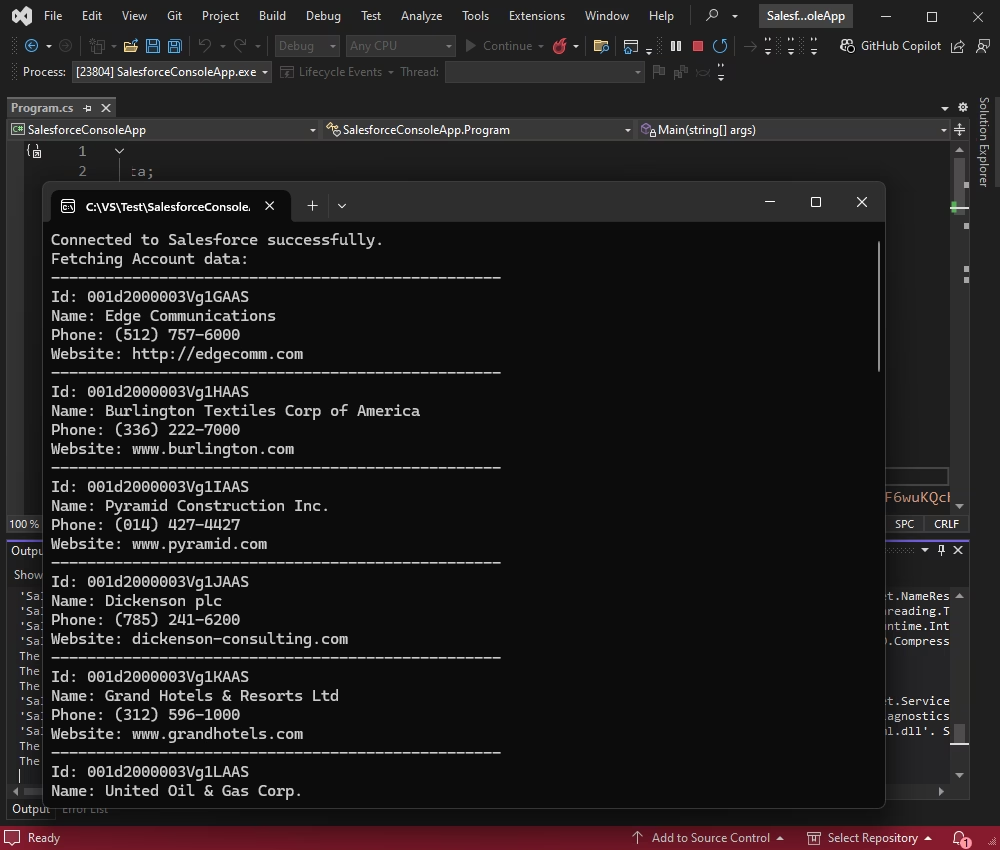
A Visual Studio console app that connected to Salesforce through dotConnect and printed Account records with their ID, name, phone and website.
Entity Framework Core, NHibernate and Dapper
dotConnect for Salesforce works with Entity Framework Core 1 to 10, Entity Framework 4 to 6, NHibernate 1.x to 5.x and Dapper 1.x and 2.x. You can scaffold a DbContext from your Salesforce org with Scaffold-DbContext and the Devart.Data.Salesforce.Entity.EFCore provider, then use LINQ for reads and writes. Devart's visual model designer, Entity Developer, builds the entity classes from Salesforce objects.
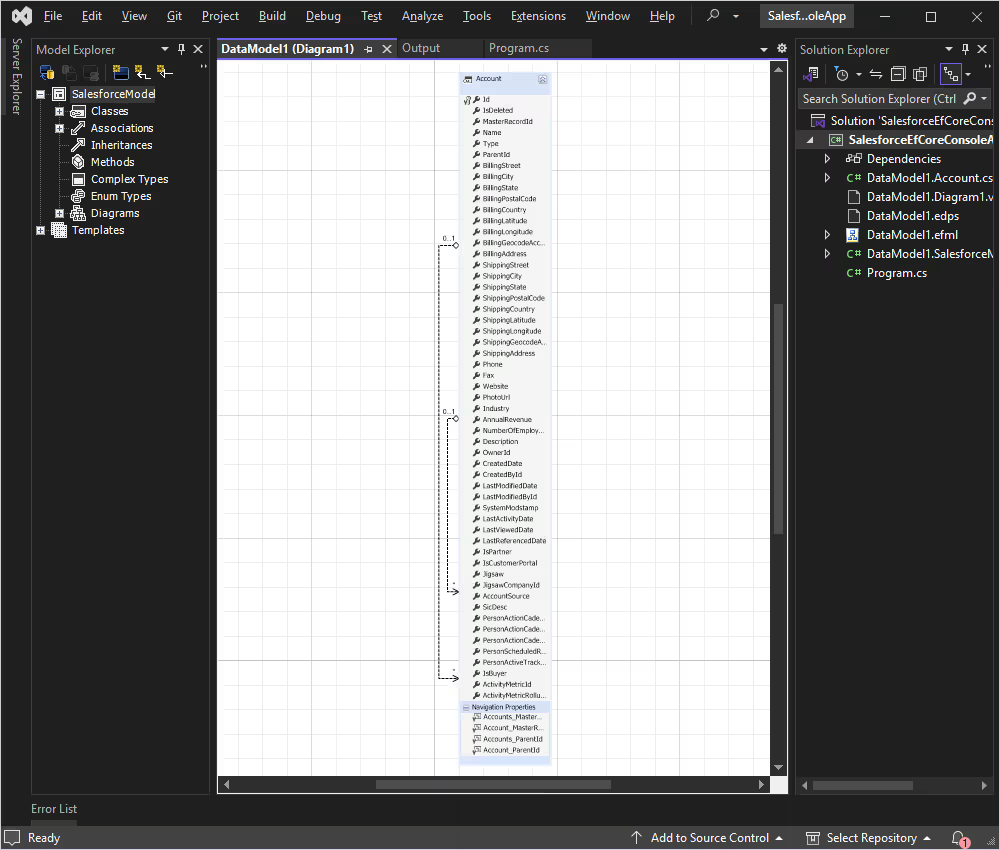
An Entity Developer model in Visual Studio showing the Salesforce Account entity, its fields and navigation properties, with the generated classes in Solution Explorer.
Authentication options
dotConnect for Salesforce signs in with interactive OAuth, a stored refresh token, a user name with password and security token, or, since version 6.2.100 (May 2026), server-to-server (client credentials) authentication for unattended services. It connects over SSL/TLS, through proxy servers if needed, and can run in FIPS 140-2 mode on Windows.
Visual Studio integration and monitoring
dotConnect for Salesforce adds a data source to Visual Studio's Server Explorer, so you can browse Salesforce objects and their data from the IDE, with design-time editors and IntelliSense descriptions. The SalesforceMonitor component and Devart's dbMonitor tool trace every statement your application sends, which helps when a query is slow or returns something unexpected.
A demo MCP server for AI assistants
dotConnect for Salesforce 6.2.192 (September 2026) added a demo Model Context Protocol server to the installation samples. It shows how AI assistants such as Claude, Cursor, Codex and Visual Studio Code can reach and manage Salesforce data through the provider.
Benefits
Less plumbing code. Reports, exports and sync jobs become SQL and LINQ instead of hand-written REST calls.
Skills your team already has. Anyone who knows ADO.NET or EF Core can work with Salesforce data on day one.
One code base across platforms. The same provider runs in a Windows service, an ASP.NET Core site on Linux or a .NET MAUI app.
Real-World Uses
- A nightly job copies new Salesforce opportunities into a SQL Server reporting database.
- An ASP.NET Core customer portal shows each customer's cases and contacts straight from Salesforce.
- An internal tool bulk-updates lead statuses with one UPDATE statement instead of a loop of API calls.
- A team adds Salesforce entities to an existing EF Core data layer so the rest of the app doesn't change.
Who It's For
dotConnect for Salesforce is for .NET developers and teams that build applications or integrations on top of Salesforce data. It isn't for Salesforce admins who want a point-and-click data loader or for business users: it needs a developer and a .NET project.
Usage Guide
- Install it. Download the trial from Devart (free account needed) and run the installer, or add the
Devart.Data.Salesforce NuGet package to your project.
- Connect. Create a
SalesforceConnection with Authentication Type=AccessRefreshTokenInteractive and your license key, then call Open(). A browser window handles the OAuth sign-in.
- Query. Run SQL through a command and read the results with a data reader, as with any ADO.NET provider.
- Use an ORM if you like. Scaffold an EF Core model with the Devart EF Core provider, or map objects with Dapper.
Tips
- Uninstall the trial completely before installing the licensed version, and make sure no old Devart.* assemblies are left behind.
- Turn on the PreserveNames option (added in 6.2.100) if you want custom objects and fields to keep their original names, including the __c suffix.
- Use SalesforceMonitor or dbMonitor while developing to see which statements reach Salesforce.
What Users Say
dotConnect for Salesforce is a niche developer component with few public user reviews. The clearest sign of real use is NuGet, where the Devart.Data.Salesforce package had been downloaded 8,859 times by October 2026.
The best way to judge it is the free 30-day trial, which has no feature limits: connect it to a Salesforce sandbox and run the queries your project needs. The revision history shows Devart fixing reported issues every month or two, such as a ContentVersion loading bug in September 2026 and EF Core query fixes in October 2026.
Comparisons
Standard vs Professional
dotConnect for Salesforce Standard is a full ADO.NET provider with design-time support. Professional adds more classes, tools and integrations, chiefly Entity Framework support. If you only use ADO.NET or Dapper, Standard may be enough. For EF Core, buy Professional.
dotConnect vs calling the Salesforce API yourself
Calling the REST API yourself costs nothing but code: authentication, paging, error handling and turning JSON into objects. dotConnect for Salesforce replaces that with an ADO.NET provider and an ORM layer, at the price of a license and a dependency on Devart's release cycle.
Editions and Pricing
| License | Who can use it | Notes |
|---|
| Developer (Single) | One developer, on one or more development workstations | $369.95 on the order page (Professional), renewal $189.95 a year |
| Server | One server used by one organization (web, application or batch servers, multi-user workstations) | $999.95 on Devart's ordering page |
| Site | Unlimited computers within one company | From $4,999 on Devart's ordering page, together with OEM |
| OEM | Your company, plus distribution in your application | Royalty-free distribution, silent install |
Devart's ordering page now groups the licenses as Developer, Server and Site / OEM. The single-developer license sold through the Buy Now button is the Professional edition (a Standard edition without Entity Framework support is also listed at checkout). The license is perpetual: you keep using the version you have after the first year, and renewing gets you new versions and priority support (two business day email response).
FAQs
Can I keep using dotConnect for Salesforce after the subscription ends?
Yes. dotConnect for Salesforce licenses are perpetual, so the version you have keeps working. The yearly subscription only gives you new versions and priority support.
Does dotConnect for Salesforce work on Linux and macOS?
Yes. dotConnect for Salesforce runs on Windows, Linux and macOS through the NuGet package. The installer and Visual Studio integration are Windows-only.
Does dotConnect for Salesforce support .NET 10 and Visual Studio 2026?
Yes. dotConnect for Salesforce added .NET 10 and Visual Studio 2026 support in version 6.0.0, released December 2025.
Do I need to know SOQL to use dotConnect for Salesforce?
No. dotConnect for Salesforce accepts standard SQL and translates it for Salesforce, though you can still send native SOQL when you want to.
Can dotConnect for Salesforce write data back to Salesforce?
Yes. dotConnect for Salesforce supports INSERT, UPDATE and DELETE statements as well as reads, and EF Core SaveChanges works through it.
Can I get a refund for dotConnect for Salesforce?
Yes. Devart offers a 30-day money-back guarantee on dotConnect for Salesforce if it doesn't meet your expectations.
Is there a version for Salesforce Marketing Cloud?
Devart sells a separate product, dotConnect for Salesforce Marketing Cloud, for that platform. dotConnect for Salesforce covers the Salesforce Web API.
System Requirements
- .NET: .NET 5.0 to 10.0, .NET Core 2.0 to 3.1, .NET Standard 2.0 and 2.1, or .NET Framework 4.5 to 4.8
- Operating system: Windows, Linux or macOS, x64 or x86
- IDE (optional): Visual Studio 2015 to 2026 for design-time integration, or any NuGet-compatible IDE
Conclusion
dotConnect for Salesforce turns Salesforce into something a .NET developer already knows how to use: a database you query with SQL, EF Core or Dapper. It's actively maintained, with .NET 10, EF Core 10 and server-to-server authentication already in place, and the license is perpetual.
There are few public reviews, so let the trial decide: it's fully functional for 30 days, needs no card, and the money-back guarantee covers you after purchase.
Download Free TrialBuy Now