Devart ODBC Driver for WordPress: Posts, Users and Comments as SQL Tables
Devart ODBC Driver for WordPress is a $109.95-a-year Windows driver that lets spreadsheet, database and BI tools read and edit a WordPress site's content with SQL. Posts, users, comments and the site's other objects show up as tables in Excel, Access, Power BI or DBeaver, reached with the site address and a WordPress login.
It is aimed at people who manage a lot of content: editors auditing hundreds of posts, marketers matching articles to traffic figures, or developers who would rather write one UPDATE than open fifty edit screens.
Quick facts
- Version: 1.5.0, released October 16, 2026; the first version shipped August 10, 2022
- Developer: Devart
- Runs on: 32-bit and 64-bit Windows Vista or newer, Windows Server and Terminal Server, with .NET Framework 4.5+
- Sign-in: site domain, WordPress user name and password (saved encrypted in the DSN), with optional proxy
- Objects: posts, users, comments and other WordPress objects
- Price: $109.95 a year for a Desktop license, $219.95 for a perpetual one
- Free trial: 30 days with a key from a Devart account
- Refunds: within 30 days, and only for a technical fault Devart's support can't resolve
- What we checked: Desktop for Windows with a 1-year subscription cost $109.95 on the order page, and the download page offered version 1.5.0 as a 32.64 MB EXE, both on November 14, 2026. We read the price of the other editions from Devart's own price list, and we didn't run the driver against a WordPress site
Before you buy
The driver logs in as a real WordPress user, so whatever that user's role allows is what SQL can do: an Administrator account can rewrite or delete any post. Make a separate user with the lowest role your work needs. Content edits made through the driver are live on the site the moment the statement runs.
Download Free Trial Buy Now
Overview
WordPress keeps everything in its own MySQL database, but on most hosting you can't reach that database from your desk, and its raw tables (with post meta spread across key-value rows) are awkward to query anyway. Devart ODBC Driver for WordPress takes the other route: it talks to the site over HTTPS, the way an app would, and presents the content as clean tables such as Posts, with columns like Title, Link, Status, Type, Slug and created and updated dates.
You configure a DSN with the site address, user name and password; any ODBC tool on that Windows computer can then use it. Devart tests the driver with the usual suspects (Excel, Access, Power BI, Tableau, Qlik, SQL Server Management Studio, DBeaver, Python, PHP) and lists the release-by-release compatibility fixes in its revision history.
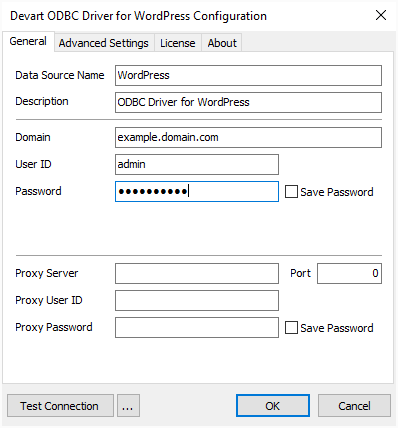
Setting up the WordPress DSN: site domain, WordPress user ID and password, with proxy fields below.
Features
Content tables you can filter and join
Devart ODBC Driver for WordPress exposes posts, users and comments as tables, so a query can list every draft by author, count comments per article or pick out posts not updated in two years.
Edits in bulk
Devart ODBC Driver for WordPress accepts INSERT, UPDATE and DELETE. Changing the status of a batch of posts, fixing a repeated typo in titles, or removing spam comments becomes a single SQL statement.
Ordinary login, protected storage
Devart ODBC Driver for WordPress signs in with a WordPress user ID and password. From version 1.2.0 (March 2024) the password is written to the DSN in encrypted form.
Fits ETL and reporting tools
Devart ODBC Driver for WordPress gained compatibility fixes for SQL Server linked servers, Access linked tables, Alteryx, Tableau, Microsoft Query, Qlik Replicate, PDO_ODBC in PHP, Node.js, Visual FoxPro and DBeaver between its 2022 launch and version 1.5.0.
Benefits
- Content inventory in minutes. One query gives a spreadsheet of every post with status, type and dates.
- Editorial data next to analytics. Join post slugs with page-view exports in Power BI to see which articles earn their keep.
- Safer than direct database access. You never touch the MySQL tables, so you can't break WordPress's internal structure with a stray query.
- Cheap entry price. $109.95 a year is Devart's lowest tier for a single cloud driver.
Real-World Uses
- Content audit. An editor exports all published posts with their last-updated dates to Excel and flags stale ones for a rewrite.
- Author report. A publisher counts posts per author per month in an Access query for contributor payments.
- Comment cleanup. A site admin finds and deletes a run of spam comments with one DELETE after previewing them with a SELECT.
- Migration check. A developer compares slugs and titles on the old and new site through two DSNs to catch missing pages.
Who It's For, and Who Should Skip It
Devart ODBC Driver for WordPress is for site owners, editors, SEO staff and developers on Windows who manage enough WordPress content that working post by post in the dashboard becomes slow, and who are comfortable with a little SQL.
It's the wrong buy for Mac and Linux users, since it is Windows-only. It's also unnecessary if you have direct MySQL access and know WordPress's table structure, or if a WordPress export plugin already gives you the spreadsheet you need. Shops that mostly want order data should look at Devart's separate WooCommerce driver.
Usage Guide
- In WordPress, create a user for the driver with the lowest role your reports or edits require.
- Download the trial with the button here (sign in with a free Devart account) and install the EXE, or use the MSI for silent deployment.
- Start the ODBC Data Source Administrator matching your program's bitness, add a DSN and pick Devart ODBC Driver for WordPress.
- Activate the trial or license key on the License tab.
- Fill in the site domain, user ID and password, plus proxy details if your network needs them, and press Test Connection.
- Open Excel, Power BI or your SQL tool, choose ODBC and select the DSN.
Tip
Before running an UPDATE across many posts, run the same WHERE clause as a SELECT and check the row count. WordPress keeps revisions for post content, but a mass status change or deletion is far easier to avoid than to undo.
Where It Falls Short
- No macOS or Linux version. The driver is sold for Windows only.
- Speed depends on your web host. Every query is served by the WordPress site itself, so large content sets come back slowly and heavy reporting adds load to the live site.
- Login is user and password. The dialog offers no OAuth or token option, so the DSN holds a real WordPress password.
- Little driver-specific documentation. Devart publishes no full table and column list for WordPress; you see the schema once the DSN is connected.
What Users Say
Nobody has reviewed the WordPress driver by name on the big software review sites. Devart's ODBC drivers are rated as one product, and the comments that name a specific driver mostly concern Salesforce, Postgres and other databases.
Ratings and a standout review
Software Advice rates Devart ODBC Drivers at 4.4 out of 5 for customer support and 4.6 for value for money, while Capterra averages 4.7 from 26 reviews. On GetApp, a higher-education reviewer of the Salesforce driver scored it 9 out of 10 and called it "a very reliable, well-performing product."
The learning curve
The criticism in the same sample is mild and mostly about getting started. One Capterra reviewer warned that "Some of the SQL code you need to write can be a bit confusing to grasp at first." That applies here too: WordPress tables are friendly, but joins between posts, users and comments still need SQL basics.
In short, users rate Devart's support and value highly and rarely report broken connections, while beginners mention a learning curve. Test the trial on a staging copy of your site first.
Comparisons
ODBC driver vs. a WordPress export plugin
Export plugins are free or cheap and produce a one-off CSV of posts or users. Devart ODBC Driver for WordPress costs $109.95 a year, stays connected so reports refresh, and can write changes back to the site.
WordPress driver vs. WooCommerce driver
Devart ODBC Driver for WordPress covers site content: posts, users, comments. Devart ODBC Driver for WooCommerce, at $139.95 a year, covers a store's commerce data and signs in with WooCommerce API keys instead of a WordPress login.
Editions and Pricing
| Edition | 1-year subscription | Perpetual | Who can use it |
|---|
| Desktop for Windows | $109.95 | $219.95 | One user at a time on one computer |
| Server Standard for Windows | $799.95 | $1,599.95 | Several users on one server with up to 6 cores, one legal entity |
| Server Enterprise, Site, OEM | Quote | Quote | Any core count, a whole company, or shipping the driver in your own app |
You buy every edition through the same Buy Now button: the order page opens on Desktop for Windows with one year of subscription, and lets you choose Server Standard, a 2- or 3-year term or a perpetual license instead. Devart's volume discount takes 5 to 15 percent off orders of 5 or more licenses, and priority support can be added there.
FAQs
Does Devart ODBC Driver for WordPress work with WordPress.com sites?
Devart ODBC Driver for WordPress connects to a site by its domain with a WordPress user name and password. Devart documents it for WordPress sites in general and doesn't single out WordPress.com plans, so test your own site with the 30-day trial.
Can the WordPress ODBC driver read custom post types?
Devart ODBC Driver for WordPress returns a Type column on posts, which separates posts from pages and other types. Check in the trial whether the custom types your plugins register appear.
Which WordPress user role should the driver use?
Devart ODBC Driver for WordPress can do whatever its WordPress user may do. Use an Editor or lower role for content work, and keep Administrator accounts out of DSNs.
Can I run the WordPress driver on a Mac?
No. Devart ODBC Driver for WordPress needs 32-bit or 64-bit Windows with .NET Framework 4.5 or later.
Do I keep using it after the subscription ends?
A subscription license of Devart ODBC Driver for WordPress stops at the end of its term and checks the license online. The perpetual license ($219.95) keeps the version you bought working for good and activates offline.
System Requirements
- Windows Vista or newer, 32-bit or 64-bit, incl. Windows Server and Terminal Server
- .NET Framework 4.5 or later
- 32.64 MB EXE installer, with one driver version installed at a time
- A WordPress site reachable over HTTPS and a WordPress user account
- Internet access for subscription activation
Conclusion
Devart ODBC Driver for WordPress earns its $109.95 a year if you look after a large WordPress site and keep exporting posts or editing them one by one: SQL turns those chores into queries, and nothing has to be installed on the server.
The catch is a Windows-only driver that logs in with a real WordPress password and runs at your host's speed. For a small blog, the dashboard and a free export plugin are enough.
Download Free Trial Buy Now