SSIS Data Flow Components for QuickBooks Online: Move QuickBooks Data In and Out of SSIS
Devart SSIS Data Flow Components for QuickBooks Online add a QuickBooks Online Source, Destination, Lookup and Connection Manager to SQL Server Integration Services on Windows, for $179.95 a year (Developer license) or $349.95 perpetual. They read accounts, customers, invoices, bills, items and reports from a QuickBooks Online company with SQL, write changes back with inserts, updates and deletes, and sign in through Intuit's own OAuth login.
QuickBooks Online is where a small or mid-sized company keeps its books, but finance teams usually want that data next to sales, inventory and payroll figures in SQL Server. Without a connector, that means code against Intuit's API, its OAuth tokens that expire, and paging through every object. These components make QuickBooks objects look like tables in an SSIS data flow, so a nightly package can copy them, or load invoices from another system into QuickBooks.
Quick facts
- Version: 5.2.145, released November 19, 2026
- Developer: Devart
- Components: QuickBooks Online Source, QuickBooks Online Destination, QuickBooks Online Lookup, QuickBooks Online Connection Manager
- QuickBooks: QuickBooks Online companies, including sandbox companies; not the QuickBooks Desktop editions
- SSIS: SQL Server Integration Services 2012, 2014, 2016, 2017, 2019, 2022 and 2025
- Platform: Windows Vista or later, 32-bit and 64-bit, .NET Framework 4.5
- Download: 616.24 MB installer shared with the whole SSIS line; needs a free Devart account
- Price: $179.95 a year or $349.95 perpetual for a Developer license; Server and Site licenses cost more
- Trial: 30 days, fully functional
- Refund: Devart's ordering FAQ gives a full refund within 30 days only when a technical problem that support can't fix stops the product working
- What we checked: the order page charged $179.95 for the Developer license with one year of updates, $349.95 for a perpetual Developer license, $449.95 a year or $899.95 perpetual for Server, and $499.95 a year or $999.95 perpetual for a Site license, and the download page listed version 5.2.145 at 616.24 MB, on November 22, 2026. We didn't run a package against a QuickBooks company.
Download Free TrialBuy Developer LicenseBuy Server LicenseBuy Site License
Overview
After installation the QuickBooks Online components appear in the SSIS Toolbox in Visual Studio. You add a Devart QuickBooks Online Connection Manager, click Sign In, log in to Intuit and pick the company to authorize; the company ID and refresh token are filled in for you. Then you drop a Source, Destination or Lookup into a Data Flow task. QuickBooks objects show up as tables, from Account, Bill, BillPayment and Budget to Customer, Estimate, Invoice and Item, and they work like any other SSIS source or destination next to SQL Server, flat files or other cloud apps.
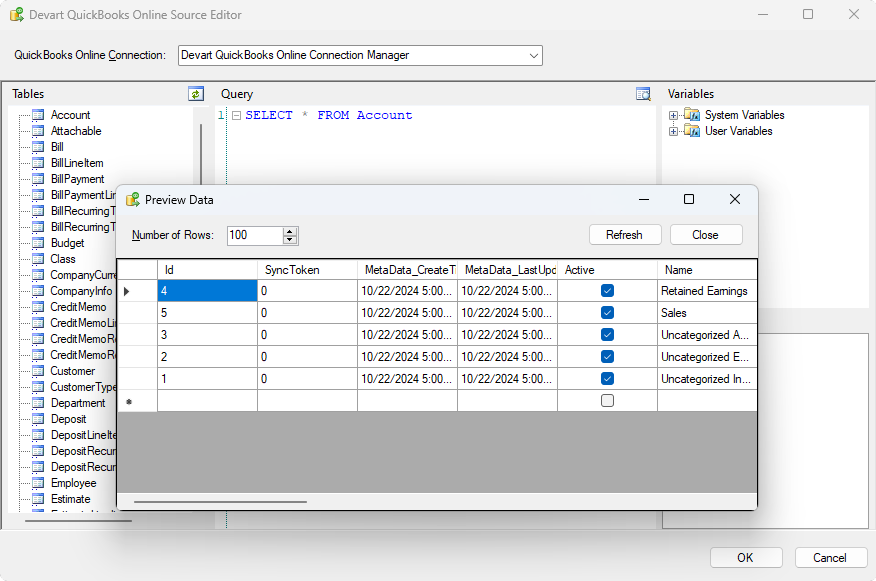
The QuickBooks Online Source Editor: QuickBooks tables on the left, SELECT * FROM Account in the query pane, and Preview Data showing accounts such as Retained Earnings and Sales.
Features
SQL over QuickBooks objects and reports
The QuickBooks Online Source in Devart's QuickBooks Online SSIS components reads QuickBooks objects with SQL, including filtering, grouping and ordering. Simple statements are turned into QuickBooks Online API calls; for complex ones the data goes into a local cache and the query runs there. Version 5.0 (June 2026) added 50 QuickBooks report objects, so report data can be pulled the same way as lists and transactions.
Write invoices, customers and more back to QuickBooks
The QuickBooks Online Destination in Devart's QuickBooks Online SSIS components supports INSERT, UPDATE and DELETE, with a batch size you set, so a package can create customers or invoices from a CRM or a CSV file, or correct records in bulk.
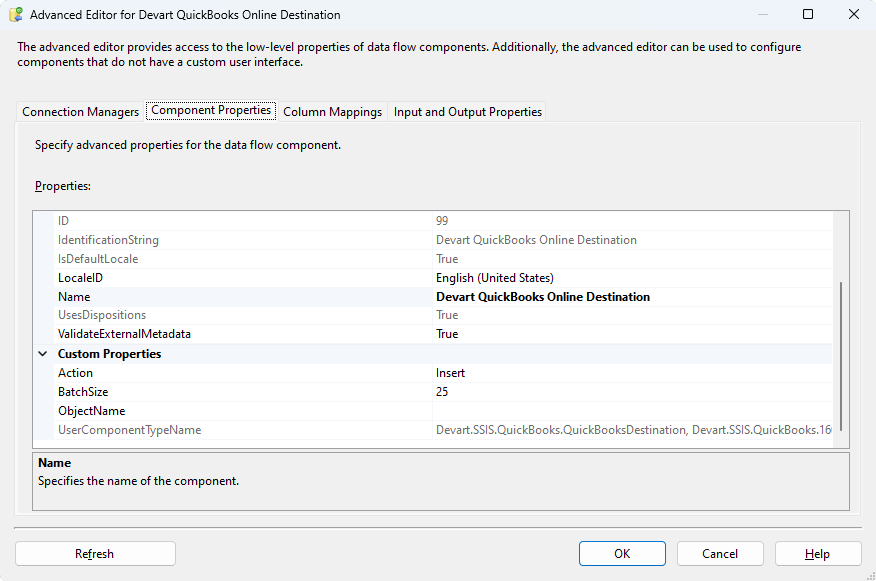
The QuickBooks Online Destination's advanced editor: the Action property (Insert here), BatchSize and the target ObjectName.
Intuit sign-in that survives scheduled runs
The Connection Manager in Devart's QuickBooks Online SSIS components signs in through Intuit's web login or OAuth Interactive and stores the company ID and refresh token. Because a QuickBooks refresh token can expire after 24 hours, a Token Server option saves each new token in a file or registry key, so packages run by SQL Server Agent keep working. You can also use your own OAuth app (client ID and secret), connect to a sandbox company, go through a proxy, or open the connection read-only.
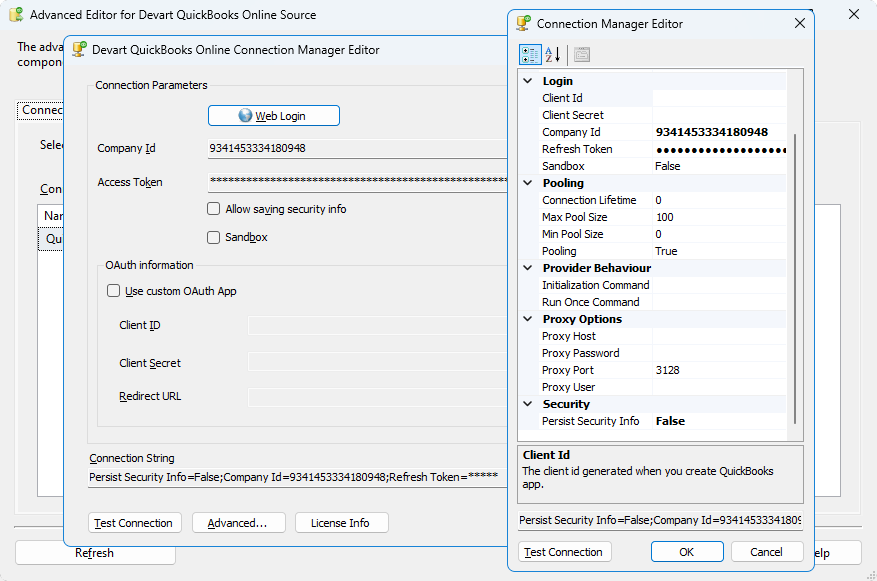
The QuickBooks Online Connection Manager Editor: Web Login, Company Id, the Sandbox and custom OAuth app options, and the advanced property grid with pooling and proxy settings.
A Lookup that batches and caches
The QuickBooks Online Lookup in Devart's QuickBooks Online SSIS components checks several incoming rows in one SELECT and caches the results, with a cache size you set, which saves API calls when you match many rows against QuickBooks customers, vendors or items.
Benefits
- No Intuit API code to maintain. QuickBooks objects behave like tables, and Devart keeps up with Intuit's API changes, such as the fields added to Item in version 5.1.
- Accounting data in your warehouse. Invoices, payments and accounts land in SQL Server next to sales and operations data for Power BI or SSRS reports.
- Two-way. The same components read from QuickBooks and load records into it.
- Unattended runs. The Token Server option keeps the OAuth sign-in alive for scheduled packages.
Real-World Uses
- Finance reporting. A nightly package copies invoices, payments and the chart of accounts into SQL Server, where a Power BI report shows receivables by customer.
- Invoicing from another system. A package reads completed orders from an e-commerce or ERP database and creates QuickBooks invoices with the Destination.
- Customer sync. The Lookup checks CRM accounts against QuickBooks customers and only new ones are inserted.
- Backups and migrations. A package snapshots QuickBooks lists and transactions into SQL Server tables before a clean-up or a move to another accounting system.
Who It's For, and Who Should Skip It
These components suit companies that already run SSIS on SQL Server and want QuickBooks Online data in their warehouse, or need to push records from other systems into QuickBooks on a schedule.
Skip them if you don't use SSIS: QuickBooks' own reports and exports, an app from the QuickBooks App Store or a cloud integration service are simpler outside the Microsoft stack. If you only need QuickBooks data in Excel or Power BI, Devart's ODBC Driver for QuickBooks Online is a lighter fit. And if your company runs QuickBooks Desktop, these components won't connect to it; they're for QuickBooks Online only.
Usage Guide
- Sign in to Devart (a free account), download the installer from the product's download page and run it; select the QuickBooks Online components and the SSIS versions you use.
- Open an Integration Services project in Visual Studio. The Devart QuickBooks Online components appear in the SSIS Toolbox.
- Add a connection: in Connection Managers, add a Devart QuickBooks Online connection, tick Sandbox if you're testing, click Sign In, log in to Intuit, choose the company and click Authorize.
- Set the Token Server option in the advanced settings so scheduled runs can renew the refresh token on their own.
- Read data: drag a Devart QuickBooks Online Source into a Data Flow task, pick an object or write a SELECT, and click Preview.
- Write data: add a Devart QuickBooks Online Destination, choose the object and the action (insert, update or delete), map the columns and run the package.
Before you buy
The Developer license covers development and testing on one developer's machines only. Running packages on a production SSIS server needs a Server license ($449.95 a year or $899.95 perpetual) or a Site license. If you need three or more of Devart's SSIS sources, compare the SSIS Universal Bundle, which Devart sells for $499.95 a year or $999.95 perpetual and which includes QuickBooks Online.
Where it falls short
- QuickBooks Online only. QuickBooks Desktop (Pro, Premier, Enterprise) isn't supported by these components.
- API speed and limits. Everything goes through Intuit's API, so a first full load of a large company takes time, and complex queries run locally after the data is fetched.
- Token housekeeping. Without the Token Server option, an expired refresh token means signing in again before the next run.
- Windows and SSIS only. No use outside SQL Server Integration Services.
- Large download. The installer is over 600 MB even if you only want the QuickBooks components.
What Users Say
Capterra (whole SSIS line)
Review sites rate Devart's SSIS components as one product line, not the QuickBooks Online components on their own. On Capterra, SSIS Data Flow Components average 4.6 out of 5 from 12 reviews, with 4.3 for ease of use and 4.3 for customer service.
Reviewers, mostly BI specialists, database administrators and integrators, describe the components as quick to set up inside Visual Studio and good value next to larger ETL suites; the criticisms are occasional bugs and packages that take effort to keep tidy as they grow. There are no published reviews of the QuickBooks Online components alone, so run the trial against your own company file, ideally a sandbox, before deciding.
Comparisons
QuickBooks SSIS components vs. Devart's ODBC Driver for QuickBooks Online
Devart also sells an ODBC Driver for QuickBooks Online that serves Excel, Power BI and other ODBC tools. For ETL packages in SSIS, the SSIS components fit better, with a Destination and Lookup built for data flows; for ad-hoc queries and reports outside SSIS, the driver is the one to buy.
QuickBooks components vs. the SSIS Universal Bundle
The SSIS Universal Bundle includes QuickBooks Online along with more than 40 other sources such as Salesforce, HubSpot, Shopify and Stripe. If QuickBooks is one of three or more sources you need, the bundle is the better deal; for QuickBooks alone, these components cost far less.
Editions and Pricing
Each button opens the order page with that license and term selected; you can still change the term to 2 or 3 years or add premium support there. A perpetual license includes one year of updates and support.
FAQs
Do Devart's QuickBooks SSIS components work with QuickBooks Desktop?
No. Devart SSIS Data Flow Components for QuickBooks Online connect only to QuickBooks Online companies through Intuit's online API. QuickBooks Desktop needs a different tool.
Can I test Devart's QuickBooks SSIS components on a sandbox company?
Yes. The QuickBooks Online Connection Manager has a Sandbox setting, so you can build and test packages against an Intuit developer sandbox before pointing them at your live books.
Will a scheduled package lose its QuickBooks sign-in?
Not if you set the Token Server option. Devart SSIS Data Flow Components for QuickBooks Online can save each new refresh token in a file or registry key and request fresh tokens on their own; without it, an expired token means signing in again.
Can Devart's SSIS components create invoices in QuickBooks Online?
Yes. The QuickBooks Online Destination supports INSERT, UPDATE and DELETE, so a package can create invoices, customers and other records, or update and delete existing ones.
Which SSIS versions do the QuickBooks Online components work with?
Devart SSIS Data Flow Components for QuickBooks Online work with SQL Server Integration Services 2012, 2014, 2016, 2017, 2019, 2022 and 2025, on Windows Vista or later with .NET Framework 4.5.
Do I need a separate license for the production SSIS server?
Yes. The Developer license of SSIS Data Flow Components for QuickBooks Online covers development and testing only; deploying packages to a server needs a Server license or a Site license.
What happens when the subscription ends?
The subscription license of SSIS Data Flow Components for QuickBooks Online works for the term you paid for, so packages that use it need a renewal. A perpetual license keeps working at the version you have.
Can I get a refund?
Only for technical problems. Devart's ordering FAQ gives a full refund within 30 days of purchase when a bug or technical issue stops SSIS Data Flow Components for QuickBooks Online working and support can't fix it, so use the 30-day trial first.
System Requirements
- Microsoft SQL Server Integration Services 2012, 2014, 2016, 2017, 2019, 2022 or 2025
- Visual Studio with Integration Services projects for designing packages
- Windows Vista or later, 32-bit or 64-bit, with .NET Framework 4.5
- A QuickBooks Online company (or sandbox) and an Intuit sign-in
Conclusion
Devart SSIS Data Flow Components for QuickBooks Online are worth $179.95 a year to SSIS teams that need QuickBooks Online data in SQL Server or want to load invoices and customers into QuickBooks on a schedule: you get SQL over QuickBooks objects and reports, write-back, and an Intuit sign-in that keeps working in unattended runs. Budget for a Server license for production. If you're on QuickBooks Desktop or don't use SSIS, this isn't the tool, and if QuickBooks is one of several sources, the Universal Bundle is better value.
Download Free TrialBuy Developer LicenseBuy Server LicenseBuy Site License