Skyvia Connect: OData, SQL and MCP Endpoints for Your Cloud Apps and Databases, With No Code
Skyvia Connect is Devart's hosted API service that publishes data from more than 200 cloud apps and databases as ready-to-use OData, SQL or MCP endpoints, so Salesforce Connect, Power BI, Tableau, .NET apps or an AI assistant can read and write it live, with no API server to build or host. It's for Salesforce admins, BI teams and developers who need live access instead of copies. The Professional plan is $99 a month at checkout, and there's a free plan.
Getting live data from one system into another usually means building and hosting an API, or copying the data on a schedule and living with stale reports. Skyvia Connect turns a connection you've already set up into an endpoint URL in a few clicks, and Skyvia runs it.
Quick facts
- What it is: an API-server-as-a-service from Devart, part of the Skyvia cloud platform; nothing to install (an optional agent runs endpoints inside your network)
- Latest release: November 2026 (monthly releases)
- Endpoint types: OData (all versions, read and write), SQL (REST with JSON, ODBC driver, ADO.NET provider) and MCP for AI agents
- Sources: 200+ cloud apps, databases and data warehouses
- Price: Free (100 KB traffic a month, 1 endpoint); Basic $19, Standard $49 and Professional $99 a month (1 GB traffic); about 20% less billed annually
- Trial: 14-day Professional trial when you register
- What we checked: the order page price of $99 a month for Connect Professional (monthly renewal) against Skyvia's pricing page, and the trial terms and endpoint types in Skyvia's documentation, on November 22, 2026. We didn't publish an endpoint ourselves.
Buy Professional (Monthly)
Overview
Skyvia Connect works from the connections you create in Skyvia. You choose a connection, pick the objects to expose (or design the data model in an advanced mode with your own entity and association names), set who may use it, and get an endpoint URL. There are three kinds:
- OData endpoints speak the open OData standard, so any OData consumer can use them: Salesforce Connect (as external objects), Power BI, Tableau, Excel, and libraries such as Apache Olingo or Python OData clients.
- SQL endpoints accept SQL over a REST API and return JSON, and also work through Skyvia's own ODBC driver and ADO.NET provider. SELECT and DML statements are supported, and DDL too for database sources.
- MCP endpoints use the Model Context Protocol to let AI assistants such as Claude look up live records and take actions like adding a record to your CRM.
Endpoints are hosted by Skyvia by default. In hybrid deployment, the Skyvia Agent and Runtime run inside your network so the data never leaves it, while you still configure and monitor everything in Skyvia's web interface.
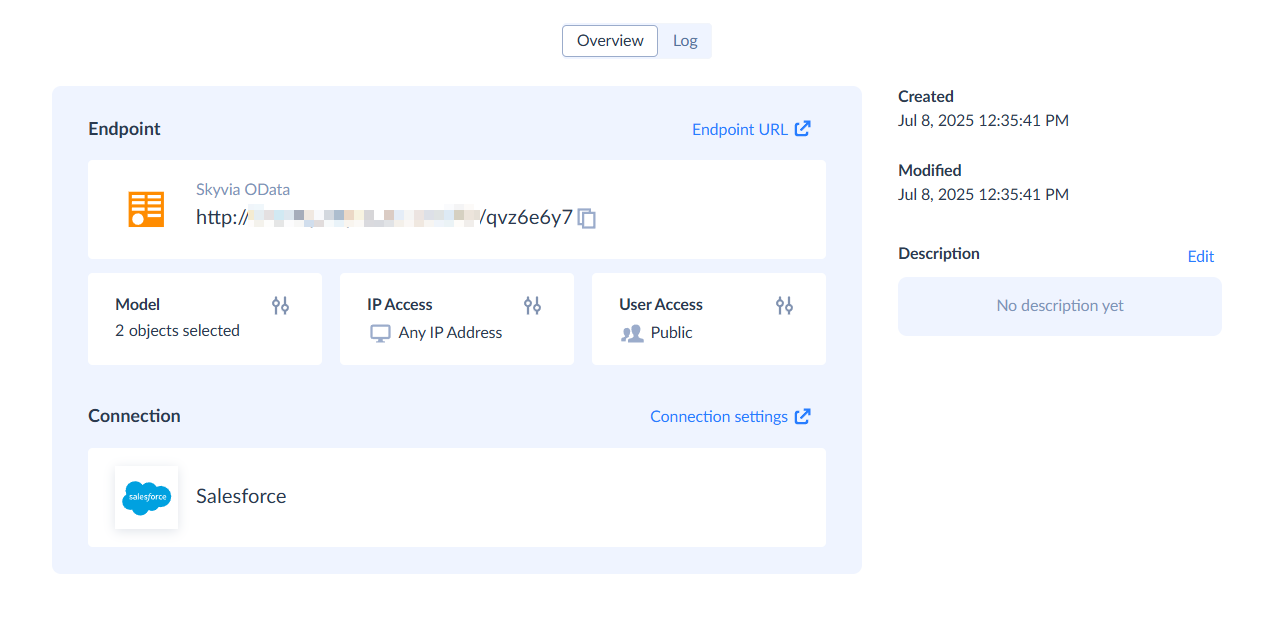
An OData endpoint on a Salesforce connection: the endpoint URL (partly blurred), two objects in the model, and IP and user access settings.
Features
Salesforce Connect without middleware
Skyvia Connect's OData endpoints plug into Salesforce Connect, so data from a SQL Server database or another app appears in Salesforce as external objects, read live instead of copied. Skyvia's documentation walks through the setup for both Lightning and Classic.
Live data for BI tools
Skyvia Connect lets Power BI, Tableau and other reporting tools read current data straight from the source through OData or the ODBC driver, with no replication job and no staging database.
SQL over HTTP, ODBC and ADO.NET
Skyvia Connect's SQL endpoints give any app a uniform SQL interface to sources that don't have one: send a query over HTTP and get JSON back, or use the ODBC driver and ADO.NET provider in existing tools and .NET code.
Data for AI assistants
Skyvia Connect's MCP endpoints connect AI agents to business systems through the Model Context Protocol, for natural-language questions over live data and actions such as creating CRM records, with the same access controls as other endpoints.
Security and logging
Skyvia Connect restricts each endpoint by IP allowlist (single addresses, ranges or CIDR blocks) and user authentication, encrypts data in transit and doesn't store the data it serves. Every request is logged with its date, status, HTTP method, URL, user and remote IP. Skyvia states it is SOC 2 certified and GDPR compliant.
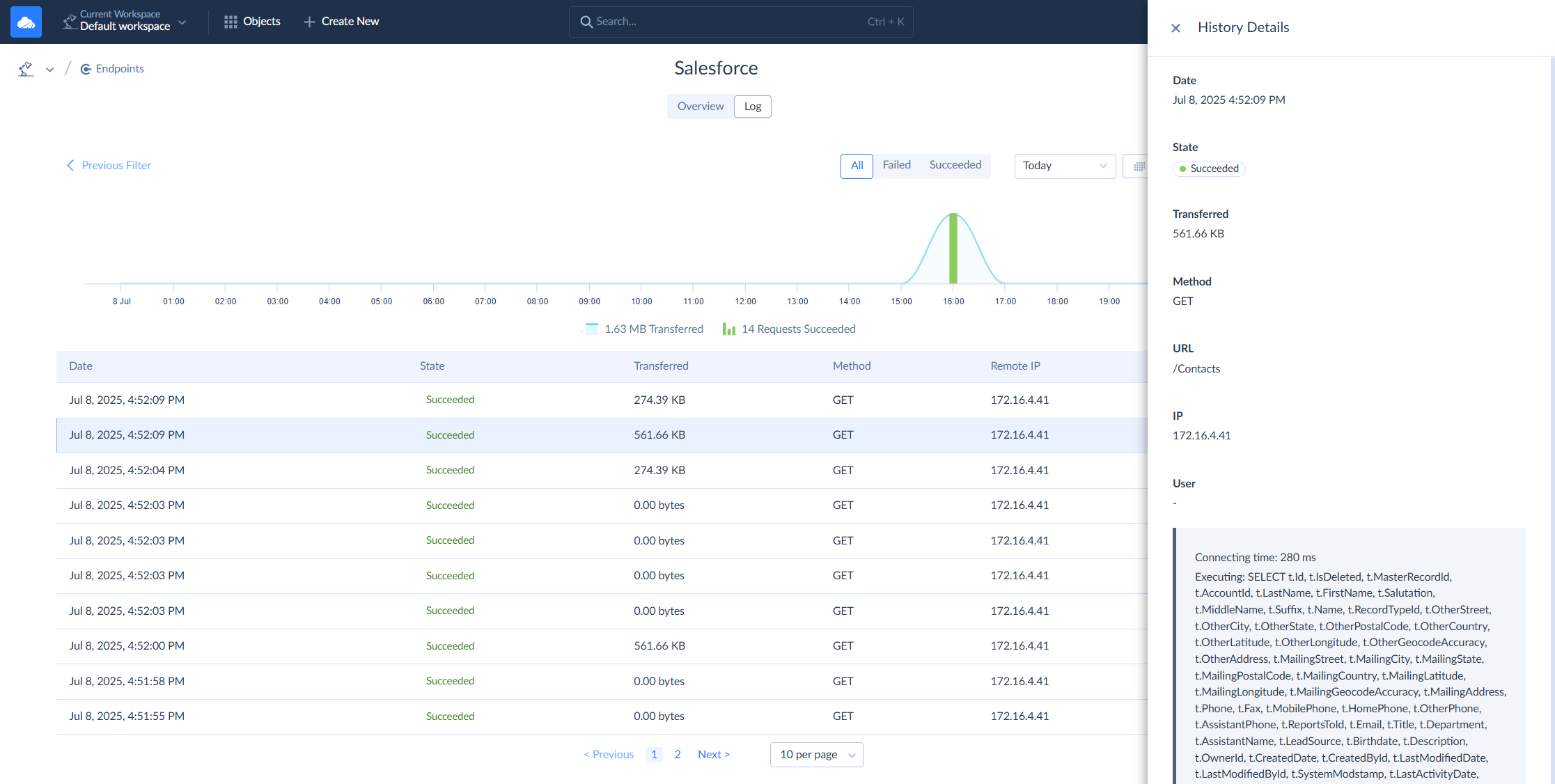
The endpoint Log tab: a chart of the day's requests and traffic, each request with its state, size, method and remote IP, and the details of one request including the query Skyvia ran against Salesforce.
Benefits
- No API project. An endpoint takes minutes in the browser instead of weeks of development and hosting.
- Live, not copied. Reports and Salesforce screens show the current data, with no sync jobs to monitor.
- One service for many protocols, so each consumer gets the interface it understands.
- A hybrid option for data that must stay inside your network.
Real-World Uses
- ERP orders in Salesforce: a company exposes its SQL Server order tables as an OData endpoint and shows them on Salesforce account pages through Salesforce Connect.
- Power BI over a SaaS app: an analyst points Power BI at an OData endpoint for HubSpot data and refreshes reports without a warehouse.
- Data for a partner: a SaaS vendor gives a customer a secured, IP-restricted endpoint to its own records.
- An AI assistant with CRM access: a team connects Claude to its CRM through an MCP endpoint to ask about deals and add contacts from the chat.
Who It's For, and Who Should Skip It
Skyvia Connect is for Salesforce admins who want external data in Salesforce, BI teams who want live sources in their dashboards, developers who need a quick API over a database or app, and teams connecting AI assistants to business data.
Skip it if you need to move or transform data in bulk on a schedule: that's Skyvia Data Integration. If your tools already have native connectors to the source, an extra endpoint adds little. And if your traffic will run to many gigabytes a month, compare the traffic-based price against hosting your own API.
Usage Guide
- Sign up on skyvia.com or sign in with Google; the 14-day Professional trial starts automatically.
- Create a connection to the app or database you want to expose.
- Click + Create New and choose an endpoint type: OData, SQL or MCP.
- Select the objects to publish, or design the model in advanced mode.
- Set access: IP allowlist and user accounts, or leave it public for testing.
- Copy the endpoint URL into Salesforce Connect, Power BI, your ODBC tool or your AI assistant, and watch the requests on the Log tab.
Where it falls short
- Traffic sets the price. Plans cap monthly traffic, from 100 KB on Free to 1 GB on Professional, so busy dashboards or large pulls need checking against the plan.
- The free plan is very small: one endpoint, one cloud connector, 100 KB a month, and no database sources.
- Security features start at Standard; Free and Basic don't include them.
- Live access means the source does the work. Every request goes to the app or database behind the endpoint, so slow sources make slow reports.
What Users Say
Ratings
Skyvia's site cites 4.8 out of 5 on G2, 4.8 out of 5 on Capterra and 4.9 out of 5 on Gartner Peer Insights, where 96% of reviewers would recommend it. Those ratings cover the whole Skyvia platform; most reviews describe its data integration and backup tools, and few are about Connect alone, so test it with the trial on your own source.
Comparisons
Skyvia Connect vs building your own API
A custom API gives full control but takes development time, hosting, security work and maintenance for every source. Skyvia Connect covers 200+ sources through one configuration screen, with access control and logging built in, for a monthly fee based on traffic. Build your own when you need custom business logic in the API itself.
Skyvia Connect vs Skyvia Data Integration
Data Integration copies data from one place to another on a schedule; Connect leaves the data where it is and serves it live on request. Use Data Integration to fill a warehouse, and Connect when a tool needs to read the source directly.
Editions and Pricing
| Plan | Price (monthly) | Traffic per month | Endpoints and connectors | Buy |
|---|
| Free | $0 | 100 KB | 1 endpoint, 1 cloud connector | Sign up on Skyvia |
| Basic | $19 | 1 MB | Unlimited, any connector type | On Skyvia's site |
| Standard | $49 | 100 MB | Unlimited, plus security features | On Skyvia's site |
| Professional | $99 | 1 GB | Unlimited, plus security features | Buy Professional |
The Buy button orders the monthly Professional plan. Billed annually on Skyvia's pricing page, the plans cost $15, $39 and $79 a month.
FAQs
Can Skyvia Connect show SQL Server data in Salesforce?
Yes. Skyvia Connect publishes SQL Server or another source as an OData endpoint, which Salesforce Connect uses to show the data as external objects, read live from the database.
Does Skyvia Connect store my data?
No. Skyvia Connect passes requests through to the source and returns the results; Skyvia says it never stores the data and encrypts it in transit. In hybrid deployment the endpoint runs inside your own network.
Can Skyvia Connect write data back, or only read?
Skyvia Connect's OData endpoints support read and write access, and its SQL endpoints accept DML statements (and DDL for databases), so consumers can insert and update records as well as read them.
What does the Skyvia Connect free plan include?
The Skyvia Connect free plan allows one endpoint on one cloud connector with 100 KB of traffic a month. A 14-day Professional trial starts when you register.
Can I connect Claude or another AI assistant with Skyvia Connect?
Yes. Skyvia Connect creates MCP endpoints that AI assistants supporting the Model Context Protocol, such as Claude, can use to read live data and perform actions in the connected apps.
System Requirements
- A current web browser to set up and monitor endpoints
- An OData consumer, ODBC or ADO.NET client, HTTP client or MCP-capable AI assistant to use them
- For hybrid deployment: the Skyvia Agent and Runtime on a machine in your network
Conclusion
Skyvia Connect is worth $99 a month at the Professional level if you need live access to app or database data from Salesforce, a BI tool, your own code or an AI assistant, and don't want to build and host an API. The reason to buy it is how quickly a connection becomes a secured OData, SQL or MCP endpoint. The reason to hesitate is the traffic cap: heavy use needs the larger plans. The cheaper Basic and Standard plans are on Skyvia's site, and the 14-day trial is the way to measure your traffic before choosing.
Buy Professional (Monthly)