Devart Python Connector for Dynamics 365: SQL Access to Dynamics 365 CRM Data from Python
Devart Python Connector for Dynamics 365 is a paid Python module, $74.95 a year for one developer, that lets Python 3.10-3.15 code on Windows, macOS and Linux read and update Dynamics 365 Customer Engagement (formerly Dynamics CRM) data with ordinary SQL through the Python DB API 2.0 interface. Entities such as account, contact, annotation and product behave like tables, and it signs in with OAuth 2.0 or a user name and password.
Microsoft's own route from Python is the Dataverse Web API, an OData REST interface you call with HTTP requests and a token library, paging through JSON results and building joins yourself. Devart's connector hides that: simple queries become Dynamics 365 API calls, and anything more complex, such as joins across entities, is finished by a SQL engine built into the connector. It covers the sales and service side of Dynamics 365; Business Central, Microsoft's ERP, has its own separate Devart connector.
Quick facts
- Version: 1.4.0, released October 22, 2026; first released December 1, 2023
- Developer: Devart
- Package:
pip install devart-dynamics365-connector, or wheel files from Devart's download page (77.84 MB for Python 3.15 on Windows, 73.72 MB for macOS, 39.02 MB for Linux) - Python: 3.10 to 3.15 (1.4 dropped 3.7 to 3.9)
- Platforms: Windows and Windows Server 32-bit and 64-bit, macOS Intel and Apple silicon, Linux 64-bit
- Sign-in: OAuth 2.0 with a refresh token, or basic user name and password (the default)
- Price: $74.95 a year or $149.95 perpetual for a Single (one developer) license
- Trial: 30 days, for evaluation only, not for production use
- Refund: the order page promises a 30-day money-back guarantee "if you are not satisfied", while Devart's ordering FAQ grants refunds within 30 days only when a technical problem support can't fix stops the product working
- What we checked: the order page charged $74.95 for a Single license with one year of updates on a yearly subscription, and PyPI and Devart's download page both showed version 1.4.0 with Windows, macOS and Linux wheels, on November 19, 2026. We didn't connect it to a Dynamics 365 environment
Download Free Trial Buy Now
Overview
You import devart.dynamics365 and connect with your environment's URL. For OAuth, dynamics365.signin(Server=...) runs Microsoft's sign-in and returns a refresh token, which you pass to connect(Authentication="OAuth", Server=..., RefreshToken=...). For basic authentication you pass UserId and Password instead. From there it's a cursor, execute("SELECT * FROM product") and fetchall(), with ? placeholders for parameters.
Devart's product page shows the kind of query it's built for: accounts left-joined to their notes (the annotation entity) and the owning business unit, filtered on exchange rate and website, and sorted by revenue. In Dynamics 365's own query options that takes FetchXML or several Web API calls; here it's one SQL statement.
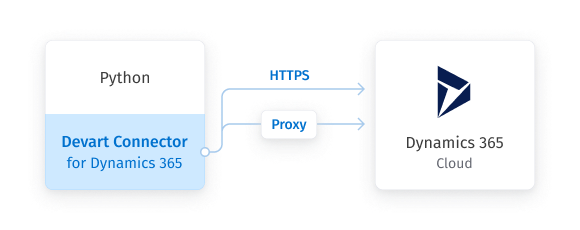
Devart's connection diagram: the connector inside a Python application reaches Dynamics 365 in the cloud over HTTPS, directly or through a proxy.
Features
ANSI SQL over Dynamics 365 entities
Python Connector for Dynamics 365 runs standard SQL, including joins, subqueries, WHERE filters and ORDER BY, against Dynamics 365 entities. Simple statements are translated into Dynamics 365 API calls and run on Microsoft's side; complex ones are split into simpler calls and completed by the connector's embedded SQL engine on a local cache.
Create, read, update and delete
Python Connector for Dynamics 365 supports INSERT, UPDATE and DELETE as well as SELECT, so a script can create leads, update account fields or clean up records. Several update statements can be sent to Dynamics 365 as one batch to save round trips.
OAuth 2.0 or password sign-in
Python Connector for Dynamics 365 supports OAuth 2.0, where a one-time browser sign-in returns a refresh token for later runs, and basic authentication with a user name and password. Version 1.4 fixed how it sets the prompt=consent OAuth parameter, and HTTP proxies with their own credentials are supported.
Metadata cache and connection pooling
Python Connector for Dynamics 365 has kept a metadata cache and pooled connections since version 1.1, which cuts the time spent opening connections. It also caches data locally, maps Dynamics 365 data types to Python types with configurable mapping, and handles Unicode text in any language.
Benefits
- CRM data without learning the Web API. SQL you already know replaces OData URLs, paging and FetchXML.
- Joins done for you. Accounts, contacts, notes and business units come back combined in one result set.
- Runs on servers of any kind. Windows, macOS and Linux wheels let the same script run on a laptop and a Linux scheduler.
- Same API as your databases. Devart's Python connectors share connect, cursor and license calls, so copying CRM data into SQL Server or PostgreSQL looks the same on both ends.
Real-World Uses
- Nightly CRM extract. A Linux job selects accounts and opportunities changed since yesterday and loads them into a reporting database.
- Bulk updates. A script reads a cleaned list of territories and runs batched UPDATE statements on the matching accounts.
- Data quality checks. A query finds accounts with no website or no owning business unit and writes the list to a file for the sales team.
- Lead import. Leads collected by another system are inserted into Dynamics 365 with parameterized INSERT statements.
Who It's For, and Who Should Skip It
The connector suits Python developers and data engineers who need to read or write Dynamics 365 Customer Engagement data with SQL, on any desktop or server platform, and teams that already use Devart's connectors for other sources and want one license and support desk.
Skip it if you only make a few simple Web API calls, where Microsoft's free REST interface with a token library is enough. Skip it if you need Dynamics 365 Business Central or Finance and Operations data, which this connector doesn't cover. And if reports in Excel or Power BI need the same CRM data as your scripts, Devart's ODBC driver for Dynamics 365 serves both.
Usage Guide
- Install with
pip install devart-dynamics365-connector, or download the zip of wheels for your Python version and platform and run pip on the .whl file. - After buying, run
devart.dynamics365.license.activate("<key>") once with the key from the order email or Devart's customer portal. - Sign in:
response = dynamics365.signin(Server="https://yourorg.crm.dynamics.com"), and keep response["Refresh Token"] safe for later runs. - Connect:
conn = dynamics365.connect(Authentication="OAuth", Server="https://yourorg.crm.dynamics.com", RefreshToken=token). - Query:
cur = conn.cursor(), cur.execute("SELECT name, revenue FROM account WHERE statecode = ?", [0]), cur.fetchall().
Before you buy
Organizations that enforce multi-factor authentication or conditional access usually block plain user-name-and-password sign-in, so expect to use OAuth with Dynamics 365 online. The refresh token acts as the account that signed in, with all of that user's rights, so store it like a password. Every query still goes through Dynamics 365's API, whose service protection limits apply to large extracts. The subscription license needs internet access to activate and check its status.
Where it falls short
- Large download. The Windows wheel is about 78 MB, large for a Python package.
- Customer Engagement only. Business Central needs Devart's separate connector, and Finance and Operations isn't covered.
- No asyncio API. It's a synchronous DB API 2.0 driver.
- Per-developer licensing. A team of up to four needs the Team license.
What Users Say
Reviews of this connector
Python Connector for Dynamics 365 hasn't collected reviews of its own on Capterra, G2, GetApp or TrustRadius. Feedback on Devart's Python connectors as a line is thin too: G2's Devart Python Connectors page shows a single 5-star review, too few for G2 to rate the product.
PeerSpot
A product engineer at a tech vendor with more than 10,000 employees reviewed Devart's Python Connectors on PeerSpot in November 2025, rating them 10 out of 10 after using them to feed an employee dashboard from an Oracle PL/SQL back end on AWS: "Since we started to use Python Connectors, we found it very reliable, and there are many measurable benefits of this." The same reviewer liked that they are "compliance-friendly, very secure, and has no plain text passwords or anything," but also wrote: "It is much costlier than other products."
What that adds up to
The little feedback there is praises reliability and security and names price as the drawback, and none of it is about Dynamics 365. Run the 30-day trial against your own environment, including your custom entities and your largest extract, before you buy.
Comparisons
Devart vs. the Dataverse Web API
Microsoft's Dataverse Web API is free and covers every Dynamics 365 feature, but from Python you build OData URLs, handle tokens, follow paging links and join results yourself. Devart's connector costs $74.95 a year and turns that into SQL through a DB API cursor, with batching, pooling and a metadata cache. Pick the Web API for a few targeted calls, Devart for SQL-heavy extracts and updates.
Python connector vs. Devart's ODBC driver for Dynamics 365
Devart's ODBC driver for Dynamics 365 also serves Excel, Power BI and any ODBC tool, and Python through pyodbc. If only Python needs the data, the Python connector is the smaller purchase; if reports need it too, the ODBC driver covers both.
Editions and Pricing
| License | 1-year subscription | Perpetual | Who can use it |
|---|
| Single | $74.95 | $149.95 | One developer at one company site |
| Team | $189.95 | On the order page | Up to 4 developers at one company site |
| Site | $339.95 | On the order page | Unlimited developers at one company site |
Buy Now opens the order for Python Connector for Dynamics 365 with a Single license on a 1-year subscription; Team, Site, the perpetual license and 2- or 3-year terms are chosen on the order page. An OEM license for shipping the connector inside your own product is arranged with Devart separately.
FAQs
Does Python Connector for Dynamics 365 work with Dynamics 365 Business Central?
No. Python Connector for Dynamics 365 connects to Dynamics 365 Customer Engagement, the former Dynamics CRM. Devart sells a separate Python Connector for Dynamics 365 Business Central.
Can Python Connector for Dynamics 365 write data back to Dynamics 365?
Yes. Python Connector for Dynamics 365 supports INSERT, UPDATE and DELETE as well as SELECT, and can send several update statements as one batch.
Does Python Connector for Dynamics 365 run on Linux and Apple silicon Macs?
Yes. Python Connector for Dynamics 365 ships wheels for 64-bit Linux, macOS on Intel and Apple silicon, and 32-bit and 64-bit Windows.
Which sign-in methods does Python Connector for Dynamics 365 support?
Python Connector for Dynamics 365 supports OAuth 2.0 with a refresh token obtained through its signin() method, and basic authentication with a user name and password, which is the default.
Which Python versions does Python Connector for Dynamics 365 support?
Python Connector for Dynamics 365 1.4, released October 2026, supports Python 3.10 to 3.15; earlier versions also supported 3.7 to 3.9.
Can I ship the connector inside an application I sell?
Only with an OEM license. Python Connector for Dynamics 365's Single, Team and Site licenses cover developing and deploying your own scripts and applications within one company.
Can I get a refund on Python Connector for Dynamics 365?
Possibly. Python Connector for Dynamics 365's order page offers a 30-day money-back guarantee if you're not satisfied, but Devart's ordering FAQ describes refunds within 30 days only for technical problems its support can't fix. Use the 30-day trial to be sure before you buy.
System Requirements
- Python 3.10, 3.11, 3.12, 3.13, 3.14 or 3.15 with pip
- Windows or Windows Server 32-bit or 64-bit, macOS (Intel or Apple silicon) or 64-bit Linux
- A Dynamics 365 Customer Engagement environment and a user account with access to the data
- Internet access, directly or through an HTTP proxy
Conclusion
Devart Python Connector for Dynamics 365 is worth $74.95 a year for developers who move Dynamics 365 CRM data in and out of Python regularly and would rather write SQL joins than OData requests, on Windows, macOS or Linux. For a handful of simple API calls, Microsoft's free Web API is enough, and Business Central users need a different connector. Test it against your own entities and data volumes with the 30-day trial.
Download Free Trial Buy Now