Devart Excel Add-in for Salesforce: Edit Salesforce Records in Excel and Save Them Back
Devart Excel Add-in for Salesforce is a $179.95 add-in for Excel on Windows that loads Salesforce accounts, contacts, leads, opportunities, tasks and any other object into worksheets, refreshes them with one click, and writes your edits back to Salesforce. Sales operations staff and Salesforce admins use it for bulk clean-ups and reports that are awkward in Salesforce itself.
Salesforce's own tools for bulk work, the Data Import Wizard and Data Loader, move CSV files in and out. That works, but every round trip means export, edit, re-import and hoping the IDs line up. The add-in keeps the data live in the workbook instead: filter it, fix it, commit it.
Quick facts
- Version: 3.1.70, released September 7, 2026
- Developer: Devart
- Sign-in: OAuth (Sign In through Salesforce's own page), server-to-server OAuth with a consumer key and secret, or user name, password and security token
- Excel: 2007 to 2024 for Windows
- Salesforce API: Web Services API version 64.0 since version 3.0.0 (June 2026)
- Price: $179.95 for a perpetual license with one year of support and upgrades
- Trial: 30 days; 76.60 MB download for signed-in Devart users
- Refunds: the order page promises a 30-day money-back guarantee if you're not satisfied, while Devart's ordering FAQ limits refunds to technical problems support can't fix, within 30 days
- What we checked: Devart's Salesforce connection documentation, the Salesforce changes in recent releases, and the order page on November 18, 2026, which charged $179.95 for Excel Add-in for Salesforce with one year of support and upgrades. We didn't connect it to a Salesforce org
Download Free Trial Buy Now
Overview
The add-in puts a Devart tab on the Excel ribbon. Get Data opens a connection editor where you choose Salesforce and sign in, then the Import Data Wizard lists Salesforce objects. Pick one, tick the columns, add filters and sorting in the Visual Query Builder (or write SQL), preview the result and import. The data lands as an Excel table you can refresh any time.
To change records, click Edit Mode. Edited cells are highlighted, new rows become inserts and deleted rows become deletes; Commit sends everything to Salesforce, and Rollback throws the changes away.
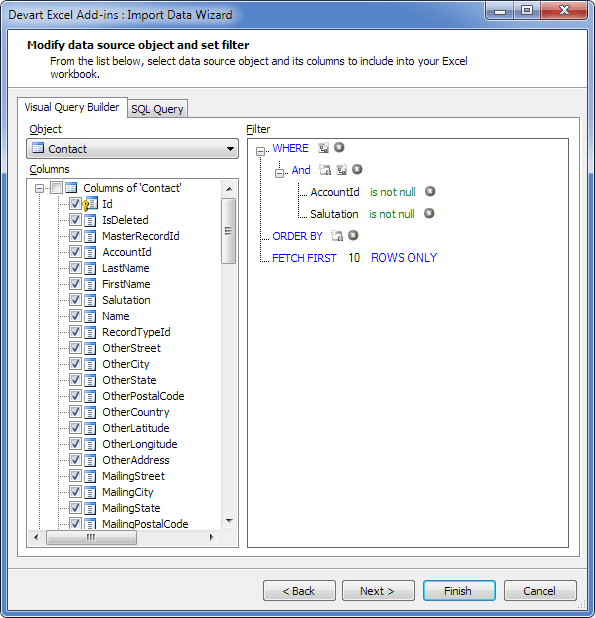
The Import Data Wizard's Visual Query Builder on the Contact object: the column list on the left, and a WHERE filter, ORDER BY and FETCH FIRST 10 ROWS ONLY on the right.
Features
SQL beyond SOQL
Devart Excel Add-in for Salesforce lets you select data with the Visual Query Builder or with SQL that goes further than Salesforce's own SOQL, joining related objects and filtering precisely, and shows a preview before anything is imported.
Edit Mode with Commit and Rollback
Devart Excel Add-in for Salesforce turns an imported table into an editable view of Salesforce: change cells, add or delete rows, see every change highlighted, then Commit to write it back or Rollback to cancel.
Validation before Salesforce rejects it
Devart Excel Add-in for Salesforce checks entries as you type and flags errors, such as a value longer than the field allows or a text that isn't a valid date, so you fix them before Commit instead of reading API errors afterwards.
Three ways to sign in
Devart Excel Add-in for Salesforce supports OAuth sign-in through Salesforce's page (your password never touches Excel and no security token is needed), server-to-server OAuth with a consumer key and secret for unattended use, and classic user name, password and security token. Version 3.0.0 added the server-to-server option and Salesforce API 64.0.
Reusable connections and custom names
Devart Excel Add-in for Salesforce can save connections in the workbook or only on your PC, so you can share a workbook without sharing credentials. A Preserve Names option keeps custom objects' and fields' original names, including the __c suffix.
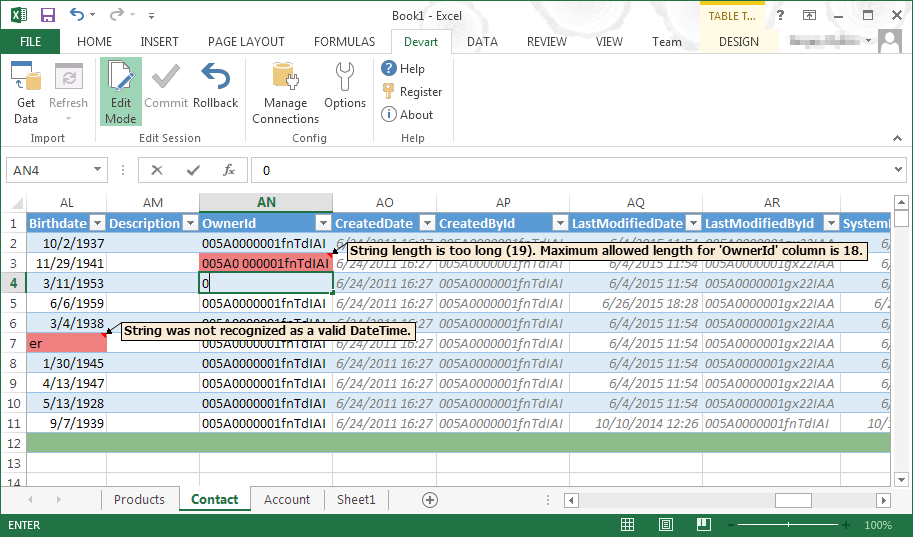
Edit Mode on a Contact sheet: one cell flagged because the text is longer than the OwnerId field allows, another because the value isn't a valid date.
Benefits
- No CSV round trips. Edit Salesforce data where it's displayed and commit it.
- Fewer failed imports. Validation catches bad values before they reach Salesforce.
- Live reports. Pivot tables and charts refresh from Salesforce with one click.
- Safer sharing. Credentials can stay on your PC while the workbook travels.
Real-World Uses
- Lead and contact clean-up. Filter contacts with empty or inconsistent fields, fix them down a column, Commit.
- Territory or owner changes. Reassign hundreds of accounts to new owners with an Excel lookup.
- Pipeline reviews. Opportunities in a pivot table by stage and close month, refreshed before each forecast meeting.
- De-duplication. Sort accounts by name and website in Excel to spot duplicates, then fix or delete them.
Who It's For, and Who Should Skip It
Good for Salesforce admins, sales operations and RevOps staff who spend part of every week on bulk edits and Excel reporting, and who'd rather work in a live workbook than in Data Loader.
Skip it if you use Excel for Mac or Excel on the web, if Salesforce's reports already give you what you need, or if you only import a list now and then, which the free Data Import Wizard handles. If you work with several cloud systems, price Devart's Cloud Pack before buying single add-ins.
Usage Guide
- Install the add-in from Devart (sign-in required to download), as an administrator, with Excel closed.
- In Excel, open the Devart tab, click Get Data and choose Salesforce.
- Pick an authentication type: AccessRefreshToken and Sign In for OAuth, or enter the host, user name, password and security token.
- Choose an object, select columns and filters in the Visual Query Builder (or switch to SQL), preview and finish.
- Click Edit Mode, make your changes, fix anything flagged, and click Commit. Use Refresh to reload current data.
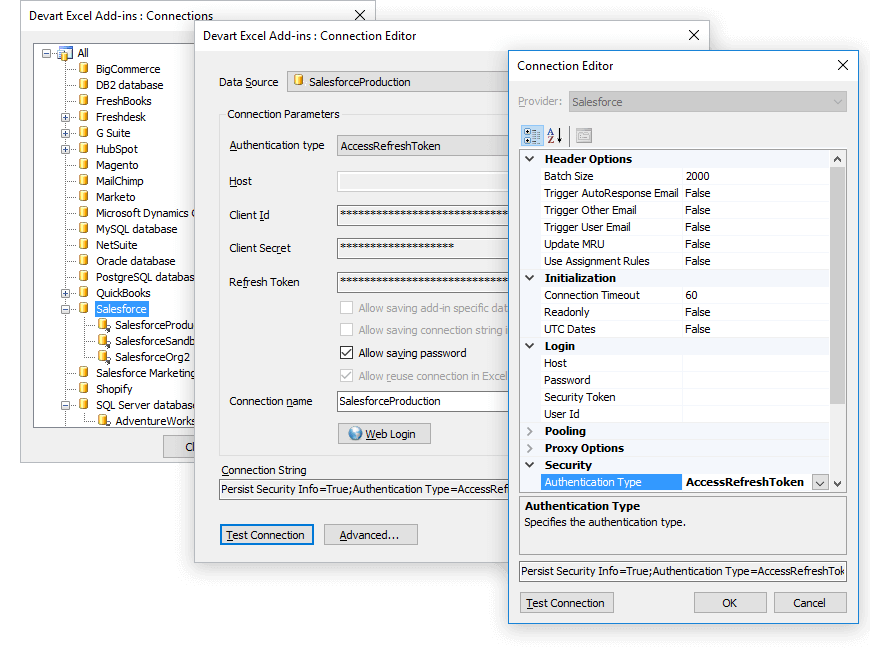
The connection editor for a Salesforce connection using the AccessRefreshToken (OAuth) type, with the advanced options list on the right.
Before you buy
The add-in works through Salesforce's API, so your Salesforce edition and user must have API access (Professional Edition orgs usually need it added). A Commit is a real bulk write: it can change thousands of records and fire workflows and triggers, so test on a filtered set first.
Where it falls short
- Windows Excel only. No Mac or web Excel support.
- API limits apply. Large orgs take time to load, and imports count against your org's daily API calls.
- Setup takes some learning. G2 reviewers mention the first configuration as the hard part.
- Price per system. At $179.95 for one add-in, several systems quickly cost more than the Cloud Pack.
What Users Say
G2
On G2, reviewers of Devart's Salesforce add-in say it lets you quickly import, edit, and update Salesforce data directly in Excel, saving time and effort. The downsides they name are cost and setup: one wrote that "the initial setup requires some configuration, which might be challenging for users unfamiliar with API connections," and another that "initially we feel bit difficult to set up, but once we used to it, then it's like a pro."
The Devart Excel Add-ins family
Devart Excel Add-In for Salesforce has its own Capterra, GetApp and Software Advice pages, but most of the feedback is on the Devart Excel Add-ins family, which TrustRadius rates about 9.3 out of 10 from 33 reviews and ratings. Reviewers like getting CRM and database data into Excel and back without exports; cost and the initial configuration are the usual complaints.
Comparisons
Excel add-in vs Salesforce Data Loader
Data Loader and the Data Import Wizard are free and handle CSV imports and exports. The add-in is for repeat work: a refreshable workbook, edits validated before they're sent, and Commit or Rollback instead of re-importing files.
Salesforce add-in vs Devart's Cloud Pack
The Salesforce add-in alone costs $179.95. Devart's Cloud Pack bundles its cloud add-ins (Salesforce, HubSpot, Zoho CRM, QuickBooks Online and others) for $499.95, so it pays off from the third system.
Editions and Pricing
| Item | Price | What it covers |
|---|
| Excel Add-in for Salesforce | $179.95 | One user, perpetual license, first year of support and upgrades |
| Order-page options | Shown at checkout | 2 or 3 years of support and upgrades, priority support, volume discounts |
FAQs
Does Excel Add-in for Salesforce work with Salesforce sandboxes?
Yes. Devart Excel Add-in for Salesforce connects to the login URL you give it, so a sandbox works like production; save one connection for each.
Do I need a Salesforce security token?
Only with user name and password sign-in. With OAuth, Devart Excel Add-in for Salesforce signs you in on Salesforce's own page and no security token is needed.
Will editing records in Excel trigger Salesforce automation?
Yes. Devart Excel Add-in for Salesforce writes through Salesforce's API like any integration, so flows, triggers and validation rules run on the records it commits.
Does Excel Add-in for Salesforce work on a Mac?
No. Devart Excel Add-in for Salesforce needs Excel 2007 to 2024 on Windows, with .NET Framework 4.0 or above.
What happens after the first year?
Devart Excel Add-in for Salesforce keeps working on its perpetual license. Renewing support and upgrades brings fixes for Salesforce API changes and new versions.
Can I get a refund?
The order page for Devart Excel Add-in for Salesforce advertises a 30-day money-back guarantee if you're not satisfied, but Devart's ordering FAQ says refunds within 30 days are given only when a technical problem stops the product working and support can't fix it. Use the 30-day trial first.
System Requirements
- Excel 2007, 2010, 2013, 2016, 2019, 2021 or 2024 for Windows
- .NET Framework 4.0 or above, Visual Studio 2010 Tools for Office Runtime
- Administrator rights for setup
- A Salesforce org and user with API access
Conclusion
Devart Excel Add-in for Salesforce is worth $179.95 for anyone who regularly fixes or reports on Salesforce data in bulk: Edit Mode with validation and Commit makes large edits faster and safer than CSV round trips through Data Loader. It's not worth it for an occasional import, which Salesforce's free tools handle, or for Mac users. Run a real clean-up through the 30-day trial before you buy.
Download Free Trial Buy Now