SSIS Data Flow Components for HubSpot: Move HubSpot CRM Data with SSIS
Devart SSIS Data Flow Components for HubSpot add a HubSpot Source, Destination, Lookup and Connection Manager to SQL Server Integration Services, for $179.95 a year (Developer license) or $349.95 perpetual. They read HubSpot contacts, companies, deals and other objects with SQL, write back with inserts, updates and deletes, and sign in with OAuth or a private app access token.
Getting HubSpot data into a SQL Server warehouse usually means writing code against HubSpot's REST API, handling paging and rate limits, and keeping up with API changes. Devart's components turn HubSpot objects into tables an SSIS package can read and write, and Devart tracks HubSpot's API: version 5.1.49 moved to the OAuth v3 endpoints.
Quick facts
- Version: 5.1.49, released August 17, 2026
- Developer: Devart
- Components: HubSpot Source, HubSpot Destination, HubSpot Lookup, HubSpot Connection Manager
- HubSpot: HubSpot CRM objects and API, including reports, labeled associations and custom unique ID properties
- SSIS: SQL Server Integration Services 2012, 2014, 2016, 2017, 2019, 2022 and 2025
- Platform: Windows Vista or later, 32-bit and 64-bit, .NET Framework 4.5
- Download: 618.60 MB installer shared with the whole SSIS line; needs a free Devart account
- Price: $179.95 a year or $349.95 perpetual for a Developer license; Server and Site licenses cost more
- Trial: 30 days, fully functional
- Refund: Devart's ordering FAQ gives a refund within 30 days only when a technical problem support can't fix stops the product working
- What we checked: the order page charged $179.95 for the Developer license with one year of updates on a yearly subscription, and the download page listed version 5.1.49 at 618.60 MB, on November 18, 2026. We didn't run a package against a HubSpot account
Download Free Trial Buy Now
Overview
After installation the HubSpot components appear in the SSIS Toolbox in Visual Studio. You add a Devart HubSpot Connection Manager and sign in through the browser (OAuth) or paste a private app's access token, then drop a Source, Destination or Lookup into a Data Flow task. Everything else works like native SSIS: the components feed and accept ordinary data flow paths, so HubSpot can sit on either side of a package next to SQL Server, flat files or any other source.
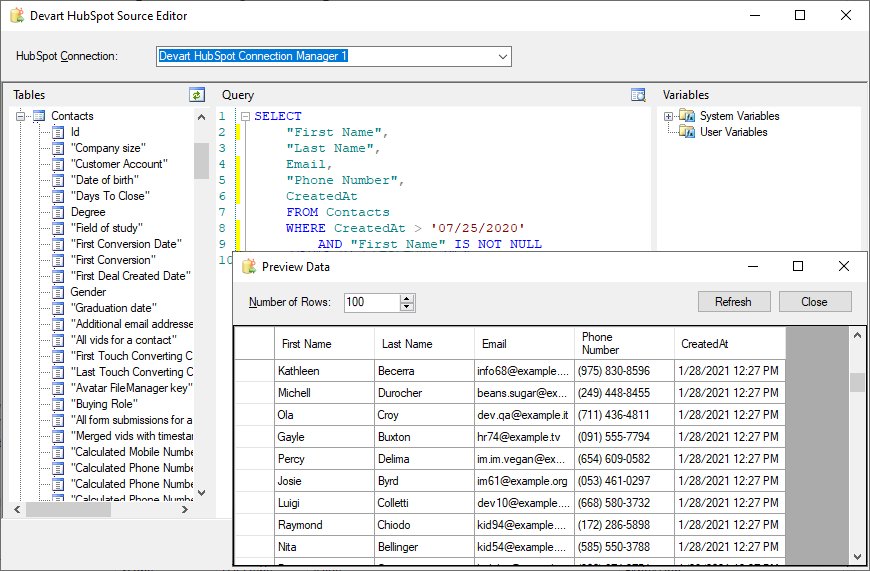
The Devart HubSpot Source Editor: the Contacts fields on the left, a SQL query filtering contacts by creation date, and the Preview Data window with the results.
Features
SQL over HubSpot objects
The HubSpot Source in Devart SSIS Data Flow Components for HubSpot accepts SQL with grouping, filtering and ordering. Simple statements are translated straight into HubSpot API calls, and for complex ones the data is fetched and processed locally. The editor lists objects and fields, builds queries by drag and drop and previews results.
Writes back to HubSpot
The HubSpot Destination in Devart SSIS Data Flow Components for HubSpot loads data into HubSpot with INSERT, UPDATE and DELETE operations, so a package can create or update contacts and deals from another system.
Current with HubSpot's API
Devart SSIS Data Flow Components for HubSpot 5.1.49 (August 2026) added the OAuth v3 endpoints, custom unique identifier properties and labeled associations, and fixed a 'Rate limit exceeded' error. Version 5.0 (June 2026) added HubSpot reports, a Sensitive Data option and new objects such as Leads, Appointments, Courses, Listings, Services and Subscriptions.
OAuth or private app sign-in
The Devart HubSpot Connection Manager in SSIS Data Flow Components for HubSpot signs in with OAuth 2.0 through the browser or with a private app's access token, whose scopes you control in HubSpot. The old API key method is still listed but HubSpot deprecated it in 2022.
A Lookup that batches and caches
The HubSpot Lookup in Devart SSIS Data Flow Components for HubSpot checks several rows at once and caches the results, saving API calls.
Benefits
- No API code to maintain. HubSpot objects behave like tables in SSIS.
- Keeps up with HubSpot. Devart adds new objects and endpoints as HubSpot changes.
- Two-way sync. Read from HubSpot and write changes back in the same tool.
Real-World Uses
- CRM data in the warehouse. A nightly package copies contacts, companies and deals into SQL Server for Power BI.
- Syncing from an ERP. A package updates HubSpot companies with account status from an ERP database.
- Deduplicating against other systems. The Lookup checks incoming leads against existing HubSpot contacts.
- Report extracts. A package reads HubSpot reports, supported since version 5.0.
Who It's For, and Who Should Skip It
These components suit companies that run SSIS on SQL Server and need HubSpot CRM data in their warehouse, or need to push data from other systems into HubSpot.
Skip them if you don't use SSIS: HubSpot's own integrations, its operations tools or a cloud ETL service are simpler outside the Microsoft stack. For a one-off export, HubSpot's built-in export to CSV is free.
Usage Guide
- Sign in to Devart (a free account), download the installer from the product's download page and run it; select the HubSpot components and the SSIS versions you use.
- Open an Integration Services project in Visual Studio. The Devart HubSpot components appear in the SSIS Toolbox.
- In Connection Managers, add a new Devart HubSpot connection: choose OAuth and sign in through the browser, or choose Private App and paste the access token.
- Drag a Devart HubSpot Source into a Data Flow task, pick objects in the editor or write a SELECT, and click Preview to check the rows.
- Connect it to a destination (or add a Devart HubSpot Destination when loading into HubSpot), map the columns and run the package.
Before you buy
The Developer license covers development and testing on one developer's machines only. Running packages on a production SSIS server needs a Server license ($449.95 a year or $899.95 perpetual) or a Site license, so budget for that from the start. HubSpot limits API calls per account, so large reads and writes take time and can hit those limits; schedule big syncs accordingly.
Where it falls short
- Bound by HubSpot's API limits. Big jobs consume your account's API allowance.
- Complex SQL runs locally. Statements HubSpot can't run are processed after fetching the data.
- Windows and SSIS only. No use outside SQL Server Integration Services.
- Large download. The installer is over 600 MB.
What Users Say
Capterra
Review sites rate Devart's SSIS components as one product line rather than the HubSpot components alone. On Capterra, SSIS Data Flow Components average 4.6 out of 5 from 12 reviews, with 4.3 for ease of use and 4.3 for customer service. Reviewers describe them as easy to set up inside Visual Studio and efficient for routine ETL work; the criticisms are occasional bugs, packages that become hard to maintain over time, and a wish for more help with troubleshooting. With so few ratings, test the trial on your own HubSpot data before deciding.
Comparisons
HubSpot components vs. the SSIS Universal Bundle
The SSIS Universal Bundle ($499.95 a year or $999.95 perpetual) includes HubSpot along with more than 40 other sources such as Salesforce, Mailchimp and Zoho CRM. If you need several, the bundle is the better deal; for HubSpot alone, these components cost far less.
Devart SSIS components vs. Devart's ODBC driver for HubSpot
Devart also sells an ODBC driver for HubSpot that serves Excel, Power BI and other ODBC tools. For ETL packages in SSIS, the SSIS components are the better fit, with a HubSpot Destination and Lookup built for data flows.
Editions and Pricing
| License | 1-year subscription | Perpetual | What it covers |
|---|
| Developer | $179.95 | $349.95 | One developer's machines, for development and testing |
| Server | $449.95 | $899.95 | One server running packages, plus one developer |
| Site for 10-100 Devices | On the order page | $999.95 | Unlimited computers in one company |
Buy Now opens the order page for SSIS Data Flow Components for HubSpot; you choose the license, subscription or perpetual, a 1-, 2- or 3-year term and optional premium support there. The SSIS Universal Bundle, with components for more than 40 sources, costs $499.95 a year or $999.95 perpetual on Devart's page.
FAQs
Does Devart's HubSpot SSIS connector support private apps?
Yes. Devart SSIS Data Flow Components for HubSpot sign in with a private app's access token or with OAuth 2.0 through the browser.
Can it update HubSpot records?
Yes. The HubSpot Destination in Devart SSIS Data Flow Components for HubSpot supports INSERT, UPDATE and DELETE.
Does it read HubSpot associations?
Yes. Devart SSIS Data Flow Components for HubSpot 5.1.49 added labeled associations, shown as objects with a _labels suffix.
Which SSIS versions do the HubSpot components work with?
Devart SSIS Data Flow Components for HubSpot work with SQL Server Integration Services 2012, 2014, 2016, 2017, 2019, 2022 and 2025.
Do I need a separate license for the production SSIS server?
Yes. The Developer license of SSIS Data Flow Components for HubSpot covers development and testing only; deploying packages to a server needs a Server license or a Site license.
What happens when the subscription ends?
The subscription license of SSIS Data Flow Components for HubSpot works for the term you paid for, so packages that use it need a renewal. A perpetual license keeps working at the version you have.
Can I get a refund?
Only for technical problems. Devart's ordering FAQ gives a full refund within 30 days of purchase when a bug or technical issue stops SSIS Data Flow Components for HubSpot working and support can't fix it. Use the 30-day trial against your own HubSpot account before buying.
System Requirements
- Microsoft SQL Server Integration Services 2012, 2014, 2016, 2017, 2019, 2022 or 2025
- Visual Studio with Integration Services projects for designing packages
- Windows Vista or later, 32-bit or 64-bit, with .NET Framework 4.5
- A HubSpot account with API access (OAuth sign-in or a private app access token)
Conclusion
Devart SSIS Data Flow Components for HubSpot are worth $179.95 a year to SSIS teams that sync HubSpot with SQL Server or other systems: you get SQL access to HubSpot objects, write-back and a vendor that keeps up with HubSpot's API changes. Add a Server license for production and watch your API limits. Without SSIS, HubSpot's own integrations are simpler, and with several cloud sources, the Universal Bundle is better value.
Download Free Trial Buy Now