SSIS Data Flow Components for Amazon Redshift: Redshift Source, Destination and Lookup for SSIS
Devart SSIS Data Flow Components for Amazon Redshift add a Redshift Source, Destination, Lookup and Connection Manager to SQL Server Integration Services, for $179.95 a year (Developer license) or $349.95 perpetual. The Destination can load large volumes through Amazon S3 and Redshift's COPY command instead of row-by-row inserts.
Redshift speaks the PostgreSQL wire protocol, so SSIS teams often reach it through a generic ODBC driver and then find that inserting millions of rows one statement at a time crawls. Amazon's recommended bulk path is to stage files in S3 and run COPY, which normally means extra scripts around the package. Devart's components build that path into the Destination.
Quick facts
- Version: 5.1.49, released August 17, 2026; Redshift supported since version 1.6 (January 2018)
- Developer: Devart
- Components: Redshift Source, Redshift Destination, Redshift Lookup, Redshift Connection Manager
- Bulk loading: splits data into CSV files, uploads them to Amazon S3 in parallel and imports them with the COPY command
- SSIS: SQL Server Integration Services 2012, 2014, 2016, 2017, 2019, 2022 and 2025
- Platform: Windows Vista or later, 32-bit and 64-bit, .NET Framework 4.5
- Download: 618.60 MB installer shared with the whole SSIS line; needs a free Devart account
- Price: $179.95 a year or $349.95 perpetual for a Developer license; Server and Site licenses cost more
- Trial: 30 days, fully functional
- Refund: Devart's ordering FAQ gives a refund within 30 days only when a technical problem that support can't fix stops the product working
- What we checked: the order page charged $179.95 for the Developer license with one year of support and upgrades on a yearly subscription, and the download page listed version 5.1.49 at 618.60 MB, on November 18, 2026. We didn't run a package against a Redshift cluster
Download Free Trial Buy Now
Overview
After installation the Redshift components appear in the SSIS Toolbox in Visual Studio. You add a Devart Redshift Connection Manager with the cluster endpoint, port, user, password, database and schema, and, for bulk loads, an AWS access key (or a temporary security token), the S3 region and optionally a bucket. Then you drop a Source, Destination or Lookup into a Data Flow task. Everything else works like native SSIS, so Redshift can sit on either side of a package next to SQL Server, flat files or any other source.
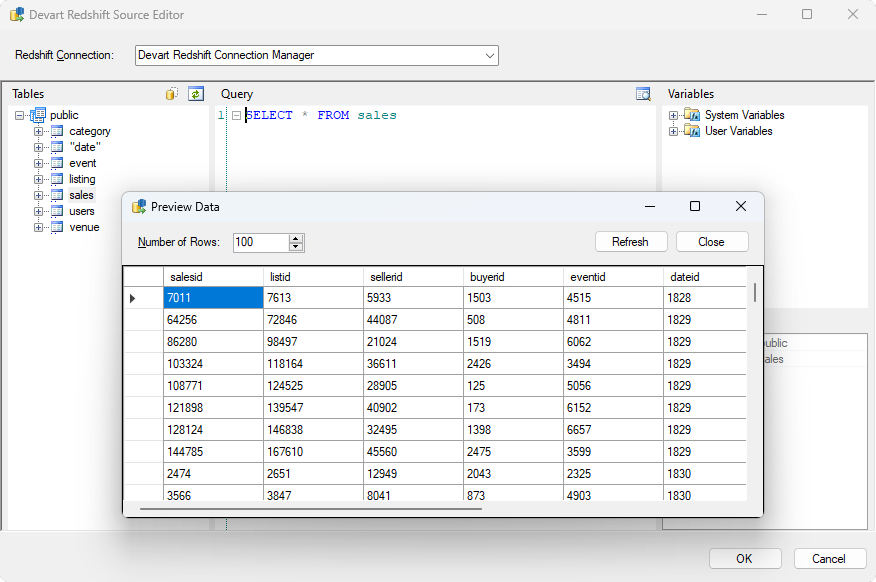
The Devart Redshift Source Editor: the table tree of the public schema, a SELECT * FROM sales query and the Preview Data window showing the returned rows.
Features
Bulk loading through S3 and COPY
The Redshift Destination in Devart SSIS Data Flow Components for Amazon Redshift splits incoming rows into CSV files, uploads them to Amazon S3 in parallel and imports them with Redshift's COPY command. If you leave the bucket name empty, it creates a temporary bucket for the load and deletes it afterwards. Plain INSERT, UPDATE and DELETE work too, with only the database login.
A Source editor that knows your schema
The Redshift Source in Devart SSIS Data Flow Components for Amazon Redshift lists the tables and columns of the connection alongside user and system variables, builds queries by drag and drop, and previews the returned rows before you run the package.
A Lookup that batches and caches
The Redshift Lookup in Devart SSIS Data Flow Components for Amazon Redshift checks several incoming rows with one SELECT and caches the results, cutting round trips to the cluster.
Connection options for real networks
The Redshift Connection Manager in Devart SSIS Data Flow Components for Amazon Redshift supports SSL and SSH tunneling, proxy servers, connection pooling, keep-alive pings for idle connections, and an IPv4-only option. Version 5.0 (June 2026) added the newer Amazon S3 regions.
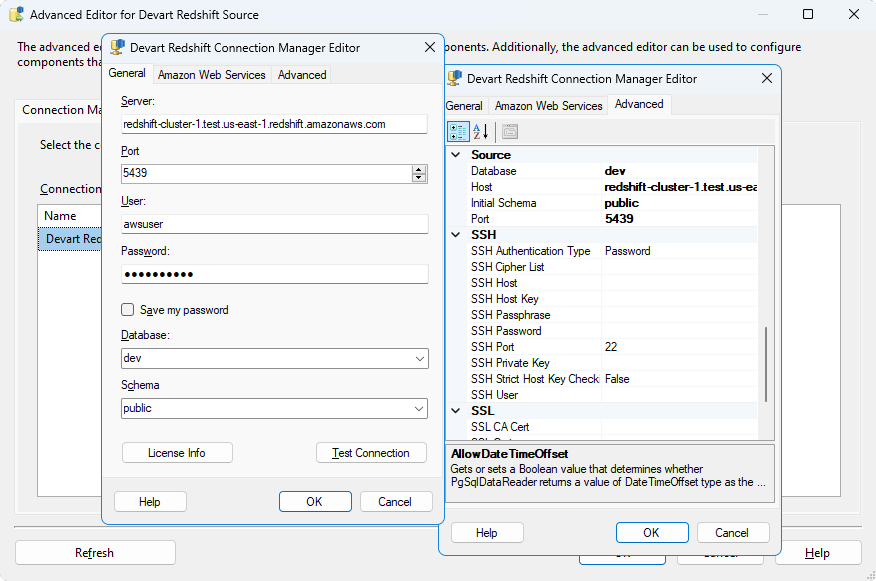
The Devart Redshift Connection Manager Editor: a Redshift cluster endpoint on port 5439, user, password, database and schema, with the Amazon Web Services tab for S3 and an Advanced tab for SSH and SSL settings.
Benefits
- Fast loads without extra scripts. The S3-and-COPY path is built into the Destination.
- No ODBC driver to deploy. One installer covers development PCs and SSIS servers.
- Reach clusters securely. SSL, SSH tunneling and proxy settings are in the connection.
- Familiar SSIS. Packages, mappings and scheduling stay in the tools the team already uses.
Real-World Uses
- Warehouse loads from SQL Server. A nightly package copies new orders from SQL Server into Redshift fact tables through S3 and COPY.
- Redshift back to SQL Server. Aggregates computed in Redshift land in a SQL Server reporting database.
- File imports. CSV or XML exports from partners are loaded into Redshift staging tables.
- Dimension lookups. A package enriches incoming rows with keys from Redshift dimension tables using the caching Lookup.
Who It's For, and Who Should Skip It
These components suit SQL Server teams that run their ETL in SSIS and load or read Amazon Redshift, especially when volumes make COPY-based loading worth having.
Skip them if your pipelines already run in AWS Glue or another cloud ETL service, or if you only move small tables now and then, where SSIS's ODBC components with Amazon's free Redshift ODBC driver are enough. If you'll connect to several systems, price the SSIS Universal Bundle first.
Usage Guide
- Sign in to Devart (a free account), download the installer from the product's download page and run it; select the Redshift components and the SSIS versions you use.
- Open an Integration Services project in Visual Studio. The Devart Redshift components appear in the SSIS Toolbox.
- In Connection Managers, add a new Devart Redshift connection: enter the cluster endpoint, port, user, password, database and schema, and on the Amazon Web Services tab the access key, secret key and S3 region for bulk loads.
- Drag a Devart Redshift Source into a Data Flow task, pick objects or write a SELECT, and click Preview to check the rows.
- Connect it to a destination, or add a Devart Redshift Destination when loading into Redshift, map the columns and run the package.
Before you buy
The Developer license covers development and testing on one developer's machines only. Running packages on a production SSIS server needs a Server license ($449.95 a year or $899.95 perpetual) or a Site license. Bulk loading through S3 also needs an AWS key with rights to write to S3, and the cluster must be allowed to read that bucket.
Where it falls short
- Windows and SSIS only. No use outside SQL Server Integration Services.
- Server licenses add up. Each production server needs its own Server license unless you buy a Site license.
- Large download. The installer is over 600 MB even if you only want the Redshift components.
- Few Redshift-specific updates. Most release notes concern other sources; the Redshift parts change rarely.
What Users Say
Capterra
Review sites rate Devart's SSIS components as one product line rather than the Redshift components alone. On Capterra, SSIS Data Flow Components average 4.6 out of 5 from 12 reviews, with 4.3 for ease of use and 4.3 for customer service. Reviewers describe them as easy to set up inside Visual Studio and efficient for routine ETL work; the criticisms are occasional bugs, packages that become hard to maintain over time, and a wish for more help with troubleshooting. With so few ratings, test the trial on your own Redshift cluster before deciding.
Comparisons
Devart Redshift components vs a generic ODBC connection
SSIS's built-in ODBC source and destination with Amazon's free Redshift ODBC driver can read and write Redshift at no extra cost, but large inserts go row by row and you write your own S3 staging and COPY steps. Devart's Destination does the S3 upload and COPY for you, and adds a schema-aware Source editor and a caching Lookup.
Redshift components vs the SSIS Universal Bundle
The SSIS Universal Bundle, with components for more than 40 sources including Redshift, costs $499.95 a year or $999.95 perpetual on Devart's page. With two or three sources, the bundle is the cheaper buy.
Editions and Pricing
| License | 1-year subscription | Perpetual | What it covers |
|---|
| Developer | $179.95 | $349.95 | One developer's machines, for development and testing |
| Server | $449.95 | $899.95 | One server running packages, plus one developer |
| Site for 10-100 Devices | On the order page | $999.95 | Unlimited computers in one company |
Buy Now opens the order page for SSIS Data Flow Components for Amazon Redshift; you choose the license, subscription or perpetual, a 1-, 2- or 3-year term and optional premium support there.
FAQs
Which SSIS versions do the SSIS Data Flow Components for Amazon Redshift work with?
Devart SSIS Data Flow Components for Amazon Redshift work with SQL Server Integration Services 2012, 2014, 2016, 2017, 2019, 2022 and 2025.
Do I need AWS keys to use the Redshift components?
Only for bulk loading. Devart SSIS Data Flow Components for Amazon Redshift read and write Redshift with the database login alone; the S3-and-COPY bulk load in the Destination also needs an AWS access key and secret (or a temporary security token) and an S3 region.
Does the Redshift Destination leave files in S3?
If you name a bucket, Devart SSIS Data Flow Components for Amazon Redshift use it for the staging CSV files. If you leave the bucket empty, the Destination creates a temporary bucket for the load and deletes it when the load finishes.
Do I need a separate license for the production SSIS server?
Yes. The Developer license of SSIS Data Flow Components for Amazon Redshift covers development and testing only; deploying packages to a server needs a Server or Site license.
What happens when the subscription ends?
The subscription license of SSIS Data Flow Components for Amazon Redshift works for the term you paid for, so packages that use it need a renewal. A perpetual license keeps working at the version you have.
Can I get a refund?
Only for technical problems. Devart's ordering FAQ gives a full refund within 30 days of purchase when a bug or technical issue stops SSIS Data Flow Components for Amazon Redshift working and support can't fix it. Use the 30-day trial against your own cluster before buying.
System Requirements
- Microsoft SQL Server Integration Services 2012, 2014, 2016, 2017, 2019, 2022 or 2025
- Visual Studio with Integration Services projects for designing packages
- Windows Vista or later, 32-bit or 64-bit, with .NET Framework 4.5
- An Amazon Redshift cluster, and an AWS access key with S3 rights for bulk loading
Conclusion
Devart SSIS Data Flow Components for Amazon Redshift are worth $179.95 a year for the developer, plus a Server license for production, to SQL Server shops that load Redshift from SSIS: the built-in S3-and-COPY loading alone saves writing and maintaining staging scripts. For occasional small transfers the free ODBC route is enough, and with several sources the SSIS Universal Bundle is better value. Try it on your own cluster with the 30-day trial.
Download Free Trial Buy Now