SSIS Data Flow Components for SQL Server: Devart's SQL Server Source, Destination and Lookup
Devart SSIS Data Flow Components for SQL Server add a SQL Server Source, Destination, Lookup and Connection Manager to SQL Server Integration Services, for $179.95 a year (Developer license) or $349.95 perpetual. They use Devart's own SQL Server connection manager, which supports SQL Server 2000 through 2025 including Express, with SSL, proxy and protocol options, and add a schema-aware query editor and a Lookup that batches and caches.
SSIS already talks to SQL Server through its built-in OLE DB and ADO.NET components, so this is an unusual purchase. It makes sense in a few cases: a team that builds packages with Devart components for its other sources and wants SQL Server to behave the same way, packages that reach a server only through a proxy, or a Lookup step that needs Devart's batched, cached lookups. It's also part of Devart's SSIS Universal Bundle.
Quick facts
- Version: 5.1.49, released August 17, 2026
- Developer: Devart
- Components: SQL Server Source, SQL Server Destination, SQL Server Lookup, SQL Server Connection Manager
- Servers: SQL Server 2000 to 2025, including Express editions (and MSDE for 2000)
- SSIS: SQL Server Integration Services 2008, 2012, 2014, 2016, 2017, 2019, 2022 and 2025
- Platform: Windows Vista or later, 32-bit and 64-bit, .NET Framework 4.5
- Download: 618.60 MB installer shared with the whole SSIS line; needs a free Devart account
- Price: $179.95 a year or $349.95 perpetual for a Developer license; Server and Site licenses cost more
- Trial: 30 days, fully functional
- Refund: Devart's ordering FAQ gives a refund within 30 days only when a technical problem support can't fix stops the product working
- What we checked: the order page charged $179.95 for the Developer license with one year of updates on a yearly subscription, and the download page listed version 5.1.49 at 618.60 MB, on November 18, 2026. We didn't run a package against a SQL Server instance
Download Free Trial Buy Now
Overview
After installation the SQL Server components appear in the SSIS Toolbox in Visual Studio. You add a Devart SQL Server Connection Manager with the server, authentication and database, then drop a Source, Destination or Lookup into a Data Flow task. Everything else works like native SSIS: the components feed and accept ordinary data flow paths, so SQL Server can sit on either side of a package next to SQL Server, flat files or any other source.
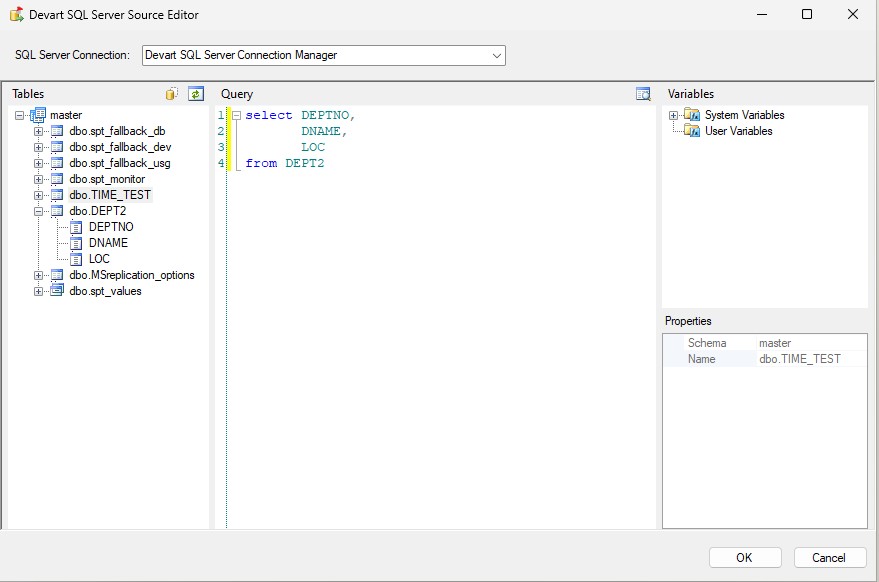
The Devart SQL Server Source Editor: the table tree of the connected database, a SELECT query on the DEPT2 table, and the package's system and user variables.
Features
Devart's own SQL Server connection manager
The Devart SQL Server Connection Manager in SSIS Data Flow Components for SQL Server supports secure SSL connections, connecting through a proxy, and setting the protocol version, and it works with every SQL Server release from 2000 to 2025, Express editions included.
A Source editor that knows your schema
The SQL Server Source in Devart SSIS Data Flow Components for SQL Server lists every table and column of the connection, builds a SELECT by drag and drop, inserts package variables into the query and previews the returned rows.
A Lookup that batches and caches
The SQL Server Lookup in Devart SSIS Data Flow Components for SQL Server checks several incoming rows with one SELECT statement and caches the returned results, cutting round trips to the server during large lookups.
Part of a consistent component set
Devart SSIS Data Flow Components for SQL Server share their editor, connection and Lookup design with Devart's components for more than 40 other sources, so a package mixing SQL Server, MySQL, Salesforce and others looks and behaves the same throughout.
Benefits
- One way of working. SQL Server steps match the Devart components used for other sources.
- Proxy and SSL in the connection. Useful for servers reached through a proxy.
- Very old servers. Support goes back to SQL Server 2000 and MSDE.
Real-World Uses
- Mixed-source packages. A package moves data between SQL Server and several cloud apps, all with Devart components and one connection style.
- Enriching rows with a cached lookup. The Lookup matches incoming rows against a large SQL Server customer table with fewer round trips.
- Reaching a legacy server. A package reads from an old SQL Server 2005 instance during a migration project.
- CSV imports. A package loads CSV exports into SQL Server tables.
Who It's For, and Who Should Skip It
These components suit teams that already use Devart SSIS components or the Universal Bundle and want SQL Server handled the same way, and packages that need Devart's proxy support or batched Lookup.
Most SSIS users should skip them: SSIS's free OLE DB and ADO.NET sources and destinations, and its own Lookup, already work well with SQL Server, and the OLE DB destination's fast-load mode is hard to beat for bulk inserts. Buy these only for one of the specific reasons above.
Usage Guide
- Sign in to Devart (a free account), download the installer from the product's download page and run it; select the SQL Server components and the SSIS versions you use.
- Open an Integration Services project in Visual Studio. The Devart SQL Server components appear in the SSIS Toolbox.
- In Connection Managers, add a new Devart SQL Server connection: enter the server, authentication details and database, and open Advanced for SSL, proxy or protocol settings.
- Drag a Devart SQL Server Source into a Data Flow task, pick objects in the editor or write a SELECT, and click Preview to check the rows.
- Connect it to a destination (or add a Devart SQL Server Destination when loading into SQL Server), map the columns and run the package.
Before you buy
The Developer license covers development and testing on one developer's machines only. Running packages on a production SSIS server needs a Server license ($449.95 a year or $899.95 perpetual) or a Site license, so budget for that from the start.
Where it falls short
- Overlaps with built-in SSIS. SSIS's native SQL Server components cost nothing extra.
- Windows and SSIS only. No use outside SQL Server Integration Services.
- Server licenses add up. Production servers need a Server or Site license.
- Large download. The installer is over 600 MB.
What Users Say
Capterra
Review sites rate Devart's SSIS components as one product line rather than the SQL Server components alone. On Capterra, SSIS Data Flow Components average 4.6 out of 5 from 12 reviews, with 4.3 for ease of use and 4.3 for customer service. Reviewers describe them as easy to set up inside Visual Studio and efficient for routine ETL work; the criticisms are occasional bugs, packages that become hard to maintain over time, and a wish for more help with troubleshooting. With so few ratings, test the trial on your own SQL Server data before deciding.
Comparisons
Devart components vs. SSIS's built-in OLE DB components
SSIS's OLE DB source, destination and Lookup are free, fast and made by Microsoft for SQL Server. Devart's components cost $179.95 a year and add a schema-aware Source editor with preview, a batching Lookup cache, proxy support and the same design as Devart's other components. For SQL Server alone, the built-in components are usually enough.
SQL Server components vs. the SSIS Universal Bundle
The SSIS Universal Bundle ($499.95 a year or $999.95 perpetual) includes these SQL Server components along with more than 40 other sources. If you already need Devart components for other systems, the bundle covers SQL Server too.
Editions and Pricing
| License | 1-year subscription | Perpetual | What it covers |
|---|
| Developer | $179.95 | $349.95 | One developer's machines, for development and testing |
| Server | $449.95 | $899.95 | One server running packages, plus one developer |
| Site for 10-100 Devices | On the order page | $999.95 | Unlimited computers in one company |
Buy Now opens the order page for SSIS Data Flow Components for SQL Server; you choose the license, subscription or perpetual, a 1-, 2- or 3-year term and optional premium support there. The SSIS Universal Bundle, with components for more than 40 sources, costs $499.95 a year or $999.95 perpetual on Devart's page.
FAQs
Why buy Devart SSIS components for SQL Server when SSIS has its own?
Devart SSIS Data Flow Components for SQL Server make sense mainly for consistency with Devart's other SSIS components, for connections through a proxy, or for Devart's batched Lookup. For a plain SQL Server package, SSIS's built-in components are free and well suited.
Does it support SQL Server 2025 and Express?
Yes. Devart SSIS Data Flow Components for SQL Server support SQL Server 2025 back to 2000, including the Express editions.
Does it support Azure SQL Database?
Devart's compatibility list names SQL Server 2000 to 2025 and doesn't mention Azure SQL Database; Devart sells separate SSIS components for Azure Synapse Analytics. Test an Azure connection in the trial before buying.
Which SSIS versions do the SQL Server components work with?
Devart SSIS Data Flow Components for SQL Server work with SQL Server Integration Services 2008, 2012, 2014, 2016, 2017, 2019, 2022 and 2025.
Do I need a separate license for the production SSIS server?
Yes. The Developer license of SSIS Data Flow Components for SQL Server covers development and testing only; deploying packages to a server needs a Server license or a Site license.
What happens when the subscription ends?
The subscription license of SSIS Data Flow Components for SQL Server works for the term you paid for, so packages that use it need a renewal. A perpetual license keeps working at the version you have.
Can I get a refund?
Only for technical problems. Devart's ordering FAQ gives a full refund within 30 days of purchase when a bug or technical issue stops SSIS Data Flow Components for SQL Server working and support can't fix it. Use the 30-day trial against your own SQL Server instance before buying.
System Requirements
- Microsoft SQL Server Integration Services 2008, 2012, 2014, 2016, 2017, 2019, 2022 or 2025
- Visual Studio with Integration Services projects for designing packages
- Windows Vista or later, 32-bit or 64-bit, with .NET Framework 4.5
- SQL Server 2000 to 2025, including Express editions
Conclusion
Devart SSIS Data Flow Components for SQL Server are a niche buy at $179.95 a year. They're worth it for teams already building packages with Devart components, who want SQL Server to work the same way, or who need a proxy connection or Devart's batched Lookup. For an ordinary SQL Server package, SSIS's free built-in components do the job, and anyone needing several Devart sources should get the Universal Bundle, which includes SQL Server.
Download Free Trial Buy Now