Devart Python Connector for Google Sheets: Query Spreadsheets from Python with SQL
Devart Python Connector for Google Sheets is a paid Python module, $74.95 a year for one developer, that lets Python 3.10-3.15 code on Windows read and update a Google Sheets spreadsheet with ordinary SQL: each sheet behaves like a table, and you get SELECT, JOIN, UNION, INSERT, UPDATE and DELETE through the standard Python DB API 2.0 interface. It signs in to your Google account with OAuth 2.0.
Most Python code that touches Google Sheets uses the free gspread library or Google's own API client, which hand you ranges of cell values that you then loop over or load into pandas. Devart's connector is for people who would rather write SELECT ... FROM Sheet1 LEFT JOIN Sheet3 and get rows back, or who want a shared team spreadsheet to sit behind the same cursor-and-execute code as their databases.
Quick facts
- Version: 1.2.0, released October 22, 2026; first released February 19, 2025
- Developer: Devart
- Package:
pip install devart-googlesheets-connector, or wheel files from Devart's download page (12.46 MB for Python 3.15 on Windows) - Python: 3.10 to 3.15 (1.2 dropped 3.7 to 3.9)
- Platforms: Windows and Windows Server, 32-bit and 64-bit; no macOS or Linux build
- Sign-in: Google OAuth 2.0: a one-time browser sign-in returns a refresh token that later connections reuse
- Price: $74.95 a year or $149.95 perpetual for a Single (one developer) license
- Trial: 30 days, for evaluation only, not for production use
- Refund: the order page promises a 30-day money-back guarantee "if you are not satisfied", while Devart's ordering FAQ grants refunds within 30 days only when a technical problem support can't fix stops the product working
- What we checked: the order page charged $74.95 for a Single license with one year of updates on a yearly subscription, and PyPI and Devart's download page both showed version 1.2.0 with Windows-only wheels, on November 19, 2026. We didn't connect it to a Google account
Download Free Trial Buy Now
Overview
A session takes three calls. googlesheets.signin() runs Google's OAuth 2.0 sign-in and returns a refresh token; googlesheets.getspreadsheet() with that token returns the ID of the spreadsheet you want; and googlesheets.connect(SpreadsheetId=..., RefreshToken=...) opens a connection to that one spreadsheet. From there it's a cursor, execute() and fetchall(), like any DB API module, with ? placeholders for parameters.
Inside the spreadsheet, every sheet tab is a table. By default the columns keep their spreadsheet letters, A, B, C and so on; set HeaderAsColumnName=True and the first row's headings become the column names instead. Simple queries turn straight into Google Sheets API calls. For complex ones, the connector fetches the data it needs and finishes the joins, unions and sorting in its own SQL engine on a local cache.
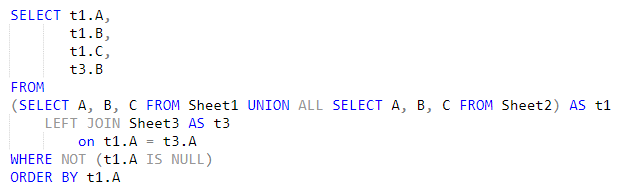
A query from Devart's product page: Sheet1 and Sheet2 combined with UNION ALL, then left-joined to Sheet3 on column A, using the default A, B, C column names.
Features
ANSI SQL over spreadsheet tabs
Python Connector for Google Sheets accepts standard SQL against the sheets of a spreadsheet, including joins between tabs, UNION ALL, subqueries, WHERE filters and ORDER BY. Anything the Google Sheets API can't do itself is completed by the connector's embedded SQL engine on cached data, so you don't write the merge logic in Python.
Read and write, not just export
Python Connector for Google Sheets supports create, read, update and delete operations, so a script can append rows, change a status cell or remove old entries with INSERT, UPDATE and DELETE. Several update statements can be sent as one batch to cut the number of round trips to Google.
Header rows or letter columns
Python Connector for Google Sheets names columns A to Z by default and switches to the first row's headings with the HeaderAsColumnName option. A MaxCellLength setting (4,000 characters by default) controls how much text it reads from a single cell.
Pooling, caching and proxies
Python Connector for Google Sheets pools connections (min_size, max_size, lifetime and validate settings, or DisablePooling per connection), caches data locally for repeat reads, and connects through an HTTP proxy with host, port, user name and password parameters for locked-down office networks.
Type mapping and Unicode
Python Connector for Google Sheets maps Google Sheets data types to Python types, with options to change the mapping, and reads and writes text in any language, including Chinese, Cyrillic and Hebrew.

Devart's connection diagram: the connector inside a Python application talks to Google Sheets in the cloud over HTTPS, directly or through a proxy.
Benefits
- SQL instead of cell ranges. Filtering, joining and sorting happen in one statement instead of loops over lists of values.
- Spreadsheets as a data source. A sheet the sales or operations team keeps up to date can feed a script the same way a database table does.
- Same code style as your databases. Devart's Python connectors share connect, cursor and license calls, so a script that already reads SQL Server or PostgreSQL through them reads Google Sheets the same way.
Real-World Uses
- Combining monthly tabs. A finance sheet with one tab per month is queried as one dataset with UNION ALL and summed by category.
- Loading form responses. A Windows scheduled task reads new rows from the sheet a Google Form writes to and inserts them into the company database.
- Updating a shared tracker. A script marks orders as shipped in the team's spreadsheet with an UPDATE ... WHERE on the order number column.
- Lookups across sheets. A price list on one tab is joined to an order list on another to check totals before invoicing.
Who It's For, and Who Should Skip It
The connector suits Windows-based Python developers and analysts who think in SQL and want to treat a Google spreadsheet like a small database, especially teams that already use Devart's other Python connectors and want one license and support desk for all of them.
Skip it if you work on macOS or Linux, or run your scripts in Docker or a cloud function: there's no build for them. Skip it too for simple jobs such as reading one range into pandas or writing a few cells, where the free gspread library does the job with less setup. And if a Google service account must run the job with no person ever signing in, check the trial first, since the documented sign-in is an interactive OAuth refresh token.
Usage Guide
- Install with
pip install devart-googlesheets-connector on Windows, or download the zip of wheels for your Python version from Devart and run pip on the .whl file. - After buying, run
devart.googlesheets.license.activate("<key>") once with the key from the order email or Devart's customer portal. - Sign in:
response = googlesheets.signin() opens Google's sign-in; keep response["Refresh Token"] somewhere safe for later runs. - Get the spreadsheet ID with
googlesheets.getspreadsheet("RefreshToken=" + token) and connect with googlesheets.connect(SpreadsheetId=..., RefreshToken=token, HeaderAsColumnName=True). - Query:
cur = conn.cursor(), cur.execute("SELECT * FROM Orders WHERE Status = ?", ["Open"]), cur.fetchall().
Before you buy
Each connection opens one spreadsheet, chosen by its ID, so a script that reads several spreadsheets needs one connection for each. The refresh token acts for the Google account that signed in, so it can reach whatever that account can open: store it like a password. The connector runs only on Windows, and its subscription license needs internet access to activate and check its status.
Where it falls short
- Windows only. No macOS or Linux wheels.
- Free alternatives cover the basics. gspread and Google's API client cost nothing and run everywhere.
- Spreadsheets aren't databases. Merged cells, mixed types in a column and extra header rows make SQL results messy; a clean one-header-row layout works best.
- Young product. It launched in February 2025, and its two updates since then added Python versions and fixed connection-string parsing rather than adding Google Sheets features.
What Users Say
Reviews of this connector
Python Connector for Google Sheets hasn't collected reviews of its own on Capterra, G2, GetApp or TrustRadius. Feedback on Devart's Python connectors as a line is thin too: G2's Devart Python Connectors page shows a single 5-star review, too few for G2 to rate the product.
PeerSpot
A product engineer at a tech vendor with more than 10,000 employees reviewed Devart's Python Connectors on PeerSpot in November 2025, rating them 10 out of 10 after using them to feed an employee dashboard from an Oracle PL/SQL back end on AWS: "Since we started to use Python Connectors, we found it very reliable, and there are many measurable benefits of this." The same reviewer liked that they are "compliance-friendly, very secure, and has no plain text passwords or anything," but also wrote: "It is much costlier than other products."
What that adds up to
The little feedback there is praises reliability and security and names price as the drawback, and none of it is about Google Sheets. Treat the 30-day trial as the real test: point it at the spreadsheet you actually use, with its own headers and layout.
Comparisons
Devart vs. gspread
gspread is a free, open-source library that wraps the Google Sheets API: you open a worksheet and read or write cells, rows and ranges, often loading them into pandas. It runs on any platform and supports service accounts. Devart's connector costs $74.95 a year, runs only on Windows and replaces cell handling with SQL queries, joins across tabs and a DB API cursor. Pick gspread for cell-level work, Devart for SQL.
Python connector vs. Devart's ODBC driver for Google Sheets
Devart's ODBC driver for Google Sheets serves Excel, Power BI and any ODBC tool, as well as Python through pyodbc. If only Python scripts need the data, the Python connector is the smaller purchase; if reports and scripts both use the spreadsheet, the ODBC driver covers both.
Editions and Pricing
| License | 1-year subscription | Perpetual | Who can use it |
|---|
| Single | $74.95 | $149.95 | One developer at one company site |
| Team | $189.95 | On the order page | Up to 4 developers at one company site |
| Site | $339.95 | On the order page | Unlimited developers at one company site |
Buy Now opens the order for Python Connector for Google Sheets with a Single license on a 1-year subscription; Team, Site, the perpetual license and 2- or 3-year terms are chosen on the order page. An OEM license for shipping the connector inside your own product is arranged with Devart separately.
FAQs
Does Python Connector for Google Sheets run on macOS or Linux?
No. Python Connector for Google Sheets is distributed only as Windows wheels for 32-bit and 64-bit Python, on Windows and Windows Server.
Can Python Connector for Google Sheets use the first row of a sheet as column names?
Yes. Python Connector for Google Sheets uses A-to-Z column letters by default; set HeaderAsColumnName to True in the connection and the first row's headings become the column names.
Can Python Connector for Google Sheets write to a Google Sheet?
Yes. Python Connector for Google Sheets supports INSERT, UPDATE and DELETE as well as SELECT, and can send several update statements to Google as one batch.
Can one connection query several spreadsheets?
No. A Python Connector for Google Sheets connection opens one spreadsheet, given by its SpreadsheetId; the sheets inside it are the tables. Open another connection for each further spreadsheet.
Which Python versions does Python Connector for Google Sheets support?
Python Connector for Google Sheets 1.2, released October 2026, supports Python 3.10 to 3.15; earlier versions also supported 3.7 to 3.9.
Does the subscription keep working offline?
No. Python Connector for Google Sheets's subscription license needs an internet connection to activate and check its status, and the connector needs internet to reach Google Sheets anyway.
Can I ship the connector inside an application I sell?
Only with an OEM license. Python Connector for Google Sheets's Single, Team and Site licenses cover developing and deploying your own scripts and applications within one company.
Can I get a refund on Python Connector for Google Sheets?
Possibly. Python Connector for Google Sheets's order page offers a 30-day money-back guarantee if you're not satisfied, but Devart's ordering FAQ describes refunds within 30 days only for technical problems its support can't fix. Use the 30-day trial to be sure before you buy.
System Requirements
- Python 3.10, 3.11, 3.12, 3.13, 3.14 or 3.15, 32-bit or 64-bit, with pip
- Windows or Windows Server, 32-bit or 64-bit
- A Google account with access to the spreadsheet
- Internet access, directly or through an HTTP proxy
Conclusion
Devart Python Connector for Google Sheets is worth $74.95 a year for Windows-based Python users who want to query and update Google Sheets with SQL, joining tabs and filtering rows without writing loops, and for teams that already run Devart's other Python connectors. For quick cell reads and writes, or for anything that runs on Linux, the free gspread library is the better choice. If the SQL approach appeals, try it on your own spreadsheet with the 30-day trial.
Download Free Trial Buy Now