Skyvia Data Integration: No-Code ETL, Replication and Sync Between 200+ Cloud Apps and Databases
Skyvia Data Integration is Devart's browser-based ETL service that moves data between more than 200 cloud apps, databases, data warehouses and file storages, with import, export, replication and two-way sync wizards and a visual pipeline designer, and no code to write. It's for operations staff, analysts and small data teams who need Salesforce, HubSpot, Shopify or QuickBooks data in a warehouse or another app. There's a free plan; the Standard plan is $99 a month at checkout.
The usual alternatives are hand-written scripts against each app's API, or enterprise ETL suites priced for large companies. Skyvia sits between them: you pick two connections in a wizard, map the fields, set a schedule, and it runs in Devart's cloud, with a per-record log when something fails.
Quick facts
- What it is: a cloud (SaaS) data integration service from Devart, the maker of dbForge and dotConnect; nothing to install
- Latest release: November 2026 (monthly releases)
- Connectors: 200+ cloud apps, plus SQL Server, PostgreSQL, MySQL, Oracle, Snowflake, BigQuery, Redshift, Azure Synapse, Amazon S3, Google Drive, Dropbox, FTP and SFTP
- Price: Free (10k records a month); Standard $99 a month (500k records); Professional $499 a month (10M records); Basic and larger record tiers on Skyvia's site; about 20% less billed annually
- Trial: 14-day Professional trial (5M records) when you register
- What we checked: the order page prices of $99 a month for Standard 500k and $499 a month for Professional, both monthly renewals, against Skyvia's pricing page and the trial terms in Skyvia's documentation, on November 22, 2026. We didn't build an integration ourselves.
Buy Standard (Monthly)Buy Professional (Monthly)
Overview
Skyvia Data Integration has two levels. The wizard tools cover the common jobs between two data sources: Import (load a CSV or another source into an app or database, with mapping, lookups and UPSERT), Export (write data to CSV files on FTP, SFTP or a storage service), Replication (copy cloud app data into a database or warehouse and keep it current with incremental updates) and Synchronization (keep two sources in step both ways).
For anything bigger there's Data Flow, a diagram editor for pipelines that read from several sources, transform the data in stages and write to several targets, and Control Flow, which chains integrations, adds conditions and retries failed runs. Everything is configured in the browser, scheduled in Skyvia's cloud on Microsoft Azure, and logged per record. An on-premise agent lets it reach databases behind your firewall.
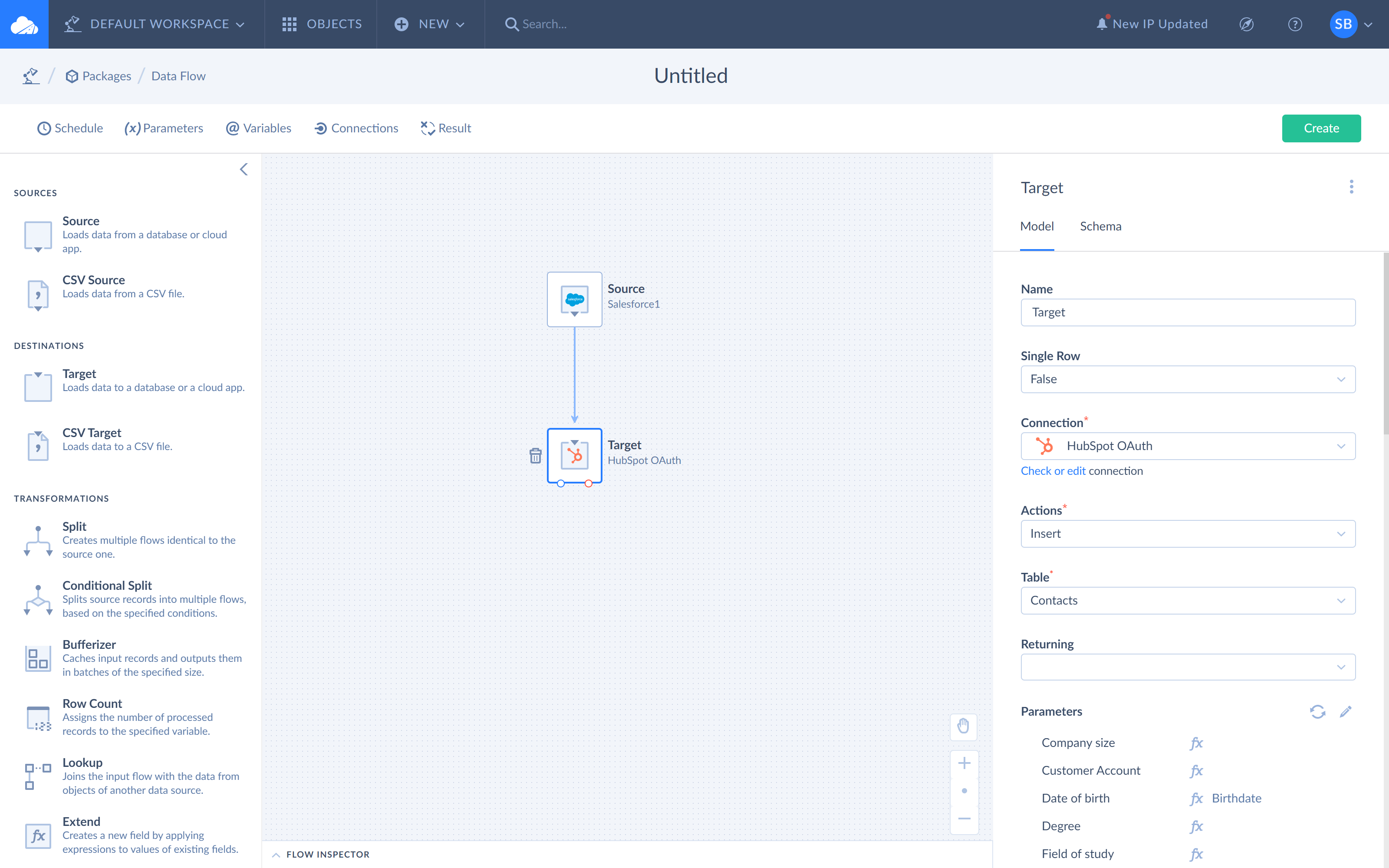
The Data Flow designer: a Salesforce source feeding a HubSpot target, with the target's connection, action (Insert) and table (Companies) set in the side panel.
Features
Import with real mapping
Skyvia Data Integration imports from CSV files (uploaded, or picked up from a storage service by file mask) or straight from another app or database, and can insert, update, delete or UPSERT. Mapping goes beyond column-to-column: constants, lookups in the target (and in the source on Standard and above), expressions, relation mapping for related records, and binary files such as attachments. Since October 2026, Replays retry only the failed or skipped records of an import from saved data instead of running the whole import again.
Replication into a database or warehouse
Skyvia Data Integration copies cloud app objects into SQL Server, PostgreSQL, MySQL, Snowflake, BigQuery, Redshift or Azure Synapse, creates the tables, and then loads only new and changed records on each run. That's the usual way people feed Power BI, Tableau or Looker Studio with Salesforce, HubSpot or Shopify data.
Two-way synchronization
Skyvia Data Integration keeps two sources in step in both directions, for example a CRM and a mailing list, with the same mapping options as import.
Data Flow and Control Flow
Skyvia Data Integration's Data Flow (Standard and Professional) combines several sources, applies multistage transformations such as lookups, conditional splits and calculated columns, and loads several targets at once. Control Flow (Professional) runs integrations in order, branches on results and adds custom error handling and retries. A dbt transformation step is available too.
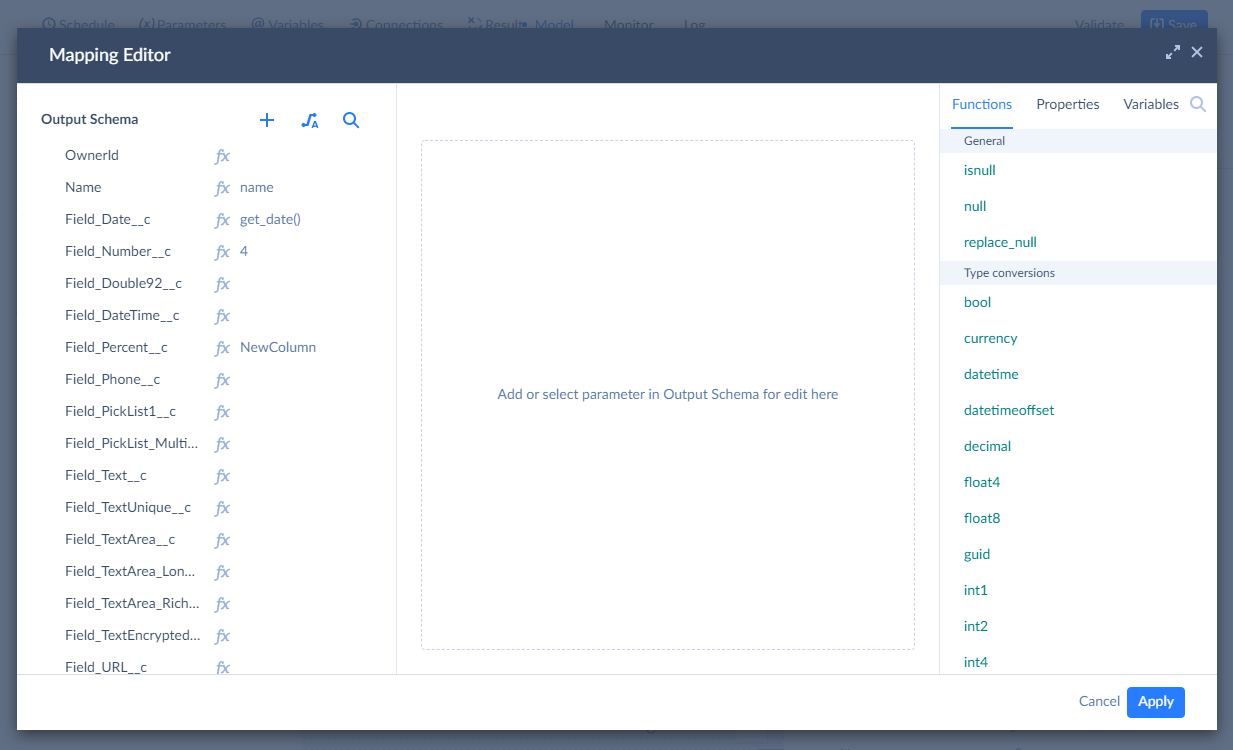
The Mapping Editor in Data Flow: target fields on the left, an expression for the Description field, and the source columns on the right, with an AI Generate box for writing expressions.
Scheduling, logs and alerts
Skyvia Data Integration runs integrations on a schedule: once a day on Free and Basic, as often as hourly on Standard and every minute on Professional. Each run keeps a per-record error log, and failures trigger email notifications you can set per account and per user.
Benefits
- No scripts to maintain. API changes, paging and retries are Skyvia's problem, not yours.
- One tool for many jobs: imports, backups to CSV, warehouse loads and syncs in one account, priced by records rather than by connector.
- Fast to start: sign in with Google, connect two sources and run a first import in the same session.
- Room to grow from simple wizards to multi-source pipelines without changing tools.
Real-World Uses
- CRM to warehouse: replicate Salesforce or HubSpot objects to Snowflake or BigQuery every hour for dashboards.
- Shop to ERP reporting: copy Shopify orders, payments and inventory to SQL Server with incremental updates and join them with ERP data in Power BI.
- Lead loading: import website sign-ups from a database or CSV into HubSpot or Mailchimp every day.
- CRM migration: move accounts, contacts and deals from Zoho CRM to HubSpot while keeping the relations between them.
- Accounting links: turn Salesforce opportunities into QuickBooks Online invoices.
Who It's For, and Who Should Skip It
Skyvia Data Integration is for small and mid-sized companies, consultants and data teams who need regular data movement between SaaS apps, databases and warehouses and don't want to write or host code for it. The free plan suits occasional small jobs.
Skip it if you need real-time streaming: Skyvia is batch integration, with schedules down to once a minute at best. If your data volume runs to hundreds of millions of records a month, price the higher tiers or an Enterprise quote against alternatives first. If all your data lives in one database, that database's own tools may be enough. And if company policy keeps data off third-party clouds, a self-hosted tool such as Devart's SSIS components fits better.
Usage Guide
- Sign up on skyvia.com, or sign in with Google. The 14-day trials for all Skyvia products start automatically.
- Create connections to your sources and targets (app sign-in, or server details for a database; install the agent for an on-premise database).
- Pick a tool: Import, Export, Replication or Synchronization for two sources, or Data Flow for a multi-step pipeline.
- Map the fields, add filters and lookups, and run it once by hand to check the results and the per-record log.
- Schedule it and turn on email notifications for failures.
- Choose a plan by the number of records you load per month and how often jobs must run.
Where it falls short
- Records drive the price. Every plan has a monthly record allowance; Standard and Professional charge for extra records ($0.06 and $0.02 per 1,000), and Free and Basic have no overage at all.
- The cheaper plans lock out advanced mapping. Free and Basic lack source lookups, expression mapping, relation mapping and Data Flow, and run at most once a day.
- Free plan schedules expire after 30 days and must be re-enabled.
- Batch only. There's no real-time streaming; the fastest schedule is once a minute, on Professional.
- Uploaded CSV files are capped at 400 MB per file (files read from a storage service have no stated limit).
What Users Say
Ratings
Skyvia's own site cites high ratings: 4.8 out of 5 on G2, which named it a Leader among ETL tools for Winter 2025, 4.8 out of 5 on Capterra, and 4.9 out of 5 on Gartner Peer Insights, where 96% of reviewers say they'd recommend it. The ratings cover the whole Skyvia platform, of which Data Integration is the main product. The praise centres on ease of use and the range of connectors; the most common reservations are a learning curve for the advanced designers and documentation that doesn't cover every case.
Customer stories
"I assessed Skyvia and Fivetran over maybe the course of four weeks, and I decided that the Skyvia team identified a good gap in the market. Because for me, a lot of the current tools are very restrictive, and Skyvia gives a lot more freedom to customize your data extraction process."
John McPhillips, Senior Data|BI Engineer, TitanHQ, which loads SugarCRM and billing data into Snowflake for Tableau
"We're using the value function in Data Flow where we save a particular value as a variable. And next time, if that particular integration is running on a day schedule, we use that value in our query right next day."
Chandan Alawadhi, Senior Program Manager, Vedantu, which connects Amazon Redshift, Salesforce and Looker Studio
Both quotes come from case studies Skyvia publishes, so they're chosen by the vendor.
Comparisons
Skyvia Data Integration vs Fivetran-style ELT services
Replication-focused ELT services concentrate on filling a warehouse. Skyvia replicates too, but also imports into apps, syncs both ways and exports to files, all in one subscription priced by records loaded. TitanHQ chose it over Fivetran for the freedom to customize extraction. A replication-only service may still suit a team whose sole job is filling a warehouse.
Skyvia vs Devart's SSIS Data Flow Components
Devart also sells SSIS components for many of the same apps. Those run inside SQL Server Integration Services on your own servers and suit teams already built on SSIS. Skyvia needs no SQL Server and no server at all, and is configured in the browser.
Editions and Pricing
| Plan | Price (monthly) | Records per month | What it adds | Buy |
|---|
| Free | $0 | 10,000 | Import, export, replication and sync; 2 schedules, once a day, expire after 30 days | Sign up on Skyvia |
| Basic | from $99 | 5M to 200M | 5 schedules, once a day; basic mapping | On Skyvia's site |
| Standard | $99 | 500k (up to 200M at higher tiers) | 50 schedules, hourly; lookups, expressions, relation mapping, Data Flow | Buy Standard |
| Professional | $499 | 10M (up to 200M at higher tiers) | Unlimited schedules, every minute; Control Flow | Buy Professional |
The two Buy buttons order the monthly Standard (500k records) and Professional (10M records) plans at the prices shown. Annual billing on Skyvia's pricing page costs about 20% less ($79 and $399 a month), and an Enterprise plan with a dedicated environment is quoted on request. Users and connections are unlimited on every plan.
FAQs
Does Skyvia Data Integration need any software installed?
No. Skyvia Data Integration runs entirely in the browser and in Skyvia's cloud on Microsoft Azure. The only optional install is the agent that lets it reach a database inside your own network.
Is there a free version of Skyvia Data Integration?
Yes. Skyvia Data Integration has a free plan with 10,000 records a month and two scheduled integrations that run once a day; the schedules expire after 30 days. A 14-day Professional trial with 5 million records starts when you register.
How does Skyvia count records?
Skyvia Data Integration counts the records it loads per month across your integrations, and plans are sized by that number, from 10,000 on Free to 200 million on the largest tiers. Standard and Professional can go over their allowance for a per-1,000-record fee.
Can Skyvia Data Integration replicate Salesforce to Snowflake or BigQuery?
Yes. Skyvia Data Integration's Replication tool copies Salesforce objects into Snowflake, BigQuery, Redshift, Azure Synapse or a relational database, creates the tables, and then loads only new and changed records on each scheduled run.
How often can Skyvia integrations run?
Skyvia Data Integration runs scheduled integrations once a day on Free and Basic, as often as once an hour on Standard, and as often as once a minute on Professional.
Can I cancel a monthly Skyvia plan?
Skyvia Data Integration is sold as monthly or yearly subscriptions. When a subscription lapses, Skyvia disables the schedules; since November 2026 you can re-enable them all at once after renewing.
System Requirements
- A current web browser on Windows, macOS, Linux or another system
- Accounts in the cloud apps, databases or storage services you connect
- For an on-premise database: Skyvia's agent on a machine that can reach it
Conclusion
Skyvia Data Integration is worth $99 a month if your team moves data between SaaS apps, databases and a warehouse every week and nobody wants to own the scripts. The reason to buy it is breadth at a modest price: import, replication, sync and multi-source pipelines over 200+ connectors in one browser tool, with a free plan to start. The main reason not to is volume: priced by records, it gets expensive for very large loads, and it doesn't stream in real time. Start with the free plan or the 14-day trial on your own sources, then size the plan by the records you actually load.
Buy Standard (Monthly)Buy Professional (Monthly)