Devart ODBC Driver for Salesforce: Query Salesforce with Plain SQL from Excel, Power BI or Access
Devart ODBC Driver for Salesforce is a $179.95-a-year driver that lets Excel, Power BI, Tableau, Access, SQL Server and any other ODBC tool on Windows, macOS or Linux read and write Salesforce data with plain SQL. It's for analysts and database people who want live CRM data in the tools they already use, without exports or API code.
Your company's customers, opportunities and cases live in Salesforce, but your reports live in Excel, Power BI or an old Access database. Getting data from one to the other usually means exporting CSV files every Monday, or asking a developer to write against the Salesforce API. By Wednesday the numbers are stale.
The driver removes that step. It makes Salesforce look like an ordinary SQL database to any program that speaks ODBC, so your spreadsheet, BI dashboard or linked Access table reads live Salesforce data, and can write it back.
Quick facts
- Version: 4.2.0, released October 16, 2026
- Developer: Devart
- Runs on: Windows 7 and later (32-bit and 64-bit, including Terminal Server), macOS 64-bit and Linux 64-bit
- Works with: any ODBC-compliant tool. Devart lists Power BI, Tableau, Excel, Microsoft Access, SQL Server Linked Server, DBeaver, Python and Visual Studio among 200+ verified tools.
- Sign-in: OAuth 2.0 over HTTPS, with optional proxy settings
- Price: $179.95 USD per year for the Desktop edition on Windows, including support and upgrades
- Trial: fully functional for 30 days
- Download size: 77.8 MB Windows EXE installer, with MSI, macOS PKG, DEB and RPM packages also available
- What we checked: version 4.2.0 (released October 16, 2026, 77.8 MB EXE) on Devart's download page and in its revision history on October 20, 2026, and the Desktop for Windows subscription at $179.95 a year on the order page on October 20, 2026. We didn't connect it to a Salesforce org ourselves.
Before you buy: pick the right edition and license
The $179.95 Desktop edition covers one computer used by one person at a time. If the driver will run on a server that several users or processes reach at once (a reporting server, a SQL Server linked server, a scheduled ETL job), Devart requires a Server edition. The yearly subscription also needs an internet connection to activate and to check the license status. Devart sells perpetual licenses too, if that's a problem.
Download Free TrialBuy Now
Overview
Once the driver is installed, you create a data source (a DSN), sign in to Salesforce, and from then on Salesforce objects such as Account, Contact and Opportunity appear as tables. You query them with standard SQL. The driver translates that SQL into Salesforce's own query language behind the scenes, so analysts don't need to learn SOQL or the Salesforce API.
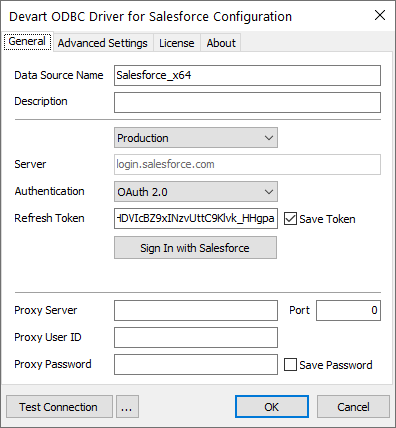
The driver's configuration dialog on Windows: a data source name, the Production environment at login.salesforce.com, OAuth 2.0 authentication with a Sign In with Salesforce button and saved refresh token, proxy settings, and Test Connection.
Features
Real SQL against Salesforce objects
The driver supports SQL-92 SELECT statements with JOINs, WHERE conditions, GROUP BY, ORDER BY, aggregate functions and subqueries, and translates them to Salesforce queries. That means a report that joins Accounts to Opportunities and sums revenue by region is a single SQL statement, written the way you'd write it for any database.
Write back, including in bulk
It isn't read-only. You can run INSERT, UPDATE and DELETE against Salesforce records with SQL syntax, and use bulk operations to change large sets of records in batches, which is handy for data clean-ups and imports.
Secure sign-in without registering an app
Connections run over HTTPS with built-in OAuth 2.0. You sign in with your Salesforce credentials and the driver saves a refresh token, with no separate connected app to register. Where there's no direct internet access, it can connect through a proxy server.
Faster and lighter on API calls
Metadata caching stores table and column information locally, so tools that read the schema repeatedly don't keep calling Salesforce. Connection pooling reuses open connections across requests, and the driver returns foreign keys so tools can map the relationships between objects.
Windows, macOS and Linux
The same driver runs on all three. On macOS it plugs into the iODBC administrator, and on Linux it installs from DEB or RPM packages and works with unixODBC tools such as isql. It fully supports the standard ODBC API and data types, and needs no extra Salesforce client software.
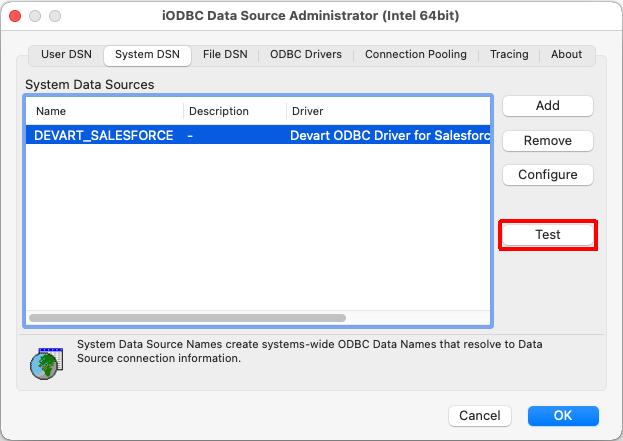
On macOS: a DEVART_SALESFORCE system DSN using the Devart ODBC Driver for Salesforce in the iODBC Data Source Administrator, with the Test button highlighted.
Benefits
The main benefit is live numbers without exports. A Power BI dashboard or an Excel pivot table refreshes straight from Salesforce, so nobody presents last week's pipeline by mistake.
It also lowers the skill bar. Anyone who knows SQL, or just knows how to link a table in Access, can work with Salesforce data. No API code, no SOQL, no custom integration project.
And because it's a standard ODBC driver, it works with the tools you already pay for. You aren't locked into one reporting product to get at your CRM data.
Real-World Uses
- Sales reporting in Excel. Pull open opportunities into a spreadsheet and refresh it each morning instead of exporting reports by hand.
- A Power BI or Tableau dashboard that joins Salesforce accounts with finance data from another database.
- Microsoft Access linked tables. Link Salesforce objects into Access, copy data locally and run the complex queries there.
- SQL Server integration. Read Salesforce from SQL Server through a Linked Server or an SSIS/DTSX package (a Server edition is needed for shared server use).
- Bulk clean-ups. Fix a field across thousands of records with a single UPDATE statement.
Who It's For, and Who Should Skip It
It's built for data analysts, report writers, database administrators and developers in companies that run on Salesforce but analyze data elsewhere. Small teams can start with the Desktop edition on one analyst's PC. Larger teams running shared servers should budget for a Server edition.
Skip it if you're a .NET developer building an application on Salesforce data: Devart's dotConnect for Salesforce, an ADO.NET provider with Entity Framework Core support, fits that job better. Skip it too if you only need a one-off export, which Salesforce's own report exports handle for free.
Usage Guide
- Download and install. Run the Windows installer, choose the 32-bit or 64-bit driver on the Select Components page, and optionally install the help files.
- Choose Trial or Activation Key. In the License Information step, pick Trial to evaluate, or paste your activation key (or load the key file) if you've bought it. Then click Next, Install and Finish.
- Create a DSN. Open the ODBC Data Source Administrator that matches your application's bitness and add a data source using the Devart ODBC Driver for Salesforce.
- Sign in. Choose the environment, select OAuth 2.0 and click Sign In with Salesforce. Add proxy details if your network needs them.
- Test and connect. Click Test Connection, then pick the DSN from Excel, Power BI, Access or any other ODBC tool.
Tips from real users
- Match the bitness. A 64-bit Excel or Access needs a DSN created in the 64-bit ODBC administrator, and 32-bit apps need the 32-bit one.
- For heavy Access queries, copy locally first. One reviewer found complex Access queries run directly against Salesforce could fail, and does the processing on a local copy instead.
- Expect some tuning. Reviewers mention fiddly configuration and modest speed that they worked around. Use the 30-day trial to test your actual reports.
What Users Say
On Software Advice UK, Devart ODBC Driver for Salesforce is rated 4.4 out of 5 from 10 reviews. These excerpts were read through a summarizer, so treat the wording as close but not guaranteed exact.
Peter, Financial Services, 4/5, "Great to copy data locally then process in Access": "Easy to setup in ODBC 64 bit setup. Allows MS-Access to see the data as linked tables." His con: "Writing complex access queries that run against salesforce ODBC connections directly can result in errors."
Ryan, Civil Engineering, 4/5, "Made my year!": "The ODBC Salesforce driver has allowed me to avoid an unnecessary migration to Salesforce." Con: "The driver isn't very fast, but there are methods to make it fast enough."
Delisa, Logistics & Supply Chain, 5/5, "Works well for connected Apps": "It connects easily to Salesforce and allows me to link tables to my local app." Con: "Configuration is a bit touchy but once it is worked through, it is good."
Not everyone was happy. Jeff, Business Supplies & Equipment, gave it 2/5 under the title "Unable to resolve connectivity issues". He liked the "Ease of use, easy to install, flexibility when using inside SSMS/DTSX Package" but called it "Super buggy" and said two support cases he had opened were still unresolved.
Comparisons
Desktop vs. Server Standard vs. Server Enterprise
Desktop is for one computer and one user at a time. Server Standard covers one server with up to 6 cores and multiple concurrent users within one company. Server Enterprise covers one server with any number of cores.
Subscription vs. perpetual
The subscription license works only while it's active and needs an internet connection to activate and check the license. A perpetual license keeps a specific version working indefinitely and can be activated offline. Devart also offers a Site license for unlimited computers in one company and an OEM license for shipping the driver inside your own application.
Single driver vs. ODBC Universal Bundle
If you also need ODBC access to other databases and cloud services, Devart's ODBC Universal Bundle covers more than 92 sources in one license. It's priced on Devart's ordering page.
Editions and Pricing
The license sold here is the Desktop edition for Windows at $179.95 USD per year, a subscription that includes a year of support and upgrades and renews yearly. Premium support isn't included. Server editions, perpetual, site and OEM licenses are priced on Devart's ordering page, and bulk discounts are available for multiple purchases.
FAQs
Can I choose which Salesforce environment to connect to?
The configuration dialog has an environment selector, shown set to Production with the login.salesforce.com server, so you choose which Salesforce environment to connect to when you set up the DSN.
Do I need to set up a connected app in Salesforce?
No. The built-in OAuth support signs you in with your credentials, with no extra app registration.
Can I use it with 32-bit Office?
Yes. The driver supports both 32-bit and 64-bit applications on Windows. Create the DSN with the ODBC administrator that matches your Office bitness.
Can I use one Desktop license on a server?
Only if one user at a time uses it. Simultaneous access by several users requires Server Standard or Server Enterprise.
What happens when the subscription ends?
Subscription access lasts only for the term, and the driver checks the license status online. If you'd rather own a version outright, choose a perpetual license.
Does Devart ODBC Driver for Salesforce run on a Mac or Linux?
Yes. Devart ODBC Driver for Salesforce has a macOS PKG for 64-bit Macs and DEB and RPM packages for 64-bit Linux, and since version 4.0 it has a graphical configuration tool and OAuth sign-in there too. Version 4.2.0 (October 2026) added a workaround for a DSN problem in unixODBC 2.3.13 and 2.3.14 and improved compatibility with Ubuntu 24 and 26 and CentOS 10.
System Requirements
- Windows: Windows 7 and later, 32-bit or 64-bit, including Windows Terminal Server, with .NET 5.0 support
- macOS: 64-bit
- Linux: 64-bit (DEB or RPM package)
- Connection: HTTPS access to Salesforce, directly or through a proxy
- Other: no Salesforce client software needed
Conclusion
Devart ODBC Driver for Salesforce is a practical bridge between Salesforce and the reporting and database tools your team already knows. It turns CRM objects into SQL tables and supports both reading and writing, on Windows, Mac and Linux.
Reviewers like how easily it links Salesforce into Access and Excel, and warn about fiddly setup, modest speed and the occasional support struggle. Use the 30-day trial on your real reports, check which edition your setup needs, and you'll know whether the $179.95 yearly Desktop license is the right fit. For one analyst who wants live Salesforce data in Excel, Power BI or Access, it's worth the price. For a shared server, budget for a Server edition, and for .NET application code, look at dotConnect for Salesforce instead.
Download Free TrialBuy Now