Excel Add-in for PostgreSQL: Work With Live PostgreSQL Tables From a Spreadsheet
Excel Add-in for PostgreSQL is a Devart add-in for Microsoft Excel on Windows that connects a worksheet directly to a PostgreSQL server, so you can load data, refresh it, edit rows and save them back. It costs $179.95 at checkout for one license with a year of updates.
Excel has no simple built-in route for writing to PostgreSQL, so colleagues who need to fix data usually depend on a developer or learn pgAdmin. With this add-in, they open a workbook, click Edit Mode, make the change and commit it.
Quick facts
- Version: 3.1.70, released September 7, 2026
- Developer: Devart
- Runs in: Microsoft Excel 2007 to 2024 for Windows
- Databases: PostgreSQL 8 to 18, EnterpriseDB, EDB Postgres Advanced Server, Pervasive Postgres SQL, Heroku Postgres
- Security: SSL connections and single sign-on
- Price: $179.95 with a year of updates; next-year renewal $89.95
- Trial: 30 days, free, with a Devart account
- Guarantee: 30-day money-back guarantee
What we checked: version 3.1.70 and the 76.60 MB download size on Devart's download page, the compatibility page and connection guide, $179.95 and an $89.95 renewal on the order page on November 6, 2026. We did not install the add-in or connect it to a server.
Before you buy
You need Excel for Windows, a PostgreSQL login and a reachable port. The PostgreSQL servers can run on Windows, Linux or macOS, but the add-in itself runs only inside Excel for Windows.
Editing needs a key. A table needs columns that uniquely identify each row. Check that your important tables have a primary key, and give each user a role with only the rights they should have.
Download Free TrialBuy Now
Overview
Once it is installed, the add-in places a Devart tab on Excel's ribbon. You enter your host, port, user, password, database and schema, then choose what to load. You can keep the connection in the workbook or enter it again each time, and a Connection Editor shows the full connection string if you need advanced settings.
Because the same installer serves every Devart add-in, the version and 76.60 MB size are shared with the rest of the family, and fixes for other connectors appear in the same revision history.
Features
A connection with host, port and schema
Excel Add-in for PostgreSQL connects straight to the server, and you can pick the schema at setup. Unlike a generic ODBC setup, there is no separate data source to create. Tick boxes control whether the connection string, the password and add-in data are saved in the workbook.
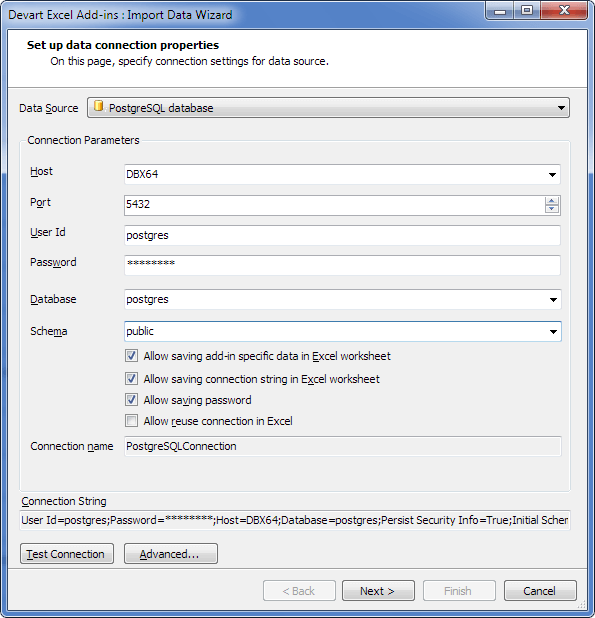
The Import Data Wizard for a PostgreSQL database: host, port 5432, user, password, database, the public schema and the saving options.
Pick data visually or with SQL
Excel Add-in for PostgreSQL offers a Visual Query Builder for choosing columns from a table and related tables, with filters and ordering, and a SQL tab for anything custom. A Data Preview window lets you check the result first.
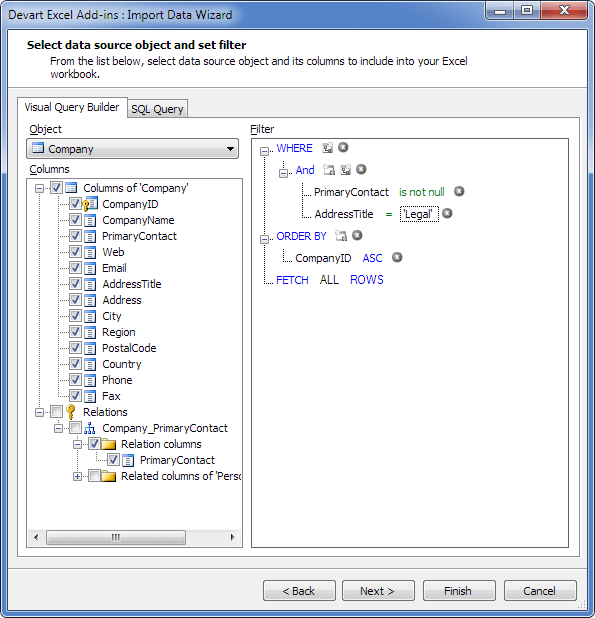
The Visual Query Builder on a Company table, with AddressTitle filtered to Legal and rows ordered by CompanyID.
Change rows, then Commit or Rollback
Excel Add-in for PostgreSQL turns the sheet into an editing grid when you click Edit Mode. New, changed and deleted rows are highlighted, and only Commit sends them to PostgreSQL.
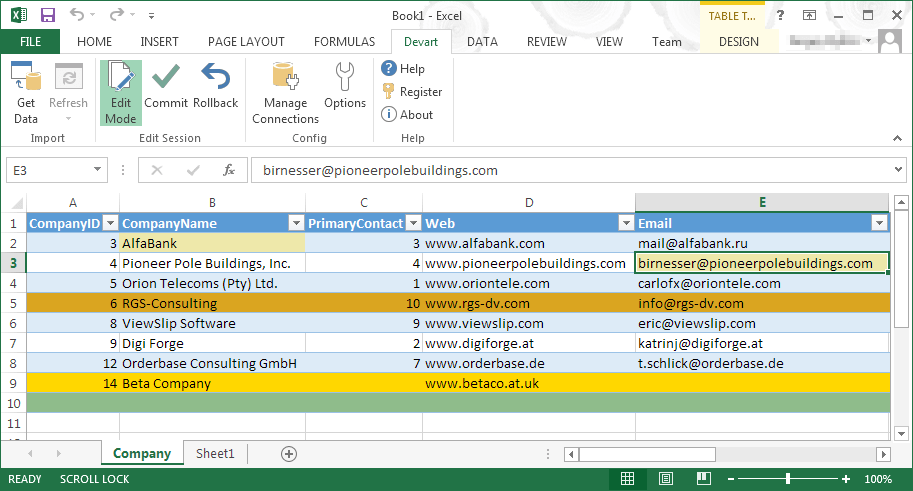
Edit Mode with the changes highlighted in color and an edited email cell selected.
Validation before anything is written
Excel Add-in for PostgreSQL flags errors as you enter data, such as a duplicate primary key value or a badly formed date, and marks the cell and row in red so you can fix them before you commit.
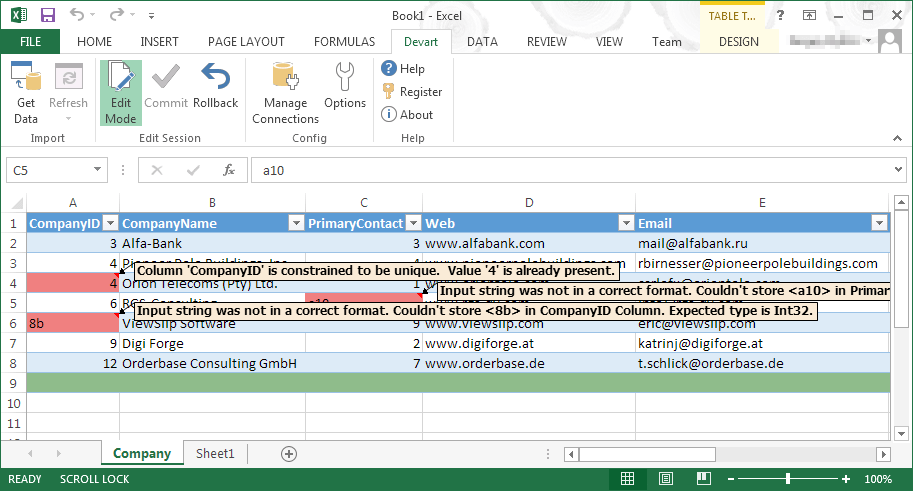
Two validation errors in the sheet, for a unique constraint and for text in an Int32 column.
Fresh data in one click
Excel Add-in for PostgreSQL re-reads your saved query with the Refresh button. Charts and calculations built on that sheet stay as they are and update with the new rows.
Benefits
- Less work for developers. Small corrections stop being tickets.
- No admin tool to teach. People stay in Excel and never see pgAdmin.
- Clear change review. Colors show what will be written before anyone commits.
Real-World Uses
- An operations manager on a SaaS team fixes account settings in a Heroku Postgres table without asking engineering.
- A data analyst pulls a filtered extract of orders from PostgreSQL and refreshes it every Monday for a report.
- A warehouse team updates stock locations in a PostgreSQL table, with validation rejecting bad values.
- A small company on EnterpriseDB gives its accountant a simple way to review and correct records.
Who It's For, and Who Should Skip It
It fits business users and analysts on Windows who need to read and change PostgreSQL data, and the database owners who want to offer that safely.
Skip it if you only need to load data: Excel's Get Data can read PostgreSQL once the Npgsql provider is installed, and that is free. Developers comfortable with SQL will be quicker in pgAdmin or a similar tool. Mac users cannot use it at all.
Usage Guide
- Make sure the PostgreSQL server accepts connections from your PC, and that you have the host, port, user and password.
- Install the add-in with an administrator account, using the installer from Devart's download page.
- Open Excel, go to the Devart tab and click Get Data.
- Choose PostgreSQL database, enter the details including the schema, and click Test Connection. Use Advanced for SSL settings.
- Pick a table and columns, preview the rows and finish.
- Click Edit Mode to change data, and clear Allow saving password if the workbook will be shared.
Where it falls short
No macros. Devart's last public answer, from 2019, was that VBA is not on the roadmap, so a scheduled refresh through a macro is out. A later forum question about VBA and PostgreSQL got the same answer: no VBA support, and no timeframe.
SSL to cloud servers can need a setting. Amazon RDS accepted only TLS 1.2 in one forum case, and the add-in's default for old servers was TLS 1.1. The fix was the connection parameter SSL TLS Protocol=1.2.
Wide rollouts add up. At $179.95 a license, equipping a department is expensive. The volume discounts are modest, at 5% from five licenses.
What Users Say
This specific add-in has no reviews on Capterra or GetApp yet, so it helps to look at the family and at its sibling add-ins.
Ratings for the Devart Excel Add-ins family
TrustRadius rates Devart Excel Add-ins at 9.3 out of 10 from about 33 reviews and ratings, with comparison pages showing somewhat different snapshots. Reviewers there mention the number of database connections as a strength, while one wants better security for large organizations and another wants lower pricing. G2 has no page that we could find for the PostgreSQL version.
Users on Devart's forum
User pgleave, February 20, 2019, about the family: "The devart excel plugin is great but also almost useless if it can't be triggered by automation. Surely this isn't something that requires 4 years to investigate? I'd be purchasing it if it did this."
Devart replied: "At the moment VBA support is not included to our roadmap, and there is no timeframe."
A hosted PostgreSQL server
User hannesk, on Amazon RDS: "We'd wish to purchase your software (multiple licenses), but as currently it does not work for our use case, so we will need find alternative options to access database from Excel." Devart's answer pointed to the SSL TLS Protocol=1.2 connection parameter.
Edits that need a key
User ebincherian, working with Oracle, hit this message: "Data cannot be edited because the table does not have columns that uniquely identify rows (primary key or unique index columns)". Devart offered workarounds, then a new build. Expect the same rule on PostgreSQL, so check your tables for a key.
The recurring themes: users like the add-in itself, while the complaints focus on automation and pricing. With no PostgreSQL-specific reviews yet, take the 30-day trial seriously.
Comparisons
Excel Add-in for PostgreSQL vs ODBC or Npgsql with Get Data
A free route exists for reading: install psqlODBC or Npgsql, then use Excel's Get Data. It costs nothing and it is read-only. The add-in charges for an easier connection and for the write-back, which is its real value.
Single add-in vs Database Pack
If you also need MySQL, SQL Server, Oracle, SQLite or DB2, Devart's Excel Add-in Database Pack bundles the database add-ins, and the Universal Pack of 25 add-ins was listed at $599.95. Price two add-ins against a pack before you order.
Editions and Pricing
| Option | Price | Notes |
|---|
| One license, one year of updates | $179.95 | Keeps working for your version after the year |
| Renewal for the next year | $89.95 | Costs 20% more if 3 or more months late, 60% more after 12 months |
| Multiple licenses | 5% to 15% off | From 5, 10 or 20 licenses |
Two- and three-year terms cost less per year. Premium support is optional, and the cart turns on automatic renewal by default.
FAQs
Can Excel Add-in for PostgreSQL connect to Heroku Postgres or other hosted servers?
Excel Add-in for PostgreSQL lists Heroku Postgres, EnterpriseDB and EDB Postgres Advanced Server as supported, and any host needs to accept connections from your PC.
Does Excel Add-in for PostgreSQL work on Excel for Mac?
Excel Add-in for PostgreSQL works only in Excel for Windows, in versions 2007 to 2024.
Does Excel Add-in for PostgreSQL need an ODBC driver?
Excel Add-in for PostgreSQL connects with its own settings: host, port, credentials, database and schema. Devart's setup guide lists no ODBC driver among the requirements.
Is my PostgreSQL password saved in the file?
Excel Add-in for PostgreSQL saves the password only with Allow saving password ticked, and Devart recommends clearing that box.
What PostgreSQL versions does the add-in support?
Excel Add-in for PostgreSQL supports PostgreSQL server versions 8 to 18.
Is the Devart tab missing after installing?
Excel Add-in for PostgreSQL adds its tab automatically. If it doesn't appear, restart Excel and confirm that add-ins are enabled under File, Options, Add-ins.
System Requirements
- Microsoft Excel 2007, 2010, 2013, 2016, 2019, 2021 or 2024 for Windows
- .NET Framework 4.0 or higher
- Visual Studio 2010 Tools for Office Runtime
- An account with administrator rights for the install
Conclusion
Excel Add-in for PostgreSQL is worth $179.95 for teams where non-developers need to change PostgreSQL data. The one reason to buy is safe write-back from Excel, with validation and a commit step.
The main reason not to buy is that you only read data. Free ODBC or Npgsql with Get Data does that, and macros cannot drive this add-in anyway.
Download Free TrialBuy Now