Devart SSIS Data Flow Components for Stripe: Stripe Payments Data in SSIS Packages
Devart SSIS Data Flow Components for Stripe add a Stripe source, destination and lookup to SQL Server Integration Services 2012 to 2025, for $149.95 a year or $299.95 perpetual (Developer license). You query customers, charges, invoices, subscriptions, products and prices with SQL inside an SSIS data flow and load them into SQL Server, and you can write changes back to the objects Stripe lets you edit, such as coupons and webhook endpoints. It's for finance and data teams whose revenue reporting runs on SQL Server.
Stripe's dashboard and Sigma reports are fine inside Stripe, but reconciling payments with an ERP or a data warehouse usually means CSV exports or code against the Stripe API with its paging, expansions and API versions. These components make Stripe one more source in your SSIS packages, on the same schedule and logging as the rest of the ETL job.
Quick facts
- Version: 5.2.145, released November 19, 2026 (the shared build of all Devart SSIS components; Stripe API version 2026-01-28.clover since version 5.1.49, August 2026)
- Developer: Devart
- Components: Stripe Source, Destination and Lookup, plus a Stripe Connection Manager
- Connection: a Stripe API key
- SSIS: SQL Server Integration Services 2012, 2014, 2016, 2017, 2019, 2022 and 2025, 32-bit and 64-bit Windows
- Download: 616.24 MB installer (all Devart SSIS components), free Devart account required
- Price: Standard $149.95 a year or $299.95 perpetual (the order page's default); Developer $149.95 a year or $299.95 perpetual; Server $379.95 or $749.95; Site (10 to 100 devices) $499.95 or $999.95; Site (100+ devices) $2,499.95 or $4,999.95
- Trial: 30 days
- Refunds: Devart's ordering FAQ gives a full refund within 30 days when a technical problem stops the product working and support can't fix it
What we checked: version 5.2.145 and the 616.24 MB installer on the download page, the supported SSIS versions on the compatibility page, the Stripe connection options in Devart's documentation, every Stripe entry in the revision history since Stripe support arrived in September 2021, and the order page, which charged $149.95 and $299.95 for Developer, $379.95 and $749.95 for Server, and $499.95 and $999.95 for Site (1-year subscription and perpetual), plus $149.95 and $299.95 for the Standard license it selects by default and $2,499.95 and $4,999.95 for a Site license for more than 100 devices, with no discount applied, on November 25, 2026. We didn't run a package against a live Stripe account.
Download Free TrialBuy Standard, 1 Year ($149.95)Buy Developer, 1 Year ($149.95)Buy Developer, Perpetual ($299.95)
Overview
After installing, you add a Devart Stripe Connection Manager to the package and paste in an API key from the Stripe dashboard. The Stripe Source then works like a database source: Stripe objects such as Customers, Charges, Invoices, InvoiceLineItems, Subscriptions, Products, Prices, Coupons and CreditNotes show up as tables in its editor, you write or drag together a SELECT, preview the rows, and connect the output to any SSIS destination.
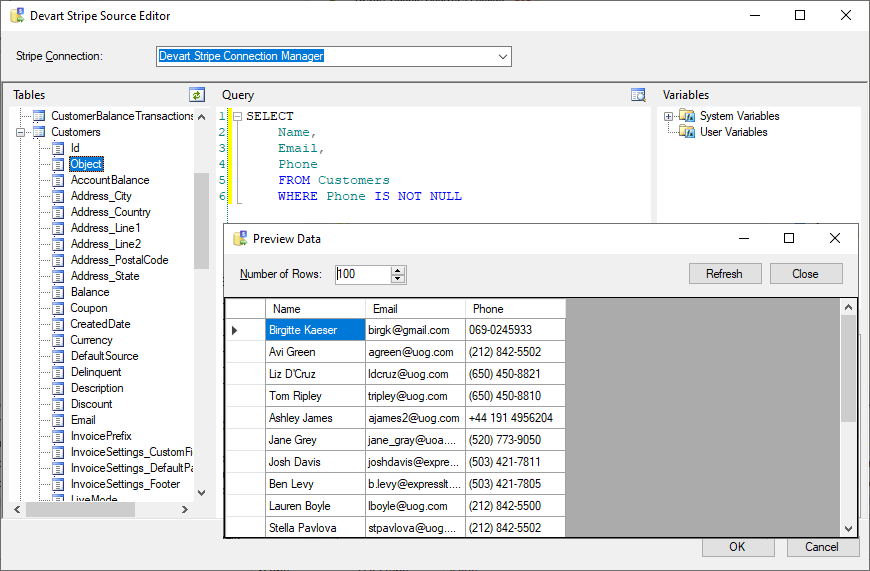
The Devart Stripe Source Editor: the Customers object and its fields on the left, a SELECT of name, email and phone from Customers where the phone isn't empty, and the Preview Data window listing the returned customers.
Features
SQL over the Stripe API
Devart's Stripe Source turns simple SELECT statements into Stripe API calls, with filtering done on Stripe's side where the API supports it (Credit Notes and Readers gained native filtering in August 2026). For joins, grouping and complex ordering, a local SQL engine caches the records and runs the query locally. A Readonly connection option allows only SELECT, for reporting packages.
Current with Stripe's billing model
SSIS Data Flow Components for Stripe follow Stripe's API changes: the June 2026 build added Billing Meters (which replace usage records), subscription discounts and payment plans on invoices, and dropped the retired Orders, Returns and SKUs objects; the August 2026 build moved to Stripe API version 2026-01-28.clover and returns invoice and credit-note lines as nested objects. AllSubscriptions and AllSubscriptionItems objects, added in March 2025, read subscriptions in every status.
Write back where Stripe allows it
The Devart Stripe Destination runs INSERT, UPDATE and DELETE against the Stripe objects that accept them: for example, update coupons, or create, change and remove webhook endpoints from a SQL Server table. Treat it as a way to read payments and maintain reference data, not to take payments.
Lookups that batch and cache
The Stripe Lookup checks several rows per request and caches the results, so matching order rows to Stripe customers or charges doesn't fire one API call per row. That keeps big reconciliation jobs inside Stripe's rate limits.
Amounts and dates handled for SQL
SSIS Data Flow Components for Stripe widened PaymentIntent amount fields to 64-bit integers in August 2026, and offer UTC Dates and a source time zone setting so timestamps land in SQL Server the way your reports expect.
Benefits
- Revenue data next to everything else. Stripe charges and invoices sit in SQL Server tables beside your orders, CRM and accounting data.
- No API maintenance. Stripe's frequent API versions and object retirements are Devart's job, not yours.
- T-SQL skills are enough. Analysts query Stripe with SELECT instead of learning the REST reference.
- Standard SSIS operations. Stripe jobs run under SQL Server Agent with SSIS logging and error outputs.
Real-World Uses
- Monthly recurring revenue reports. A nightly package copies Subscriptions, SubscriptionItems, Invoices and Prices into a warehouse for MRR and churn dashboards.
- Payment reconciliation. Charges are matched against ERP invoices with a Lookup, and mismatches go to an exceptions table.
- Usage-based billing feeds. Billing Meters data is read alongside product usage stored in SQL Server.
Who It's For, and Who Should Skip It
It's for SQL Server teams that already build SSIS packages and need Stripe data in their warehouse or ERP on a schedule.
Skip it if you don't use SSIS. For Excel or Power BI access to Stripe, Devart's ODBC Driver for Stripe fits better. If your reporting already lives in Stripe Sigma or Stripe's own data pipeline to a cloud warehouse, you may not need a second route, and a shop with one small monthly export can use Stripe's CSV exports.
Usage Guide
- Sign in to devart.com (a free account), download the SSIS components installer and run it on the machine with Visual Studio or SQL Server Data Tools. The installer holds every Devart SSIS data source.
- In the Stripe dashboard, copy a secret API key (a restricted read-only key is enough for reporting packages).
- In an Integration Services project, add a Devart Stripe connection manager, paste the key and click Test Connection.
- In a Data Flow task, drag in the Devart Stripe Source, choose the connection, build the SELECT in the editor and preview the rows.
- Connect the output to a SQL Server destination, map the columns and run the package.
- To write to Stripe, use the Devart Stripe Destination with the object and operation you need.
- Before deploying to a production SSIS server, license that server (Server or Site license).
Before you buy
- A server needs its own license. The Developer license covers one developer's workstations for building and testing; production SSIS servers need the Server license (which also covers one developer) or the Site license.
- A subscription stops working when it ends. A subscription license works only during its term and needs an internet connection to check its status. A perpetual license keeps working with the version you have; renewing updates late costs 20% more after 3 months and 60% more after 12 months.
- Automatic renewal is ticked. The order page has automatic renewal selected by default; untick it at checkout if you don't want next year's subscription or updates billed automatically.
- Old packages may need edits. Packages built on the Orders, Returns, SKUs or UsageRecords objects stopped having a source when Devart removed them in June 2026, following Stripe; several Invoices and Charges columns were removed too.
- Several sources? With three or more cloud sources, compare the SSIS Universal Bundle.
Where it falls short
- Stripe's rate limits still apply. A query that falls back to the local SQL engine can read a whole object, which is slow on accounts with years of charges.
- Not a payments tool. It reads payment data and edits a few objects; you don't take payments through it.
- Windows and SSIS only, and a 616 MB installer that carries every Devart SSIS component even when you bought one.
- Breaking changes follow Stripe's. When Stripe retires fields, the components drop them too, so read the release notes before updating production.
What Users Say
We found no published reviews of the Stripe components on their own. The reviews that exist cover Devart's SSIS Data Flow Components as a line, which share one installer, editor design and support team.
Capterra and G2
- Capterra rates SSIS Data Flow Components 4.6 out of 5 from 12 reviews. One reviewer who moved over from Informatica PowerCenter praised the switch; a critical reviewer found the components buggy and the pipelines hard to maintain over time.
- G2 rates Universal SSIS Components by Devart 4.5 out of 5 from 20 reviews, with praise for components that work like the built-in SSIS ones and for handling large data volumes.
- Common complaints across both sites: a learning curve for SSIS newcomers, documentation gaps, and troubleshooting that takes time.
The release record shows active upkeep for Stripe in particular: Stripe changes in March 2025, June 2026 and August 2026, each with long lists of new objects, new fields and removed deprecated ones.
Comparisons
vs. scripting the Stripe API
A Script Component or Python job using Stripe's libraries costs nothing to license, and Stripe's SDKs are good. You still write paging, expansions, retries and table mapping, and redo them when Stripe changes API versions. For one feed a script can be enough; for many objects, the components save time.
vs. Devart ODBC Driver for Stripe
The ODBC driver lets any ODBC tool, including SSIS's own ODBC source, Excel and Power BI, query Stripe. The SSIS components add a Stripe-aware editor, a caching lookup and a destination. Pick the driver if several tools need Stripe data.
vs. the SSIS Universal Bundle
Devart's product page lists a Developer Universal Bundle, covering every Devart SSIS source, at $499.95 a year or $999.95 perpetual: worth it once you need Stripe plus two or three other systems.
Editions and Pricing
Devart's ordering page lists three licenses (Developer, Server and Site for 10 to 100 devices); the order page also offers Standard, which it selects by default, and a Site license for more than 100 devices. Each is sold as a 1-year subscription or a perpetual license. Each button opens the order page with that license and term selected; 2- or 3-year subscriptions and priority support can be chosen there.
| License | 1-year subscription | Perpetual | What it covers | Buy |
|---|
| Standard | $149.95 | $299.95 | The default license on the order page; Devart's EULA and ordering page don't describe its terms | Buy 1 year Buy perpetual |
| Developer | $149.95 | $299.95 | One developer's workstations, development and testing | Buy 1 year Buy perpetual |
| Server | $379.95 | $749.95 | One server running packages, plus one developer | Buy 1 year Buy perpetual |
| Site (10 to 100 devices) | $499.95 | $999.95 | Unlimited computers in one company | Buy 1 year Buy perpetual |
| Site (100+ devices) | $2,499.95 | $4,999.95 | Company-wide site license for more than 100 devices | Buy 1 year Buy perpetual |
All ten prices were read on the order page on November 25, 2026. Devart's ordering data gives volume discounts from 5 licenses (5%) up to 20 or more (15%).
FAQs
Which Stripe API version do Devart SSIS Data Flow Components for Stripe use?
Devart SSIS Data Flow Components for Stripe support Stripe API version 2026-01-28.clover since version 5.1.49 in August 2026.
Can I use a restricted Stripe API key?
Devart SSIS Data Flow Components for Stripe connect with a Stripe API key from the dashboard; a key limited to read access covers SELECT-only packages, while writes need a key allowed to change those objects.
Do Devart SSIS Data Flow Components for Stripe read canceled subscriptions?
Yes. The AllSubscriptions and AllSubscriptionItems objects, added in March 2025, return subscriptions in every status, while Subscriptions follows Stripe's default listing.
Can I still read Stripe Orders or SKUs?
No. Devart SSIS Data Flow Components for Stripe removed the Orders, Returns, SKUs and UsageRecords objects in June 2026 after Stripe retired them; Products and Prices replace SKUs and Orders, and Billing Meters replace usage records.
Does a perpetual license stop working after a year?
No. A perpetual license of Devart SSIS Data Flow Components for Stripe keeps working; what ends after a year is access to new versions and support, which you can renew.
Is there a money-back guarantee?
Devart's ordering FAQ offers a full refund within 30 days of purchase when a technical problem prevents you from using SSIS Data Flow Components for Stripe and support can't fix it; it doesn't promise a refund for a change of mind.
System Requirements
- SQL Server Integration Services 2012, 2014, 2016, 2017, 2019, 2022 or 2025
- Windows (32-bit or 64-bit) with .NET Framework 4.5
- Visual Studio or SQL Server Data Tools with SSIS projects for designing packages
- A Stripe account and API key, and internet access from the machines running the packages
Conclusion
Worth it for SQL Server teams that report on Stripe revenue. At $149.95 a year for a developer, plus a Server license for production, Devart SSIS Data Flow Components for Stripe are cheaper than keeping your own Stripe API code current, and Devart's release notes show it tracks Stripe's API changes closely. The one reason to buy is getting charges, invoices and subscriptions into SQL Server with plain SELECTs. The main reason not to is if you don't run SSIS: then the ODBC driver, Stripe Sigma or Stripe's own warehouse export fit better.
Download Free TrialBuy Standard, 1 Year ($149.95)Buy Developer, 1 Year ($149.95)Buy Developer, Perpetual ($299.95)