Devart SSIS Data Flow Components for SQLite: SQLite Files as SSIS Sources and Destinations
Devart SSIS Data Flow Components for SQLite add a SQLite source, destination and lookup to SQL Server Integration Services 2012 to 2025, for $179.95 a year or $349.95 perpetual (Developer license). You read tables from SQLite database files, including encrypted ones, with SQL inside an SSIS data flow, and bulk-load data into SQLite files. It's for teams that move data between SQL Server and the SQLite databases used by desktop, mobile and embedded applications.
SSIS has no SQLite connection of its own. The usual workaround is an ODBC driver and the generic ODBC source, which usually can't open encrypted files, offers no SQLite-aware editor, and is slow for inserts. These components give SQLite its own connection manager and components built for it.
Quick facts
- Version: 5.2.145, released November 19, 2026 (the shared build of all Devart SSIS components; SQLite support since version 2.1.411, July 2023)
- Developer: Devart
- Components: SQLite Source, Destination and Lookup, plus a SQLite Connection Manager
- Databases: SQLite 3 files, with built-in encryption (AES-128, AES-192, AES-256, Blowfish, CAST-128, RC4, Triple DES)
- SSIS: SQL Server Integration Services 2012, 2014, 2016, 2017, 2019, 2022 and 2025, 32-bit and 64-bit Windows
- Download: 616.24 MB installer (all Devart SSIS components), free Devart account required
- Price: Standard $179.95 a year or $349.95 perpetual (the order page's default); Developer $179.95 a year or $349.95 perpetual; Server $449.95 or $899.95; Site (10 to 100 devices) $499.95 or $999.95; Site (100+ devices) $2,499.95 or $4,999.95
- Trial: 30 days
- Refunds: Devart's ordering FAQ gives a full refund within 30 days when a technical problem stops the product working and support can't fix it
What we checked: version 5.2.145 and the 616.24 MB installer on the download page, the supported SSIS versions on the compatibility page, the SQLite connection options (attached databases, encryption, busy timeout, date format) in Devart's documentation, the SQLite entries in the revision history since July 2023, and the order page, which charged $179.95 and $349.95 for Developer, $449.95 and $899.95 for Server, and $499.95 and $999.95 for Site (1-year subscription and perpetual), plus $179.95 and $349.95 for the Standard license it selects by default and $2,499.95 and $4,999.95 for a Site license for more than 100 devices, with no discount applied, on November 25, 2026. We didn't run a package against a SQLite file ourselves.
Download Free TrialBuy Standard, 1 Year ($179.95)Buy Developer, 1 Year ($179.95)Buy Developer, Perpetual ($349.95)
Overview
After installing, you add a Devart SQLite Connection Manager to the package and give it the path of the database file; a check box decides whether a missing file is created or raises an error. The SQLite Source then lists every table and its columns in its editor, you write or drag together a SELECT using package variables if needed, preview the rows, and connect the output to any SSIS destination. Going the other way, the SQLite Destination loads rows from SQL Server or any other source into a SQLite table.
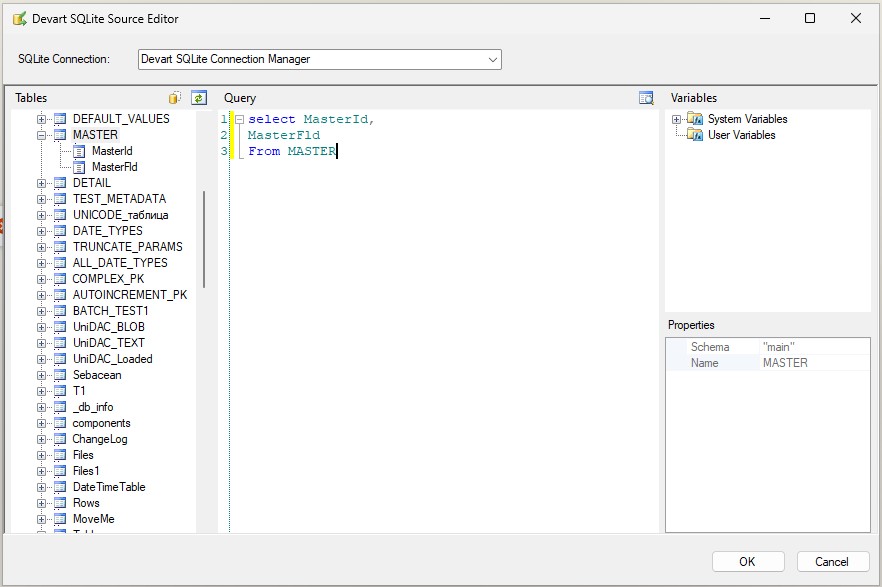
The Devart SQLite Source Editor: the tables of a test database on the left (MASTER expanded to its two columns), a SELECT from MASTER in the query pane, and system and user variables on the right.
Features
Encrypted SQLite files without extra libraries
Devart SSIS Data Flow Components for SQLite read and write databases encrypted with AES-128, AES-192, AES-256, Blowfish, CAST-128, RC4 or Triple DES using built-in code, so you don't need to buy a separate SQLite encryption library to get at an application's protected data.
Fast bulk loading
The Devart SQLite Destination uses SQLite-specific optimizations for bulk inserts, which matters because SQLite is slow when each row is written as its own transaction. Exporting a large SQL Server table into a SQLite file for an offline app is the typical case.
A connection manager that knows SQLite
SSIS Data Flow Components for SQLite expose SQLite's own settings in the connection: attach several database files to one connection, set a busy timeout for locked files, choose the journal mode and auto-vacuum behavior, store dates as ISO-8601 text or ticks, and pick GUID storage. These are the settings that decide whether a package works against a real application's file.
Lookups that batch and cache
The Devart SQLite Lookup checks several rows in one SELECT and caches the answers, so matching incoming rows against a SQLite table doesn't run one query per row.
Benefits
- SQLite as a first-class SSIS source. No ODBC driver setup on every server.
- Protected files are reachable. Built-in encryption support opens data that most free drivers can't.
- Faster exports to SQLite. Bulk inserts make generating SQLite files from SQL Server practical.
- Standard SSIS operations. SQLite jobs run under SQL Server Agent with your other packages.
Real-World Uses
- Offline app data. A nightly package exports product catalogs or price lists from SQL Server into a SQLite file that field staff's apps download.
- Collecting device data. SQLite files uploaded by point-of-sale terminals or instruments are read and merged into a central SQL Server database.
- Migrating a desktop application. A legacy tool's SQLite data is moved into SQL Server when the application moves to a server back end.
- Test fixtures. Developers generate SQLite test databases from production-like SQL Server data.
Who It's For, and Who Should Skip It
It's for SQL Server teams with SSIS packages that need to read or produce SQLite files regularly, especially encrypted ones.
Skip it if you don't use SSIS, or you convert a SQLite file once: a free tool or a short script is enough. To edit SQLite data by hand, Devart's Excel Add-in for SQLite fits better, and for reading SQLite from several tools the ODBC Driver for SQLite does.
Usage Guide
- Sign in to devart.com (a free account), download the SSIS components installer and run it on the machine with Visual Studio or SQL Server Data Tools.
- In an Integration Services project, add a Devart SQLite connection manager and enter the database file path. Set encryption, attached databases or busy timeout in the advanced options if the file needs them, then test the connection.
- In a Data Flow task, drag in the Devart SQLite Source, choose the connection, build the SELECT and preview the rows.
- Connect the output to a SQL Server destination, map the columns and run the package.
- To load into SQLite, use the Devart SQLite Destination, pick the table and map the input columns.
- Before deploying to a production SSIS server, license that server (Server or Site license).
Before you buy
- A server needs its own license. The Developer license covers one developer's workstations; production SSIS servers need the Server license (which also covers one developer) or the Site license.
- A subscription stops working when it ends. A subscription license works only during its term and needs an internet connection to check its status. A perpetual license keeps working with the version you have; renewing updates late costs 20% more after 3 months and 60% more after 12 months.
- Automatic renewal is ticked. The order page has automatic renewal selected by default; untick it at checkout if you don't want next year's subscription or updates billed automatically.
- Several databases? If you also need MySQL, PostgreSQL, Oracle or cloud sources, compare the SSIS Universal Bundle.
Where it falls short
- SQLite is single-writer. If the application that owns the file writes to it during a package run, the package waits up to the busy timeout and then fails; schedule around it.
- A young product line. SQLite arrived in Devart's SSIS components in July 2023, and recent builds still fix SQLite issues (table names with apostrophes, transactions left open in pooled connections in November 2026).
- Windows and SSIS only, with a 616 MB installer that carries every Devart SSIS component.
What Users Say
We found no published reviews of the SQLite components on their own. The reviews that exist cover Devart's SSIS Data Flow Components as a line, which share one installer, editor design and support team.
Capterra and G2
- Capterra rates SSIS Data Flow Components 4.6 out of 5 from 12 reviews. One reviewer who moved over from Informatica PowerCenter praised the switch; a critical reviewer found the components buggy and the pipelines hard to maintain over time.
- G2 rates Universal SSIS Components by Devart 4.5 out of 5 from 20 reviews, with praise for components that work like the built-in SSIS ones and for handling large data volumes.
- Common complaints across both sites: a learning curve for SSIS newcomers, documentation gaps, and troubleshooting that takes time.
The release record shows active SQLite work: URI-format file paths fixed in December 2025 and June 2026, and four SQLite fixes in the November 2026 build.
Comparisons
vs. an ODBC driver with SSIS's ODBC source
A free SQLite ODBC driver plus the built-in ODBC source and destination can move unencrypted data at no license cost. Devart's components add encryption, SQLite-specific settings in the connection, a query editor with preview, a caching lookup and faster bulk loading. For an occasional, unencrypted transfer the free route is fine.
vs. Devart ODBC Driver for SQLite
Devart's ODBC driver serves every ODBC tool, including Excel and Power BI, as well as SSIS's ODBC components. The SSIS components are built for packages and cost less if SSIS is the only consumer.
vs. the SSIS Universal Bundle
Devart's product page lists a Developer Universal Bundle, covering every Devart SSIS source, at $499.95 a year or $999.95 perpetual, under the price of three single sources.
Editions and Pricing
Devart's ordering page lists three licenses (Developer, Server and Site for 10 to 100 devices); the order page also offers Standard, which it selects by default, and a Site license for more than 100 devices. Each is sold as a 1-year subscription or a perpetual license. Each button opens the order page with that license and term selected; 2- or 3-year subscriptions and priority support can be chosen there.
| License | 1-year subscription | Perpetual | What it covers | Buy |
|---|
| Standard | $179.95 | $349.95 | The default license on the order page; Devart's EULA and ordering page don't describe its terms | Buy 1 year Buy perpetual |
| Developer | $179.95 | $349.95 | One developer's workstations, development and testing | Buy 1 year Buy perpetual |
| Server | $449.95 | $899.95 | One server running packages, plus one developer | Buy 1 year Buy perpetual |
| Site (10 to 100 devices) | $499.95 | $999.95 | Unlimited computers in one company | Buy 1 year Buy perpetual |
| Site (100+ devices) | $2,499.95 | $4,999.95 | Company-wide site license for more than 100 devices | Buy 1 year Buy perpetual |
All ten prices were read on the order page on November 25, 2026. Devart's ordering data gives volume discounts from 5 licenses (5%) up to 20 or more (15%).
FAQs
Can Devart SSIS Data Flow Components for SQLite open SQLCipher databases?
Yes, if you have the SQLCipher extension. Devart SSIS Data Flow Components for SQLite have an Encryption connection option for SEE, CEROD, SQLCipher and SQLiteCrypt databases, which needs that extension bought separately; their built-in AES, Blowfish, CAST-128, RC4 and Triple DES encryption needs nothing extra.
Do I need to install SQLite on the SSIS server?
No. Devart SSIS Data Flow Components for SQLite open the database file directly through their own connection manager.
Can the components create a new SQLite database?
Yes. Devart SSIS Data Flow Components for SQLite can create the database file if it doesn't exist, controlled by a check box in the connection settings.
Can one package read from several SQLite files?
Yes. Devart SSIS Data Flow Components for SQLite can attach several database files to one connection with the Attach option, or you can use one connection manager per file.
Does a perpetual license stop working after a year?
No. A perpetual license of Devart SSIS Data Flow Components for SQLite keeps working; what ends after a year is access to new versions and support, which you can renew.
Is there a money-back guarantee?
Devart's ordering FAQ offers a full refund within 30 days of purchase when a technical problem prevents you from using SSIS Data Flow Components for SQLite and support can't fix it; it doesn't promise a refund for a change of mind.
System Requirements
- SQL Server Integration Services 2012, 2014, 2016, 2017, 2019, 2022 or 2025
- Windows (32-bit or 64-bit) with .NET Framework 4.5
- Visual Studio or SQL Server Data Tools with SSIS projects for designing packages
- SQLite 3 database files reachable from the machines running the packages
Conclusion
Worth it if SQLite files are a regular part of your SSIS work. At $179.95 a year for a developer, plus a Server license for production, Devart SSIS Data Flow Components for SQLite replace a patchwork of ODBC drivers and scripts with a proper source, destination and lookup, and they open encrypted files that most free drivers can't. The one reason to buy is reliable, fast SQLite transfers inside SSIS. The main reason not to is occasional use: for a one-off conversion, free tools do the job.
Download Free TrialBuy Standard, 1 Year ($179.95)Buy Developer, 1 Year ($179.95)Buy Developer, Perpetual ($349.95)