Devart Excel Add-in for Adobe Commerce: Bulk-Edit Magento Store Data in Excel
Devart Excel Add-in for Adobe Commerce (formerly Excel Add-in for Magento) connects Microsoft Excel for Windows to an Adobe Commerce or Magento store, so you can load products, categories, orders and inventory into a worksheet, edit them in bulk and save the changes back, for $179.95 as a perpetual license with 1 year of updates. It's for store managers and merchandisers who maintain catalogs and prices in spreadsheets.
Changing prices, descriptions or stock for hundreds of products one page at a time in the Magento admin is slow, and CSV import profiles are easy to get wrong. With the add-in the product grid is an Excel table connected to the store: fill down a new price, fix descriptions with find and replace, and commit the changes.
Quick facts
- Version: 3.2.145, released November 18, 2026 (the shared build of all Devart Excel add-ins; renamed from Excel Add-in for Magento in February 2024)
- Developer: Devart
- Stores: Adobe Commerce and Magento 2.x (user name and password, two-factor authorization supported) or Magento 1.x (API key)
- Excel: Microsoft Excel 2007, 2010, 2013, 2016, 2019, 2021 and 2024, Windows only
- Download: 81.18 MB installer (all Devart Excel add-ins), free Devart account required
- Price: perpetual license with 1 year of updates $179.95, with 2 years $259.95, with 3 years $329.95
- Trial: 30 days
- Refunds: the order page promises a 30-day money-back guarantee "if you are not satisfied"; Devart's ordering FAQ describes refunds only for technical problems support can't fix, within 30 days
What we checked: version 3.2.145 and the 81.18 MB installer on the download page, the Excel versions and requirements on the compatibility page, the connection options (service version, store view, read-only mode) in Devart's documentation, the Magento and Adobe Commerce entries in the revision history back to 2016, and the order page, which charged $179.95, $259.95 and $329.95 for 1, 2 and 3 years of updates, with no discount applied, on November 25, 2026. We didn't connect the add-in to a live store.
Download Free TrialBuy with 1 Year of Updates ($179.95)
Overview
The add-in adds a Devart tab to the Excel ribbon with Get Data, Refresh, Edit Mode, Commit and Rollback. Get Data opens an import wizard where you enter the store's address and an admin user, choose the store version, and then pick an object such as Products in the visual Query Builder or write a SQL query. The rows land in an Excel table that stays connected, so Refresh reloads current data and Commit sends your edits to the store.
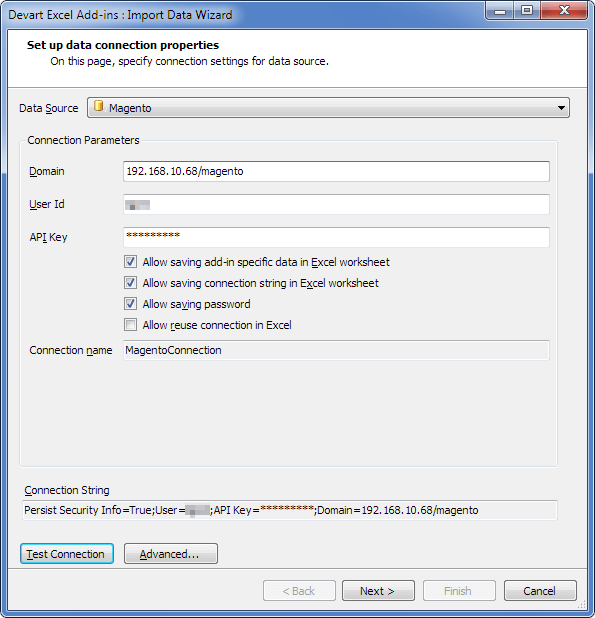
The import wizard's connection page, from the Magento-branded version of the add-in: the store domain, user ID and API key, options to save the connection in the workbook, and the resulting connection string.
Features
Bulk-edit products in a worksheet
Devart Excel Add-in for Adobe Commerce turns an imported table into an editable view of the store. Click Edit Mode, change names, descriptions, weights, status or prices, add rows or delete them; changed rows are highlighted and nothing reaches the store until you click Commit. Rollback throws the edits away.
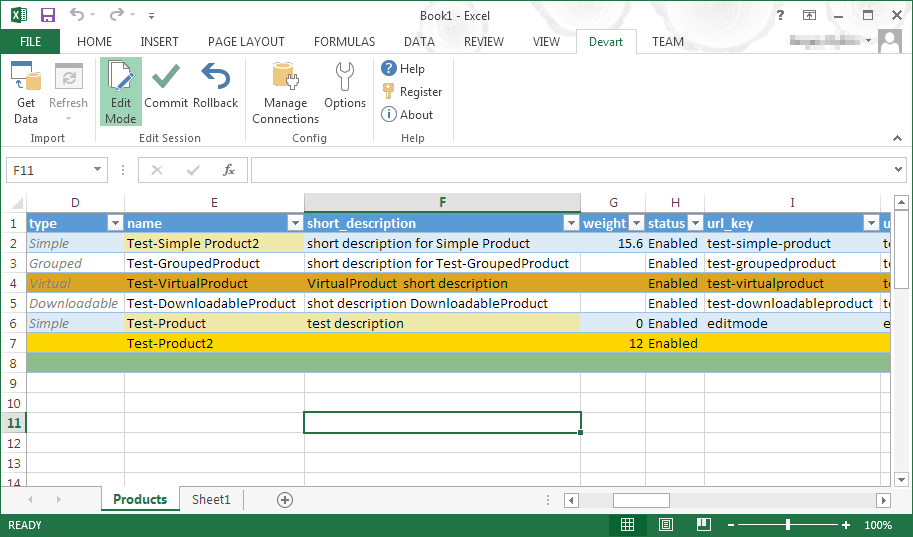
Edit Mode on a Products table: simple, grouped, virtual and downloadable test products with name, short description, weight, status and URL key, and edited and new rows highlighted before Commit.
Query Builder or SQL
Devart Excel Add-in for Adobe Commerce imports through a visual Query Builder, where you tick columns and add WHERE conditions such as "status = Enabled" or a created_at date, or through SQL, with complex queries handled locally when the store's API can't run them.
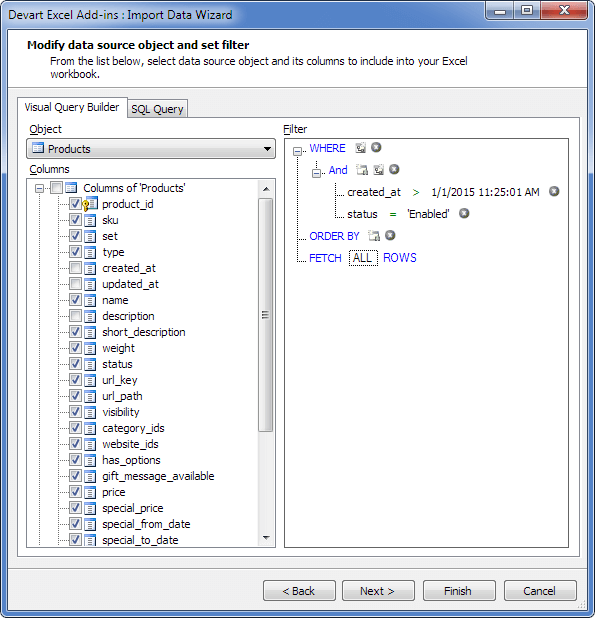
The Visual Query Builder on Products: columns from product_id and sku to price and special_price ticked, and a filter on created_at and status.
Store views and inventory
Devart Excel Add-in for Adobe Commerce has a StoreViewCode option that scopes prices, stock and other store-view values to one store view, which matters on multi-store installations. The inventory stock items table has been editable since 2019, so stock levels can be updated from the sheet too.
Validation before commit
Devart Excel Add-in for Adobe Commerce checks edits against field types and required fields as you type and marks bad cells with a note, so a bulk price change doesn't fail halfway through on one typo.
Benefits
- Catalog changes in minutes. Excel's fill-down, formulas and find and replace work on hundreds of products at once.
- No import profiles. You edit the live table instead of building and uploading CSV files.
- Fewer mistakes. Highlighted changes and validation show exactly what will be sent.
- Live reports. Order and product sheets refresh in one click.
Real-World Uses
- Seasonal price updates. A merchandiser loads enabled products, raises prices by a percentage with a formula and commits them.
- Catalog cleanup. Short descriptions and URL keys are fixed across the catalog with find and replace.
- Stock corrections. Inventory from a stock count is pasted into the stock items sheet and committed.
- Order reporting. Orders are pulled into a refreshable workbook with pivot tables by product and period.
Who It's For, and Who Should Skip It
It's for Windows Excel users who manage an Adobe Commerce or Magento catalog and spend hours on repetitive edits in the admin panel.
Skip it if you're on a Mac, or your store already uses a PIM or a catalog-management extension. For loading store data into SQL Server on a schedule, Devart's SSIS components for Adobe Commerce fit better, and for Power BI the ODBC Driver for Adobe Commerce.
Usage Guide
- Close Excel, sign in to devart.com (a free account), download the Excel add-ins installer and run it with an administrator account. The installer contains every Devart Excel add-in.
- Open Excel, select the Devart tab and click Get Data.
- Choose Adobe Commerce as the data source, enter the store address and admin user, set the service version (Ver2 for Magento 2 and Adobe Commerce, which uses the password), and click Test Connection.
- Pick an object such as Products, tick the columns and add filters in the Query Builder, preview and click Finish.
- To change data, click Edit Mode, edit the rows, then click Commit, or Rollback to undo.
- Click Refresh whenever you want current data from the store.
Before you buy
- Windows Excel only. It needs Excel 2007 to 2024 on Windows, .NET Framework 4.0 and the Visual Studio 2010 Tools for Office Runtime, installed by an administrator.
- What the price buys. Devart's order page describes the license as perpetual with one year of updates and support, extendable to three years at purchase.
- Automatic renewal is ticked. The order page has automatic renewal selected by default; untick it at checkout if you don't want the update period renewed automatically.
- Set the store version. Devart's documentation gives Ver1 (Magento 1.x) as the default; switch to Ver2 for Magento 2 and Adobe Commerce.
- Edits are live. A commit changes your real store, so try bulk edits on a staging store first.
Where it falls short
- Large catalogs load slowly. Everything comes through the store's API, so filter big catalogs in the query.
- Few recent store-specific changes. The last Adobe Commerce entries in the revision history are the 2024 rename and two-factor authorization support.
What Users Say
We found no published user reviews of the Adobe Commerce add-in on its own. What the release record shows about it and the Excel add-ins line it belongs to:
What the record shows
- Nearly ten years of Magento support. Magento arrived in February 2016, editable stock items in July 2019, and the Adobe Commerce name with two-factor authorization in February 2024.
- Steady releases. Builds in June (Excel 2024 support), August, September and November 2026.
- User-friendly licensing change. Since January 2025 saved connections are no longer hidden or deleted when a trial or subscription ends.
- Faster imports. An October 2024 build noted significantly faster imports from fast cloud services.
Comparisons
vs. Magento's built-in import and export
The admin panel's import and export cost nothing and handle large catalogs, but every change is an export, an edit and a re-import, with format errors found only at the end. The add-in edits the live data and validates as you type, which pays off for frequent, smaller changes.
vs. Devart ODBC Driver for Adobe Commerce
The ODBC driver lets Power BI and Excel's Power Query read the store, but Power Query doesn't write back. The add-in is the one for editing.
vs. the Excel Add-in Cloud Pack
If you also work with other cloud apps, Devart's Cloud Pack bundles its add-ins for cloud services, and the Universal Pack holds all 25 Devart Excel add-ins.
Editions and Pricing
There is one edition with full functionality, sold as a perpetual license; the price depends on how many years of updates and support you buy. Each button opens the order page with that term selected; priority support can be added there.
| License | Updates and support | Price | Buy |
|---|
| Excel Add-in for Adobe Commerce | 1 year | $179.95 | Buy 1 year |
| Excel Add-in for Adobe Commerce | 2 years | $259.95 | Buy 2 years |
| Excel Add-in for Adobe Commerce | 3 years | $329.95 | Buy 3 years |
All three prices were read on the order page on November 25, 2026.
FAQs
Is Excel Add-in for Adobe Commerce the same as Excel Add-in for Magento?
Yes. Devart renamed Excel Add-in for Magento to Devart Excel Add-in for Adobe Commerce in February 2024; the product page address still says magento.
Does Devart Excel Add-in for Adobe Commerce work with Magento 2?
Yes. Devart Excel Add-in for Adobe Commerce connects to Magento 2 and Adobe Commerce with the Ver2 service version and a user name and password, and to Magento 1.x with an API key.
Does it work if my admin account uses two-factor authentication?
Yes. Devart added two-factor authorization support for Adobe Commerce to the Excel add-in in February 2024.
Can I edit prices for one store view only?
Devart Excel Add-in for Adobe Commerce has a StoreViewCode connection option that sets which store view's prices and inventory you read, so set it to the store view you want to work with.
Does Devart Excel Add-in for Adobe Commerce work with Excel for Mac?
No. It supports only Microsoft Excel for Windows, versions 2007 to 2024.
What happens when the update period ends?
Devart's order page describes the Excel add-in license as perpetual: the version you have keeps working, and the update period only covers new versions and support, which you can extend.
System Requirements
- Microsoft Excel 2007, 2010, 2013, 2016, 2019, 2021 or 2024 for Windows
- .NET Framework 4.0 or higher
- Visual Studio 2010 Tools for Office Runtime
- An administrator account for installation
- An Adobe Commerce or Magento store with an admin user
Conclusion
Worth it for store teams that make bulk catalog edits every week. At $179.95 for a perpetual license with a year of updates, Devart Excel Add-in for Adobe Commerce turns slow admin-panel work and fragile CSV imports into spreadsheet edits with validation. The one reason to buy is editing the live catalog with Excel's tools. The main reason not to is a store that rarely changes, or one already managed through a PIM: then the free import and export are enough.
Download Free TrialBuy with 1 Year of Updates ($179.95)